💡 You can review your Dolphin orthodontist on Google in under one minute. Curogram sends a direct review link by text right after the appointment — no searching, no scrolling.
  • One text lands on your phone minutes after the visit ends
  • One tap opens the Google review page for your orthodontist
  • One minute is all a patient needs to write and post
  • No search through Google Maps, no wrong listings, no guesswork
  • The link is easy, quick, and built for busy parents on the go
For practices that use Dolphin charting software, this flow turns happy moments into five-star reviews. It also helps other families find trusted ortho care fast.

Your child's braces just came off. You see that new smile in the mirror for the very first time. You feel proud, a little teary, and truly grateful. You plan to leave a kind Google review later that night.

Then dinner happens. Then homework, dishes, and bath time. By 9 PM, you're asleep on the couch. The review you meant to leave never gets written.

This scene plays out every day at busy orthodontic offices. Happy parents plan to post, but small steps pile up fast. Open Google. Search the practice. Pick the right listing. Scroll to find the review button. By the third tap, most people give up.

The fix is simple and kind. A Google review for your Dolphin orthodontist — one text, one tap, one minute — locks in the moment while it still feels real. No searching. No scrolling. Just a link that works.

Curogram built this flow for busy parents and patients. Right after the visit, you get a short text from the office. You tap the link. Google's review page opens with the practice already loaded.

Pick five stars. Type a line or two. Hit submit. The whole thing takes 45 to 60 seconds, start to finish. Your child is still buckling their seatbelt.

Why does this matter? Because a quick, easy review from one patient helps the next family pick a great orthodontist. Your single minute saves them hours of searching and doubt.

In this guide, we'll show why so many happy patients never post reviews. We'll explain how Curogram's one-tap tool fixes the problem. Then we'll share real results from practices that turned happy moments into five-star stories — and built trust with every new family that reads them.

The Villain: The Review You Meant to Leave

Orthodontics has some of the happiest patients in all of healthcare. Parents love the results. Kids love their new smiles. So why don't more of them leave Google reviews?

The answer is not about feelings. It is about friction.

The Intention-Action Gap

Most parents plan to post a review. They really mean it. They walk to the car thinking, "I should leave a review for Dr. Patel."

Then life gets in the way. They drive home, start dinner, fold laundry, and help with math homework. By 8 PM, the thought has slipped their mind. By morning, it feels too late. The kind words they meant to write stay locked in their head.

This gap between feeling and posting is real and costly. A practice can have 500 thrilled families and still have only 40 Google reviews. The love is there. The action is not.

The Search Friction Problem

Leaving a Google review without a direct link takes at least six steps. Let's walk through them:

Step

Action

Time Cost

1

Open Google on your phone

5 seconds

2

Search the practice name

10 seconds

3

Pick the right listing (not a similar one)

15 seconds

4

Scroll to find the review area

10 seconds

5

Tap "Write a review"

5 seconds

6

Sign in to Google if not logged in

30 seconds

7

Pick stars, write, and submit

60 seconds


That's over two minutes just to start. For a parent juggling two kids and a work call, two minutes feels like twenty. Each extra step loses people. By the third tap, most are gone.

And that is for patients who remember. Most simply forget.

The Debanding Moment You Cannot Recreate

In orthodontics, the debanding visit is the emotional high point of a long journey. The child sees their finished smile for the first time. The parent tears up. Dr. Martinez hands over a final treatment photo. Everyone hugs.

This is the single best review moment in all of dentistry. Nothing else comes close. The feeling is pure and real.

But without a direct link sent at that moment, the debanding review never gets written. By the time the family gets home, the peak has passed. The parent is back in normal mode. The magic has faded.

A review posted an hour later says "Great office, thanks." A review posted in the car, five minutes after the braces come off, says, "I cried when I saw Emma's smile. Dr. Martinez gave my daughter something I can't put into words."

Those two reviews look very different to the next family reading them. And they feel very different, too.

The Familiar Inner Voice

Most parents have lived this exact thought pattern:

"Emma's braces came off today, and she looks beautiful. I should leave a review for Dr. Martinez. I'll do it when we get home."

[Gets home. Makes dinner. Helps with homework. Falls asleep on the couch.]

"Oh — I meant to leave that review. Maybe tomorrow."

[Tomorrow never comes.]

This is not a story about lazy patients. It is a story about a broken process. The system asks too much from people who already love you.

A good review tool removes every step between a happy feeling and a five-star post. It turns the "I meant to" into "I just did." The next section shows how a quick one-text, one-tap flow solves the whole problem.

The Guide: One-Tap Google Review Link

The fix for "the review you meant to leave" is simple. Remove every step that stands between a happy patient and the review page. That is exactly what a one-tap review link does.

The Solution in Plain Terms

Curogram sends a short text to the patient or parent right after their visit. The text has a direct link. That link opens the Google review page for your practice — with the listing already loaded and the star buttons ready to tap.

No search. No Google Maps. No picking the right listing out of a dozen. Just tap, rate, type, submit.

One text. One tap. One minute. Done.

The Feature: A Direct-to-Google Pathway

The tool skips every step of the old review process. Here is the contrast, side by side:

Old Way (No Direct Link)

New Way (Curogram Link)

Open Google app

Get a text

Search the practice

Tap the link

Pick the right listing

Google review page opens

Scroll to reviews

Pick five stars

Tap "Write a review"

Type a short note

Sign in

Hit submit

Rate and write

6–8 steps

3 taps total


That shift from eight taps to three taps sounds small. It is not. Each tap you remove saves a real share of patients who would have quit along the way.

The Timing Matters More Than You Think

Curogram sends the text within minutes of the appointment ending. Not hours. Not the next day. Minutes.

Why? Because emotion fades fast. A parent who just watched their child's braces come off is at peak joy for about 20 minutes. After that, life pulls them back to normal.

The review text should arrive while the parent is:

  • Still in the parking lot
  • Still in the car, about to pull out
  • Still watching their child smile in the visor mirror
  • Still feeling the full weight of the moment

Catch them then, and the review writes itself. Catch them at 10 PM, and it will not happen.

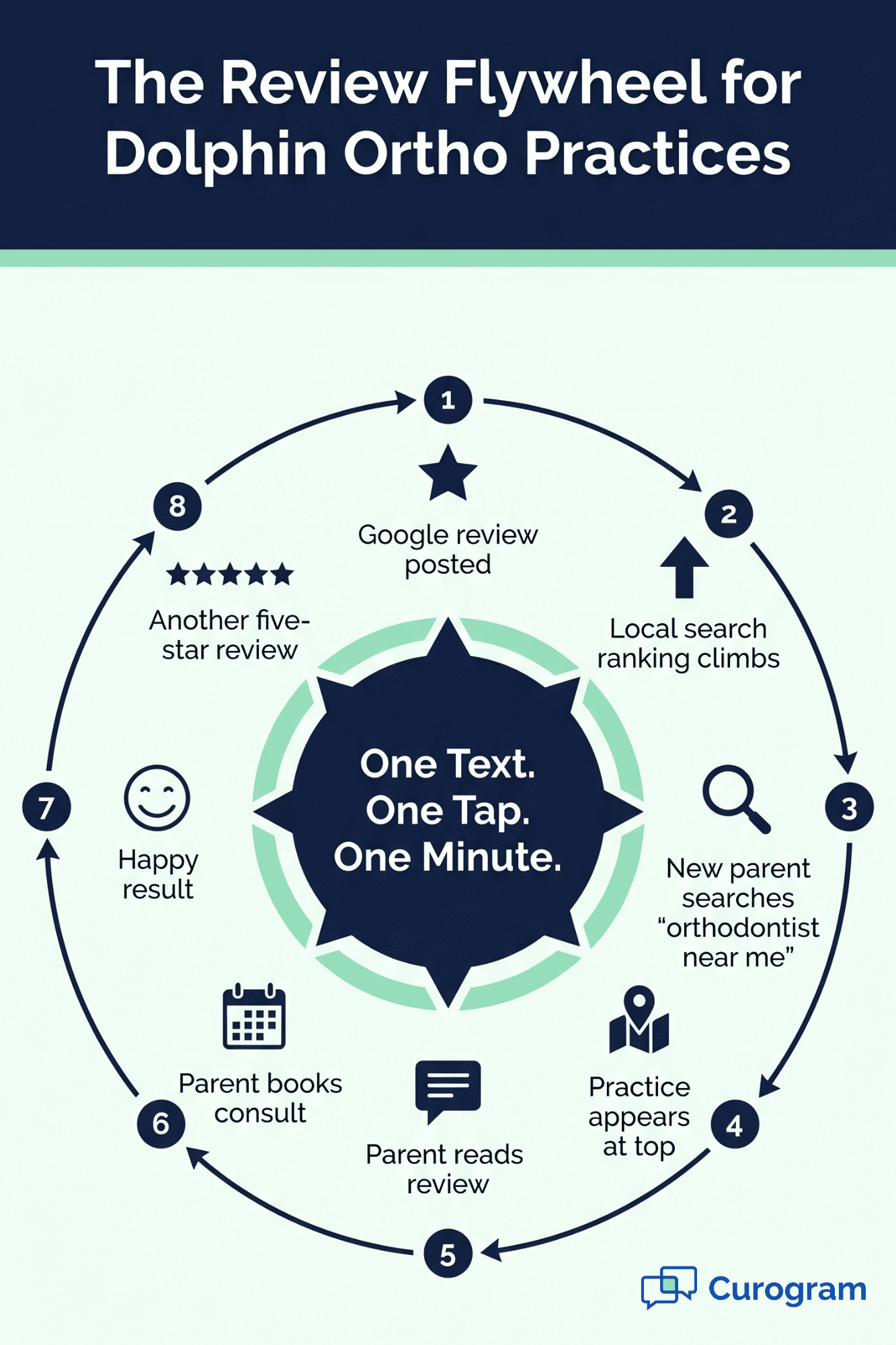
Circular diagram of how a quick Google review for a Dolphin orthodontist drives new patient growth in eight stages

What the Parent Experience Looks Like

Here is a real walkthrough of how this feels from the patient side:

  • Step 1 — Appointment ends. The child hops out of the chair. The family says thanks and walks out.

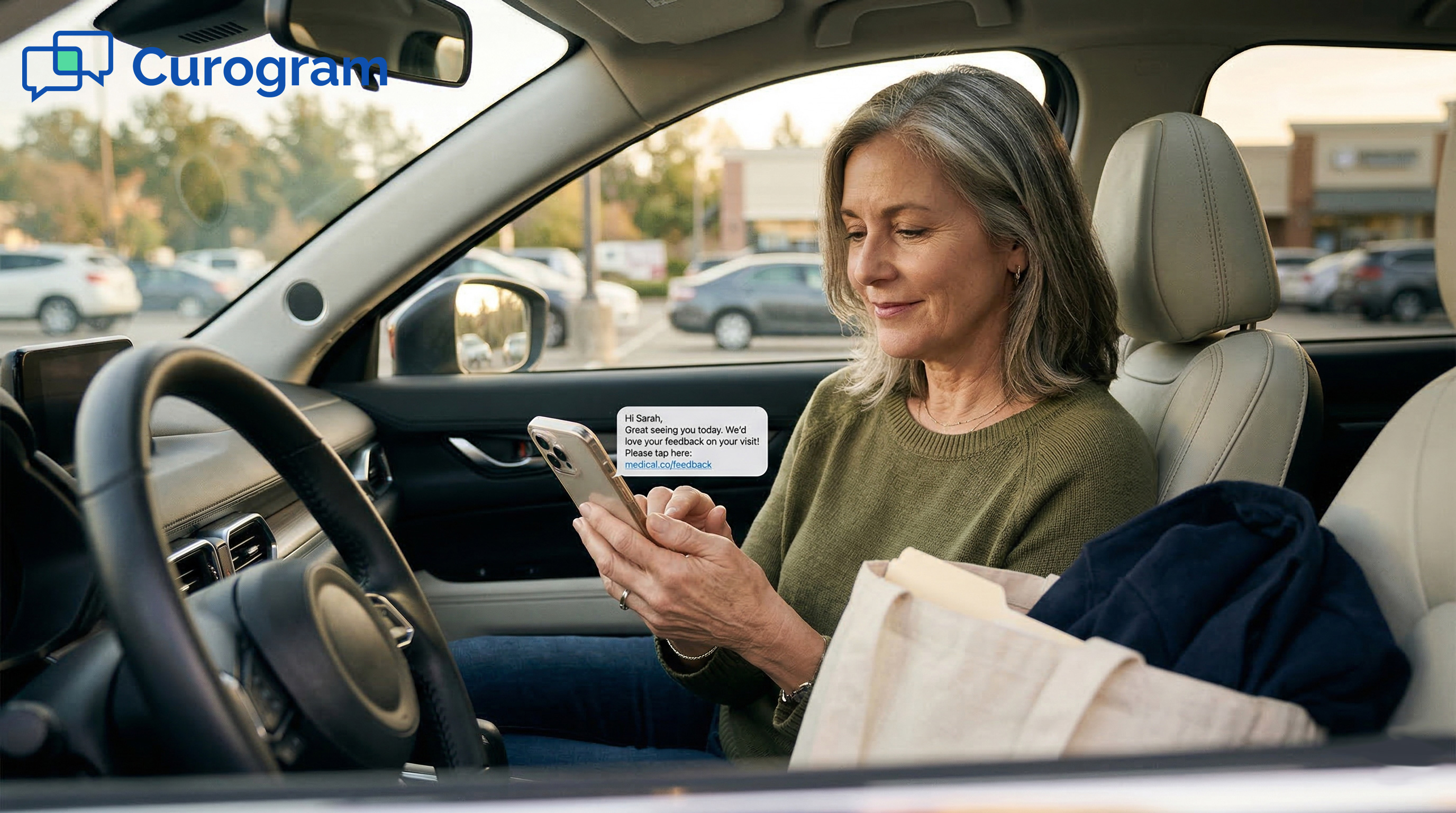
  • Step 2 — Buzz. Within a few minutes, the parent's phone buzzes. A short text appears: "Thanks for visiting Bright Smiles Ortho! If you had a great visit, we'd love a quick Google review — tap here."

  • Step 3 — One tap. The parent taps the link while walking to the car.

  • Step 4 — Google opens. The review page loads with the practice name and logo at the top. No search needed.

  • Step 5 — Five stars. The parent taps five stars. They type one short line: "Emma's smile is perfect. The whole team was amazing. Highly recommend!"

  • Step 6 — Submit. Done. Total time: 45 to 60 seconds. The child is still buckling their seatbelt.

That's it. That is the whole flow.

Why This Fits Dolphin Practices So Well

Dolphin gives your team the charting, imaging, and treatment plans. Curogram fills the gap on patient communication. It sits next to Dolphin, sharing appointment data, and triggers the review text at just the right moment.

Your front desk does not lift a finger. The patient does not search for anything. The review happens on its own, while the smile is still fresh and the feeling is still real.

The Success: Sixty Seconds, Five Stars, Done

When you remove the steps between a happy patient and the review page, something amazing happens. The reviews start pouring in. Not a trickle. A steady stream.

This section shows what the shift looks like in real numbers, real stories, and real patient experiences.

The Metric: Direct Links Crush Every Other Ask

There are many ways to ask for a Google review. Most of them barely work. Here is a quick look at how they compare:

Review Ask Method

Typical Response Rate

Why It Works (or Doesn't)

"Please review us!" poster in lobby

Very low

Patient has to remember later

"Find us on Google" verbal ask at checkout

Very low

Too many steps at home

Email with a review link

Low to moderate

Often unread or buried

Handing out a card with a QR code

Moderate

Requires a saved card and action

One-text, one-tap direct link right after visit

High

Zero friction, peak emotion


The last row wins every time. It meets the patient where they are — on their phone, in the moment, with their feelings fresh. Based on our internal data, practices that use Curogram's automated post-visit surveys tied to Google Reviews have seen 90% of patients leave five-star reviews.

That is not a small bump. That is a whole new level.

The Shift From "I Meant To" to "I Just Did"

The mental switch for the patient is simple but huge. Before: "I should leave a review tonight." After: "I just left one in the parking lot."

This small shift adds up fast. One practice we work with went from fewer than 1,000 reviews to over 8,000 in about 16 months using automated post-visit review requests. That is based on our internal research and tracking.

Look at how the growth stacks up over time:

Month

Total Google Reviews

Month 1

~993

Month 4

~2,260

Month 8

~4,334

Month 12

~6,546

Month 16

~8,159


In just three months of using the direct-link flow, one multi-location practice saw 1,064 new five-star reviews. That's based on our internal data. Before the switch, the same practice had been stuck with slow review growth for years.

The reason? Every happy patient now has a one-text, one-tap path to post. The friction is gone.

The Outcome: A Story You've Probably Lived

Picture a Tuesday afternoon. The Chen family walks out of Dr. Liu's ortho office after Maya's debanding. Maya cannot stop smiling. She keeps checking her teeth in the car window.

Two minutes later, Mrs. Chen's phone buzzes. She reads: "Thanks for visiting us today! If you had a great experience, we'd love a quick Google review." She taps the link.

Google's review page loads. She picks five stars. She types:

"Dr. Liu and the whole team were amazing. Two years of braces and Maya's smile is perfect. Highly recommend for any family looking for a great orthodontist!" Submit.

Sixty seconds. Done. The review is live.

Now fast-forward three weeks. The Johnson family is searching for a new orthodontist for their son. They type "orthodontist near me" into Google. Dr. Liu's office shows up at the top. Next to the listing: 4.9 stars, 812 reviews.

The Johnsons scroll. They read Mrs. Chen's review. They feel the warmth. They call to book a consult the next morning.

That is what a single, quick review can do. It turns one parent's happy minute into the next parent's easy choice.

Why This Works for Busy Families

Parents have no spare time. Anything that takes more than a minute is too much. A quick Google review for your Dolphin orthodontist hits the sweet spot.

Here is why it fits so well with real family life:

  • It happens in dead timewaiting in the car, sitting in the pickup line, killing 30 seconds while the kid gets a snack.
  • It needs no memory work the link is right there. No recall needed.
  • It feels good to do saying nice things about a great office is a small act of kindness.
  • It takes less time than a social media scrollmost parents spend more time on Instagram per day.

The result is that even casual, busy, distracted patients become review writers. Not because they try harder. Because the tool asks less of them.


Parent taps her phone to leave a one-minute Google review for her Dolphin orthodontist while her daughter smiles nearby

How Curogram Captures the Moment That Matters Most

Curogram is built to close the gap between a happy patient and a posted review. It is a HIPAA-compliant, two-way texting platform made for busy healthcare offices. Your team can learn it in as little as 10 minutes.

The tool connects with almost any EMR, including Dolphin charting software. When a patient checks out of an appointment, Curogram knows. It sends a short, friendly text with a direct Google review link — no front-desk action needed.

Here's what that means for a Dolphin ortho practice in real life:

  • Automated post-visit texts go out minutes after each appointment
  • Each link points straight to your Google Business Profile review page
  • The patient taps, rates, and types — all in under a minute
  • Your team stays focused on clinical work, not review chasing
  • Every five-star post adds to your local search ranking over time

Based on our internal data, practices that use Curogram's automated Google Reviews feature have seen 90% of their patients leave five-star reviews. One multi-location practice earned 1,064 new five-star reviews in just three months after turning on the flow.

The feature also ties into Curogram's wider set of tools. The same texting system handles appointment reminders (which have cut no-show rates from 14.20% to 4.91% for some practices, per our internal research). It also handles two-way patient messages, intake forms, and secure payments — all in one dashboard.

For a Dolphin orthodontist, this means one platform covers communication, reminders, and reviews. Everything works together. Your team does less. Your patients feel more cared for. And your Google profile fills up with the reviews your practice has earned all along.

Conclusion: Your Best Review Is the One That Almost Didn’t Happen

Satisfied patients don't leave reviews because the process asks too much of them. Six to eight taps. A search. A sign-in. Too much work for a busy parent.

Curogram's one-tap review link removes every step between a happy feeling and a five-star post. One text lands. One tap opens the page. One minute turns a moment into a review.

Dolphin gives you the tools to create a perfect smile. Curogram catches the moment that smile happens — while the parent is still in the car, still feeling proud, still ready to share.

This matters more than most practices realize. That one quick review from a thrilled parent becomes the reason another family picks your office next month. Your patient's 60 seconds saves a stranger hours of worry.

The compounding effect is real. More reviews boost your Google ranking. A higher ranking brings more new calls. More calls mean more families helped. One happy parent starts the whole chain.

And it costs your team nothing. No scripts at checkout. No forgotten follow-ups. No awkward "please rate us!" asks. The system handles everything on its own.

Next time your family gets a quick text after an ortho visit, tap the link. Leave a sentence or two. Help the next parent who's searching for a great orthodontist for their own child. Sixty seconds really does make a difference.

Let your Google profile fill up on its own while your team focuses on patients. Schedule a demo and watch the one-tap review flow in action before you leave the call.


Frequently Asked Questions

Why do happy patients forget to leave reviews even when they love the office?
Happy feelings fade fast once life resumes. Dinner, homework, and bedtime all pull focus. Without a direct link sent right after the visit, the review slips from a parent's memory within hours. The feeling was real — the friction was just too high.
How long does it really take to post a Google review through the Curogram link?
Most parents finish in 45 to 60 seconds. The text arrives with a direct link that opens the Google review page for the practice. No search is needed. Tap five stars, type one short line, hit submit. That's it.
What should a parent actually write in a review to make it helpful?

Keep it short and honest. Mention what stood out — the staff, the doctor, the results, or how the office made things easy for your child. Even one sentence like "Dr. Kim gave my son a great smile and was kind the whole way" helps other families a lot.

How does the one-tap review flow fit with Dolphin charting software?

Curogram works alongside Dolphin and most other EMRs. It pulls appointment data and sends a review text minutes after the visit ends. Your team does nothing extra. The flow runs on its own, every day, for every patient who gives consent.

Why does the timing of the review request matter so much for ortho practices?

Emotion peaks in the first 20 minutes after a key visit, like a debanding. A review written then is warmer, more detailed, and more genuine. Send the text later, and you get "fine" reviews. Send it right away, and you get stories that move the next family to book a consult.