
.jpg?width=30&height=30&name=square-formal-photo%20(1).jpg) Mira Gwehn Revilla
Mira Gwehn Revilla

- The text goes out on its own once the visit is marked complete, with no portal login and no staff step.
- Messages carry no PHI. There’s no diagnosis or visit type, just the practice name and a link.
- Every patient gets the same Google link, and anyone with a complaint also gets a private line to your team.
- Curogram connects through CharmHealth’s FHIR API, and setup takes about 1 to 2 weeks.
- Based on our internal data, one multi-location practice earned 1,064 new 5-star reviews in 3 months.
Plenty of CharmHealth practices think they already collect reviews. They’ve turned on Feedback/Survey Forms, a few patients fill them out, and the comments are kind. Those comments sit inside the Patient Portal, where only your staff can read them.
New patients never see a word of it. Based on our internal data, 90% of new patient leads look at your Google Business Profile before they reach your website. If that profile shows 3.1 stars from 14 reviews, the warm notes in your portal do nothing for you.
Our view is plain. Your Google rating should run on autopilot, with every patient getting a short text after every completed visit. Nobody at check-out should have to work up the nerve to ask in person. Nobody should have to remember, and nobody should get to pick which patients seem happy enough to ask.
CharmHealth gives you solid clinical tools at a price small practices can live with. It doesn’t give you any way to point a happy patient toward Google.
There’s no review request, no review alert, and no reply tool in the core platform or its add-on list. So the five-star opinion walks out the door with the patient, and we call that the Unasked Review.
The bar keeps rising, too. In BrightLocal’s 2026 Local Consumer Review Survey, 31% of US adults said they’ll only use a business rated 4.5 stars or higher. A year earlier, that figure was 17%.
A practice that leaves reviews to chance drifts further below that line every month. One that asks every patient, every time, can climb past it in a single quarter.
The Unasked Review
CharmHealth earns its place in a lot of small offices. Its free tier lets a new clinic open with almost no software bill. Primary care, multi-specialty, and integrative medicine groups get charting, e-prescribing, billing, and a Patient Portal in one login.
Its feedback tools are real, too. A patient can click the help icon in the portal, choose Send Feedback, and write straight to the practice. An Appreciate option lets them say what they liked. Your team reads those notes and replies in the portal inbox.
That’s useful for quality checks. If five patients in a month mention the wait in the lobby, you’ll spot the trend there first. Still, the whole loop is closed. Patients write to you, you read it, and nobody outside the building ever finds out how good the visit was.
CharmHealth Feedback Survey Forms vs Google Reviews
Side by side, the gap is easy to see.
|
CharmHealth Feedback/Survey Forms |
Google reviews |
|
|
Where patients find it |
Inside the Patient Portal, after login |
A link in a text, or a Google search |
|
Who can read it |
Your staff |
Anyone looking for a doctor nearby |
|
What it changes |
Internal fixes |
Your star rating and Maps visibility |
|
Prompt after each visit |
Survey invite waits in the portal |
None built into CharmHealth |
The login is the choke point. Lots of patients never finish setting up portal access, and many who did forget the password between yearly visits. A survey invite parked behind that wall reaches the few patients who like logging in.
Browse the CharmHealth add-on catalog and you’ll find Two-Way Text and other modules. You won’t find a Google review request, review alerts, or a way to reply to reviews. It’s the one gap CharmHealth doesn’t even sell a fix for.
How a Five-Star Visit Disappears
Follow one good visit from check-out to silence.
- A patient finishes her annual physical and tells the front desk it was the best checkup she’s had in years.
- Nobody asks for a review. Asking face to face feels like begging, and two more patients are waiting to pay.
- A survey invite lands in the Patient Portal. She hasn’t logged in since she made the account.
- By Thursday she’s forgotten. The praise she said out loud never gets written down anywhere.
- Across town, a hospital-owned group sends an automated review request after every visit. It picks up new reviews each week, and its lead grows.
Nobody in that chain made a mistake. Each step is a normal call by a busy person, and the same thing repeats every day the clinic is open.
Why the Front Desk Never Asks
Check-out is the busiest spot in the office. The person at the desk is taking a copay, booking a follow-up, and holding a ringing phone against one shoulder. Turning to a patient and asking for a Google review on top of that feels awkward, so it rarely happens.
When it does happen, it’s uneven. Staff ask the patients who chatted and smiled, and skip the quiet ones. That’s a gamble with no system behind it, and one sick day on the front desk wipes out a week of asks.
What a Sub-3.0 Rating Costs
In our own prospect research, we’ve found real CharmHealth practices sitting below 3.0 stars on Google. At that score, the profile turns away the very patients your ads and referral work are paying to attract. A family new to the area sees 2.8 stars next to a rival’s 4.7 and taps the rival.
Freshness counts as well. BrightLocal’s 2026 survey found 74% of consumers look for reviews from the last three months. A profile with nothing new since spring looks like an office that’s barely open.
A few lost bookings add up quickly. The visit values below are illustrative:
|
Lost new patients per month |
Visit value (illustrative) |
Lost per month |
Lost per year |
|
2 |
$150 |
$300 |
$3,600 |
|
4 |
$225 |
$900 |
$10,800 |
|
6 |
$300 |
$1,800 |
$21,600 |
When the Owner Googles the Practice
The owner knows the care is good. Patients bring cookies at the holidays and send their neighbors. Then one weekend the owner types the practice name into Google and sees 2.9 stars.
Three reviews drag that score down: a billing dispute, a long wait, and a gripe about parking. Behind them sit ten years of patients who would have given five stars. None of them was ever handed a one-tap way to do it.

The Review Engine
Curogram fills the review gap CharmHealth leaves open. It reaches each patient within hours of the visit, while the experience is fresh, and points them to your Google Business Profile.
What Happens After the Visit is Marked Complete
Once your staff closes the appointment in CharmHealth, Curogram sees the completed status and queues a text. A few hours later, the patient gets a short message on their own phone. It lands in the same thread as their appointment reminders.
The text asks one question about the visit. Tapping the link opens a brief survey, and from there a button takes the patient straight to your Google review page.
No one at the desk sends anything. Nobody has to judge which patients seem happy enough to ask. That’s how you get more patient reviews without asking in person: the ask is built into the last step of every visit.
Why Every Patient Gets the Same Ask
Some review tools send only happy patients to Google and hide everyone else. That practice is called review gating, and Google’s review policy bars businesses from asking only satisfied customers for reviews. A gated profile can lose reviews or face limits on the listing.
So the Google link goes to every patient. Patients who flag a problem in the survey also get a private line to your office manager.
A patient upset about a surprise bill can get a call back that afternoon, which gives your team a real chance to fix it before anything goes public.
Keeping PHI Out of the Text
HIPAA compliant review requests say nothing about why the patient came in. Curogram’s messages hold the practice name, a thank-you, a link, and opt-out wording. A typical message reads like this:
Thanks for visiting Oak Street Family Medicine today. How did we do? Tap here to share a quick review: [link]. Reply STOP to opt out.
There’s no diagnosis, provider specialty, or visit type in it. Curogram signs a Business Associate Agreement and tracks opt-outs on its own, so a patient who replies STOP won’t get another request.
Replies need the same care as the ask. Manasa Health Center paid $30,000 to settle an OCR case over PHI it disclosed while answering Google reviews. Thank reviewers in general terms, and never confirm that someone was a patient.
How the CharmHealth Connection is Built
A CharmHealth reputation management integration runs on CharmHealth’s documented FHIR API. Access is gated, so it helps to know the steps before you book:
- Curogram fills out CharmHealth’s API questionnaire and signs its license agreement.
- Our team builds and tests the connection in CharmHealth’s sandbox.
- Your practice admin authorizes Curogram under Settings > Account > API Keys.
- Completed visits start triggering review requests.
Plan on 1 to 2 weeks from kickoff to live. Your staff’s share of the work is mostly step 3, which takes a few minutes.
Two-Way Text is a Different Tool
CharmHealth sells a Two-Way Text add-on, and it’s easy to assume it covers reviews. It’s a staff messaging tool that lives inside the EHR. Your team works from Messages > Text Messages > All, and a person sends each text.
Secured messages add more steps for the patient. They click a link, enter a one-time passcode that lasts two hours, and confirm their date of birth. For sharing a lab note, that’s reasonable. For a review request, each extra screen costs you responses.
Curogram sends the request itself, on a set schedule, into the patient’s normal text thread. There’s no code to enter and no login.
Stars Don’t Show Your Software Budget
Reputation is one of the few places where a small practice competes on equal terms. A Google listing shows stars, review count, hours, and recent comments, and that’s what a searcher compares. A clinic on CharmHealth’s free tier can post a higher rating than a hospital-backed group across the street.
Online reputation for primary care clinics comes down to volume and recency, because patients compare several nearby offices before they book one. Automation also makes the ask fairer. Every patient gets the same polite text, where before only the chatty ones got asked.
The Climbing Rating
A multi-location practice came to Curogram struggling with both patient feedback and its online reputation. We set up automated post-visit surveys tied to Google Reviews across its offices.
Based on our internal data, 90% of the practice’s patients left 5-star reviews. That added up to 1,064 new 5-star reviews in 3 months. Spread across 13 weeks, it works out to about 82 new five-star reviews a week, all sent without a staff member asking.
The same survey step fixed the feedback half of the problem. Complaints now reached the practice through a private channel, where staff could call the patient back.
A 90-Day Walkthrough for One CharmHealth Clinic
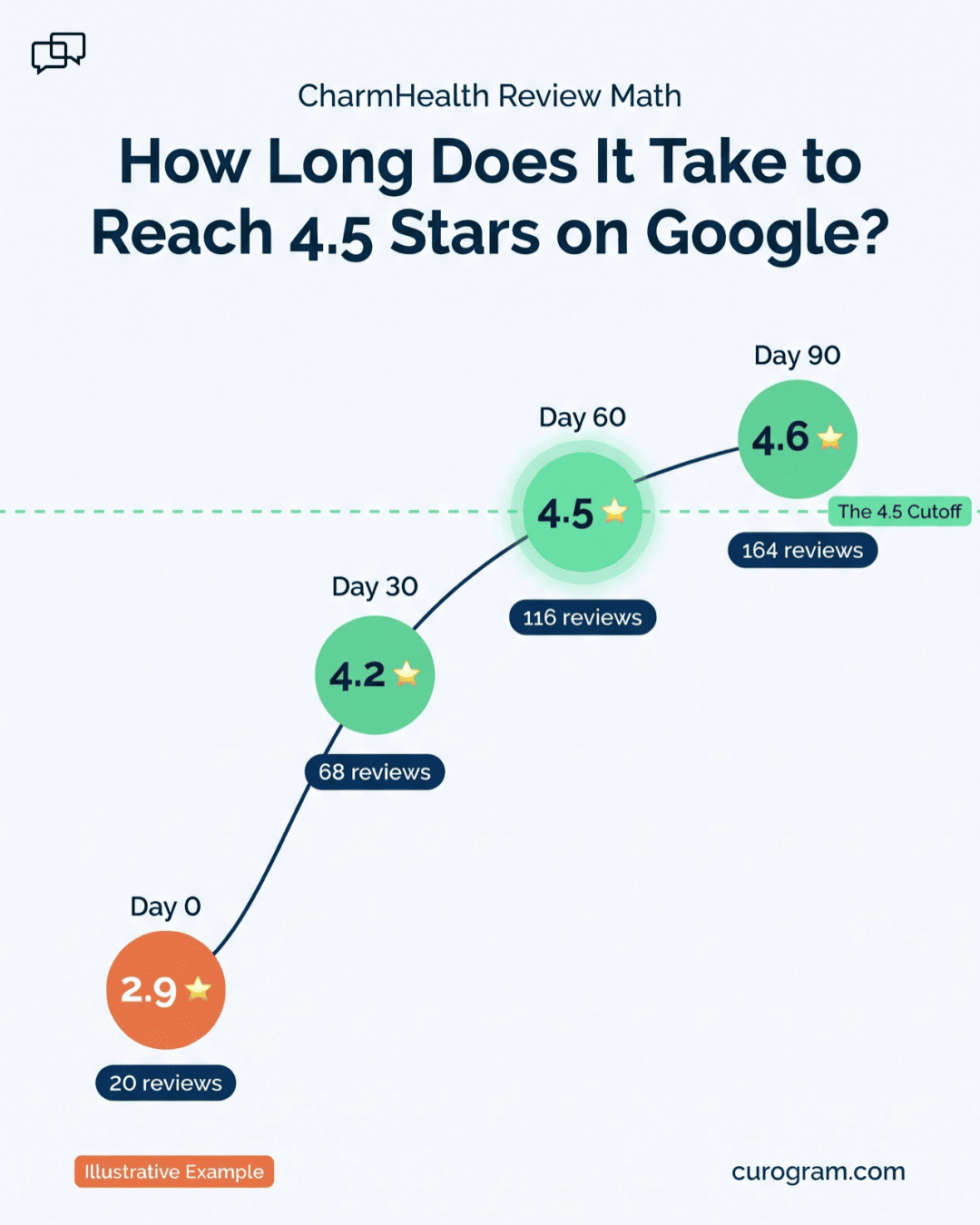
Every number in this walkthrough is illustrative, built for a single office.
Start with a clinic at 2.9 stars from 20 reviews. It completes 600 visits a month. Assume 8% of texted patients leave a review, which gives 48 new reviews a month. Following the case study above, assume 90% are five stars and the rest average three.
|
Point in time |
Total reviews |
Average rating |
|
Day 0 |
20 |
2.9 |
|
Day 30 |
68 |
4.2 |
|
Day 60 |
116 |
4.5 |
|
Day 90 |
164 |
4.6 |
Most of the lift comes in month one, because new reviews quickly outnumber the old ones. By day 60 the clinic displays 4.5 stars, the cutoff 31% of consumers named in BrightLocal’s 2026 survey.
To run this for your own office, swap in three numbers: your current review count, your current rating, and your monthly completed visits.
Week One After Go-Live
The first week sets up everything that follows. Four small jobs make the difference:
- Match each office to its own review link. A Google Business Profile for medical practices is set up per location, so a three-site group needs three links.
- Close visits in CharmHealth the same day. The text only fires when a visit is marked complete, so a stack of open encounters means no requests go out.
- Name one person who owns the private feedback. A complaint about a bill should get a call within one business day.
- Write two short reply templates for Google reviews, one for praise and one for complaints. Neither should confirm the reviewer was a patient.
Curogram Highlight: Automated Google Review Requests
Automated Google Review Requests is the Curogram feature that texts each patient after a CharmHealth visit. The text points them to your Google review page. It’s built for practices that want a steady flow of fresh reviews without adding a task to the front desk.
Once it’s live, the feature handles five jobs:
- It picks up completed visits from CharmHealth through the FHIR API and queues the text without a staff click.
- Each message holds a thank-you, a link, and opt-out wording, with no PHI.
- A short survey sits in front of the Google link, and every patient sees that link.
- Patients who report a problem also get a private path to your team, so you hear about it the same day.
- Opt-outs are logged automatically, and Curogram signs a Business Associate Agreement.
It also works alongside the rest of the platform. Recall campaigns bring lapsed patients back, and each returning visit becomes another chance at a review. Based on our internal data, one multi-location practice saw 35% of recalled patients book within a month. That’s 1,240 patients seen from recall texts alone.
For a CharmHealth practice, that means one subscription covers reminders, two-way texting, forms, recalls, payments, and review requests.
Conclusion: Turn Every Visit Into Visibility
CharmHealth runs your clinic well. Its Feedback/Survey Forms belong in your quality process, where a run of wait-time complaints should land. A stranger comparing three practices on a phone will never see them.
That stranger makes up their mind on Google. Based on our internal data, 90% of new patient leads see your profile before your site, so the rating there decides who calls.
Asking shouldn’t depend on anyone’s memory or nerve. A text that fires after every completed visit treats each patient the same and stays inside Google’s rules. It keeps PHI out, and it gives unhappy patients a private way to reach you first.
Before your next budget review, add up what you pay for CharmHealth add-ons today. Then compare it to one platform that runs your reminders and grows your rating at the same time. For most CharmHealth offices, the review piece is the part they’ve never had at all.
Book your CharmHealth integration demo. Bring your current star rating and your monthly visit count. We’ll walk through the 90-day review math for your practice, show which add-ons Curogram replaces, and lay out the net cost.