
.jpg) Mira Gwehn Revilla
Mira Gwehn Revilla

- Give each clinic its own review link, since one shared link sends every review to the flagship.
- Fire requests from completed visits on the Fusion schedule, while a family’s progress is fresh.
- Send the same ask to every family. Google’s review policy bars picking only the happy ones.
- Keep PHI out of replies. OCR settled with Manasa Health Center for $30,000 over review responses.
- Give newer clinics with thin profiles the most requests first.
A parent looking for speech therapy for a 3-year-old reads Google reviews longer than almost any other healthcare shopper. She checks the rating, opens the 1-star posts, and looks at the date on the newest review. Then she does it again for the next clinic on the map.
If your group runs four clinics on Fusion, she’s running four separate tests. Most groups pass one. The founding clinic has years of reviews, while the clinic that opened 18 months ago has 11, and its newest one is from last spring.
Our position is plain. Managing Google reviews for multiple Ensora Fusion therapy clinics is a per-clinic job, and the clinics that need reviews most are usually the ones asked least.
Fixing it takes a request after real visits, a review link for each location, and one person who watches every profile.
Those stakes land before a family ever calls. Based on our internal data, 90% of new patient leads see a practice’s Google Business Profile before they see its website.
Pediatric therapy also produces some of the best review material in healthcare: a first word, a first step without a walker, a child who finally sits through a haircut.
Almost none of it reaches Google.
The front desk is checking in the 3:15 social skills group. A dad at the counter has a question about an insurance auth. Meanwhile, the mom who just heard her son say “more” walks out unasked. She’ll be back Thursday, so nobody feels the miss.
Fixing this doesn’t call for a marketing hire. Based on our internal data, one multi-location practice on Curogram added 1,064 new 5-star reviews in 3 months once post-visit requests ran on their own.
The Invisible Location
Type “OT for sensory processing near me” into Google and you get a map with three clinics above everything else. Google’s own Business Profile help pages say review count and review score factor into local ranking, along with distance and relevance.
So a thin profile loses twice: it ranks lower, and it looks weaker when it does show up. Reviews are also the part of local SEO therapy clinics can move week to week, unlike distance.
A newer clinic’s side of that comparison often looks like this. The figures below are illustrative.
|
What the parent checks |
Your newest clinic |
Franchise clinic 2 miles away |
|
Review count |
11 |
300 |
|
Star rating |
3.8 |
4.8 |
|
Newest review |
7 months ago |
2 days ago |
|
Owner replies |
None |
Most reviews |
Why Grateful Families Go Unasked
Therapy runs on repeat visits. A child in speech twice a week may come through your door close to 100 times in a year, and that rhythm makes the ask easy to postpone.
The therapist finishes a session at the gym door, the parent is beaming, and the next child is already pulling on her sleeve. At the desk, one phone line is ringing about a cancellation and the other is a payer on hold. Everyone assumes the family will get asked next time.
Next time is an ordinary Tuesday. The breakthrough is three weeks old, and the parent’s thank-you never gets typed.
Unhappy parents don’t wait to be asked. A surprise bill or a canceled session can send a parent to Google that same evening.
When nobody asks the happy families, pediatric therapy clinic Google reviews skew toward the worst weeks, which is how a good clinic ends up at 3.8.
Multiply that by every clinic in the group. The flagship still collects some reviews because it has a long list of loyal families who post on their own. The newer clinics don’t have that list yet.
How One Link Starves the Other Clinics
Many groups set up one review link years ago, back when they had one location. That link still sits on the front desk sign, in the email footer, and on the website’s “Leave a review” button.
So a family at your Eastside clinic clicks it and posts a glowing review on the founding clinic’s profile. The flagship climbs to 400 reviews. Eastside stays at 11. Nobody notices, because the group’s total looks healthy on a Monday check.
Families who search your group’s name see the same split: one busy profile and several quiet ones.
Careful Researchers Filter Out Thin Profiles
Picking a therapy clinic is a big commitment for a family. Twice-weekly visits for six months adds up to roughly 50 trips, plus the drive and the copays. Parents research therapy providers online the way they’d vet a school.
With 90% of new patient leads meeting you on Google first, the profile is the interview. A careful parent reads 11 reviews as “new and unproven,” whatever the rating says. She also reads a 7-month gap as “maybe they’re short-staffed.”
Our view is that count and recency hurt a newer clinic more than the 3.8 does. Two 1-star posts drag a small profile down, and a steady flow of fresh reviews pulls it back up faster than any reply can.
Old Names, Old Hours, Old Phone Numbers
Growth makes it worse. Therapy groups often add clinics by buying a local practice, and the Google profile comes along with the old name, the old hours, and reviews that mention therapists who left.
Some of those profiles were never claimed by the new owner. That means nobody can reply to a review, fix the phone number, or update the suite. A parent who calls the old number and reaches a dead line moves on to the next clinic in the map pack.
Duplicates cause trouble too. A clinic that moved down the street can end up with two profiles, and its reviews split between them.
Fusion groups have also lived through their own vendor’s name change, from Therapy Brands to Ensora Health. Admin teams spend that kind of season on software and billing. Google profiles sit untouched until someone assigns them an owner.
The Network Reputation Desk
Your billing lead owns accounts receivable. Your scheduler owns the waitlist. In most therapy groups, nobody owns Google, so each clinic’s profile drifts on its own.
One Desk, Every Profile
Curogram works as a single review desk for the whole group. Every clinic’s profile sits in a per-clinic rating dashboard with its review count, star rating, newest review date, and any review still waiting for a reply.
The owner sees the group view. Each clinic director sees only their own location. That split gives reputation an owner without adding a marketing role, and it puts acquired or renamed clinics under active care.
A weekly check works best when it follows the same three questions each time:
- Which clinic hasn’t gotten a new review in 14 days?
- Which reviews are still waiting on a reply?
- Which clinic’s rating moved since last week?
That review takes about 10 minutes when the numbers are in one place. It takes most of a morning when someone has to log into five Google profiles one by one.
Requests That Fire from Real Visits
Running automated review requests, a therapy group stops relying on someone’s memory at the desk. Requests key off actual appointment activity in Fusion.
When a visit shows as complete, Curogram sends the parent a text with the review link for the clinic where that visit happened.
A request might read like this example:
Hi Dana, thanks for coming in to Brightpath Therapy Eastside today. If you have a minute, would you share your experience on Google? [link]
A late cancel or a no-show never marks complete, so those families don’t get a request for a visit that didn’t happen. Parents who reply STOP are opted out of future texts.
The text names the clinic and nothing clinical. It leaves out the child’s diagnosis, the therapy type, and the therapist’s notes. Because the link is tied to the location, a review written in the Eastside parking lot lands on the Eastside profile.
Timing That Follows Progress
A family’s first evaluation is the wrong moment to ask. They haven’t seen progress yet, and they’re still filling out intake forms.
We suggest holding the first request until a family has had several sessions, then spacing later asks far apart. A child seen twice a week shouldn’t get a review text twice a week. Settings like this are tuned per clinic, so a new location can ask earlier while the flagship asks less often.
Since requests follow real visits, the timing tends to land near the moments that make therapy reviews so strong. A parent who just watched her daughter climb the rock wall for the first time is a parent with something to say.
The Same Ask for Every Family
Google’s review policy says businesses shouldn’t selectively ask for positive reviews. That rules out review gating, where a survey screens out unhappy families and sends only the happy ones to Google. Google also bars offering gifts or discounts in return for reviews.
So every family gets the same request. Based on our internal data, 90% of patients at one multi-location practice on Curogram left 5-star reviews. With a 5-star share that high, gating adds risk and buys almost nothing.
Replies That Keep PHI Out
Parents name their kids in reviews all the time. “Ms. Rachel got Ava talking in full sentences!” is lovely to read and risky to answer.
A reply that confirms Ava is a patient, mentions her therapy, or adds any detail from her chart is a disclosure. The HHS Office for Civil Rights settled with Manasa Health Center for $30,000 after the practice shared patient details in replies to Google reviews.
A safe reply thanks the reviewer and stops: “Thank you for taking the time to share this. Our team loves hearing from families.” Some groups route every reply through one administrator, while others let each director answer for their own clinic. Curogram supports both from the same dashboard.

Every Clinic Findable, Every Clinic Chosen
Based on our internal data, one multi-location practice on Curogram gained 1,064 new 5-star reviews in 3 months.
That volume came from automated requests sent after appointments. The walkthrough below shows how the same math plays out for one weak clinic in a Fusion group.
Step 1: Find the Gap at Each Clinic
Start with a simple table for every location. The group below is illustrative.
|
Clinic |
Visits per week |
Reviews today |
Rating |
|
Founding clinic |
400 |
310 |
4.8 |
|
Northside |
250 |
64 |
4.6 |
|
Westgate (acquired) |
120 |
23 |
4.1 |
|
Eastside |
180 |
11 |
3.8 |
To fill in the competitor side, search each clinic’s main service plus “near me” from its own address. Write down the review count and rating of the top 3 results.
Then rank your clinics by weekly visits per review on the profile. Eastside runs about 16 visits for every review it has. The founding clinic runs about 1.
That makes Eastside the clinic to fix first, with strong traffic and the weakest profile. New clinic review building pays off fastest where families already walk in every day. Westgate comes next, after someone claims its profile and corrects the old phone number.
Step 2: Count Families to Ask
Eastside logs 180 visits a week. Most children there come twice a week, so the clinic has about 90 families to ask. Sending a text after every visit would hit each parent 26 times in a quarter.
Over 90 days, with one ask per family, that’s 90 requests. About 15 new families will also reach their first few sessions during that window. That brings Eastside to roughly 105 requests.
Check which phone number Fusion holds for each family, too. In split households, the guarantor on file may never sit in the waiting room. The request should reach the parent who sees the sessions.
Step 3: Project the Reviews
Assume 1 in 4 families leaves a review. That rate is an illustrative planning number, and your own will differ by clinic. Eastside’s math works out like this:
|
Line |
Value |
|
Requests in 90 days |
105 |
|
New reviews at 1 in 4 |
26 |
|
5-star share (assumed 90%) |
23 five-star, 3 four-star |
|
Star points today (11 reviews at 3.8) |
41.8 |
|
Star points after (41.8 + 115 + 12) |
168.8 |
|
New total and rating |
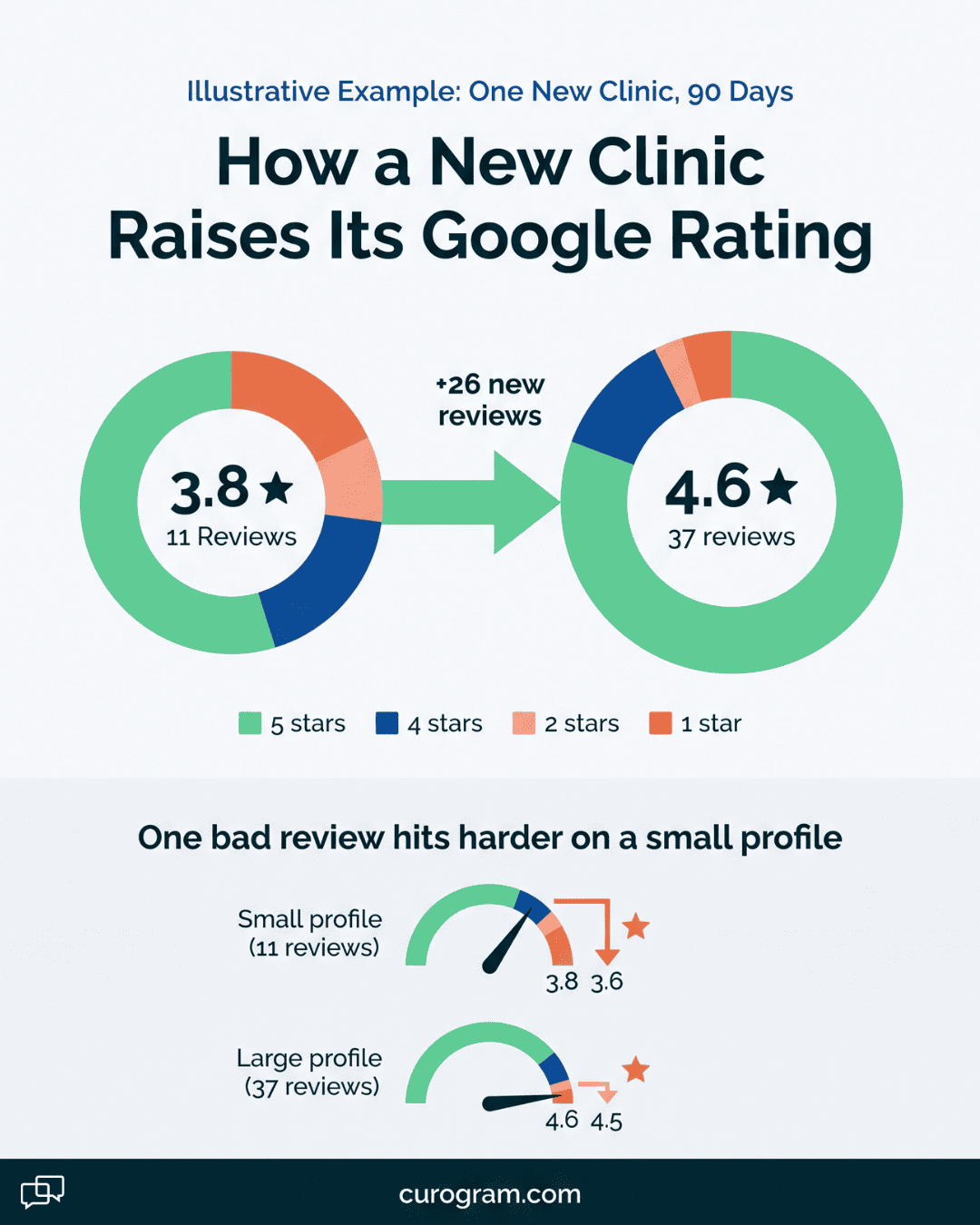
37 reviews at about 4.6 |
Eastside goes from 11 reviews at 3.8 to 37 at about 4.6, with a new review landing most weeks.
Volume also makes the profile harder to knock down. At 11 reviews, one new 1-star post drops Eastside from 3.8 to about 3.6. At 37 reviews, that same post moves it from 4.6 to 4.5, and most parents won’t notice.
It won’t match the franchise’s 300. It doesn’t need to, because distance matters in local ranking, and Eastside is the closest clinic for the families on its side of town.
Step 4: Shift the Weight
While Eastside builds, the founding clinic can drop to maintenance. Space its requests further apart and let its long list of loyal families keep it steady.
Westgate gets Eastside’s settings once its profile is claimed. Before the first request goes out, fix the name, hours, and phone number, so new reviews land on a profile that’s correct.
Step 5: Read It Like a Growth Number
Each month, track three numbers per clinic in the dashboard. Look at new reviews, days since the newest review, and replies still owed.
Then line them up with new evaluations booked at each location in Fusion. Give the plan a full 90 days before you judge it, since a few slow weeks can hide a strong trend.
If Eastside’s new-family intakes rise in the same months its review count climbs, the requests are doing their job. If reviews rise and intakes stay flat, check the profile’s hours, phone number, and listed services next.
Curogram Highlight: Automated Review Requests for Fusion Groups
Team Performance Views give administrators a side-by-side look at front desk workload across every location in a DrChrono group.
Each view pulls from the same shared inbox your staff already use for texting, reminders, confirmations, and recall replies, so there’s nothing extra to log.
For each office and queue, the views show messages handled, median first-response time, resolution rate, and an hourly volume curve.
You can filter to a single queue, such as scheduling, to see where patients wait longest. You can also compare one office’s trend against the group median across weeks.
Context sits next to the numbers. Campaign days and volume spikes appear on the same timeline, so a slow Wednesday after a recall batch reads as what it is.
Staffing levels feed the per-staffer figures, which keeps a three-person desk from being judged against a five-person one.
The views stay at the team level. Managers see patterns, such as a 1:00 to 3:00 slowdown or a queue that never clears on Mondays. They don’t get a ranked list of individual staffers, which keeps the tool pointed at workload and coaching.
Because Curogram syncs with DrChrono, appointment-linked threads carry the correct office tag. Confirmations, reminder replies, and recall bookings count toward the location that will see the patient.
A typical use looks like this. An administrator opens the views before a quarterly staffing review, sorts offices by per-staffer load, and checks response time beside it.
The office that needs a hire and the office that needs coaching are usually different, and the views make that plain before the meeting starts.
Conclusion: Let Google See What Parents See
Your clinics earn a rare kind of gratitude every week. Parents watch their kids reach goals that seemed far off at the first evaluation, and they’d say so if someone asked at the right time.
Fusion holds your record of that progress: the goals, the notes, the visit history. Google holds the parents’ public story about it. Right now, at many groups, only the founding clinic’s story is getting told.
We think the fix belongs in operations, with the same weight as confirmations and billing. Give each clinic its own link, tie requests to real visits, send the same ask to every family, and keep PHI out of every reply. Then put a name next to each clinic’s numbers and check them weekly.
Start with one search this week. Google your newest clinic the way a parent would, with the service and “near me.” Count the reviews, check the date on the latest one, and compare that to what happened in its therapy gym over the last five days.
Then book a demo with us. We’ll audit the review gap at each of your clinics and project 90-day review volume from your actual Fusion visit counts.