
.jpg) Mira Gwehn Revilla
Mira Gwehn Revilla

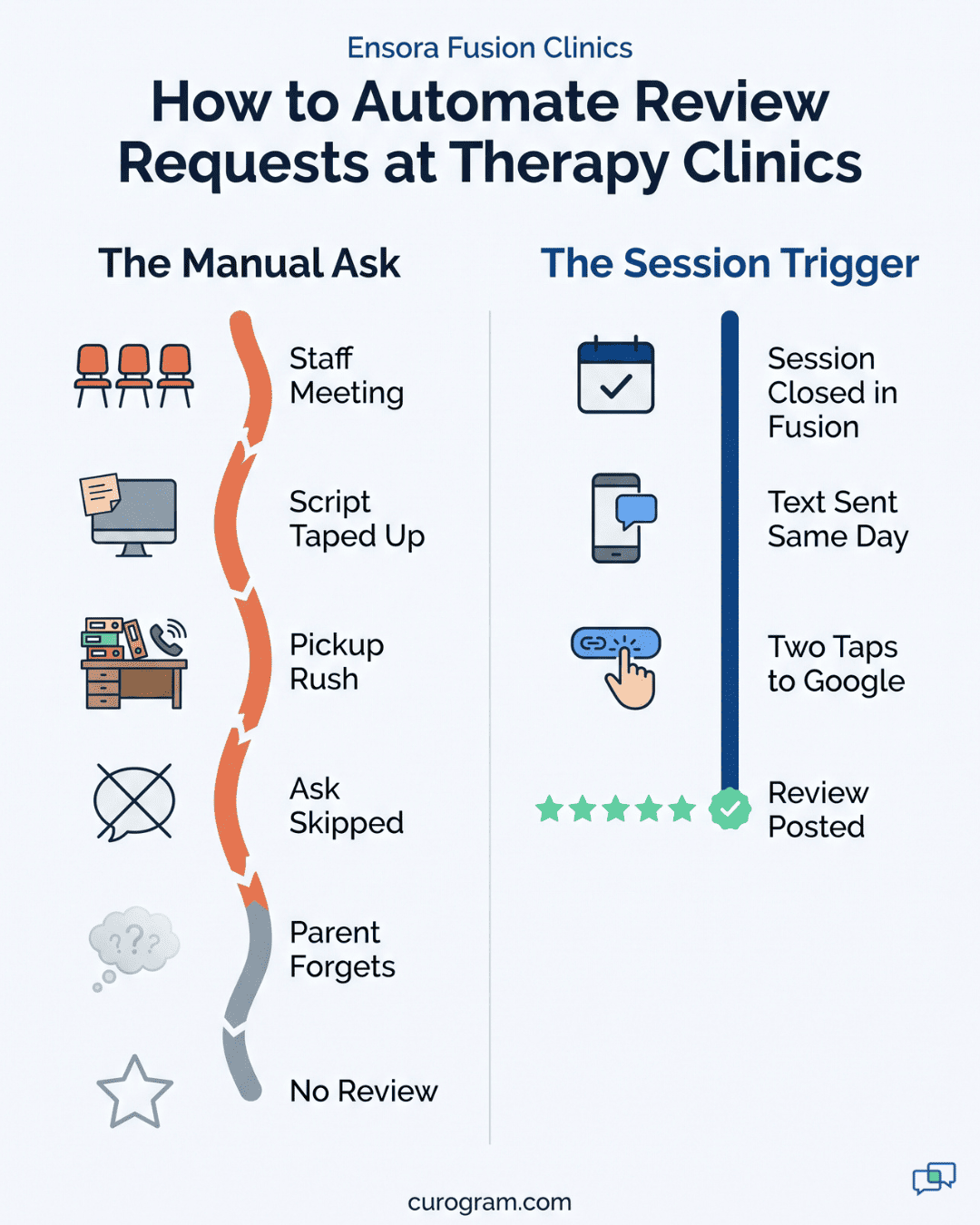
- The trigger is the session status in Fusion. Every clinic asks at the same rate, however short-staffed it is that week.
- Each text routes to the right location’s Google Business Profile, so praise for your Eastside team stays on the Eastside page.
- Every family gets the same ask, which keeps you inside Google’s rule against selectively asking for positive reviews.
- Owners see requests, clicks, and new reviews for each clinic side by side.
- Based on our internal data, one multi-location practice gained 1,064 new 5-star reviews in 3 months with this setup.
Say one clinic in your group has 140 Google reviews and the newer one across town has 11. It’s easy to read that as a gap in care. Usually it’s a gap in asking. Families at the newer clinic are just as grateful, and nobody handed them a link while the feeling was fresh.
Front desks in pediatric therapy run on pickup windows. During the after-school rush, the person at the desk is checking kids out, booking next week’s slots, and calming a bored sibling. The phone keeps ringing through all of it.
A review ask is the first thing to drop, and it should be. Families in the room come first.
Our view is plain. Any task that depends on a busy person remembering it between pickups will fail at every clinic, just on different weeks.
So the fix for review volume per clinic has to sit outside the front desk. Automating review requests across Ensora Fusion clinics ties the ask to an event every clinic already produces: a completed session.
Fusion records the visit. A text goes to the parent with a link to that clinic’s own Google profile, and staff do nothing new. Owners get a count of requests and reviews for each location, which most groups have never had.
Based on our internal data, one multi-location practice gained 1,064 new 5-star reviews in 3 months with this setup. That works out to about 12 a day.
None of them depended on a front desk lead squeezing in an ask between a late OT session and a billing question.
The Manual Ask
Nobody at a therapy clinic is hired to get reviews. The front desk’s attention belongs to the families standing at the counter, and that’s the right call.
Think about what a review ask actually needs. It takes about 30 seconds, a calm parent, and a staff member with free hands.
At 4:30 on a weekday, none of those are present. A dad wants to know if the home exercise sheet changed, a speech session is running 10 minutes over, and someone needs an insurance card scanned.
So the front desk review ask fails for a simple reason. It competes with work that has a person waiting for it, and the review has no one waiting. Staff make the correct trade every time.
Even when the ask happens, the parent still has to find the clinic on Google later, scroll to reviews, and tap the stars from memory. By dinner, most have forgotten.
The Script Taped to the Monitor
Most groups have run the same play. The owner raises reviews at a staff meeting. Someone prints a short script and tapes it to the monitor at each clinic:
“We’d love it if you shared your experience on Google. We’ll text you a link!”
Week one, a few families hear it between pickups. By week three, the tape is still there and the asks are gone. Nobody decided to stop. With no trigger and no one checking, the habit never formed.
Some groups add a QR code sign at the counter. It helps a little. It also asks a tired parent holding a toddler to scan, search, and write a review in the lobby.
Next quarter, the same meeting happens again, often with a new script and the same tape. Owners often blame staff at this point, which misreads the problem. A task with no trigger, no owner, and no count will fade no matter who sits at the desk.
What the Gap Costs You Against the Clinic Across Town
Parents searching for a pediatric OT or speech clinic usually start on Google Maps. Based on our internal data, 90% of new patient leads see a practice’s Google Business Profile before they reach its website.
On that map, a parent sees your newer clinic with 11 reviews, the latest from last spring. Next to it sits a franchise location with 300 reviews and five from this week. Most parents won’t call both. Many make that call on a phone in the pediatrician’s parking lot, right after the referral.
That franchise may have automated its ask already. Say it adds 30 reviews a month while your newer clinic adds two. The gap widens by 28 every month you stay with the manual approach.
Recency counts too. A profile whose newest review is eight months old can look like a quiet clinic, even when its schedule is full through spring.
Why One Clinic Grows and the Others Don’t
Ask a multi-site owner which clinic gets the most reviews, and they can usually name it. Ask why, and the answer is often one person. Maybe a front desk lead with six years on the job made asking part of every checkout.
When she leaves, the reviews leave with her. Your review count ends up tracking front desk turnover. Progress in the sensory gym barely registers.
New clinics feel this hardest. Your founding site has years of reviews, and the new site opens at zero with a team still learning Fusion.
Most groups can’t see any of this as it happens. Fusion tracks sessions, notes, and billing, and it has no field for “asked for a review.”
Nobody can say which clinic asked 200 families last month and which asked four. Without that count, an owner can only notice the gap six months later on Google.

The Network Reputation Desk
A therapy group with five clinics completes thousands of sessions a month. Each one is a clean signal that a family just spent time with your team. We built the Network Reputation Desk around that signal, so the ask runs off the schedule.
What Happens When a Session Closes in Fusion
The trigger is real appointment activity. When a session in Fusion moves to completed, Curogram queues a review request for that family. There’s no list to export, no monthly campaign to plan, and no button for staff to press.
That matters most at your weakest clinics. Take the location with a new front desk team and a two-week backlog of intake paperwork. It still sends every request, because the request doesn’t need that team.
It also means the ask covers every therapist. In a manual setup, families of the chattiest clinician tend to hear the ask, and families of the quiet ones don’t. Tying it to the session record removes that skew, and your quiet SLP with a full caseload gets the same shot at reviews.
Review Request Timing: Breakthrough Moments and Same-Day Sends
Pediatric therapy has real breakthrough moments. A child says “more” for the first time, or climbs the rock wall without help. A parent who watched it happen is most likely to write about it that same day.
Good post-visit review request automation in therapy works with that window. We usually suggest a send a few hours after the session closes, inside daytime hours. That’s late enough for the family to be home and settled, and early enough that the moment is still fresh.
Two timing mistakes come up often. A text that lands at 9:40 pm feels intrusive. A link sent a week later reaches a parent who has already moved on to the next visit.
Timing is set per clinic during setup. A clinic with mostly morning sessions can run a different window than one that’s packed after school.
Routing Each Text to the Right Clinic’s Profile
Each Fusion location maps to its own Google Business Profile. A family seen at your Eastside clinic gets the Eastside link and lands on the review form in two taps. No searching, no picking the wrong location from a list of five.
A sample request might read:
“Hi Dana, thanks for coming in today. If you have a minute, we’d love to hear about your experience with Brightpath Eastside: [link]. Reply STOP to opt out.”
Keep diagnosis and service type out of the text. “Thanks for coming in” carries the same warmth as naming the therapy. It also keeps health details off a lock screen that a grandparent or older sibling might see.
Review Gating Compliance and the Every-Family Ask
Review gating means steering happy families to Google and unhappy ones somewhere else. Google’s review policy bars selectively soliciting positive reviews. The FTC’s 2024 rule on consumer reviews targets review suppression.
Review gating compliance comes down to one setup choice: every family gets the same link. Curogram sends that request after every completed session, with no survey in front of it deciding who sees Google.
If a parent replies to the text with a concern, the reply lands in your team’s inbox. Staff can call back that day. The family can still post whatever they want on Google.
Per-Clinic Numbers You Can Coach
Running Google review automation group-wide gives owners a number they never had before. Each clinic gets its own row.
|
Metric |
What It Tells You |
|
Requests sent |
Whether sessions are being closed out in Fusion on time |
|
Link clicks |
Whether the message and timing land with families |
|
New reviews |
How well that clinic turns sessions into reviews |
Say one clinic sends 400 requests and gets 9 reviews while its neighbor gets 30 from the same volume. You now have a specific question for that clinic director. Maybe the send window lands during dinner, or the profile name doesn’t match what families call the clinic.
We suggest reviewing these rows monthly, in the same meeting where you look at cancellations. It takes five minutes per clinic.
Reviews as a Byproduct of Care
Based on our internal data, one multi-location practice using Curogram’s automated post-appointment requests gained 1,064 new 5-star reviews in 3 months. That’s close to 12 a day across the group.
That practice didn’t hire a marketing coordinator or run a contest. Its review volume became a function of visits, and every location already delivered visits. No one at the front desk had to fit an ask into checkout.
A daily flow also keeps each profile current. Google shows the date on every review, so a parent checking the map sees reviews from this week at every clinic in the group.
One Session, Start to Finish
A single request moves through the system at a Fusion clinic like this:
- A 45-minute OT session for a 6-year-old ends, and the therapist closes it out in Fusion.
- Curogram sees the completed status and queues a request for that family, tagged to the clinic.
- A few hours later, inside the send window, the parent gets a text with that clinic’s Google link.
- She taps the link, picks a star rating, and writes two sentences about her son’s handwriting.
- Curogram logs the request, the click, and the new review on that clinic’s row.
Nobody at the front desk touched steps 2 through 5. If the parent ignores the text, nothing else happens. If she replies “Can we move Thursday to 3?” instead, that message lands in the shared inbox like any other text from a family.
Curogram Highlight: Automated Review Requests
Automated Review Requests is the Curogram feature that sends a review text after each completed session in Ensora Fusion. It reads appointment activity, waits for the send window you choose, and routes each family to the Google profile for the clinic they visited.
Setup is done once, with our team. We map each Fusion location to its Google Business Profile, set the send window for each clinic, and agree on the wording. Most groups finish that in one working session. After that, staff don’t add a step to checkout.
Every family gets the same request, which keeps your ask clear of review gating. When a parent replies with a concern instead of tapping the link, the message lands in Curogram’s shared inbox. Your team sees it with the clinic name attached and can follow up the same day.
Owners get a per-clinic view of three numbers: requests sent, link clicks, and new reviews. A clinic with plenty of sessions and few reviews stands out in the first month, well before its Google profile falls behind.
Curogram is HIPAA-compliant, and the review text can stay free of health details. The request carries the clinic name and a link, with nothing about the child’s diagnosis or therapy type.
Based on our internal data, one multi-location practice gained 1,064 new 5-star reviews in 3 months on this workflow. Review requests also go out from the same number as your reminders and two-way texts, so families recognize who’s writing.
Conclusion: Retire the Manual Ask
Fusion holds your session record: notes, goals, visits, and claims. Curogram handles the family’s side of that same visit, the moment a parent feels grateful enough to say so in public. Both start from the same completed session.
The manual ask put your front desk in charge of marketing during the busiest hour of the day. It held for a few weeks at a time, then faded on its own schedule at each clinic. Clinics that lost reviews when a front desk lead left were relying on one generous person.
Try a quick count before your next staff meeting. Pull last month’s completed sessions for each clinic from Fusion. Then count the new Google reviews each clinic got in the same month.
For most groups, the first number runs in the hundreds per clinic and the second stays in single digits. That gap is your uncollected reputation: real families who had a good visit and were never handed a link.
Schedule a demo with our team and we’ll show you how Curogram ties review requests to completed sessions in Fusion.