

10 min read

Automated Appointment Reminders for Cerbo Practices

Automated Appointment Reminders for Cerbo Practices
💡Automated appointment reminders for Cerbo functional medicine practices can be two-way, letting patients confirm, cancel, or reschedule by text reply.

Cerbo sends one booking email, one reminder email, and one SMS reminder per event, plus a confirm link added in its spring 2022 update. Curogram adds a sequence at booking, one week out, and the day before, and routes replies to a shared inbox your front desk watches.

A cancellation that arrives five days early becomes a refilled slot instead of an empty room. Appointment data syncs from Cerbo’s schedule through its Open API, so nobody re-keys bookings.

Atlas Medical Center went from a 14.20% no-show rate to 4.91% in three months, based on our internal case data. Cash-pay practices absorb the full cost of an empty 90-minute slot, which makes confirmation certainty worth more here than in high-volume specialties.


Cerbo sends reminders. Practices shopping for patient messaging tools sometimes hear otherwise, and it’s wrong.

Every event on a Cerbo calendar can carry an email notification when the booking is made, a reminder email, and an SMS reminder timed to whatever hour you choose. Patients have been able to confirm by tapping a link since the spring 2022 update.

What Cerbo doesn’t hand you is a conversation. A patient who reads Tuesday’s text and remembers a conflict has one move: call the office during business hours and hope someone picks up. Plenty of people never make that call. They just don’t come.

Silence costs more in this corner of medicine than almost anywhere else. A new-patient functional consult runs 60 to 90 minutes.

The physician has already read the intake form, worked through a lab panel, and sketched a plan. Nobody is billing insurance for that slot, so the whole $300 to $500 sits on the practice.

Our claim, and the rest of this piece backs it: a reminder protects a schedule only when the patient can answer it and someone sees the answer in time to act.

Two-way reminder texting in Cerbo practices moves the chasing off your front desk. Patients answer on their own time, from a lock screen, in four seconds.

Staff work from a list of replies rather than a list of numbers to dial. Cancellations surface days ahead instead of showing up as an empty chair, which gives you a real window to refill.

That shift is small in engineering terms and large in scheduling terms. It’s also the difference between a calendar you hope is accurate and one you can staff against.

The Villain: The One-Way Reminder

Cerbo’s scheduling side does what it was built to do. Appointments book quickly, appointment types are color-coded, and notifications go out without anyone touching them. Follow one message past the send, though, and the path ends at the patient’s phone.

What Cerbo’s built-in notifications actually send

Each calendar event can carry three automated messages: an email notification when the appointment is created, a reminder email, and a reminder SMS. You set the timing in hours before the visit.

Clinic name and address ride along in the emails automatically. The SMS only says what you typed into it, which is why most builds spell out the practice name by hand.

Defaults live under Admin > Manage > Schedule Types, in Manage Default Notifications. You write one general set, then override it per appointment type.

That’s how a 90-minute new-patient consult ends up with different wording than a 20-minute follow-up. Save and close the window between each type or the edits collide.

Since spring 2022, patients can confirm by tapping a link inside the email or the text. Cerbo records that click.

The 8:40 confirmation call

Tomorrow’s column has five long blocks on it. Someone at the front desk works down the list at 8:40, phone in one hand, sticky note in the other. Two patients answer. Three go to voicemail, and nobody calls back before close.

The confirm link helps, and we won’t pretend otherwise. It tells you Dana opened her reminder and tapped confirm on Monday.

It says nothing about the Wednesday call from her daughter’s school that pulls her out of Thursday’s 2:00 slot. A patient in that spot has one route back to you: your phone line, during your hours, between her own meetings.

So the calling continues, because an unconfirmed 90-minute block is a $450 guess.

Running the numbers on a missed slot

MGMA’s DataDive Practice Operations data put the single-specialty aggregate no-show rate at 6.81% in 2023, up from 5% the year before.

Cash-based integrative practices we talk with often run well above that, since a 90-minute visit booked three weeks out has more chances to fall apart.

The table is illustrative, using a $400 average visit to show how exposure scales.

Monthly visits

No-show rate

Missed visits

Revenue not billed

150

7%

10

$4,200

150

12%

18

$7,200

300

12%

36

$14,400

Illustrative figures at a $400 average visit charge.

Our prospect analysis puts monthly unrealized revenue between $5,000 and $15,000 for a solo integrative practice, and $15,000 to $30,000 once a second provider fills a schedule. No insurance payment sits behind any of it.

The hour of prep that goes with it

Long visits carry preparation. Before a root-cause consult, the physician reads the intake questionnaire, interprets a lab panel, and drafts a supplement and diet plan. Call it 45 minutes, usually done the night before.

None of that work gets recycled when the chair stays empty. It gets redone in three weeks when the patient rebooks, assuming she rebooks.

Practices trying to reduce no-shows in a cash-based practice tend to start with the prep math rather than the reminder settings, and they’re right to.

Integrative medicine no-show prevention comes down to giving patients a fast way to tell you something changed. Message frequency matters much less than the reply path.

What the click can and can’t tell you

A recorded confirm click answers one question: Did this patient see the message and agree to the time?

It can’t carry a reason, a new date, or a request. It also can’t tell you that a patient tapped confirm on autopilot while walking into a meeting, which happens more than anyone likes.

Staff still open Thursday morning without knowing which of the five long blocks will actually walk in. 

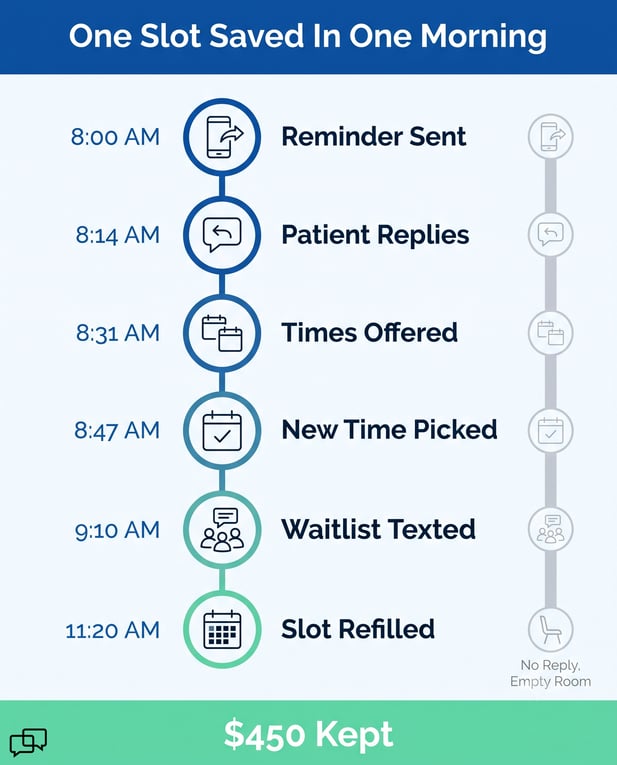
Timeline of a clinic refilling a canceled appointment to save $450

The Guide: The Confirmation Loop

Wording carries most of the work here. A reminder that invites a reply looks different on a lock screen than one that only states a date and time.

A three-touch cadence, and the words in it

Curogram runs its sequence off your Cerbo schedule: one message when the appointment is booked, one a week out, one the day before. Most practices set the day-before send for mid-morning, when people are awake and near their phones.

A day-before text reads roughly like this:

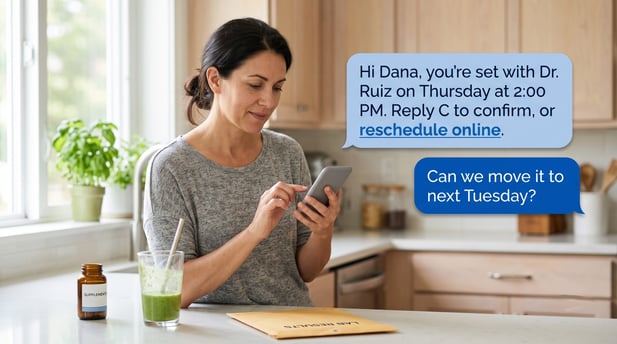
Hi Dana, this is Cascade Integrative Health. You’re set with Dr. Santos on Thu Aug 13 at 2:00 PM, 90 minutes. Reply C to confirm, R to reschedule, or X to cancel. Reply STOP to opt out.


No condition. No reason for the visit. No chart detail. Appointment logistics only, which keeps the message compliant and short enough to read from the lock screen.

Where the reply goes

A patient who answers C marks the appointment confirmed, and that confirmation lands on the shared dashboard your team already watches. Across Curogram clients, more than 75% of patients confirm, based on our internal data.

R is the reply that changes your week. Monday morning, you learn Thursday is a problem, which leaves four days to do something about it. Staff answer with two open times, the patient picks one, and someone moves the appointment on the Cerbo calendar before the morning rush.

Cerbo EHR appointment confirmations by text work best when one person owns that inbox during clinic hours.

Practices that name an owner, usually the front-desk lead, act on replies within minutes. Practices that leave it to whoever notices give back the timing advantage that made the reply worth having.

How appointment data moves between Cerbo and Curogram

Cerbo publishes an open RESTful API, which puts it ahead of most EHRs serving direct care. Our team builds and monitors the connection. A few details tend to come up first with physician-owners who read documentation.

Credentials sit apart from staff logins

API access uses its own user records, created under Admin > Manage > Integrations in the API User Management console.

You generate a secret key, copy it once, and store it securely, since Cerbo won’t display it again. Nobody shares a staff password, and the API user can be disabled at any point.

Webhooks fire once, and the delta endpoint reconciles

Webhook events post in real time and are configured in that same Integrations menu by a Superadmin. A webhook that fails isn’t retransmitted, so the sync also polls Cerbo’s delta endpoint to catch changes that slipped through.

Bulk historical loads run off-peak, and everything gets tested in a sandbox build before it touches production. None of this is a dealbreaker. It’s ordinary integration work, and it’s worth knowing about before someone promises you a five-minute setup.

Why direct care raises the stakes

Volume clinics absorb a missed visit. Thirty appointments went on the books that morning, and a walk-in closes the gap by ten.

A DPC appointment reminder workflow handles a different shape of day: six to ten visits, several of them 90 minutes, each tied to a patient paying out of pocket or through a membership.

Confirmation certainty is worth more in that setting than anywhere else in outpatient medicine. One recovered $450 consult visibly changes a solo practice’s month.

A 20-provider group would need a dozen recovered visits to feel the same difference, which is why generic reminder advice written for volume clinics keeps missing this market.


The Success: The Protected Calendar

Two-way reminders change what your calendar tells you before the week starts. The walkthrough below follows a single appointment from reminder to refill, with real timing.

One Thursday slot, tracked through a Monday

Dana has a 90-minute follow-up on Thursday at 2:00, booked seventeen days earlier. Her week-out reminder goes out Monday morning.

Monday

What happens

8:00 AM

Week-out reminder sends from the Cerbo booking data

8:14 AM

Dana replies R; her son has a school thing Thursday

8:31 AM

Front-desk lead sees the reply, sends two open times

8:47 AM

Dana takes the following Tuesday at 10:00

8:52 AM

Staff moves the appointment on the Cerbo calendar

9:10 AM

Two waitlist patients get texted about Thursday at 2:00

11:20 AM

One accepts; Thursday is booked again


Total staff time: under fifteen minutes of attention, spread across a normal morning. No outbound calls. Dr. Ruiz preps the right chart on Wednesday night instead of the wrong one.

Compare that against the same appointment without a reply path. Dana gets the reminder, means to call, forgets.

Thursday at 2:05 the room sits empty, the prep is spent, and the waitlist patient who would have taken the slot is still waiting.

What the numbers looked like at Atlas Medical Center

Atlas ran automated reminders with two-way texting for three months. Their no-show rate moved as follows, based on our internal case study data.

Measure

Before

After three months

No-show rate

14.20%

4.91%

Missed visits per 150 booked

21

7

Not-billed revenue at $400 each

$8,400

$2,800

The final row applies a $400 cash-pay average to the Atlas rates for illustration; Atlas’s own visit pricing isn’t part of the case study.

Across our client base, no-show rates run roughly 53% below the industry average, and average confirmation rates hold above 75%. For outside context, MGMA put the 2023 single-specialty aggregate at 6.81%.

Where the payback line sits

Two or three prevented no-shows a month, at $300 to $500 each, puts $600 to $1,500 back on the books. That’s the threshold most practices we work with clear in the first billing cycle.

It’s a fair way to evaluate any Cerbo scheduling reminders upgrade before you sign anything. Some clients pair it with collecting outstanding balances by text, which pulls the same visit’s payment forward as well.

Run it against your own rate rather than ours. Pull last quarter’s no-show count from your Cerbo reports, multiply by your average visit charge, and divide by three. The monthly number that comes out is what you’re currently choosing to absorb.

What two-way reminders don’t fix

Four honest limits, each with a specific condition attached.

Mobile numbers have to be current, and patients need documented consent to receive SMS. A panel with 20% stale cell numbers gets 20% fewer replies, and cleaning that list is real front-desk work before launch.

Confirming isn’t attending. A patient can tap C on Monday and still miss Thursday. The rate drops sharply; it doesn’t hit zero.

Cerbo’s native SMS reminder keeps sending unless someone turns it off for the appointment types Curogram now covers.

Skip that step, and patients get two texts about the same visit, which erodes trust in both. We switch it off during implementation, per appointment type, in Manage Default Notifications.

Same-day cancellations still leave you short. Four days’ notice refills a slot; four hours usually doesn’t, unless you keep a texting waitlist ready to go.

Practices that pair reminders with mass texting to refill open slots recover a meaningful share of those, though nobody recovers all of them.

One workflow decision worth making before launch

Decide who owns replies during clinic hours and write it into that person’s job description. Shared responsibility for a shared inbox tends to mean nobody watches it between 11:00 and 2:00, which is exactly when the reschedule requests arrive.

How Curogram Fits Alongside Cerbo

Automated reminder sequences is the piece doing the work in every example above.

You define a cadence per appointment type, so a 90-minute new-patient consult can get three touches while a 20-minute recheck gets one. Messages send by SMS, with email as a fallback for patients who prefer it.

The reply side is what separates it from a broadcast. C, R, and X map to confirm, reschedule, and cancel.

Anything a patient types outside those keywords routes to your shared inbox as a normal conversation, so “can I bring my labs from the other clinic” gets an answer instead of a bounce-back.

Curogram reads and writes appointment data through Cerbo’s Open API. Your schedule stays in Cerbo. Charting stays in Cerbo.

Supplement dispensing, subscription billing, and custom intake forms all stay exactly where your team already uses them. We add the engagement layer around them and nothing else.

Compliance sits where it should. Reminders carry appointment logistics only, never a diagnosis or visit reason.

Patients consent to SMS contact and can opt out by replying STOP. Curogram signs a BAA, operates under HIPAA, and holds SOC 2 Type II certification.

Setup runs through our implementation team rather than your staff. That includes generating API credentials in Cerbo, mapping appointment types, writing your message templates, turning off duplicate native reminders, and testing in a sandbox build before anything goes live for patients.

Most practices are sending sequences within a couple of weeks, with the front-desk lead trained on the shared inbox on day one. For teams already running two-way texting for Cerbo practices, reminder sequences turn on inside the same tool.

A patient rescheduling her appointment via a text message interface

ConclusionA Reminder Nobody Can Answer Is a Hope

Cerbo runs your schedule well. It holds your appointment types, your calendar, your intake forms, and your billing, and it sends every patient a heads-up without anyone lifting a finger.

Ask it to tell you which of Thursday’s five long blocks will actually walk through the door, though, and it can only report who clicked a link.

Your team already knows this, which is why the calling continues.

What we’d push you toward is a narrower change than a platform switch. Give patients a reply path, put one person on the inbox during clinic hours, and keep a short texting waitlist for the gaps that open up.

Atlas moved from 14.20% to 4.91% in three months on that basic setup. Two or three saved visits a month cover the cost at $300 to $500 per consult, and most cash-based practices are losing far more than three.

The math is worth doing with your own numbers rather than ours.

Book a free demo and we’ll do the arithmetic together. You’ll know within the call whether this is worth pursuing.


Frequently Asked Questions

How do Curogram reminders avoid doubling up with Cerbo’s own texts?

During implementation, we switch off the native SMS reminder for each appointment type Curogram covers, so patients receive one sequence. Cerbo’s booking confirmation email can stay on, since it arrives through a different channel entirely.

Why does confirmation matter more in a cash-based practice than a high-volume clinic?

A missed 90-minute consult at $400 has no insurance payment behind it and no walk-in ready to replace it. With six to ten visits a day, every gap takes a visible bite out of the month.

How does appointment data move between Cerbo and Curogram?

Curogram reads your Cerbo schedule through the Open API using its own credentials, created under Admin > Manage > Integrations. Webhooks push changes in real time, and a delta-endpoint poll reconciles anything a failed webhook missed.

How are reschedule requests that arrive after hours handled?

The message sits in the shared inbox with its timestamp, and an auto-reply tells the patient your team will confirm in the morning. Staff see it first thing and offer open times while there’s still room to refill.

Why do some practices see bigger drops in no-shows than others?

Reply rates track directly with mobile number accuracy and how fast someone acts on incoming texts. Practices that clean their contact list before launch and assign inbox ownership consistently outperform those that skip both steps.


Why Two-Way HIPAA-Compliant Texting Suits Cerbo EHR Practices

Why Two-Way HIPAA-Compliant Texting Suits Cerbo EHR Practices

💡 Two-way HIPAA-compliant texting for Cerbo EHR practices gives patients a direct SMS line to your clinic, with no portal login required. Curogram...


Read More
Frictionless Appointment Confirmation: Cerbo Cash-Based DPC Patients

Frictionless Appointment Confirmation: Cerbo Cash-Based DPC Patients

💡 Frictionless appointment confirmation for Cerbo cash-based DPC patients works through Curogram's two-way SMS system. Patients confirm visits with...

Read More
Automated Appointment Reminders for Cerbo EHR Functional Medicine

Automated Appointment Reminders for Cerbo EHR Functional Medicine

💡 Automated appointment reminders for Cerbo EHR functional medicine practices solve a costly gap. Cerbo's native one-way notifications leave too...

Read More