Skip to the main content.

13 min read

Accessible Healthcare Communication: Complete Compliance Guide (2026)

Accessible Healthcare Communication: Complete Compliance Guide (2026)
 💡 Accessible healthcare communication means making sure every patient — including those with vision, hearing, cognitive, or physical disabilities — can receive, understand, and respond to health information. Under the ADA, all healthcare providers must offer auxiliary aids and services so that communication with disabled patients is just as effective as it is with anyone else.

This includes screen readers, sign language interpreters, captioned videos, plain language forms, and accessible patient portals. With over 70 million U.S. adults reporting a disability, practices that fail to meet these standards face legal penalties, lost federal funding, and poor patient outcomes.

Compliance also requires meeting WCAG 2.1 Level AA for all digital tools by May 2026. Building inclusive patient communication is not just a legal duty. It is a smart, patient-centered approach to better care for everyone your practice serves.

A deaf patient shows up for a follow-up visit. The front desk hands them a paper form with small print and no other option. They sit in the waiting room, unsure of what happens next.

No interpreter. No captions. No text-based check-in. This is not a rare event. It happens every day across the country.

Over 70 million adults in the U.S. report having some form of disability, according to CDC data. That is roughly 1 in 4 people. Many of them face healthcare communication barriers every time they try to see a doctor, fill out forms, or read test results online.

The ADA is clear: your practice must communicate with disabled patients just as well as you do with anyone else. This is not a suggestion. It is the law. And the penalties for failing to comply are real — from federal lawsuits to losing Medicare and Medicaid funding.

But accessible healthcare communication is not just about staying out of legal trouble. It is about better care. When patients can actually understand their diagnosis, follow their care plan, and respond to your messages, outcomes improve across the board.

This guide walks you through everything your practice needs to know. We will cover the legal rules, the specific strategies for each type of disability, and the technology standards you must meet. You will also learn how to train your staff and build a system that works for every patient who walks through your door.

Whether you run a small clinic or a large multi-location practice, this is your complete playbook for inclusive patient communication. Let's get started.

Legal Requirements: ADA and Section 504

The legal framework for disability access patient communication is built on two main federal laws. If your practice accepts any federal funds — including Medicare or Medicaid — you need to know both inside and out.

The Americans with Disabilities Act (ADA)

The ADA prohibits discrimination against people with disabilities in places that serve the public. Healthcare practices fall under Title III of the ADA. This means every clinic, hospital, dental office, and therapy center must provide what the law calls "effective communication."

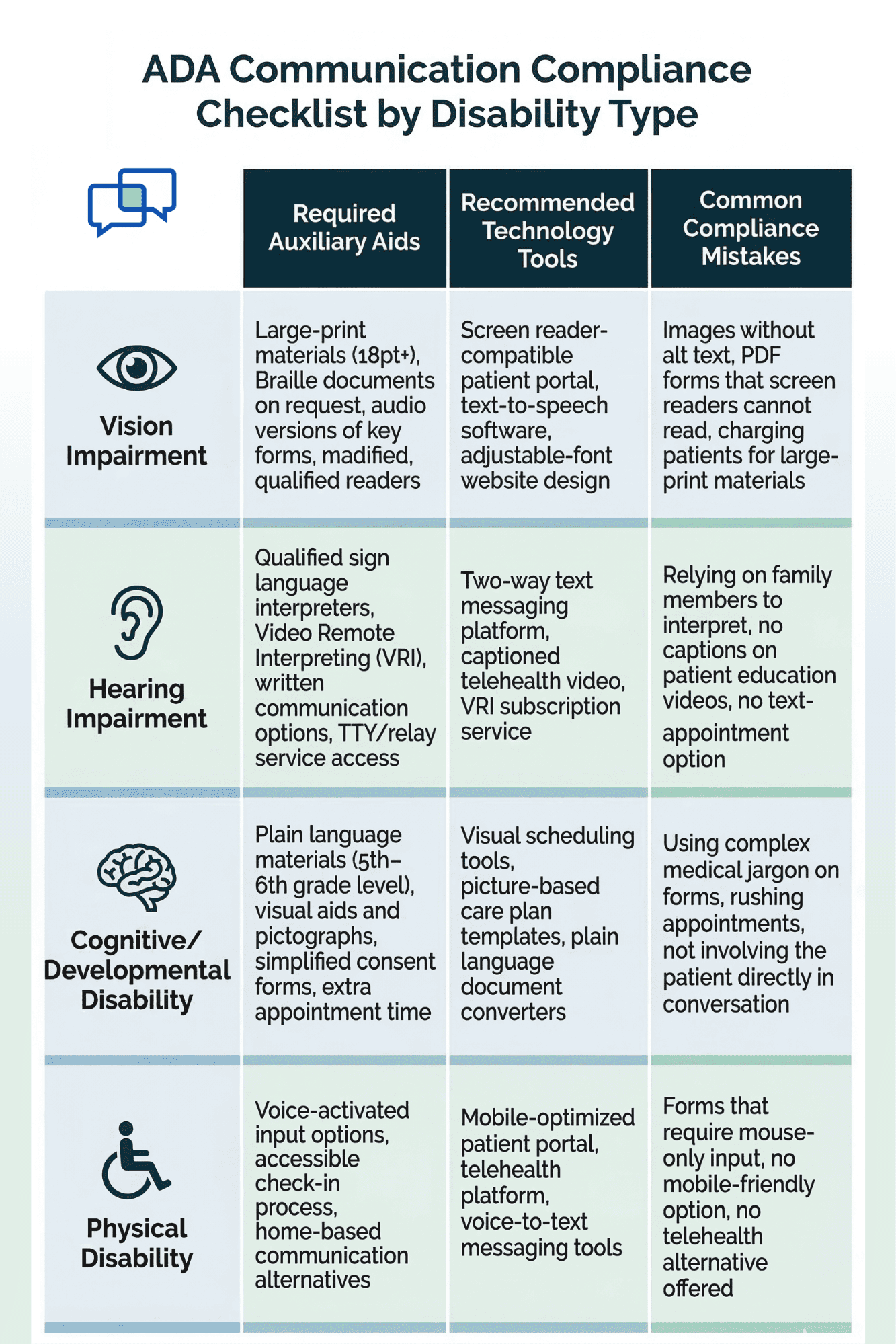
In plain terms, your communication with a disabled patient must be just as clear and useful as it is with any other patient. The ADA uses the term "auxiliary aids and services" to describe the tools you need to provide. These can include sign language interpreters, large-print documents, screen reader-friendly websites, and captioned video content.

The key rule is this: you cannot charge the patient for these aids. The cost is part of doing business, just like keeping your exam rooms clean or your billing system updated.

Section 504 of the Rehabilitation Act

Section 504 applies to any entity that receives federal financial assistance. For most healthcare providers, this means you are covered if you accept Medicare, Medicaid, or CHIP payments.

In May 2024, the Department of Health and Human Services updated Section 504 to add specific digital standards. Now, your website, mobile apps, and patient portals must meet WCAG 2.1 Level AA.

The deadline for practices with 15 or more employees is May 11, 2026. Smaller practices have until May 10, 2027.

What Happens If You Don't Comply

Non-compliance is not a slap on the wrist. The HHS Office for Civil Rights can investigate complaints, conduct reviews without a complaint, and refer cases to the Department of Justice. The biggest risk? Loss of federal funding.

For most practices, that means losing Medicare and Medicaid payments — a threat to the entire operation. ADA compliance healthcare communication is not optional. It is a core part of running a practice that serves the public.

Vision Impairment Communication Strategies

About 12 million Americans aged 40 and older have some form of vision loss, according to CDC estimates. For these patients, standard printed forms, small text on screens, and image-heavy websites are major barriers. Here is how your practice can serve them better.

Screen Reader Compatibility

A screen reader is software that reads on-screen text aloud. Patients who are blind or have low vision rely on these tools to navigate websites, read emails, and fill out forms.

For your website and patient portal to work with screen readers, every image needs descriptive alt text. Every form field needs a clear label. And every button needs a purpose that the software can read aloud.

If your patient portal is not built with screen reader support, a blind patient cannot book an appointment, read lab results, or pay a bill online. That is a direct failure of accessible medical communication.

Large Print and Audio Options

Not every patient with vision loss is fully blind. Many have low vision and can still read — if the text is large enough. Offer printed materials in 18-point font or larger. For digital content, make sure your website lets users adjust text size without breaking the layout.

Audio descriptions and text-to-speech tools are another option. You can provide recorded audio versions of key documents, like consent forms or post-visit care plans. This gives patients the ability to review their care details at home, on their own time.

Practical Tip: Braille Documents

Braille is not needed for every patient or every form. But for patients who request it — especially for legal documents like consent forms — you should be ready.

Services that convert standard documents to Braille are widely available and cost between $0.25 and $1.00 per page, depending on the vendor.

The bottom line: vision-impaired patients can fully engage with your practice when you remove the barriers. Screen reader support, large print, and audio options are not "extras." They are part of delivering complete, inclusive care.

Hearing Impairment Communication Strategies

About 15% of U.S. adults report some degree of hearing loss, according to the National Institute on Deafness and Other Communication Disorders. For patients who are deaf or hard of hearing, spoken communication falls short. Your practice needs to offer alternatives that actually work.

Sign Language Interpreters and Video Relay Services

For complex or sensitive conversations — like discussing a diagnosis, going over surgery options, or explaining a care plan — a qualified sign language interpreter is often the best option.

The ADA is clear that you cannot ask the patient's family member to interpret except in emergencies. You must provide a qualified interpreter.

Video Remote Interpreting (VRI) is a cost-effective alternative when an in-person interpreter is not available. The interpreter joins by video and signs in real time. A basic VRI setup costs around $2 to $4 per minute, which is often far less than an in-person interpreter's hourly rate.

Written Communication and Captioning

Many deaf and hard-of-hearing patients prefer written communication. Two-way text messaging lets them ask questions, confirm appointments, and receive care updates without picking up the phone.

Based on our internal data, practices that use text-based communication see over 75% average appointment confirmation rates — proof that meeting patients where they are actually improves results.

For any video content your practice creates — patient education videos, telehealth sessions, or recorded instructions — captions are a must. Auto-generated captions are a start, but they often miss medical terms. Manual review is worth the extra step to ensure the captions are correct.

TTY/TDD Services

TTY (teletypewriter) and TDD (telecommunications device for the deaf) services are still required under the ADA.

While text messaging has largely replaced these tools for day-to-day use, your practice should still be able to receive and make TTY calls. Many phone systems include TTY support, and relay services like 7-1-1 connect TTY users to standard phone lines.

Serving hearing-impaired patients well is not complicated. It just takes the right mix of interpreters, text-based tools, and captioning to make every interaction clear.

Doctor and deaf patient engaged in a consultation using a tablet-based video relay interpreter in a modern clinic setting

Cognitive and Developmental Disability Strategies

Cognitive disability is the most common type of disability in the U.S., affecting about 14% of adults. This includes people with intellectual disabilities, autism, traumatic brain injuries, dementia, and learning disorders. These patients often struggle with complex language, long forms, and fast-paced appointments.

Plain Language Communication

The single most impactful step you can take is to simplify your language. Use short sentences. Choose common words.

Say "take this pill once a day" instead of "administer this medication at a frequency of once daily." Write at a 5th- to 6th-grade reading level for any patient-facing materials.

Plain language is not "dumbing things down." It is making sure the message actually lands. Research consistently shows that patients of all ability levels prefer and better understand plain language materials.

Visual Aids and Pictographs

For patients who struggle with reading, visual aids can fill the gap. Use simple icons or pictographs to illustrate steps in a care plan.

For example, a morning pill schedule can be shown as a picture of a sun next to a pill icon. A follow-up visit can be shown as a calendar with a circle around a date.

Many practices already use visual aids in pediatrics. The same approach works for adult patients with cognitive or developmental needs.

Simplified Consent Forms

Standard consent forms are dense and full of legal language. Create a simplified version that covers the same key points in plain, short sentences.

Pair it with a verbal walkthrough, and give the patient extra time to ask questions. If the patient has a caregiver or legal guardian, involve them in the process — but always speak to the patient directly first.

Extra Time and Patience

This is the simplest strategy and also the most overlooked. Patients with cognitive needs may take longer to process information, form responses, and make decisions.

Build in extra time for their appointments. Train your staff to slow down, repeat key points, and check for understanding without being condescending.

Removing healthcare communication barriers for these patients does not require expensive tools. It requires thoughtful, patient-centered changes to how you speak, write, and schedule.

Physical Disability Considerations

Patients with physical disabilities — such as those who use wheelchairs, have limited hand mobility, or live with paralysis — face unique challenges when interacting with healthcare systems.

Their barriers are not just about getting into the building. They also affect how they use phones, computers, and medical devices.

Voice-Activated Technology and Adaptive Input

For patients who cannot type or use a mouse, voice-activated tools are essential. Voice assistants, speech-to-text software, and voice-controlled apps let these patients fill out forms, send messages, and navigate websites hands-free.

When choosing patient-facing software, check that it supports voice input and does not rely solely on click-based actions.

Adaptive input devices like switch controls, eye-tracking systems, and large-button keyboards also help. While your practice does not need to supply these devices, your digital tools must work with them.

If your patient portal only functions with a mouse, you have locked out patients who rely on other input methods.

Mobile Accessibility and Home-Based Options

Many patients with physical disabilities rely on their phones more than desktop computers. Make sure your website and forms work well on mobile screens. Buttons should be large enough to tap easily.

Forms should auto-fill where possible. And the entire experience should be smooth without needing fine motor control.

Home-based communication options are another big win. Telehealth visits eliminate the need for patients with mobility challenges to travel.

Based on our internal research, practices that offer text-based recall messages saw 35% of patients schedule an appointment within a month — showing that meeting patients at home, through their phones, drives real engagement.

Telemedicine as an Accessibility Tool

Telehealth is not just a convenience. For patients with physical disabilities, it can be the difference between getting care and skipping it entirely.

A virtual visit removes travel barriers, wait room challenges, and the physical strain of an in-person appointment. Pairing telehealth with accessible messaging tools creates a complete communication loop from the patient's home.

ADA communication compliance checklist grid showing required auxiliary aids and technology tools for vision, hearing, cognitive, and physical disabilities in healthcare

Technology Accessibility Requirements

Technology is at the center of modern healthcare communication. Patient portals, websites, mobile apps, and text messaging systems all need to be accessible. Starting in 2026, this is not just a best practice — it is a legal requirement.

WCAG 2.1 Level AA: What You Need to Know

The Web Content Accessibility Guidelines (WCAG) 2.1 Level AA is the standard your practice must meet. It is built around four principles: content must be perceivable, operable, understandable, and robust.

In everyday terms, this means your website needs proper color contrast, keyboard navigation, alt text on images, captions on video, and clear form labels.

Healthcare providers that receive federal funding must comply with WCAG 2.1 Level AA by May 11, 2026 (for those with 15 or more employees). Smaller practices have until May 10, 2027. Falling short can mean losing Medicare and Medicaid funding.

Patient Portal and Mobile App Accessibility

Your patient portal is where patients check lab results, message providers, pay bills, and book appointments. If any part of this portal is not accessible, you are creating a barrier for disabled patients.

Common issues include:

  • Unlabeled form fields

  • Poor contrast on buttons

  • Navigation that only works with a mouse

Mobile apps face the same requirements. Given that many patients, especially those with physical or vision disabilities, use their phones as their primary device, app accessibility is not secondary. It is essential.

Text Messaging Accessibility

Text messaging is one of the most accessible communication channels available. It works with screen readers, does not require fine motor skills, and delivers messages directly to the patient's phone.

Based on our internal data, practices using automated text reminders saw no-show rates drop from 14.20% to 4.91% in just three months — a clear sign that accessible, simple tools drive better outcomes.

Testing and Compliance Verification

Do not assume your tools are accessible. Run a formal audit. Use automated testing tools like WAVE or axe to scan for common issues.

Then follow up with manual testing — navigate your site with a keyboard only, test it with a screen reader, and check every form for labels and error messages. Make this a regular practice, not a one-time event.

Multilingual and LEP Patient Accessibility

Language access is a core part of accessible healthcare communication. Patients with limited English proficiency (LEP) face many of the same communication barriers as patients with disabilities — and sometimes even greater ones when language and disability overlap.

Language Access Requirements

Under Title VI of the Civil Rights Act, any healthcare provider that receives federal funding must provide meaningful language access to LEP patients.

This is not limited to Spanish or the most common languages in your area. It applies to any language a patient speaks if it affects their ability to access care.

In practice, this means offering interpreter services, translated documents, and multilingual options on your website and patient portal.

Interpreter Services: Phone and Video

Phone-based and video-based interpreter services are the fastest way to serve LEP patients. Phone interpretation works well for routine calls like appointment reminders or billing questions.

Video interpretation adds a visual layer, which helps when body language or visual context matters — like during a medical exam or consent discussion.

Many practices already use text-based communication platforms that support multiple languages. This is a simple but powerful tool for reducing language barriers without adding staff.

Translated Materials and Cultural Competence

Key documents — consent forms, discharge instructions, prescription labels, and patient education handouts — should be available in the primary languages your patient base speaks.

Machine translation tools can help draft these, but a human reviewer should always check for accuracy, especially for medical terms.

Cultural competence goes beyond words. It means understanding how different cultures view healthcare, authority, and personal space.

Training your staff on these nuances helps build trust and makes every interaction more effective. Strong language access supports inclusive patient communication and ensures that no patient is left behind because of the language they speak.

Staff Training for Accessible Communication

Even the best technology and policies will fail without trained staff. Your front desk team, nurses, and providers are the people who interact with patients every day. They need to know how to communicate well with patients of all abilities.

Disability Awareness Training

Start with the basics. Staff should understand the different types of disabilities — vision, hearing, cognitive, physical, and speech — and the common barriers each group faces. This is not about making anyone an expert. It is about building awareness so that staff recognize when a patient needs help and know how to respond.

For example, your front desk should know to offer a written option when a deaf patient checks in. Your nurses should know to slow down and use plain language with a patient who has a cognitive disability. These small actions make a big difference.

Person-First Language

Train your team to use person-first language. Say "a patient with a disability," not "a disabled patient."

Say "a person who uses a wheelchair," not "a wheelchair-bound person." This is more than a language rule. It shapes how staff see and treat each patient — as a person first.

Using Auxiliary Aids Effectively

Staff should know how to set up and use the tools your practice provides. This includes VRI systems, TTY relay services, captioning software, and any assistive communication devices. If your team does not know how to use these tools, they will not use them — even when a patient clearly needs them.

Run hands-on training at least once a year. Include role-play scenarios so staff can practice real-world situations, like helping a blind patient complete an intake form or working with a caregiver to explain a treatment plan.

Ongoing Education

Disability access standards change over time. New technology emerges. Staff turnover means new hires need training. Build accessible communication into your annual staff education plan, just like HIPAA training or infection control updates.

The practices that treat accessibility as a continuous priority — not a one-time event — are the ones that serve all patients well.


Implementing Accessible Communication Systems

Knowing the rules and strategies is one thing. Putting them into action is another. Here is a step-by-step approach to building an accessible communication system in your practice.

Step 1: Run an Accessibility Audit

Start by evaluating what you already have. Review your website, patient portal, printed materials, phone systems, and in-office processes.

Use a mix of automated tools (like WAVE or axe for digital content) and manual checks (like walking through your office as if you used a wheelchair). Document every gap you find.

Step 2: Set Technology Procurement Criteria

Whenever you buy or renew a software contract, make accessibility a requirement. Ask vendors if their product meets WCAG 2.1 Level AA.

Ask for a Voluntary Product Accessibility Template (VPAT) — this is a document that shows how accessible a product is. If a vendor cannot provide one, that is a red flag.

Your patient communication platform should support screen readers, keyboard navigation, text messaging, and captioning at a minimum.

Step 3: Budget Planning

Accessibility does not have to break the bank, but it does require a line item. Common costs include interpreter services ($2–$4 per minute for VRI), large-print document conversion, staff training, and website remediation.

Many of these costs qualify for tax credits under the ADA. Small businesses may qualify for up to $5,000 per year in tax credits for accessibility-related expenses.

Step 4: Build a Continuous Improvement Plan

Accessibility is not a box you check once. It is a system you maintain. Schedule annual audits. Collect patient feedback on accessibility. Track how often auxiliary aids are used and whether patients report barriers. Use this data to improve year over year.


Conclusion

Accessible healthcare communication is not just a legal box to check. It is the foundation of patient-centered care. When patients with disabilities can understand their care plans, respond to messages, and navigate your systems, outcomes improve for everyone.

The numbers are clear. Over 70 million American adults live with a disability. That is 1 in 4 people — patients who are already in your waiting room, already calling your front desk, already trying to log in to your portal. If your communication systems are not built to include them, you are failing a quarter of your patient base.

The good news is that the path forward is practical and achievable. Start by understanding the legal rules under the ADA and Section 504.

Then, address the specific needs of patients with vision, hearing, cognitive, and physical disabilities. Make sure your technology meets WCAG 2.1 Level AA. Train your staff. And build a system that improves over time.

You do not need to do everything at once. Run an audit. Fix the biggest gaps first. Add interpreter services and text-based communication. Make your patient portal screen reader-friendly. Each step matters.

Practices that invest in inclusive patient communication are not just avoiding lawsuits. They are building trust, improving retention, and delivering better care.

Based on our internal research, practices that use accessible text-based outreach tools see measurable gains — from higher appointment confirmation rates to significantly lower no-show rates.

The deadline for digital compliance is fast approaching. But this is about more than a deadline. It is about making sure every patient who walks through your door — or logs in to your portal — gets the same quality of care. That is what accessible healthcare communication is all about.

Start meeting accessibility requirements before the May 2026 deadline hits. Book a quick demo to see how HIPAA-compliant two-way texting reaches every patient — no matter their ability.


Frequently Asked Questions

How does the ADA define "effective communication" for healthcare providers?
The ADA requires providers to communicate with disabled patients just as clearly as with anyone else, using auxiliary aids like interpreters, large-print materials, and accessible digital tools — at no cost to the patient.
Why is WCAG 2.1 Level AA important for medical practices right now?
Federal rules now require healthcare providers receiving Medicare or Medicaid to meet WCAG 2.1 Level AA by May 2026, or risk losing federal funding through HHS enforcement actions.
How can a small practice afford sign language interpreters for deaf patients?

Video Remote Interpreting (VRI) costs around $2 to $4 per minute and only charges for actual use time, making it far more affordable than hiring an in-person interpreter for each visit.

How should staff handle communication with patients who have cognitive disabilities?

Use plain language, short sentences, and visual aids. Give the patient extra time to process information, and check for understanding by asking them to repeat key points back to you.

Why is text messaging considered one of the most accessible patient communication tools?

Text works natively with screen readers, requires no fine motor skills, and reaches patients directly on their phones — removing barriers for patients with vision, hearing, and physical disabilities.


The Ultimate Guide to Communication in Healthcare: 35+ Strategies for Unparalleled Patient Care

The Ultimate Guide to Communication in Healthcare: 35+ Strategies for Unparalleled Patient Care

In the intricate and high-stakes world of healthcare, the most potent instrument is not a scalpel or a sophisticated medical device, but rather,...

Read More
Professional Text Communication in Healthcare: A Complete Guide

Professional Text Communication in Healthcare: A Complete Guide

💡 Professional text communication in healthcare refers to the use of secure, HIPAA-compliant patient texting to manage appointments, share...

Read More
Text vs Phone Calls in Healthcare: Data-Driven Comparison

Text vs Phone Calls in Healthcare: Data-Driven Comparison

💡 When comparing text vs phone calls in healthcare, data shows that text messaging wins on speed, cost, and patient preference, while phone calls...

Read More