
Best HIPAA Texting Tools for Small Practices (2026)
 Jo Galvez : Jul 23, 2026, 8:00:00 AM
The best HIPAA-compliant texting tools for small medical and radiology practices in 2026. Compare Curogram, Spruce, Klara, Weave, and more.

Most “best secure texting” lists rank vendors as if every clinic runs the same software and staffs the same front desk. Small clinics don’t.
A 1- to 10-provider practice usually has one or two people working the phones, a fixed budget, and an EMR nobody wants to replace.
That last point decides more than the feature checklist does. A texting tool that can’t read your EMR forces staff to copy phone numbers by hand and retype appointment times into a second screen.
Twenty of those a morning is real time lost, and a compliance badge on the vendor’s homepage does nothing to give it back.
Choosing the best secure texting platform for small clinics comes down to fit, not feature count. This guide ranks eight HIPAA-compliant options by what a small clinic actually feels day to day.
That means whether patients need an app, how fast setup runs, what the pricing model does to a tight budget, and whether the tool connects to your EMR or stands alone.
We sign a BAA and hold SOC 2 Type II ourselves, so we’ll be straight about where each competitor is strong and where it isn’t. For a small clinic, a shorter tool your staff actually opens confirms more appointments than a rich one they avoid.
You’ll get a criteria checklist, a per-vendor breakdown with one honest limitation each, a side-by-side clinic texting software comparison table, and a quick “best for” guide.
HIPAA compliance for texting isn’t one setting. It’s a short list of safeguards that either exist in the product or they don’t. Verify these before signing anything, and pass our HIPAA texting compliance checklist to whoever vets your vendors.
No business associate agreement, no deal. A BAA is the contract where a vendor accepts legal responsibility for protecting patient data on their side of the connection.
Any platform that texts patients on your behalf handles protected health information, so federal law requires one before a single message goes out.
Free consumer tools skip this step. Regular SMS, WhatsApp, and a staffer’s personal phone come with no BAA, which is why HIPAA-compliant texting for a small clinic starts with that signature rather than a feature list.
Ask for the BAA in writing during the demo, and read who it names. A vendor that stalls on it, or charges extra for it, is telling you how they’ll treat the rest of the relationship.
Encryption protects messages two ways, and you want both. In transit means data is scrambled while it travels between phones and servers.
At rest means it stays scrambled while stored. A vendor that mentions only one has a gap worth asking about.
Access controls decide who on your team can open a patient thread. Look for individual logins, role-based permissions, and the ability to cut off a former employee’s access the day they leave. Shared passwords fail an audit fast.
Audit logs record who viewed or sent what, and when. If a patient or a regulator ever asks, that trail is your evidence.
During the demo, ask to see a real log entry. Screens that look polished in a sales deck sometimes hide a thin record underneath.
HIPAA sets the rules for protecting patient data. Confirming a vendor actually follows them is a separate question, and that’s what a SOC 2 Type II report answers.
SOC 2 Type II is an independent audit of how a vendor handles security over a period of months, not a one-day snapshot. The auditor tests real controls and reports what held up.
Every vendor in this guide signs a BAA and supports HIPAA-compliant texting, so that’s table stakes. An independent SOC 2 Type II report is the higher bar, and we maintain one alongside HIPAA compliance.
For a small clinic, this matters most when a larger partner, payer, or health system reviews your vendors. Handing them a current SOC 2 report ends a security questionnaire that could otherwise drag on for weeks.
Consent is the safeguard people forget until a complaint lands. Patients should agree to texts before you start, and every thread needs a clear way out. Most platforms handle opt-out with a keyword like STOP, then suppress that number automatically.
Check three things during the demo. First, how the tool captures initial consent and where it stores that record. Second, whether STOP requests apply across every message type or only marketing blasts.
Third, whether staff can see a patient’s consent status inside the thread, so nobody texts a number that already opted out.
Get these right, and you stay clear of both HIPAA and TCPA trouble. A small clinic rarely has a compliance officer watching this, so the platform needs to enforce it for you.
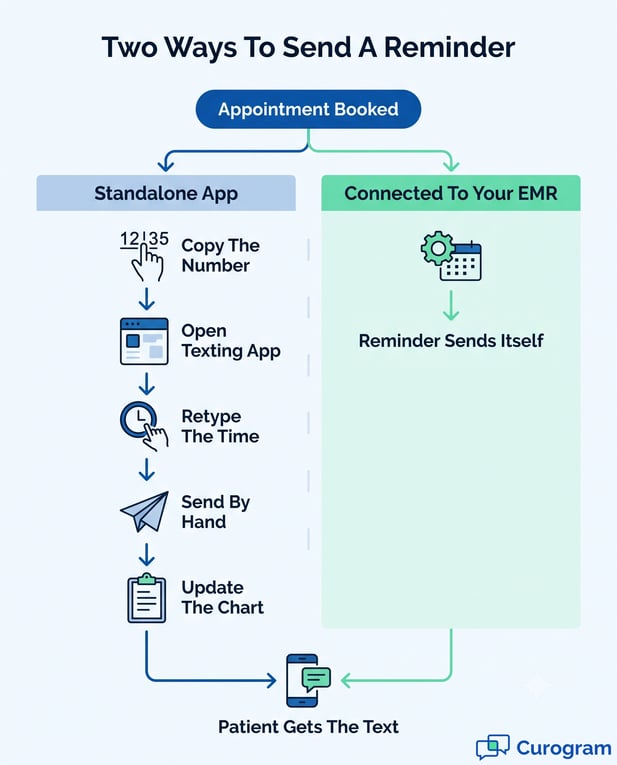
Ranking the best secure texting platform for small clinics means weighing fit over feature count, so that’s how we scored these eight: EMR connection, patient experience, pricing model, and setup effort.
Curogram leads for practices that want to keep their current EMR. After that, your best pick depends on what you value most. Each block names one honest limitation, because every tool has one.
Curogram adds HIPAA-compliant, two-way texting on top of the EMR you already run, with 20+ integrations covering systems like eClinicalWorks, athenahealth, and Azalea Health.
Patients text your number from their normal phone, so there’s no app to download and no login to explain at the front desk.
The features that move numbers: automated appointment reminders and confirmations, mass and individual SMS, automated review requests, patient recalls, and a shared team inbox.
Based on our internal data, clients average a confirmation rate above 75%, and no-show rates run about 53% below the industry average.
Atlas Medical Center cut no-shows from 14.20% to 4.91% in three months. Covina Arthritic Clinic went from 369 to over 1,300 confirmations a month.
Compliance is covered by a signed BAA and SOC 2 Type II. Honest limitation: Curogram is a patient-communication layer, not an EMR, so it works alongside your record system rather than replacing it.
OhMD is the pick when budget is the hard constraint. Its free tier actually works for a very small clinic, offering two-way patient texting, a shared inbox, and a webchat widget without a monthly bill. Paid plans add broadcast texting, reminders, and EHR connections.
It integrates with a solid set of EHRs and keeps the patient side app-free. Compliance runs on a signed BAA. Best for a solo or two-provider clinic that wants HIPAA-compliant texting live this week at no cost.
Honest limitation: the free tier caps volume and automation, so a growing clinic outgrows it and lands on paid plans sooner than expected. Read our Curogram vs OhMD comparison if you’re weighing the two.
Spruce Health prices per user, which makes costs predictable as you add or drop staff. Beyond secure texting, it bundles a HIPAA-compliant phone line, voicemail, fax, and team messaging into one app, so a small practice can run most patient contact from a single place.
Features worth noting: secure two-way messaging, VoIP calling, shared team inboxes, and message routing. It signs a BAA and targets independent practices and behavioral health specifically.
Best for solo clinicians and small teams that want texting plus a phone system, billed per seat.
Honest limitation: patients often need the Spruce app for the richest secure threads, which adds a step compared with plain SMS. Front desks report a few extra “how do I install this” calls in the first weeks.
Front-desk teams tend to like Klara. It centers on conversational patient messaging, pulling calls, texts, and web messages into one thread per patient so nothing scatters across channels. Automated reminders, scheduling links, and forms round it out.
Klara connects to a set of EHRs and offers a patient experience that can run app-free by text. It signs a BAA. Best for clinics whose front desk lives in patient messages all day and wants them organized by person, not by channel.
Honest limitation: Klara sits at the higher end for a very small clinic’s budget, and pricing is quote-based, so you’ll sit through a sales call before you see a number. Our Curogram vs Klara comparison lays out the trade-offs.

Weave bundles phones, texting, scheduling, payments, and reviews into one system aimed at small practices, dental offices especially. If you want your phone system and patient texting from the same vendor, Weave makes a strong case.
Two-way texting, appointment reminders, review requests, and a mobile app for staff all sit in the package. It signs a BAA for its healthcare customers. Best for a small clinic replacing an aging phone system that also wants texting and reviews in the bundle.
Honest limitation: because Weave leads with hardware and phone service, EMR integration depth varies by specialty, and clinical-record syncing is thinner than an EMR-first tool. Confirm your specific system before committing.
Falkon SMS answers a narrow, common need: turn the landline or VoIP number already on your website into a texting line. Patients text the number they’ve always called, and your team replies from a shared dashboard.
It handles two-way SMS, MMS, templates, scheduled messages, and bulk sends, with a BAA available for healthcare use. Best for a clinic that wants to text-enable an existing published number without changing carriers or printing new cards.
Honest limitation: Falkon is a texting tool first, not a clinical platform, so deep EMR integration and healthcare-specific automations aren’t its focus. Pair it with your EMR’s own reminders if you need scheduling logic.
TigerConnect is built for scale, and it shows. Hospitals and large groups use it for secure clinical messaging, alarm routing, and on-call scheduling across teams. For a small clinic, that power comes with enterprise pricing and setup.
It offers encrypted messaging, role-based delivery, EHR integration with systems like Epic and Oracle Health, and strong audit controls. Compliance is thorough, as you’d expect at that tier. Best for a growing group heading toward multi-site or hospital-level coordination.
Honest limitation: for a 1 to 5 provider clinic, TigerConnect is usually more platform and more cost than the day needs. Its secure clinical messaging leans app-based rather than plain patient SMS.
Rhinogram pairs HIPAA-compliant texting with telehealth, so a clinic can message and see patients from the same in-context thread. Patients respond by normal text, no app required, which keeps the patient side simple.
The platform covers two-way messaging, virtual visits, broadcast texting, and integrations with several EHRs. It signs a BAA. Best for clinics running real telehealth volume that want messaging and video under one roof.
Honest limitation: the telehealth focus is more than a texting-only clinic needs, and you may pay for capabilities that sit unused if virtual visits aren’t part of your model.
These eight platforms sit in one view below. We line up the criteria a small clinic weighs most: pricing model, EMR integration depth, compliance, two-way SMS, whether patients need an app, and setup time.
Every option works as a two-way texting platform clinics can use for real conversations, so the true differences show up in EMR fit and cost.
|
Platform |
Pricing model |
EMR integrations |
SOC 2 / Compliance |
Two-way SMS |
Patient app |
Setup |
|---|---|---|---|---|---|---|
|
Curogram |
Subscription, quote-based |
20+ (works with any EMR) |
SOC 2 Type II + HIPAA, BAA |
Yes |
Not needed |
Days |
|
OhMD |
Free tier + paid plans |
Select EHRs |
HIPAA, BAA |
Yes |
Not needed |
Days |
|
Spruce Health |
Per user / seat |
Limited |
HIPAA, BAA |
Yes |
Often needed |
Days to weeks |
|
Klara |
Quote-based |
Select EHRs |
HIPAA, BAA |
Yes |
Not needed |
Weeks |
|
Weave |
Per location + hardware |
Varies by specialty |
HIPAA, BAA |
Yes |
Not needed |
Weeks |
|
Falkon SMS |
Per number / tiered |
Limited |
HIPAA, BAA |
Yes |
Not needed |
Days |
|
TigerConnect |
Enterprise / custom |
Enterprise EHRs (Epic, Oracle Health) |
HIPAA, BAA |
Yes |
Often needed |
Weeks+ |
|
Rhinogram |
Quote-based |
Select EHRs |
HIPAA, BAA |
Yes |
Not needed |
Days to weeks |
All eight vendors sign BAAs and support HIPAA-compliant texting. SOC 2 status can change, so confirm the current report with each vendor. Curogram’s SOC 2 Type II is current.
Two patterns stand out. Pricing model shapes the small-clinic decision more than sticker price does: a free tier or per-seat billing protects a tight budget, while quote-based and enterprise plans ask you to commit before you see numbers.
EMR integration is the other divider. Tools that read your schedule automate reminders without manual entry, and the depth ranges from any-EMR breadth to a short supported list.
Setup time tracks with that complexity. App-free, EMR-connected tools tend to go live in days, while enterprise and hardware-based systems run into weeks.

Matching a platform to your clinic is faster than reading every feature page. Below, each recommendation ties a real clinic situation to the tool that fits it.
Choosing a secure texting app for medical clinics comes down to your EMR, your budget, and how much beyond texting you need.
Curogram is the fit when replacing your EMR is off the table. It layers texting onto eClinicalWorks (see our patient texting options for eClinicalWorks), athenahealth, Azalea Health, and 20+ others, so reminders and confirmations fire from the schedule you already keep.
For most small clinics tied to one EMR they can’t abandon, this is the whole decision.
Start with OhMD’s free tier. A one= or two-provider clinic can run two-way patient texting and a shared inbox without a monthly bill, then upgrade only when volume demands it. It’s the lowest-risk way to get HIPAA-compliant texting live.
Spruce suits a solo clinician who wants secure messaging, calls, and fax billed per seat. Weave fits a small practice replacing an old phone system that also wants reviews and payments bundled.
Both cover secure patient messaging a small practice can run without a separate phone vendor.
Klara organizes every call, text, and web message by patient, which front-desk teams drowning in channels tend to love. Budget for quote-based pricing at the higher end, and confirm your EMR is on its supported list before you sign.
A group heading toward several locations or hospital-level coordination gets room to grow with TigerConnect.
Expect enterprise pricing and a longer rollout, matched by deeper clinical messaging and on-call features a tiny clinic won’t use yet.
Keep the number on your website and make it textable with Falkon SMS. It’s the narrow, cheap answer when you don’t need EMR logic, only a way for patients to text the line they already call.
Clinics running virtual visits get messaging and video in one thread with Rhinogram. Skip it if telehealth isn’t part of how you see patients, since you’d pay for capacity you won’t touch.
One rule cuts through all of it: pick the tool your staff will open every day. A platform that connects to your EMR and needs no patient app removes the friction that kills adoption, which is why we score EMR fit and an app-free patient experience above raw feature counts.
A confirmed appointment is what you’re actually buying, and the tool your front desk opens every day is what delivers it. For a small clinic, that means the platform connecting to your EMR, needing no patient app, and staying HIPAA-compliant, not the longest spec sheet your staff works around.
That’s where we’ve put Curogram first: it adds secure texting to the EMR you already run, backed by a signed BAA and SOC 2 Type II.
Clients see confirmation rates above 75% and no-shows about 53% below average, with results like Atlas Medical Center’s drop from 14.20% to 4.91% in three months.
Covina Arthritic Clinic went from 369 to more than 1,300 confirmations a month on the same setup. Curogram works alongside your record system as a communication layer, never as a replacement.
The other seven here are real options, and the right one depends on your budget, your EMR, and whether you need phones or telehealth in the mix. A two-person front desk on eClinicalWorks will weigh setup time and app-free patient replies more than an on-call routing feature.
A group adding a second location may want room to grow into TigerConnect. Match the shortlist to how your clinic runs, not to a feature you may never open.
Start with the comparison table, pick the two that fit your EMR and your budget, then watch each one handle a real reminder and a real reply.
Most small clinics go live in days, so the gap between reading about texting and using it stays short. Bring your own patient volume and your hardest compliance question to the demo.
Book a Curogram demo, and we’ll show your exact EMR connected, your reminders running, and your numbers, not a generic sales tour. Bring your toughest question about compliance or setup, and we’ll answer it live.
 Jo Galvez : Jul 23, 2026, 8:00:00 AM
The best HIPAA-compliant texting tools for small medical and radiology practices in 2026. Compare Curogram, Spruce, Klara, Weave, and more.
 Jo Galvez : Jul 27, 2026, 12:00:01 PM
The top Spruce Health alternatives for medical practices in 2026; compared on EMR integration, two-way texting, pricing model, and where Spruce still...

.jpg?width=30&name=square-formal-photo%20(1).jpg) Mira Gwehn Revilla : Jul 23, 2026, 1:00:00 PM
Mira Gwehn Revilla : Jul 23, 2026, 1:00:00 PM
Compare the best patient texting software for multi-location practices, and see how each platform routes messages and cuts inbound call volume at...