
 Michael Hsu
eClinicalWorks EHR Integration is Simple with Curogram
Cut your no-shows with eClinicalWorks EHR integration from Curogram, which sends text reminders patients actually answer. Book a demo to see how it...

Front desk staff still say Kareo. The invoices say Tebra. Both are right, which becomes a problem the moment you go looking for help.
Kareo merged with PatientPop in November 2021, and the combined company took the name Tebra. The software people log into every morning is the same one.
Search the old name, and you get pages written before the change. Search the new one, and you get pages that assume you already knew. That is why this page still says Kareo. It is the word practices use, and the integration question has not changed with the logo.
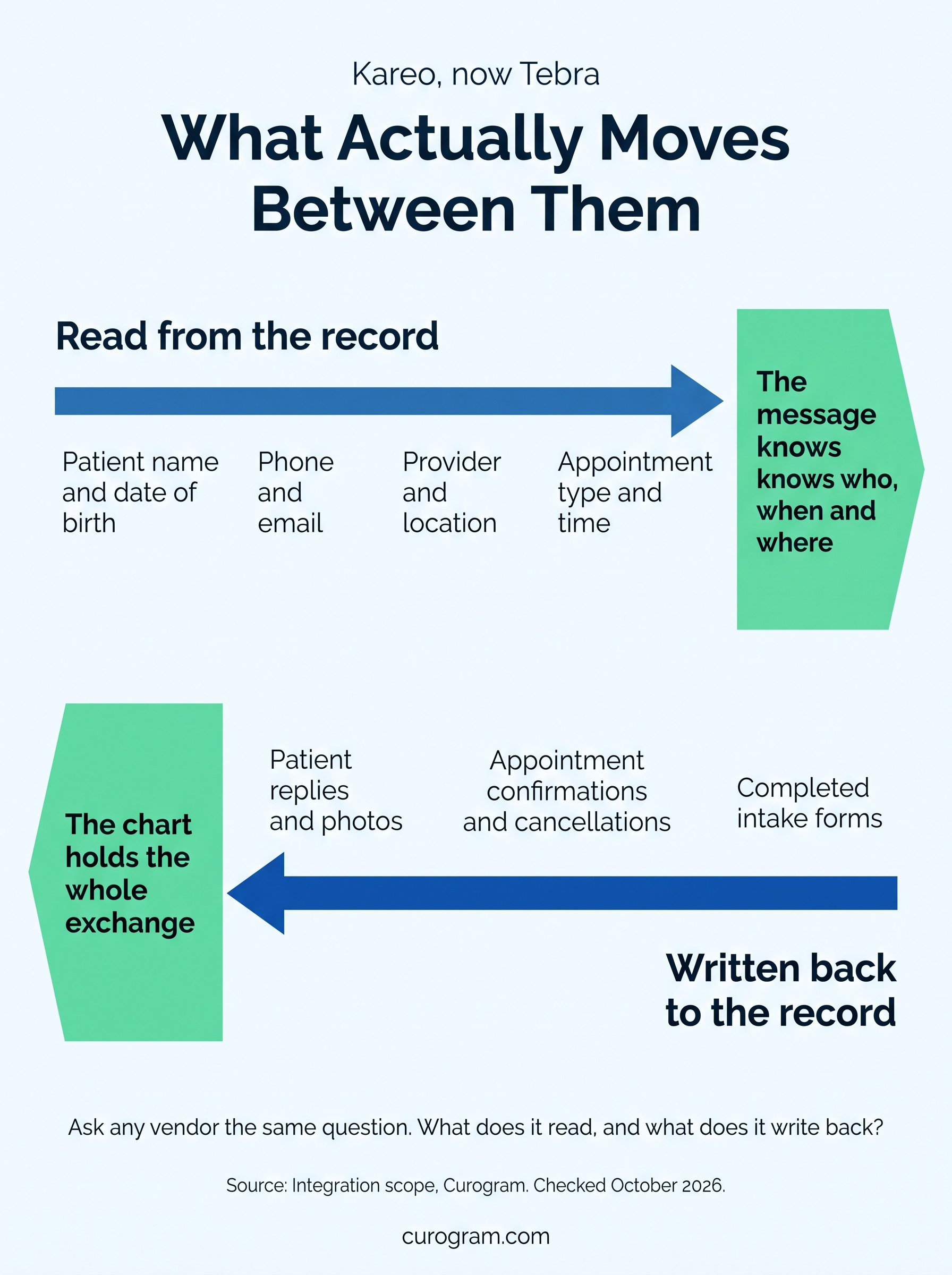
The question itself is narrow. A practice wants messages, reminders, forms, and video visits to work without typing anything twice. Most tools manage half of that. They read from the record and leave the write-back to somebody at the desk.
Below: what the connection should read and write, and what to ask a vendor before signing. Plus the one federal limit that decides how much you may send.
The Tebra platform now covers records, billing, patient experience and marketing. Its own site still credits Kareo and PatientPop in the footer.
So an article about integrating Kareo is an article about integrating Tebra. Anyone searching the old name is looking for the same answer.
Double entry is the obvious one. A patient's phone number typed into a texting tool and again into the chart will drift apart within a month.
Scheduling is the other. A reminder tool that does not read the schedule sends reminders for appointments that moved. Both failures look small on any given day. They show up as the wrong patient getting the wrong message.
Virtual visits reach patients who would otherwise skip the appointment. Long drives, no transport, a job that does not give time off. They do not replace an exam that needs hands, or bloodwork, or imaging. Treat them as a way to keep contact between those visits.
Digital forms, online booking, and a synced record cut the retyping. Staff time moves from data entry toward the patients in front of them.
The gain is real and hard to quantify honestly. Any vendor quoting a precise efficiency figure for your practice is guessing.
Patients answer texts. They do not answer unknown numbers, and they do not open practice email. Mass texting is where that pays off, for closures, recalls and campaigns. Our piece on mass texting in Cloud 9 covers the campaign side.
Volume is also where the rules bite. We covered broadcast messaging in CureMD, and the limit on it is in the next section.
Less travel, shorter waits, and an answer that arrives the same day. Those are the things patients mention. Satisfaction also tracks whether somebody replied. A channel nobody monitors is worse than no channel.
Patient engagement is mostly that, repeated. Someone asked, someone answered, and it happened when the patient was looking.
That is our commitment rather than a measured average. Ask any vendor what happens when it takes longer, and get the answer in writing.
The honest version of a fast setup is that nothing custom is being built. Standard connection, standard fields, standard contract.
No price negotiation and no bespoke contract. A business associate agreement applies by default, so it does not need drafting.
That removes the step that usually adds weeks. Legal review of a standard agreement is faster than legal review of a new one.
Patient name, date of birth, phone, and email import automatically. So do providers, locations, appointment types, and times. Nobody has to export a file or map a field. That matters most for practices with no IT person at all.
The interface is a message thread, which is the one piece of software every staff member already understands. Training time goes into the parts that are specific to your practice. Who handles which replies, and what gets escalated.
A virtual visit needs a reminder minutes before, with the link in it. An in-person visit needs one the day before, with parking and arrival time.
Sending the same message for both is how patients end up at the office for a video call. Forms and photos a patient sends back land in the chart rather than in somebody's inbox.
Paper forms get transcribed, and transcription is where the errors enter. Handwriting on a clipboard is read once, at speed, by whoever is free. Forms completed before arrival also empty the waiting room, which is the part patients notice first.
Does it read the schedule, or does somebody upload a list?
Does the patient need an app?
What happens when a patient replies?
Who can see the thread?
Does anything reach the chart?
Is there a limit on messages per patient, and does the system count them for you?
How long is setup, and what is the remedy if it runs over?
What does training involve?
What is billed monthly, and what is billed per message?
Ask the last one twice. Per-message pricing and mass texting do not sit comfortably together.
Patients book an open slot themselves and the schedule updates. No call, no callback, no slot held by hand. The test is whether the booking writes back. A booking tool that emails the front desk has moved the work, not removed it.
Appointment reminders work. A March 2026 review and meta-analysis pooled 10 studies and 8,236 patients. It found reminders lifted attendance at a risk ratio of 1.11.
That is a real effect and a modest one. Treat any vendor promising your practice a specific drop in no-shows with the suspicion it deserves. Reminders also carry prep instructions and closure notices. Our writeup of patient notifications in Allscripts covers the closure case.
A form sent by text gets completed more often than one emailed. The link opens where the patient already is. Completed forms should land in the record automatically. Anything else is retyping with extra steps.
Role-based access decides who sees a waiting patient. Front desk updates the status, and the clinician joins when ready. Without it, a virtual visit is a link in an inbox and nobody knows who is waiting.
Two-way texting carries forms, payment links and results. Templated replies handle the questions that repeat all day.
One limit is worth knowing before building anything at volume. The federal delivery rules carry a health care exemption that lets a practice message patients without separate consent.
That exemption caps messages at one per patient per day and three a week, counting calls and texts together. It also bars billing content and caps texts at 160 characters.
A practice holding the patient's prior express consent is not working under that exemption. The frequency cap does not bind it. Opt-outs and content rules still do.
Curogram HighlightCurogram's Mass Text Messaging sends to a filtered list drawn from the schedule rather than an uploaded spreadsheet. Replies come back into the same threads staff already use. Opt-outs apply across every message type rather than per campaign. Which matters more than it sounds. A patient who stops one campaign and keeps receiving another has not really opted out. |

Curogram connects to app-based, cloud-based, server-based and browser-based systems. The list of named EHRs is long and it keeps moving.
Which is the wrong thing to check first. Ask what the connection reads and writes, rather than hunting for your system on a logo wall. That is the real EHR integration question, and it gets skipped in most demos.
Reading the schedule and writing back to the chart are the two that decide whether the integration saves any work.
Start by checking which name your contract uses. Kareo and Tebra are the same company, and support tickets go faster with the current one.
Then count the messages a single patient could receive from you in one week. Reminders, recalls, results, campaigns and forms all count.
Settle which basis you are messaging on. The health care exemption, or consent you collected at intake. That answer decides if the weekly cap binds you.
Check state rules before running virtual visits across a state line. The patient's location governs, and the rules move.
When you are ready to see the connection running, book a Curogram demo. Bring your own schedule and ask to watch a reminder go out and a reply come back.
Cut your no-shows with eClinicalWorks EHR integration from Curogram, which sends text reminders patients actually answer. Book a demo to see how it...

Curogram integrates with Epic seamlessly, creating cost-reducing efficiencies and reducing patient no-shows leading to increased revenue.

 Joshua Inciso : 2/8/22, 6:27 AM
Curogram integrates with Cerbo and any other electronic health record system within 48 hours. Learn about other Curogram benefits.