
7 min read

Mass Patient Messaging for CureMD: The 3-Minute Broadcast Strategy

Mass Patient Messaging for CureMD: The 3-Minute Broadcast Strategy
💡 Mass patient messaging for CureMD workflows lets medical practices send urgent alerts and health campaigns to thousands of patients in under 3 minutes. This system syncs directly with your CureMD database and achieves a 98% open rate.

By filtering patients through specific criteria like location or insurance type, staff can broadcast a single text message that reaches 100% of the target population instantly. This replaces slow phone trees and expensive direct mail.

The result? Hours of administrative work saved while ensuring every patient receives critical information about closures, health campaigns, or service changes right away.


A massive snowstorm is heading toward your city tomorrow morning. You have 200 patients scheduled at your primary care practice. Your front desk team starts calling patients one by one to cancel appointments.

After two hours of nonstop dialing, they have only reached 30 people. The rest went to voicemail. Some patients will still show up tomorrow to a closed office because they never got the message.

This scenario plays out in medical offices across the country every single day. Not just for weather closures, but for urgent policy changes, vaccine clinics, service announcements, and population health outreach SMS campaigns.

The traditional approach of manual phone calls simply does not work at scale.

Mass patient messaging forCureMD workflows solves this exact problem. Instead of spending hours on the phone, your staff can send a broadcast SMS for medical practices to your entire patient base in less than 3 minutes.

Everyone gets the message. Everyone stays informed. And your team stays focused on patient care instead of playing phone tag.

This is not about sending spam to your patients. This is about smart, targeted communication that helps practices operate more efficiently while keeping patients in the loop.

Whether you need emergency closure notifications CureMD or want to run a flu shot campaign, bulk patient alerts CureMD makes it possible to reach thousands of people instantly.

In this guide, we will show you exactly how mass messaging transforms the way medical practices communicate.You will learn why phone trees fail, how to send broadcasts in three simple steps, and why text messages get 98% open rates while emails sit unread.

By the end, you will understand why broadcast communication is not just faster—it is essential for modern medical practices.

Why Phone Trees and Manual Outreach Cannot Keep Up

Manual outreach methods like phone trees and direct mail made sense 20 years ago. Today, they create more problems than they solve. The core issue comes down to basic math and human limitations.

The Phone Tree Problem

The snow day scenario we mentioned earlier shows exactly why phone trees fail medical practices. Your staff can only dial about 30 numbers per hour when you factor in voicemails, busy signals, and actual conversations.

For a practice with 200 scheduled patients, that means nearly 7 hours of nonstop calling just to notify everyone about a closure.

But it gets worse. Most calls goto voicemail anyway. Patients screen unknown numbers. Even when someone picks up, they might be at work and unable to talk.

Your front desk ends up leaving hundreds of voicemails asking patients to call back, which creates another wav eof incoming calls that paralyzes your phone lines.

The Direct Mail Lag

Direct mail has different problems but the same result—delayed communication. When your practice moves to a new location, sending announcement postcards seems professional.

Until you realize it costs 68 cents per patient and takes 3 to 5 days to arrive. By then, patients are already driving to your old office, confused and frustrated.

The biggest issue with both methods? They waste valuable staff time. Your front desk team should focus on patient care, scheduling, and check-ins. Instead, they spend hours on repetitive communication tasks that modern technology handles in minutes.

The Real Cost of Manual Outreach

Method

Time Required

Cost (200 patients)

Response Rate

Phone Tree

7 hours

$210 (labor at $30/hr)

20% call back

Direct Mail

3-5 days

$136 (postage)

Unknown

Email Blast

5 minutes

$0

20% open rate

Broadcast SMS

3 minutes

$10-20

98% open rate


These inefficiencies add up fast. A practice that handles just two urgent announcements per month loses nearly 200 hours of staff time per year.

That represents thousands of dollars in wasted labor costs, not counting the frustrated patients, missed revenue from scheduling chaos, and potential impact on your reputation management.

The solution?Moving from phone trees to broadcast SMS for medical practices eliminates the time waste and ensures 100% of your patient population receives critical information instantly.

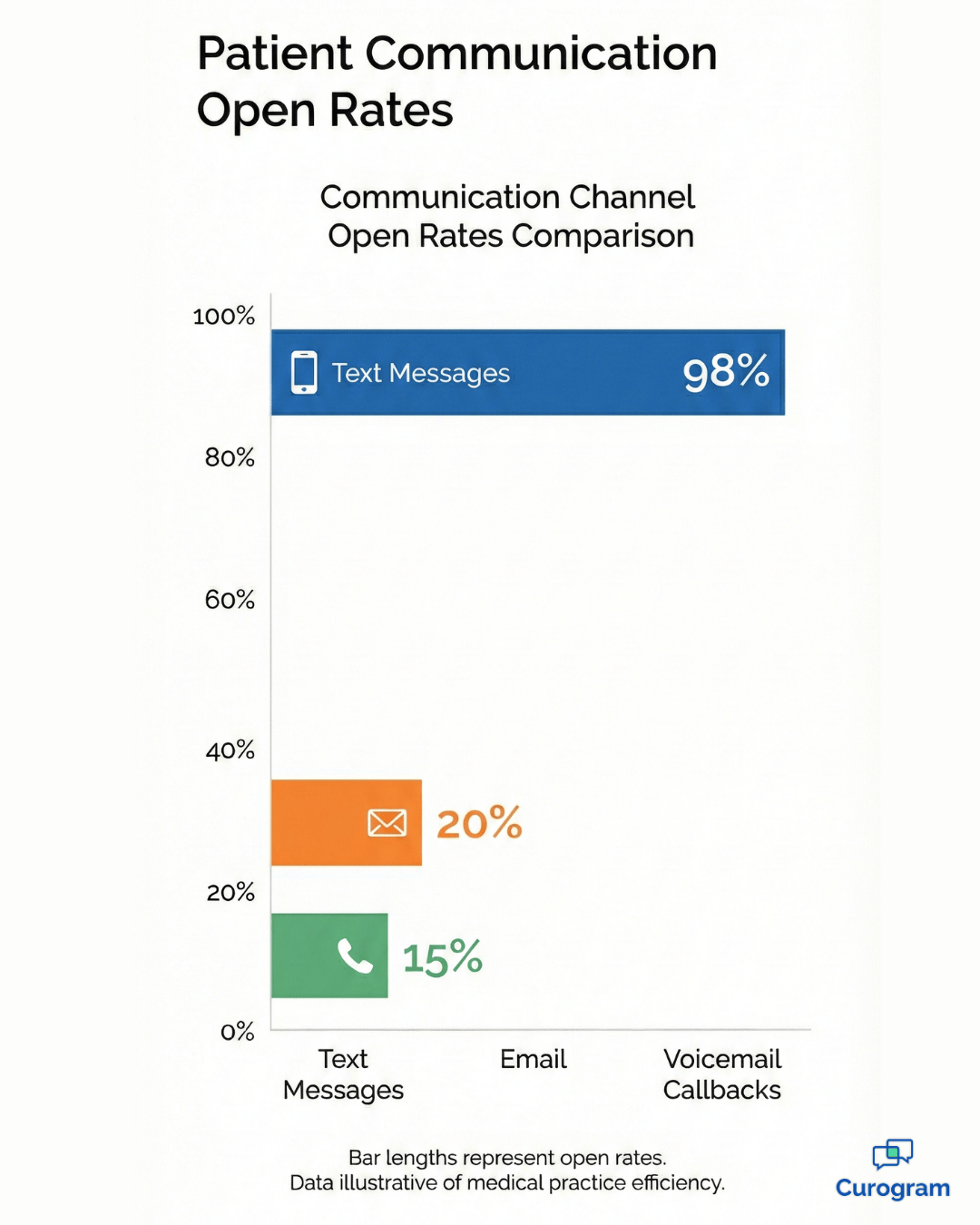
Bar chart comparing patient communication open rates: text, email, voicemail

How to Send a Broadcast in Three Simple Steps

Mass patient messaging for CureMD workflows breaks down into three straightforward steps. Anyone on your staff can learn this process in less than 10 minutes. Here is exactly how it works.

Step 1: Filter Your Patient List

Your first task is pulling the right patients from your CureMD database. The system integrates directly with your EMR, which means you can filter by specific criteria without exporting spreadsheets or manual data entry.

Common filter options include:

  • Locatione.g., all patients at your Downtown clinic versus Suburban location
  • Time framee.g., patients seen in the last 6 months or 12 months
  • Insurance type e.g., Medicare patients for specific campaigns
  • Age group e.g., seniors 65+ for flu shot reminders
  • Appointment status e.g., only patients with scheduled visits tomorrow

For example, during a weather closure, you would filter for all patients with appointments scheduled within the next 24 hours. For a flu shot campaign, you might target everyone over age50 who visited in the past year. The filtering happens inside the platform, so no manual list building required.

Step 2: Write Your Message

Once you have your patient list, compose your broadcast message. Keep it clear, concise, and action-oriented.Remember that text messages work best when they deliver information quickly.

Here is a good emergency closure template:

Alert: Our Downtown office is closed tomorrow due to snow. Reply RESCHEDULE to book a new time or call us at555-1234.

Notice several key elements in this message. It starts with 'Alert' so patients know this is urgent. It mentions which office is affected. It gives a brief explanation (snow) for context.

And it provides two clear options for patient response. For health campaigns, you want a slightly different approach that creates urgency while providing clear availability:

Flu season is here! Get your flu shot at our office this week. Walk-ins welcome Mon-Fri 9am-5pm. Reply YES for more info or to schedule.

This message creates urgency(flu season), provides clear availability (walk-ins plus hours), and includes a simple response mechanism. The goal is giving patients everything they need to take action without overwhelming them with details.

Step 3: Send the Broadcast

With your list filtered and message written, you are ready to broadcast. Hit send and the system queues your messages for delivery. Most platforms send messages at a controlled pace(like 500 per hour) to prevent overwhelming your phone lines with responses.

You can also schedule bulk patient alerts CureMD for future delivery. If you know your office will be closed next Monday for a holiday, schedule the message to go out Sunday evening.

Patients get the reminder at the perfect time without requiring staff to work over the weekend. The entire process from filter to send takes less than 3 minutes. Compare that to 7 hours of phone calls and you start to see why broadcast messaging transforms practice operations.

One important note: Always review your filtered list before sending. Double-check that you selected the right location or time frame. A quick 30-second review prevents accidentally sending a closure notice to patients at a different office location.

Patient checking in at medical office, confirming appointment on a device

Why Text Messages Get 98% Open Rates While Emails Go Unread

The communication method you choose directly impacts whether patients actually receive your message. Let us compare how different channels perform for medical practices.

The Attention Economy

Text messages achieve a 98% open rate within 3 minutes of delivery. This means nearly every patient reads your broadcast almost immediately. Compare this to email, which averages only 20%open rates in healthcare settings. Most practice emails end up in spam folders or buried under hundreds of unread messages.

Phone calls have their own problems beyond time consumption. Even if someone answers, they might be driving, in a meeting, or unable to talk. Voicemail creates a lag where patients need to listen, remember the number, and call back.


Each step adds friction that reduces response rates. Text messages win because they meet patients where they already spend their time. People check their phones constantly throughout the day.

A text notification gets immediate attention without disrupting their current activity. They can read the message in 5seconds and respond when convenient.

The Financial Impact of Higher Open Rates

Consider a weather closure scenario for 200 scheduled patients:

Email at 20% open rate:

160 patients never see the message

Text at 98% open rate:

Only 4 patients miss the notification


Those 156 extra patients who get the message via text insteadof email represent massive cost savings. Fewer confused patients calling your office. Fewer people showing up to a closed location. Less time spent dealing with rescheduling chaos the next business day.

Text messaging also costs far less than direct mail while delivering faster results. A postage stamp costs 68cents and takes 3 to 5 days. A text message costs just a few cents and arrives in seconds. For a 1,000-patient mailing, you save over $600 in postage alone.

Two-Way Engagement That Drives Revenue

But the real advantage of broadcast SMS for medical practices goes beyond open rates. Unlike a 'Do NotReply' bot, patients can text back with questions. This two-way engagement turns your broadcast into a conversation.

A patient receives your flu shot campaign message and texts back: 'Do you accept my insurance?' Your front desk can respond immediately, answer their question, and book their appointment. That single text exchange just generated revenue for your practice.

This engagement level simply does not exist with email or direct mail. Emails might include a phone number to call, but most patients will not take that extra step. With texting, the conversation happens naturally in the same thread.

Frequently Asked Questions About Mass Messaging

Is this TCPA compliant?

Yes. As a healthcare provider, you have consent to send informational messages like closures and appointment reminders to your patients. These fall under the established patient relationship exception.

Marketing messages require an opt-out option. Always include 'Reply STOP to unsubscribe' at the end of promotional campaigns like flu shot announcements or wellness programs. This gives patients control while keeping you compliant with federal regulations.

Can we attach images or files?

Yes. You can attach images directly or include links to PDF documents. For example, a flu shot clinic announcement might include a flyer image showing your hours and location. A policy update could link to a detailed PDF explaining the changes.

Keep in mind that multimedia messages cost slightly more than standard texts. Most practices reserve images for important campaigns where visual content adds real value.

Will everyone calling back crash our phone system?

No. One major benefit of text messaging is that it encourages text responses instead of phone calls. Your broadcast message should include options like 'Reply RESCHEDULE' or 'Reply YES for more info' so patients can respond via text.

You can also throttle your send rate. Instead of blasting 1,000 messages instantly, spread them over an hour at500 per hour. This prevents response spikes and gives your team time to handle incoming questions.

For off-hours broadcasts, schedule your message when staff is not in theoffice. A Sunday evening closure reminder reaches patients at a convenient time without

Communication at Scale: Reaching Everyone Instantly

Your medical practice cannot afford to spend hours calling patients one by one. Phone trees do not scale.Direct mail costs too much and arrives too late. Email gets ignored.

Mass patient messaging for CureMD workflows solves these problems by combining instant delivery with 98%open rates. Your staff saves hours every week. Your patients stay informed about closures, health campaigns, and service changes.

Your practice operates more efficiently while improving patient communication.

The three-step process makes broadcast messaging accessible to any team member. Filter your patient list based on location, appointment status, or other criteria. Write a clear, action-oriented message. Send the broadcast and reach thousands of patients in under 3 minutes.

Whether you need emergency closure notifications or want to run population health outreach SMS campaigns, CureMD system integration ensures your broadcast messaging reaches every patient efficiently, giving you the tools to communicate at scale.

No more wasted staff time. No more patients showing up to closed offices. No more critical announcements getting buried in spam folders.

Ready to see how broadcast messaging works in action? Schedule a live demo where we will show you how to queue an emergency alert and reach your entire patient base in minutes.

GE Centricity Clinics Improve Workflows with Mass Texting

GE Centricity Clinics Improve Workflows with Mass Texting

💡 Multi-location GE Centricity clinics use HIPAA-compliant mass texting to solve common workflow problems across specialty departments. Secure...
Read More
Mass Texting for Medstreaming: Automate Imaging Alerts & Communication

Mass Texting for Medstreaming: Automate Imaging Alerts & Communication

💡 Mass texting in Medstreaming automates HIPAA-compliant patient alerts across locations, delivering prep instructions, reminders, and urgent...

Read More
Mass Texting for GE Centricity Clinics | Curogram

Mass Texting for GE Centricity Clinics | Curogram

💡 Multi-location GE Centricity clinics use HIPAA-compliant mass texting to manage urgent communication across radiology and specialty departments....

Read More