GE Centricity Workflow Improvements With HIPAA-Compliant Texting
💡 GE Centricity practices use HIPAA-compliant texting to solve radiology workflow problems. Instead of managing hundreds of daily phone calls,...
13 min read
Aubreigh Lee Daculug
:
Dec 30, 2025 11:00:00 AM
Table of Contents
Your front desk staff answers the same questions 50 times a day. They spend hours on hold waiting for patients to pick up. When they finally reach someone, the patient asks them to call back later. This cycle repeats endlessly while other patients wait in line.
GE Centricity specialty clinics manage thousands of patient interactions every week. Each phone call takes 3-5 minutes when you include hold time and callbacks. A single radiology department might need to reach 200 patients daily with prep instructions. That adds up to 15 hours of staff time just making phone calls.
Most patients prefer text messages over phone calls anyway. Studies show that 90% of people read a text within three minutes of receiving it. Phone calls, on the other hand, have a connection rate of only 20-30%. Patients miss calls, ignore voicemails, and forget important instructions.
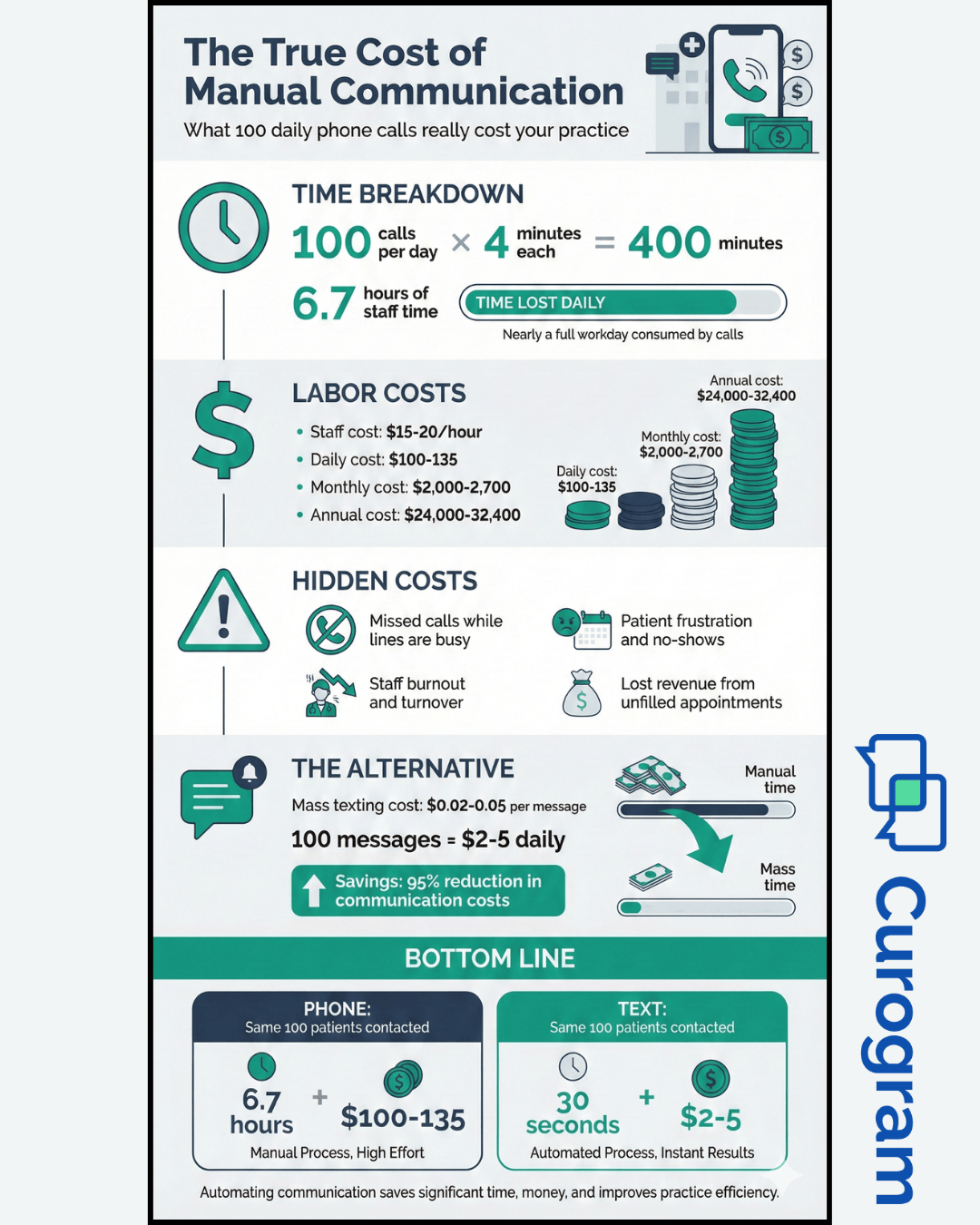
Mass texting changes everything for busy medical practices. Instead of calling patients one by one, your team can send broadcast patient updates to entire groups at once. Need to notify 100 patients about a weather closure? That takes 30 seconds with text messaging instead of 5 hours on the phone.
The technology works seamlessly with your existing GE Centricity system. You can automate patient notifications in GE Centricity based on appointment types, locations, or providers. Your staff pulls patient lists right from your practice management software. No manual data entry, no spreadsheets, no extra work.
This guide shows you exactly how HIPAA-compliant mass texting improves workflows in real GE Centricity clinics. You will learn which processes to automate first, how to reduce front desk workload, and why patients respond better to texts. By the end, you will understand how to handle more volume without hiring more staff.
Running multiple clinic locations creates unique communication problems that single-site practices never face. Each location has its own front desk team handling patient calls. They all use the same GE Centricity system but work independently. This setup leads to inconsistent messaging and confused patients.
Consider what happens when you need to update patients about a schedule change. Your downtown location sends reminder calls on Tuesday mornings. Your suburban office calls on Monday afternoons. Patients with appointments at both locations get different messages at different times. Some patients receive three reminders while others get none.
Manual communication creates serious bottlenecks in specialty departments. Your radiology team needs to give prep instructions to every patient scheduled for imaging. These instructions vary by procedure type and take 5-10 minutes to explain over the phone. When a front desk clerk is on the phone, other patients cannot get through. The line stays busy and patients get frustrated.
Phone tag makes everything worse. A typical reminder call goes like this: you call the patient, leave a voicemail, wait for them to call back, miss their return call, leave another voicemail. This back-and-forth wastes time for both your staff and patients. Meanwhile, the appointment slot might go unfilled because the patient never got proper confirmation.
Staff turnover adds another layer of complexity to multi-location operations. New front desk employees need training on communication protocols. They might not know which patients need special instructions or how to handle different appointment types. Experienced staff members leave for other jobs, taking their knowledge with them. Every time someone quits, your consistency suffers.
Holiday schedules and provider absences create communication chaos. Dr. Smith is out sick, so you need to reschedule 40 patients. Each front desk location starts calling their scheduled patients. But patients might have appointments at multiple locations. They get duplicate calls and conflicting information about which appointments are affected.
Weather emergencies show how badly manual systems fail. A snowstorm hits and you need to close three locations. Your teams start calling hundreds of patients to cancel appointments. Some patients get called, some do not. Patients still show up because they did not receive the message. Others stay home even though you opened by noon.
The delays affect radiology and specialty visits more than regular checkups. Imaging procedures require fasting or special preparation. If patients miss the prep instructions, they show up unprepared. You cannot perform the procedure. The patient wasted their time, you lost revenue, and now someone else needs that appointment slot.
Language barriers make phone communication even harder for diverse patient populations. Your staff speaks English but many patients prefer Spanish or other languages. Phone conversations get awkward when neither person understands the other clearly. Important medical instructions get lost in translation. Patients agree to things they do not fully understand.
Documentation becomes impossible with manual phone systems. Staff members forget to note which patients they reached. They lose track of who confirmed and who needs a callback. GE Centricity has fields for documenting outreach attempts, but clerks forget to fill them out during busy periods. Managers cannot track team performance or identify communication gaps.
All these workflow challenges share a common root cause: manual processes that do not scale. Your practice grew from one location to five. Your patient volume doubled. But your communication methods stayed the same. Phone calls worked fine for 50 patients a day. They cannot handle 500.
Every phone call your front desk makes costs your practice money and time. A simple appointment reminder takes 3-5 minutes when you include dialing, waiting for pickup, leaving voicemails, and documenting the call. Multiply that by 100 daily calls and you have lost 8 hours of productive staff time. That equals one full-time employee doing nothing but making phone calls.
High call volume creates a vicious cycle at the front desk. Staff members spend their morning making outbound reminder calls. Patients try to call in but get busy signals because all lines are tied up. The patients who do get through face long hold times. They hang up in frustration and try again later, creating even more call volume.
Most patients do not answer calls from unknown numbers anymore. Your clinic shows up as a random phone number on their caller ID. They assume it is spam and ignore it. Your staff leaves voicemails that patients delete without listening. You make five attempts to reach one patient and still fail to connect.
The numbers get worse during flu season or other high-volume periods. Your normal 100 daily calls jump to 300. You schedule extra staff just to handle phone outreach. Labor costs spike but patient satisfaction drops because everyone is overwhelmed. Front desk clerks rush through calls and make mistakes. They give wrong information or forget important details.
Staff workload overload leads to burnout and turnover. Nobody wants to spend eight hours a day making repetitive phone calls. Your best employees leave for jobs with more variety. New hires need weeks of training before they can handle calls efficiently. Meanwhile, your experienced staff members train newcomers instead of serving patients.
Increased patient confusion happens when different staff members give different information. One clerk tells a patient to arrive 15 minutes early. Another says 30 minutes. A third forgets to mention the early arrival time at all. Patients show up at different times and blame your clinic for poor communication. They complain about wasted time in the waiting room.
Language barriers make phone communication exponentially harder. Your bilingual staff members get pulled away from other duties to translate phone calls. Patients who speak limited English struggle to understand spoken instructions. They agree to everything the caller says even when they do not comprehend. Later they show up unprepared or miss appointments entirely.
Phone calls interrupt workflow in ways that text messages never do. A front desk clerk is checking in a patient when the phone rings. She has to either ignore the call or interrupt the patient standing in front of her. Neither option provides good service. The in-person patient waits while she takes the call. Or the caller goes to voicemail and never gets called back.
After-hours communication becomes nearly impossible with phone-based systems. You cannot call patients at 8pm to remind them about tomorrow morning appointments. Staff members cannot make calls on weekends. This means Monday morning appointments never get same-day reminders. Tuesday appointments get called on Friday and patients forget by Tuesday.
Documentation gaps create liability risks and missed revenue opportunities. Staff forgets to log which patients they called and what they said. Managers cannot prove they attempted to reach patients for recall alerts. Insurance companies deny claims because you lack documentation of patient contact attempts. You lose money on preventable no-shows.
Emergency situations expose how slowly manual phone systems respond. A physician gets sick and you need to reschedule 50 patients immediately. It takes your team four hours to contact everyone. Some patients already left for their appointments before you reached them. They arrive at the clinic only to learn their doctor is not there.
The ROI calculation is simple but stark. A front desk employee making calls costs $15-20 per hour. She can make about 15-20 calls per hour when you factor in all the wasted time. That equals $1 per patient contact. Mass texting costs $0.02-0.05 per message and reaches patients instantly. You save 95% on communication costs while improving delivery speed.
HIPAA-compliant mass texting transforms how your clinic communicates with patients throughout the day. Instead of making individual phone calls, your staff sends text messages to groups of patients at once. The system pulls patient data directly from GE Centricity and formats it into readable messages. Patients receive instructions instantly on their mobile phones.
Automated broadcast messaging handles routine communication without human intervention. Your team sets up message templates for common scenarios like appointment reminders, cancellations, or prep instructions. The system sends these messages automatically based on appointment data in GE Centricity. Staff members spend five minutes setting up automation that saves hours of manual calling.
The technology respects patient privacy through encrypted messaging and secure data handling. Messages never include sensitive health information in the text body. Patients receive a notification that they have a secure message waiting. They click a link to view the full message through a HIPAA-compliant portal.
Standardized communication eliminates inconsistency across multiple locations. Every patient gets the same message with identical information. Your downtown office and suburban office both use the same templates. Patients never receive conflicting instructions because every location follows the same communication protocol.
Response rates prove that patients prefer text over phone calls. Text messages get read within minutes while voicemails sit unheard for hours or days. Patients can quickly confirm appointments with a simple reply. One study found that text reminders reduced no-shows by 38% compared to phone reminders.
The delivery speed advantage becomes obvious during urgent situations. A mass text reaches 200 patients in 30 seconds. Phone calls to the same number would take 10-15 hours. Two-way communication lets patients ask questions and get quick answers through a central dashboard. This beats phone tag where you miss each other's calls repeatedly.
Templates save time while maintaining a personal touch with placeholder fields for patient names, appointment times, and provider names. Multilingual support breaks through language barriers by detecting patient language preferences from GE Centricity records. The system sends Spanish messages to Spanish-speaking patients automatically.
Recall alerts become manageable with automated text messaging. GE Centricity identifies patients due for annual checkups or preventive care. The system sends recall alerts automatically and patients can book appointments through text conversation. Your recall completion rate jumps from 40% to 75% within the first quarter.
After-hours messaging solves timing problems with manual phone calls. The system sends appointment reminders at optimal times when patients actually read messages. Morning appointments get reminded at 8pm the evening before. Afternoon appointments get reminded at 8am the same day.
Documentation becomes automatic and comprehensive with mass texting platforms. Every message gets logged with timestamps and delivery status. Managers can pull reports showing communication metrics across all locations. This data helps identify workflow improvements and proves compliance during audits.
The cost savings extend beyond labor to include phone system expenses. You can downsize from 10 phone lines to 4 because staff spends less time on the phone. That saves $200-300 monthly on telecommunications bills. Patient satisfaction scores improve by 15-20% while staff morale benefits from less repetitive phone work.
Integration with GE Centricity makes the whole system seamless and efficient. Patient lists sync automatically from your practice management system. Appointment data flows into text templates without manual data entry. Staff members work in familiar GE Centricity screens while the texting happens in the background.
Accurate patient list generation
Curogram pulls patient lists directly from your GE Centricity database without manual intervention. The system queries your appointment schedule and creates segmented patient groups automatically. You see real-time patient data synced from your practice management system. Changes in GE Centricity appear in Curogram within seconds.
The accuracy eliminates common errors from manual list creation. Staff members used to export patient lists to spreadsheets and make mistakes during data entry. Phone numbers got transposed, names misspelled, and appointments missed. Automatic sync means every patient record matches GE Centricity exactly. Your team trusts that messages reach the right patients.
No manual exports or spreadsheets
Traditional communication tools required exporting patient data from GE Centricity into CSV files. Staff members opened these files in Excel and formatted them for import into separate systems. This process took 15-30 minutes per export and introduced data errors at every step. You also risked HIPAA violations by having patient data sitting in unencrypted spreadsheets.
Curogram eliminates all spreadsheet work through direct GE Centricity integration. Your team selects message recipients right inside the platform using filters. The system handles all data queries and formatting automatically. Zero exports, zero imports, zero spreadsheets. This saves hours weekly while improving data security.
Segmentation by location, provider, appointment type
Advanced filtering helps you target exactly the right patients for each message. Need to contact all cardiology patients at your north location? Select those filters and send. Want to remind only Dr. Johnson's patients about annual physicals? Apply provider and appointment type filters. The granular control prevents message fatigue and keeps communication relevant.
Multi-location practices benefit enormously from location-based segmentation. Each site has unique hours, policies, and procedures. You can send location-specific messages without worrying about cross-contamination. Patients only receive information relevant to their appointment location. This targeted approach improves message engagement and reduces patient confusion.

Automated prep reminders for imaging studies
Imaging procedures require specific patient preparation that varies by scan type. CT scans need fasting instructions. MRIs require metal removal guidelines. Ultrasounds have different prep requirements. Calling every patient individually to explain these details wastes hours daily.
Automated prep reminders send procedure-specific instructions to patients based on their scheduled imaging type. The system detects which scan they are getting and sends the appropriate preparation message. Patients receive these reminders 24-48 hours before their appointment when they have time to prepare properly. No-show rates drop by 25% when patients receive timely prep instructions.
Instant updates for modality downtime
Equipment failures happen without warning in radiology departments. Your MRI machine breaks down and you need to reschedule 30 patients immediately. Manual phone calls take hours while patients are already driving to their appointments. Mass texting sends instant updates to affected patients within minutes. You can include rebooking instructions or alternative appointment options right in the message.
Bulk instructions for high-volume days
Some days bring higher patient volumes than normal. Your radiology department schedules 100 patients for screening mammograms during breast cancer awareness month. Each patient needs arrival instructions, parking information, and what to expect. Sending one bulk message with all these details takes seconds. Patients arrive informed and your check-in process runs smoothly instead of backing up with questions.
Multi-location practices face unique communication challenges when operational changes affect multiple sites. Weather closures, holiday schedules, provider absences, and unexpected facility updates all require fast, accurate communication. Mass texting handles these scenarios better than any other communication method.
Weather closures demand immediate action. A winter storm closes three of your five locations. Manual phone calls to hundreds of patients would take all day. Mass texting reaches everyone in under a minute. Patients see the closure notification before they leave home. You avoid having frustrated patients show up to locked doors.
Holiday schedules need advance communication across all locations. Your clinic has modified hours for Thanksgiving week. Some locations close completely while others maintain limited schedules. You send targeted messages by location so patients only hear about changes affecting their appointments. Clear communication prevents confusion and reduces missed appointments.
Provider absences create ripple effects across your schedule. Dr. Martinez is sick and cannot see patients today. Her schedule includes patients at two different locations. You need to notify them quickly and offer rescheduling options. Mass texting sends cancellation notices immediately. Patients can reply to rebook or they receive follow-up scheduling assistance.
Unexpected facility updates require fast notification. Your parking lot is being repaved and patients need to use the side entrance. Or your phone system is down temporarily and patients should use a backup number. These situations demand real-time updates. Text messages ensure patients receive critical information before it affects their visit.
The centralized approach means one staff member can manage communication for all locations. Your office manager sends updates from a single dashboard instead of coordinating with front desk teams at each site. This eliminates coordination delays and ensures consistent messaging. Every patient gets the same information at the same time regardless of location.
Patient flow improves when everyone arrives prepared and on time. Text reminders include clear arrival instructions and what to bring. Patients show up with insurance cards, completed forms, and proper preparation. Your check-in process runs faster because patients come prepared. The waiting room stays moving instead of backing up with unprepared patients.
More patients arrive prepared because text instructions are accessible and clear. They can reference the text message while getting ready for their appointment. Parents can check what documents to bring without calling the office. Radiology patients review fasting instructions multiple times. Having written instructions reduces preparation errors by 60%.
Fewer appointment disruptions mean your daily schedule stays on track. When patients confirm appointments ahead of time, you know your schedule is solid. No-shows decrease when patients receive multiple touch points. Your providers see more patients per day because fewer slots go unfilled. This throughput improvement translates directly to higher revenue.
Improved daily operations create a positive feedback loop. Staff stress decreases when communication runs smoothly. Happy employees provide better patient service. Better service leads to higher patient satisfaction. Satisfied patients keep appointments and refer friends. Your practice grows without increasing operational overhead.
GE Centricity specialty clinics need modern communication tools that match today's patient expectations and operational demands. Manual phone-based outreach no longer works for practices managing multiple locations and hundreds of daily appointments. The time and money spent on repetitive calling tasks drains resources that could serve patients better.
HIPAA-compliant mass texting solves the core workflow problems facing busy medical practices. Automated patient notifications reach hundreds of people instantly instead of requiring hours of staff time. Broadcast patient updates ensure every patient receives consistent information regardless of location. Recall alerts automate preventive care outreach that previously required extensive manual follow-up.
The technology works seamlessly with your existing GE Centricity systems through direct integration. Your staff continues using familiar workflows while the messaging platform handles communication automatically in the background. No spreadsheets, no manual exports, no duplicate data entry. Patient lists sync from GE Centricity and messages send based on appointment data.
Front desk teams gain hours of productive time each day when they stop making repetitive phone calls. Radiology departments can send prep instructions to entire patient groups with one click. Office managers coordinate communication across all locations from a single dashboard. The operational improvements compound across every department.
Patients respond better to text messages than phone calls based on every measurable metric. Read rates exceed 90% within minutes. Confirmation rates double compared to voicemail reminders. No-show rates drop by 30-40%. Patient satisfaction scores improve by 15-20%. The data consistently shows that text messaging delivers superior results.
Your practice can achieve these same results by implementing mass texting for GE Centricity workflows. Start with appointment reminders, add prep instructions for specialty procedures, then expand to recall campaigns and operational updates. Each use case builds on the previous one. Within weeks, your team will wonder how they ever managed with phone calls alone.
Reduce front desk workload and improve patient communication with mass texting for GE Centricity. Book a demo now.
Mass texting platforms like Curogram connect directly to your GE Centricity database through secure API integration. The system pulls patient contact information, appointment schedules, and demographic data automatically. You do not need to export files or manually enter patient information. Changes in GE Centricity sync to the messaging platform in real-time so your patient lists always stay current.
Patients appreciate the convenience and speed of text messages. They can read and respond to texts during meetings, while commuting, or whenever they have a free moment. Phone calls require both parties to be available simultaneously. Text messages also create a written record that patients can reference later. Studies show 90% of people read texts within three minutes while only 20% answer calls from unknown numbers.
HIPAA-compliant mass texting platforms use encrypted messaging and secure data storage. Messages do not include protected health information in the text body. Instead, patients receive a notification to view secure messages through an encrypted portal. The platform logs all communications and provides detailed audit trails. Business associate agreements ensure the texting vendor meets all HIPAA requirements for handling patient data.
Mass texting reduces communication time by 85-90% compared to manual phone calls. A staff member making phone calls can reach 15-20 patients per hour. Mass texting reaches hundreds of patients in seconds. This means tasks that took 10 hours with phone calls now take 30 seconds with text messages. Clinics typically see front desk productivity improve by 40-60% after implementing automated texting.
Broadcast updates ensure every patient receives identical information at the same time. This eliminates inconsistency problems where different staff members give different instructions. Messages reach patients instantly instead of over several hours of calling. Patients can refer back to the written message if they forget details. The combination of speed, consistency, and accessibility makes broadcasts far more effective than individual phone communications.
💡 GE Centricity practices use HIPAA-compliant texting to solve radiology workflow problems. Instead of managing hundreds of daily phone calls,...
💡 Exa mass texting needs a clear system for communication to not feel scattered. Patients miss updates, staff repeat the same calls, and your...
💡 StreamlineMD practices use mass texting to automate patient notifications and streamline imaging workflows. This tool helps radiology, vascular,...