
 Joshua Inciso
Integrate Curogram With AdvancedMD
Curogram integrates easily with AdvanceMD and other electronic health records programs to enhance patient engagement and boost your bottom line.

Cerbo serves a narrower slice of medicine than most records systems. Direct primary care, concierge, functional medicine, IV therapy, hormone clinics.
Nearly all of those practices sell a membership rather than a visit. That one fact changes what good patient communication looks like.
A fee-for-service clinic messages patients to fill tomorrow's schedule. A membership clinic messages them to justify next month's payment. Broadcast is where that shows up. Closure notices, protocol changes, a new service, a provider joining.
There is also a reason to review the stack this year. Cerbo announced a merger in December 2025 and the product names were not addressed.
Below: what the connection actually carries, what it does not, and which parts survive a change underneath. Curogram's Cerbo route runs on a Public API, with no integration fee from the EMR side.
Membership patients expect access rather than appointments. A question answered by text on Tuesday is most of what they are buying.
Video visits run from a link, so nobody installs anything. That matters more in functional and hormone practices, where patients are often out of state. Check your own state rules before leaning on that. Licensure follows the patient's location rather than yours.
Members often text before they book anything. A thread that stays open between visits is the product rather than an add-on.
The Cerbo connection pulls patients and appointments in. It pushes patient records, appointments, intake forms and COVID testing details back out.
It also writes an appointment status back. Confirmed and Cancel are the two it supports, which is worth knowing before you design a workflow around no-show tracking.
Staff messaging sits alongside the patient threads, so a case discussion does not move to a personal phone. Ask where a lab result conversation lives. Split between a portal and a text thread, somebody ends up reconciling two places.
Intake sent by text and written straight to the chart removes the retyping step and the typo with it.
Functional and integrative practices ask for more at intake than most. Long questionnaires are exactly where handwriting and transcription go wrong. One gap worth naming. The Cerbo route carries intake forms but not insurance card or driver's license images, which some other connections do.
Electronic intake forms completed on a phone write straight into Cerbo. Send the long questionnaire days ahead rather than at the door. Members fill in more when they are not sitting in a waiting room with a clipboard. Set a reminder to chase the ones who do not finish. An unfinished intake form is a visit that starts late.
Patients book from open slots and the appointment lands in Cerbo rather than in somebody's inbox. Start narrow on which visit types a member can book without a call. Widening later is easier than pulling it back.
Membership practices usually run fewer slot types and more flexibility. That makes self-scheduling easier to switch on here than in a busy specialist clinic.
A reminder that reads the schedule knows whether the visit is in person or virtual. It can say different things for each. An in-person reminder can carry the address and travel time. A virtual one can land minutes before, carrying the link.
Appointment reminders for an infusion or an injection series need a different lead time again. Set it by the gap that matters rather than by one default.
Staff check a patient in and the provider joins when ready, which mirrors how the front of house already works.
Role-based access decides who can see a waiting patient. In a small practice, that list is short, and it still needs to be written down. Patients open a link rather than install an app. Fewer calls about downloads is most of the benefit.
The practice gets a local business number, so replies reach the practice rather than a personal handset.
Two-way texting means the reply comes back to a shared inbox rather than to whoever owns the phone. Decide who answers after hours before you publish the number. Members will use it.
Patient detail belongs behind a secure link rather than in the message body. A wrong number then receives a link it cannot open. A business associate agreement has to be signed rather than generated. 45 CFR 164.504(e) also makes it an ongoing duty, not a one-off form.
What Cerbo needs is modest. A practice domain at Cerbo and a set of API credentials, with no access to any server.
That is why this one is quick. Setup time follows the connection type rather than the vendor promising a number. No server access is the line that usually matters to an outside IT contractor. This route does not need it.
Credential handling is the other question. An interface running on one person's login breaks the week they leave. The same product, four records systems, four different answers.
|
EMR |
Connection |
What it needs |
Setup |
|---|---|---|---|
|
Cerbo |
Public API |
Practice domain and API credentials |
Credential based |
|
Elation Health |
Private API |
Username and password |
1 day |
|
Centricity |
Public API via agent |
User ID and password |
Credential based |
|
RamSoft |
HL7 |
RamSoft's HL7 team builds and approves it |
2 to 3 weeks |
RamSoft is the useful contrast. An HL7 build waits on another company's interface team, which is weeks rather than days. We covered patient notifications for RamSoft radiology, where that longer runway changes how a rollout is planned.
Any is doing too much work in that heading, and our own records say so. We track 126 EMRs, 67 of which have a route ready today.
Thirty-six have no route at all. The live version of this page also claimed over 700 EHRs, which is not a number we can support.
Most is the honest word, and it still covers the systems these practices actually run. Ask what happens after a Cerbo release. When the EMR ships a change, somebody has to test the interface and own the fix.
Write the answer down rather than taking it on a call. Interface ownership is the question that gets vague under pressure.
Broadcast is the piece a membership practice should set up first, because it is the one members notice.
We walked through practice updates for Elation Health clinics, which is the same job in a similar kind of practice. Our writeup on automating patient notifications in GE Centricity covers the older on-premise version of it.
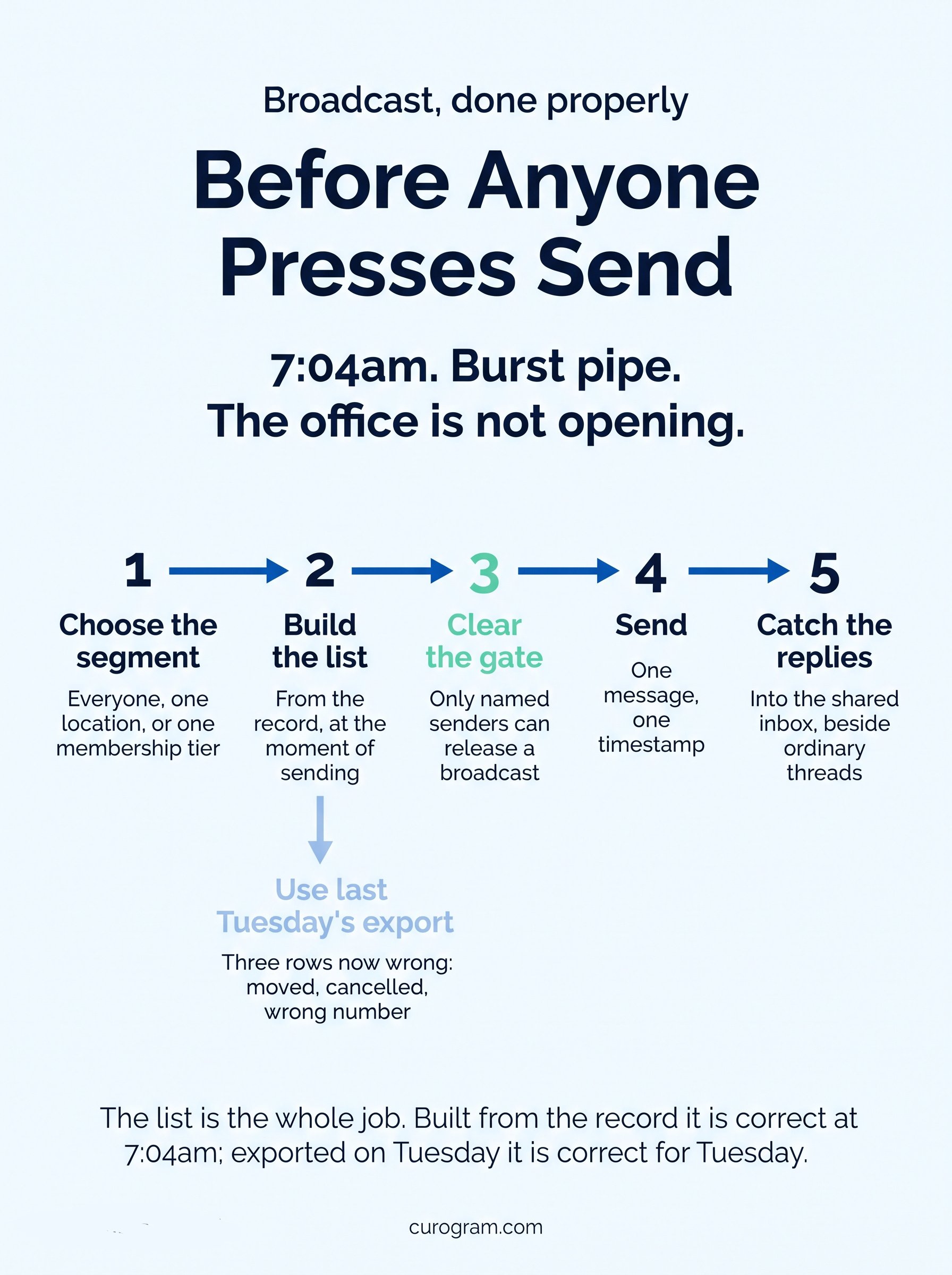
The test in all three is where the recipient list comes from. A list exported to a spreadsheet is out of date the moment it is saved. Mass texting built from the record is the version that holds up. A list exported on Tuesday is wrong by Thursday.
Decide who can press send before you need to. A closure notice at seven in the morning is a poor moment to sort out permissions. Segment by membership tier if you run them. A message that reaches everyone equally is sometimes the wrong message.
Keep one person responsible for the send list. Shared ownership of a broadcast channel is how duplicate messages happen.

Curogram HighlightCurogram's Mass Text Messaging builds the recipient list from the record rather than from an export. Broadcasts and one-to-one replies share an inbox, so a closure notice and the forty replies to it stay together. Threads attach to the patient chart, which keeps the audit trail in the same place as the conversation. One more reason to keep the layers separate. Cerbo and OptiMantra announced a merger on December 3, 2025 under a new chief executive, Jeff Hindman. That release did not say what happens to either product name. Founders and leadership were described as remaining engaged. Nothing about that is alarming on its own. It is a reasonable moment to ask your rep what it means for your contract and your interfaces. A communication layer sits above the record. That is the part that should not have to move if the record underneath changes. |
Pick one thing to set up first. For most Cerbo practices that is the broadcast list, built from the record rather than a spreadsheet.
Then write down two answers before the rollout. Which appointment statuses come back to Cerbo, and who tests the interface after a Cerbo release.
Ask your rep what the OptiMantra merger means for your contract while you are at it. The messaging layer sits above the record, so that answer does not decide what happens to your patient threads.
Book a Curogram demo. One pass covers the schedule read, a confirmation writing back to Cerbo, and a broadcast going out.

Curogram integrates easily with AdvanceMD and other electronic health records programs to enhance patient engagement and boost your bottom line.

Curogram integrates with Epic seamlessly, creating cost-reducing efficiencies and reducing patient no-shows leading to increased revenue.

We can integrate Curogram with Greenway in 48 hours or less. Streamline workflows, trim costs, and boost your bottom line with our best-in-class...