
The Complete Guide to HIPAA Secure Texting in 2026
 Aubreigh Lee Daculug : 10/6/26, 10:00 AM
What HIPAA actually requires of a texting vendor, what it does not, and how to test a compliance claim before you sign anything.
5 min read

A practice manager sets up Google Voice for the clinic's second line. Calls, texts, voicemail, all free. Then somebody asks whether patient names can go in it. Most answers online say a flat no, and a flat no is wrong.
Google Voice can carry protected health information. Conditions apply, and they are narrower and more specific than most articles say.
Three things decide it. Which version you have, which services the agreement covers, and what you do after signing it.
That last one gets skipped everywhere. Signing a business associate agreement starts an obligation rather than ending one.
Below: what Google's own guidance says. Which service beside Google Voice is excluded, and the setup step almost nobody takes.
Google's Workspace HIPAA implementation guide, issued September 2025, puts it plainly. Licensed users of Google Voice are covered under the Google Workspace business associate agreement.
The guide marks Google Voice as managed users only. A license assigned by an administrator is what brings a user inside the agreement.
The free consumer version sits outside it. No agreement covers a personal Google account, whatever settings are applied to it.
Most articles on this question answer no and stop. That was never quite right, and it has been wrong for years.
A better question is where a given setup sits. Inside the agreement, or outside it.
A business associate agreement is a contract with required contents. The Privacy Rule sets them out at 45 CFR 164.504(e)(2).
It has to state permitted uses, require safeguards, require reporting of unauthorized disclosures, and bind subcontractors to the same terms.
It also has to let the covered entity terminate if a material term is breached. That clause exists for a reason, covered next.
Section 164.504(e)(1)(ii) is the part nobody quotes. A covered entity is out of compliance if it knew of a pattern of material breach by its business associate.
Knowing is enough to create the duty. The entity has to take reasonable steps to cure it. If those steps fail, it has to end the contract where that is feasible.
So a signed agreement is not a finished task. It is the start of something a practice has to keep an eye on.
G Suite became Google Workspace in October 2020. Anything written about G Suite and HIPAA predates two rebrands of the guidance. Worth checking the date on any article answering this question. The guide it relies on may be a decade old.
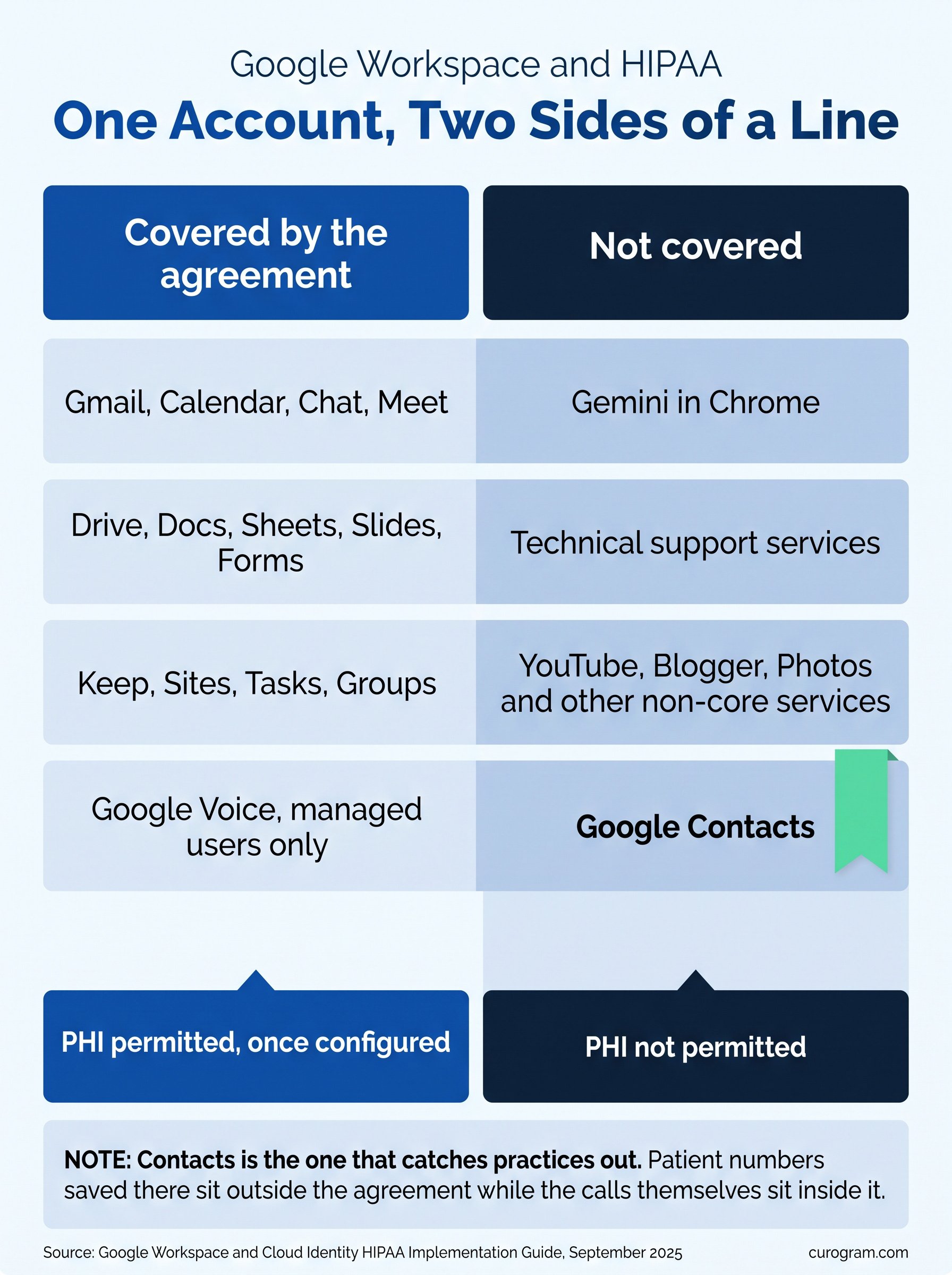
September 2025 guidance lists the covered services. Gmail, Calendar, Chat, Drive, Meet, Keep, Sites, Tasks, Groups and Google Voice for managed users.
Google Contacts is not on that list. Google names it as a core service where protected health information is not permitted.
Read that one twice. Say a practice calls patients through Google Voice. Patient names and numbers saved in Contacts sit somewhere the agreement does not reach.
Non-core services have to be switched off for anyone handling patient data. YouTube, Blogger and Photos are the named examples, unless a separate agreement covers them.
Gemini in Chrome is ruled out by the same guide. Technical support sits outside the covered services too.
One case from the guide is worth spelling out. When a Meet participant dials a Google Voice user, the meeting name can appear on that user's device.
Three situations allow it. One is being on the invite itself. Another is sharing a domain where the invite is visible. The third is a creator whose calendar is public.
A meeting titled with a patient name and a procedure then shows up on a phone screen. The guide's answer is to mark those entries Private. It also suggests limiting calendar sharing. External to free and busy only, internal to none or free and busy.
Every one of those steps is an administrator action, not a user one. A practice without a Workspace administrator has nobody to do them. That is the honest gap. Configuration can be done correctly, and most small practices have no one whose job it is.
As a VoIP line, it works. Calls, voicemail, transcription and a number that is not somebody's mobile. A small practice with a paid Workspace account already in place could reasonably use it as a second line.
It knows nothing about your schedule. No reminder reads an appointment, no reply reaches a chart, and no message attaches to a patient record.
Texting is one-to-one and manual. No way exists to reach a list. No record of what went to whom survives outside the thread.
Volume is the first thing. A phone line handles one conversation at a time, and a messaging tool handles a list. Our writeup of mass texting in GE Centricity covers what that looks like at scale across sites.
The second is the record. A text thread tied to the chart is documentation, and a thread in a separate app is not. Our piece on the HIPAA texting workflow in Elation Health covers how clinical staff use that in practice.
The earlier version of this page said Curogram guarantees 100% HIPAA compliance. No vendor can guarantee that, and the claim is gone.
Compliance depends on your policies, your workforce and your configuration. A platform supplies the agreement and the safeguards, and the rest belongs to the practice.
Four questions settle most of it for any secure texting tool. Will the vendor sign an agreement? Which of its services does that agreement cover?
Does the tool read your schedule, and does anything written in it reach the chart? Our writeup of HIPAA-compliant texting in Allscripts PM works through those questions for one system.
Curogram HighlightCurogram's HIPAA-Compliant Texting comes with a business associate agreement by default rather than as an upgrade. Messages sit beside the patient record rather than in a separate contact list. Staff work from one inbox, and the thread stays with the chart. Configuration is ours rather than yours. There is no list of services to disable and no calendar setting to remember. |

Start with which account you are on. A personal Google account has no agreement behind it, whatever the settings say.
Then check whether Google Voice licenses are actually assigned. The guide covers licensed, managed users rather than anyone who can open the app.
Look at Contacts next. Patient names and numbers saved there sit outside the agreement, and that is the most common version of this problem.
Mark any calendar entry naming a patient as Private, and check what your calendar sharing is set to. Then ask who owns those settings. If the answer is nobody, that is the finding rather than the configuration.
Patient communication tends to outgrow a phone line before anyone notices. The compliance question and the capability question are separate, and both deserve an answer.
None of this is a legal opinion, and your own compliance lead should see whatever you decide.
Book a Curogram demo if you would rather not own that list. Ask what the agreement covers and what reaches the chart.
 Aubreigh Lee Daculug : 10/6/26, 10:00 AM
What HIPAA actually requires of a texting vendor, what it does not, and how to test a compliance claim before you sign anything.

We reviewed the best HIPAA compliant video conferencing platforms so you can see exactly which ones include a signed BAA before your first patient...

Email is a convenient way to communicate with patients, but is it HIPAA compliant? Learn how to ensure your patient communications are secure.