
What Makes Clinic Patient Texting Break Down
 Aubreigh Lee Daculug : 10/1/26, 6:00 PM
Four failures behind broken clinic texting: personal phones, no BAA, no audit trail and no opt-out record. What each exposes and how to close it.

"We're HIPAA certified."
You'll hear it in almost every texting vendor demo. It sounds reassuring, but it describes something that doesn't exist.
No government agency issues a HIPAA certificate for software. HIPAA secure texting requirements fall on your practice, and a vendor's job is to help you meet them. When a sales rep leads with a badge, they're asking you to skip the questions that matter most.
Those questions carry more weight every year. Texting has become a central part of patient communication, and reminders, intake forms, refill notices, and recall messages now land on a phone screen. Many can carry protected health information.
That makes your platform choice a serious decision. A weak setup rarely fails loudly. It fails quietly, through a shared login here and a missing activity log there, until a breach report or an HHS Office for Civil Rights inquiry arrives. Then you need documentation, and a logo on a sales slide won't count.
Here's the difficult part.
Most practice administrators were never trained to review a business associate agreement or evaluate an encryption claim. You're already managing staffing, billing, and patient flow, so vendor reviews get squeezed into a 30-minute call.
This guide closes that gap. We'll walk through what HIPAA actually expects from a texting program, in plain language. You'll learn what a BAA must cover and which two clauses deserve a careful read, and we'll explain encryption, access controls, and audit logs without the jargon.
Next, we'll cover consent, including what to do when someone asks for plain SMS, and where the FCC's texting rules sit on top of HIPAA. Finally, you'll get a list of documents to request and contract language to add before you sign.
By the end, you won't have to trust a compliance claim. You'll know how to test one.
No. No agency, including the HHS Office for Civil Rights, certifies a texting platform as HIPAA compliant. There's no official seal, no federal test, and no list of approved apps.
So what can a vendor truthfully claim? It can say it will sign a BAA. It can describe the safeguards it has built, like encryption and audit logs, and share outside audit reports such as SOC 2 or HITRUST.
Those claims are useful. Still, even the best HIPAA-compliant secure texting platforms can't make your practice compliant on their own. How your staff use the tool matters just as much as how it was built. Weigh every claim against our compliance standards before you take it at face value.
A covered entity is a health plan, a clearinghouse, or a provider that bills insurance electronically, which includes most medical practices. A business associate is any outside company that creates, receives, stores, or sends health data on a covered entity's behalf.
Protected health information (PHI) is any health detail that can be tied to a person, such as a name next to an appointment type. Your texting vendor becomes a business associate the moment a message holds PHI.
That status comes from 45 CFR Part 160 and Part 164, the federal rules behind HIPAA. It applies to patient texts and to internal clinical communication, like a nurse messaging a doctor about a chart. Either way, the vendor must protect that data under the same Security Rule you follow.
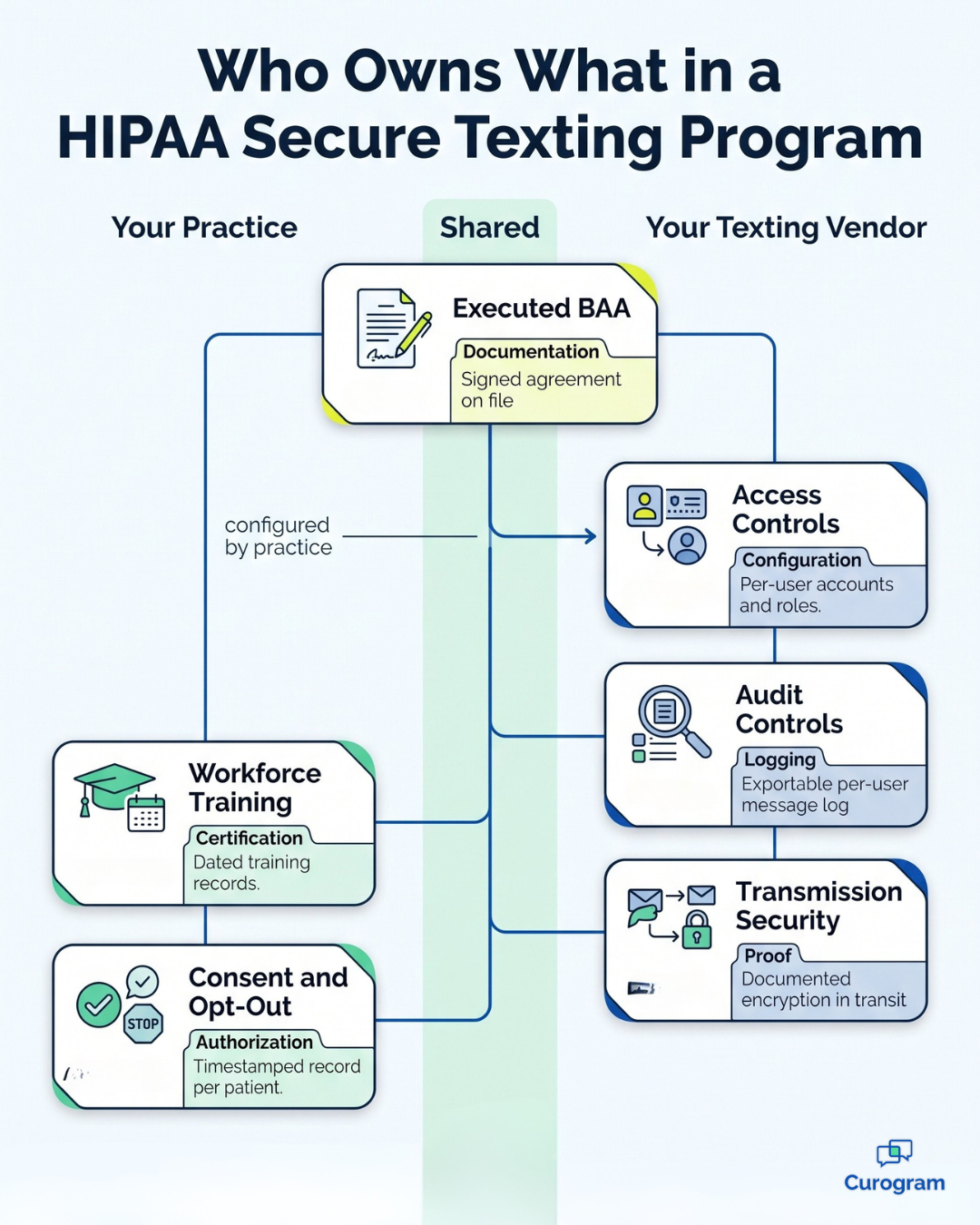
Here's how the core HIPAA secure texting requirements break down by owner, and how you prove each one:
| Requirement | Owner | Evidence |
|---|---|---|
| Executed BAA | Practice and vendor | Signed agreement on file |
| Access controls | Vendor, set up by practice | Per-user accounts and roles |
| Audit controls | Vendor | Exportable per-user message log |
| Transmission security | Vendor | Documented encryption in transit |
| Workforce training | Practice | Dated training records |
| Consent and opt-out | Practice | Timestamped record per patient |
A business associate agreement is a contract that sets out how a vendor may use your patients' PHI and how it must protect it. HIPAA requires one before any vendor handles PHI for you.
A sound BAA covers five areas:
For a baseline, compare any draft against the sample business associate agreement provisions published by HHS on January 25, 2013. Keep in mind that the sample is a starting point. It isn't a safe harbor.
The breach notice clause and the data-at-termination clause deserve your slowest read. Both decide how exposed you are when something goes wrong.
Start with timing. HIPAA lets a business associate take up to 60 calendar days after it finds a breach to tell you. That's the legal limit, not a goal. Every day a vendor waits is a day you lose to look into it and reach your patients, so ask for notice within a few business days.
Next, check what happens to your data at the end. The BAA should say the vendor will return or destroy all PHI, backups included, and confirm it in writing. If the clause says "where feasible" with no detail, ask what that means. A message archive you can't get back is a problem you'll only find when it's too late.
HHS guidance on the HIPAA Security Rule organizes protections into administrative, physical, and technical safeguards. Secure texting depends mostly on the technical group, so here's what each piece does in practice.
Encryption in transit protects a message while it travels from your system to a patient's phone. Encryption at rest protects stored messages while they sit on a server, laptop, or mobile device.
In transit, encryption stops someone on the same network from reading a text as it passes through. At rest, it means a stolen laptop or a hacked database shows scrambled data instead of patient names. Your practice needs both layers.
Under the current rule, encryption is "addressable." That means you must use it or document why an equivalent option is reasonable, and for texting, a valid reason to skip it is rare. HHS proposed in January 2025 to make encryption mandatory, although that rule was not yet final when this guide was updated.
A shared login breaks access controls because HIPAA requires every action to be tied to one specific person. When three front desk employees all sign in as "frontdesk1," nobody can tell who sent which message. The Security Rule calls this unique user identification, and it's a required standard.
A single shared account undermines several controls at once. Your audit log becomes useless, since every entry shows the same name. You also can't remove one person's access when they leave without locking out the entire team.
Role limits fail as well, because a shared account has to carry the broadest access anyone on the team needs. Ask every vendor for individual user accounts, role-based permissions, and automatic logoff after a set period of inactivity.
Audit controls are records showing who viewed, sent, or changed a message, and when it happened. They're only useful if you can retrieve them quickly and read them without calling your IT department.
Ask the vendor to run this export live during the demonstration:
Your practice should be able to complete this in under a minute. If it requires a support ticket and a three-day wait, that log won't help you much during an investigation.

A text message should contain only the minimum PHI needed to accomplish its purpose. That's HIPAA's minimum necessary standard, and it applies to every message your practice sends.
Use one simple dividing test:
Would this message be harmless if the wrong person read it on a locked screen?
A reminder with a date, time, and phone number usually passes. A text that mentions a condition, a test result, or a medication usually doesn't.
For anything sensitive, send a secure link that asks the patient to verify their identity. Pay attention to your sender name too, since a text from "Valley Oncology" already reveals more than one from "Valley Medical."
| Message | Passes the test? | Why |
|---|---|---|
| "Hi John, you have an appointment on Jan 25 at 2 PM. Reply YES to confirm." | Yes | Date and time only, no health details |
| "You have a secure message from XYZ Family Practice. Tap to verify your identity and view it." | Yes | Sensitive content sits behind a secure link |
| "John Smith, your cardiology visit for coronary artery disease is Jan 25 at 2 PM." | No | Full name plus a condition is PHI |
| "Your blood sugar result is 140 mg/dL. Call your doctor." | No | Shares a test result in plain text |
You can text a patient through plain SMS if they request it, as long as you warn them about the risk first. HHS guidance on the right of access says patients may choose to receive their own PHI through a less secure channel, such as regular text or unencrypted email.
Your responsibility is to give a short, clear warning that standard texts can be intercepted or read by others. If the patient still prefers that channel, you may honor their choice.
Then document the decision. Record the warning, the date, and the patient's response in their chart. Remember that this choice applies to that individual patient only and doesn't relax your safeguards for anyone else.
The FCC's TCPA rules govern automated calls and texts, and they apply in addition to HIPAA. Meeting one set of rules doesn't mean you've satisfied the other.
Two FCC orders shape healthcare messaging most directly. The healthcare exemption, adopted June 18, 2015, permits certain exempt messages, like appointment reminders, under strict conditions. Each text must be free to the patient, 160 characters or fewer, and limited to one per day and three per week, with a simple "STOP" reply option.
The consent revocation order, adopted February 15, 2024, requires you to honor opt-outs made through any reasonable method, such as replying "STOP" or "cancel," within 10 business days. A broader "revoke-all" provision is delayed until January 31, 2027. Your vendor should record every opt-out with a timestamp.
Request six documents before you sign, since each one maps directly to the HIPAA secure texting requirements covered above.
Paste this list into your next vendor email:
One missing item may have a reasonable explanation, but two is a pattern. Curogram, for example, limits standard texts to general reminders and routes PHI through encrypted secure messaging, so you can see exactly where the line falls.
A demo promise only binds a vendor once it appears in the contract. Add three clauses to the statement of work so that what you saw becomes what you receive.
First, an audit export clause: you can pull a per-user log in a readable format at any time, at no additional cost.
Second, a breach notice clause: the vendor will alert you within a set number of business days, with the details you need to respond.
Third, a data return clause: when the contract ends, the vendor returns your complete message history in a usable format, then destroys all copies and confirms it.
The same principle applies to EHR integration. If you're comparing HIPAA texting platforms with EHR integration, get each vendor's chart write-back promise in writing as well.
You don't need a law degree to evaluate a texting vendor. What you need is the right set of questions and the patience to wait for genuine answers.
Start with the business associate agreement, because if a vendor won't sign one, nothing else on their feature list matters. If they will, read the breach timing and data return terms carefully, because those two clauses decide how much risk lands on your practice.
Then look past the presentation. Ask for a live audit export and time it, confirm that every staff member gets an individual login, and get the encryption details in writing for messages in motion and at rest.
Don't overlook the patient side. Keep every text to the minimum necessary, and move anything sensitive behind a secure link. Document each plain SMS request and every opt-out, because those records are exactly what an auditor will ask to see.
Above all, remember that secure texting is a program you manage, not a box you check once. Training records expire, employees leave, and patients change their preferences. A reliable vendor makes that maintenance easy, and an exceptional one makes it nearly automatic.
That's the standard Curogram is built to meet. Our platform keeps everyday reminders simple, routes PHI through encrypted secure messaging, and gives each team member individual access you can track. The results reach beyond compliance, too: based on our internal data, practices using Curogram see an average confirmation rate above 75%.
If you're narrowing your options by specialty, our guide to the best secure texting platforms for specialty clinics is a helpful next step.
Ready to see how it works with your own workflows? Book a Demo with our team and bring this guide along. We'll walk through each test live, so you can judge the answers for yourself.
 Aubreigh Lee Daculug : 10/1/26, 6:00 PM
Four failures behind broken clinic texting: personal phones, no BAA, no audit trail and no opt-out record. What each exposes and how to close it.

 Joshua Inciso : 11/10/22, 12:56 PM
Discover how the 5 rules for texting your patients can improve your practice. Maintain proper and secure communication by implementing these rules.
 Joshua Inciso : 5/17/22, 8:05 AM
See how TCPA and TRACED rules apply to healthcare texting, what appointment reminders require, and where most practices lose track of patient...