
How to Generate Google Reviews for Your Business Success
Discover easy ways to generate Google reviews and boost your online presence. Learn how to increase Google reviews effortlessly today!
18 min read

Your best patient of the week just walked out the door. They loved the visit. They told your medical assistant you were the first provider who actually listened to them. Then they got in their car and drove away.
That praise went nowhere.
Meanwhile, the one frustrated patient from three months ago sat down and wrote 240 words on Google. That review is still the second thing a prospective patient sees when they search your practice name.
This is the quiet math working against most practices. Unhappy patients are motivated. Happy patients are just busy. Unless you ask them, they will not think to post anything at all.
Asking is the whole problem. Email requests get buried. Phone calls feel pushy. In-person asks depend on whichever staff member remembers, which means they happen maybe one visit in six.
Text is different. Around 98% of text messages get opened, most within minutes of arriving. Compare that to email, where roughly 20% ever get read at all.
That gap is why getting patients to leave a review via SMS has become the default approach for practices serious about their online reputation. It reaches people where they already are, on the device they already use to look things up.
This guide covers the whole process. You will learn why reviews matter more than most practices realize, how to stay compliant with HIPAA and TCPA, which strategy fits your practice, what to actually write, and how to turn the results into a system that runs without anyone remembering to run it.
Your online reputation is a business asset. Prospective patients read reviews before they call, and what they find decides whether they call at all. Excellent care builds that reputation. Asking for feedback is what makes it visible.
Traditional methods keep failing for predictable reasons. Email sits unopened in a crowded inbox. Phone calls interrupt people at work. In-person requests are inconsistent because they depend on memory and mood.
Text messaging removes all three problems at once. It is direct, convenient, and hard to ignore.
Here is what that difference looks like side by side:
| Method | Typical open rate | Effort per patient | Consistency |
|---|---|---|---|
| Email request | ~20% | Low (automated) | High, but rarely seen |
| Phone call | N/A | 3–5 minutes | Low |
| In-person ask | N/A | 30–60 seconds | Very low |
| SMS request | ~98% | Near zero (automated) | Very high |
Read that last row carefully. A text costs almost no staff time and still gets seen by nearly everyone. That combination does not exist anywhere else in patient communication.
Before the how, it helps to be clear on the why. Reviews do more than make you look good. They shape five parts of your practice at once.
There is a hard number worth sitting with here. Roughly 90% of new patient leads look at your Google Business Profile before they ever reach your website. For your team, that means your Google listing is the front door, and reviews are what it looks like from the street.
SMS wins on six practical points, and each one has a clear effect on how many reviews you actually collect.
Email still has a role, and asking in person builds commitment. But for reach and reliability, text is the channel that carries the program.
Do not send a single message until this part is settled. Getting it wrong can mean fines, legal exposure, and lost patient trust. Two regulations apply to review requests sent by text: HIPAA and TCPA.
HIPAA protects the privacy and security of Protected Health Information (PHI). Even a simple review request falls under it, because the message goes to an identified patient.
1. Get explicit written consent.
You need documented, written consent before texting a patient for any reason, including feedback requests. Verbal consent is generally not enough for ongoing electronic communication. Store it securely and keep it current.
Your consent form should clearly state:
2. Use a HIPAA-compliant platform.
Texting from a personal phone is not secure and does not qualify. Look for a vendor that offers encryption in transit and at rest, role-based access controls, and immutable audit logs of who sent what and when.
The vendor must also sign a Business Associate Agreement (BAA). This is the legal contract that binds them to HIPAA standards for handling PHI. Never use a platform that will not sign one.
3. Keep PHI out of the message.
Review request texts should never include diagnoses, treatment details, procedure names, or test results. Use the patient's first name and a generic reference like "your recent visit." The minimum necessary standard applies here, and a review request needs almost nothing.
4. Check your survey tool too.
If your text links to an internal survey before the public review ask, that survey platform also needs to be HIPAA compliant and covered by a BAA. This applies whenever it collects identifiable information, including a name or an IP address tied to visit details.
TCPA governs automated calls and texts, with a focus on consent. Review requests sit in a gray area, because they can be read as promotional even when they feel routine.
1. Get prior express written consent.
Appointment reminders may qualify as transactional. Review requests often do not, since they aim to improve your public image. The safest path is written consent that explicitly covers feedback and review requests by text, names your practice, and states that consent is not required to receive treatment.
2. Give a clear way out.
Every patient needs an easy way to revoke consent, such as replying STOP. Honor opt-outs promptly, generally within 10 business days, and make sure your system recognizes STOP, UNSUBSCRIBE, CANCEL, END, and QUIT.
3. Identify your practice.
Put your practice name in the message so the recipient knows who is texting.
4. Respect sending hours.
Send only between 8 a.m. and 9 p.m. in the patient's local time zone. Watch this closely if your patient base crosses time zones.
5. Keep consent records.
Log the date, time, method, and exact disclosures for at least four years, which matches the TCPA statute of limitations.
6. Mention carrier rates.
Include a note about message and data rates in your consent form, and consider repeating it periodically in messages.
This information is educational and is not legal advice. Healthcare regulations change often. Ask legal counsel familiar with HIPAA, TCPA, and your state's laws to review your policies before you launch any SMS program.
With compliance handled, you have three workable approaches to getting patients to leave a review via SMS. Each fits a different type of practice, and there is no single right answer.
This is the simplest version. You text the patient, thank them, and include a direct link to your Google or Healthgrades profile.
| Best for: Practices confident in a consistently strong patient experience, those focused on building review volume quickly, and teams that already monitor and respond to reviews closely. |
This approach splits feedback collection into two messages and filters between them.
| Best for: Practices that want quality improvement data, teams working to reduce negative public reviews, and behavioral health or sensitive care settings where an immediate public ask may not fit. |
Here you send patients to one mobile-friendly page on your own website. That page carries your branding and does several jobs at once.
A good feedback hub includes your logo, a short thank you, a one-line explanation of why feedback helps, and clear buttons for each review site you care about. Many practices list Google, Healthgrades, Vitals, and Yelp. Adding a private feedback form gives patients who prefer not to post publicly somewhere to go.
| Best for: Practices building presence across several platforms, teams that want more control over the first destination, and anyone who wants to capture private feedback alongside public reviews. |
Whichever strategy you choose, this one small step lifts response rates across all of them.
At checkout, have a trained staff member say something simple:
"We'd love your feedback. Would it be okay if we texted you a quick link later today?" It takes about 15 seconds.
If the patient says yes, thank them and confirm their mobile number is correct in the chart. That verbal commitment does two things. It makes the text feel expected rather than random, and it makes the patient far more likely to act on it.
|
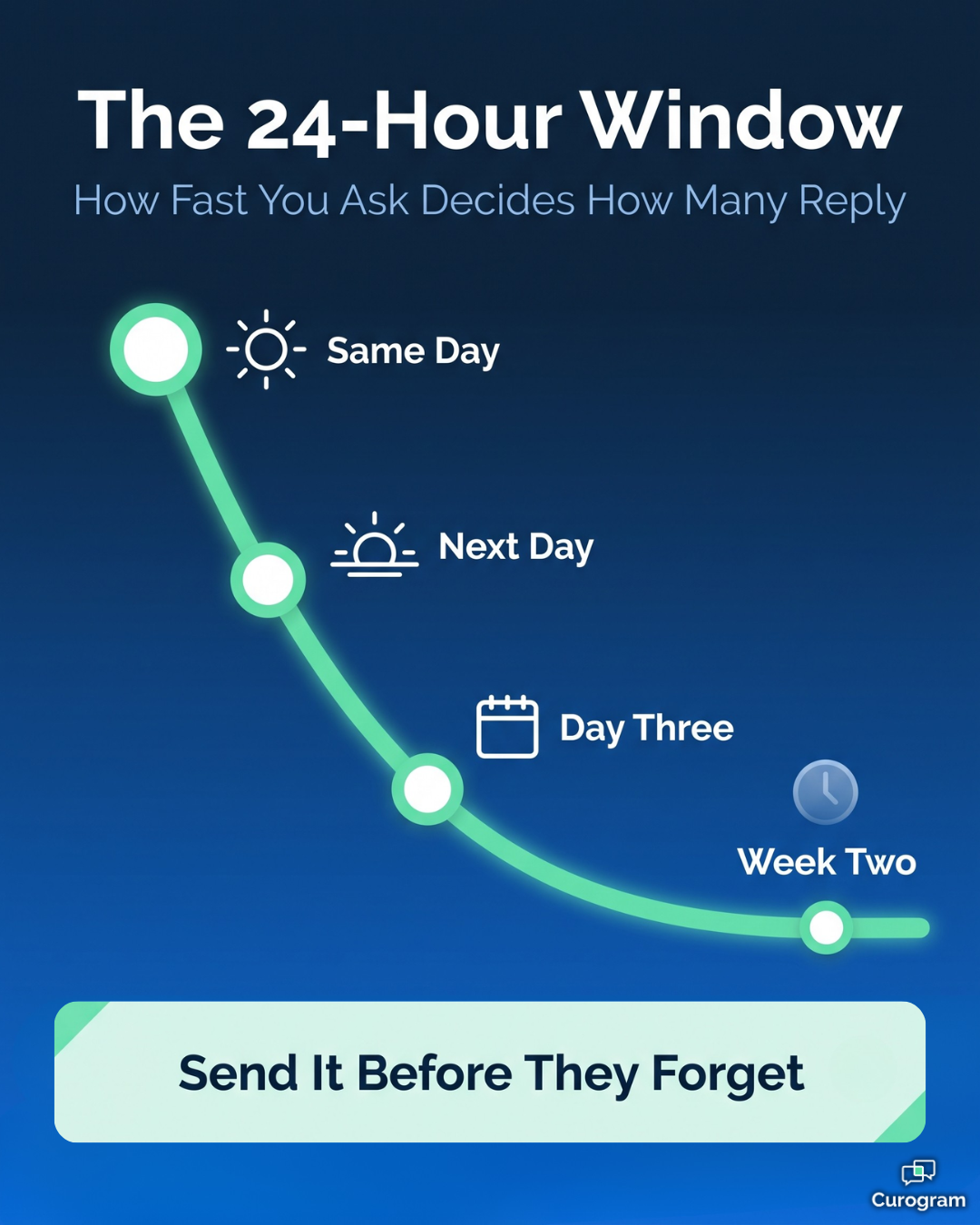
The single biggest factor in review response rates is not what your message says. It is when it arrives. A review request sent within a few hours of the visit lands while the experience is still specific and emotional. The patient remembers the name of the nurse who was kind to them. That is the review you want, because detailed reviews rank better and convince more readers than a bare five stars. Wait three days and you get a different result. The memory has flattened into "it was fine," and most patients will not bother at all. If you change only one thing about your current process, shorten the delay. Same-day beats a perfectly written message sent next week. |
The wording matters. So does the structure. Nine elements separate a request that gets tapped from one that gets ignored.

Adapt these templates based on your chosen strategy, practice specialty, and brand voice. Always insert the correct, functioning link and double-check compliance before implementing. Remember, the goal of getting patients to leave a review via sms is facilitated by clear, compliant, and patient-friendly messaging.
Hi [Patient Name], thanks for visiting [Practice Name] today! We truly value your feedback. Would you mind taking just a moment to leave us a review on Google? [Direct Google Review Link]. Thank you for helping us improve!
Direct Request (Healthgrades Example)
Hi [Patient Name], thanks for visiting [Practice Name] today! We truly value your feedback. Would you mind taking just a moment to leave us a review on Google? [Direct Google Review Link]. Thank you for helping us improve!
Two-Step (Step 1 - Internal Survey Request)
Hi [Patient Name], thank you for your visit to [Practice Name] today! To help us continually improve our care, could you please take 60 seconds to rate your experience? [Link to HIPAA-Compliant Survey]. Your feedback matters greatly!
Two-Step (Step 2 - Public Review Request after Positive Survey)
Hi [Patient Name], thank you so much for your positive feedback on our recent survey! We're delighted you had a good experience. Would you be willing to share your thoughts publicly on Google to help other patients seeking care? [Direct Google Review Link]. Thank you again for your time!
Central Feedback Hub Request
Hi [Patient Name], we appreciate you choosing [Practice Name] for your healthcare needs! Your feedback helps us provide the best possible service. Please take a moment to share your experience via our secure feedback page: [Link to Practice Feedback Hub Page]. Thanks!
Follow-Up Request (Gentle reminder; send 2-4 days after initial if no response)
Hi [Patient Name], just a friendly follow-up from your recent visit to [Practice Name]. If you have a moment, we'd still appreciate hearing about your experience. Your feedback helps us improve: [Original Link]. Thank you! (Msg&Data Rates May Apply/Txt STOP 2 OptOut - consider periodic inclusion)
Request for Long-Term Patients
Hi [Patient Name], as a valued long-term patient of [Practice Name], your perspective is incredibly helpful to us and potential patients! If you're willing, please take a moment to share your experience with us here: [Link]. Thank you for your continued trust over the years!
Post-Support Interaction Feedback (e.g., after resolving a billing query)
Hi [Patient Name], we hope our team at [Practice Name] fully addressed your questions today. To help us improve our support, could you take a moment to share feedback on your interaction? [Link to brief support survey or general feedback page]. Thanks!
Remember:
Effectively getting patients to leave a review via sms often involves some trial and error. Consider testing different phrasings or timings (while remaining compliant) to see what resonates best with your specific patient population and yields the highest quality feedback.
Getting patients to leave a review via SMS does not end when the message sends. Four habits separate practices that collect a steady stream of reviews from those that see a brief spike and then nothing.
Persistence helps. Pestering does not. A single gentle follow-up sent 2 to 4 days later, only to patients who have not responded, reliably lifts total response.
The key word is "only." Your system needs to track who already left feedback so those patients never get a second nudge. Nothing sours goodwill faster than being asked twice for something you already did.
This one is not a gray area. Do not offer discounts, gift cards, raffle entries, or any compensation in exchange for a review.
It violates the terms of service for Google, Yelp, and Healthgrades. It conflicts with Federal Trade Commission guidance on endorsements, which requires disclosure when a review is incentivized. And in healthcare specifically, it raises ethical problems that are not worth the risk of removed reviews and reputational damage.
Staff incentives are a different question. You can reasonably reward your team for consistently capturing documented consent or for reliably triggering the request process. Just make sure the incentive rewards following the procedure, never the number or content of reviews that result.
Do not run this blind. Watch delivery rates, click-through rates on your links, and the number of new reviews appearing on each platform.
Then compare. If your Two-Step funnel is producing fewer reviews than a direct ask did, you have real information to act on. Test different send times and message variations if your volume supports it.
Responses are public, and most people read them before deciding anything.
For positive reviews:
Reply promptly and briefly. Thank the patient for taking the time and keep it genuine. This signals to every future reader that you pay attention.
For negative reviews:
Reply fast, stay professional, and never get defensive. Acknowledge the concern in general terms, then move it offline: "We're sorry your experience fell short. Please contact our practice manager at [phone] so we can learn more." Never discuss specific patient details in a public reply, since doing so would violate HIPAA even if the patient mentioned them first.
Ignoring negative reviews is the worst option. A thoughtful reply often limits the damage, and sometimes the patient updates the review after you resolve the issue.
Here is the part where most review programs quietly die. The plan is good, the templates are written, and then a busy Tuesday happens and nobody sends anything. Three weeks later the program exists only in a document.
Manual review requests do not survive contact with a real front desk. The fix is automation.
Use a HIPAA-compliant texting platform that connects to your EHR or practice management system. The request then fires automatically on a trigger you set, usually appointment completion or checkout, with no one deciding to send it.
This is where a platform like Curogram fits into the picture. Curogram is not a replacement for your EMR. It sits alongside it, pulls the appointment data it needs, and handles the automated Google reviews workflow from post-visit survey through public review request.
The results are measurable. One multi-location practice using Curogram's automated post-appointment surveys saw 90% of surveyed patients leave 5-star reviews, producing 1,064 new 5-star reviews in three months. For a practice that had been collecting a handful of reviews a year, that is a different search result entirely.
Here is what the shift usually looks like in numbers. This example assumes a practice with 500 completed visits per month.
| Manual asking | Automated SMS | |
|---|---|---|
| Patients actually asked | ~75 (15%) | 500 (100%) |
| Reviews collected monthly | ~8 | ~40 |
| Reviews per year | ~96 | ~480 |
| Front desk time per month | ~6 hours | ~0 hours |
In practice, this means two things. You collect roughly five times more reviews, and you get back about 75 hours of front desk time a year that was going into asking, tracking, and forgetting.
Now translate that to revenue. If a stronger review profile brings in just 3 additional new patients per month, and your average new patient is worth $300 in first-year revenue, that is $900 per month or $10,800 per year. That is a conservative example, not a promise, but it shows why review volume is a growth lever rather than a vanity metric.

Automation handles sending. People still handle consent, questions, and the in-person ask.
Make sure front desk staff, medical assistants, and providers all understand why reviews matter, how to capture and document consent correctly, how to answer patient questions about privacy and opt-outs, and where to send someone whose link is not working.
Someone needs to own this. Name the person responsible for watching the platform dashboard, handling patient replies that come in by text, tracking metrics, and coordinating review responses across platforms.
Without a name attached, the program drifts. With one, it stays alive.
Use what you learn. If three reviews in a month mention wait times, that is a scheduling problem showing up in public.
When you fix something based on feedback, tell patients about it in a newsletter or a website update. It costs nothing and it proves their input actually goes somewhere, which makes the next request easier.
These examples are composites drawn from common implementation patterns, showing how getting patients to leave a review via SMS plays out over time. Each covers a few months of consistent use.
The problem:
A well-established dental practice delivered excellent care but had almost no recent reviews. Patients searching online kept choosing competitors with more visible social proof.
What they did:
They added a clear consent checkbox to their digital intake forms and connected a HIPAA-compliant texting platform to their scheduling system. After each cleaning or completed treatment plan, an automated text went out with a direct link to their Google Business Profile. Front desk staff also began asking at checkout whether patients would be open to a text.
The result:
Within four months their total Google reviews tripled and their average rating rose. New patient requests that mentioned finding the practice through search went up by about 35%. The steady flow of recent reviews did the heavy lifting, because Google weights recency as well as volume.
The problem:
A regional specialty clinic with five locations had five different approaches to feedback. Reviews were scattered across providers and sites, and the online picture did not match the actual quality of care.
What they did:
They adopted the Central Feedback Hub strategy. Consent was captured during patient portal registration, and post-visit texts sent everyone to one branded feedback page. That page offered links to Google, Healthgrades, and Vitals, plus a private feedback option routed to clinic management.
The result:
Review volume rose across all three platforms. Just as useful, the private feedback channel surfaced operational differences between locations that nobody had documented, which led to targeted fixes at two sites. Centralizing the request also made reputation monitoring a single task instead of five.
You are already doing the hard part. The care is good, the staff is kind, and patients leave satisfied. The gap is that almost none of that shows up where prospective patients are looking.
Getting patients to leave a review via SMS closes that gap better than anything else available. It reaches nearly everyone, it costs almost no staff time, and it arrives while the visit is still fresh enough to write about.
The path forward is straightforward. Get written consent documented properly. Choose the strategy that matches your practice, whether that is a direct ask, a two-step funnel, or a central hub. Write messages that are short, warm, and easy to act on.
Then automate it, so the program survives your busiest week instead of dying during it.
Finally, respond to what comes in. Reviews are a conversation, and how you handle criticism in public says as much about your practice as the praise does.
Done well, this becomes more than a marketing tactic. You get a steady stream of honest feedback, a clearer picture of what patients actually experience, and a search result that finally reflects the quality of care you deliver.
Ready to see how automated review requests work inside your existing workflow? Schedule a Curogram demo and watch a post-visit survey turn into a 5-star Google review, without adding a single task to your front desk.
Frequently Asked Questions

Discover easy ways to generate Google reviews and boost your online presence. Learn how to increase Google reviews effortlessly today!

 Jo Galvez : 2/7/26, 11:00 AM
Learn how to automate 5-star Google reviews for your practice. Discover the EMR-integrated workflow that captures patient feedback and drives growth.
 Jo Galvez : 2/7/26, 3:00 PM
Discover the impact of online reviews on medical practice growth. Learn how Curogram's automated surveys drive revenue and new patient volume.