
1 min read
Grow Your Market Presence through 5-Star Google Reviews!
💡Reactivate overdue patients with text recalls for Azalea Health by sending one friendly message they can act on fast. The patient rebooks in a...
15 min read

Most practices don't have a review problem. They have a workflow problem that shows up as a review problem.
The ask is supposed to happen at checkout. At checkout, two patients need rescheduling, a claim just got kicked back, and the phone hasn't stopped.
Nobody asks. The visit ends, the patient leaves happy, and none of that satisfaction reaches the page where new patients are actually looking.
Based on our internal data, 90% of new patient leads check a practice's Google Business Profile before they ever open the website. Your rating and review count do the selling. Everything you wrote about your practice runs second.
Once you accept that, the fix stops being motivational and starts being mechanical. Review volume comes from a process that doesn't depend on anyone remembering during the busiest part of the day.
The scripts still matter. The timing matters more than most staff realize. But the practices that build real volume are the ones that removed the request from the front desk's memory entirely and put it on a trigger.
One practice we work with rebuilt from a 1.67 rating with 101 reviews to a 5.0 rating with 479 reviews. Their inbound call volume dropped 24% over the same period, because patients found their answers in the reviews instead of picking up the phone. That practice didn't ask harder. It asked consistently.
What follows covers the parts that decide whether a request converts: when to ask and when to stay quiet, which platforms are worth your effort, what the message should actually say across in-person, email, and text, and how to reply to a bad review without disclosing anything you shouldn't.
Your online reputation does the selling before a patient ever reaches your website. Based on our internal data, 90% of new patient leads check a practice's Google Business Profile first. The star rating and review count are what they see.
Most practices know reviews matter and still don't ask. The reasons are real. HIPAA makes staff nervous, timing feels awkward, and the front desk is busy with three reschedules and a ringing phone. So the ask gets skipped.
This guide covers what actually determines whether a request converts: when to ask, which platform to send patients to, what to say, and how to reply publicly without exposing anything private.
One practice we work with rebuilt from a 1.67 rating and 101 reviews to a 5.0 rating and 479 reviews. Call volume dropped 24% in the same window, because patients found their answers in the reviews instead of calling the desk.
A prospective patient can't judge your clinical skill from a website. What they can judge is whether forty other people say the office ran on time and the doctor listened. Reviews are the only signal about your practice that you didn't write.
Peer feedback covers what marketing can't: wait times, front desk manner, whether the provider explained things clearly. A 4.8 rating built on 12 reviews from three years ago reads as stale. The same rating on 300 recent reviews reads as current.
Google's Map Pack ranks partly on review count, rating, and recency. A practice posting new reviews monthly can outrank a practice with a better average and no activity.
| Signal | What It Affects |
|---|---|
| Review count | Map Pack placement |
| Star rating | Click-through from search |
| Recency | Whether the practice looks active |
| Reply rate | Engagement signals |
Three patients naming the same wait time isn't an opinion. It's a workflow problem with a location. Positive reviews work the same way in reverse: when patients keep naming one medical assistant, you've found what your practice does well.
Patients comparing two clinics with similar insurance and similar distance will use reviews as the tiebreaker. That's often the whole decision.
Reviews that name people are worth circulating internally. It's specific praise from the person who received the care, not from a manager.
Protected health information includes the fact that someone is your patient at all. That single rule governs everything below.
In requests, never include:
A text that says "hope your knee feels better" is a disclosure if the wrong person reads that phone.
In replies, never:
Train every person who touches this workflow. The front desk staffer sending texts needs the same HIPAA grounding as the manager writing replies.
Reviews posted on Google or Healthgrades are governed by those platforms. Using a patient's name, photo, quote, or video on your own site or social media is a different thing and requires signed consent.
The consent form should state:
Store the signed forms. Video needs the most care, since the face and the story are both identifiable.
Don't offer gifts, discounts, or contest entries for reviews.
Incentivizing staff for the act of asking is a different matter and generally fine, as long as the reward isn't tied to the rating that comes back.
Say why you're asking. "Your honest feedback helps us improve" is a real reason. Language that hints you only want five stars invites exactly the skepticism you're trying to avoid.
Every request needs a visible exit. "Would that be okay?" is enough. If a patient hesitates, drop it immediately and don't circle back.
If you have consent to publish a testimonial and need to trim it:

The window matters more than the wording. A perfect script sent three weeks late converts worse than a plain one sent the next morning.
Within 24 to 48 hours of a good visit. The experience is still specific in their memory. This is where automated email and SMS earn their keep, because the timing doesn't depend on anyone remembering.
Right after unsolicited praise. When a patient says the visit went well, that's the opening.
"That's great to hear, [Patient Name]. Feedback like that really helps us. If you'd be willing to share it in a review, it would mean a lot."
After you fix something. A patient whose complaint you resolved well often writes the most persuasive review you'll get.
"Glad we could get that sorted, [Patient Name]. If you felt we handled it well, sharing that could help someone in the same spot."
At a treatment milestone. Completing a PT program or an ortho case is a natural end point, and the patient has the whole arc to reflect on.
During routine follow-up. If the check-in call is going well anyway, the ask costs nothing.
| Situation | Why It Backfires |
|---|---|
| Right after a painful or invasive procedure | Patient is uncomfortable, not reflective |
| Patient complained during the visit | You're asking them to publish it |
| Emotionally heavy consult | The ask is tone-deaf |
| Patient is rushed or stressed | One more task they didn't want |
| No response to two prior asks | Now it's pestering |
Bonus Timing Tips:
Weekday mornings, especially Tuesday and Wednesday, tend to catch people when they're actually reading messages. And for treatments where results take time, like certain dermatology cases, wait until the patient can see the outcome they'd be reviewing.
You don't need to be everywhere. You need to be strong where your patients actually look.
| Platform | Why It Matters | Best For |
|---|---|---|
| Google Business Profile | Drives local search and the Map Pack; the first thing most patients see | Every practice |
| Healthgrades | Specialty and condition filters; patients arrive already comparing providers | Physicians, specialists |
| Vitals | Shows wait times, awards, sanctions | Practices where wait time is a selling point |
| Zocdoc | Verified reviews from booked appointments | Practices already on Zocdoc |
| RateMDs | Provider-level ratings | Individual clinicians |
| Recommendations from local community members | Practices with an active page | |
| Yelp | Prohibits solicitation, but patients still read it | Keep the profile accurate, don't ask |
Niche sites matter in some fields. RealSelf carries real weight in cosmetic surgery and almost none anywhere else. Here are tips to help you:
Pick one to three. A strong Google profile plus one specialty site beats a thin presence on six.
Claim and complete every profile you keep. Address, phone, hours, insurance, photos. An incomplete profile suppresses the reviews you worked to get.
Link directly. Every request should drop the patient on the review form itself, not the homepage of a platform they then have to search. Each extra step drops conversion.
Watch for new reviews. You can't reply to what you don't see. Set alerts.
Now we arrive at the heart of the matter: the specific methods and language you can use to request reviews effectively and ethically.
There's no single "best" way; a multi-pronged approach, integrating requests naturally into various patient touchpoints, typically yields the best results. Remember to always ground these methods in the ethical and HIPAA-compliant principles discussed earlier.
Face-to-face carries the most weight and takes the most skill. The person asking can read the room, which no automation can do. It's also the ask most likely to never happen, because it depends on someone remembering during checkout.
Clinicians should ask at the end of the visit, once every clinical question has been answered. Something plain works best:
"Things look good today, [Patient Name]. If you were happy with your care, a quick online review would really help us."
Front desk staff ask after payment and scheduling are done, and only when the patient isn't visibly rushing.
"Before you go, would you be open to sharing feedback about today? It helps us improve and lets other patients know what to expect. Would that be okay?"
Then hand over a card with a QR code, because a patient who has to find the link later usually doesn't.
Two things make these asks convert. Give a reason, since requests that include one perform better than requests that don't. And use the word "feedback" rather than "review," which lowers the stakes of the question.
Train for it directly. Write the scripts, run the role-play, and be explicit about when not to ask. Left to instinct, most staff won't ask at all.
Reward the act of asking, never the rating that comes back, and track request count against reviews received. If your team asks 40 times a week and two reviews land, the link is broken, not the script.

Email scales without adding front desk work, and it holds a clickable link. Send within one to three days, use the patient's first name, and keep the body under 100 words. One button, one platform. A menu of choices reduces the odds a patient picks any of them.
Automate the trigger so the timing doesn't depend on anyone's memory, and check that it looks right on a phone, since that's where it'll be opened.
Template 1: Simple and Direct
Subject: How Was Your Recent Visit, [Patient Name]?
Dear [Patient Name],
Thank you for choosing [Practice Name]. We hope your visit went smoothly.
Your feedback helps us improve and helps other patients decide where to go. If you have a moment, we'd appreciate you sharing your experience.
[Leave a Google Review]
Thank you,
The Team at [Practice Name]
Template 2: Two-Platform Option
Subject: Share Your Experience With [Practice Name]
Dear [Patient Name],
We hope you're doing well after your recent visit. Hearing from patients is how we know whether we're getting it right.
Would you take two minutes to share your experience?
[Review on Google] [Review on Healthgrades]
Thank you for trusting us with your care.
The [Practice Name] Team
Template 3: Post-Procedure (Time Carefully)
Subject: Checking In, [Patient Name]
Dear [Patient Name],
We're following up to see how your recovery is going. We hope you're feeling better.
If you're comfortable doing so, we'd be grateful for your feedback on your experience with us.
[Share Your Experience]
Please reach out with any questions during your recovery.
Dr. [Provider Last Name] and the Team at [Practice Name]
Test subject lines against each other. Small changes move open rates more than most people expect.
Texts get read within minutes. That immediacy is the whole advantage, and it's also why the consent has to be real and the message has to be short.
Get prior express written consent at intake, before a single message goes out. TCPA fines are assessed per message, which is how a small oversight becomes a large number.
Name your practice in the first four words, include one link that lands on the review form itself, and add "Reply STOP." Send once, within a few hours to 24 hours of the visit. A second text reads as pressure in a way a second email doesn't.
Template 1: Simple and Friendly
Hi [Name], thanks for visiting [Practice]! We'd love your feedback. Leave a quick review here: [Link] — Reply STOP to opt out.
Template 2: Slightly More Formal
[Practice]: Hi [Name], could you spare a moment to share your experience today? It helps us improve: [Link] — Reply STOP to end msgs.
Template 3: Naming the Platform
Hi [Name] from [Practice]. Hope your visit went well. A Google review helps other patients find us: [Link] — Reply STOP to opt out.
Template 4: Question Format
[Practice]: Hi [Name], how did we do today? We value your opinion: [Link] — Reply STOP to unsubscribe.
Template 5: Focus on Helping Others
Thanks for coming in, [Name]! Reviews help other patients choose with confidence. Mind sharing yours? [Link] — Reply STOP to opt out.
Template 6: Next-Day Check-In
Hi [Name], [Practice] checking in. Hope you're doing well. We'd appreciate your feedback when you have a minute: [Link] — Reply STOP to end.
Keep the tone professional even at 160 characters. The message is still coming from a medical practice.
Not every review has to come from an outbound ask. Your own properties can collect them quietly, without anyone at the desk doing anything.
Build a reviews page and link it in the main navigation. Say briefly why feedback matters, then put two prominent buttons to your chosen platforms.
Display existing testimonials only where you have written consent. Beyond that page, keep a review link in the site footer, next to the phone number on your contact page, and in every staff email signature.
The patient portal is the most underused spot on this list. When a visit closes, show a thank-you message with a review link. The patient is already logged in and already thinking about the appointment, which is exactly the state you want them in.
Portal message:
Thank you for visiting [Practice Name]. Your feedback helps us improve. Share your experience here: [Link]
Dedicated page intro:
Your feedback shapes how we care for every patient who walks in after you. If you have a few minutes, we'd be grateful if you shared your experience on one of the platforms below.
For button text, plain wording beats clever: Share Your Experience, Rate Your Visit, Leave a Review on Google.
Social is a weak review channel and a strong community channel. Treat it as the second thing.
General posts inviting feedback work, with the link in your bio rather than the post itself. Anonymized themes work too, and consented testimonials perform best of all, though the consent has to be written and specific.
General feedback post:
We hear from patients every week about what's working and what isn't. Both are useful. If you've had a good experience with us, we'd love for you to share it. Links in our bio.
Anonymized positive theme:
Patients keep telling us the front desk made things easy. We'll take it. Thank you for the feedback.
Reply to a positive public comment:
Thank you for the kind words. We appreciate you taking the time to share this.
The risk here is public replies. Confirming in a comment that someone is a patient is a disclosure, and responding to a clinical complaint with any detail is worse. If a patient raises a care issue in your comments, move it offline in one sentence and don't engage with the substance, even if they started it.
Small, low-pressure placements won't carry a review program on their own. Together they mean the request is never more than one screen away.
Thank-you card:
Dear [Name], thank you for trusting us with your care. If you have a moment, we'd appreciate hearing about your experience. [QR Code]
Warmly, The [Practice Name] Team
Receipt or invoice footer:
We'd appreciate your feedback. Leave a review here: [Short Link]
Appointment confirmation footer:
[Practice Name] | [Phone] | Read Patient Reviews: [Link]
Email signature:
[Practice Name] · [Phone] · [Website] · Read Patient Reviews: [Link]
Keep the confirmation text clean. That message has one job, and burying a review link in the body of it costs you appointment confirmations to save a click.
An unanswered review tells the next reader that nobody at the practice is paying attention. A reply tells them someone is.
Fast, short, warm, and generic. That's the whole formula.
Examples:
"Thank you for the kind words, [Reviewer Name]. We appreciate you taking the time to share this."
"Thanks so much, [Reviewer Name]. We're glad you found the team helpful and we'll pass your note along."
"Thank you for the 5-star review, [Reviewer Name]."
Note what's missing from all three: any confirmation that this person was treated at your practice.
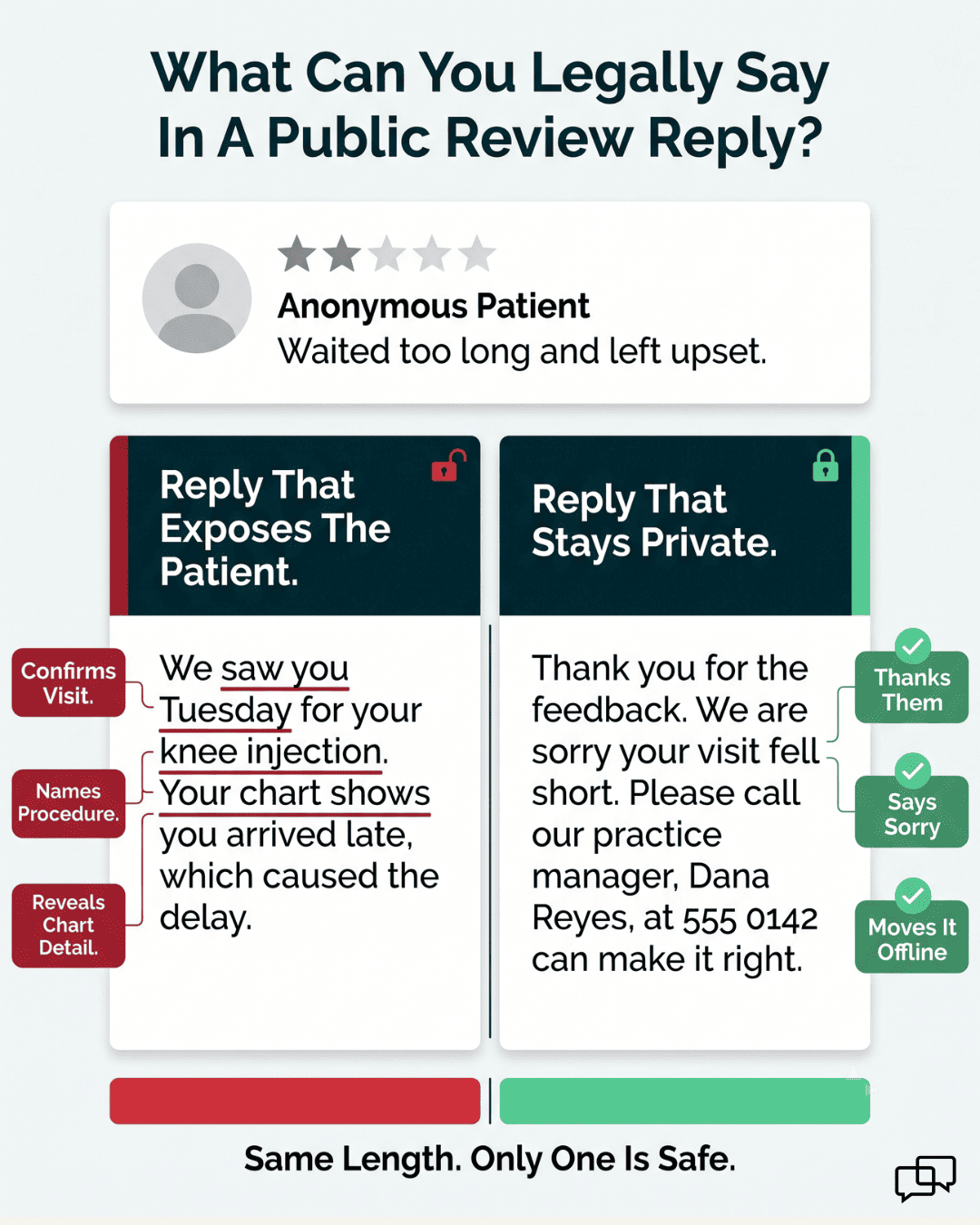
This is where practices create HIPAA violations trying to defend themselves. The instinct to correct the record is the exact instinct to suppress.
Never do this:
"We saw you Tuesday for your knee injection. Your chart shows you arrived 20 minutes late, which caused the delay."
That reply confirms the visit, names the procedure, and discloses a chart detail. Three violations in two sentences.
Do this instead:
"Thank you for the feedback. We're sorry your visit fell short of what you expected. Please call our practice manager, [Name], at [Phone] so we can look into this directly."
Same length. Acknowledges, apologizes, moves it offline, discloses nothing.
Two more compliant patterns:
"Thank you for sharing this, [Reviewer Name]. We take concerns seriously and would like to hear more. Please reach out to our Patient Advocate at [Phone]."
"[Reviewer Name], we appreciate you bringing this to our attention. Please contact our office at [Phone] so we can discuss it."
Reply fast, stay generic, name a real person and a real number.
You have consent, or you don't. There is no middle setting.
With written consent, you can:
Without consent, you can still:
Three rules that don't bend:
Based on our internal data, practices running automated review requests generated 1,064 new 5-star reviews in three months, with roughly 90% of all collected reviews landing at five stars. That volume comes from asking every eligible patient, not from asking harder.
While implementing your review strategy, be mindful of common pitfalls that can hinder your efforts, damage patient relationships, or even lead to compliance issues. Avoiding these mistakes is just as important as employing the right techniques.
| Mistake | The Cost |
|---|---|
| Asking dissatisfied patients | You prompted the one-star review yourself |
| Asking three or four times | Annoyance, opt-outs, and a worse impression than not asking |
| Sending unpersonalized blasts | Reads as spam, gets deleted |
| Including PHI in a request or reply | Real fines and real reputational damage |
| Offering gifts or discounts | Platform penalties and ethical exposure |
| Buying fake reviews | Listing suppression, and permanent credibility loss when found |
| Sending patients to a homepage | Each extra click drops conversion sharply |
| Ignoring reviews entirely | Signals nobody's listening |
| Chasing platforms your patients don't use | Effort with no return |
| Asking at the wrong moment | Turns a good visit into an irritation |
| Collecting feedback and never reading it | You paid for insight and threw it away |
The most common failure isn't on this list. It's inconsistency. A practice that asks everyone for a month, then stops, ends up with a burst of reviews that goes stale and a Map Pack listing that slides back down.
Review generation fails for the same reason most front desk initiatives fail. It depends on someone remembering during the busiest hour of the day.
The practices that build real review volume do two things. They automate the request so it fires on every eligible visit, and they train staff to catch the moments automation can't, like a patient who says the visit went well on their way out the door.
Everything else in this guide supports those two moves. The scripts matter. The timing matters. The direct link matters more than most people think.
What doesn't work is asking harder. Pressure produces opt-outs, and incentives produce reviews nobody should trust.
Pick one channel this week. Set up the trigger, write the message, put a direct link in it, and check the numbers in 30 days.
Want to see what automated review requests look like running against your own schedule? Book a demo and we'll walk through it with your workflow.

1 min read
💡Reactivate overdue patients with text recalls for Azalea Health by sending one friendly message they can act on fast. The patient rebooks in a...

1 min read
💡 To generate Google reviews consistently, start by claiming and fully optimizing your Google Business Profile. Then ask customers at the right...

1 min read
💡 Getting patients to leave a review via SMS works because text messages get read. SMS open rates reach 98%, while email hovers near 20%. A...