11 min read

Cut 10 Hours of Data Entry With Welligent Form Write-Back Automation

Cut 10 Hours of Data Entry With Welligent Form Write-Back Automation
💡 The fastest way to eliminate double entry in behavioral health is Welligent form write-back automation through Curogram. Here is how it works:
  • Clients fill out forms like the PHQ-9 on their phone via text
  • Curogram scores the form the moment it is submitted
  • Both the PDF and the data sync straight into the Welligent chart
  • No staff member has to type a single answer by hand
  • The full process meets HIPAA and 42 CFR Part 2 rules
This human services intake workflow saves intake teams up to 10 hours a week. That time goes back to client care, not data entry.

Your intake team didn't go into human services to type numbers into a database. But that's where a huge chunk of their week goes.

Think about what happens right now at most agencies. A client walks in, grabs a clipboard, and fills out a PHQ-9 or a full intake packet. The paper goes to the front desk. Then an intake worker sits down and types every single answer into Welligent — one field at a time.

That process is slow. It's prone to errors. And it burns out the very people your agency can't afford to lose.

Here is the real cost no one talks about: you are paying skilled case managers and intake staff to do basic data entry. Every hour spent copying answers from paper to screen is an hour not spent helping a client in crisis. At most agencies, this adds up to 10 or more hours per week — per worker.

And the worst part? The answers already exist. The client already wrote them down. The data is right there. It just needs to get into Welligent without a human being stuck in the middle.

That's the exact problem Welligent form write-back automation was built to solve. With Curogram, there is no clipboard.

There is no paper. There is no re-typing. Clients complete forms on their own phone via a secure text link. The moment they hit submit, the data flows into their Welligent chart — scored, filed, and ready for review.

In this article, we'll walk through how this works, why it matters for your budget, and how it gives your staff their time back. If your agency runs on Welligent and your team still types in form data by hand, this is the upgrade you've been waiting for.

The Hidden Cost of the Clipboard

Let's be honest about what "intake" really looks like at most agencies.

A new client shows up for their first visit. Staff hands them a stack of paper forms. The client sits in the lobby, filling in their name, address, insurance info, health history, and a PHQ-9 or GAD-7 screening tool.

Maybe the pen runs dry. Maybe the handwriting is hard to read. Either way, the paper packet lands on someone's desk within the hour.

Now the real work starts — for your staff.

The Manual Grind No One Budgets For

An intake worker picks up that packet and opens Welligent. They look at the first question on the paper form. They type the answer into the matching field in the EMR. Then they move to the next question. And the next. And the next.

For a full intake packet with a screening tool, this process can take 20 to 30 minutes per client. If your agency sees 15 to 20 new intakes per week, that's 5 to 10 hours spent just on data entry. That number climbs fast when you add follow-up forms, updates, and progress notes.

Here's what makes this even worse: the data already exists. The client wrote it down. The only thing standing between that data and the EMR is a human being doing copy-and-paste work by hand. That's not skilled labor — that's a bottleneck.

What This Really Costs Your Agency

Most agencies don't track the cost of manual data entry. They should. Let's run a quick example.

Task

Time per Client

Clients per Week

Hours per Week

Typing intake forms into Welligent

15 min

20

5.0 hrs

Typing PHQ-9/GAD-7 scores

5 min

20

1.7 hrs

Scanning and uploading paper PDFs

5 min

20

1.7 hrs

Fixing data entry errors

5 min

10

0.8 hrs

Total


9.2 hrs


That's nearly 10 hours a week from one staff member. At many agencies, that work gets split across two or three people — which means the total cost is even higher.

Now think about what those hours could be used for. Case follow-ups. Client phone calls. Crisis support. Treatment planning. All of it gets pushed aside to make room for the grind of typing things twice.

The Human Cost Is Just as Bad

Burnout in human services is well known. But we don't always connect it to the admin tasks that pile up. When a case manager spends half their Monday entering data from last week's intakes, that's not just lost time. It's lost morale.

Staff who feel buried in admin work are more likely to leave. In a field where hiring is already hard, losing a trained intake worker over something as fixable as data entry is a huge loss. And yet it happens all the time.

The bottom line: The clipboard is costing your agency more than you think — in time, in money, and in people. To eliminate double entry in behavioral health, you need more than a scanner or a shared drive. You need the data to move from the client's hands into Welligent without passing through your staff's hands first.

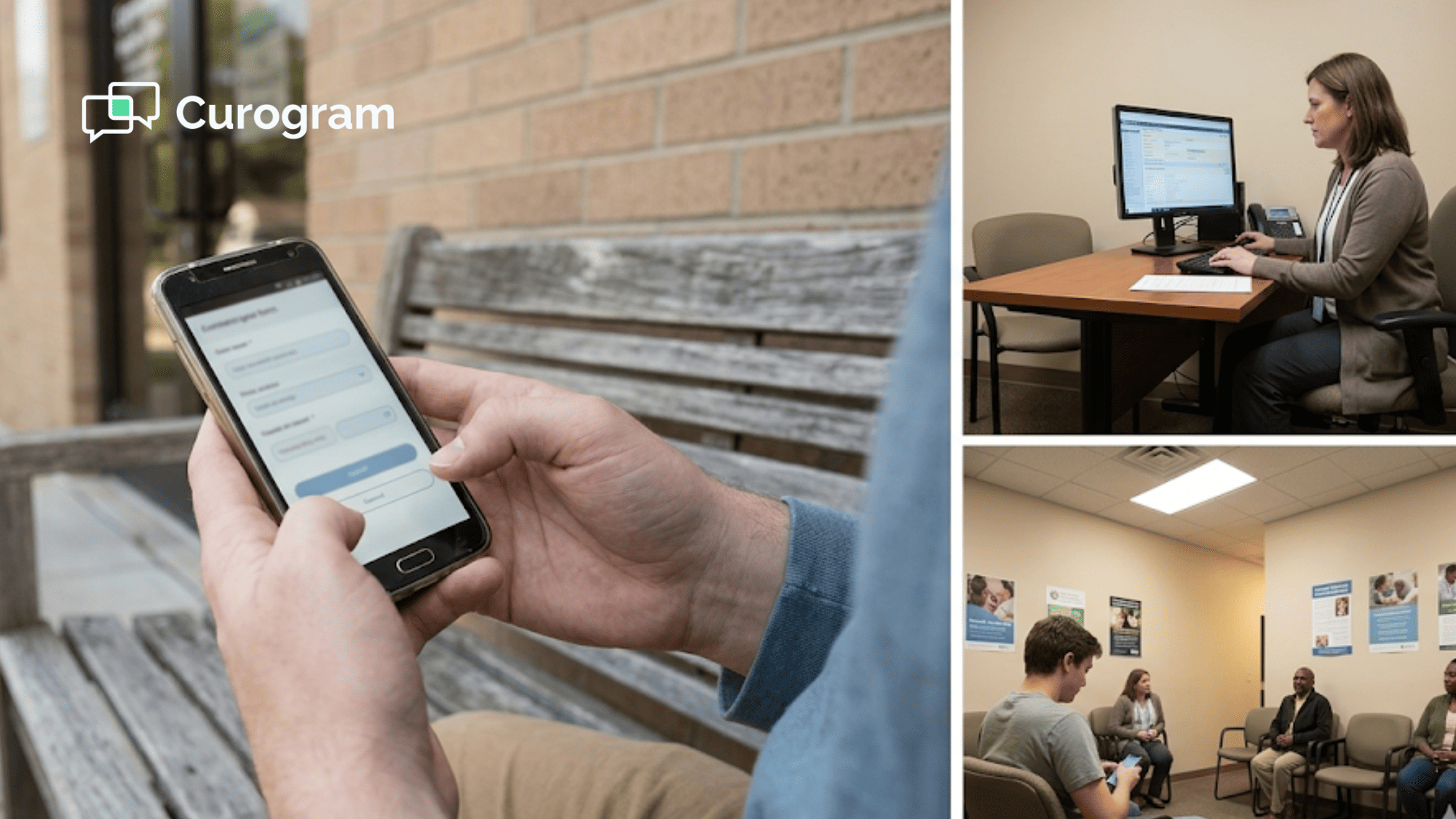
Behavioral health worker at a tidy desk reviewing auto-scored assessment data before meeting a client

True Write-Back: Moving Beyond the PDF

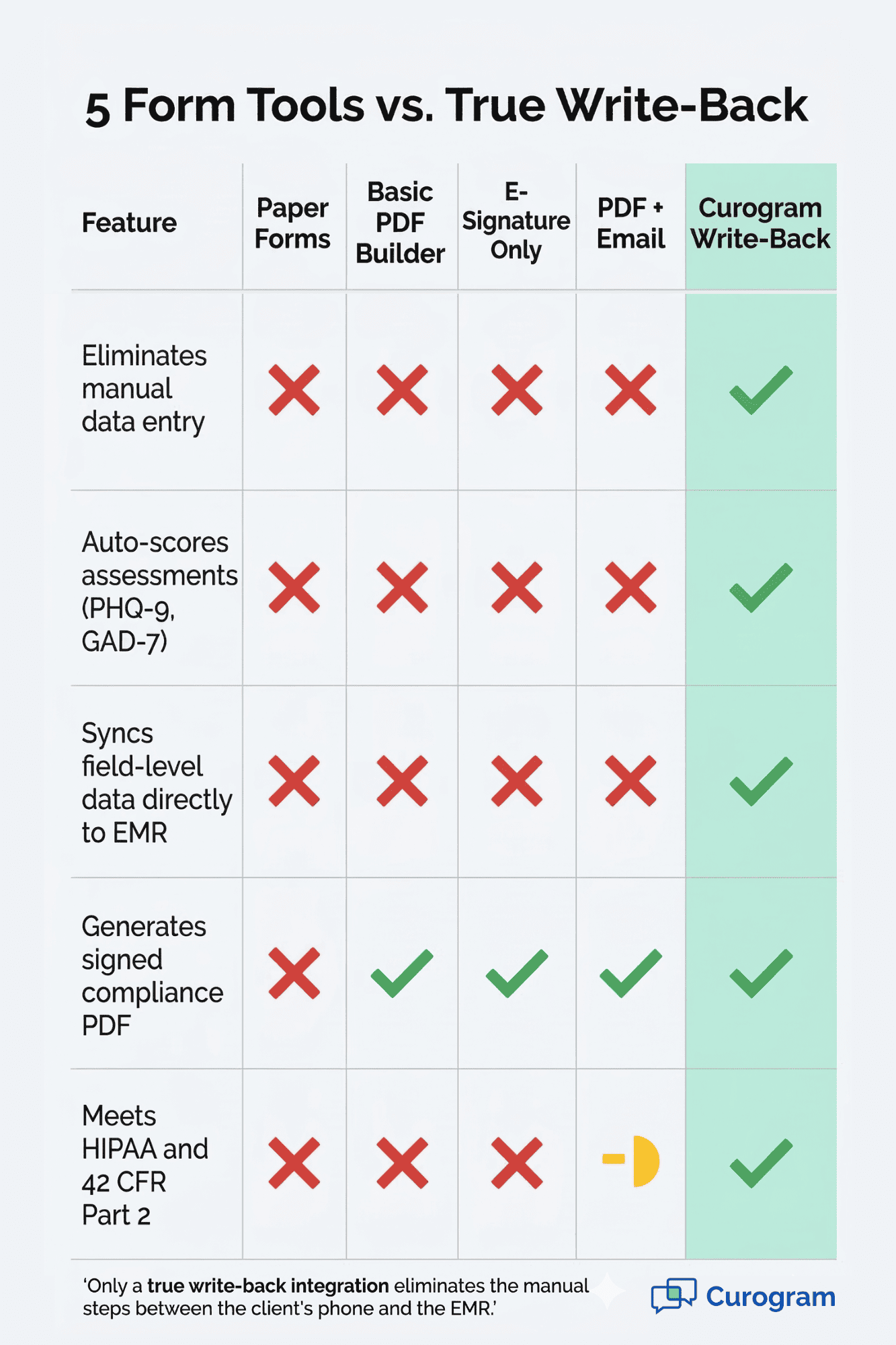
Not all digital form tools are created equal. Many agencies have already tried going paperless. They bought a form builder, created digital PDFs, and asked clients to fill them out online. That's a step forward — but it's only half the answer.

The "Fake Digital" Problem

Most form tools do one thing: they collect the client's answers and produce a flat PDF. That PDF gets emailed to the front desk or dropped into a shared folder. Then someone on your team still has to open that PDF, read each answer, and type it into Welligent by hand.

You've removed the clipboard. But you haven't removed the data entry. Your staff is still doing the same typing work — they're just reading from a screen instead of paper. That's not a workflow fix. That's a format change.

True write-back means the data moves on its own — no human in the middle.

How Curogram's Write-Back Actually Works

Curogram takes a different approach. Instead of just making a PDF, Curogram captures the actual data from each field. When a client taps "Yes" on question 4 of an intake form, that "Yes" doesn't sit in a static document. It becomes a live data point.

Here's the step-by-step flow:

  1. Your agency sends a secure text link to the client's phone.
  2. The client opens the form on their device — no app needed, no login wall.
  3. They fill out the intake packet or screening tool at their own pace.
  4. When they hit submit, Curogram does two things at once: it creates a signed PDF and it maps each answer to the right field in Welligent.
  5. The PDF and the field-level data both land in the client's Welligent chart.

That last part is the key difference. When your case manager opens that client's record, they don't see just a PDF to read through. They see the actual data — already in the right fields, already scored, already filed.

The Tech Behind It (In Plain Terms)

Curogram connects to Welligent using HL7 or direct database links. Think of Welligent as a vault for client data. Most form tools slide a piece of paper under the vault door. Curogram opens the door, walks in, and puts each piece of data on the right shelf.

This is what sets real case manager efficiency software apart from basic form builders. It's not enough to collect the data. You need to sync psychosocial assessments and intake answers straight into the fields your staff already uses — without any extra steps.

What This Means for Your Daily Workflow

When Welligent form write-back automation is set up, here's what your human services intake workflow looks like on a normal day:

  • Client gets a text at 8:00 AM with a link to their intake forms
  • Client fills them out on the bus, in the lobby, or at home
  • By the time they walk in for their visit, everything is already inside Welligent
  • The intake worker just reviews the data and starts the session

No printing. No scanning. No typing. The whole front-end of intake becomes hands-free for your team.

Comparison table showing Curogram write-back versus paper forms and basic PDF builders for behavioral health intake

Instant Insights: Auto-Scoring the GAD-7 and PHQ-9

If your agency does any kind of mental health screening, you know the PHQ-9 and GAD-7. These are short tools that help measure how severe a client's symptoms are. They're used everywhere — from county programs to private clinics.

But here's the thing most people don't think about: the scoring itself takes time, and mistakes happen more often than you'd expect.

How Manual Scoring Works Today

Let's take the PHQ-9 as an example. It has 9 questions. Each answer is scored from 0 to 3. A staff member has to add up the scores, check the total against a range chart, and then type the final number into Welligent. It's not hard work. But it's work that adds up.

Here's a look at what that process costs per week:

Step

Time per Form

Weekly Volume

Weekly Total

Hand-scoring the PHQ-9

2 min

25

50 min

Hand-scoring the GAD-7

2 min

25

50 min

Typing scores into Welligent

1 min

50

50 min

Double-checking for errors

1 min

50

50 min

Total


3.3 hrs


Over 3 hours a week — just on scoring and entering two common tools. Most agencies use more than two. Some run the AUDIT-C, the Columbia Suicide Severity Scale, or custom intake screeners on top of these. The time cost keeps climbing.

And the error risk is real. One wrong addition, and a client who should score as "moderate" shows up as "mild." That can change the course of treatment.

What Changes When You Automate PHQ-9 Scoring in Welligent

With Curogram, the scoring happens the instant the client taps "Submit." There is no hand math. There is no manual lookup. The system reads the answers, runs the scoring logic, and sends the total straight into Welligent.

Here's what that looks like in practice:

A client receives a text with a link to the PHQ-9. They open it on their phone and answer the 9 questions. Each answer is stored as a number — 0, 1, 2, or 3. The second they finish, Curogram adds up the total and tags it with the right severity level.


When the case manager opens the client's chart, they see:

  • PHQ-9 Total Score: 14
  • Severity: Moderately Severe
  • Date Completed: Today at 9:42 AM

No delay. No guessing. No waiting for someone to enter it.

This is what it means to automate PHQ-9 scoring in Welligent. The numbers move from the client's phone to the EMR in seconds — not hours.

Why Speed Matters in a Clinical Setting

In mental health care, timing matters. A client who scores a 20 on the PHQ-9 needs a different response than one who scores a 7. The faster that score is in front of the case manager, the faster they can act.

Imagine this scenario:

A client fills out a PHQ-9 via text at 8:15 AM, right before their 9:00 AM session. By 8:16, the score is in Welligent. The case manager reviews the chart at 8:45 and sees the score. They walk into the session prepared, knowing the client's current state.


Now compare that to the old way: the client fills out the form on paper at 8:50 AM, the front desk collects it at 9:00, and the form sits in a pile until someone scores it later that day — or the next morning. The case manager walks into the session blind.

The difference isn't just time. It's the quality of care the client receives.

Auto-Scoring Beyond the PHQ-9

The PHQ-9 and GAD-7 are just the start. Curogram can auto-score any form that uses a point-based system. That means your agency can build custom screening tools, set the scoring rules once, and let the system handle the rest.

For example:

Say, your agency uses a custom risk assessment with 12 questions, each scored 1 to 5. Normally, a worker would need to add up the scores, check a threshold table, and type the result into Welligent. With Curogram, all of that happens in the background the moment the form is submitted.


This works for any tool that follows a clear scoring model: the AUDIT-C, the PCL-5, the DAST-10, and more. If the math can be defined, Curogram can run it.

The Compliance Angle

Accurate scoring isn't just about speed — it's about compliance. When an auditor pulls a client's file, they want to see a clean, clear record: the right score, the right date, the right severity tag. Manual scoring often leads to messy records, crossed-out corrections, and missing dates.

With Curogram, every score is logged with a timestamp. The signed PDF is attached to the chart. And the data matches the PDF, because the same system produced both. There's no gap between what the client wrote and what the chart says.

This level of clean data also helps when your agency needs to report outcomes. If a funder asks how many clients screened above a 15 on the PHQ-9 last quarter, you can pull that data in seconds — because it's already structured inside Welligent. No one has to go dig through PDF scans or paper files.

Unlocking the Agency Budget

Here is a truth most agency directors already know: you're not getting more staff anytime soon. Budgets are flat. Grants are competitive. And the need for services keeps growing.

So the question isn't "how do we hire more people?" It's "how do we get more out of the team we have?"

The ROI of Cutting Data Entry

When you use Welligent form write-back automation, you give your intake team roughly 10 hours per week back. Based on our internal data, agencies that switched to Curogram's write-back workflow saw a direct drop in the time spent on manual form processing.

Those recovered hours don't vanish. They go straight back into client-facing work. That means shorter wait lists, faster first appointments, and more people served — with the exact same budget.

Serving More Clients Without Hiring More Staff

For non-profits and county agencies, every dollar matters. You can't just throw money at a staffing problem. What you can do is remove the low-value tasks that eat up high-value time.

When your intake team isn't buried in data entry, they can take on more intakes per day. A worker who used to handle 4 intakes in a shift can now handle 5 or 6 — because the form data is already in the system when the client walks in.

This is what case manager efficiency software is really about. It's not a fancy dashboard. It's a tool that removes the busywork so skilled staff can focus on what they were trained to do.


How Curogram's Write-Back Changes the Daily Routine for Intake Teams


Picture a typical Monday at a county behavioral health agency. The lobby fills up at 8:00 AM. Clients check in. The front desk hands out clipboards. Intake workers juggle phone calls, paper forms, and a growing backlog in Welligent. By noon, they're behind. By Friday, they're burned out.

Now, picture the same Monday with Curogram in place. Before the doors even open, 12 clients have already filled out their intake packets on their phones. The forms were sent by text over the weekend. Each one is already scored, signed, and sitting inside the right Welligent chart.

When the first client walks in, the intake worker pulls up their record and reviews the data. No typing. No scanning. No decoding messy handwriting. The session starts on time and stays focused on the client — not the paperwork.

This is more than a time-saver. It changes how intake feels for everyone involved. Staff aren't rushing through a pile of admin tasks. Clients aren't sitting in a lobby for 30 minutes filling out forms they've already completed at other agencies.

Based on our internal research, agencies using Curogram's full write-back flow report that staff morale goes up when the admin burden goes down. Workers feel like they're doing the job they were hired for — helping people.

For agency directors, the shift is just as clear. You see faster intake cycles, fewer errors in your data, and cleaner records for audits. You don't need to add headcount to keep up with demand. You just need to stop wasting the headcount you already have on tasks a machine can do better.

That's the write-back advantage. It doesn't replace your team. It frees them.

Conclusion

Manual data entry is one of the most fixable problems in human services today. Your staff shouldn't spend their week typing form answers into Welligent by hand. The data should move on its own.

With Welligent form write-back automation through Curogram, it does. Clients fill out forms on their phone. The data syncs into the right chart fields. Scores are calculated in seconds. PDFs are filed for compliance. And your team never has to touch a clipboard again.

This isn't about small time savings. This is about 10 hours a week — real hours that go back to client care, crisis follow-ups, and treatment planning. For agencies running on tight budgets, that kind of shift changes what's possible.

The tools to sync psychosocial assessments and automate PHQ-9 scoring in Welligent already exist. Agencies across the country are already using them. The only question is whether your team will keep typing — or start leading.

See how a fully automated human services intake workflow can free your staff to focus on the mission. Book a demo to get a live walkthrough with our team tailored to your Welligent setup.


Frequently Asked Questions

How does Curogram map data to our custom Welligent fields?
Curogram's team works with your agency during setup to match each form question to the exact Welligent field you use. Custom fields, dropdown menus, and text boxes are all supported and tested before launch.
Why does the write-back process include a PDF if the data is already synced?
The PDF serves as a signed, audit-ready record. Funders and regulators often ask for a visual copy of the form the client completed. Curogram files the PDF and the structured data at the same time, so both are always available.
How does this automated data transfer stay compliant with substance abuse privacy laws?

The entire write-back process uses end-to-end encryption. It is built to meet both HIPAA and 42 CFR Part 2 rules, which cover substance use disorder records. No client data passes through unsecured channels at any point.

How quickly does the data appear in the Welligent chart after a client submits a form?

In most setups, the data shows up within seconds. By the time a case manager opens the client's chart, the scores and form answers are already there — ready for review before the session starts.

Why should our agency switch from paper-based intake if our current process already works?

Paper intake may feel familiar, but it carries hidden costs: 10+ hours of weekly data entry, higher error rates, slower audit prep, and faster staff burnout. Switching to a write-back workflow doesn't change what you collect — it eliminates the manual steps that waste your team's time.


How to Streamline Welligent Behavioral Health Intake Forms Integration

How to Streamline Welligent Behavioral Health Intake Forms Integration

💡 The most effective Welligent behavioral health intake forms integration is Curogram. It sends heavy clinical forms straight to a client's phone...

Read More
How Mobile-First Behavioral Health Intake Fixes Welligent

How Mobile-First Behavioral Health Intake Fixes Welligent

💡 The best way to boost intake form rates in Welligent is with mobile-first behavioral health intake Welligent users can send through Curogram via...

Read More
Welligent 2-Way Texting for Case Managers | Barrier-Free Access

Welligent 2-Way Texting for Case Managers | Barrier-Free Access

💡 The best 2-way texting add-on for Welligent is Curogram. It lets case managers text clients by SMS with no app or portal login needed. Clients...

Read More