
1 min read
Examples of HIPAA-Compliant Texting Workflows in Practice Fusion
💡 HIPAA-compliant texting in Practice Fusion helps small clinics enhance their workflows. With secure texting, they can improve efficiency, reduce...
7 min read

Paperwork has always been one of the biggest bottlenecks in healthcare. For small and independent practices, paper intake slows down check-in.
This traditional method also increases errors and overwhelms staff who must re-enter data. Patients often arrive frustrated when asked to complete multiple pages of forms.
Using online patient forms for Practice Fusion changes the equation. By digitizing intake, consents, and insurance uploads, practices eliminate the clipboard shuffle.
Instead, digital intake creates a seamless patient journey. Patients complete forms securely from their phone or computer. Staff receive structured data that syncs directly with the EMR. The result is faster check-in, fewer errors, and happier patients.
This article provides the top HIPAA-compliant online forms for Practice Fusion users. We’ll explore the following:
We’ll also look at real-world success stories of those who went fully digital. By the end, you’ll understand why digital forms are becoming a necessity for modern clinics.
Paper intake fails in three specific places: the waiting room, the patient’s expectations, and the front desk keyboard. Each one costs minutes the schedule cannot absorb.
Paper forms slow down clinic workflows. Patients spend extra time in waiting rooms, staff manually enter data into Practice Fusion, and errors creep in from illegible handwriting or transcription mistakes.
These bottlenecks reduce efficiency and frustrate both patients and staff. Digital paperwork automation healthcare solutions remove these inefficiencies by allowing patients to submit forms online before appointments, giving clinics structured, accurate data at check-in.
Modern patients are accustomed to filling out forms online for banks, schools, and other services. They expect the same from their healthcare providers.
Offering Practice Fusion digital intake forms meets these expectations while improving patient satisfaction. Patients appreciate being able to complete paperwork on their own schedule, from home or on a mobile device, rather than scrambling to fill out forms upon arrival.
Typing data by hand wastes staff time and adds errors. Rather than helping patients, staff spends hours retyping what patients already wrote down.
Electronic intake forms that connect with Practice Fusion do this step for you, pushing the data straight into the chart. That kills the double work and frees staff up.
Backed-up check-in, patients who expect better, and staff stuck retyping. Those three make paper a poor fit for a small clinic. Online patient forms in Practice Fusion take on all three at once.
Compliance rests on three checks. Any vendor pitching you a form should be able to answer all three in a sentence each.
|
A HIPAA-compliant online patient form locks data in transit and at rest, limits access by user role, and comes from a vendor that has signed a Business Associate Agreement. Miss any one of the three and the form is not compliant, no matter how safe the web page looks. |
HIPAA requires that all protected health information (PHI) be encrypted in transit and at rest. The best online forms for medical practices ensure that every submission is transmitted securely and stored in encrypted databases.
This protects patient privacy and prevents breaches that could result in fines and reputational damage.
Not all staff should have the same access to patient forms. HIPAA-compliant online forms healthcare systems enforce authentication measures like unique logins and role-based access controls.
This ensures that only authorized users can view or edit sensitive information, minimizing the risk of unauthorized disclosures.
Any vendor handling PHI on behalf of a clinic must sign a Business Associate Agreement. This document legally binds the vendor to follow HIPAA requirements.
Secure patient form solutions small clinics adopt always include BAAs, ensuring that compliance responsibilities are clear and enforceable.
By meeting these requirements—encryption, authentication, and BAAs—clinics can confidently use online patient forms in Practice Fusion while maintaining full HIPAA compliance.
Four form types carry most of the load at a small practice. Each maps to a moment where paper currently slows the schedule down.
These forms collect essential demographic and health history information for first-time patients.
Practice Fusion digital intake forms ensure that this information flows directly into the EMR, reducing onboarding time and improving data accuracy. Patients complete these forms in advance, giving providers a full picture before the first appointment.
Every clinic needs signed consent for treatment, procedures, or sharing information. Electronic intake forms and Practice Fusion integrations allow patients to review and sign these forms digitally.
This not only saves time but also creates an electronic record that is easier to store, access, and audit compared to paper versions.
Managing insurance cards and identification documents manually creates unnecessary delays.
Secure patient form solutions small clinics rely on allow patients to upload photos of their cards and IDs securely. Staff can verify coverage before visits, reducing check-in times and avoiding surprises during billing.
Each specialty needs its own pre-visit details. An imaging center may want allergies and prior scans. A behavioral health clinic may want a screening survey instead. The best online forms for medical practices let you build a template per specialty, so you ask only what you need.
Registration, consents, insurance uploads, and specialty forms are the base of paperless intake workflows. Digitize those four and a Practice Fusion clinic has fixed the whole front end of the visit.
When patients complete forms ahead of time, check-in is faster and smoother. Independent practices report cutting wait times by as much as 50% by using online patient forms in Practice Fusion. This improves efficiency and reduces frustration in the waiting room.
Electronic intake forms Practice Fusion workflows reduce transcription errors and missing data. Patients enter information directly, ensuring accuracy and completeness. Providers benefit from having reliable data during appointments, which leads to better clinical decision-making.
Paper-based intake requires staff to re-enter data, scan documents, and file paperwork. With digital paperwork automation in healthcare systems, this workload disappears. Staff can focus on higher-value tasks, improving morale and reducing burnout.
Patients appreciate digital convenience. Completing forms from home or on mobile devices makes their experience easier and less stressful. Secure patient form solutions small clinics adopt lead to better satisfaction scores and stronger patient loyalty.
HIPAA-compliant online forms in healthcare systems automatically log, store, and secure all submissions. This makes compliance reporting and audits easier to manage. Clinics avoid missing signatures or misfiled documents, reducing compliance risks.
Moving away from paper forms reduces printing costs and environmental impact. Practices that adopt paperless intake workflows not only save money but also demonstrate commitment to sustainable operations, which patients increasingly value.
When providers receive complete intake information ahead of time, they can review patient history and concerns before the visit. This leads to more efficient, focused appointments and higher quality care.
For expanding practices, digital forms scale effortlessly. Whether serving dozens or thousands of patients, electronic intake forms Practice Fusion integrations handle the increased workload without additional staff.
Digital forms often include embedded instructions or prompts that guide patients through the process. This reduces confusion and ensures patients arrive with all required documentation, improving communication between clinic and patient.
Three clinic types, three different problems solved by the same shift. Each moved intake ahead of the visit rather than adding staff.
A family practice added registration and consent forms to the text reminder that goes out two days before each visit. Patients arrive with paperwork already in the chart. Providers start on time, and the front desk stops retyping.
An imaging center sent specialty forms ahead of each scan. Patients logged allergy history and confirmed prep steps before they arrived. Fewer showed up unready, so same-day cancellations fell and scanner time stopped going to waste.
A specialty clinic moved its pre-visit questionnaires into electronic intake forms. Patients turned up ready. Visits ran tighter, and outcomes improved.
Practice Fusion is not a blank slate on intake. Paperless patient intake forms come with its scheduling workflow.
Its patient portal, now FollowMyHealth from Veradigm, adds custom pre-visit forms and auto-invites at no extra cost. Updox also stays on as a partner for e-fax and document handling.
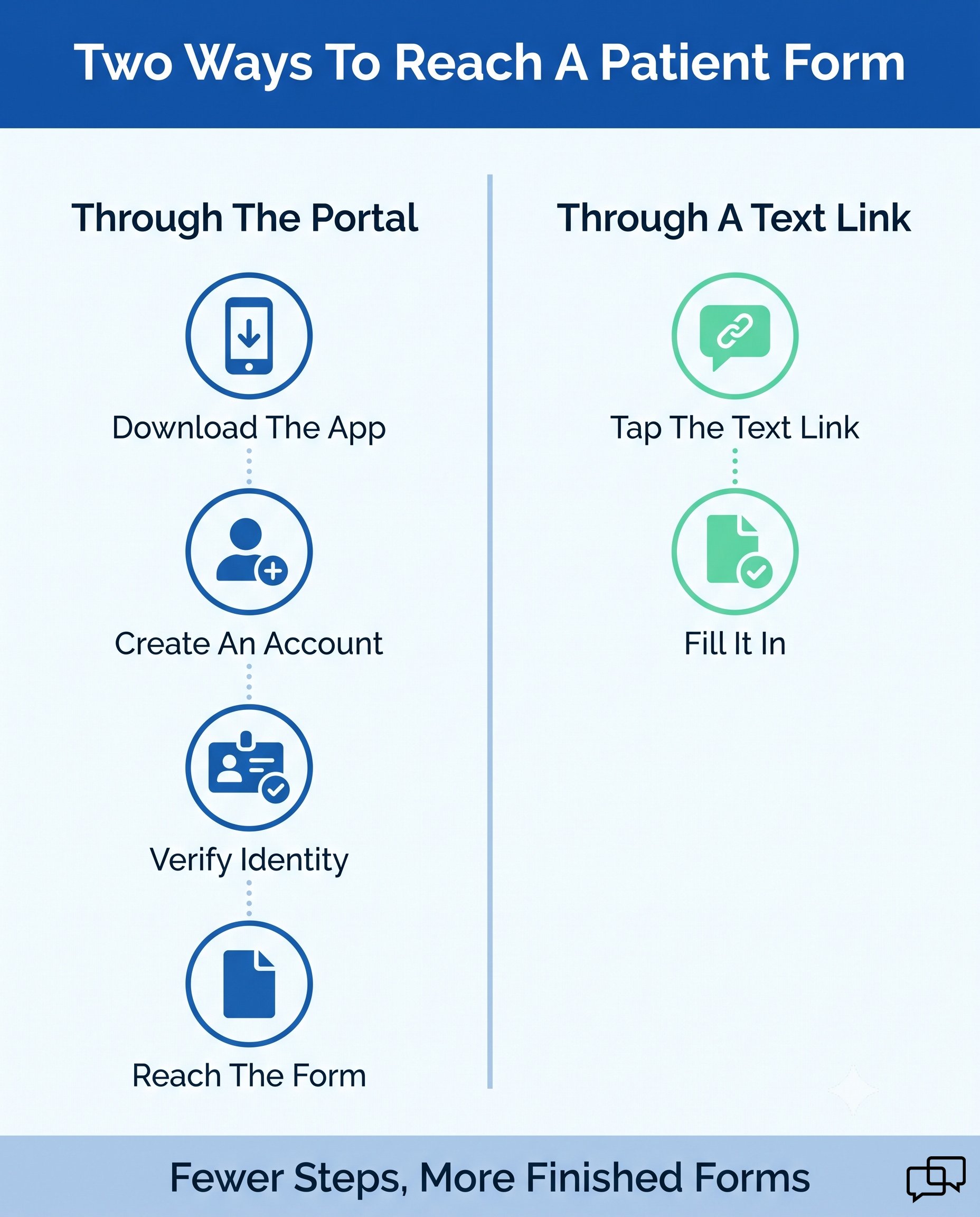
The gap is enrollment, not capability. A portal form reaches a patient only after they install the app, create an account, and verify their identity. Curogram works alongside those tools and covers the patients who never finish that setup.
Curogram’s online forms connect directly with Practice Fusion. Curogram operates under HIPAA and maintains SOC 2 Type II compliance. Completed forms sync to the patient record on their own, so nobody retypes anything.
Every clinic has different needs. Curogram lets you build custom templates per provider or specialty. Pediatrics can add a shot consent form. Cardiology can add a heart health survey, both tied to Practice Fusion workflows.
Curogram supports secure uploads of insurance cards and IDs, reducing the need for staff to scan or photocopy documents.
Patients simply snap a photo from their phone, and the image is stored securely in compliance with HIPAA. This speeds up insurance verification and reduces errors during check-in.

Paper forms create bottlenecks that small and independent clinics can no longer afford. Patients expect digital convenience. Practices that provide it gain a competitive advantage in efficiency and satisfaction.
The benefits of going paperless are hard to ignore. Success stories demonstrate measurable improvements in wait times, cancellations, and patient preparedness. It's imperative for practices of all sizes to go from paper to digital for them to stay competitive.
Curogram makes the transition easy. It features customizable templates, secure uploads, and HIPAA-compliant integrations. Curogram syncs online forms directly with Practice Fusion for a seamless experience.
Want HIPAA-compliant online forms in Practice Fusion? Book a quick demo today.

1 min read
💡 HIPAA-compliant texting in Practice Fusion helps small clinics enhance their workflows. With secure texting, they can improve efficiency, reduce...

1 min read
💡 Digital intake forms in Practice Fusion help small clinics cut check-in times. Online forms also reduce manual errors and improve patient flow....

1 min read
💡 HIPAA-compliant online forms for NextGen users are encrypted intake, consent, and history forms patients finish on any device, with answers...