

11 min read

Top HIPAA-Compliant Online Forms for NextGen Users

Top HIPAA-Compliant Online Forms for NextGen Users
💡 HIPAA-compliant online forms for NextGen users are encrypted intake, consent, and history forms patients finish on any device, with answers syncing into NextGen records under a signed BAA. NextGen ships native digital intake through Patient Engage powered by Luma, and practices add a text layer for patients who skip the portal.
  • Encryption covers data at rest and in transit, and the text carries a link, never health data
  • Role-based access limits who opens each form, with every view logged by name
  • The vendor signs a Business Associate Agreement before any patient data moves
  • Registration and insurance card photos go first, since that is where front-end denials start
  • Demographics map to chart fields, while clinical answers route to staff for review
Curogram clients average confirmation rates above 75% on the same texting channel the form link travels, based on our internal data.

A paper intake packet gets handled twice. Your patient fills it out once. A staff member types the same answers into NextGen a second time, usually after the schedule clears.

Two passes, two chances to go wrong. A transposed birth date kicks back an eligibility check. A handwritten drug name gets read as the wrong drug.

NextGen is not the bottleneck here. NextGen Patient Engage powered by Luma sends digital intake forms built for specific appointment types, and the demographics, insurance, and consent data collected update in the practice management system.

Gaps show up elsewhere. Patients who never activate a portal login, and practices running the EHR without the intake module, still get the clipboard.

Text-delivered forms close those gaps. One tap, no password, done in the parking lot.

This guide covers four things:

  • Why online patient forms matter for NextGen practices
  • What makes a form HIPAA compliant
  • The 10 form types NextGen clinics digitize first
  • Real client numbers from our own data, plus how Curogram fits

We'll also cover the sync mechanics. What writes back into the chart on its own, and what still needs a person to review it.

Why Online Patient Forms Matter for NextGen Clinics

Paper Intake Creates Bottlenecks and Errors

Six pages on a clipboard slow down more than one patient. Your 9:15 waits while your 9:00 is still writing. Then a staff member re-keys the whole packet later that day.

Errors enter on that second pass. A "9" that reads like a "4" in a policy number turns into a denied claim three weeks out. Allergy lists get skipped when the handwriting is bad.

Online patient forms NextGen practices send by text remove the second pass entirely. Patients type their own data. Nobody re-types it.

Paper also disappears. A signed consent that sits in a stack of forms waiting to be scanned is not in the chart, and an auditor will not accept a promise that it exists somewhere.

Patients Expect Convenient Digital Check-In

Most patients will fill out a form on their phone the day before. Very few will create a portal account to do it.

That is the split that matters for a NextGen practice. Portal intake works well for people who already use it. Everyone else needs a lower bar.

Paperless intake solutions NextGen users adopt alongside the portal reach both groups. A text goes out 48 hours ahead. Patients tap once, answer, and submit. No username, no password reset, no app download.

Older patients do this fine, as long as the form is short and the buttons are big. So do people who speak Spanish at home, when the form itself is translated.

Staff Workload from Manual Data Entry

Front desk data entry is steady, low-visibility work. It happens between phone calls, which is where mistakes start.

Count what your team retypes for one new patient: name, address, two phone numbers, emergency contact, insurance ID and group, a medication list, an allergy list, a family history. That is five to eight minutes if nothing is unclear.

At 15 new patients a day, that is over an hour of typing that produces nothing a patient can feel.

NextGen digital intake forms move that work to the patient, who already knows the answers. Your staff shifts from typing to checking, which is faster and catches more.

What Makes Online Forms HIPAA-Compliant

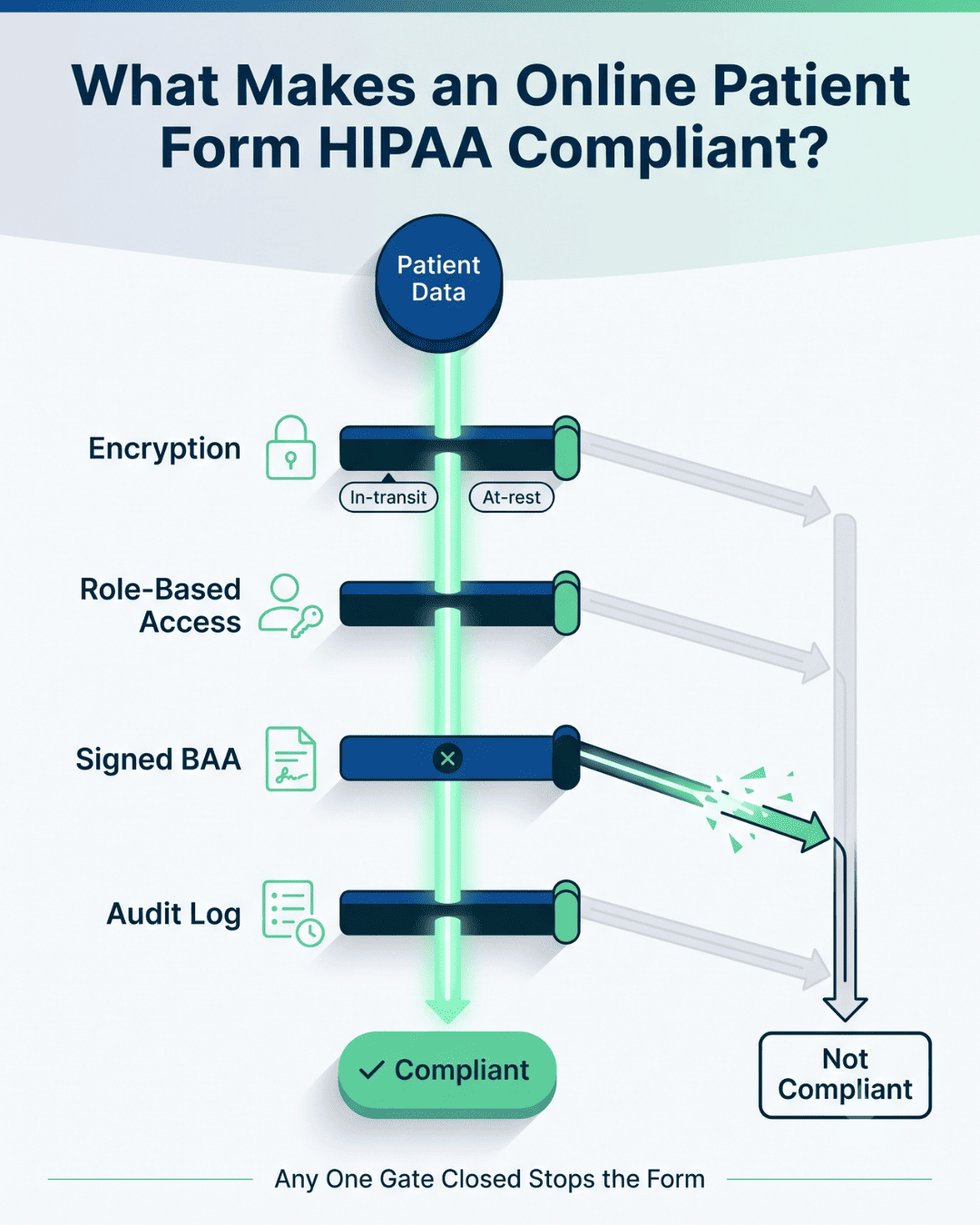
An online patient form is HIPAA compliant when data is encrypted in transit and at rest, access is restricted by role, the vendor signs a Business Associate Agreement, and every submission is logged for audit.

Secure Transmission and Data Storage

HIPAA-compliant online forms for NextGen users encrypt data in both states. Data moving from the patient's phone to the server is "in transit." Data sitting in a database afterward is "at rest." Skip either one and the form is not compliant.

The text message itself should carry no health information. It carries a link. The form opens in an encrypted browser session, and the answers go straight to the server from there.

Secure online forms for clinics also need session timeouts and link expiry. A form link that still works six months later, on a phone the patient traded in, is a problem nobody notices until it is one.

Ask any vendor two questions: what encryption standard covers data at rest, and how long does a form link stay live.

Authentication and Access Controls

Role-based access sets who can open a completed form. Your billing lead needs the insurance card image. A scheduler probably does not need the psychiatric history.

HIPAA-compliant patient forms healthcare teams rely on should let you set those roles per user, not per office. One shared login for the whole front desk defeats the point, because the audit log then shows five people as one person.

Two-factor authentication belongs on any account that can open patient records. Your staff loses a few seconds per login and you lose the password-sharing problem.

Audit logging is the third piece. Every view, every edit, every export gets a name and a timestamp. When a patient asks who saw their file, you need to answer with a record, not a guess.

Business Associate Agreements (BAAs)

A Business Associate Agreements (BAA) is the contract that makes a vendor legally accountable for the PHI they touch. Without one signed, sending patient data to that vendor is itself a HIPAA violation, regardless of how good their encryption is.

Ask for the BAA before the trial, not after. Any vendor built for healthcare will send it the same day. A vendor that stalls, or offers a "privacy addendum" instead, is telling you something.

Read the breach notification clause specifically. It should name a deadline in days for when the vendor has to tell you. Curogram signs a BAA with every practice before any patient data moves.

Infographic showing the four gates that make an online patient form HIPAA compliant, with a closed BAA gate blocking one path

10 Types of Online Patient Forms for NextGen Users

The 10 patient forms NextGen clinics most commonly digitize are registration, consent, insurance uploads, specialty pre-visit, medical history, medication and allergy, telehealth consent, payment authorization, post-visit surveys, and chronic-care follow-ups.

Most practices do not roll out all ten at once. Registration and insurance go first, because that is where the money and the rework live.

1. New Patient Registration Forms

Registration sets up everything downstream. Demographics, contact numbers, emergency contact, preferred pharmacy, and how the patient found you.

Send it when the appointment is booked, not the night before. New patients book two to three weeks out, and a form sent at booking gets returned while they are still thinking about the visit.

2. Consent and Authorization Forms

Treatment consent, HIPAA privacy acknowledgment, and release of information all need a signature and a date. Electronic forms for medical practices capture a typed or drawn signature with a timestamp attached.

The stored record beats a paper file for one reason: you can find it in four seconds during an audit.

3. Insurance Card and ID Uploads

Pull last month's front-end denials and count how many trace back to insurance data captured wrong at intake. Card photos fix most of that, because a phone camera reads the card better than a patient reading it aloud.

Ask for front and back, plus a photo ID. Then run eligibility before the visit, not at the counter.

4. Specialty-Specific Pre-Visit Forms

A rheumatology intake asks about joint swelling and morning stiffness. A GI intake asks about last colonoscopy date. Same practice, different forms.

NextGen supports form sets tied to appointment type through Patient Engage. Match your form library to your visit types, or providers open the chart to answers that do not apply.

5. Medical History and Family History Forms

History is the longest form and the one patients abandon most. Break it into short screens with progress shown, and completion goes up.

Pre-fill what you already have. Returning patients should confirm or edit, not start from a blank page every year.

6. Medication and Allergy Forms

This is the form with clinical consequences. A missed penicillin allergy is a different class of problem than a wrong phone number.

Let patients pick from a searchable drug list rather than typing free text. "Metaprolol" typed by hand becomes a reconciliation task for your MA.

7. Telehealth Consent Forms

Virtual visits need their own consent covering the technology, its limits, and what happens if the connection drops. Many states also require the patient to state their physical location at the time of the visit.

Send it with the visit link so consent and connection happen in the same tap.

8. Payment Authorization Forms

Card-on-file authorization and financial policy acknowledgment belong in intake, before anyone is standing at the counter with a copay question.

Collecting the authorization ahead of the visit shortens the checkout conversation to one sentence. It also gives billing a card to run when the claim comes back with patient responsibility.

9. Post-Visit Feedback and Survey Forms

Send the survey the same day. One that arrives four days later competes with everything else in the inbox.

Keep it to three questions. Digital documentation workflows can route a low score to your office manager and a high score to a review request, so nobody is reading survey results manually on Friday afternoon.

10. Follow-Up and Chronic Care Management Forms

Chronic care patients report between visits: blood pressure logs, symptom changes, medication side effects. Patient data collection NextGen practices depend on for chronic care works best on a schedule the patient does not have to remember.

Automated monthly check-ins catch the diabetic patient whose numbers drifted in week two, instead of at the 90-day appointment.

Benefits of Online Forms for NextGen Clinics

Faster Check-In and Reduced Wait Times

Check-in drops to an ID verification and a copay when the packet is already done. Your front counter stops being the place where paperwork happens.

The waiting room thins out as a side effect. Fewer people sitting with clipboards means fewer people sitting at all, which matters in a small lobby.

Providers feel it too, because the 9:00 actually starts at 9:00.

Improved Data Accuracy and Completion Rates

Patients typing their own data beats staff typing it from handwriting. The patient knows the spelling of their own medication.

Required fields also stop the classic blank: no phone number, no policy group, no signature. A paper form can be handed back incomplete. A digital form cannot be submitted incomplete.

Completion rates rise when the form is short and built for a phone. Split a 40-question history across one long screen and patients quit partway down it.

Reduced Administrative Burden

Removing the retype loop gives your front desk back the hour it spends on data entry. That hour usually goes to the phones, which is where patients are waiting anyway.

Scanning goes away too. No stack of signed consents waiting for the scanner, no file naming, no misfiled PDF.

Staff turnover is the harder cost. Data entry is the part of the job people quit over, and a front desk that runs on forms instead of typing is easier to staff.

Higher Patient Satisfaction

Patients judge a practice by the first ten minutes. Filling out a form at home on Sunday reads as organized. Filling it out in a lobby chair reads as behind.

Practices that pair forms with reminder texting see the effect compound. Based on our internal data, Curogram clients average a confirmation rate above 75% on automated appointment reminders, which is the same channel the form link travels on.

Patients also stop calling to ask what to bring. The form told them.

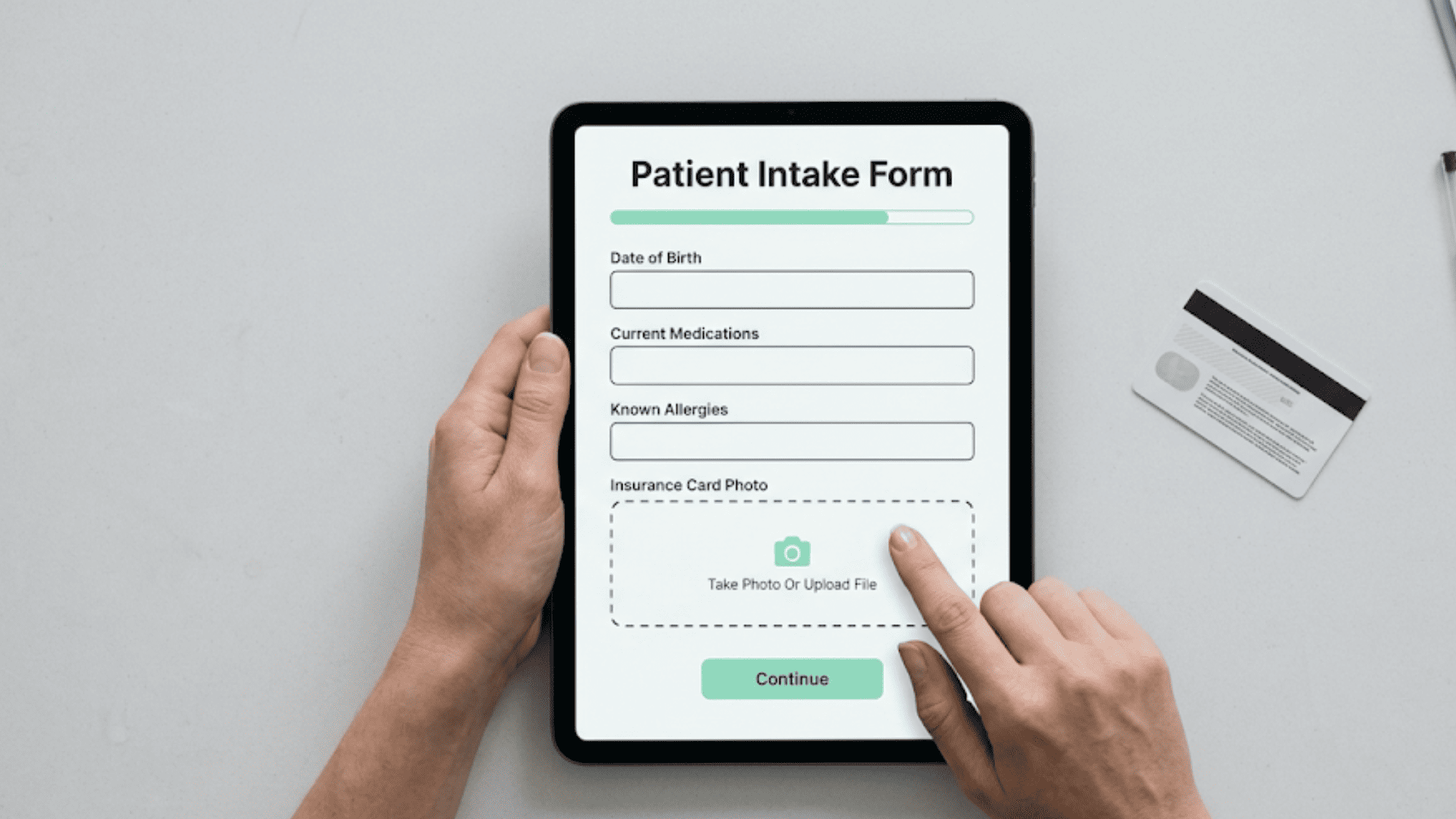
Overhead view of a patient completing a digital intake form on a clinic tablet, tapping the insurance card photo upload field

Real-World Examples of Success With Online Forms

The three numbers below come from our internal data, drawn from the Curogram Case Studies file.

Practice What changed Result
Atlas Medical Center Automated reminders and confirmations No-show rate fell from 14.20% to 4.91% in three months
Covina Arthritic Clinic Manual confirmation calls replaced with automated texting More than 1,100 appointments confirmed per month
Multi-location practice SMS recall to patients overdue for follow-up 35% booked within a month, 1,240 patients seen


Atlas Medical Center Cut No-Shows by Two-Thirds

Atlas ran the same problem most practices run: reminder calls that reached voicemail. After moving to automated reminders and confirmations, their no-show rate dropped from 14.20% to 4.91% within three months, based on our internal data.

Prep forms ride the same channel. A patient who confirms by text is already in a thread where the intake link can follow.

Covina Arthritic Clinic Confirms 1,100+ Appointments a Month

Covina's staff had been confirming appointments by phone, one call at a time. Automating it moved more than 1,100 confirmations a month off the front desk, according to our internal data.

That volume is the point for intake. That same automated thread carries 1,100 chances to attach a form before the visit.

A Multi-Location Practice Brought Back 1,240 Patients

Recall texting to patients overdue for follow-up produced a 35% booking rate within a month, and 1,240 patients were seen from those messages alone. This client runs multiple locations, based on our internal data.

Follow-up forms plug into that same recall list. Patients who book from a recall text get the chronic care check-in form in the same conversation.

Across our client base, no-show rates run 53% below the industry average. Prep forms contribute to that number by catching the patient who did not know to fast, or to bring a referral, before they cancel the morning of.

How Curogram Integrates with NextGen for Online Forms

HIPAA-Compliant Digital Forms Accessible from Any Device

Curogram provides secure online forms that send as a text link. The patient taps it, the form opens in an encrypted browser session, and no health information travels in the SMS itself.

No portal account is required. That is the practical difference for a NextGen practice whose portal adoption stalled below the panel it needs to reach.

Forms render on any phone, tablet, or desktop, and a patient can start on a phone and finish on a laptop. Curogram signs a BAA with every practice.

Direct Sync Into NextGen Patient Records

Completed forms flow back into NextGen patient records rather than sitting in a separate inbox. Demographics and insurance data map to the chart fields your staff already uses.

Some items still need a human. Clinical answers that affect the note, like a new medication or a reported allergy, route to a staff member for review before they land in the record. That review step is intentional, and it needs a licensed user to complete it.

Forms that sync through our NextGen integration show up attached to the right appointment, not floating loose in a document queue.

Customizable Templates by Visit Type or Specialty

Build a form library by visit type: new patient, annual physical, pre-op, telehealth, chronic care follow-up. Assign each one to the appointment types that should trigger it.

A cardiology group and a behavioral health practice on the same platform run completely different form sets. Skip logic hides questions that do not apply. A patient who answers "no" to tobacco use never sees the four follow-up questions.

Templates update in one place. Change your financial policy language once and every future form carries it.


Conclusion

Paper intake costs your practice twice: once at the counter and again at the keyboard. Online forms remove the second cost and shrink the first.

NextGen already offers native digital intake through Patient Engage. Adding a text-delivered forms layer reaches the patients who never open it.

The bar for HIPAA-compliant online forms for NextGen users is specific and checkable. Encryption both ways, role-based access, a signed BAA, and an audit log with names on it.

Our clients see the results downstream. No-shows 53% below industry average, and confirmation rates above 75%, based on our internal data.

Want to see how electronic forms improve compliance and cut your front desk retyping? Get a quick demo today.


Frequently Asked Questions

Does NextGen have online patient intake forms?

Yes. NextGen Patient Engage powered by Luma sends digital intake forms tied to appointment type, and the collected demographics, insurance, and consent data update in the practice management system. What you get depends on which modules your practice licenses. Practices often add a text-based forms layer for patients who never activate a portal login.

What makes an online patient form HIPAA compliant?

Four things together: encryption of data in transit and at rest, role-based access controls limiting who can open each form, a signed Business Associate Agreement with the vendor, and an audit log recording every view and edit by name. Miss any one of the four and the form is not compliant, however well you handle the other three.

Can patients upload insurance cards to NextGen before a visit?

Yes. Patients photograph the front and back of the card on their phone and submit it with the intake form, before they arrive. The images attach to the patient record so your billing team can verify eligibility ahead of the visit instead of at the front counter. Card photos cut the typing errors that drive front-end claim denials.

Do online intake forms sync automatically into NextGen?

Demographics and insurance fields map straight into the chart with no retyping. Clinical answers, such as a new medication or a reported allergy, route to a staff member for review first, then post to the record. That review step needs a licensed user, so it is not fully automatic by design.

What happens if a patient does not finish the form before the visit?

The link stays valid through the appointment window. Your front desk hands over a tablet at check-in, and the patient picks up where they stopped. Answers already sent are saved, so nothing gets retyped. A reminder 24 hours ahead catches most unfinished forms before anyone reaches the counter.

Digital Intake Forms for Modmed Practices | Replace Paper Intake

1 min read

Digital Intake Forms for Modmed Practices | Replace Paper Intake

💡 Secure online forms digital intake Modmed specialty practices use replace clipboard paperwork with mobile-friendly forms patients complete on...
Read More
AdvancedMD Intake Automation | Eliminate Data Entry Before Check-In

1 min read

AdvancedMD Intake Automation | Eliminate Data Entry Before Check-In

💡 AdvancedMD intake automation through Curogram removes one of the biggest time drains in a medical practice: front desk data entry.When patients...

Read More
Online Patient Forms in DrChrono with Curogram

1 min read

Online Patient Forms in DrChrono with Curogram

💡 Online patient forms in DrChrono eliminate paperwork bottlenecks and modernize check-in. Small clinics can benefit from digital forms using the...

Read More