7 min read

How to Reduce No-Shows for a Therapy Group Practice on TherapyNotes

How to Reduce No-Shows for a Therapy Group Practice on TherapyNotes
💡 Reducing no-shows for a therapy group practice on TherapyNotes takes more than the EHR's built-in alerts. Group practices lose far more revenue to missed visits than solo clinics do.

The fix is multi-channel therapy reminders paired with two-way confirmation. Curogram for TherapyNotes adds text, email, and voice reminders that clients can reply to.

When a client confirms by text, that status updates the TherapyNotes schedule in real time. This closes the gap that one-way alerts leave open.

Based on our internal data, therapy and psychiatry practices on the Curogram platform average an 11.03% no-show rate. That sits roughly 52% below the 23% industry average reported by ProspyrMed in 2024.

For a 12-clinician group, that drop recovers around 11 visits a day. Setup takes two to four weeks with workflows built for behavioral health.


A missed appointment feels small at a solo practice. One client skips, and the therapist catches up on notes. The schedule barely notices.

The same miss looks far worse across a busy group, where a dozen clinicians turn small gaps into a real money problem.

That is the core challenge when you reduce no-shows for a therapy group practice on TherapyNotes.

The volume that makes a group strong also makes no-shows costly. Knowing the true cost makes the fix easy to justify. Curogram for TherapyNotes helps close that gap, but first it helps to see its scale.

TherapyNotes sends appointment reminders, and for many clients they work well. Still, built-in reminders hit a ceiling as a practice grows. Some clients ignore a text. A one-way alert also never tells you who plans to show up.

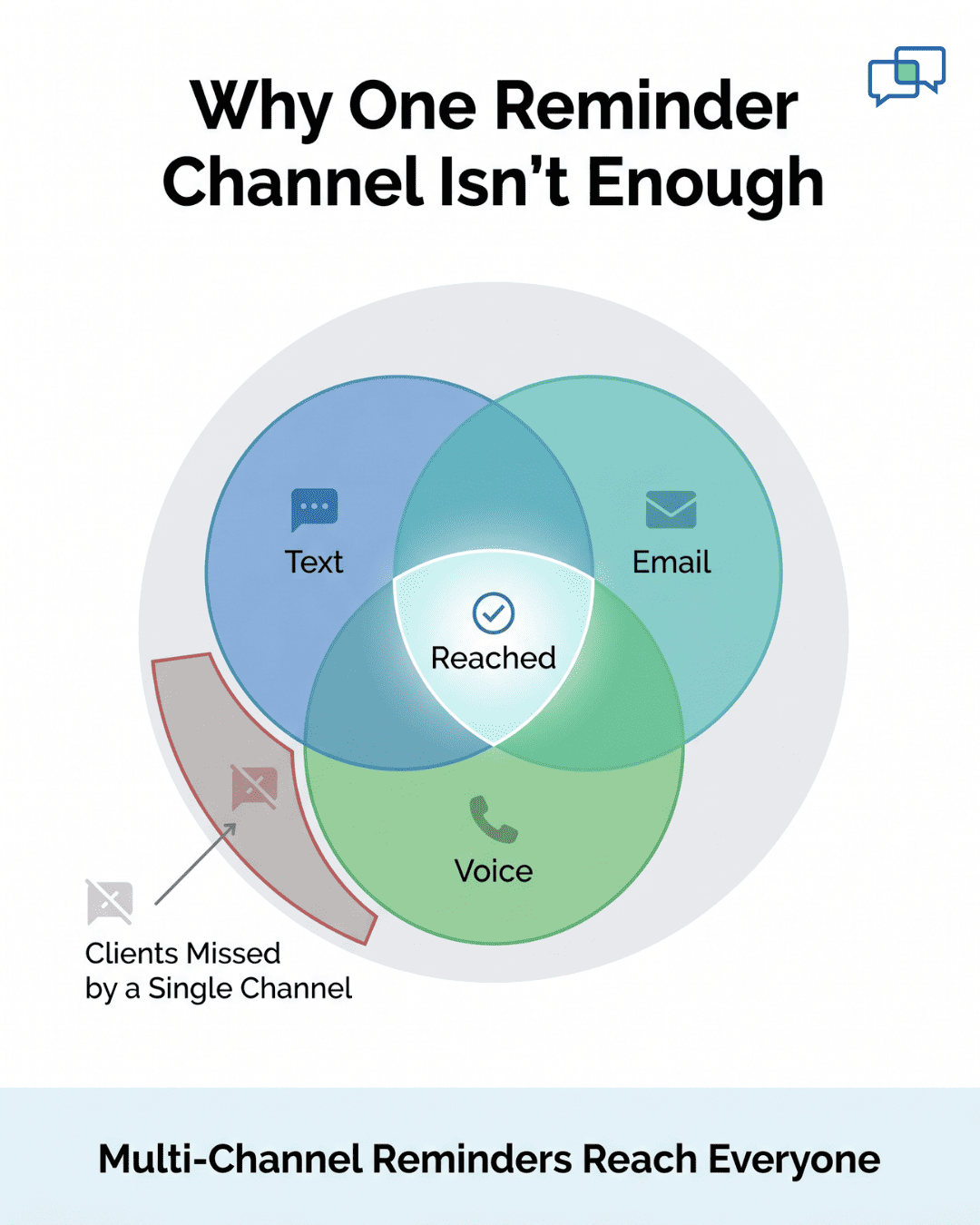
This is where multi-channel therapy reminders change the math. Instead of one message on one channel, clients get reminders by text, email, and voice.

They reply to confirm, and that reply updates your TherapyNotes schedule. Nothing falls through the cracks, so your front desk finally sees who is coming.

The payoff is not just fewer empty chairs. Recovered visits mean steadier revenue and shorter waits for new clients.

Your staff also stops burning hours on confirmation calls. That time can shift to intake and patient support instead.

In this guide, we break down the no-show math for group practices. We show why standard reminders stall at scale.

Then we walk through how Curogram layers reminders, confirmations, and follow-up onto TherapyNotes.

You will also see what recovered slots are worth across a full year. By the end, you will know where your no-show losses hide and how to win them back.

The No-Show Math for Group Therapy Practices

At a solo practice, a no-show stings but stays manageable. Consider a therapist with eight visits a day at the 23% industry average. That works out to about two missed visits daily. It is frustrating, but the practice survives it.

Now scale that up to a 12-clinician group with the same rate. Across roughly 96 visits a day, 23% means about 22 missed visits. That is no longer a scheduling annoyance. It is a structural revenue problem.

The dollars make it clear. At $150 to $200 per therapy session, 22 missed visits cost about $3,300 to $4,400 a day. Over a five-day week, that is $16,500 to $22,000 in lost revenue. These figures use the cited industry average, so treat them as an estimate.

No-shows also cost more than the missed visit itself. They punch holes in each provider's schedule that you cannot fill on short notice.

Empty slots make the calendar look full when it is not. So new clients wait longer for a first appointment that never needed to be delayed.

Many groups try to fix this by hand. As one practice put it, "Our front desk is fielding 80+ calls a day just for directions and confirmations." Those confirmation calls are a manual patch for the no-show problem. The trouble is simple: that approach does not scale as your group grows.

Why TherapyNotes' Built-In Reminders Hit a Ceiling

TherapyNotes sends appointment reminders through its own system. For plenty of clients, those reminders do the job. The ceiling shows up in three places once your group grows. Each one chips away at your no-show results.

Channel Limits

A reminder only helps if the client actually sees it. People do not all use the same channel the same way. A younger client may read every text but never open practice email. An older client may screen unknown numbers but check email each morning.

When you send on one channel only, you bet on a single habit. That bet fails for a real slice of your caseload every week. Some texts land in a muted thread, and some emails drop into spam. A morning voice call would have caught those same clients with ease.

In a group setting, that missed slice multiplies fast. One unseen reminder per clinician per day adds up across 12 providers. Over a month, that is hundreds of reminders that never truly registered. Single-channel reminders leave too much attendance to chance.

The Confirmation Gap

A standard reminder is a one-way note. It tells the client about the visit but asks for nothing back. So you never learn who saw it, who plans to come, or who already chose to skip. Without a reply, your schedule is really just a hopeful guess.

That gap hides your true risk until it is too late. A client who decided to cancel still shows as booked on your calendar. The slot looks full, so staff never offer it to a waiting client. Then the hour arrives, the chair stays empty, and the revenue is simply gone.

Two-way confirmation closes this gap by turning the reminder into a question. The client replies, and you instantly know their real intent.

Confirmed visits give you confidence, and silence flags who needs a nudge. You stop guessing and start managing the schedule with facts.

Patient receiving multi-channel therapy reminders on a phone

Volume at Scale

With 12 clinicians seeing clients all day, reminder volume climbs fast. A solo therapist might track a handful of confirmations by memory. A large group cannot, because the numbers are simply too high. Someone still has to follow up on every client who does not confirm.

That follow-up work lands on a front desk that is already stretched. The same staff answer phones, greet clients, verify insurance, and handle billing.

Adding manual confirmation calls on top of that is a losing battle. Something gets dropped, and dropped confirmations turn into no-shows.

Manual effort also does not scale evenly with growth. Each new clinician you hire adds another full day of reminders to chase. Your front desk headcount rarely grows at the same pace. So the gap between what needs doing and what gets done keeps widening.

None of this means TherapyNotes is doing anything wrong. Its reminders are a solid starting point for a smaller caseload. The issue is that a growing group needs more reach and a way to capture replies. That is the exact gap a dedicated reminder layer is built to fill.

How Curogram Reduces No-Shows for TherapyNotes Practices

Curogram sits on top of TherapyNotes and fills the gaps above. It turns one-way alerts into a real confirmation system. Here is how it works in a busy group practice.

  • Reminders across every channel. Clients get reminders by text, email, and voice. You can set a different cadence for each appointment type. Individual therapy, group sessions, and medication management can each follow their own schedule. 

  • Two-way confirmation. Clients reply to a text to confirm their visit. That status writes back to the TherapyNotes schedule automatically. Your front desk sees in real time who has confirmed and who has not. No more guessing, and no more manual call lists.

  • Automated escalation. If a client does not confirm by text, Curogram can place a follow-up voice call. The sequence runs on its own until a client is flagged as unconfirmed. Staff only step in for the few who need a personal nudge.

Venn diagram showing text, email, and voice reminders reaching clients to reduce no-shows

The results back this up. Based on our internal data, Atlas Medical Center cut its no-show rate from 14.20% to 4.91% in three months.

That is about a 65% drop, and roughly three times better than the industry average. Across the platform, therapy and psychiatry practices average an 11.03% no-show rate — roughly 52% below the 23% industry norm.

Wondering how this compares to enterprise tools? See our Curogram vs Luma Health breakdown. Luma Health targets large health systems with complex workflows. Curogram deploys for therapy groups in two to four weeks, with reminders tuned to each appointment type.

What Recovered Appointments Mean for a Growing Practice

Cutting no-shows does more than tidy the calendar. It changes the economics of the whole group. Here is what those recovered slots are worth.

Revenue Recovery

At the 23% industry average, our example 12-clinician group loses about 22 visits a day. Bringing that down near the 11% platform average recovers roughly 11 visits daily. Over a typical year of about 250 clinic days, that is close to 2,750 recovered visits. Even at $150 each, that adds up fast.

Provider Utilization

Clinicians see more clients without adding hours. The schedule fills more evenly and predictably. That eases the urge to overbook as a hedge against no-shows. Steadier days also tend to keep providers happier in their work.

New Patient Access

Fewer no-shows means your real capacity grows. Slots that used to sit empty now hold actual visits. New clients can book sooner instead of waiting weeks. Shorter waits matter most in behavioral health, where timing affects outcomes.

Front Desk Reallocation

Your staff stops spending hours on confirmation calls. That recovered time can shift to intake and insurance checks. They can also give more attention to clients who walk in or call with real needs. The same team simply gets more done.


Getting Started

Getting started with Curogram is simple, and you are not on your own. Our team handles the TherapyNotes integration for you.

We then build your reminder sequences by appointment type, so each visit gets the right cadence. You tell us your workflow, and we set it up to match.

The setup respects how your group already runs. Individual therapy, group sessions, and medication management can each follow their own timing.

You decide which channels go out first and how follow-up should escalate. Nothing is forced into a one-size-fits-all template.

Most practices go live in two to four weeks. There is no new platform for your staff to master. Reminders, confirmations, and follow-up run quietly in the background. Your team stays focused on client care, not on chasing replies.

Once you are live, the results show up quickly in your own numbers. You can watch confirmation rates climb and empty slots shrink week over week.

Our team stays available to fine-tune cadences as you learn what works. As you add clinicians, the same system scales with you.

Want to see it work with your schedule? Start a free demo and explore how Curogram supports behavioral health clinics of every size.


Frequently Asked Questions

What if a patient doesn't respond to the SMS or can't figure out how to join the video?

Curogram SMS includes embedded support link ('Trouble joining? Click here'). Routes to minimal-friction support page: (1) Camera/microphone permission check with visual guide, (2) Three large buttons: 'Join Video Call Now,' 'Call Curogram Support,' 'Schedule Phone Consultation.'

This resolves 95% without coordinator intervention. Remaining 5% have direct Curogram support included.

Does this work for patients who absolutely prefer phone-only?

Yes. Front desk asks: 'Virtual (video link via text) or Phone Only?' Phone-only fully supported, still receive SMS reminders. In practice, 65–70% opt video once they understand zero app-download requirement.

Will this work for patients with older phones or rural internet?

Curogram codec optimized for low-bandwidth (1.5 Mbps minimum). Audio+Screen Share mode available for severe connectivity issues. Successfully serves isolated rural patients.

Why does the workflow free up so much coordinator time compared to portal-based telehealth?

Portal-based workflows force coordinators to troubleshoot logins, send reset links, and play voicemail tag. SMS removes those steps entirely. The 17 to 23 minutes saved per consult adds up to 6–10 hours weekly per coordinator, based on our internal data.

How do we measure whether the rollout is actually working at week 12?

Track four numbers weekly: no-show rate, coordinator hours on telehealth admin, consultation-to-imaging conversion, and patient feedback scores. Compare them to your baseline. If three of four are trending in the right direction by week eight, the rollout is on track.