
How to Prepare for a Telehealth Visit in Athenahealth
Learn how to prepare for a telehealth visit in Athenahealth. Step-by-step tips for patients and clinics to ensure smooth, HIPAA-compliant virtual...
10 min read

Your front desk picks up the phone. A parent can't leave work. A senior can't arrange a ride. A new patient is worried about sitting in a crowded lobby. Moments like these are where virtual care changes everything.
In this article, we'll cover why telehealth matters for small practices. Learn how video visits fit inside your existing flow, and the core wins you can expect.
You'll see real examples from clinics like yours and get a quick-start plan to launch online visits. If you want the full picture first, here's how Curogram connects to Office Ally across scheduling, messaging, and virtual care.
Telehealth in Office Ally gives small practices a simple way to meet patients where they are. Because when your team runs lean, every extra step feels heavy. Complex platforms, passwords, and downloads slow everyone down.
Curogram keeps it light: a secure link, a device people already own, and a video visit that starts on time. It's Office Ally virtual care designed for daily life, not just emergencies. Patients get the care they need; your schedule stays on track; your team breathes a little easier.
If you've been looking for a telehealth option that "just works," this guide is for you.
Large health systems can absorb a missed appointment. A three-provider clinic feels it the same afternoon.
That is the honest case for telehealth in Office Ally. Small practices run close to capacity, with little slack to rebook, chase, or backfill. When a patient cannot make it, the slot usually stays empty.
Distance and logistics drive a large share of those gaps. A parent cannot leave a shift. A senior cannot arrange a ride. A patient with anxiety cannot face a crowded lobby.
None of these are clinical reasons to delay care. All of them delay care anyway.
Researchers pooled 45 retrospective studies comparing virtual and in-person attendance. The meta-analysis found patients receiving virtual care were less likely to miss appointments than in-person groups, with an odds ratio of 0.61. Put plainly, virtual visits get attended more often.
Individual clinics report steeper gaps. One primary and specialty care study recorded a 7.5% no-show rate for telehealth visits against 36.1% for in-office visits over the same period. Your own numbers will land somewhere in between, but the direction is consistent.
Here is what that gap is worth. Industry estimates commonly place the cost of a single missed appointment around $200 once you count lost revenue, staff time, and idle rooms.
| Practice profile | Visits per month | No-show rate | Missed visits | Monthly loss at $200 | Annual loss |
|---|---|---|---|---|---|
| Solo provider | 320 | 15% | 48 | $9,600 | $115,200 |
| Two providers | 640 | 15% | 96 | $19,200 | $230,400 |
| Four providers | 1,280 | 15% | 192 | $38,400 | $460,800 |
These are illustrative figures, not a promise. Still, they reframe the question. Recovering even 20% of those missed visits through a virtual option is worth roughly $23,000 a year for a solo provider and about $92,000 for a four-provider group.
For your team, that is the difference between a schedule that holds and one that leaks all week.
Virtual care stopped being a pandemic workaround years ago. It is now a standing expectation. The numbers keep climbing.
FAIR Health reported that telehealth utilization rose 10.1% nationally between the fourth quarter of 2025 and the first quarter of 2026, moving from 5.01% to 5.51% of medical claim lines. The share of patients with a telehealth claim rose from 17.3% to 18.4% over the same stretch.
Behavioral health drives much of that volume. Mental health conditions topped the diagnostic categories for every age group and region in Q1 2026, with 52.1% of patients holding a telehealth claim tied to a mental health condition.
If your practice offers counseling or medication management, telecounseling is not a side feature. It is the main use case.
There is also an emotional layer worth naming. Some patients feel real anxiety about navigating buildings, parking, and crowded lobbies. A clean virtual option lowers that barrier and makes it easier to say yes to care.
For years, the biggest objection to building a telehealth program was policy whiplash. Medicare flexibilities expired, got extended by a few months, then expired again.
That changed in early 2026. Congress passed the Consolidated Appropriations Act of 2026 on February 3, extending Medicare telehealth coverage flexibilities through December 31, 2027. Behavioral telehealth policies, including home-based care, audio-only services, and expanded clinician eligibility, remain permanent.
Two years of visibility is enough to build a real program instead of a stopgap. Still, check current rules with your payers before you set fee schedules. Telehealth policy keeps moving.
Office Ally's patient portal, Patient Ally, gives patients access to lab results and clinical notes, secure messaging, appointment requests, and intake documents that sync back to Practice Mate and EHR 24/7.
Video visits are not part of that portal, and telehealth is not listed among the current EHR 24/7 add-on services. That is exactly the gap Curogram fills.
Telehealth in Office Ally works when Curogram supplies the patient-facing access layer: providers launch a HIPAA-compliant video session from the Office Ally schedule, and patients join by tapping a link in their browser—no app download, no portal login, no password.
Curogram adds a video button to the world your team already knows. Providers launch HIPAA-compliant sessions right from the day's schedule.
Patients receive a secure link that opens in the browser—no app store, no passwords, no surprises. It works on phones, tablets, and computers, so almost anyone can join with one tap.
Clarity makes visits start on time. Patients get simple, friendly instructions in plain language, with options for multiple languages when needed. If a device mic or camera needs a quick check, the pre-visit screen walks them through it.
Because links and instructions arrive by text rather than through a portal login, practices using Curogram see confirmation rates above 75%.
The result:
Fewer "tech hiccups" and more face-to-face minutes that matter.
Documentation stays straightforward. Providers keep notes in the same workflow they use every day, and staff can send follow-up messages with next steps.
For complex cases, you can add photos or documents securely so nothing is lost in email chains.
Curogram is HIPAA-compliant and holds SOC 2 Type II certification through an independent third-party audit, so the security posture behind every visit is externally validated. It's telehealth that respects clinical reality—fast to start, easy to finish, and simple to reference later.
Scalability is built in. Whether you're a solo provider or a multi-site group, Curogram supports your pace without adding layers of tools.
Covina Arthritic Clinic is a useful marker for what that looks like at volume:
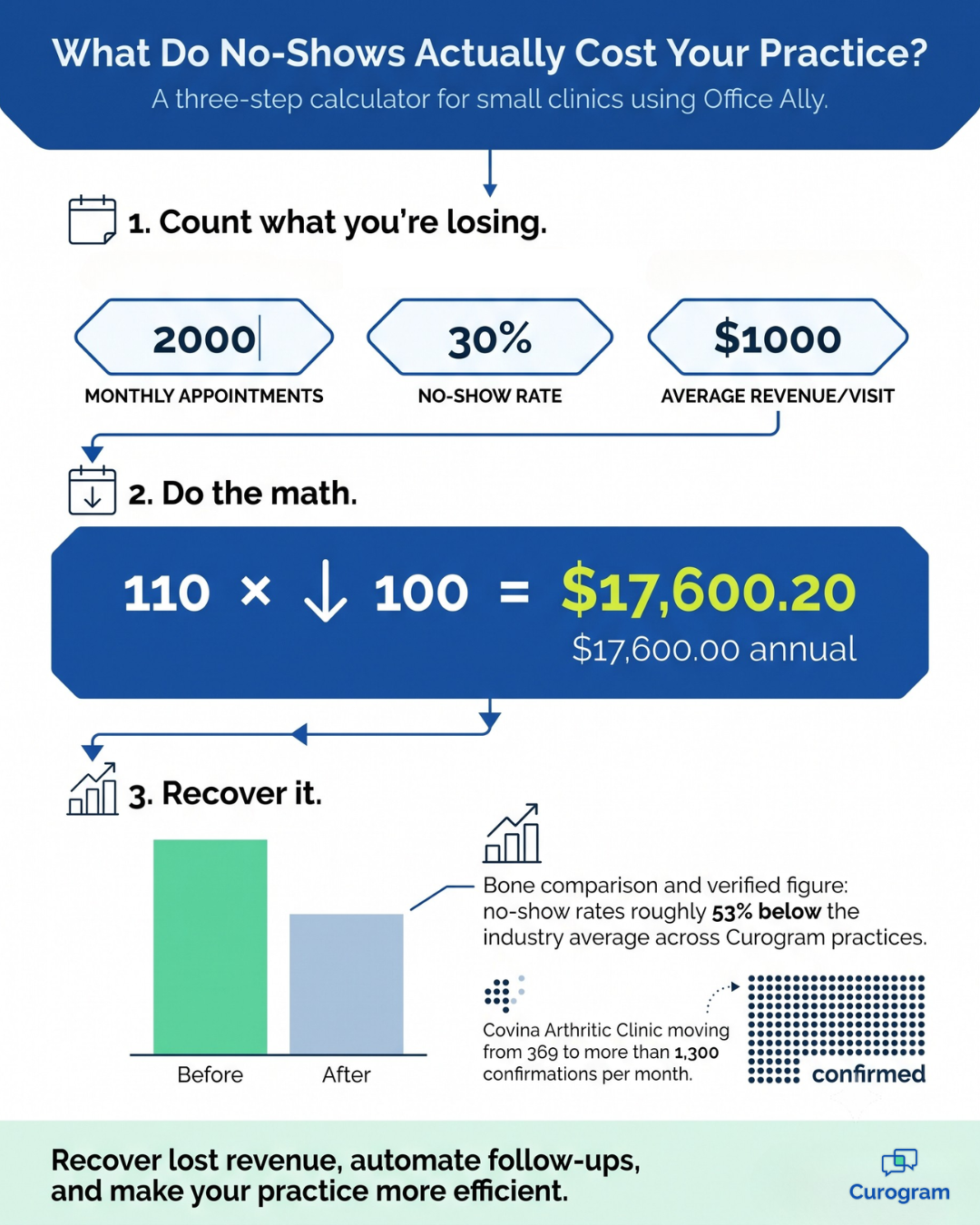
The practice went from 369 confirmations a month to more than 1,300.
You can standardize simple visit types for virtual care—follow-ups, medication reviews, lab result discussions—while keeping in-person visits for what truly needs hands-on care. This balance lets your team serve more patients reliably, not just during a crisis but every week.
The benefits of connecting Office Ally with Curogram show up in three places: what patients experience, what your staff stops doing, and what lands on your books.
Here is the full picture at a glance.
| Benefit | Who feels it first | What changes |
|---|---|---|
| Expanded patient access | Patients | Working parents, students, and older adults connect without travel |
| More kept routine appointments | Practice | Simple visits survive transportation and schedule problems |
| Higher satisfaction and loyalty | Patients | Clear links and on-time starts build repeat visits and referrals |
| Better use of staff time | Front desk | Less troubleshooting, fewer callbacks, more care coordination |
| Flexible scheduling | Providers | Video blocks group cleanly around in-person procedures |
| Safer, private communication | Both | Encrypted sessions and controlled access for sensitive topics |
| Fewer avoidable ER trips | Patients | Early guidance prevents expensive detours |
| Stronger post-procedure continuity | Providers | Wound checks and med reviews happen the same week |
| Easier caregiver involvement | Families | Multi-user sessions bring the full history into the visit |
| Growth without overhead | Practice | Added virtual capacity with no platform overhaul |
Each row is useful on its own. Grouped together, they change the shape of the week.
Access is the benefit everything else rests on. A patient who cannot reach you gets nothing else you offer.
For visits that do not need hands-on care, video removes travel, parking, childcare, and time off from the equation.
That matters most for the groups most likely to drop off your schedule. Older adults. Patients managing mental health conditions. Caregivers and hourly workers who lose pay for every visit.
Continuity improves alongside access. A post-op wound check or med review can happen within days instead of weeks. That is when problems are cheapest to catch.
Caregivers can join from another location. The history stays complete, and everyone leaves with the same plan.
Patients notice when care is easy to reach. That shows up later in retention and in reviews.

Staff burnout in small practices is rarely one big thing. It is 40 small interruptions.
Virtual visits cut one whole category of them. The rebooking calls. The stuck-in-traffic scrambles. The phone tag over a lab result that takes four minutes to explain.
When the link works on the first tap, none of that reaches the front desk.
Providers gain something too. Grouping short video follow-ups into set blocks keeps the rest of the day from sliding. Lunch breaks and end times hold. Predictability is an underrated form of burnout prevention.
The financial case comes down to protected capacity. Every routine visit that stays on the calendar is revenue you already earned and nearly lost.
Look again at the earlier table. A two-provider practice losing 96 visits a month is leaving about $230,400 on the table each year.
Converting even a small share of those to online visits changes that picture. No new provider. No new room.

This is the kind of online visits SMB clinics can actually staff and sustain. No new hire, no build-out, no separate platform contract. You are using the schedule you already manage and the team you already have.
If you want to run this math on your own numbers, Curogram's no-show ROI calculator does it in a few minutes.
Family clinic added after-hours access:
A small primary care group opened two evening blocks each week for quick medication checks and sick notes.
Parents booked from their phones after kids’ activities, and visits started on time with one-tap links.
Staff reported fewer next-day call surges and clearer care plans.
Patients praised the flexibility and kept returning for in-person care when needed.
Solo provider improved follow-up completion by 25%:
A single-physician practice offered virtual slots for post-visit check-ins and lab reviews. Short video visits replaced phone tag and reduced missed follow-ups.
The provider documented in the usual workflow and closed loops faster. Patients felt more supported and were more likely to stay on therapy.
Launching telehealth in Office Ally doesn't have to be a long project. Keep it simple, start small, and build from real results.
Here's a practical plan your team can follow right away.
By focusing on simple wins first, you'll create a telehealth rhythm that your team enjoys and your patients trust. That rhythm is what keeps the program strong all year long.
Why Curogram Fits Office Ally Specifically
Plenty of platforms offer video. Fewer solve the part that actually breaks.
Curogram's approach is narrow on purpose. It does not replace Office Ally, duplicate your charting, or ask your team to work in two systems.
It handles one thing: the connection between a scheduled appointment and a completed visit. And it does that through the channel patients respond to fastest.
The practices seeing the strongest results are not the ones with the most features turned on. They are the ones that removed every barrier between the patient and the screen.
For clinics with many elderly patients, behavioral health patients, or caregivers, that difference decides whether the program works at all.
Everything else runs from the same platform. Telemedicine, texting, reminders, forms, and payments all live in one place. The EMR integration is already built, so there is no development project on your end.
Most missed appointments are not clinical decisions. They are logistics failures.
A ride falls through. A shift changes. A caregiver cannot get off work. The patient still needs the visit, and the practice still needs the revenue, but the appointment dies over a transportation problem.
Telehealth in Office Ally closes that gap for visits that do not need hands-on care. Curogram makes it work by removing the two things that sink most virtual programs. App downloads for patients. Extra systems for staff.
The evidence supports the effort. Virtual visits are attended more often than in-person ones. National use keeps climbing. Medicare flexibilities now run through the end of 2027, which gives you real planning runway.
The financial case is just as concrete. A two-provider practice with a 15% no-show rate is losing roughly $230,000 a year to empty slots. Recovering even a fifth of that through a virtual option pays for the program several times over.
Start small. Two visit types, three weekly blocks, one dry run before you go live. Watch your start-on-time and completion rates for two weeks, then adjust.
Expand only when the first version runs itself. Office Ally virtual care works best when it feels boring, because boring means nobody is troubleshooting.
That is the whole program. It is not a transformation project, and it should not feel like one.
What you get back is a schedule that holds together when life does not cooperate, a front desk that stops fielding tech questions, and patients who stay connected to your practice instead of drifting toward urgent care.
Ready to see what Office Ally virtual care looks like in your workflow? Schedule a demo and we will walk through it with your actual schedule.

Learn how to prepare for a telehealth visit in Athenahealth. Step-by-step tips for patients and clinics to ensure smooth, HIPAA-compliant virtual...

See how Curogram integrates with DrChrono to deliver HIPAA-compliant telehealth, helping small practices expand access and reduce no-shows.
See how Curogram integrates with Dolphin to deliver HIPAA-compliant telehealth for ortho and oral surgery practices, supporting consults and...