

6 min read

Standardizing Appointment Reminders Across Tebra Locations

Standardizing Appointment Reminders Across Tebra Locations
💡Standardizing appointment reminders across Tebra locations means every site sends the same governed reminder sequence, and patients can confirm, cancel, or rebook by replying. Curogram runs that sequence alongside Tebra from one console.

The owner locks one cadence and one core message, so a new site can't drift from it. Each site keeps its own details: provider names, directions, language options, and local number.

Patient replies update the status staff see on the schedule. No-show and confirmation rates for every location sit side by side in one weekly view.

Based on our internal data, Curogram clients run no-show rates 53% lower than industry benchmarks. The standard also applies to the next practice you acquire, starting on day one.


Pull the reminder settings at each of your Tebra locations and lay them side by side. Most groups we work with find three or four different setups.

Your first clinic texts 48 hours out and lets patients reply. The practice you bought last year still robocalls the morning of the visit, and nobody picked either one.

That spread shows up in your no-show report as a gap of several points between your best and worst site.

Reminder variance between locations is a policy gap, and a group closes it by choosing one reminder policy and enforcing it at every site.

This hits Tebra groups harder than most. Tebra grew out of Kareo and PatientPop, so many groups on it run their practice like a growth funnel. They track ad spend, booking rate, and cost per new patient every week.

The no-show sits at the bottom of that funnel. The patient was found, won over, and booked, then lost at the one step that costs the least to fix.

The Villain: The Reminder Patchwork

No one sat down and designed four reminder setups. They piled up one site at a time.

How Each Location Ended Up Different

Audit the Tebra appointment reminder settings locations have built up, and each field has a history. A manager who left two years ago set up the first clinic. The second site copied it, then someone cut the 24-hour text after a few patients complained.

Acquired practice reminder drift is the hardest to spot. The new site keeps its old vendor's robocall because switching felt risky during the transition. Staff turnover does the rest, since each new front desk lead inherits settings they never saw built.

What the Owner Sees, and What Stays Hidden

The monthly report shows no-show variance by location. It doesn't show why.

Take three sites. Cedar texts at 48 hours with a reply option. Birch robocalls the morning of the visit, with no way to answer.

Your newest site hired Dr. Alvarez in March, and her patients never got a reminder because no one added her to the reminder rules.

Each of these takes one settings screen to find. Nobody opens that screen until the numbers look bad.

Why a Funnel Last Step No-Show Costs the Most

We'd argue no loss in a growth-focused group has worse unit economics than a missed visit. Every no-show carries its full acquisition cost, plus a slot no one else can use.

Illustrative figures: two sites each book 1,000 visits a month. Cedar runs 6% no-shows, and Birch runs 14%. That 8-point gap means 80 extra empty slots at Birch.

At $140 per visit, that's $11,200 a month, before counting the ad spend that brought those patients in. Our guide to reducing no-show rates across Tebra multi-location groups walks through that math per site.

Why the Memo Fails

Most owners standardize by email: "All sites text at 48 and 24 hours." It works for a few weeks. Then a new hire at Birch turns the robocall back on for one upset patient, and the newest site never updates at all.

Within a quarter, the old setups are back, because nothing in the system stops a site from changing them.

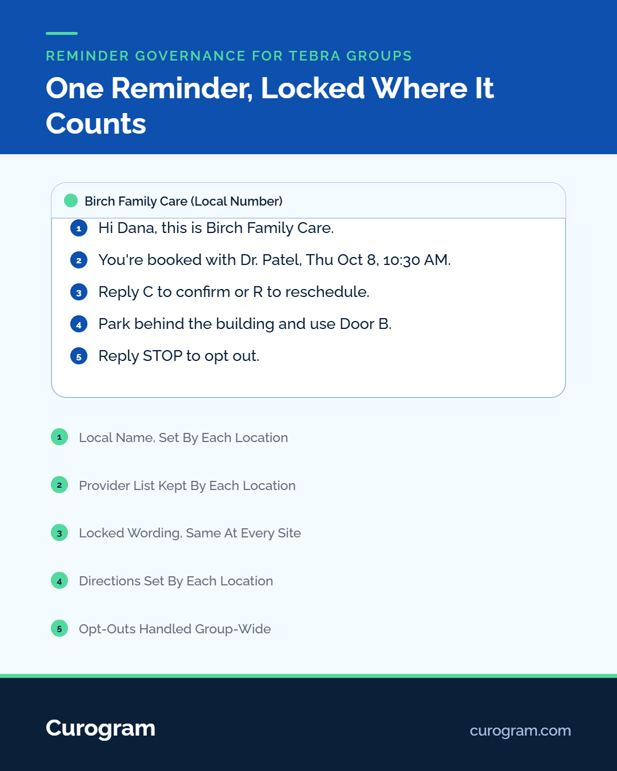
Breakdown of patient text message reminder governance for Tebra groups by Curogram

The Guide: The Reminder Policy Engine

Curogram works alongside Tebra through our Tebra integration, as the place where reminder policy lives. The owner sets the standard once, and every location inherits it as the default, including sites you haven't bought yet.

What the Owner Locks

Two things get locked: timing and core wording. A common cadence is a text 3 days out, another the day before, and a short note 2 hours before the visit.

Every site sends the same core message:

"Hi Dana, this is Birch Family Care. You're booked with Dr. Patel on Thu, Oct 8 at 10:30 AM. Reply C to confirm or R to reschedule."

Site managers can't shorten the cadence or drop the reply option.

What Each Location Still Controls

Local details stay local. Each site sets its provider list, parking and door directions, language options, and sender name. Patients still get texts from the number they already know.

That matters most at acquired sites, where patients are watching for signs of change. For how this reads from the patient's side, see our piece on consistent appointment reminder texts for Tebra patients at every location.

How Replies Reach the Front Desk

With two-way confirmation, Tebra schedule gaps show up days early. A patient who replies R lands in a staff thread with the visit details attached.

A cancellation on Tuesday frees a Thursday slot while there's still time to fill it. Our page on appointment reminder texts for Tebra users covers the confirm, cancel, and reschedule replies.

Getting a reminder to every patient comes first. A 2026 meta-analysis in the Journal of Hospital Management and Health Policy found patients who got a reminder were about 11% more likely to attend than those who got none. Dr. Alvarez's patients sat in that second group for months.

Curogram Highlight: Two-Way Reminder Sequences

Two-Way Reminder Sequences give a multi-site group one governed set of reminder templates with a locked cadence.

Patients confirm, cancel, or rebook by replying, and each answer syncs to the schedule your front desk works from.

Owners control the parts that drive results: timing, the reply option, and core wording. Locations control a short list of approved fields, such as provider names, directions, and languages. Nothing outside that list can change at the site level.

We treat the reminder as the final conversion step in your funnel. It gets a confirmation rate, a reply rate, and a no-show rate for every location, pulled into the same location benchmarking reports your leadership already reads.

The Success: One Policy, Every Location

The table below shows the pattern we look for once a group moves to one sequence. All figures are illustrative, not client data.

Location

No-Show Rate Before

No-Show Rate After One Policy

Cedar

6%

5%

Birch

14%

6%

Aspen

10%

6%

Newest site

12%

5%


The Gap Between Sites Shrinks

Cedar, the best site, barely moves. Birch and the newest site move the most, because they had the furthest to fall. In this example, the spread between best and worst drops from 8 points to 1.

Based on our internal data, Curogram clients confirm more than 75% of appointments by text. Recovered visits drive a 10% to 20% increase in revenue.

What the Owner Does Each Week

The group-wide reminder policy becomes something you set once and check weekly. Open the Monday report. Find the site with the lowest confirmation rate, then read a few of its unanswered threads.

Most weeks the cause is local and small: a provider missing from the list, or a wrong door in the directions.

What the Next Acquisition Gets

A newly acquired practice inherits the sequence on its first day. Reminder setup becomes a line on your integration checklist, next to phones and payroll.

This governed approach carries into recall and reactivation across the network, where lapsed patients get the same clear, reply-able texts.

Conclusion: Seal the Funnel's Last Leak

No-show variance between your locations comes from settings nobody chose. Once you see it that way, it's a governance task with a clear owner.

Tebra runs your scheduling and your growth tools. Curogram handles the last step: getting the booked patient through the door, at every site, under one policy.

Start with one number this week. Pull last quarter's no-show rate for each location, find the gap between best and worst, and multiply it by your cost per acquired patient. That's what the patchwork costs you.

Then book a demo. We'll draft your group-standard sequence with you and show confirmations reaching the schedule live.


Frequently Asked Questions

How much can individual locations still customize?

Locations edit a short list of approved fields: provider names, directions, language options, and sender name. The owner locks cadence, the reply option, and core wording, so local detail stays while the timing and structure can't drift.

How does an acquired practice move onto the group standard?

An acquired site inherits the governed sequence on day one. Its patients keep getting texts from the familiar local number, and reminder quality becomes a step in your integration checklist, checked off alongside phones and payroll.

How does automated reminder texting stay HIPAA and TCPA compliant?

Curogram is HIPAA-compliant and SOC 2 Type II certified. It tracks consent, handles opt-outs automatically, and keeps reminder content to the minimum details needed, because the locked templates are built that way.

Why do no-show rates differ so much between locations in one group?

Each site's reminder setup reflects its own history: who configured it, which vendor it came from, and what later staff changed. Different timing and missing reply options produce different no-show rates, even with similar patients.

How often should an owner review reminder performance by location?

Weekly works for most groups. Compare confirmation and no-show rates side by side, then read a few unanswered threads at the lowest site. Small local errors, like a missing provider, show up fast this way.