
.jpg) Mira Gwehn Revilla
Mira Gwehn Revilla
.png)
- Today, most sites run their own call list, Reminder Mate setup, or old robocall tool, each with its own no-show rate.
- One sequence sends the same steps for each visit type. Provider names and directions are filled in per site.
- Patients confirm, cancel, or ask to rebook by text, and the status reaches the Practice Mate schedule.
- The administrator sees confirmation and no-show rates for each location side by side.
Two offices in the same chiropractic group can share an owner, an Office Ally account, and a fee schedule. They can still lose patients at very different rates.
At one, Reminder Mate sends texts on settings someone picked years ago. At the other, a staff member works down a printed list of tomorrow’s patients before close and leaves voicemails for most of them.
Patients only see whatever their own location sends, or nothing at all.
We think no-show variance by location is a policy problem first. Most group owners already know the rate differs from site to site. What they lack is a way to make one reminder standard stick at every front desk after the meeting where it was announced.
That’s the work behind standardizing appointment reminders across Office Ally locations. It takes one sequence per visit type and one set of approved templates.
Patients need a way to reply, and the administrator needs one screen to check every site. Provider names and parking notes still change by location, inside limits the group sets.
Office Ally covers a lot for groups that watch every software line item. Practice Mate runs the schedule, EHR 24/7 holds the chart, and the clearinghouse moves claims.
Reminders are the piece each office ends up handling its own way. After a few rounds of staff turnover, those choices drift into five setups with five different results.
The best result is already proven, so the gap is worth closing. Based on our internal data, Atlas Medical Center cut its no-show rate from 14.20% to 4.91% in three months on a standardized two-way sequence.
A group that runs that sequence everywhere gives each location the same starting line.
The Reminder Patchwork
Office Ally sells a reminder add-on called Reminder Mate that can send texts, calls, and emails. Whether a location bought it, how it was set up, and who still knows the login are usually local calls.
Groups that grew by buying practices have it worse, because each new office arrives with its own habits and vendor contracts.
Patchworks build up one fix at a time, usually after a staff change.
A manager leaves, and her replacement goes back to phone calls. A new site keeps the robocall service it paid for in 2015 because the contract hasn’t run out. One short-staffed month turns into a habit of skipping reminders.
By year three, the group has a set of local workarounds where a policy should be. The only record of how each one works lives in one staff member’s head.
Three Locations, Three Setups
Take a five-site group offering family medicine, chiropractic care, and therapy. It’s a composite we’ll use as an example throughout. Three of its locations show the pattern clearly.
Riverside’s front desk blocks off 4:30 to 5:00 every afternoon to call tomorrow’s list. Most calls reach voicemail, so the staff member leaves a message and dials the next name. Patients who meant to cancel rarely call back.
Hillcrest runs an older robocall tool. It says the provider’s last name wrong every time, and patients can’t reply to it. Anyone who needs to move a visit has to call the main line during office hours and wait on hold.
Sunset stopped sending reminders during last year’s staff shortage. When the team was back to full strength, nobody turned them on again.
|
Location |
Reminder method |
Can patients reply? |
What breaks |
|
Riverside |
Manual call-down list |
Only by calling back |
30 minutes a day, mostly voicemail |
|
Hillcrest |
Legacy robocall |
No |
Wrong name, no way to rebook |
|
Sunset |
None |
No |
Patients forget |
What Patients and Floating Staff Run Into
Patients and staff often cross between sites. In a group like this, a mother might see her provider at Riverside while her son’s pediatric visits happen at Sunset. She gets a voicemail about one visit and nothing about the other. From her side, the group can’t keep track of its own schedule.
Staff feel it too. Think of a medical assistant who covers Hillcrest on Mondays and Riverside on Thursdays. She learns two ways of doing reminders, plus a third if she fills in at Sunset. Each site has its own call script, its own log, and its own idea of what counts as confirmed.
Reporting breaks the same way. Riverside tracks confirmations on a sticky note by the phone, and Hillcrest’s robocall vendor sends a delivery report nobody opens. Sunset has nothing to report.
When the owner asks which site has a no-show problem, the honest answer is that nobody can say for sure.
What the Gap Costs
No-show cost is easy to ignore because it never arrives as an invoice. Nobody signs a check for an empty 2:15 slot. The math is still short: missed visits times what each visit is worth.
Let’s run it for the composite group with illustrative numbers. Say each location sees 30 patients a day across 22 clinic days, or about 660 visits a month. An average visit brings in $110.
|
Location |
No-show rate (illustrative) |
Missed visits per month |
Lost revenue per month |
|
Riverside |
8% |
53 |
$5,830 |
|
Lakeview |
9% |
59 |
$6,490 |
|
Hillcrest |
11% |
73 |
$8,030 |
|
Mesa |
13% |
86 |
$9,460 |
|
Sunset |
17% |
112 |
$12,320 |
|
Group total |
383 |
$42,130 |
Why the Meeting Standard Fades
Most groups have tried to fix this once. The administrator brings a reminder standard to the quarterly meeting: text two days out, call anyone who doesn’t answer, log the result. Everyone agrees.
Then Monday comes. Riverside’s call list still takes 30 minutes, and on a day with three reschedules and a ringing phone, it gets cut short.
Hillcrest can’t change the robocall script without a support ticket. Sunset needs someone to own reminders, and nobody was hired for that.
Within a few weeks, each site is back to its old setup. The standard lived in the meeting notes, and nothing at the front desk was set up to carry it out.
The Reminder Policy Engine
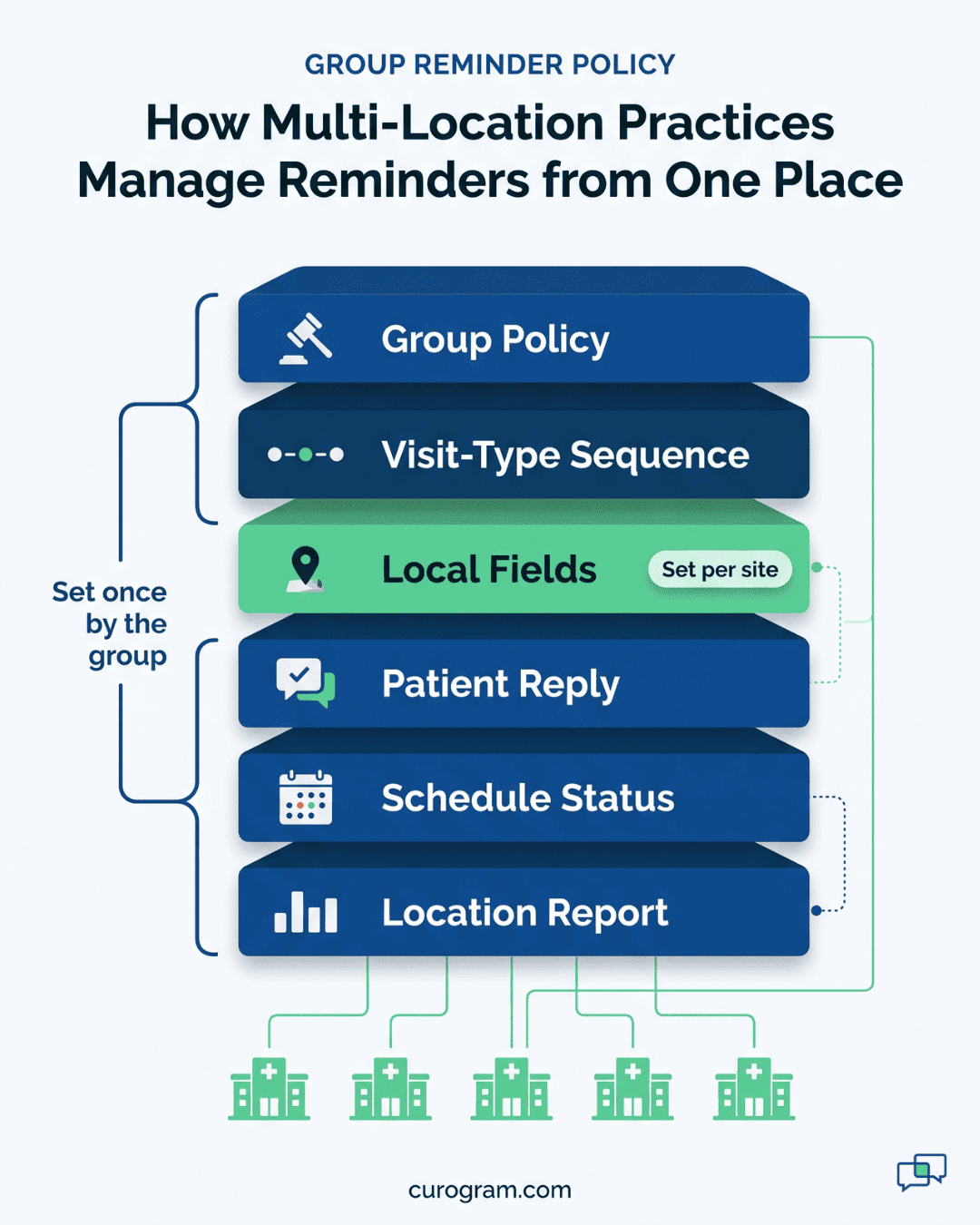
Curogram treats the group standard as a setting every location inherits. The administrator builds each reminder sequence once, in one console, and every site runs it from day one. Front desk staff don’t have to remember the policy, because it runs on its own.
Ownership moves with it. Today, each office manager decides how reminders work, and those decisions drift apart. Under one console, the administrator owns the design and each location owns its local details.
Say the group adds a 2-hour day-of text. That update reaches all five sites at once, with no round of calls to five managers.
What Gets Locked and What Stays Local
A group standard falls apart if it ignores real local differences. Sunset may serve many Spanish-speaking families. Mesa may have a parking garage that confuses first-time visitors. Those details belong in the message.
So each reminder has two parts. The administrator locks cadence and core wording, and each site fills in approved fields.
|
Locked by the administrator |
Set by each location |
|
When each reminder sends |
Provider names |
|
Core message wording |
Address and parking notes |
|
Reply options |
Language options |
|
Opt-out handling |
Main phone number |
What a Governed Reminder Looks Like
A sample day-ahead text from Sunset might read:
Hi Maria, this is Sunset Family Care. You have a visit with Dr. Patel tomorrow at 9:00 AM at 412 Main St. Park in Lot B. Reply YES to confirm or NO to cancel, or text us to reschedule.
The greeting, the visit line, and the reply prompt come from the group template. Riverside sends the same words with its own clinic name, provider, and address. “Park in Lot B” is Sunset’s local field, and Mesa can put its garage note in the same spot.
If Sunset turns on Spanish, patients who prefer it get the same message in Spanish, with the same timing. Nobody at Sunset has to write or translate anything by hand.
Replies That Reach the Schedule
A reminder helps only if the answer gets back to the people running the day. Patients reply to confirm, cancel, or ask to rebook, and each reply is matched to the right appointment.
Once a patient answers the two-way confirmation, Practice Mate schedule status updates. The front desk sees what the patient just said.
In Curogram, confirmed visits show green. No reply yet shows yellow. Cancelled or flagged visits show red, and the open slot is marked for rebooking.
If a patient stays silent, the sequence follows up 24 hours before the visit and again 2 hours out. A reply like “running 10 min late” lands in a shared inbox where staff can read and answer it. A one-way robocall has nowhere to put that message.
Sequences Built for Each Visit Type
Visit types need their own timing, and the group sets it once for every site.
- An adjustment series runs short and frequent, so a day-ahead text plus a 2-hour nudge fits the pace.
- Therapy sessions get messages with only the date, time, and location, and nothing about the visit itself.
- An annual physical is often booked months ago, so its first reminder goes out about a week ahead, with room for a fasting note.
A therapy patient at Riverside and one at Sunset get the same timing and the same wording. Only the provider name and address differ.
Retiring the Old Tools
Groups that replace robocall reminders usually find the switch smaller than they feared. Most cancel the robocall service when its contract ends. Reminder Mate can keep sending a first alert if a site still wants it. Curogram then runs the two-way layer on top.
Timing matters on the day a site goes live. Turn the robocall off that morning, so no patient gets two calls about one visit. Riverside’s call list stops once its patients start replying by text.

One Policy, Every Location
Reminders become a short weekly review. The administrator opens the location report and reads three numbers for each site: confirmation rate, no-show rate, and reminders still unanswered.
Atlas Medical Center as the Benchmark
Based on our internal data, Atlas Medical Center cut its no-show rate from 14.20% to 4.91% in three months. The clinic made that change on Curogram’s automated reminder sequence. That’s a drop of about 65%.
For a group, Atlas sets the target. Every location starts on the sequence that produced those numbers, whatever it was running before.
A Worked Rollout for the Composite Group
Using the five-site group from earlier, a rollout runs in four steps.
- Pull a baseline. The administrator exports last quarter’s no-show rate per location. In our example, rates run from 8% at Riverside to 17% at Sunset.
- Build the sequences. One sequence goes in for adjustments or follow-ups, one for therapy sessions, and one for annual physicals, each with locked cadence.
- Fill in local fields. Each office manager adds provider names, parking notes, language options, and the main line.
- Go live everywhere the same week. Sunset, which sent nothing, and Riverside, which called by hand, start on the same day.
Now the illustrative math. If all five sites reached Atlas’s 4.91%, each would miss about 32 visits a month instead of 53 to 112. Group-wide, missed visits would fall from 383 to 160 a month.
|
Illustrative group |
Missed visits per month |
Lost revenue per month |
|
Current patchwork |
383 |
$42,130 |
|
All sites at 4.91% |
160 |
$17,600 |
|
Difference |
223 |
$24,530 |
Your own visit counts and values will differ. Plug them in, and the gap between the patchwork and one standard becomes a real dollar figure. In this example, Sunset and Mesa alone account for more than half of the missed visits, so those two sites get watched first.
Curogram Highlight: Two-Way Reminder Sequences
Two-Way Reminder Sequences let a group with many sites set one reminder policy and run it at every Office Ally location. The administrator builds a sequence for each visit type. Timing and core wording are locked, and each office gets a short list of local fields.
With Office Ally appointment reminder automation, locations share one sequence. Patients get the same texts at any site. A typical sequence looks like this:
- First reminder on the timing the group picked for that visit type
- Follow-up text 24 hours out if the patient hasn’t replied
- Day-of text 2 hours before the visit
- Replies to confirm, cancel, or ask to rebook
Each reply is matched to the right visit, and its status shows on the schedule your staff run in Practice Mate. Free-text replies like “Can I come at 3 instead?” go to a shared inbox, so a real person answers them.
From one console, the administrator sees confirmation and no-show rates for each location side by side. Based on our internal data, the appointments recovered this way add 10% to 20% to clinic revenue.
Curogram is HIPAA compliant and handles opt-outs on its own. It also works next to Reminder Mate if a site wants to keep it for first alerts.
Conclusion: Make the Standard Enforceable
The spread between your best and worst location comes from governance. Riverside’s call list, Hillcrest’s robocall, and Sunset’s silence all started as sensible local choices. They stay in place because nothing above the location level decides how reminders work.
Office Ally already handles your schedule and claims. Curogram adds the part it leaves to each office. Patient confirmations get set once by the administrator and sent from every site. It’s a group-wide reminder policy budget practices can run without new staff or a new EHR.
Start with numbers you already have. Pull last quarter’s no-show rate for each location and line them up.
Multiply the gap between your best and worst site by that site’s monthly visits and average visit value. That figure is roughly what one enforced standard could win back at a single location. Run it for each site, and the total is the case your owners will want to see.
Then book a demo with out team. We’ll map a group-standard sequence for your visit types and show how locked templates and local fields work.