
.jpg?width=30&height=30&name=square-formal-photo%20(1).jpg) Mira Gwehn Revilla
Mira Gwehn Revilla
Access Controls for Ensora Fusion Messaging | RBAC
.jpg?width=30&name=square-formal-photo%20(1).jpg) Mira Gwehn Revilla : Oct 22, 2026, 1:00:01 PM
Mira Gwehn Revilla : Oct 22, 2026, 1:00:01 PM
All-or-nothing access fails therapy groups. Curogram scopes Ensora Fusion family messaging by clinic and role — admin-managed, fully logged.

When a Tebra group closes on a new location, the transition list covers the EHR, the phone tree, and the fax line. Patient texting usually gets one line: add the new staff.
In most basic texting tools, that line gives nine people you met last month the keys to every thread. That means every patient, at every clinic you own.
Nobody signs off on that. It happens because the tool has two settings, and "full access" is the one that lets people work.
Our view is that a shared patient inbox is only safe for a growing group when each login is cut to the size of the job.
Role-based access controls for Tebra patient messaging do that by tying each user to a location, a duty, and a role. Your practice manager should be able to set those limits in minutes, without calling IT.
HIPAA already points the same way. The Privacy Rule's minimum necessary standard (45 CFR 164.502(b)) asks you to limit how much patient information each workforce member can reach.
Its sister rule, the Security Rule (45 CFR 164.312(b)), requires audit controls that record activity in systems holding patient data. A login that sees every thread at every site makes both hard to defend.
And growth makes it worse with each deal. Floats cover two clinics on Tuesdays. A central billing team needs every balance thread but no visit notes. An acquired site brings staff you're still getting to know, plus the turnover that tends to follow a sale.
The fix starts with a short, plain list: who can read which patient messages, at which sites, and why. A group that can produce that list in five minutes is in good shape for an audit and for its next deal.
Groups centralize patient texting for good reasons. A patient who texts the Corona clinic about a refill shouldn't wait because the one person watching that number is out sick.
A call center or float pool can cover three front desks at once. Billing can answer "why is my balance $240?" from one desk for the whole group.
All of that depends on sharing. Staff at one site need to see some threads from another site, some of the time.
Most basic texting tools handle sharing with a single switch. A user either belongs to the account and sees everything in it, or doesn't belong and sees nothing.
That worked when the practice was one office with six people. It stops working the day you add a second address, because your org chart now has a shape the tool can't draw.
Say your group runs three clinics and just bought a fourth. The selling doctor's staff of nine get logins on Monday so they can keep texting their patients.
By lunch, every one of them can scroll through:
None of these nine people did anything wrong. Some of them may stay for years. But you haven't finished checking references, you don't know who shares passwords, and a few of them may leave once the sale settles. Each of those exits now walks out with a memory of your whole patient base.
Think of each login as a door into your patient data. Under all-or-nothing access, every door opens onto the same room.
Run the numbers on that four-clinic example (illustrative figures):
|
Setup |
Users |
Threads each user can read |
|
One clinic, one account |
12 |
That clinic's threads |
|
Four clinics, shared account |
57 |
All threads at all four clinics |
|
Four clinics, scoped roles |
57 |
Only their own site and duties |
Many small groups also run texting on a shared login. One username, one password, taped inside a drawer or pinned in a group chat.
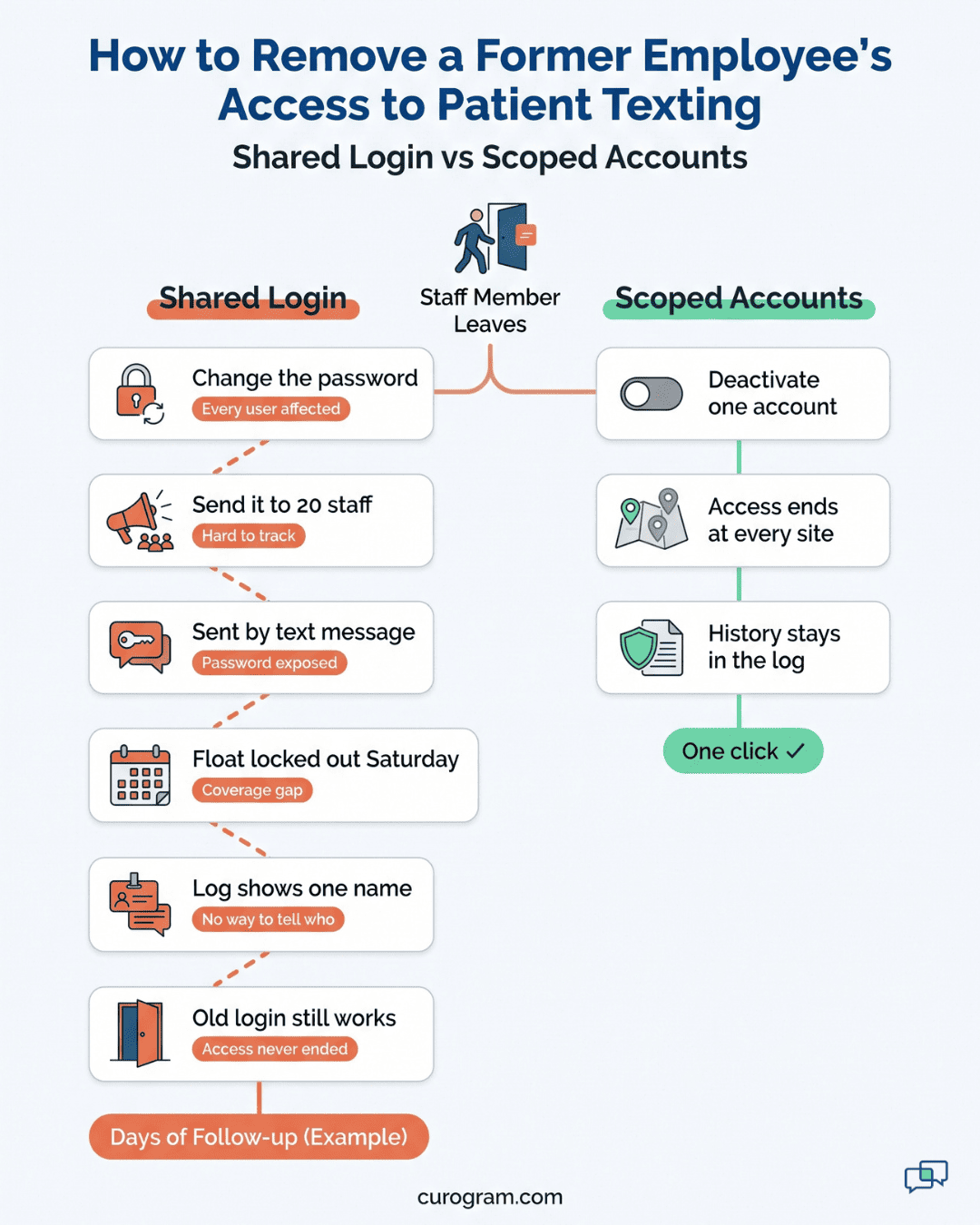
When a front desk lead quits, the safe move is to change that password. Then someone has to send the new one to 20 people across four sites. Two of them will get it by plain text message because they're on the road. A week later, a float can't log in on a Saturday and calls the owner's cell.
Shared logins also wreck the audit trail. When five people reply under one username, the log shows the same name on every message. If a patient complains about a curt text, you can't tell who sent it, and you can't coach the right person.
HIPAA's Security Rule lists termination procedures for ending a former worker's access (45 CFR 164.308(a)(3)(ii)(C)). A shared password makes that step close to impossible to prove.
Curogram was built for groups that want one platform and different views for different people. Everyone works in the same system. Each person sees the slice of it their job calls for.
In practice, a patient's thread lives in one shared record. The Riverside front desk sees it because the patient belongs to Riverside.
The central biller sees it only when it's tagged as a billing thread. A medical assistant at the Temecula clinic never sees it at all, and has no reason to.
This is what NIST calls least privilege: patient messages, like any sensitive data, should reach only the users whose duties need them. NIST SP 800-53 lists it as control AC-6. For a texting inbox, it comes down to three questions about each user, covered next.
Access in Curogram is built from three pieces that combine:
Put together, the three pieces describe a real job someone holds. "Front desk, Riverside, scheduling and intake, reply" is one person. "Biller, all locations, billing queue, reply and assign" is another.
With this, you can scope staff access by location and still give group-wide reach to the people who serve every site. Your central biller works one account across four clinics, and your Riverside receptionist sees Riverside.
Permission management without IT matters for groups at this size. Your group may have no full-time IT person at all. If it has one, that person is already busy with printers, Wi-Fi, and EHR updates.
So the console is built for a practice manager. Adding a user is a short form: name, locations, duties, role. No ticket, no vendor call, no waiting until Thursday.
Say a Corona receptionist moves to Riverside full-time. The manager unchecks Corona, checks Riverside, and saves. Her next login opens the Riverside queue, and Corona's threads drop out of her view.
Every change is logged with who made it and when. If the owner asks why a float can see Riverside, the answer is one search away. The log shows the grant, the manager who set it, and the date it ends.
When the group buys a practice, the new site becomes one more location in the same model. Your roles are already built. You pick the people, attach them to the new site and their duties, and they start.
Acquired staff onboarding access then matches what you'd want. The new front desk sees their own patients, and your central biller picks up their balance threads. Nobody new sees your flagship clinic's behavioral health queue.
Curogram keeps an audit log patient texting staff can't edit or delete. It records who opened a thread, who replied, and who changed a permission. When a patient asks who read their messages, or an auditor asks for an access review, you pull the report.
Offboarding access revocation is one deactivation. The person loses access to every location at once. Their past activity stays in the log, which is exactly what a reviewer wants to see.

Let's run the four-clinic group from earlier through an acquisition with scoped roles in place. The new site is a family practice in Murrieta with nine staff. The first day runs in five steps.
Step 1: Add the location. The practice manager creates "Murrieta" in the console and links its Tebra schedule, so appointments and patient details flow into Curogram.
Step 2: Map the people to existing roles. Murrieta's three front desk staff get the same role as every other front desk: their site, scheduling and intake queues, reply rights. Two medical assistants get the refill queue for Murrieta only.
Step 3: Extend the shared roles. The central biller already covers three sites. The manager adds Murrieta to that role, and Murrieta's balance threads appear in the billing queue that afternoon.
Step 4: Set a coverage grant. One of your Riverside receptionists will help Murrieta through its first two weeks. She gets a Murrieta grant ending on day 14.
Step 5: Check the access report. Before the end of the day, the manager runs the report and confirms that nobody from Murrieta can see any other site.
|
Person |
Before scoping |
After scoping |
|
Murrieta front desk |
All four clinics, all queues |
Murrieta scheduling and intake |
|
Riverside receptionist on loan |
All four clinics, all queues |
Riverside, plus Murrieta for 14 days |
|
Central biller |
All four clinics, all queues |
Billing queue at all four clinics |
|
Medical assistant who quit last month |
Shared password, still active |
Deactivated, history kept in the log |
Six months later, the difference shows up in coverage. In an all-or-nothing tool, every coverage favor adds a site to someone's profile for good. After a year of sick days and vacations, most of your front desk can see most of your group again.
Time-boxed grants stop that drift. Each loan has an end date, so the group's access map at month twelve looks like the one at month one.
A quarterly access review takes about an hour with the report open. Without it, the review is a week of asking people what they think they can see.
Curogram Granular RBAC lets your practice manager decide, person by person, who reads which patient conversations across your Tebra group. It runs from one console and needs no IT staff.
Each user's access is built from location, duty, and role. A front desk lead at your Corona clinic gets Corona's scheduling and intake threads with reply rights.
Your central biller gets the billing queue at every site. A clinical director can be given read access across all locations for chart questions, and nothing in billing.
Coverage gets its own tool. Time-boxed grants give a float extra sites for set dates, then expire on their own. Your access map stays the same size from one year to the next.
New locations join the same model. When you add a site, it links to its Tebra schedule, and you attach its staff to roles that already exist. Acquired staff work from their first login, scoped to their own patients.
Every view, reply, and permission change goes into a log that staff can't edit. When a patient or auditor asks who read what, you pull the log. When someone leaves, one deactivation ends their access everywhere and keeps their history on file.
The rest of the platform works inside these limits. Two-way texting, appointment reminders, digital forms, and text-to-pay all follow the same permissions, so a biller sending a payment link works from the billing thread alone.
Based on our internal data, practices using Curogram's automated texting see a 24% drop in inbound calls. With scoped access, every location in your group can get that benefit from day one.
A shared inbox is the reason to centralize, and scoped access is what makes it safe to keep growing. Groups that skip the second part end up either exposed or split back into silos.
Tebra already holds your practice permissions: who can open charts, post payments, and change the schedule. Patient conversations deserve the same care. They hold the same data, often in plainer words, and they're read by more people.
Start with one list. Write down everyone who can read patient messages at a location where they've never worked. Include floats who covered once, billers with full access, and any shared logins still in use. We'd bet your list is longer than you expect.
Then shrink it to zero. Each name on it should either get scoped to real duties or lose access.
That's the work we do in a consultation. Book a demo with Curogram and we'll map your locations, duties, and coverage patterns into a permission model in one session.
 Mira Gwehn Revilla : Oct 22, 2026, 1:00:01 PM
All-or-nothing access fails therapy groups. Curogram scopes Ensora Fusion family messaging by clinic and role — admin-managed, fully logged.

 Aubreigh Lee Daculug : Oct 12, 2026, 10:00:00 AM
All-or-nothing access fails multi-location groups. Curogram scopes DrChrono patient messaging by location and role — admin-managed, fully logged,...
.png) Mira Gwehn Revilla : Oct 19, 2026, 1:00:00 PM
Mira Gwehn Revilla : Oct 19, 2026, 1:00:00 PM
Texts from staff personal phones risk patient privacy and trust. Curogram keeps every Tebra patient message on verified practice numbers — auditable.