
HIPAA Texting Governance for DrChrono Groups
 Aubreigh Lee Daculug : Oct 5, 2026, 10:00:00 AM
New locations with 13 stale reviews lose every near me search. Curogram automates review requests per DrChrono location — 1,064 five-stars in 3...

An auditor asks you one simple question during a routine review. Who decided your newest front-desk hire could read patient texts from all four of your clinics?
You pause, because honestly, nobody decided that. The messaging tool simply works that way out of the box.
That silence is the real problem. In a mobile group practice, people move constantly. Providers rotate between locations, float staff cover unexpected absences, and managers review the inbox from a phone between buildings.
Each of those moves changes who should see which conversations. Yet most basic texting tools offer only two settings: complete access or none at all.
Neither setting works well for a growing group. Complete access turns every login into an open door to protected patient information. Strict lockdown makes the tool so frustrating that staff drift back to personal phones. That creates a different kind of risk.
This is where role-based access controls for DrChrono patient messaging change the picture. Instead of one master switch, your practice gets a set of precise dials. Each person sees the conversations tied to their location, their role, and their daily duties.
The basic idea isn't new. HIPAA's minimum necessary standard has expected it for years. What's new is applying it without an IT department, a ticket queue, or a lengthy implementation project.
In this guide, you'll learn why the all-or-nothing login fails multi-location groups like yours. You'll see how Curogram works as a compliance backbone that scopes access by location and role. You'll also discover what changes when every staff member sees their job, not the entire organization.
If your team works across more than one building, this topic deserves your attention right now.
Access problems rarely warn you in advance. They usually surface during an audit, a breach investigation, or a complicated employee departure.
Mobility multiplies access requirements. The same nurse might need the north clinic on Monday and the east clinic on Thursday. A billing coordinator might need every location but only one category of patient message.
Basic tools can't express any of those distinctions. They treat each user as a single switch that's either on or off. So the default often becomes "on for everything." It's the only option that doesn't slow down the workday.
Consider a new hire at your smallest location. From her first login, she can scroll through patient texts from every clinic in the group.
That includes test result questions, billing disputes, and refill requests.
Nobody approved that arrangement on purpose. However, an auditor won't care about intentions. They'll ask who approved the access and where that decision is written down. An all-or-nothing tool leaves you without a good answer.
Every account with complete access is a larger target. If one password is compromised, an attacker can view every patient conversation at every location instead of just one.
Here's an illustrative example that shows the scale.
Take a group with 4 locations and 40 employees. With all-or-nothing access, each user can reach all 4 inboxes, which adds up to 160 separate user-to-location access points.
Now suppose most employees work at one location and a few rotate between two. Scoped permissions might require only about 50 access points. In practice, that reduces your exposure by roughly 69% without changing anyone's actual workday.
Departures create another layer of risk. When logins are shared or loosely managed, one resignation can trigger a scramble. Someone has to change passwords across several tools.
Practice owners eventually face a hard choice. They can accept the exposure, or they can divide communication back into separate tools for each location.
The second option feels safer. But it rebuilds the same silos the group paid to remove. Patients receive inconsistent messages, and staff return to juggling multiple logins throughout the day.
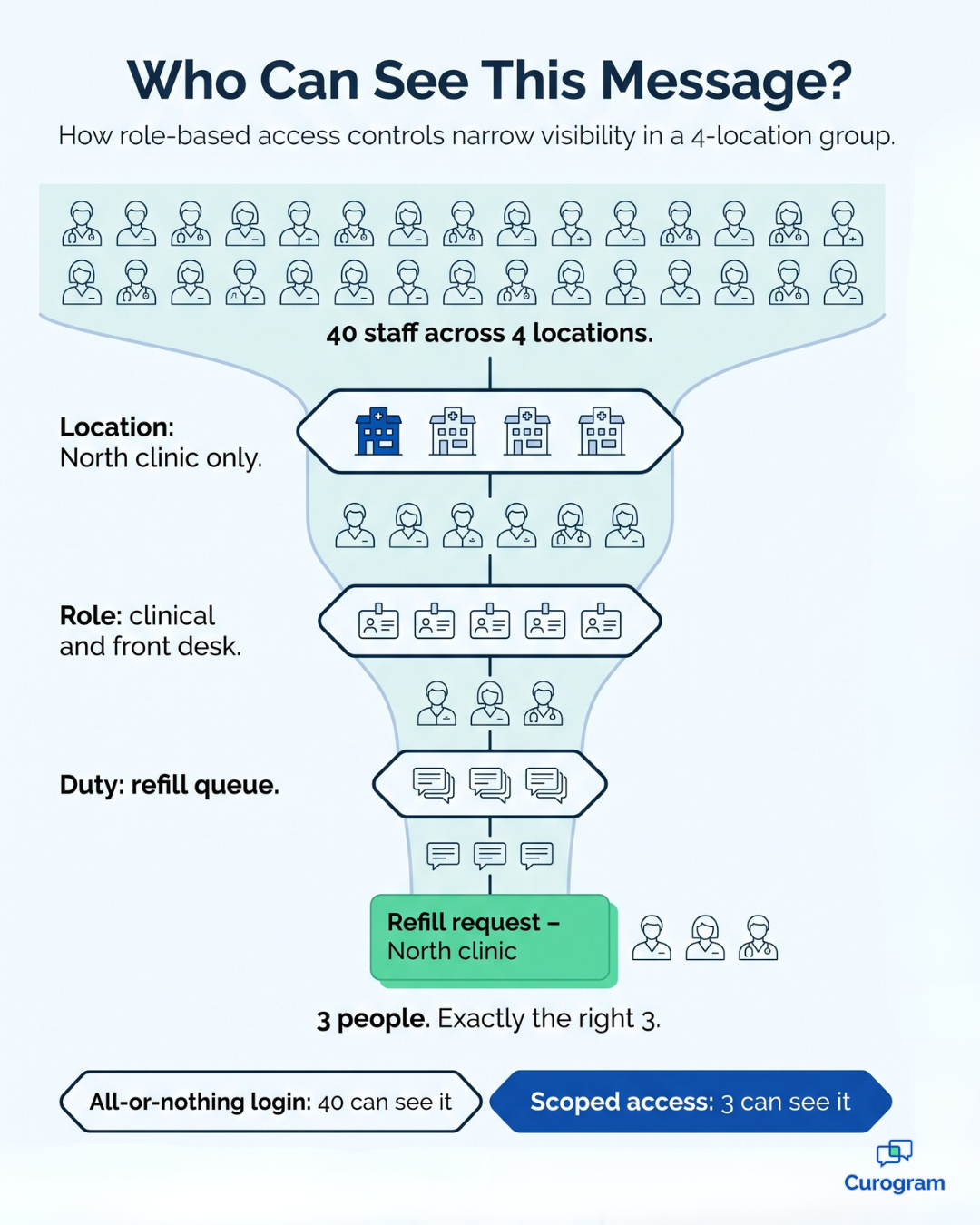
Curogram was built for shared messaging with carefully scoped visibility. The entire group operates on one platform, but each person sees only the portion relevant to their work.
Think of it as "The Compliance Backbone," the layer that keeps mobile operations secure.
It works on whatever device your team prefers. That might be a desktop at the front desk or a tablet in the exam room. It might be a phone between visits. The same permission rules follow each user everywhere.
At the center is granular, role-based access. Every permission combines three parts: which sites, which duties, and which role. You can also attach time limits, which makes it easy to give float staff temporary access that expires automatically.
Here's how that might look across a typical group:
| Team member | Locations | Message access | Duration |
|---|---|---|---|
| Rotating provider | North, South, East | Their own patient threads | Standing |
| Front-desk hire | North only | Scheduling and reminders | Standing |
| Float medical assistant | East | Refill and intake queues | 2-week grant |
| Billing coordinator | All locations | Billing questions only | Standing |
| Departing employee | None | None | Removed in one click |
This model mirrors how your group already operates.
Do you already plan rotations and coverage by site? Then you can scope staff access by location using the same logic.
The software adapts to your schedule instead of forcing a new one.
Most mid-size groups don't have a security team. That's why the console is designed for a practice manager rather than an engineer. It's permission management without IT tickets, vendor calls, or frustrating delays.

Every administrative change is recorded, and every message view appears in a complete access log. Offboarding access revocation takes one click across every location and device simultaneously.
Your practice gets the audit readiness of a large health system. You just don't need the large IT staff.
The most important change is simple: every message view is scoped and logged. Your compliance position moves from hard to defend to easy to prove. Often, that happens in a single platform move.
That's what least privilege patient messages look like in daily practice. Each conversation reaches the people who truly need it and nobody else.
Here's how everyday operations shift:
The audit log patient texting leaves behind becomes an asset instead of a liability. When a reviewer asks who opened a specific conversation, you can answer in seconds.
Rotations also stop creating permission sprawl. A provider who covers a new site for one month gets access for that month. When coverage ends, access ends too, so nobody has to remember the cleanup.
For your team, the result is steady confidence. Staff can move between sites freely, and you can prove who viewed what. Mobility and security stop fighting each other.
Mobile groups can't afford to choose between flexibility and security. When access follows people across locations and devices, scoped permissions are what keep that movement safe.
The all-or-nothing login forces an unfair trade. Give everyone complete access, and every account becomes a liability. Lock everything down, and staff return to personal phones, which fails every audit anyway.
Role-based access controls for DrChrono patient messaging offer a better path. Each person sees their locations, their duties, and their queues. Float staff get access that expires on its own, and departing employees lose access in one click.
Every view also lands in a log you can share with reviewers. That record turns a stressful audit into a routine one.
Here's a helpful way to think about it.
DrChrono governs who can open a patient chart, while Curogram governs who can read a patient conversation. Both deserve the same discipline, because both hold the same private information.
Try one quick, practical exercise before your next management meeting. List everyone who can read patient messages at a location where they've never worked. Be honest about the count, then set a goal to shrink that list to zero.
For many groups, that list is surprisingly long. That isn't a failure of your team. It's a limit of the tools they were given.
Curogram gives your practice manager the controls to fix it, without hiring IT staff or rebuilding your workflow. You keep one shared platform while you stop sharing needless exposure.
Ready to see how this works with your own sites and schedules? Schedule a Demo with Curogram today. In one focused session, our team will map your locations, roles, and provider rotations to a clear permission model.
 Aubreigh Lee Daculug : Oct 5, 2026, 10:00:00 AM
New locations with 13 stale reviews lose every near me search. Curogram automates review requests per DrChrono location — 1,064 five-stars in 3...

 Jo Galvez : Aug 25, 2026, 8:00:02 AM
All-or-nothing access fails multi-site groups. Curogram scopes eCW patient messaging by location, department, and role — centrally managed, fully...

.jpg?width=30&name=square-formal-photo%20(1).jpg) Mira Gwehn Revilla : Oct 12, 2026, 1:00:00 PM
Mira Gwehn Revilla : Oct 12, 2026, 1:00:00 PM
All-or-nothing access fails growing groups. Curogram scopes Tebra patient messaging by location and role — admin-managed, fully logged,...