
.jpg) Mira Gwehn Revilla
Mira Gwehn Revilla

- A new front desk hire at one clinic sees that clinic’s threads and nothing from your other sites.
- A float therapist covering two clinics gets both for two weeks, and the grant ends on its own date.
- Your central scheduler reads scheduling threads group-wide but can’t open billing or therapy threads.
- Each thread a user opens, answers, or hands off is written to a log with their name and the time.
- One deactivation removes a departing aide from every clinic at once.
A new front desk hire at your Westside clinic logs in on her first day. Her inbox holds every family thread from all three of your clinics. One of them is a custody note about a boy in her own son’s class.
Nobody chose that. Most basic texting tools ship with two settings: a user sees everything, or a user sees nothing. We call it the All-or-Nothing Login, and therapy groups on Ensora Fusion feel it as soon as every clinic moves into one inbox.
Our view is plain. A shared texting platform is only safe for a group when every login is cut down to one person’s clinics and duties.
Role-based access controls for Ensora Fusion patient messaging do that cutting, and your office manager can run them without an IT department.
The stakes run higher in pediatric therapy than in most clinics. Parents text about IEP meetings, feeding plans, who’s allowed at pickup, and why a session ended early.
HIPAA’s minimum necessary standard (45 CFR 164.514(d)) already asks you to limit what each role can reach. A wide-open inbox has no way to meet it.
Fusion decides who can open a chart. Your texting tool needs the same rules for conversations, and most groups have a gap there. It shows up in three places: new hires, float coverage, and staff who leave.
Closing it needs three pieces: a map of who works where, coverage grants with end dates, and a log of every open. None of them call for code or a consultant. An office manager can keep all three current as part of onboarding.
The All-or-Nothing Login
Centralizing makes sense for a therapy group. Parents get one number to text. A central scheduler can move a Thursday speech session from Westside to Northgate without three phone calls.
Volume follows fast. Based on our internal data, one multi-location practice saw 1,240 patients come back from SMS recall texts alone. Every reply to a text like that opens a thread, and every thread sits in an inbox someone can read.
So sharing across clinics is the reason to centralize. It’s also the risk. If your tool can’t limit access to match your org chart, every new thread widens what every user can see.
What a New Hire Can See on Day One
Go back to the front desk hire at Westside. Her job is check-in, copays, and rescheduling for one site. In a flat inbox, she can also scroll Northgate’s threads.
That includes a mom asking about her son’s speech eval and an OT’s note on toilet training. It also includes texts like this one:
“Hi, it’s Maya’s mom. Her dad can’t pick her up anymore. Please don’t release her to him.”
Some of those kids go to her children’s school. She may sit next to their parents at soccer on Saturday.
None of this needs bad intent to cause harm. A parent who asks, “Who at your office can read my texts?” deserves a real answer. With an all-or-nothing tool, the honest one is “everyone on staff, at every site.”
Every Login Is a Full-Size Target
Over-broad access turns each account into a copy of your whole message history. A phished password on a part-time aide’s login exposes as much as the owner’s would.
Do the math on a group of 38 users. That’s 38 ways into every family’s thread at every clinic. Under the HIPAA Breach Notification Rule, a breach touching 500 or more people must be reported to HHS within 60 days. It’s then posted on the OCR breach portal for anyone to search.
If more than 500 residents of one state are affected, you must notify local media too. Most of the records in a pediatric therapy group belong to minors.
Shared Passwords and the Exit Scramble
Many groups try to fix this with clinic logins, like one “Westside Front Desk” account shared by three people. That swaps one problem for two:
-
The HIPAA Security Rule requires a unique user ID for each person (45 CFR 164.312(a)(2)(i)). A shared login breaks that. Your log can say the Westside account opened a thread, but not which of the three people did.
-
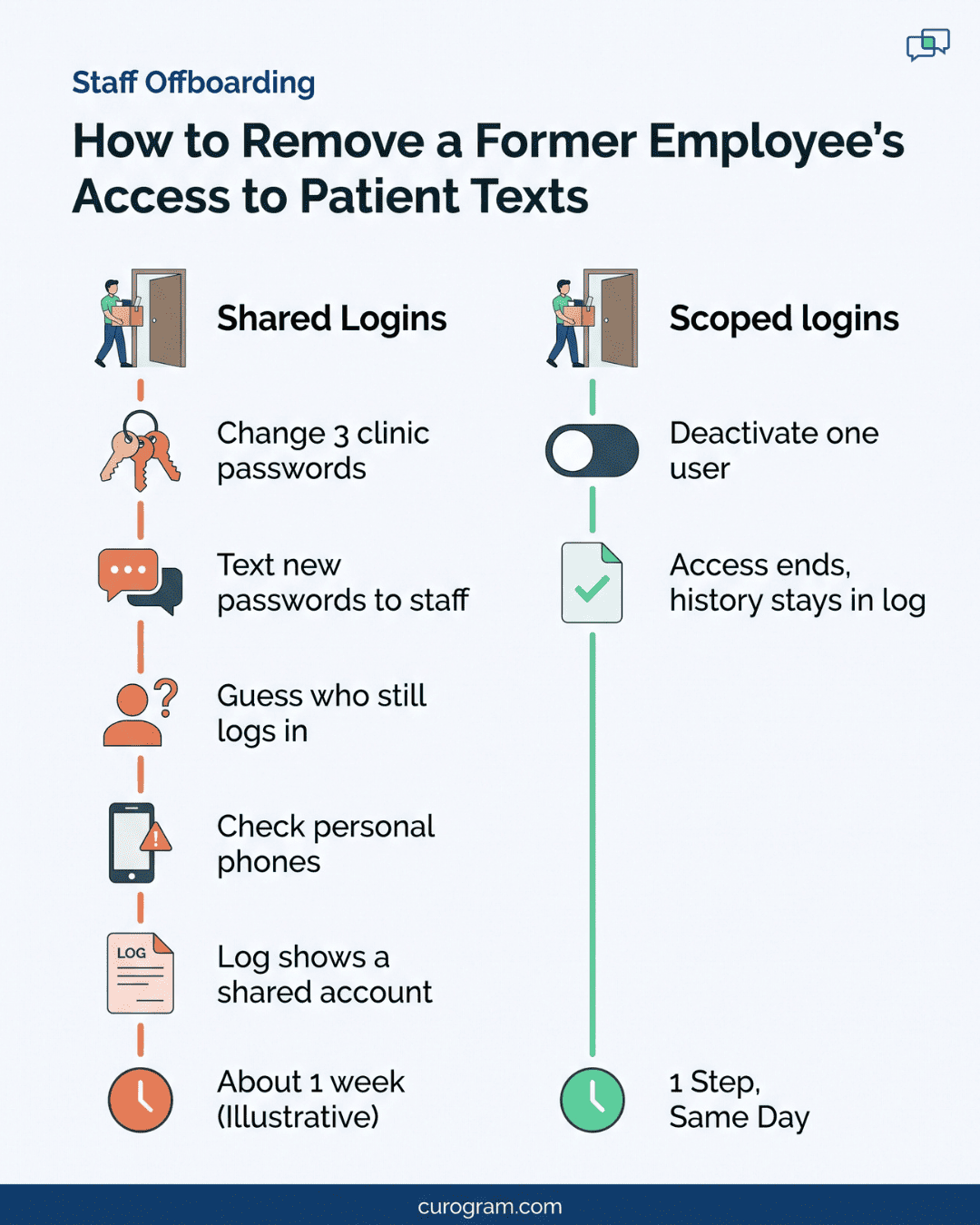
Departures get messy. When an aide leaves, someone has to change the password at each clinic she worked. Then the new one goes out by text to everyone who stays, which is its own small risk.
HIPAA also expects you to end access when someone leaves (45 CFR 164.308(a)(3)(ii)(C)). “We changed it Friday” is a weak answer if she logged in Thursday night.
The Two Exits Owners Usually Take
Faced with this, owners tend to pick one of two paths. Some accept the exposure and hope nobody asks. Others lock the tool down so hard that staff can’t do their jobs, or split back into one tool per clinic.
We think the lockdown is the worse of the two. When the official tool gets in the way, therapists start texting parents from personal phones. Those phones have no access log, no offboarding, and no record your practice controls.
Splitting into clinic-by-clinic tools brings back the silo the group just paid to remove. The central scheduler loses her view, and parents go back to calling each site.
A family with a child in speech at Westside and a sibling in OT at Eastside now gets two numbers. That means two threads and two sets of reminders for one household.
The Compliance Backbone
Three questions decide what any user sees in Curogram: which clinics, which kinds of threads, and what they’re allowed to do. We built the platform for shared use across a group, with each person’s view cut to fit their role.
Three Settings Shape Every View
Each user’s access combines clinic, duty, and role. Your office manager sets all three from one console.
|
Setting |
What It Limits |
Example |
|
Clinic |
Which sites’ threads show up |
Westside front desk sees Westside only |
|
Duty |
Which kinds of threads appear |
Central scheduler sees scheduling threads at all 3 clinics |
|
Role |
What the user can do with a thread |
Aide can read and reply; office manager can also add users |
Float Therapist Temporary Access That Ends on Its Own
Coverage is where most permission sprawl starts. A speech therapist from Eastside covers Northgate for two weeks during a leave. Someone adds Northgate to her login. Nobody removes it.
Eight months later, she still sees every Northgate thread. Multiply that by every vacation, every leave, and every sick-week swap, and your “scoped” setup is open again.
Curogram handles float therapist temporary access with a start date and an end date. In an illustrative case, your office manager grants Northgate from November 3 to November 14.
On November 15, the grant ends with no one needing to remember it. The access log keeps a record that it happened.
Split-week staff are a different case. A PT who works Westside on Mondays and Northgate on Thursdays should hold both clinics on a lasting basis, because that’s her real schedule. Dated grants are for coverage, and lasting access is for the job as hired.
Access That Matches How the Group Already Runs
Your group already has a structure: clinics, disciplines, and caseloads. Speech, OT, and PT staff work in different rooms with different parents. Access in Curogram follows the same lines, so what each person sees tracks what they’re responsible for.
Fusion keeps its own user rules for charts, notes, and billing. Curogram applies the same kind of limits to family conversations. A reply to a Westside visit reminder lands in the Westside queue, where Westside staff pick it up.
This matters for the minimum necessary standard. HIPAA asks you to name which staff need which kinds of patient information (45 CFR 164.514(d)(2)). Your access map in Curogram becomes the written answer.
Logs and Exits Without an IT Hire
Each thread a user opens, answers, or reassigns is logged with their name and the time. The HIPAA Security Rule calls for audit controls (45 CFR 164.312(b)) and regular review of system activity. Every view lands in the audit log. Family texting history can then be checked thread by thread.
When someone leaves, one deactivation removes their access at every clinic at once. Their past activity stays in the log for your next access review.
Most therapy groups don’t have a security team, and they shouldn’t need one for this. Permission management without IT staff means the person who already handles onboarding also handles access. Adding a new hire takes three choices: clinic, duty, and role.
What You Can Tell a Parent Who Asks
Scoped access changes the answer to that parent’s question. Before, the honest reply was “everyone.” Now the front desk can say something like this:
“Maya’s messages can be read by her two therapists, our Westside front desk, and our office manager. Every time someone opens her thread, it’s logged.”
That reply names people and a record. It also gives the parent a reason to keep texting your official number instead of a therapist’s cell.
In our view, that trust matters as much as the audit posture. A parent who stops trusting your number will text a therapist’s personal phone instead.

Exactly Enough Access, Everywhere
To show how this works, we’ll use an illustrative group. It has three clinics (Westside, Northgate, and Eastside), 38 staff, and speech, OT, and PT on Fusion. All numbers below are example math from a made-up group.
Step 1: Count Who Can Read What Today
Start with one question. Who can read family messages at a clinic they’ve never worked?
Pull the user list from your current texting tool and put it next to your staff roster. Mark each person’s home clinic, plus any site they work on a set schedule.
In this group, every one of the 38 users sees every thread. Only 7 people work across all three sites. That leaves 31 users who can open threads about children they’ll never treat.
Write that number down. It’s your baseline for the access review.
Step 2: Sort Staff by Clinic and Duty
Next, list each role and what the job actually needs. The office manager did this in one sitting with the staff roster open.
|
Role |
Users |
Before |
After |
|
Front desk |
6 |
All clinics, all threads |
Own clinic, all thread types |
|
Central scheduler |
2 |
All clinics, all threads |
All clinics, scheduling only |
|
Billing |
3 |
All clinics, all threads |
All clinics, billing only |
|
Therapists |
22 |
All clinics, all threads |
Own clinic or clinics |
|
Aides |
3 |
All clinics, all threads |
Own clinic, read and reply |
|
Office manager |
1 |
All clinics, all threads |
All threads, plus user admin |
|
Clinical director |
1 |
All clinics, all threads |
All clinical threads |
The rule behind this table is called least privilege. Family messages are where it pays off most, because each thread is about a child.
Two edge cases came up. The clinical director needs clinical threads at every site for case reviews, but has no use for billing threads. One aide splits time between Westside and Eastside, so she holds both clinics with read-and-reply rights only.
Step 3: Set Rules for Coverage and Exits
Two therapists split their week between Westside and Northgate. They get both clinics on a lasting basis, since that’s their real schedule.
Anyone else who covers gets a dated grant. The office manager sets it when the coverage is booked, and it lapses on the end date. In this example, an Eastside SLP covering a two-week leave at Northgate gets Northgate from March 2 to March 13, and nothing longer.
For exits, the group drops its old habit. Offboarding access revocation clinic by clinic used to mean three password changes and a group text. Now it’s one deactivation on the staff member’s last day.
Step 4: Tell Families What Changed
Once the map is live, the group adds one line to its intake packet and welcome text: “Only your child’s care team and our front desk can read your messages, and every view is logged.” Front desk staff use the same sentence when a parent calls with the question.
Parents rarely ask until something feels off. A ready answer keeps that call short.
Step 5: Check the Log Once a Month
On the first Monday of each month, the office manager pulls last month’s log for one clinic.
She looks for opens by users outside that clinic and checks each one against a coverage grant. Anything without a grant gets a short conversation with that staff member and a note in the review file.
A clinical thread for a Northgate family used to be open to all 38 users. Now it’s open to 13: two front desk staff, eight therapists, one aide, the office manager, and the clinical director.
That’s about 66% fewer people who can open any one child’s thread. Schedulers and billing still see the scheduling and billing threads they need, and nothing more.
Curogram Highlight: Role-Based Access for Group Messaging
Curogram’s Role-Based Access Controls give a multi-clinic therapy group one shared texting platform with a separate view for each login. Your office manager runs it from one console, with no IT department involved.
Every user’s access combines three settings. Clinic decides which sites’ threads they see. Duty decides which kinds of threads appear, such as scheduling, billing, or clinical. Role decides what they can do, from reading and replying to adding other users.
Coverage gets its own tool. A float therapist can receive access to a second clinic for set dates, and the grant ends on its own. Your access map stays accurate after every vacation and leave without a cleanup project.
Each open, reply, and reassignment is logged with the user’s name and the time. That gives you a record for HIPAA audit controls.
It also gives you a plain answer for a parent who asks who has read their messages. When an access review comes around, you pull the log instead of rebuilding history from memory.
Exits take one step. Deactivate a departing staff member, and their access ends at every clinic at once. Their past activity stays in the log.
For groups on Ensora Fusion, these limits sit beside the chart rules Fusion already enforces. The record and the family conversation then follow one standard.
Conclusion: Share the Platform, Not the Exposure
A group-wide inbox is the right move for a therapy group with more than one clinic. Parents want one number, and your schedulers need to see across sites. That only holds up when each login is limited to the clinics and duties that person covers.
Ensora Fusion already sets who can open a child’s chart. Family texting deserves the same care, because those threads hold the same details: diagnoses, custody notes, school plans, and behavior updates. A front desk hire at one clinic has no reason to read them at another.
So run one test this week. List everyone who can read family messages at a clinic they’ve never worked. In the illustrative group above, it was 31 of 38 people.
Then shrink that list to zero. Set dated grants for coverage, so floats don’t keep access for months after they leave a site. Make sure one action ends a departing staff member’s access everywhere.
If you’d like help building that map, book a demo with our team. We’ll walk through your clinics, roles, and coverage patterns and map them to a permission model in one session.