11 min read

Text-to-Pay for Prime Clinical Practices | Paid in Hours

Text-to-Pay for Prime Clinical Practices | Paid in Hours
💡 A Prime Clinical text-to-pay patient billing SMS carries the patient's exact balance and a secure payment link, so the money can land the same day instead of waiting on a statement run.

Curogram reads that balance from Prime Clinical and sends the text. Intellect keeps doing the claims work it already does well.

  • The link opens right in the phone. Two taps, no login, no portal password to reset.
  • No card numbers and no clinical detail appear in the message itself.
  • Payments post back into the posting workflow your billers already use.
  • Mailed statements run about $1 to $2.50 each to print and send, per LetterStream's 2026 pricing guide.
  • Payment plans charge on schedule, so nobody has to call.
The 60-Day Statement Cycle is print, mail, wait, remail. A text skips all four steps.

MGMA asked 519 medical groups how long they wait before sending a patient balance to collections. 42% wait 91 to 120 days. Another 32% wait even longer than that.

By day 100, the visit is a blur to the patient and the balance is mostly gone.

That delay is not a billing skill problem. Prime Clinical has been your practice's foundation for years, and the claims side shows it. Intellect handles scheduling, eligibility checks, billing, and reporting, and it has done that work for more than three decades.

Then the payer pays its share. Whatever is left becomes patient responsibility, and the whole operation hands off to a printer and a mail truck.

Our claim is simple. The statement is the slowest channel your practice owns, and the balance you need is already sitting in Intellect. A text moves that number to the patient in seconds, with a link they can pay from the grocery store line.

Front desk teams feel this gap every day. They watch a $95 balance go out on Friday, sit in a pile at home for two weeks, then come back as a second statement. Meanwhile that same patient paid a vet bill, a phone bill, and a parking ticket by text.

Below we walk through the real cost of a statement run, what a payment text actually looks like on a patient's screen, and the day-by-day timing difference on a single balance. Bring your own statement invoice while you read. The math gets uncomfortable fast.

The 60-Day Statement Cycle

Prime Clinical Systems has built practice management and EHR software out of Pasadena for over 30 years, and now sits inside Harris Healthcare.

Intellect covers scheduling, billing, workflow, eligibility checks, and reporting. Patient Chart Manager is ONC-certified and HIPAA compliant.

None of that is the problem here.

Your billers verify coverage before the visit. Claims go out clean. Remittances come back and post. For the payer half of the ledger, the machine works.

The handoff breaks at the moment the payer's share lands and the rest turns into a patient balance. That number is accurate, timely, and sitting in your system. Then it goes into a print queue.

What a Statement Run Really Costs

Print-and-mail services charge roughly $1 to $2.50 per statement once you count paper, envelope, postage, and handling, according to LetterStream. Volume moves you inside that band.

Run the numbers for a mid-size practice:

Statements mailed per month

Cost at $1.75 each

Cost per year

400

$700

$8,400

500

$875

$10,500

600

$1,050

$12,600

Figures above are illustrative, built from the published per-statement range.

Postage and paper are the only line items in that table. Left out: the biller who pulls the aging report, whoever opens return envelopes, and the staff member keying a card number off a voicemail.

The Staff Hours Nobody Bills For

Statement runs generate a second job, and it never shows up on an invoice. Someone pulls the aging report. Someone matches a check stub to the right account when the patient forgot to include the remit slip.

Then come the calls.

A patient dials in about a $40 line they don't recognize. Your front desk pulls the visit, reads the payer's adjustment out loud, and takes a card over the phone. Fifteen minutes for $40.

Multiply that by a dozen calls a week and the statement run costs more in labor than in postage. None of that work moves a chart, closes a claim, or fills a schedule slot.

The Mail-Wait-Remail Loop

Follow one balance. Visit on Tuesday. Statement drops into Friday's print run. It reaches a mailbox the middle of the next week.

Then it sits on a kitchen counter behind a school flyer.

Day 30 arrives and nobody has paid, so a second statement prints. Same paper, same postage, same wait. Somewhere in week seven a check shows up, or it doesn't and the balance rolls into the 90-day bucket.

Six weeks of calendar time passed. Your practice spent two statements to get there.

A Portal is Not a Second Channel

Plenty of practices assume the portal covers this. ASTP/ONC data from 2024 says 77% of people were offered online access to their health information, and 65% got in at least once during the year.

Once a year is not a payment channel.

Ask any front desk what happens when a patient tries to pay through a portal they set up in 2021. They forgot the username. The reset email goes to spam. They call the office, and now your staff is doing tech support for a $60 balance.

What Aging Does to a Patient Balance

Patient responsibility AR aging punishes delay harder than payer AR does. A payer that owes you money still owes it at day 90. A patient at day 90 has moved on, changed their card, or decided the bill was already handled by insurance.

MGMA's Better Performers keep more than 70% of their A/R inside the 30-day bucket, with only 8.1% sitting past 120 days. Practices on paper cycles rarely get near that on the patient side.

Every extra week burns goodwill too. A second statement reads like a dunning notice to someone who thought they were square with you.

Practices already sending appointment reminders by text have the answer in the building. That channel gets opened. The mailbox doesn't. If your practice hasn't set up two-way HIPAA-compliant texting yet, the payment piece is the easiest reason to start.

The Collection Accelerator

Curogram reads the patient balance from Prime Clinical and sends the payment link automatically. Nobody re-keys an amount. Nobody exports a CSV on Thursday afternoon and hopes it matches Friday's run.

Patient balance collection by text starts with that read. The link carries the exact amount your billing data says is owed, tied to the right patient record.

Payments then reconcile back into the posting workflow your team already runs. Your billers keep their same reports and their same routine.

This runs alongside Intellect, never on top of it. Prime Clinical stays the source of truth for the chart and the claim.

What the Patient Actually Sees

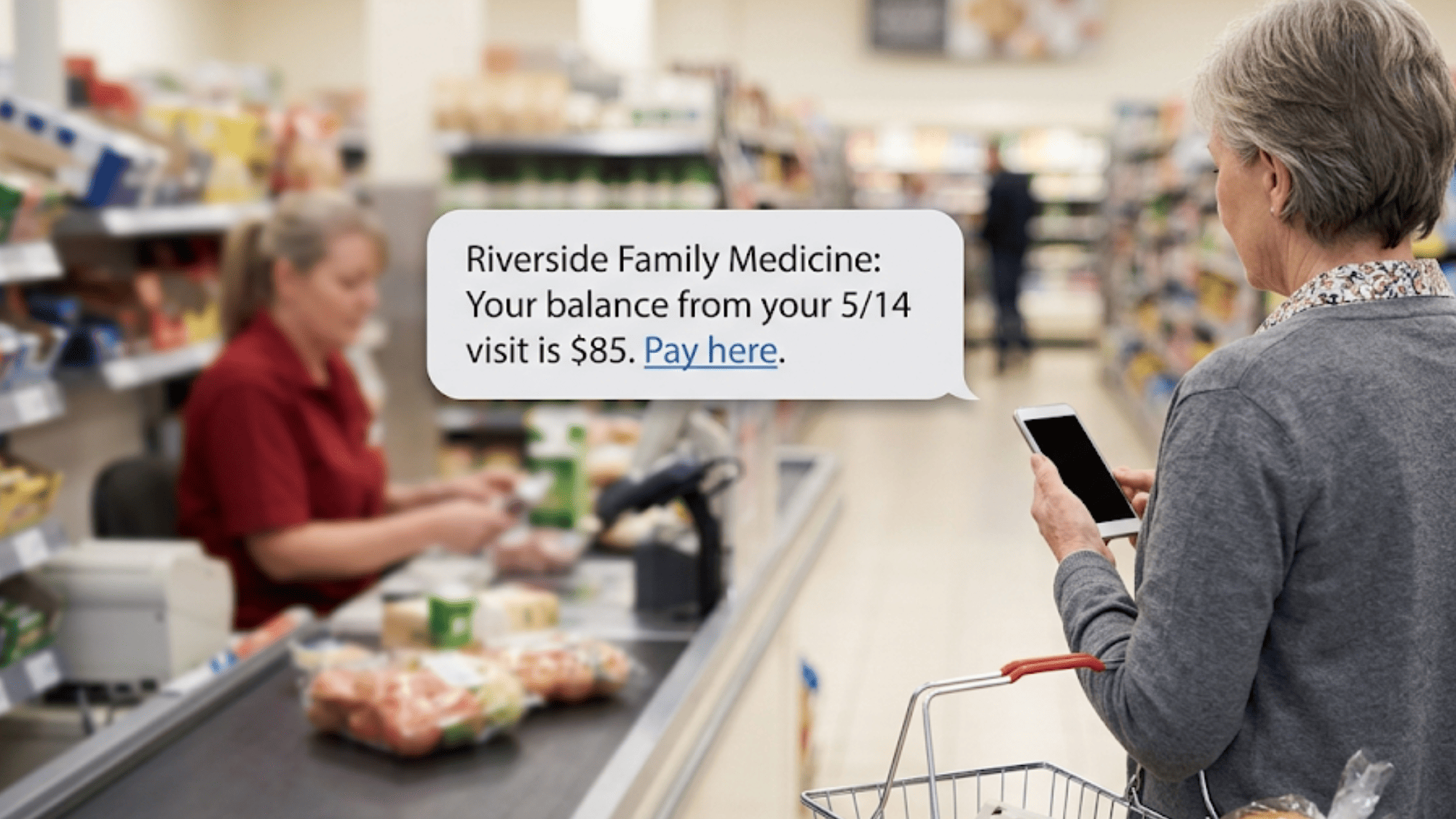
The message is short and plain. Practice name, the visit date, the amount, and a link. Something like:

"Riverside Family Medicine: you have a balance of $85 from your 5/14 visit. Pay here: [link]"

Two taps finish it. Tap the link, tap pay with a saved card or a typed card, and a text receipt comes back.

No app download, no username, no password reset at 9pm.

The message never shows a card number, and it never shows a diagnosis or a procedure. The secure link handles the payment page; card data goes through PCI-compliant processing, and the platform itself is HIPAA compliant.

When the Text Goes Out

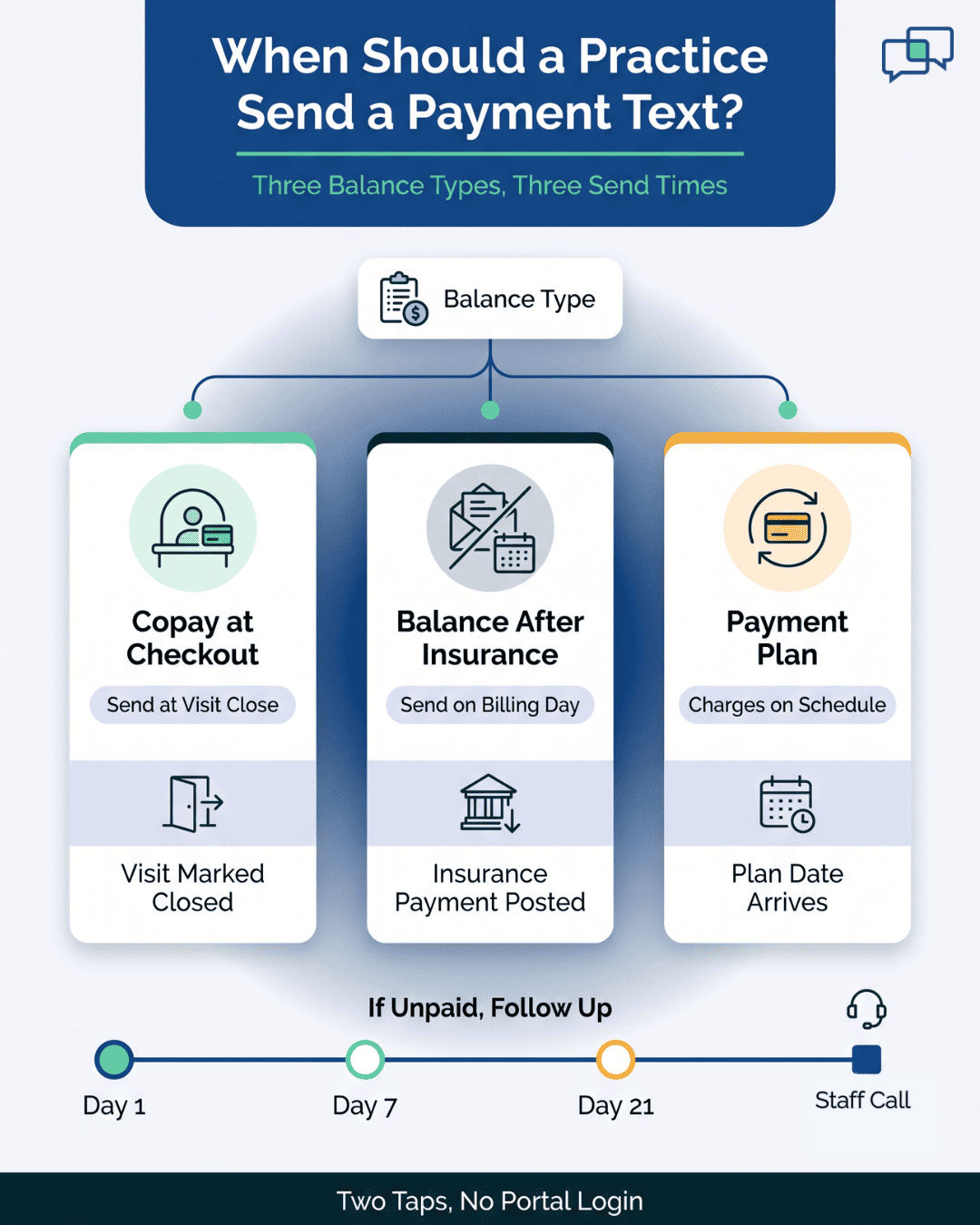
Timing is a setting, not a guess. Three cadences cover most practices:

  • At visit close. A copay payment link SMS fires as the encounter is marked out, while the patient is still walking to the car.
  • On your billing day. The same day your statement run would have printed, the texts go instead. That is where you reduce mailed statements practice-wide.
  • On a plan schedule. Recurring balances charge on their own date without a phone call.

Most practices start with the billing-day cadence. It replaces a known cost with a known message, and you can measure it against last month's statement batch inside two weeks.

What Happens When the First Text Goes Unanswered

One send does not close every balance, and no honest vendor claims otherwise. Build a short follow-up ladder instead.

A reasonable pattern: first text at visit close or on billing day, second at day 7, third at day 21. After that, the account goes to a human.

What makes the follow-up work is the thread. Patients can reply in the same conversation where they confirmed their appointment last month.

A reply like "I thought insurance covered this" reaches your biller as a message, not a voicemail, and your biller answers with the adjustment detail in writing.

Balances that survive three texts and a reply thread are genuine exceptions. Those deserve a phone call. The other 80% never should have consumed one.

Older Patients Handle a Link Fine

We hear the objection constantly: our patients are 70, they won't do this. Watch what actually happens.

A payment link is easier than a portal for exactly the reason it sounds too simple. There is no account to create. Nothing to remember. The text arrives in the same thread where they already got their appointment reminder, from a number they recognize.

Compare the two asks. A portal asks a 72-year-old to recall a password from 18 months ago. A text asks them to tap twice.

Patients who need help still get it. Your staff can read the balance over the phone and take the card, same as always. The link just removes that call for the 8 out of 10 who never needed it.

Older patient in a grocery line paying a clinic balance from a text payment link

Where This Sits Next to Your Reminder Messages

Practices running automated appointment reminders already have the plumbing. The phone number is verified. Patients recognize the thread. Opt-out language and consent records are in place.

Adding payment texts is a settings change on a channel that already works, not a second rollout.

Curogram clients average more than a 75% appointment confirmation rate, based on our internal data. That number is worth knowing before you launch a payment text, because it tells you the channel gets read. A statement has no such number attached to it.

Practices that already collect copays at check-in by text usually see the balance text as the same motion, moved to the back end of the visit.

The Front Desk Stops Making the Counter Ask

No workflow diagram includes this moment. A patient stands at the window, coat half on, and last visit's balance is $140. Three people wait behind her. Your staff member has to decide whether to bring it up.

Usually she doesn't. It's awkward, the line is long, and the patient is already frustrated about a parking spot.

That skipped ask is real revenue. Collections acceleration small practice budgets can actually afford starts by taking the money conversation off the counter and putting it on the patient's phone, an hour later, in private.

The Same-Week Balance

Take a single $85 patient balance from a Thursday visit and run it both ways.

Day

Statement path

Text-to-pay path

Thu

Visit ends, balance posts

Visit ends, balance posts

Thu evening

Waits for Friday print run

Text sends, patient pays $85

Fri

Statement prints

Payment posted, receipt sent

Wed (next week)

Statement arrives in mailbox

no action

Day 30

Second statement prints

no action

Day 45

Check arrives, or doesn't

no action


Same balance. Same patient. One version clears in hours, the other consumes two statements and six weeks of aging.

The Walkthrough, Step by Step

  1. Patient checks out Thursday at 3:40pm. Your staff closes the visit in Intellect and the claim goes out.
  2. Remittance posts a few days later. What remains, $85, becomes patient responsibility inside your Prime Clinical data.
  3. Curogram reads that balance and queues a text on the cadence you set.
  4. At 6:15pm the patient opens the message, taps the link, and pays with the card in their phone wallet.
  5. A text receipt goes back. That payment reconciles into your normal posting workflow.
  6. Your biller sees it on the next report as paid, not as an open balance to chase.

Step 4 collapses the whole cycle from weeks to minutes. Patients who paid within a day of the visit rarely dispute the charge. They remember the appointment, the room, and the person who checked them out.

Compare that to a dispute call at day 40, when the patient remembers none of it and your biller has to reconstruct the encounter from the claim.

What Changes on the Aging Report

Watch the 0-to-30 bucket first. Balances that used to enter aging at day 10 now never enter it at all, because they cleared before the statement would have printed.

Two months in, the 90-plus column starts thinning out. That is the column that turns into write-offs and collection agency splits.

Curogram clients see a 10% to 20% revenue increase overall, based on our internal data. Much of that comes from recovered appointment slots, and faster patient collections stack on top of it.

Your write-off line moves last, and it moves quietly. Balances never reach the agency threshold, so the split you used to pay stays in the practice.

What to Measure in the First 30 Days

Three numbers tell you whether the switch worked. Pull them at day 30, not day 90.

  • Share of balances cleared inside 72 hours. This is the headline. Statement cycles cannot produce a 72-hour number at all.
  • Statement batch size. Compare this month's mailed count to last month's. A drop of 40% to 60% is what practices target first.
  • Share of A/R in the 0-to-30 bucket. MGMA's Better Performers hold above 70% here. Patient-responsibility A/R is usually the piece dragging that down.

Skip open rates and click rates. They flatter the tool without telling you whether money arrived.

One more habit worth keeping: run the same aging report, same day of the month, every month. Changing the report is how practices lose the ability to tell whether anything improved.

What Your Billers Do Instead

Nobody's job disappears. It changes shape.

Instead of printing, stuffing, and mailing a batch of 500, your team works the 60 accounts that actually need a human. Payment plan setups. Insurance questions. Balances a patient disputes with cause.

A billing FTE handling 60 real exceptions is worth far more than the same person handling 500 envelopes.

Front desk staff get something too. Nobody has to open the money conversation across a counter with a line behind it.


Infographic showing when a practice should send a payment text by balance type

How Curogram's Text-to-Pay works with Prime Clinical

Text-to-Pay sends each patient a secure, tokenized link with their balance already filled in. Curogram pulls that amount from your Prime Clinical billing data, so no one re-keys a number and no one guesses.

Patients tap the link, pay by card, and get a text receipt. Saved cards make the second visit faster than the first. Recurring plans charge on schedule with no call from your office.

Everything runs on the same HIPAA-compliant texting platform your practice already uses for reminders and two-way messages. Same thread, same phone number, so the payment text is not a cold message from a stranger.

Setup does not touch your chart workflow. Prime Clinical stays your system of record. Curogram sits on the communication side and moves the number that already exists in Intellect out to the patient.

Front desk staff learn it in about 10 minutes, which matters when your schedule has no training week in it.

Text to pay medical practice rollouts usually stall on one question: who owns the amount. That question has a clean answer here. Prime Clinical owns it, Curogram carries it, and nobody types it twice.

Conclusion: Stop Mailing, Start Collecting

Prime Clinical for charting. Curogram for communication. Intellect bills the payers and does it well, and that work should not change. Curogram collects from the patients.

Between those two jobs sits a gap measured in postage and weeks.

You can close it without touching a chart workflow, a claim edit, or a single screen your billers already know. The balance is in Intellect right now. The only question is whether it travels by mail truck or by text.

Pull your aging report before you decide. Count what sits past 60 days, then count what you spent mailing statements to reach that point. Most practices find the second number pays for the first several times over.

Small practices feel this first. One aged $200 balance matters more across four providers than across forty. Larger groups feel it in volume, when a 600-statement batch stops printing and the 0-to-30 bucket starts filling instead.

Your patients already pay everyone else this way. The vet, the dentist, the mechanic, the parking ticket. Your practice does not need to be the last paper bill in their kitchen.

Request a demo today. Bring one month's statement costs to the call. We will run the math against your own volume and your own aging report, not a benchmark from someone else's practice.


Frequently Asked Questions

How does Curogram know what balance to put in the text?

It reads the patient-responsibility amount directly from your Prime Clinical billing data. No one exports a list, no one types a figure into a second system, and no one reconciles two versions of the same number. The link carries what Intellect says is owed, attached to the correct patient record.

Why does a payment text clear faster than a statement asking for the same money?

Two delays disappear. Mail transit takes five to seven days before the patient sees anything, and the payment method itself adds friction — finding a check, an envelope, a stamp. A text arrives in seconds and the card is already in the phone. Same amount, same patient, four fewer obstacles.

How should a practice handle patients who ignore the first payment text?

Set a short ladder rather than resending the same message weekly. First text on your billing day, second around day 7, third at day 21, then hand the account to a biller. Patients can reply inside the thread, so questions about an insurance adjustment reach your team in writing instead of voicemail.

What happens to patients already on a payment plan when you switch?

Their plan keeps charging on its existing schedule, automatically. Nobody calls to collect the monthly amount, and your staff stops chasing a card that expired in March. One-off links can carry any amount you set, so partial payments and negotiated balances still work without a statement.

How can a practice tell whether text-to-pay actually cut its statement spend?

Compare mailed statement counts month over month against your print vendor's invoice. Then check the share of balances cleared within 72 hours of the visit, a number statement cycles cannot produce. Watch the 0-to-30 A/R bucket last, since it moves once the earlier two have shifted.