11 min read

DrChrono Text-to-Pay: Collect Patient Balances via SMS Link

DrChrono Text-to-Pay: Collect Patient Balances via SMS Link
💡 DrChrono text-to-pay patient billing lets practices collect copays, balances, and past-due amounts through a single SMS payment link — no portal login needed.
  • Patients tap a secure link in their text and pay in under 60 seconds
  • Works outside of DrChrono's claims pipeline, so billing delays don't stall collections
  • Delivers 50–70% open-and-pay rates versus 30–40% for paper statements
  • Cuts collection time from 45–60 days down to 24–48 hours
  • Ideal for copays, co-insurance, and self-pay balances under $500
For practices dealing with EverCommerce billing issues, a text-based mobile payment channel gives you a way to collect patient balances right now — while claims get sorted out on the back end.

A patient walks out of your clinic. The claim goes to the clearinghouse. Then... nothing.

Weeks pass. The claim stalls or comes back denied. Your front desk calls the patient about a balance owed. The patient doesn't pick up. A paper statement goes out — and maybe 30–40% of those even get opened.

If you run a practice on DrChrono, this cycle might feel painfully familiar. Since the EverCommerce acquisition, many clinics have dealt with broken claims, lost data, and delayed payments.

Some have reported months of stalled revenue. The billing system that should protect your cash flow is the very thing putting it at risk.

But here's the thing — patient responsibility doesn't have to wait for insurance claims to clear.

DrChrono text-to-pay patient billing through Curogram gives your practice a direct line to collect copays, balances, and past-due amounts. You send a secure SMS payment link.

The patient taps it, enters their card info, and pays — all within the text thread. No app. No portal. No hold music.

This works whether your claims are processing, pending, or stuck in limbo. It's a mobile payment channel that runs outside the billing pipeline, so it keeps working even when everything else breaks.

Practices using this approach see 50–70% open-and-pay rates, based on our internal data. That's a massive jump from paper statements, which hover around 30–40%.

In this article, we'll break down why DrChrono's billing system is costing you money, how a text-based payment channel solves the cash flow gap, and what real results look like when you stop waiting on claims to collect from patients.

If your practice has been caught in the post-acquisition billing mess, this is your path out.

The Villain: The Billing System That's Bleeding Money

DrChrono's billing and RCM services have been under heavy fire since the EverCommerce acquisition in 2021. What was once a stable EHR platform has turned into a source of constant stress for small practices. The problems are real, growing, and costing clinics serious money.

The Crisis That Won't Quit

During 2023 and 2024, DrChrono went through clearinghouse transitions that left many practices without claims being processed for two months or more. Insurance claims started coming back with wrong data.

Appointments vanished from schedules. Revenue dried up — on both the insurance and patient sides.

One practice reported losing $20,000 or more in revenue from billing errors alone. For a solo provider or small clinic, that's not a bad quarter — that's a threat to the business.

How a Single Broken Claim Snowballs

Let's trace a typical visit through a broken billing system. A patient comes in for care. The claim gets submitted to the clearinghouse. Days turn into weeks. The claim is denied, lost, or returned with wrong codes.

Now your staff has to chase the denial. While they're on hold with the payer, they're not calling patients about their balances. Nobody is working on DrChrono patient responsibility collection because everyone is fighting fires on the insurance side.

Meanwhile, the patient has no idea they owe money. A month later, a paper statement arrives. Based on industry data, only 30–40% of patients even open those envelopes. A fraction of that group actually pays.

The Domino Effect on Cash Flow

Here's the cycle that crushes small practices:

Stage

What Happens

Impact

Week 1

Claim submitted to clearinghouse

No issues yet

Week 3–8

Claim stalls, denied, or lost

Revenue frozen

Week 6–10

Staff diverted to fix claim issues

Patient billing neglected

Week 8–12

Paper statement mailed to patient

30–40% open rate

Week 12+

Balance ages, written off or sent to collections

Revenue lost for good


When insurance claims stall, patient balances stall too. Your staff can't focus on both at once. And when the same billing system that broke the claims is also the one supposed to collect from patients, you have no backup plan.

Why This Hits Small Clinics the Hardest

Large health systems have cash reserves to ride out a 60–90 day billing gap. Solo providers, chiropractors, PTs, mental health counselors, and urgent care clinics don't have that cushion. A two-month gap in cash flow can mean missed payroll, delayed rent, or turning away patients.

Staff morale drops when every day feels like a losing battle. Patients feel ignored when they don't hear from the office. And when the EverCommerce billing issues compound without a clear payment solution, the damage keeps growing.

The root problem isn't just one failed claim or one late payment. It's that the entire revenue cycle — from claim to collection — runs through a single, broken pipeline. When that pipeline fails, everything stops.

What practices need is a DrChrono billing alternative for text-to-pay — a way to collect patient balances that works even when the claims process doesn't. A channel that lets you bring in money today, not 90 days from now.

The Guide: The Revenue Recovery Channel

The fix is simple in concept: stop tying patient payment to the claims pipeline. Give patients a way to pay that doesn't depend on whether insurance has processed, denied, or lost their claim.

That's exactly what DrChrono text-to-pay through Curogram does.

How It Works — Two Taps to Payment

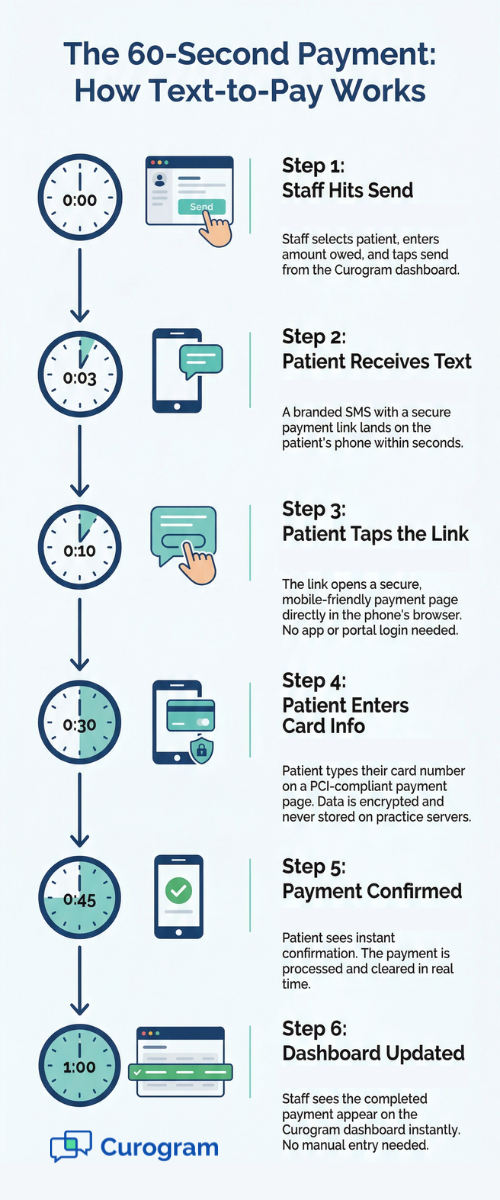
Here's the process from start to finish. Your front desk or billing team sends a text to the patient. The text includes a secure, branded SMS payment link.

The patient taps the link — it opens right in their phone browser. They enter their card details and confirm the amount. Payment is done. The whole thing takes about 60 seconds. It's as easy as paying for a coffee with your phone.

The payment is recorded right away. Your practice sees it in Curogram's dashboard in real time. There's no waiting for a clearinghouse to confirm or a payment processor to batch the transaction. Staff know who paid and who didn't — instantly.

Why Text Beats Every Other Channel

Think about how your patients use their phones. Based on our internal research, SMS messages get opened within minutes. Compare that to email (hours or days) or paper mail (if it gets opened at all). This is why DrChrono copay collection via SMS is so effective.

When you send a mobile payment link through text, you're meeting patients where they already are — on their phones. There's no extra step. No friction. And because the message is personal and direct, patients take action fast.

Practices using Curogram's text-to-pay see 50–70% open-and-pay rates. That means more than half the patients who get the text actually pay — right then and there.

Works Alongside DrChrono, Not Instead of It

This isn't about replacing your EHR's billing system. DrChrono still handles claim filing, insurance follow-up, and account records. What Curogram adds is the patient-facing collection layer — the moment when you need to ask a patient for money and need them to pay fast.

Payments made through text can be synced back to DrChrono through FHIR API for proper records. So your books stay clean and your accounting stays current. This is a true DrChrono patient payment text system that fits right into the workflow your team already uses.

Step-by-step infographic showing how text-to-pay collects patient balances in 60 seconds

Built for Every Specialty

Different practices have different collection needs. Here's how text-to-pay works across common DrChrono specialties:

Specialty

Use Case

Chiropractic

Collect adjustment copays at checkout or text a link for past-due balances

Physical Therapy

Text for remaining patient share while insurance is still processing

Mental Health

Collect self-pay balances or session copays after each visit

Podiatry

Send a link for wound care follow-up charges or deductible upfront

Urgent Care

Collect copay and co-insurance via text before the patient leaves


Each of these workflows can run from day one. There's no complex setup or long onboarding. Staff can be trained in as little as 10 minutes, based on our internal data.

Automated Balance Alerts

You can also set rules to text patients when their balance hits a threshold — say, $50 or more. The message goes out on its own, with a DrChrono mobile payment link right in the body. The patient gets a clear amount owed and a one-tap way to pay.

This is what makes text-to-pay an EverCommerce billing issues payment solution that actually works — it collects money from patients without depending on the same system that's causing problems.

The Success: Collections That Don't Wait for Claims

The biggest win of text-to-pay isn't just the speed. It's that your revenue stops being held hostage by the claims process. Let's dig into what this looks like in practice — with real numbers, clear examples, and a side-by-side view of the old way versus the new way.

The 90-Day Balance vs. The Same-Day Payment

In a standard billing cycle, here's what happens after a patient visit:

  1. The claim goes to the clearinghouse.
  2. The payer takes 14–30 days to process.
  3. If denied, the staff files an appeal — another 15–30 days.
  4. Once insurance pays its share, a patient statement is printed and mailed.
  5. The patient receives it 5–7 days later.
  6. If they pay (and many don't), the check takes another 5–10 days to arrive and process.

Add it up. Even when nothing goes wrong, you're looking at 45–60 days to collect a patient balance. When something does go wrong — a lost claim, a coding error, a clearinghouse transition — that timeline stretches to 90 days or more.

Now compare that to how DrChrono text-to-pay works:

  1. The patient finishes their visit.
  2. Your staff sends a text with a secure payment link.
  3. The patient opens it and pays within minutes.
  4. The payment shows up in your dashboard the same day.

That's it. No clearinghouse. No paper. No waiting. The balance is resolved in 24–48 hours.

Side-by-Side: Traditional Billing vs. Text-to-Pay

Factor

Paper Statement

Text-to-Pay

Time to reach patient

5–7 days via mail

Seconds via SMS

Open rate

30–40%

90%+ for text messages

Pay rate

15–20% of those who open

50–70% open-and-pay

Time to collect

45–90 days

24–48 hours

Staff effort

Print, mail, follow-up calls

One text, automated

Cost per contact

$1–3 per mailed statement

Pennies per text


The numbers speak for themselves. Text-to-pay doesn't just speed up collection — it replaces a broken process with one that actually works.

What This Means for Your Cash Flow

Let's make this concrete. Say your practice sees 20 patients a day. Of those, 10 have a copay or balance due. The average amount owed is $75.

With paper statements:

  • 10 patients × $75 = $750/day in patient balances
  • 35% open rate × 50% pay rate = roughly 17.5% actual collection
  • You collect about $131 per day
  • Timeline: 45–60 days

With text-to-pay:

  • Same 10 patients × $75 = $750/day
  • 60% open-and-pay rate (using the midpoint of the 50–70% range)
  • You collect about $450 per day
  • Timeline: 24–48 hours

That's a difference of over $300 per day. Over a month, that adds up to $6,000+ in extra revenue — not from seeing more patients, but from collecting what you're already owed.

For a solo practice or small clinic, that's the gap between healthy cash flow and barely making rent.

Freeing Staff From the Phone

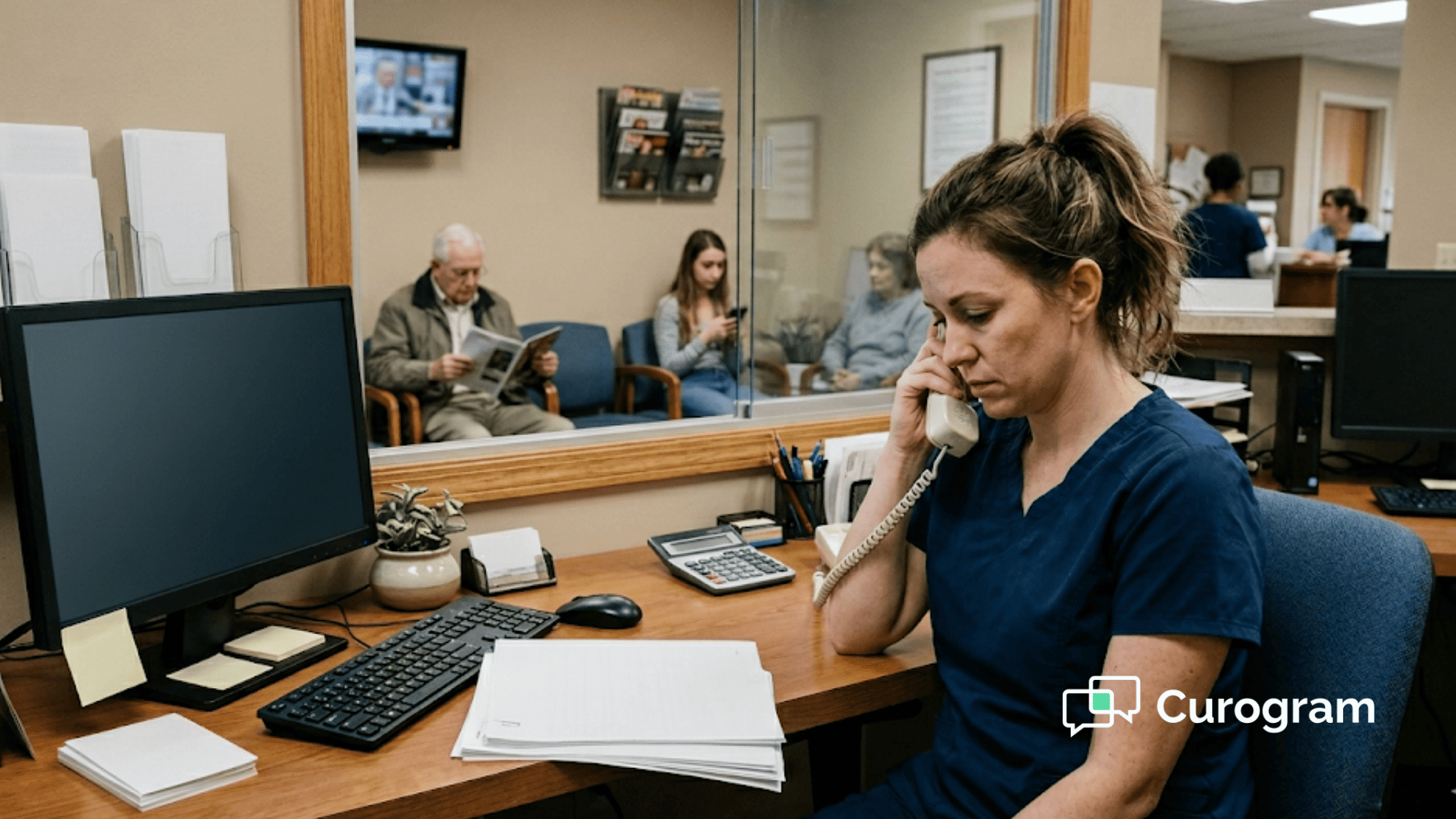
One of the hidden costs of poor billing is staff time. When patient balances go unpaid, someone on your team has to make calls. Based on our internal data, front desk staff spend up to 30% of their day on follow-up calls and payment chasing.

Think about what that means. Your front desk person — the one who should be greeting patients, managing the schedule, and handling intake — is stuck on the phone asking people for money. It's awkward, it's slow, and it rarely works.

With text-to-pay, that entire step goes away. The system sends the message. The patient pays or doesn't. If they don't, a follow-up text goes out on its own. Your staff never has to make a single collection call unless the patient wants to talk.

This frees your team to focus on what matters — patient care, scheduling, and keeping the clinic running smoothly. It also cuts stress, which means better morale and less turnover.

Why Patients Prefer Paying by Text

Here's something that surprises a lot of practice owners: patients actually like paying by text. It's not that they enjoy spending money. It's that a clear, simple text beats a confusing paper bill any day.

Think about the patient's side. They get a letter in the mail two months after their visit. The bill lists codes they don't understand. They're not sure if insurance covered part of it. They set it aside — and forget about it.

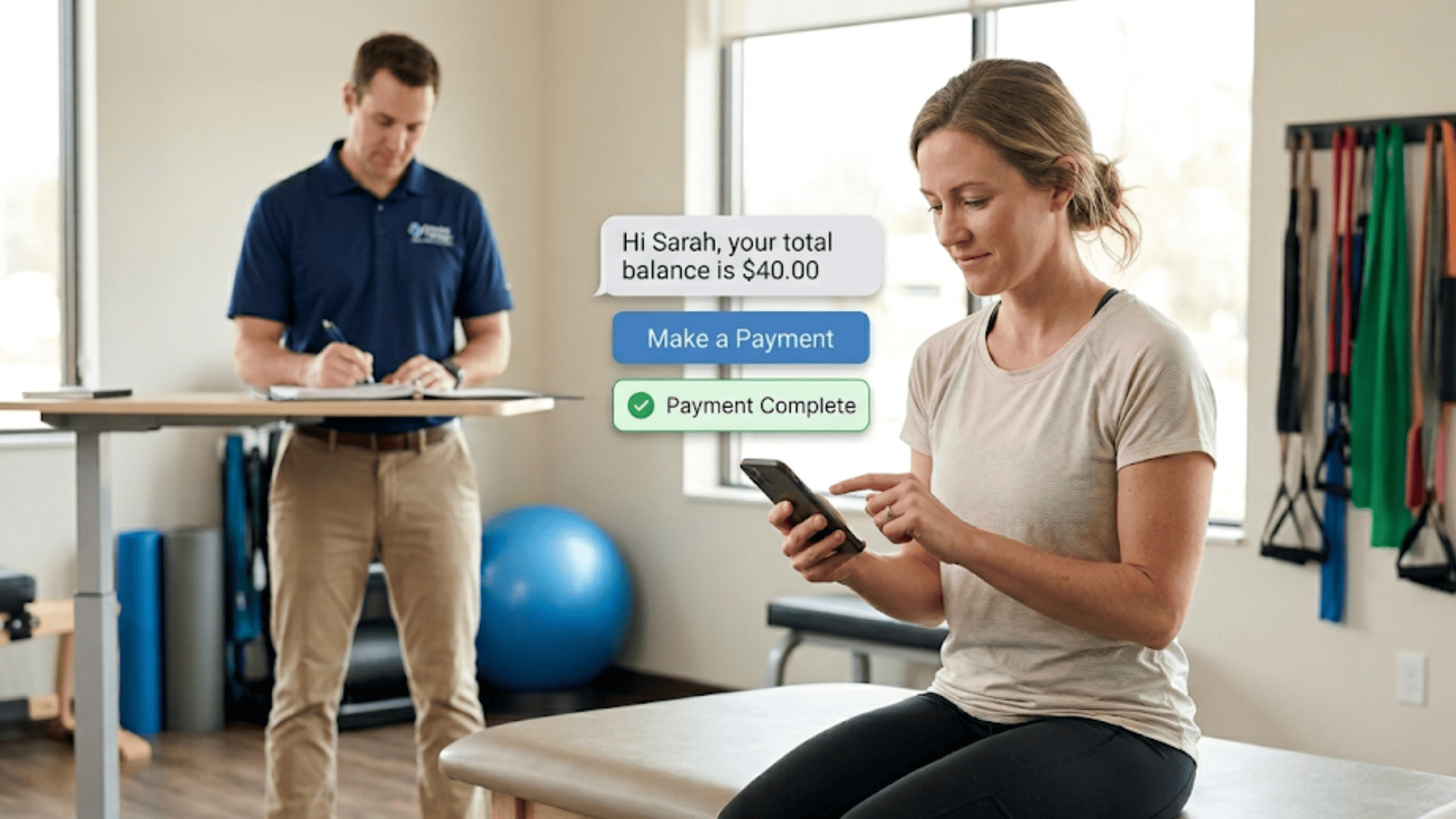
Now imagine they get a text the same day: "Hi Sarah, your copay for today's visit is $40. Tap here to pay securely." It's clear. It's easy. And it's done before they even leave the parking lot.

This is why DrChrono patient responsibility collection works so much better through text. Patients don't want to be confused. They want to know what they owe and have a fast way to take care of it.

The Insurance-Independent Safety Net

The most critical thing about text-to-pay is that it works no matter what's happening with insurance. Claims can be pending, denied, or stuck in a clearinghouse swap — and your practice can still collect the patient's share.

This makes it a safety net for practices dealing with billing disruptions. When your claims pipeline fails, your cash flow doesn't have to fail with it.

For practices on DrChrono that have felt the impact of the EverCommerce transition, this isn't a "nice to have." It's the difference between staying open and closing your doors. A DrChrono billing alternative using text-to-pay means you always have a revenue channel that works — even when the rest of the system doesn't.


Patient completing mobile payment from text message at PT clinic

How Curogram Turns Unpaid Patient Balances Into Same-Day Revenue

Most billing tools were built to track money. Curogram was built to collect it — right now, through the device your patients already check dozens of times a day.

Here's what makes Curogram's text-to-pay different from a standard billing add-on. It doesn't sit inside your EHR's claims workflow. It runs alongside it. That means when DrChrono's billing pipeline slows down, stalls, or breaks, Curogram keeps collecting.

Your front desk sends a text. The patient taps a secure, PCI-compliant payment link. They enter their card details and pay — all in under 60 seconds. No login. No app. No follow-up call needed.

The platform integrates with DrChrono through FHIR API, so payments sync back to the patient's record for clean accounting. Staff can see every payment status in real time from the Curogram dashboard.

But text-to-pay is just one piece. Curogram also handles HIPAA-compliant two-way texting, automated appointment reminders, digital patient intake forms, and reputation management through automated review requests. This means your entire patient contact flow — from booking to payment — lives in one place.

Based on our internal data, practices using Curogram reduce phone call volume by up to 50% and boost staff output by more than 30%. No-show rates drop by as much as 75% with automated reminders. And the text-to-pay feature pushes open-and-pay rates to 50–70%, compared to the 30–40% open rate on mailed statements.

For practices on DrChrono — or any EHR dealing with billing disruptions — Curogram fills the gap between "money owed" and "money collected." It works for copays, self-pay balances, past-due amounts, and even balance threshold alerts.

Conclusion: Collect Now, Resolve Claims Later

DrChrono's billing pipeline is under pressure. Claims are stalling. Staff are stretched thin chasing denials. And while the insurance side sorts itself out, patient balances keep aging on the books.

The good news? You don't have to wait.

Text-to-pay gives your practice a revenue channel that works on its own — outside the clearinghouse, outside the claims process, and outside the delays that have plagued practices since the EverCommerce transition. When you send a patient an SMS payment link, you're skipping every bottleneck that slows down traditional billing.

Think of it this way. DrChrono handles the complex side — claim filing, payer follow-up, and clinical records. Curogram handles the fast side — collecting the money patients owe right now. The two systems work together. One manages the process; the other delivers the cash.

Based on our internal data, practices that adopt text-to-pay see balances collected in 24–48 hours instead of 45–60 days. Open-and-pay rates reach 50–70%. Staff stop spending their day on collection calls and get back to patient care.

For solo practices, small clinics, and specialty offices on DrChrono, this is not an optional upgrade. When your cash cycle drops from two months to two days, it changes everything — payroll, morale, growth, and survival.

If your practice has dealt with billing delays, claim errors, or stalled patient collections, you need a system that works even when your EHR doesn't. Text-to-pay through Curogram is that system.

Collect what patients owe right now — not two months from now. Schedule a demo to see how one text does the work of ten phone calls.


Frequently Asked Questions

Is text-to-pay PCI compliant and secure for patient payment data?
Yes. Text-to-pay links use PCI-DSS Level 1 compliant payment processors. Patient card information is never stored on Curogram or your practice's servers—it's transmitted directly to the payment processor via encryption. The patient sees a branded link in their text message; all data exchange is encrypted and audited. 
Can patients pay partial balances or set up payment plans via text?
Text-to-pay is designed for full-balance and single-payment transactions—ideal for copays, deductibles, and outstanding balances of $50-$500. For patients who need payment plans or partial payment arrangements, staff can handle those conversations separately via text or phone. The text-to-pay link is for straightforward 'you owe $X, pay it now' scenarios, which represent 60-70% of patient responsibility collection needs.
Does text-to-pay replace DrChrono's billing or work alongside it?

Text-to-pay complements DrChrono's billing, not replaces it. DrChrono handles claim submission, insurance adjudication, and accounting reconciliation. Curogram handles the patient-facing collection—the moment when you need to ask a patient for money and need them to pay immediately. Payments can be synced back to DrChrono via API, so your billing records stay current.

How can small practices with thin margins benefit most from switching to text-to-pay?

Small clinics often can't survive a 60–90 day lag in cash flow. Text-to-pay shrinks collection time to 24–48 hours, frees staff from phone-based follow-ups, and collects 50–70% of balances on first contact — turning aging AR into same-week revenue.

Why should DrChrono practices consider a separate payment collection channel during billing disruptions?

When the EHR's billing system is under stress — stalled claims, clearinghouse transitions, or RCM errors — patient collections stall too. A separate text-to-pay channel keeps cash flowing in even while back-end issues get resolved.