11 min read

Tebra Text-to-Pay: SMS Payment Links That Collect Faster

Tebra Text-to-Pay: SMS Payment Links That Collect Faster
💡 Tebra text-to-pay powered by Curogram sends patients an SMS payment link so they can settle balances in two taps — no portal login needed.
  • Patients get a text with a secure link and pay in under 60 seconds
  • Replaces paper statements that cost $800–$1,000+ per month to mail
  • Bypasses the Tebra patient portal, where payment adoption stays low
  • Works for copays, post-visit balances, and payment plans across any specialty
  • Helps practices accelerate collections and shrink aging A/R
Curogram adds a text-first collection channel that works alongside Tebra's billing. The result: practices collect faster, spend less on mailing, and reduce paper statement costs without changing their claims workflow.

Your billing team prints the statement. They stuff it in an envelope. They slap on a stamp and drop it in the mail. Then they wait — 30 days, 60 days, 90 days — hoping the patient opens it.

Most don't.

That's the reality for Tebra practices stuck in a loop of portal-based payments that patients ignore and paper bills they never open. The patient portal requires a login. Many patients never create an account or forget how to get in. So the bill sits unseen. The practice falls back on paper. Each statement costs $3–$5 to print and mail. And only about 20% of those result in a payment.

This means your office spends hundreds — even over $1,000 a month — just to maybe collect a fraction of what's owed.

There's a better way. Tebra text-to-pay powered by Curogram sends a secure payment link straight to the patient's phone. The patient taps the link, enters their card info, and pays. Done. Two taps, under a minute, no portal login, no stamps.

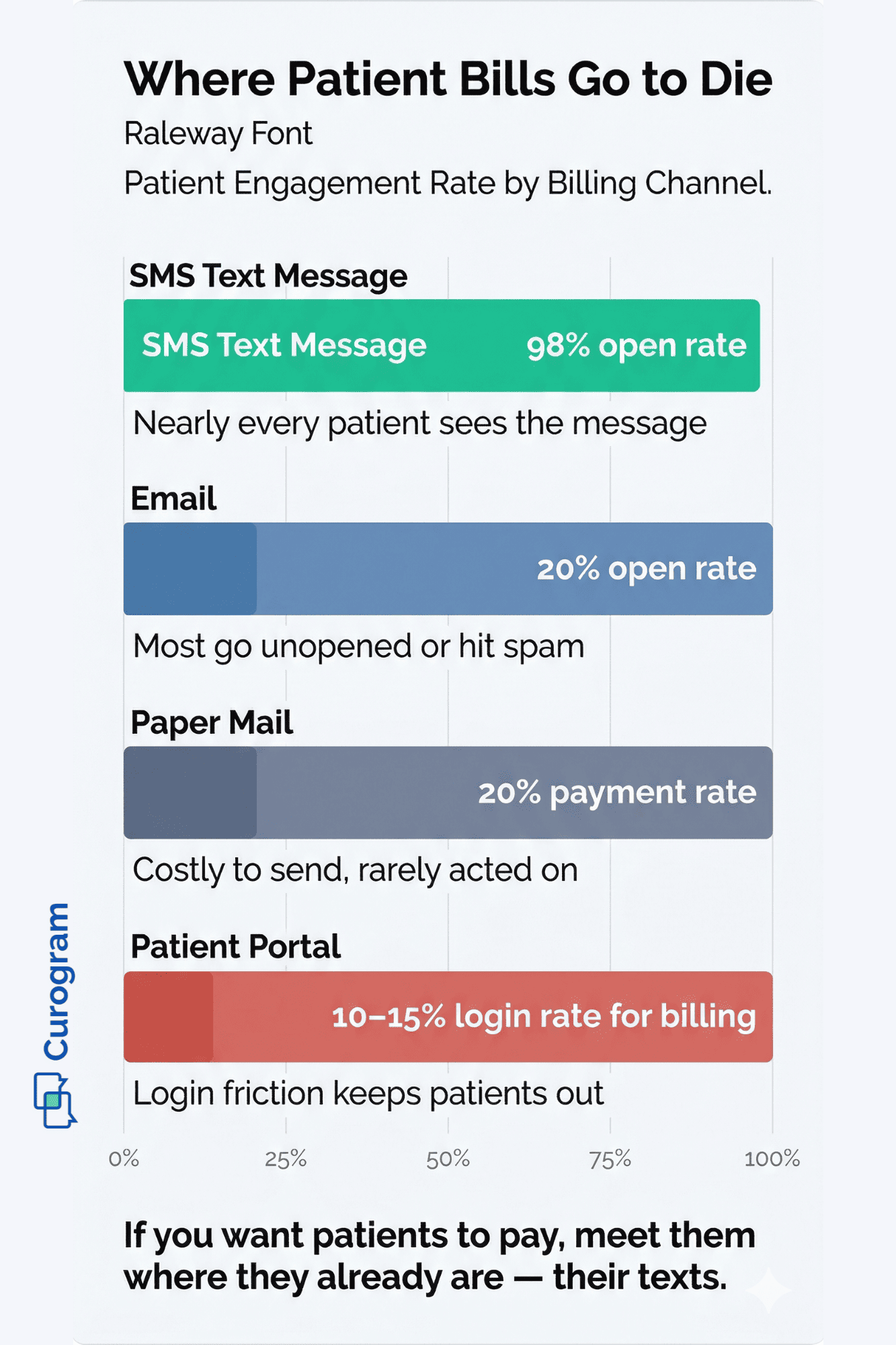
SMS open rates sit near 98%. That means nearly every patient sees the bill — and the ones who see it can pay right away. No more waiting on mail. No more chasing down balances that age for months.

This article breaks down exactly why the old billing model fails Tebra practices, how an SMS payment link fixes it, and what kind of results you can expect when you stop relying on the statement they never open.

Whether you run a single-location family practice or a multi-site group, text-to-pay offers a patient billing channel that actually works — one that helps you collect faster and reduce the cost of chasing every dollar.

The Villain: The Statement They Never Open

Tebra's patient billing system follows a pattern most EHRs share. Patients can view and pay their balances through the patient portal. The practice can also send e-statements. For patients who log in often, this works fine.

But portal adoption for billing mirrors portal adoption for everything else — low. Most patients either never set up an account, forgot their password, or just don't check it between visits. For this group, the bill is invisible. It's like sending a letter to an address where no one lives.

The Slow Bleed

Here's how the cycle plays out in real time.

A patient visits your office, gets care, and leaves with a copay or balance. Tebra creates the bill and sends an e-statement to the portal.

The patient doesn't log in. After 30 days, your team mails a paper statement. The patient gets it in a stack of junk mail, sets it on the counter, and forgets about it.

After 60 days, a second paper statement goes out. The patient may or may not open it. After 90 days, your billing staff starts making calls — to a patient who was willing to pay all along. They just never got the bill in a way that made paying easy.

Three months of effort. All for a $150 balance.

The Money Pit

The cost hits your practice two ways: the direct cost of the process and the indirect cost of money you never collect.

Let's break it down with some real math.

Cost Factor

Estimate

Cost per paper statement (print, postage, labor)

$3–$5

Statements mailed per month (typical practice)

200–300

Monthly mailing cost

$800–$1,000+

Collection rate on paper statements

~20%

Cost to collect each dollar via paper

$4–$5


When only one in five statements leads to a payment, the practice is spending $4–$5 just to collect every $1 through paper billing. That's not a strategy — it's a drain.

Meanwhile, balances that age past 90 days get harder to collect with each passing week. Many end up written off. For a practice sitting on $50,000 in aging patient A/R, even a small bump in collection rate means tens of thousands in found revenue.

The Trap

Billing managers feel stuck between two bad options. The Tebra patient portal exists, but patients don't use it for payments. Paper statements work in theory, but they're slow and costly. Collection calls eat up staff time that often costs more than the balance itself.

The practice is losing money trying to collect money. And the root cause isn't that patients refuse to pay. It's that the payment request never reaches them through a channel that makes paying simple.

The Tebra patient portal payment adoption rate stays low because the portal itself has a login barrier. The payment tool exists — the delivery channel doesn't.

This is what we call "The Statement They Never Open." It's not one broken thing. It's a system that pushes bills through channels patients don't engage with — portals they skip, mail they toss, and calls they screen. The good news? There's a fix, and it's already in your patient's pocket.

Infographic comparing patient billing channel engagement rates showing SMS texts at 98% versus email portal and paper mail below 20%

The Guide: The Two-Tap Payment

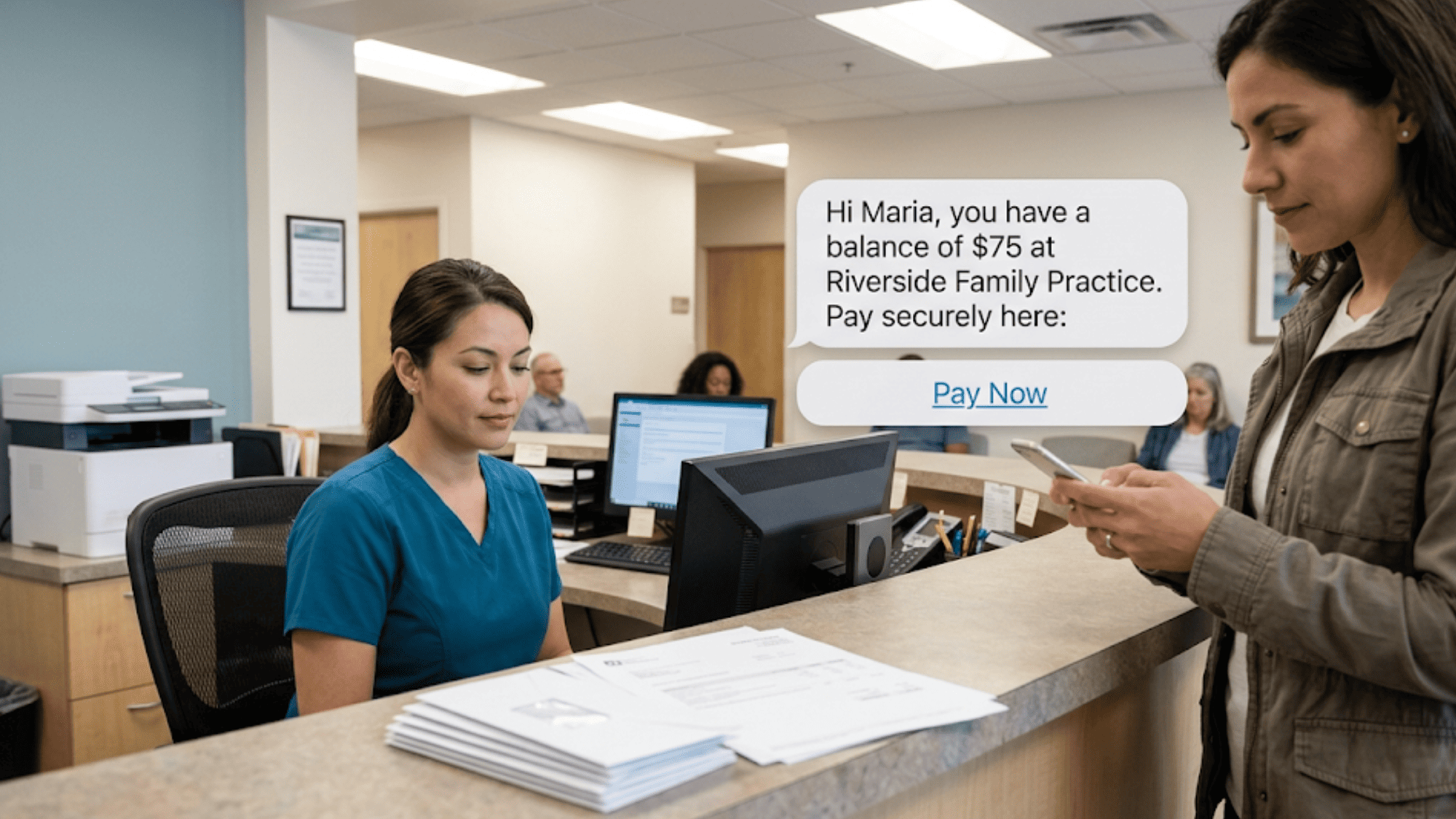
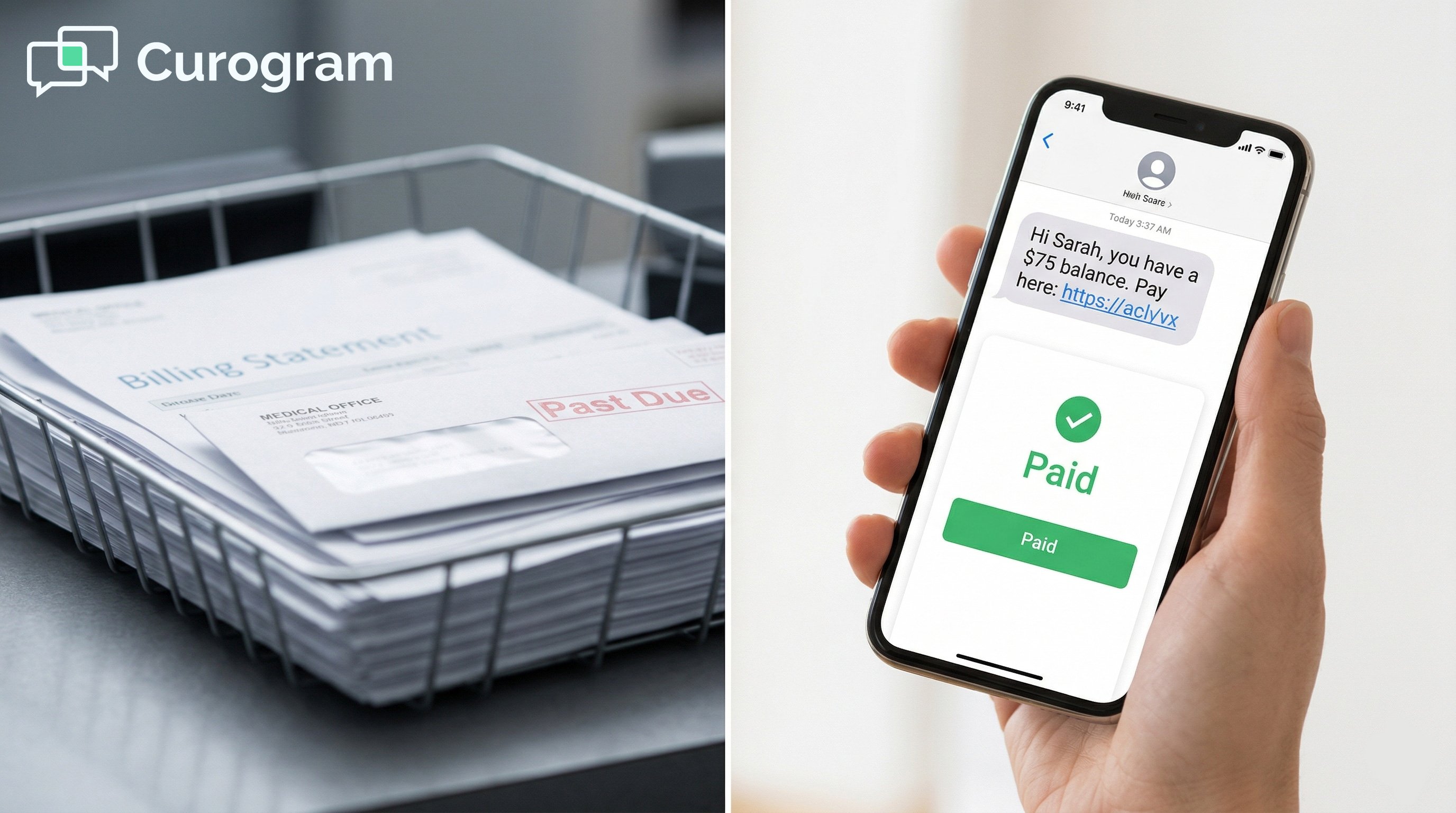
Curogram's text-to-pay sends a secure SMS payment link to the patient's phone. The message is short and clear: "Hi [Name], you have a balance of $[amount] at [Practice Name]. Pay here: [link]."

The patient taps the link. A secure, mobile-friendly payment page opens. They enter their card info and get a quick receipt. The whole thing takes less than 60 seconds. No portal login. No app to download. No phone call.

That's it. Two taps and done.

Why Text Beats the Portal

The core gap between Curogram's text-to-pay and Tebra's portal payments is the delivery method. Portal-based payments need the patient to act first — log in, find the billing section, and process the payment. That's a lot of steps for a $75 copay.

Text-to-pay flips the script. It puts the payment request in the patient's hand, right where they already check messages dozens of times a day.

SMS open rates run close to 98%. The payment link sits in the same text thread as their visit reminders and check-in texts — a channel they know and trust.

Think about your own behavior. If someone texts you a link, you tap it. If someone sends you a letter, you might open it next week. Or never.

Working With Tebra, Not Against It

Curogram doesn't replace Tebra's billing tools. Your practice keeps managing claims, insurance, and invoicing through Tebra. Curogram adds the patient-facing payment link — the text that gets the patient to actually pay.

Think of it this way: Tebra builds the bill. Curogram delivers it. The billing system stays in Tebra. The collection channel moves to text. Payment data can be checked against Tebra's records for smooth tracking.

This makes it a Tebra patient billing alternative to portal-based payment that works alongside what you already have. No need to rip out your current workflow.

Patient receiving SMS payment link on phone in medical office waiting area while front desk staff works at computer

Fits Any Specialty, Any Balance

Text-to-pay isn't built for just one use case. It works across every balance type and every specialty.

Use Case

How Text-to-Pay Helps

Copay after a visit

Send a text the same day — collect before the patient forgets

Insurance-applied balance

Text when the EOB posts — no waiting for a statement cycle

Payment plans

Schedule texts with links for each due date

Post-procedure bills

Collect for cosmetic derm, ortho, dental, and more

Multi-location tracking

View payment rates by site to spot issues early


Whether it's a $25 copay at a pediatrics clinic or a $1,200 post-op balance at an orthopedic center, the SMS payment link works the same way. The text reaches the patient. The patient taps. The balance gets paid.

Based on our internal data, practices using Curogram's SMS features see strong response rates — with over 75% of appointment messages acted on, showing patients engage with texts far more than portals or mail. That same habit carries over to payment links.

The text channel adapts to any billing case because it's a delivery method — not a one-trick tool.

The Success: Faster Collections, Lower Costs, Smaller A/R

When a practice shifts from portal-based and paper-based billing to text-to-pay, the first thing that changes is speed. Balances that used to age for 60–90+ days through the statement cycle can be resolved in hours or days.

The math is simple. SMS open rates hover near 98%, which means nearly every patient sees the bill. And because the payment page is just one tap away, patients who see it can pay right now — instead of adding "pay the doctor" to a mental list they never finish.

Compare that to the old model: wait 30 days for the statement to arrive, 30 more for the patient to maybe pay, and 30 more before the team starts calling. That's 90 days for a balance that could've been settled the same week.

From Statement Cycle to Same-Day Collection

Text-to-pay doesn't just speed things up. It shifts the entire billing rhythm. The old cycle looked like this:

Old Billing Timeline:

  1. Visit happens → Tebra creates the bill
  2. E-statement goes to the portal → patient doesn't log in
  3. Day 30 → first paper statement mailed
  4. Day 60 → second paper statement mailed
  5. Day 90+ → billing team starts calling

New Billing Timeline with Text-to-Pay:

  1. Visit happens → Tebra creates the bill
  2. Same day or next day → patient gets a text with a payment link
  3. Within 24–48 hours → many patients pay

The billing paradigm shifts from a weeks-long statement cycle to near-real-time collection. Your billing team's role changes too. They spend less time printing, stuffing envelopes, and making calls. They spend more time on insurance follow-ups, denial management, and tasks that actually grow revenue.

A Real-World Example

Let's walk through what this looks like for a real Tebra practice.

A 6-provider office spends $950 per month on paper statements. They send about 250 statements a month at roughly $3.80 each. Their collection rate on paper hovers near 20%. That means 200 of those 250 statements bring in nothing.

The practice turns on Curogram's text-to-pay. Within 60 days, statement volume drops by more than half. Why? Because patients who pay via text no longer need a paper bill.

The billing manager reports that balances under $200 — which make up most of the patient A/R — now get collected within 48 hours of the text being sent.

Here's what the shift looks like in numbers:

Metric

Before Text-to-Pay

After Text-to-Pay

Monthly statement cost

~$950

~$400

Average days to collect (balances under $200)

60–90+

1–2

Staff hours on billing calls per week

10+

3–4

Balances aging 90+ days

High

Significantly reduced


Monthly mailing costs drop by hundreds. Patient A/R aging improves across the board. The practice collects more, faster, and at a lower cost. And patients like it too — paying from their phone beats writing a check or logging into a portal.

The ROI Math

Let's do a quick return-on-investment check for a mid-sized Tebra practice.

Say the practice has $60,000 in total patient A/R. Of that, $35,000 sits in balances aged 60+ days. Under the old model, a good chunk of that gets written off. With text-to-pay, even pulling in 30%–40% of those stuck balances means $10,500–$14,000 in found revenue.

At the same time, you cut mailing costs by $400–$600 per month. That's $4,800–$7,200 saved per year — just on stamps, paper, and labor.

Add it up. The practice recovers thousands in aging A/R, saves thousands more on mailing, and frees billing staff to focus on higher-value work. Based on our internal research, the ROI on text-to-pay often covers the entire cost of the platform within the first month.

Why Patients Respond

It's worth pausing on why this works so well from the patient side.

Patients don't skip bills on purpose (most of the time). They skip them because the process is hard. Logging into a portal requires a username, a password, maybe a two-factor code. Mailed statements get buried under pizza flyers. Phone calls go to voicemail.

But everyone reads texts. The phone buzzes. The message pops up. The link is right there. One tap to open, one tap to pay. No app. No login. No friction.

This is why practices that text-to-pay accelerate patient collections across the board — not because patients suddenly become more willing to pay, but because the barrier between "I should pay this" and "I just paid this" drops to nearly zero.

Scaling Across Locations

For multi-site Tebra practices, text-to-pay adds one more layer of value: data. Each location's payment rates can be tracked side by side. If Site A collects 70% of texted balances and Site B collects 40%, you know where to dig in.

Maybe Site B's team isn't sending texts fast enough. Maybe they're not sending them at all. With text-based billing, you get clear signals on what's working and what's not — which is something paper statements never gave you.


How Curogram Turns Tebra Billing Into a Text-First Collection System


Curogram was built to solve one problem that every EHR leaves open: getting patients to actually respond. Tebra handles scheduling, claims, and records well. But when it comes to patient-facing actions — confirming visits, filling forms, paying bills — the portal creates a wall that most patients don't climb.

Curogram punches through that wall with SMS.

For billing, Curogram gives Tebra practices a text-to-pay tool that sends secure payment links straight to the patient's phone. But payment is just one piece. Curogram also handles automated appointment reminders, two-way HIPAA-compliant texting, digital intake forms, patient recall campaigns, and Google review requests — all through SMS.

Based on our internal data, practices using Curogram see no-show rates 53% lower than the industry average. One multi-location client saw 35% of recalled patients book a follow-up within a month — adding 1,240 patient visits from recall texts alone.

When you combine payment texts with reminders, recalls, and review requests, you get a full patient communication layer that sits on top of Tebra. The patient's text thread becomes a single hub for every interaction with your office — from confirming their next visit to paying their last one.

Curogram connects with Tebra and works the same way with any EHR. Setup takes minutes, not weeks. Staff training is done in about 10 minutes. And because Curogram is SOC 2 Type II certified and fully HIPAA compliant, you're covered on security from day one.

If you're using Tebra and still chasing balances through portals and paper, Curogram offers a clear upgrade — reduce paper statement costs, collect faster, and give patients a way to pay that they'll actually use.

Conclusion: The Bill They Actually Pay

Tebra's portal payments need patients to log in. Paper statements need patients to open mail. Both channels have low engagement for billing. And every day a balance sits uncollected, it costs your practice money — in mailing fees, staff time, and write-offs.

Curogram's text-to-pay sends a secure payment link to the one place patients check all day — their text messages. Two taps. Under 60 seconds. No login needed.

The EHR creates the bill. The text delivers it. Together, Tebra and Curogram close the gap between what patients owe and what you actually collect. It's a simple shift from a billing channel patients ignore to one they act on right away.

Think about what you're spending right now. How much goes to statements that patients never open? How much sits in aging A/R, waiting for a payment that won't come through the portal?

For most Tebra practices, the answer is hundreds per month in mailing and thousands in stuck balances.

One text changes that math.

Text-to-pay doesn't ask you to overhaul your workflow. It layers on top of what you already do. Tebra stays your billing engine. Curogram becomes the delivery system that gets patients to pay — fast.

If your practice is ready to stop losing money on the collection process and start closing balances the week they post, it takes one step.

Your patients are ready to pay — they just need the right channel. Book a demo and see text-to-pay collect what your portal and paper statements can't.


Frequently Asked Questions

Is text-to-pay secure and HIPAA compliant?
Yes. The text message contains a link to a secure, encrypted payment page — no financial or health information is included in the text itself. The payment page uses bank-level encryption (256-bit SSL), and Curogram is SOC 2 Type II certified and fully HIPAA compliant. Patient payment data is processed through PCI-DSS compliant payment processors, meeting the same security standards as any online payment system.
Can we still use Tebra’s portal payments alongside text-to-pay?
Absolutely. Curogram’s text-to-pay adds a collection channel; it doesn’t replace Tebra’s portal payments. Patients who prefer to pay through the portal can continue doing so. Text-to-pay reaches the patients who don’t use the portal — the ones whose balances are aging because they never saw the bill. Most practices find that text-to-pay becomes the primary collection channel over time, but there’s no requirement to disable portal payments.
What does it cost to send payment texts compared to paper statements?

SMS payment requests cost a fraction of paper statements per contact. Paper statements run $3–$5 each fully loaded (printing, postage, envelope, labor), and a practice sending 200–300 per month spends $800–$1,000+. Text-to-pay eliminates the majority of that cost. More importantly, the collection rate on texts is significantly higher than paper — meaning you’re spending less to collect more. The ROI typically covers Curogram’s entire cost within the first month.

How can multi-location Tebra practices track text-to-pay results across sites?

Curogram lets you view payment collection rates by location. This helps you spot which sites send texts on time and which lag — so you can fix gaps before balances pile up.

Why is Curogram's SMS payment link considered HIPAA compliant for patient billing?

The text itself contains no health or financial data — just the balance amount and a secure link. The payment page uses 256-bit SSL encryption, and Curogram holds SOC 2 Type II certification with full HIPAA compliance.