
1 min read
The Financial Cost of Manual Confirmation Calls
 Jo Galvez : Feb 6, 2026, 5:00:00 PM
💡 When you eliminate manual appointment calls in Prime Clinical practices, you can reclaim up to 10 hours of staff time each week. Instead of...
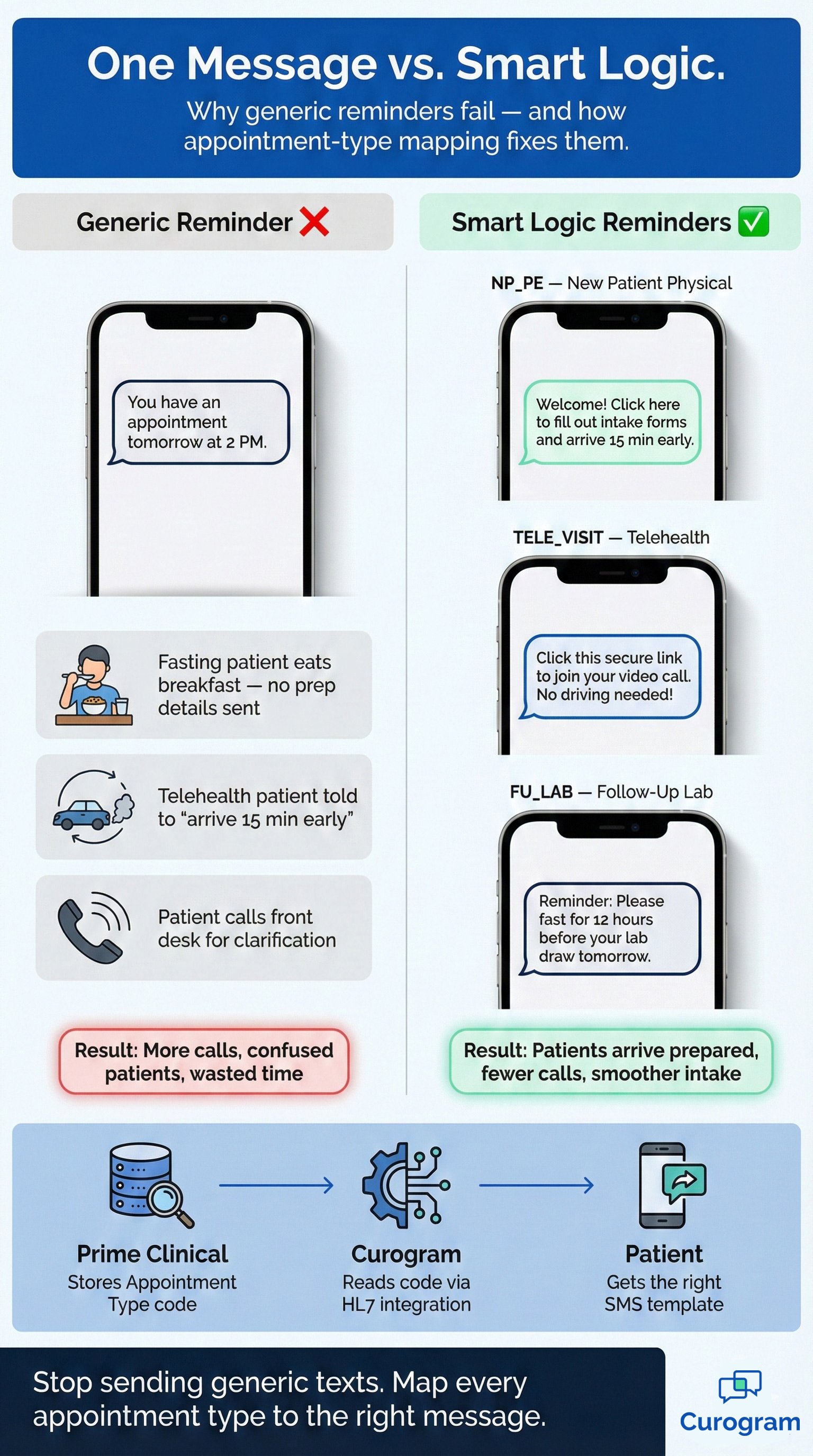
Your patient gets a text: "You have an appointment tomorrow at 2 PM." That's it. No prep details. No forms link. No clue whether to fast, log in online, or show up in person. They call your front desk. Your staff spends five minutes on a question that the reminder should have answered.
This scene plays out every day in clinics that rely on basic reminder tools. The text goes out, but it says nothing useful. Worse, it can mislead.
A telehealth patient gets told to "arrive 15 minutes early." A lab patient never hears about fasting. The reminder creates more work than it saves.
Prime Clinical users feel this pain more than most. The system tracks dozens of visit codes: new patient exams, follow-up labs, virtual consults, imaging sessions, and more.
Each one needs its own set of details. Yet most reminder tools ignore those codes and blast the same flat message to every patient on the schedule.
Customizable patient reminders for Prime Clinical Systems fix this gap. They read the visit type stored in your schedule and send a text that matches.
A new patient physical gets intake forms and parking info. A telehealth visit gets a secure video link. A lab draw gets fasting rules. Every message lines up with what the patient actually needs to do.
Curogram acts as the logic layer between your Prime Clinical data and your patient's phone. Once you map each Appointment Type to a template, the system runs on its own. No manual sorting. No extra clicks. No room for human error.
In this guide, we'll walk through how this works, why it matters, and how to set it up for your practice.
Most reminder platforms treat every appointment the same way. They pull a date, a time, and maybe a provider name, then fire off a cookie-cutter text. That approach might work for a single-doctor office with one visit type. It falls apart fast in a busy, multi-provider practice.
Basic reminder services scrape two data points from your schedule: the date and the time. They drop those into a standard template like "Don't forget your appointment on Tuesday at 10 AM."
The patient reads it, nods, and moves on without any idea of what to do next.
That blank space between the reminder and the visit is where problems start. A patient booked for a fasting lab eats breakfast because the text never mentioned fasting.
A new patient walks in empty-handed because no one sent a link to the intake forms. The reminder did its job on paper but failed in practice.
When Telehealth Gets the Wrong Script
Think about a virtual visit patient who gets told to "please arrive 15 minutes early." Arrive where? The message was built for in-person visits and pushed to everyone. The patient now has to call your office to ask whether they should drive in or click a link.
That single phone call costs your staff time and patience. Multiply it by dozens of confused patients each week, and the "time-saving" reminder system starts eating into your day instead.
A Message That Says Nothing Useful
A vague text gives patients no reason to act. There are no forms to fill out, no fasting window to follow, and no video link to save.
The patient treats the reminder like junk mail. Show-up rates stay flat, and your front desk still fields a wall of calls the morning of each visit.
The whole point of multi-provider scheduling automation is to save labor. But if the messages it sends create new questions, you've just shifted the workload from one task to another.
The Prime Clinical Reality
Prime Clinical tracks visit types with specific codes like NP_PE for a new patient physical, FU_LAB for a follow-up lab, and TELE_VISIT for a virtual consult. These codes hold real meaning. They tell you exactly what the patient is coming in for and what they need to prepare.
Most basic tools ignore these codes. They never look past the date field. That means a system rich with useful data sits unused while patients get the same hollow text no matter what kind of visit they booked.
Your staff already entered the visit type when they built the schedule. The data is there. If your reminder tool doesn't read it, you're doing the work twice: once in the system and again on the phone when the patient calls to ask what they should do.
That gap between data and action is exactly where patient preparation compliance breaks down. The info exists, but it never reaches the person who needs it.
Patients call the office to ask for details. Staff pause their work to answer. The call queue grows. Wait times rise. The very problem the reminder was meant to prevent now shows up in a different form. For practices with ten or more visit types, this cycle repeats all day long.
The fix isn't more staff or longer hours. It's a smarter message that uses the data you already have.
Curogram connects to your Prime Clinical database and reads the fields that matter. It doesn't just pull a date and time. It looks at the appointment type, the provider, and the location, then picks the right template. Here's how the mapping works step by step.
Curogram pulls scheduled events from Prime Clinical through an HL7 reminder integration. HL7 is a standard format that health systems use to share data between platforms. When a new event lands on your schedule, the integration reads its fields and routes the message through the correct template.
The key field is the appointment type. This is the code your staff selects when booking the visit. Curogram maps each code to a unique SMS template you've already written. No manual step sits between the booking and the text.
When the system sees code NP_PE, it fires Template A. That text might say: "Welcome! Please click here to fill out your intake forms and arrive 15 minutes early."
The patient gets a direct link, clear timing, and a reason to act before they ever step through the door.
This is a prime example of specific instructions for medical appointments doing the heavy lifting. The patient shows up with forms done, ID ready, and time to spare. Your front desk skips the clipboard hand-off and jumps straight to care.
When the code is TELE_VISIT, Template B takes over. The text reads something like: "Click this secure link to join your video call at your scheduled time. No driving needed!"
The patient knows the visit is virtual and has the link at their fingertips. No one calls to ask where to park. No one drives to the office by mistake. The reminder did its job because the message matched the visit type.
Once you map your codes to templates, the logic runs on its own. Each new booking flows through the same rules without any extra clicks from your team. You set the Prime Clinical appointment type mapping once, test it, and let it handle every future reminder.
That's the real payoff. Your staff doesn't review each appointment and pick a template by hand. The system does it in the background, 24 hours a day, with zero fatigue.
If your practice adds a new visit code, you create a new template and link it to the code. The change takes minutes.
There's no need to rebuild the whole workflow or retrain your staff on a new process. This kind of flexibility matters for growing clinics. As your services expand, your messaging keeps pace without extra cost or effort.
Manual sorting invites mistakes. A tired staff member might send the wrong prep sheet or forget the fasting note. Automation removes that risk. Patients get the right message every time, which builds trust and keeps your office running smoothly.
When patients trust the texts they receive, they follow through. They show up prepared, and your day moves forward without the back-and-forth.

Many Prime Clinical users operate across two, three, or even ten sites. Each location has its own parking setup, check-in process, and sometimes its own set of providers.
A single reminder template can't cover all of that. Curogram solves this by reading the Location ID attached to every scheduled event.
The Challenge of Multiple Sites
Picture a medical group with two clinics. Main Street Clinic has a parking garage on the south side. Westside Imaging has a surface lot off the main road. If both sites send the same text, half the patients get wrong directions.
It's not just parking. One site might have a separate entrance for lab work. Another might require patients to check in at a kiosk instead of the front desk. These small details shape the patient's first impression. Getting them wrong starts the visit on a sour note.
The problem grows as you add more sites. Each location brings its own quirks. Without a way to tailor the message per site, your staff ends up fielding calls from lost or confused patients. That eats into time that should go toward care.
A patient headed to Westside Imaging doesn't need garage instructions. They need to know about the surface lot and the side entrance near radiology. When the text doesn't match the location, the patient wastes time circling the wrong building or walking through the wrong door.
This might sound minor, but it adds up. Late arrivals push your schedule back. Confused patients take longer at check-in. Every delay ripples through the rest of the day.
Some offices try to fix this with manual notes. A front desk member adds a line to the reminder before it goes out. That works when you send ten texts a day. It breaks when you send a hundred.
Manual fixes depend on memory and attention. One missed edit sends a patient to the wrong lot. Multi-provider scheduling automation should handle these details, so your team doesn't have to.
How Curogram Reads Location Data
Every event in Prime Clinical carries a Location ID. Curogram reads that ID the same way it reads the Appointment Type. It then layers the location data on top of the visit-type logic to build a message that covers both what the patient needs to do and where they need to go.
For Main Street Clinic patients, the text includes parking garage details and the main lobby entrance. For Westside Imaging patients, it includes surface lot directions and the radiology wing door. The message adapts to the data, not just the person.
Say a patient is booked for a new patient physical at Main Street. The system sees code NP_PE plus Location ID "Main Street." It pulls the NP_PE template, drops in the Main Street parking and entrance info, and sends the combined message. One text covers visit prep and site details.
Now change the location to Westside. Same visit type, different site. The system swaps in the Westside directions while keeping the intake form link and early arrival note. The patient gets exactly what they need without your staff lifting a finger.
When you open a new site, you add its Location ID and create a set of location-specific notes. The templates stay the same. The system just layers in the new site's details when it sees the matching ID.
This makes growth simple. You don't rebuild your reminder flow each time you expand. You plug in the new data and let the logic do the rest. Patient preparation compliance stays high across every site because the message always fits the place.
Practices that switch to location-aware reminders see fewer misdirected patients within the first week. Front desk call volume drops because patients already know where to park, which door to use, and what to bring.
The effect compounds over time. As patients learn to trust the texts, they stop calling for details. Your staff reclaim hours each week. Patient experience improves before anyone even walks through the door.
Offices that use targeted reminders often see inbound "where do I go" calls fall by 30% to 50% in the first month. That's not a small shift. It frees up phone lines for urgent matters and lets your team focus on patients who are already in the building.
Those saved minutes add up. Over a full quarter, a mid-sized practice can reclaim dozens of staff hours. That's time you can redirect toward patient care, billing follow-ups, or growth tasks.
When a patient parks in the right lot, walks through the right door, and already has forms done, the visit starts calmly. They feel cared for before they sit down.
That feeling of confidence and ease is the kind of patient experience that drives loyalty and referrals. Smart reminders don't just save time. They shape how patients feel about your practice from the very first touchpoint.
The gap between a good reminder and a great one is data. Your Prime Clinical system already holds the details patients need. The question is whether your messaging tool is smart enough to use them.
Telling patients when to show up is the bare minimum. Telling them how to prepare is what changes outcomes. When a fasting patient knows to skip breakfast, a new patient fills out forms at home, and a telehealth patient has a link ready, everything flows.
That shift from "when" to "how" is what customizable patient reminders for Prime Clinical Systems deliver. The message matches the visit. The patient arrives ready. Your team spends less time on the phone and more time on care.
Your staff built the schedule. They picked the visit code, chose the provider, and set the location. All of that data sits in Prime Clinical right now. Curogram reads it and turns it into a clear, useful text that reaches the patient at the right time.
No new data entry. No extra steps. Just better use of what's already there.
Patients who get clear, relevant prep details are more likely to follow through.
They fast when they should. They complete forms early. They show up on time and at the right place. That kind of patient preparation compliance means fewer no-shows, smoother intake, and a better day for everyone.
Customize your workflow and map specific Prime Clinical appointment types to the right messages. A smarter reminder system starts with the data you already own.
Book a free demo today to learn how Curogram maps your specific Prime Clinical appointment types.
1 min read
Jo Galvez : Feb 6, 2026, 5:00:00 PM
💡 When you eliminate manual appointment calls in Prime Clinical practices, you can reclaim up to 10 hours of staff time each week. Instead of...

1 min read
Jo Galvez : Feb 6, 2026, 4:00:00 PM
💡 Automated appointment reminders for Prime Clinical Systems let practices drop the daily call list and cut no-show rates by up to 53%.Curogram...
.png)
1 min read
💡 Allscripts appointment prep reminders help you send the right instructions every time. With automated prep reminders integrated into Allscripts,...