


Why GE Centricity Patients Complete Digital Forms 3X Faster
💡 Patients at GE Centricity practices finish intake forms about 10x faster when they get a text link before the visit. Curogram sends a secure SMS...
5 min read
Jo Galvez
:
June 12, 2026
A busy psychiatry practice plans to test a new patient communication tool. The first question is easy. Can it send reminders? Yes, almost every tool can do that much.
The next questions cut deeper. Can patients confirm by text? A few tools manage it. Does that confirmation flow back into the chart?
Here is where most tools fall flat. Curogram's Osmind integration was built to answer that last question.
A tool that sends reminders but skips the record creates a second system. Staff then watch two screens at once. One screen holds the clinical chart. The other holds the message history.
This is the single biggest snag in tool reviews. Practices want less work, not more. A tool with no write-back piles on steps. So the trial stalls, and the hunt starts again.
Write-back changes the whole story. The data does not just leave your system. It comes back. When a patient confirms, the chart updates on its own.
In this guide, we break down what write-back means for Osmind. We show how it works, what syncs, and how the workday shifts once it is live.
The goal is one source of truth, not two. Read on to see why this one feature settles so many tool searches.
Every tool review for an Osmind practice tends to follow the same script. The early questions feel easy. The later ones decide the deal. One question, near the end, stops most tools cold.
The talk starts light. Can the tool send reminders? Yes, most can. Can patients confirm by text? Some can do that too.
Then comes the real test. Does that confirmation write back to Osmind? Almost no tool can. This is the stall point, and it shows up in nearly every review. Buyers sense the catch before they can name it.
A tool that sends reminders but skips the chart builds a parallel system. Staff now check two places. They open Osmind for the clinical record. They open a second dashboard for message status.
One prospect put it plainly: “We're re-entering the same patient data into three different systems.” That extra work piles up fast.
For a clinic with 100+ visits a week, this can mean hours of lost time. Every minute spent toggling screens is a minute taken from patient care.
The fix is not a flashier reminder. The fix is a record that updates itself. Once a buyer sees that, the rest of the checklist feels small. Write-back is the line that separates a real upgrade from a shiny add-on.
The phrase “write-back” sounds technical. The idea behind it is simple. Data does not just leave your tool. It returns to the place your team already trusts.
For Osmind, an Osmind write-back integration for patient communication covers three core things.
Without write-back, a communication tool is an island. It works, but it stands apart from your chart.
With write-back, the tool becomes an extension of the EHR. That single shift is why so many reviews stall. Staff can tell when a tool adds steps instead of cutting them. They want the chart to do the remembering, not their memory.

So how does this work in practice? Curogram connects to Osmind and moves data both ways. Your team keeps working in Osmind, and the record stays current on its own.
Curogram links to Osmind through API-based and proprietary connectors. These enable a true two-way data flow.
Setup happens during a 2 to 4 week rollout. Our team configures the write-back for you. No IT skills are needed on your side.
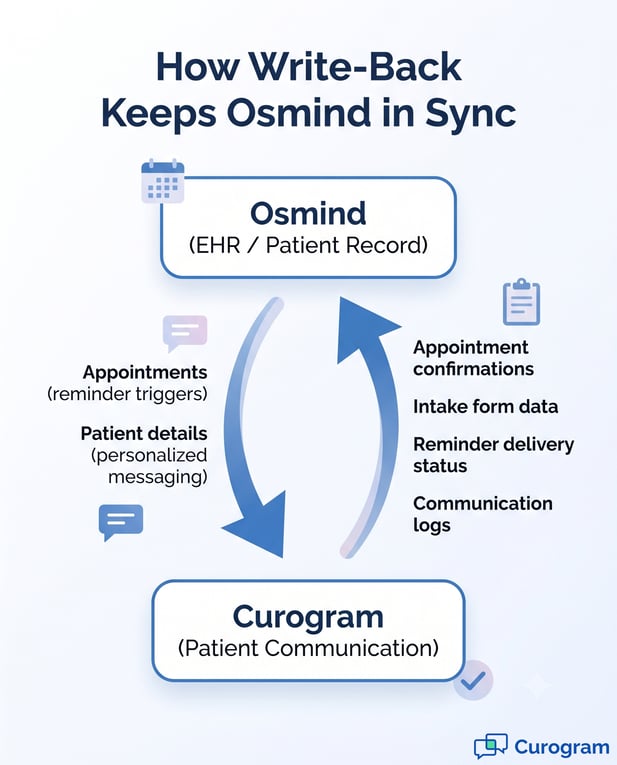
Two things move in this direction. Appointments flow over to trigger reminders. Patient details flow over to make each message personal.
More moves back the other way. Confirmations, intake form data, delivery status, and full message logs all post into Osmind. The chart reflects every touch.
The payoff is simple. Your team works in Osmind and sees everything there. They can tell who confirmed, which forms are done, and whether reminders went out. There is no second system to open.
It helps to compare options here. Curogram vs Phreesia shows the gap clearly.
Phreesia offers strong intake workflows, but its rollouts run for months and target large health systems. Curogram delivers Osmind write-back in 2 to 4 weeks, built for mid-market psychiatry practices.
|
What to weigh |
Curogram |
Phreesia |
|---|---|---|
|
Setup time |
2 to 4 weeks |
Multi-month rollout |
|
Built for |
Mid-market psychiatry practices |
Large health systems |
|
Osmind write-back |
Included, two-way |
Enterprise intake focus |
Numbers and features matter less than the daily feel. When write-back runs well, the workday gets quieter. Here is how a single day shifts.
The morning huddle starts with the Osmind schedule. Confirmed visits are already marked. No one has to ask the front desk who replied in a separate app.
New patient intake feels lighter too. The patient finished the PHQ-9, GAD-7, insurance check, and consent by text before arriving.
Those answers already sit in Osmind. The first visit opens with care, not a clipboard.
Recalls get easier to track. A lapsed patient who returned through an SMS recall has that full story in Osmind. The provider can see the gap, the outreach, and the return.
The end of day is the real prize. There is no reconciling two systems. No cross-checking. No late re-entry.
The whole team feels the change. The front desk stops chasing status updates by hand. Providers trust what the chart shows. The day ends on time, and the record is already done.

Getting going is lighter than most teams expect. The heavy lifting sits with us, not you. Here is what the start looks like.
Our team handles the full write-back setup. Staff training takes about 10 minutes. The write-back is included in the platform, not a paid add-on or premium tier. You get the whole flow from day one.
Curogram is also SOC 2 Type II certified and fully HIPAA compliant. Your patient data stays protected through every sync. That peace of mind comes built in, not bolted on later.
You do not have to guess how this fits your clinic. Book a demo to see Curogram's write-back working with your own Osmind instance. You can also see how Curogram serves behavioral health clinics across the country.
Write-back moves data from Curogram back into Osmind in real time. When a patient confirms or fills out a form, Osmind updates on its own. Curogram connects through API-based and proprietary connectors that run both ways. Your team sees everything in one chart, with no manual re-entry.
Most tools can send reminders, but they cannot update the chart. That gap forces staff to run two systems at once. Practices notice the extra work and lose interest fast. Write-back removes that snag, which is why it tops most buyers' lists.
Setup runs about 2 to 4 weeks from start to finish. Our team configures the write-back for you during that window. No IT staff or special skills are needed on your end. Training the team takes roughly 10 minutes.
Reminders only push messages out to patients. Write-back brings the results back into the record. Without it, your chart never reflects what really happened. With it, Osmind stays the single source of truth.
Every confirmation, form, and log posts straight into Osmind. Staff no longer copy details from one screen to another. That ends the habit of typing the same data three times. The day gets shorter and the record gets cleaner.
💡 Patients at GE Centricity practices finish intake forms about 10x faster when they get a text link before the visit. Curogram sends a secure SMS...

💡 You can replace paper intake at a GE Centricity practice with secure digital forms. Curogram links straight to GE Centricity Practice Solution...
💡 Operations teams running 20+ GE Centricity clinics can swap paper check-in for digital intake in 2 to 4 weeks. Curogram pushes the same forms to...