
.jpg?width=30&height=30&name=square-formal-photo%20(1).jpg) Mira Gwehn Revilla
Mira Gwehn Revilla
Patient Feedback Workflows for Meditab IMS Teams
 Jo Galvez : Jan 14, 2026, 8:00:00 PM
Use structured patient feedback workflows across Meditab IMS teams.

A patient walks out of your clinic upset. Maybe the wait was too long. Maybe the front desk seemed rushed. They never tell you. Instead, they post a one-star review online. Your team finds out a week later.
This story plays out every day across large health systems. Without a clear path to capture feedback, small problems turn into big ones.
Oracle Health teams face a unique challenge. They run dozens—sometimes hundreds—of sites. Each site may have its own way of asking patients about their care. Some sites don't ask at all. The result? A patchwork of data that tells no clear story.
Enterprise patient-feedback workflows solve this problem. They give health systems a single, repeatable way to gather, route, and act on what patients say. Every site follows the same steps. Every response goes to the right person. No feedback slips through the cracks.
Think of patient experience workflows as a backbone for trust. When you ask patients how things went, you show you care. When you act on what they say, you prove it. And when you do this across every site, you build a reputation patients believe in.
This guide walks through how to design and run feedback workflows at scale. You'll learn how to set up triggers that send surveys at the right time. You'll see how to route feedback so the right team gets it. And you'll find out how to use that data to fix problems fast.
Large health systems don't operate like single clinics. Oracle Health teams often span dozens of sites, thousands of staff, and millions of patient visits each year. Managing patient experience across all of that is not simple.
When feedback is left to chance, problems hide in plain sight. One site may send surveys after every visit. Another may only ask when staff remember to. A third may skip surveys entirely. This creates blind spots.
Workflow-based feedback collection fixes this. It sets rules that apply everywhere. It removes guesswork. And it gives leaders a real view of how patients feel across the system.
Picture a health network with 40 clinics. Clinic A uses paper comment cards. Clinic B sends email surveys. Clinic C asks for Google reviews. Clinic D does nothing at all.
What happens? Leadership gets data from some sites but not others. The data they do get can't be compared. A 4-star rating at one site might mean something different than a 4-star at another. This is fragmented feedback.
When feedback is not uniform, issues grow before anyone notices. A rude front desk staffer at Clinic D might drive patients away for months. Without surveys, no one knows. By the time leadership finds out, the damage is done.
Fragmented systems also burden staff. Each site makes its own rules. Staff waste time figuring out how to ask for feedback. Some give up.
Oracle Health teams need structure. They need a way to ask the same questions, at the same time, across every site. That's where enterprise workflows come in.
An enterprise feedback workflow is a set of rules. These rules define when to ask for feedback, how to ask, and what to do with responses.
For example, a workflow might say: "Send a two-question survey 30 minutes after every check-out." That rule applies to every site. No exceptions.
This creates structure in three ways:
Consider a real-world scenario:
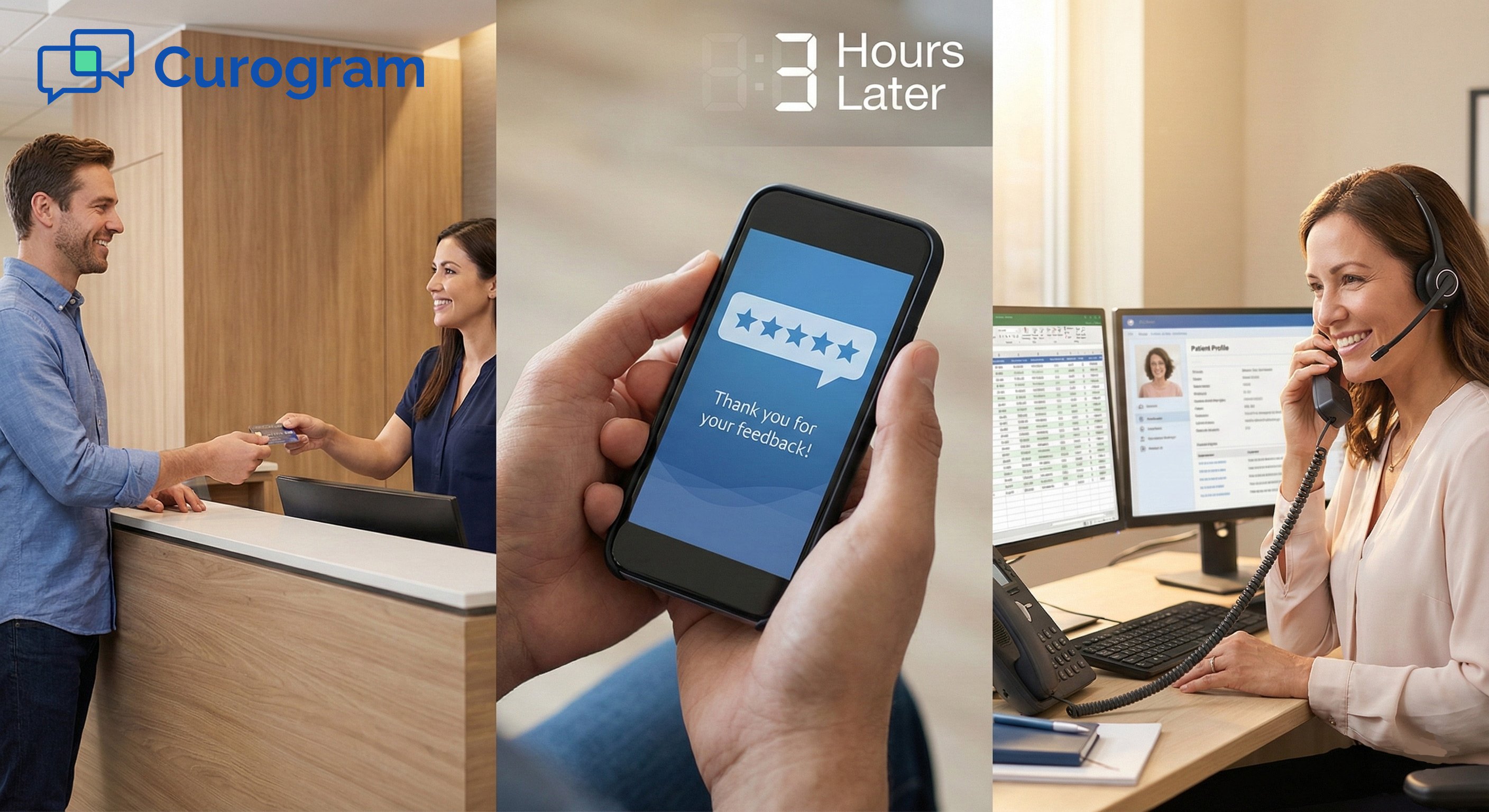
A patient visits a clinic for a routine check-up. Thirty minutes after check-out, they get a text: "How was your visit today? Reply 1–5." They tap 2. The system sees a low score and sends an alert to the site manager. The manager calls the patient that same day. They learn the wait was 45 minutes. They apologize and offer to reschedule a follow-up. The patient feels heard. They don't post a bad review.
That's the power of workflow-based feedback. It catches problems early. It lets teams respond fast. And it protects the system's reputation.
For Oracle Health networks, this matters at scale. With hundreds of thousands of visits each year, even a small improvement in feedback capture can reveal patterns. Maybe wait times are worst on Monday mornings. Maybe a certain provider type gets lower scores. These insights drive real change.
Patient-feedback workflows turn scattered voices into clear signals. They help Oracle Health teams see what's working, fix what's not, and build trust across every site.
A workflow only works if it's consistent. For Oracle Health teams, that means every site must follow the same playbook. This section covers how to build that playbook.
Timing matters. Ask too soon, and the patient hasn't had time to reflect. Ask too late, and they've moved on. The best time to ask is right after the visit ends. For most clinics, this means 15 to 60 minutes after check-out. The experience is still fresh. Patients are more likely to respond.
Enterprise workflows use triggers to send surveys at this window. A trigger is an event that starts the process. In most cases, the trigger is a check-out record in the Oracle Health system.
Here's how it works:
A patient checks out at the front desk. The system logs the event. That event tells the feedback tool to send a survey. The survey goes out by text or email within the set time frame.
This process runs without staff input. No one has to remember to send surveys. No one has to click a button. It just happens.
Why does this matter? Manual outreach fails at scale. Staff get busy. They forget. Or they skip the task to save time. When surveys depend on people, some patients never get asked.
Automated triggers fix this. They make sure every eligible patient gets a chance to share feedback. And they do it the same way, every time.
For Oracle Health teams, this is key. A system with 50 sites might see 10,000 visits a week. Manual outreach can't keep up. Automated triggers can.
Once you have the timing right, focus on the questions. A common mistake is letting each site write its own survey. This seems flexible. In practice, it creates chaos.
If Clinic A asks "How was your visit?" and Clinic B asks "Did you feel heard?", you can't compare answers. Each question measures something different. You lose the ability to spot trends across the system.
A simple survey might include two items. The first asks about the overall visit. The second asks if the patient would recommend the clinic. These two questions give a quick pulse on patient sentiment.
Some systems add a third open-ended question: "Is there anything we could do better?" This captures details that numbers miss.
Keep surveys short. Long surveys hurt response rates. Patients get tired. They quit halfway through. Aim for three questions or fewer.
With a single survey structure, you unlock powerful insights. You can compare Site A to Site B. You can track trends over time. You can see if a new policy helped or hurt.
For example, say your system rolls out a new check-in kiosk. With uniform surveys, you can measure patient satisfaction before and after the change. You'll know if the kiosk improved the experience—or made it worse.
Consistency also helps staff. They don't have to manage different surveys. They don't have to learn new tools. One survey. One process. Done.
Designing standardized patient-feedback workflows takes work up front. You need to agree on triggers. You need to pick questions. You need to set rules that every site will follow.
However, the payoff is huge. You get clean data, early warnings, and a system that runs itself.
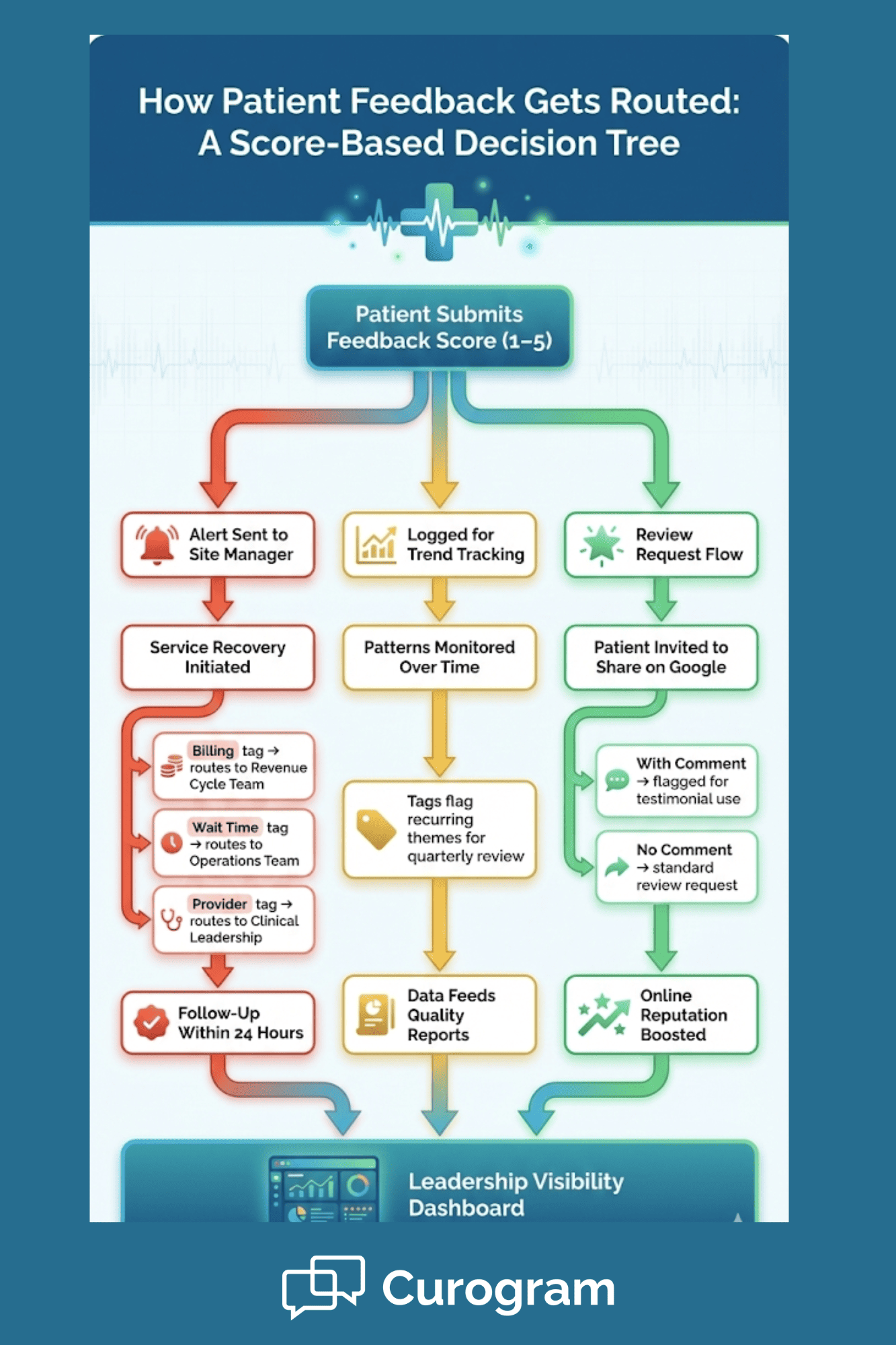
Collecting feedback is only half the job. The other half is getting it to the right people. A patient sends a low score. Now what? If that response sits in a database, nothing changes. But if it reaches someone who can act, real improvement happens.
Enterprise workflows include routing rules. These rules decide where each response goes based on its content, score, or topic.
Not all feedback is the same. A glowing review needs different handling than a harsh complaint.
Routing by sentiment means sorting responses by how positive or negative they are. A score of 5 out of 5 is positive. A score of 1 is negative. A score of 3 is neutral. Each type gets a different path.
Positive feedback can go to a review request flow. For example, a patient who gives a 5 might get a follow-up text: "We're glad you had a great visit. Would you share your experience on Google?" This turns happy patients into public advocates.
Negative feedback should go to the site manager or a service recovery team. These responses need quick action. The goal is to reach the patient before their frustration grows.
Neutral feedback often gets logged for trend tracking. It may not need immediate action, but it shows where the experience is "just okay"—not bad, but not great.
Routing by topic adds another layer. Some surveys include tags or keywords. A patient might mention "billing" or "wait time" or "nurse." These tags can route the feedback to the right team.
For example, if a patient complains about a confusing bill, that response can go to the billing department. If they mention a long wait, it can go to operations. This saves time. The right people see the right issues without digging through every response.
Oracle Health teams can set up rules that combine sentiment and topic. A low score about billing goes to billing. A low score about a provider goes to the clinic manager. A high score with no issues goes to the review request flow. This precision makes feedback useful. It turns raw data into action.
The worst thing that can happen to patient feedback is silence. A patient takes time to share their thoughts. Then nothing happens. They don't hear back. They don't see change. They feel ignored.
At scale, this risk grows. With thousands of responses, it's easy for some to slip through.
Automated alerts help. When a patient gives a low score, the system sends a notice to the assigned owner. That owner sees the alert right away. They know action is needed. But alerts alone aren't enough. You also need clear ownership.
Every feedback category should have a named owner. Who handles billing complaints? Who handles provider concerns? Who handles facility issues? When these roles are defined, responses reach people who can act.
Consider this setup for a large Oracle Health network:
Each response has a home. No one wonders who should handle it.
Follow-up timelines also matter. Set a rule: respond to negative feedback within 24 hours. Track compliance. If a site misses the window, flag it.
This creates accountability. Staff know they're expected to act. Leadership can see who's meeting the standard and who's not.
Faster resolution also helps patients. When someone has a bad experience, they want to feel heard. A quick call or message can turn things around. Studies show that patients who get a response after a complaint are often more loyal than those who never had a problem at all.
Oracle Health teams can build dashboards to track follow-up. How many negative responses came in this week? How many got follow-up within 24 hours? What's the average resolution time?
These metrics make performance visible. They show where the system works and where it needs help.
Let's walk through a scenario:
Maria visits an Oracle Health clinic for a routine visit. She waits 40 minutes past her appointment time. The visit itself is fine, but she's annoyed about the wait.
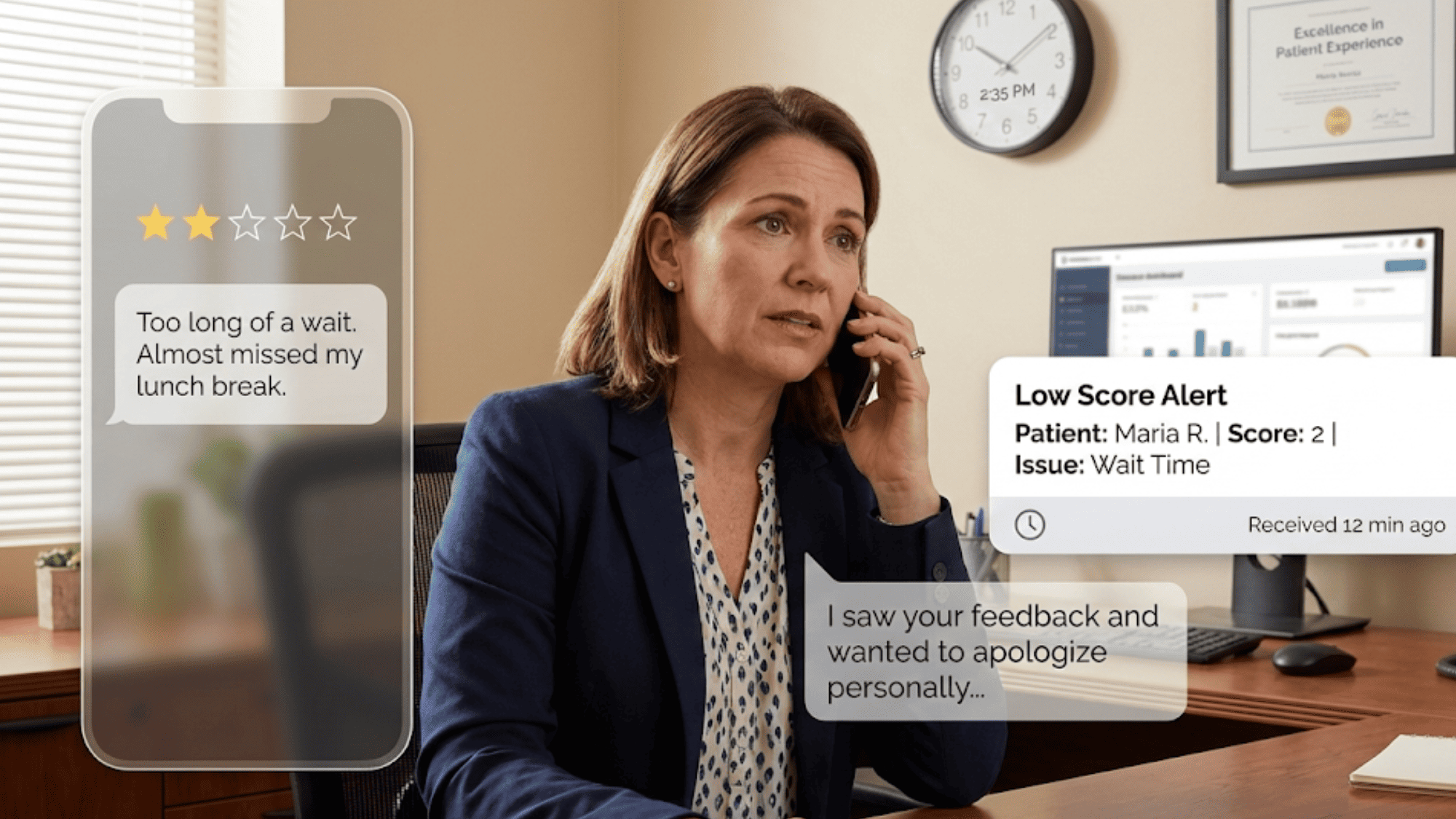
After check-out, she gets a text survey. She gives a 2 out of 5 and writes: "Too long of a wait. Almost missed my lunch break."
The workflow sees the low score. It sends an alert to the clinic manager, Tom. It also tags the response as "wait time" and routes a copy to the operations team.
Tom gets the alert within minutes. He sees Maria's comment. He calls her that afternoon.
"Hi Maria, this is Tom from the clinic. I saw your feedback and I wanted to apologize for the long wait today. We had a few emergencies that threw off our schedule. I'd like to offer you a priority slot for your next visit."
Maria is surprised—and pleased. She expected her feedback to disappear into a void. Instead, she got a call within hours. She tells Tom she appreciates it. She doesn't post a negative review.
Meanwhile, the operations team sees a trend. Wait time complaints have spiked at three clinics over the past two weeks. They dig into the data and find a staffing gap during Monday mornings. They adjust schedules. Wait times drop.
This is what routing does. It turns feedback into action. It connects patients to people who can help. And it gives leaders the data they need to fix root causes.
For Oracle Health teams, routing is not optional. Without it, feedback piles up. With it, feedback drives improvement.
Unhappy patients don't always complain to you. They complain to everyone else. They post online. They tell friends. They switch providers. Service recovery stops this cycle. It gives teams a chance to fix problems before they spread.
The best time to recover is right after the issue happens. Enterprise feedback workflows make this possible. When a patient gives a low score, the system sends an alert. A staff member sees it right away. They reach out—often within hours.
This speed matters. A patient who hears back the same day feels valued. They see that the system works. Their anger fades.
Without workflows, follow-up depends on luck. Someone has to notice the feedback. Someone has to decide to act. Someone has to find time. At scale, this rarely happens.
Automated alerts remove the guesswork. They push the issue to the right person. They create a paper trail. And they set a clock ticking for response.
For example, a workflow might require follow-up within 24 hours for any score below 3. The system tracks who responded and when. Managers can see compliance at a glance. This discipline turns feedback into a recovery engine.
Most patients don't leave bad reviews to be mean. They do it because they feel unheard.
Service recovery changes that. When you reach out, you show the patient you care. You give them a chance to vent in private. You offer to make things right.
Consider the math. If your system sees 100,000 visits a year and 2% of patients have a bad experience, that's 2,000 unhappy people. If half of them would have posted a negative review, but your recovery process stops 80% of those, you've prevented 800 bad reviews.
That's not just good for optics. It protects revenue. Patients look at reviews before choosing a provider. A strong rating attracts new patients. A weak one drives them away.
Oracle Health teams that invest in service recovery see real gains. They keep patients who might have left. They protect their online presence. And they build a culture where feedback leads to action.
Multi-site systems face a special challenge: how do you keep every location on the same page? Without standards, each site drifts. One follows the rules. Another cuts corners. A third invents its own process. Enterprise workflows prevent this. They set one set of rules for everyone.
Centralized rules mean every site uses the same survey. Every site sends it at the same time. Every site routes responses the same way.
This creates fairness. A patient at Site A gets the same experience as one at Site B. Leaders can compare results knowing the data was gathered the same way.
It also simplifies training. Staff don't have to learn different systems. They learn one process and use it everywhere.
Enterprise workflows balance control and flexibility. Leadership sets the rules. Local teams carry them out.
This means the central office defines the survey, the timing, and the routing. But the site manager handles follow-up. They know their patients. They know their staff. They're best placed to recover trust.
Dashboards let leadership monitor trends. They can see which sites shine and which need support. They can spot issues early and step in when needed.
This model works. It gives leaders visibility. It gives local teams ownership. And it keeps the whole system moving in the same direction.
Feedback workflows do more than capture data. They make performance visible.
With a structured system, you can track how much feedback each site collects. You can see response rates. You can spot patterns over time.
For example, if complaints about parking spike in the fall, you might discover a lighting issue in the lot. If scores dip at one clinic but not others, you can investigate what changed.
Trend data also supports quality initiatives. If your system launches a new patient check-in process, you can measure satisfaction before and after. You'll know if the change helped.
Leaders can set goals: "Increase response rate by 10% this quarter." Or: "Cut average wait-time complaints in half." Workflow data shows progress toward those goals.
When everyone owns feedback, no one owns it. That's why enterprise workflows assign clear roles.
Each category of feedback has an owner. Billing issues go to billing. Provider concerns go to clinical leadership. Facility complaints go to operations.
This clarity speeds up response. It reduces confusion. And it makes it easy to hold people accountable.
Managers can track follow-up rates. They can see who responds on time and who doesn't. They can coach staff who fall behind. Ownership turns feedback from a passive report into an active tool.
Patient feedback often includes personal details. A comment might mention a diagnosis. A complaint might name a provider. This data must be handled with care.
Enterprise systems need secure tools. SMS and email are fine for general outreach, but messages should not include protected health information.
HIPAA-compliant platforms use encryption and access controls. They limit who can see responses. They log every action for audit purposes.
For example, a survey might ask "How was your visit?" but avoid asking "How did you feel about your diabetes care?" The first is safe. The second may reveal health details.
Curogram's platform is built with HIPAA compliance in mind. It keeps patient data secure while still enabling feedback collection at scale.
Large health systems face audits. They need to show how data is handled. Workflow tools create records. They log when surveys were sent, who responded, and how responses were routed. This documentation supports compliance reviews.
Centralized records also make reporting easier. Instead of gathering data from 50 sites, leaders pull from one system. They get a full picture without extra work.
HIPAA compliance is not just a legal box to check. It protects patients. It protects staff. And it protects the system's reputation.
Oracle Health teams need tools that work at scale. Curogram is a HIPAA-compliant 2-way texting platform that integrates with almost any EMR. It automates front desk tasks, streamlines patient communication, and boosts revenue.
For patient feedback, Curogram offers automated surveys that go out right after visits. Responses route to the right teams based on score or topic. Staff get alerts for low scores so they can follow up fast.
Curogram's approach is built for enterprise healthcare. It provides consistent capture across every site. It routes feedback so nothing falls through the cracks. And it supports the governance needs of large networks.
Automated patient surveys supply valuable customer feedback and give teams the ability to intervene when needed. Positive responses can flow into review requests, boosting online presence. Negative ones trigger service recovery.
The platform reduces phone call volume by up to 50% and increases staff productivity by over 30%. For Oracle Health teams managing millions of interactions, that efficiency matters.
Curogram also keeps things simple. Staff can learn the system in about 10 minutes. No complex training. No steep learning curve.
Structured feedback workflows change how health systems operate. They turn scattered comments into clear signals. They catch problems early. They drive improvement across every site.
For Oracle Health teams, the stakes are high. With many locations and many patients, small gaps in feedback can hide big problems. Workflow-based systems close those gaps.
This article covered the key steps: setting triggers, designing surveys, routing responses, supporting recovery, and staying compliant. Each piece fits into a larger whole.
Enterprise patient-feedback workflows for Oracle Health teams are not a nice-to-have. They're a must for systems that want to protect trust, improve care, and grow their reputation.
To learn more about how feedback workflows fit into a broader patient experience strategy, visit our main guide on Oracle Health patient experience management.
Curogram: Built for Enterprise Patient-Feedback Workflows
Oracle Health teams need more than a survey tool. They need a system that fits their scale, their workflows, and their compliance needs. Curogram delivers on all three.
Curogram is the most advanced and HIPAA-compliant patient 2-way texting platform on the market. It integrates with almost any EMR, so data flows smoothly without double entry. This makes it easy to trigger surveys based on check-out events or other milestones.
The platform automates feedback collection at the right moment. Surveys go out by text within minutes of a visit. Patients respond while the experience is still fresh. Response rates climb.
Routing is built in. High scores can feed into Google review requests, boosting your online presence. Low scores trigger alerts so staff can reach out fast. Neutral responses get tracked for trends.
For multi-site systems, Curogram brings consistency. Every location uses the same process. Every response follows the same rules. Leaders get a single view across the network.
Security is core to the design. Curogram meets HIPAA standards with encrypted messaging and controlled access. Patient data stays protected throughout the feedback cycle.
The results speak for themselves. Practices using Curogram see phone call volume drop by up to 50%. Staff productivity rises by over 30%. No-show rates can fall by as much as 75% with advanced reminders.
Curogram also handles more than feedback. It supports text-to-pay for faster billing. It offers online patient forms to cut wait times. It connects internal teams with secure messaging.
For Oracle Health teams building enterprise patient-feedback workflows, Curogram offers the foundation. It's simple to use, fast to deploy, and built to scale.
Patient feedback is a window into how your system performs. It shows what works and what doesn't. It reveals gaps that data alone can't capture.
For Oracle Health teams, enterprise patient-feedback workflows turn that window into a control panel. They let you collect feedback the same way at every site. They route responses to people who can act. They catch problems before they grow.
This article walked through the building blocks. Start with triggers that send surveys at the right time. Use a single survey structure so data can be compared. Route responses by score and topic. Build service recovery into the flow. Keep everything HIPAA compliant.
The goal is simple: make feedback useful. Raw data sitting in a database helps no one. But feedback that reaches the right person at the right time drives real change.
Oracle Health teams that invest in patient experience workflows see the payoff. They resolve issues faster. They prevent negative reviews. They build trust across their network.
Curogram supports this work. Its platform automates surveys, routes responses, and keeps data secure. It fits into existing EMR systems without friction. It scales to meet the needs of the largest health networks.
Ready to move from scattered feedback to structured insight? Book your demo today to see how Curogram supports better care workflows with Oracle Health.
 Jo Galvez : Jan 14, 2026, 8:00:00 PM
Use structured patient feedback workflows across Meditab IMS teams.
 Jo Galvez : Jan 16, 2026, 2:00:00 PM
Learn how Meditab IMS organizations protect online reputation, reduce risk, and maintain patient trust with structured feedback workflows.
 Jo Galvez : Jan 14, 2026, 6:00:00 PM
Capture patient feedback and protect trust with reputation management for Meditab IMS practices.