11 min read

Fix Your OncoEMR Staff Appointment Confirmation Automation Gap

Fix Your OncoEMR Staff Appointment Confirmation Automation Gap
💡 OncoEMR staff appointment confirmation automation lets oncology practices replace manual confirmation calls with two-way SMS. Curogram syncs patient replies back into Flatiron Health's schedule in real time.
  • Patients reply "Yes," "No," or "Reschedule" via text in seconds
  • Staff stop spending 5–6 hours daily on phone tag
  • Schedulers update OncoEMR once, not twice
  • No-show rates drop as low as 4.91%, based on our internal data
  • All texts run on SOC 2 Type II and HIPAA-compliant channels
This setup keeps chemotherapy timing safe. It also recovers infusion bay time and protects monthly revenue.

Your front desk phone won't stop ringing. Staff are fielding callback after callback, just to confirm tomorrow's chemo slots. Meanwhile, three patients still haven't replied to their CareSpace alerts. Sound familiar?

This is the daily grind for community oncology teams. Flatiron Health handles your clinical work well. But its one-way notifications leave your staff stuck on the phone, chasing replies they should be getting by text.

The fix is simple. OncoEMR staff appointment confirmation automation closes that gap. Patients reply by SMS, and the response syncs back to the schedule. No phone tag. No double entry. No surprise empty chairs in the infusion bay.

Curogram serves as a Virtual Front Desk Assistant. It sits next to Flatiron Health, not on top of it. Your clinical workflows stay intact. What changes is how confirmations flow in and out of the schedule.

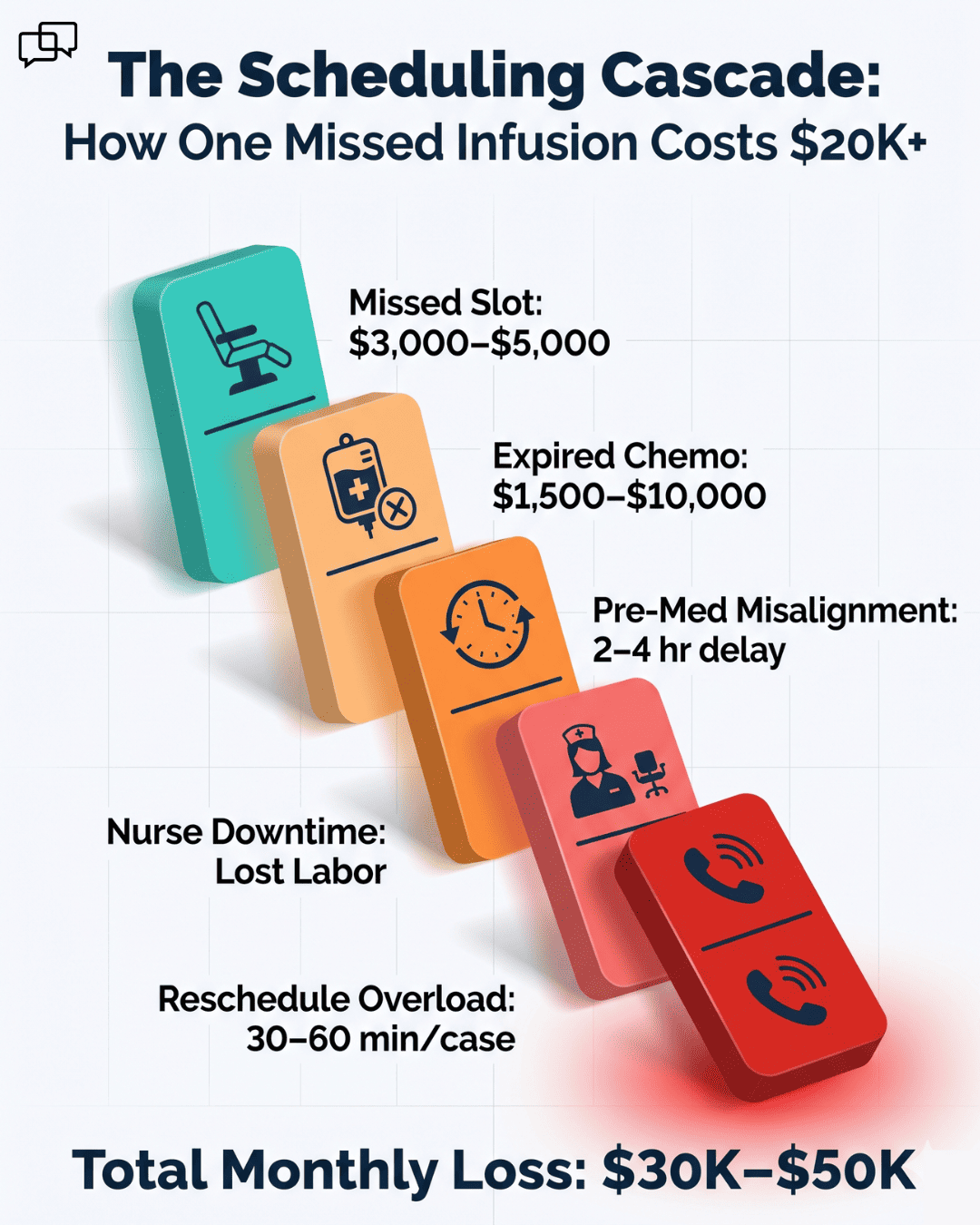
The stakes here are real. One missed infusion is not just a lost slot. Pre-mixed chemo expires. Pre-meds fall out of sync. The next patient can't slide up because their timing isn't ready. One no-show becomes five problems.

For a busy oncology practice, that cascade can cost $30,000 to $50,000 per month in lost revenue. And it burns out the very staff trying to keep things running.

Based on our internal data, Atlas Medical Center cut no-show rates from 14.20% to 4.91% in just three months. That's a 65% drop. It also frees up 8 to 10 infusion slots each week.

This guide breaks down the Scheduling Cascade, the Confirmation Loop, and how community oncology teams can fix the chaos. You'll see how Flatiron Health oncology front desk confirmation calls turn from a daily headache into a quick, automated text exchange.

The Villain: The Scheduling Cascade

Flatiron Health is strong at clinical work. It manages chemo protocols, lab data, and treatment timelines with care. But its CareSpace notifications only flow in one direction.

When a patient gets a reminder, they can't text back. They have to call the practice and explain the change to whoever picks up. That person then digs into the chart and updates the schedule by hand.

This gap is where the Scheduling Cascade begins. The CareSpace notification limitation staff workaround is always the same: more phone calls.

The Agitation

Picture this scene. A patient gets a reminder for tomorrow's 9 a.m. infusion. They have a lab visit at another clinic at 10 a.m. and need to push their chemo back.

So they call the practice. The phone rings. They wait on hold for 10 minutes. When someone finally answers, that staff member has to pull up the chart, find a new slot, and check that pre-meds still align. They also need to make sure the lab work fits the new time.

Meanwhile, two other staff members are running the same drill with other patients. There's no system. Just phone tag, sticky notes, and stress.

The Cost Cascade

One missed oncology appointment is never just one problem. It triggers a chain reaction across the whole infusion bay.

Here's what happens in sequence:

Cascade Stage

What Breaks

Cost Impact

Empty infusion chair

One slot lost

$3,000–$5,000 per slot

Pre-mixed chemo expires

Drug must be discarded

$1,500–$10,000 per dose

Next patient stuck

Pre-meds out of sync

Schedule pushes back 2–4 hours

Nurse downtime

Idle clinical staff

Wasted labor cost

Reschedule calls

Front desk overwhelmed

30–60 mins per case


Multiply this by a few no-shows per week. Then add multi-location oncology practices that face this issue at every site. The losses compound fast.

The Reality for Staff

Front desk staff are not clinical decision-makers. But they're spending half their day chasing rescheduling calls because the CareSpace notification limitation staff workaround forces it. The result? Burnout, errors, and missed details.

Schedulers face their own struggle. They keep re-typing the same data into OncoEMR every time a patient calls. Instead of focusing on complex scheduling logic, they're stuck on data entry.

Here's a quick look at where the time really goes for a typical 5-person oncology front desk:

  • Confirmation calls: 5–6 hours per day, per staff member
  • Reschedule data entry: 1–2 hours per day, per scheduler
  • Patient hold times: 8–12 minutes on average
  • Drug waste tracking: 2–3 hours per week

That's a huge slice of the workday spent on tasks that should be automatic. And it explains why OncoEMR scheduling staff phone volume reduction is one of the top asks from community oncology managers.

OncoEMR no-show cost breakdown infographic with empty chair, expired chemo, and reschedule overload stages

Why This Hurts Oncology More Than Other Specialties

In primary care, a missed slot is mostly a revenue issue. In oncology, it's a clinical risk too. Drug prep is timed. Pre-meds must hit the right window. Lab orders depend on the schedule.

When the schedule slips, treatment safety can slip with it. That's why oncology front desk infusion scheduling efficiency isn't just an operations metric. It's tied to patient outcomes and protocol integrity.

The Scheduling Cascade is not a single problem. It's five problems stacked on top of each other, each one making the next worse. And it all starts with a notification system that can't capture a simple "Yes" or "No" from the patient.

The Guide: The Virtual Front Desk Assistant

Curogram is the Virtual Front Desk Assistant your oncology team has been missing. It's a two-way SMS layer that sits next to Flatiron Health's clinical workflow, not on top of it.

When a patient texts back to confirm or reschedule, the reply lands in Curogram's dashboard right away. Your scheduler can sync that change to OncoEMR in seconds. No API hacks. No double entry.

The whole confirmation happens in the medium patients already use: text. Flatiron Health stays the source of truth for clinical work. Curogram just makes sure the schedule reflects what patients actually plan to do.

The Feature: Two-Way SMS Confirmations

Patients reply with simple options like "Yes," "No," or "Reschedule." Each reply gets time-stamped and saved in Curogram's dashboard. Staff see updates as they come in, not hours later.

Here's how the flow works in practice:

Step

Patient Action

Staff Action

Time

1

Gets text reminder

None

Auto

2

Replies "Yes"

None

5 sec

3

Replies "Reschedule"

Sees alert in dashboard

30 sec

4

Confirms new time

Updates OncoEMR once

1 min

5

Gets confirmation text

None

Auto


Compare that to the old way: a 12-minute call, a chart pull, two staff members involved, and a manual entry. The community oncology appointment confirmation automation flow takes minutes, not hours.

For oncology, where infusion bay time and drug costs are high, this real-time loop is more than a convenience. It's a financial safeguard.

The Integration

Curogram syncs back to Flatiron Health through OncoEMR's native connection. A confirmed appointment stays put in the schedule. A "Reschedule" alert flags the scheduler to act before drug prep starts.

Pre-meds, lab orders, and protocol timing all stay in sync. That's because Curogram doesn't overwrite clinical data. It just captures patient intent and routes it to the right staff member fast.

This matters for OncoEMR scheduling workflow integrity. Your treatment timing logic stays in Flatiron Health, where it belongs. Curogram simply removes the phone tag layer that gets in the way.

The Oncology Fit

Other specialties can absorb a missed slot here and there. Oncology can't. When you can't confirm infusion times in advance, you waste drugs, disrupt protocols, and burn out staff.

Two-way confirmation does more than save minutes. It protects the treatment timeline itself. Staff feel in control of the schedule again, not controlled by it.

Here's what changes when the Confirmation Loop replaces the old system:

  • Front desk shifts from reactive to proactive
  • Drug prep happens on time, every time
  • Infusion bays stay full and on schedule
  • Patients get faster responses to reschedule requests
  • Staff burnout drops because phone tag ends

Why This Works for Community Oncology

Community oncology practices often run lean. They don't have the staff bandwidth of a hospital system. So OncoEMR scheduling staff phone volume reduction is not a luxury. It's a survival tool.

A typical community practice with 100+ infusion slots per week sees a clear shift after Curogram goes live. Staff move from 5–6 hours of calls per day down to 2–3 hours of text follow-ups. Schedulers gain back time for complex cases. And patients enjoy the same convenience they get from any modern service.

The Confirmation Loop turns chaos into clarity. It's the missing piece that lets Flatiron Health's clinical strength shine through, without the daily phone tag weighing your team down.

The Success: The Confirmed Schedule

Atlas Medical Center provides one of the clearest case examples of how this plays out. Based on our internal data, the practice cut no-show rates from 14.20% to 4.91% in just three months. That's a 65% drop, and 3X better than the industry average of 10% no-shows.

For an oncology practice running 100+ appointments per week, that math hits hard. Eight to ten infusion slots come back to life each week. At an average of $3,000 to $5,000 per slot, the recovered revenue lands between $30,000 and $50,000 per month.

Here's a side-by-side look at the before and after at a typical mid-size oncology practice:

Metric

Before Curogram

After Curogram

Change

No-show rate

14.20%

4.91%

-65%

Daily confirmation calls

5–6 hours

2–3 hours

-50%

Reschedule response time

12 min avg

1 min avg

-92%

Drug waste incidents

4–6 per month

1–2 per month

-67%

Monthly recovered revenue

$0

$30K–$50K

+$30K–$50K


These aren't projections. They reflect what oncology teams report after closing the confirmation gap. And they show why Flatiron Health oncology front desk confirmation calls don't have to dominate the workday anymore.

The Shift: From Reactive to Proactive

The old model was reactive. A patient called. Staff scrambled. A slot got lost or filled at the last minute. Everyone moved on, exhausted.

The Confirmation Loop flips that script. Patients confirm by text in seconds. Staff see real-time updates in Curogram's dashboard. Schedulers update Flatiron Health once, not twice.

Drug prep happens on schedule. Infusion timelines stay intact. The whole practice moves from chasing problems to preventing them.

This shift shows up in three clear ways:

  • Speed: Reschedules happen in minutes, not hours
  • Accuracy: No more retyping data across systems
  • Sanity: Staff feel like they own the schedule again

For oncology front desk infusion scheduling efficiency, this change is the difference between barely keeping up and running smoothly. It's also what lets community practices compete with larger health systems on patient experience.

The Outcome: A Full Bay, A Calm Front Desk

Let's break down what a typical day looks like before and after the Confirmation Loop kicks in.

  • Before: The front desk opens at 8 a.m. By 8:15, the phone is ringing. Three patients want to reschedule tomorrow's chemo. Two more want to confirm. By 10 a.m., staff have made 30 calls. Hold times stack up. Two patients give up and don't reschedule. Their slots stay empty. Pre-mixed chemo for one of them gets discarded.

  • After: The front desk opens at 8 a.m. Curogram has already sent confirmation texts overnight. By 8:15, 70% of tomorrow's patients have replied "Yes." The dashboard shows three "Reschedule" alerts. Staff handle each one in under two minutes. Drug prep begins on time. The bay stays full.

That's the practical difference. Not just numbers on a slide deck, but a calmer, more focused day for everyone.

Staff Capacity Gains

When confirmation calls drop from 5–6 hours per day to 2–3 hours, what happens with that recovered time? Based on our internal research, practices typically reinvest it in three ways:

  1. More complex scheduling work: Schedulers focus on multi-step cases, like coordinating labs, infusions, and follow-ups together
  2. Patient experience tasks: Staff have time to greet patients, answer questions, and help with intake forms
  3. Revenue cycle support: Front desk teams handle insurance verification and balance collection without rushing

This is where OncoEMR scheduling staff phone volume reduction pays off twice. You save staff hours, and you reinvest those hours in higher-value work. The practice gets stronger across the board.

The Drug Waste Reduction Effect

For oncology, drug waste is one of the most painful costs. Pre-mixed chemo can run thousands of dollars per dose. When a patient no-shows after prep is done, that money is gone.

Two-way confirmation cuts this risk sharply. When a patient texts "Reschedule" the night before, drug prep can be paused or shifted. The drug stays viable. The cost stays controlled.

Here's a rough estimate of monthly drug waste for a community oncology practice:

No-Show Rate

Wasted Drug Costs/Month

14%

$20,000–$40,000

10%

$14,000–$28,000

5%

$7,000–$14,000

4.91% (Atlas)

$6,800–$13,700


Cut your no-show rate by two-thirds, and you cut drug waste by roughly the same. That's real money back in the practice's pocket every month.

Patient Experience Wins

Patients notice the difference too. Texting is fast and familiar. They can reply between meetings, after work, or while running errands. They don't have to wait on hold or play phone tag.

For chemo patients especially, this matters. Treatment fatigue is real. The last thing a patient on chemo wants is to spend 15 minutes on hold to move an appointment. A quick text exchange respects their time and energy.

This is also where community oncology appointment confirmation automation gives community practices an edge. Patients increasingly expect modern communication. Practices that offer it stand out. Those that don't risk losing patients to bigger competitors.

Tying It All Together

The Confirmed Schedule isn't a single feature win. It's a system-wide shift. No-shows drop. Drug waste falls. Staff hours come back. Patient experience improves. Revenue rises.

All of this flows from one simple change: letting patients text back. The OncoEMR scheduling workflow stays clinically pure in Flatiron Health. Curogram just adds the missing two-way layer that makes the whole system actually work for everyone involved.

When you measure the impact, you're not just measuring a tool. You're measuring how a single fix to the confirmation loop reshapes the daily reality of an oncology practice.


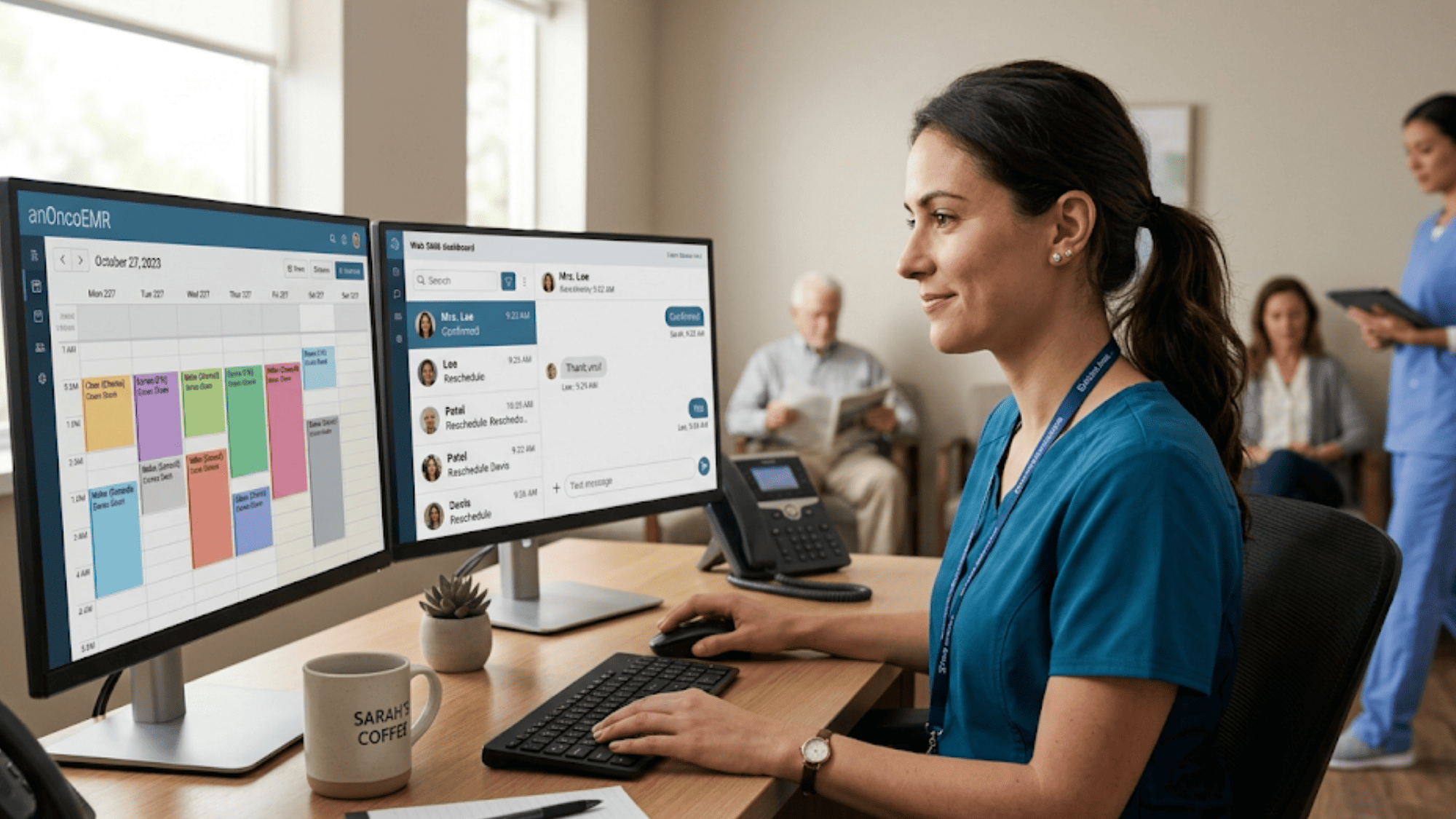
Calm front desk scene with scheduler using two-way SMS to cut OncoEMR phone volume and reschedule delays

How Curogram Closes the Confirmation Gap Without Disrupting Flatiron Health

Curogram was built for one purpose: to fix the communication breakdown between practices and patients. For oncology teams running Flatiron Health, that mission becomes especially valuable.

Here's how it works in plain terms. Curogram sends an SMS reminder to each patient before their infusion or office visit. The patient replies with a simple "Yes," "No," or "Reschedule." That reply lands in Curogram's dashboard, time-stamped and ready for staff to act on.

Your scheduler then updates the appointment in OncoEMR once. Curogram syncs that change back to the patient with a confirmation text. The whole loop runs in minutes instead of hours.

Beyond infusion confirmations, Curogram also supports patient recalls, intake forms, and online review collection. Based on our internal data, practices using these features see meaningful gains. Covina Arthritic Clinic, for example, confirms over 1,100 appointments per month through automated workflows.

For multi-location practices, Curogram has helped recover 1,240 patients through SMS recall messages alone, with 35% appointment reconversion. These numbers come from real practices, not theoretical models.

The bottom line: Curogram is the Virtual Front Desk Assistant that lets your oncology team focus on what matters. Patients get easier communication. Staff get their day back. Flatiron Health stays at the heart of your clinical work, exactly where it belongs.

Conclusion: Reclaim the Schedule, Protect the Protocol

Flatiron Health does its job well. It runs your chemo protocols, manages your labs, and tracks treatment timelines with care. What it doesn't do is capture patient replies.

That's where the gap lives. And that gap is what creates the Scheduling Cascade your team battles every day.

Curogram fills that gap with a single, focused tool: two-way SMS that syncs back to OncoEMR. Patients confirm by text. Staff see replies in real time. Schedulers update Flatiron Health once. The loop closes.

The math is hard to argue with. Based on our internal data, no-show rates can drop from 14.20% to 4.91%. That's $30,000 to $50,000 in monthly recovered revenue. It's also 8–10 infusion slots back in the schedule each week.

But the deeper win is harder to measure. It's a calmer front desk. Schedulers who actually finish their day. Patients who feel respected. Drug prep that lands on time.

Flatiron Health is for your clinical decisions. Curogram is for your patients' convenience and your staff's sanity. Together, they form the complete scheduling system community oncology has been waiting for.

If your team is still buried in Flatiron Health oncology front desk confirmation calls, there's a better way. The Scheduling Cascade isn't something you have to live with. It's something you can end this quarter.

Every week without two-way confirmation costs your practice 8–10 infusion slots and up to $50,000 in monthly revenue. Book a demo and see exactly how Curogram closes that gap on top of Flatiron Health.


Frequently Asked Questions

How does Curogram sync reschedule requests back to OncoEMR without creating duplicate entries?
When a patient texts "Reschedule," the request lands in Curogram's dashboard as an alert. Your scheduler updates the appointment once in OncoEMR. Curogram then auto-confirms the new time with the patient by text.
Why do one-way notifications fall short for oncology scheduling?
One-way notifications send reminders but can't capture replies. So patients still call to reschedule, which keeps your phone lines busy. For oncology, this delay risks drug prep timing and protocol integrity, not just lost slots.
How does Curogram protect patient data during text exchanges?

Every text runs through encrypted, audit-logged channels. Curogram is SOC 2 Type II certified and HIPAA-aligned, with a signed BAA. All messages are stored within the same compliance framework as your OncoEMR data.

What kind of staff time savings can a community oncology practice expect?

Staff typically shift from 5–6 hours of daily confirmation calls down to 2–3 hours of text follow-ups. That recovered time lets schedulers focus on complex cases, while front desk teams handle intake and patient experience tasks.

How fast can a community oncology practice see results after launch?

Most practices see measurable changes within the first 30–60 days. Based on our internal data, Atlas Medical Center cut no-show rates from 14.20% to 4.91% in just three months. Drug waste and reschedule delays drop quickly too.


Reducing Oncology No-Shows with 2-Way SMS Reminders in OncoEMR

Reducing Oncology No-Shows with 2-Way SMS Reminders in OncoEMR

💡 Reducing oncology no-shows with automated 2-way SMS reminders for OncoEMR practices means moving past portal logins. Patients confirm visits with...

Read More
Veradigm Staff Confirmation Automation | End the Phone Marathon

Veradigm Staff Confirmation Automation | End the Phone Marathon

💡 Veradigm EHR automates confirmations with two-way texts, replacing 80+ daily calls and reaching all patients—not just portal users. Curogram...

Read More
OncoEMR 2-Way HIPAA-Compliant Texting: A Guide for Oncology

OncoEMR 2-Way HIPAA-Compliant Texting: A Guide for Oncology

💡 OncoEMR 2-way HIPAA-compliant texting for oncology patient communication is delivered through Curogram. It sits next to OncoEMR and handles daily...

Read More