10 min read
The OncoEMR Oncology Telehealth Experience: One Text, No App
Mira Gwehn Revilla
:
May 7, 2026
- No app store search or download
- No new account or password setup
- No portal login after a hard chemo day
- Works on any phone with a web browser
- Keeps full HIPAA and SOC 2 Type II security
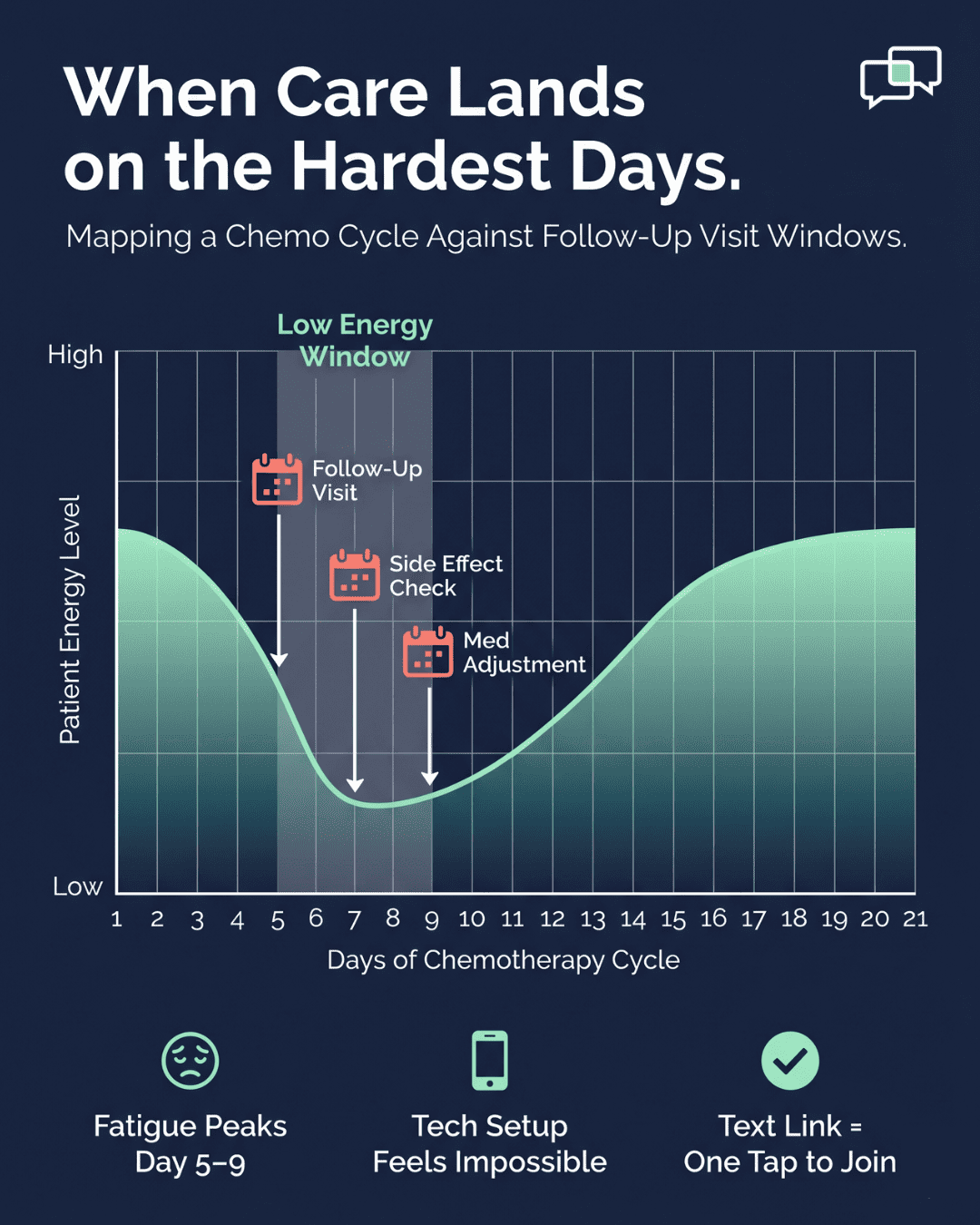
Chemo fatigue does not pause for tech support. After a hard treatment week, even simple tasks feel huge. Now picture being asked to download an app, set up an account, and verify your ID. All to talk to your nurse for ten minutes.
This is where many oncology video visits fall apart. The clinical need is clear. The follow-up matters. But the tech wall is too high for a tired patient.
Cancer care should make life easier, not harder. A 68-year-old healing from chemo should not need IT skills to join a check-in. They need a path that feels familiar — like opening a text from a family member. That feeling matters more than most teams realize.
This is where the cancer patient telehealth accessibility text link approach changes things. Patients get one text. They tap one link. The video call opens right in their phone browser.
No app store search. No password reset. No portal hunt. Just the visit, ready when they are.
For practices using OncoEMR, this small shift changes outcomes. When the door to care is easy to open, more patients walk through it. Side effects get caught early. Med changes happen in time.
This article looks at the issue through the patient lens. We will explore why app-based visits fail tired patients. We will show how a text link rebuilds trust in telehealth. And we will share what real success looks like when access feels light.
If your oncology practice runs on OncoEMR or Flatiron Health, this matters. The tools you pick decide who shows up. Simplicity is not a perk here. It is part of the care plan itself.
The Villain: The App You Couldn't Download Between Treatments
The villain in this story is not a lazy patient or a mean tech team. It is the gap between what oncology software asks of patients and what those patients can give. After chemo, that gap can feel like a canyon.
The Patient Reality
You finish a chemo cycle on Friday. By Saturday, the side effects hit hard. Nausea, brain fog, and a tired body that refuses to cooperate. Your oncologist has scheduled a follow-up video visit for Monday. The goal is simple — check on side effects and adjust meds.
Then the instructions arrive in your email. Download this app. Create a username. Set a password. Verify your phone. Test your camera. Test your mic. For an adult juggling chemo brain, this is not a minor task. It is a wall.
The Agitation
You pick up your phone. Most of the icons feel new. You open the app store and type the name of the platform. Three apps come up with similar names. Which one is yours?
You guess and pick one. It asks for an email and a password. You try the password you use for everything. It does not work. You ask for a reset link. The link goes to an old email you do not check. You call the office for help.
A staff member walks you through five more steps. They confirm your email, send a new code, and help you set a new password. You finally log in. Now you must find the telemedicine tab in the menu. You scroll. You tap. You scroll some more.
By the time the nurse calls to start the appointment, you have been at this for thirty minutes. You are not in a clinical mindset. You are frustrated and worn out. The visit feels rushed because half the slot was eaten by tech support.
The Consequence
Many oncology patients do not bother. They cancel the video visit and ask for a phone call instead. Or they reschedule as in-person, even though they may be immunocompromised and the trip is hard. Some just miss the visit and do not reschedule.
The typical Flatiron Health patient telehealth experience app download flow looks similar to other oncology systems. It works for tech-confident users. It fails for the people who need it most. Skipped visits are not a small admin issue — they have real clinical weight.
A post-chemo check-in is where:
- Emerging side effects get flagged
- Drug doses get tuned
- Early signs of complications get caught
- Patient anxiety gets addressed
When patients skip these visits because the tech is too hard, outcomes suffer. Some side effects become hospital admissions. Some treatment delays could have been avoided.
Based on our internal data, when patient engagement tools are simplified, confirmed appointments at clinics like Covina Arthritic Clinic grew by more than 3.5X. The pattern is clear: friction is the silent driver of skipped care.
The Emotional Truth
Sit with this voice in your head. It is not made up — it is what real oncology patients say in surveys and family conversations:
"I want to do this. I want to talk to my nurse about how I am feeling. But I am so tired, and I cannot figure out how to make this app work. So I am just not going to do the appointment. I will call next week if it gets worse."
That last line is the heartbreak of app-based telehealth. The patient does want care. They are not avoiding the visit out of denial. They are avoiding it because the system failed them at the door.
Telehealth was meant to lower the bar to care. For oncology patients in active treatment, app-based visits often do the opposite. The tool becomes the problem. The fix is not adding more help videos or longer support hours. The fix is choosing tools built for the patient on the worst day of their week.

The Guide: The Text That Starts the Visit
If the villain is the app, the guide is something far simpler — a single text message. The kind your patient gets from their child or their pharmacy. Familiar. Safe. Quick to open.
The Solution
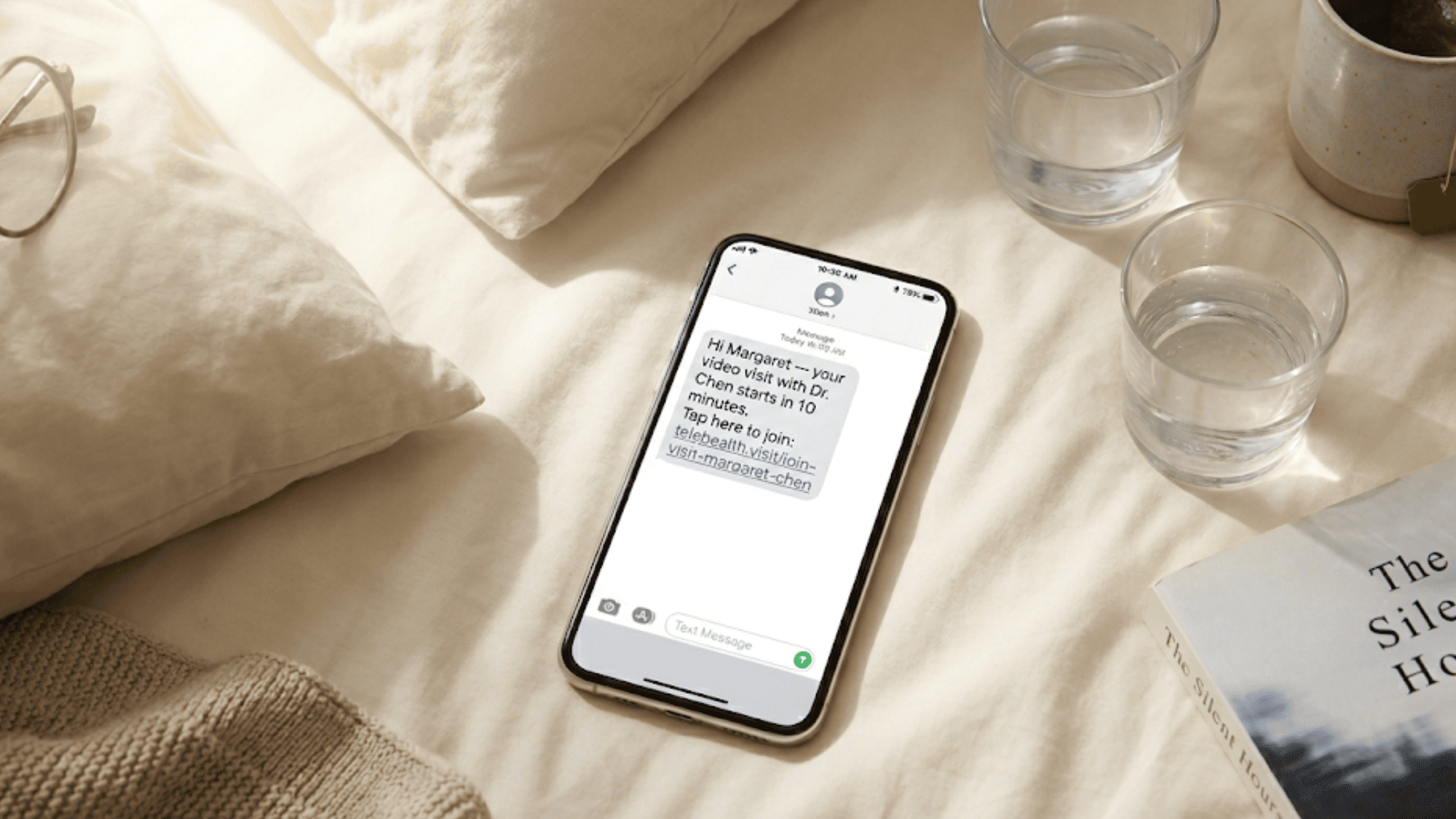
Curogram's text-link video visits remove the app barrier from start to finish. Your oncology practice schedules the visit in OncoEMR like usual. Curogram sends the patient a text with a link. The patient taps the link. Their phone browser opens the video call. That is the whole flow.
There is no app to download. There is no account to make. There is no password to remember. The patient is in the visit in roughly ten seconds — most of which is the page load.
The Feature
Here is how the oncology patient video visit text message no portal flow works in real life:
- The care team books the visit in OncoEMR.
- Curogram sends a text the day before, with a reminder closer to the time.
- The text contains the visit link and the time.
- At appointment time, the patient taps the link.
- The browser opens the secure video room.
- The provider joins from their side.
That is it. No menus. No tabs. No "Where do I click?" calls to the front desk. The text format is the same one the patient has used for years to confirm dentist visits and pharmacy refills.
The Integration
Curogram is not trying to replace OncoEMR. It works alongside it. OncoEMR remains the home for the chart, the labs, the regimens, and the clinical notes. Curogram handles the patient-facing layer — texts, links, and the video room itself.
This split matters for two reasons:
- The clinical record stays where your team already knows it
- The patient never has to learn a new system
Think of Curogram as the front porch of telehealth. OncoEMR is the house. The patient does not need to enter the house through three doors — they just need a porch they can find.
This OncoEMR patient telemedicine no download required setup is also why deployment moves fast. Practices do not need to retrain staff on a new EHR. They just turn on a smarter front door.
|
Old Telehealth Flow |
Curogram Text-Link Flow |
|
Email with sign-up link |
Text with visit link |
|
Download app from store |
No app needed |
|
Create account and password |
No account |
|
Test camera in app |
Browser handles it |
|
Find telemedicine tab |
Tap and join |
|
20-30 minutes of setup |
Under 30 seconds |
Why This Matters for Cancer Patients
Cancer treatment is hard enough on its own. Patients should not need IT skills on top of it. A text feels familiar — it looks like every other text on their phone. A link looks like every other link they tap each day. A video call in the browser looks like a regular call.
This is what the elderly oncology patient video visit simplified into one workflow looks like. No tech ramp. No new vocab. Just the visit.
Three things shift when you remove the app wall:
- Show-up rates rise. Patients who used to cancel now join. The barrier is gone, so the choice gets easier.
- Visits start on time. Without troubleshooting at the start, the clinical conversation begins right away.
- Trust in telehealth grows. The patient leaves the visit thinking, "That was easy." Next time, they say yes faster.
The point is not that apps are always bad. For some patient groups, apps make sense. But oncology patients in active treatment are a special case.
They are tired, often older, sometimes scared, and rarely in the mood to learn new tools. The format must meet them where they are — and a text meets them right there.

The Success: Care When You Need It, Without the Tech Barriers
When friction goes down, care goes up. That is not a slogan — it is what shows up in clinic dashboards once a text-link telehealth flow goes live. The story below is what success looks like for an OncoEMR practice that switches.
The Metric: A Real-World Example
Based on our internal data, Covina Arthritic Clinic offers a clear before-and-after picture. The clinic was struggling with manual appointment confirmations. Staff spent hours on calls. Confirmed appointments sat at 369 in May 2024.
After turning on Curogram's text-based engagement, the numbers changed fast. Confirmed appointments rose to 1,207 the next month. By October 2024, they hit 1,310. The trend held — over 1,100 confirmed appointments per month became the new normal.
Here is the simple view:
|
Month |
Confirmed Appointments |
|
May 2024 |
369 |
|
June 2024 |
1,207 |
|
July 2024 |
1,122 |
|
August 2024 |
1,157 |
|
September 2024 |
1,067 |
|
October 2024 |
1,310 |
|
November 2024 |
1,117 |
That is more than a 3.5X jump in confirmed appointments. The clinic did not hire new staff. It did not change its specialty. It changed the tool patients used to engage.
While Covina is not an oncology clinic, the pattern travels well — when the engagement layer feels native to the patient, more patients show up. For cancer follow-ups, that math is even more important.
Curogram clients also see an average appointment confirmation rate above 75%, with 100% of confirmations automated. For an oncology practice managing 300 to 500 patients in active treatment, that translates to dozens of saved visits per month.
The Shift: From Burden to Background
The mental shift for the patient is the most important part. With app-based telehealth, the visit becomes a project. They have to plan around it. They have to charge their phone, set reminders, and budget time for tech setup.
With text-link visits, the appointment moves to the background. The patient lives their day. The text arrives. They tap. The visit happens. Then they go back to whatever they were doing.
This shift also changes the front desk experience. Staff stop fielding "How do I log in?" calls. They stop walking patients through password resets.
The hours of "telehealth tech support" each week go to zero. That time goes back to clinical care, scheduling, and patient questions that actually need a person.
For an oncology team, this is huge. Front desk staff in a cancer center are not just admins. They are the first call for patients who are scared, confused, or in pain. Freeing their time means more capacity for the calls that truly matter.
The Outcome: What Visits Look Like Now
Picture a Tuesday morning in your practice. You have eight follow-up video visits booked. With the old app-based flow, three of those would no-show or call to switch to phone. Two would join late after a tech struggle. Three would join on time.
With the text-link flow, the math flips. Seven join on time. One may run late for a reason that has nothing to do with tech. The eighth confirms by text and reschedules to next week. No phone tag. No frustrated staff. No clinical time lost to "Can you hear me now?"
The provider's time also shifts. Instead of starting each visit with "Are you able to see and hear me?", the provider starts with "How are you feeling since last week?" That is the visit the patient needed in the first place.
Here are the outcomes you can expect, based on the patterns Curogram clients see:
- Higher join rates. Patients who used to cancel now show up. The simpler the path, the smaller the drop-off.
- Faster visit starts. Less setup means more clinical conversation in the same slot.
- Lower no-show rates. Friction is the biggest cause of skipped telehealth — and it is gone.
- Better staff focus. Front desk hours move from tech help to real care coordination.
- More repeat use. Patients who had a good first text-link visit are more likely to say yes to the next one.
How Curogram Built a Telemedicine Flow That Cancer Patients Actually Use
Curogram did not start with a telehealth product. It started with patient texting — the most-used part of any phone, by patients of every age. From there, the team built outward. They watched front desks. They studied call center patterns. They saw where patients gave up.
The result is a platform that treats messaging as the front door to care. Telemedicine sits inside that same door. The patient does not move between tools. They move from a text reminder to a text-based appointment confirmation to a text-based video link. One thread. One number. One feel.
Curogram's platform can be mastered by staff in under ten minutes. That is by design — front desks in oncology centers are busy, and a tool that takes weeks to learn is a tool that gets shelved. The same simplicity that helps patients also helps the team that supports them.
This is what makes Curogram a strong fit for oncology practices specifically. The patient population is older, sicker, and more drained than most.
The care moments are higher stakes. A tool that lowers the bar for those patients — without lowering the bar for security — is rare. Curogram set out to build exactly that, and the OncoEMR integration is where it shines.
Conclusion: Oncology Care That Respects Where You Are
Oncology telehealth should make care easier on the worst days of treatment. It should not add a tech project to a tired afternoon. The OncoEMR oncology patient telehealth experience text link video no app model strips the friction out of follow-up care and leaves only the visit itself.
Your OncoEMR practice already does the hard clinical work. Treatment plans. Drug protocols. Survivorship follow-ups. The care is sound. What Curogram adds is the bridge between that care and the patient's worst-energy day.
A simple text. A single tap. A video room that opens in the browser. No app. No portal. No password. Just the conversation that needs to happen.
For patients, this is the dignity of being met where they are. They do not have to perform tech skills to get care. They can show up tired and still be present. The medicine matches the moment.
For practices, this is a quiet operational win. More visits get kept. Front desk hours shift from tech support to real coordination. Survivorship care holds up over years instead of fading after treatment.
Give your front desk back the hours they spend on telehealth tech support. Schedule a demo with our experts and see how text-link telehealth fits right alongside your OncoEMR setup.
Frequently Asked Questions
Curogram can resend the link in seconds from the practice side. Staff click resend in OncoEMR-connected workflows, and a fresh link arrives on the patient's phone. There is no account to recover or password to reset, so the recovery path takes one tap.
The patient can forward the text to a spouse, adult child, or caregiver. Both parties tap the link from their own phones. They join the same video room. No second account or shared password is needed, which makes three-way visits simple for elderly patients.
Older patients often run older phones and skip frequent app updates. App-based telehealth can fail when versions mismatch. Browser-based video works on almost any phone made in the past decade. The patient does not need to know what version of anything they are running.