10 min read
How HIPAA Texting Cuts OncoEMR Oncology Front Desk Call Volume
Mira Gwehn Revilla
:
April 28, 2026
- Most routine confirmations, reminders, and simple questions shift from phone to text.
- Curogram runs alongside OncoEMR as a separate, compliant communication layer.
- SOC 2 Type II certification keeps every thread encrypted and audit-ready.
- Based on our internal data, clients see a 75%+ average appointment confirmation rate.
- No write-back to OncoEMR is needed, so EMR data stays clean.
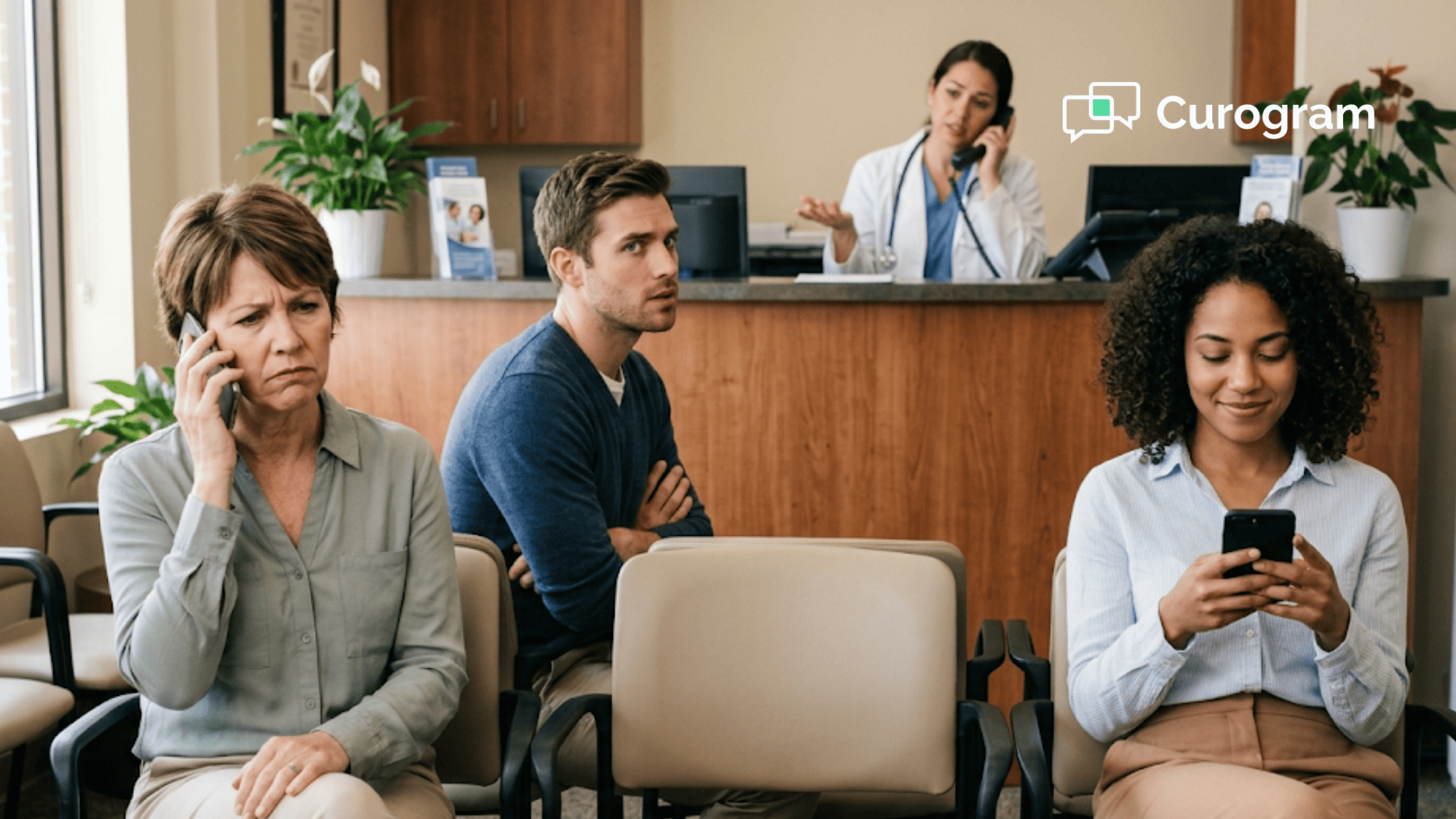
Picture a Monday morning at a busy community oncology clinic. The phone starts ringing at 7:45 a.m. and does not stop. By noon, the front desk has fielded more than 40 calls. Most of them are simple questions that a quick text could solve.
This is the daily reality for OncoEMR oncology front desk staff. HIPAA texting oncology phone volume reduction is no longer a nice-to-have. It is a survival tool. Community oncology practices handle 80+ calls per day on average. Each one takes more time than a primary care call.
Why? Oncology is complex. Patients call about chemo schedule changes, lab timing, prior authorizations, side effects, and pre-visit prep.
A routine "yes or no" confirmation is rare. Meanwhile, the CareSpace portal built into OncoEMR only supports one-way alerts. Patients cannot reply inside it.
So staff pick up the phone. Again and again. Every single question becomes a call. This is the hidden tax on your front desk.
Curogram solves this with a simple idea. It sits next to OncoEMR as a dedicated patient communication layer. Staff send appointment confirmations, reminders, and updates through secure text. Patients reply in the same thread. The flow is clean, fast, and HIPAA-compliant.
Based on our internal research, Curogram clients see a 75%+ average appointment confirmation rate. No-show rates drop 53% below the industry average. Staff get hours back in their day.
This guide walks you through how Flatiron Health oncology front desk phone volume falls when you add two-way texting. You will see the villain (the phone that never stops), the guide (Curogram), and the real numbers. By the end, you will know how to build a front desk that runs on fewer calls and more results.
The Villain: The Phone That Never Stops
Every oncology front desk manager knows the sound. Three lines ringing at once. Two voicemails waiting. A patient at the check-in window. And it is only 9 a.m.
The problem is not that your team is slow. The problem is that every patient question must go through a phone. Here is why the calls pile up.
Treatment Schedules Are Never Simple
A primary care appointment confirmation takes about 90 seconds. A chemo confirmation can take 5 to 10 minutes. Patients ask about pre-visit labs, parking, pharmacy timing, and side-effect prep. Some ask about clinical trial enrollment.
One chemo patient might need three phone touches before a single visit. Multiply that by 50 infusion slots a week. The math gets painful fast. Staff burn hours on calls that could be quick text threads.
CareSpace Portal Only Talks, It Does Not Listen
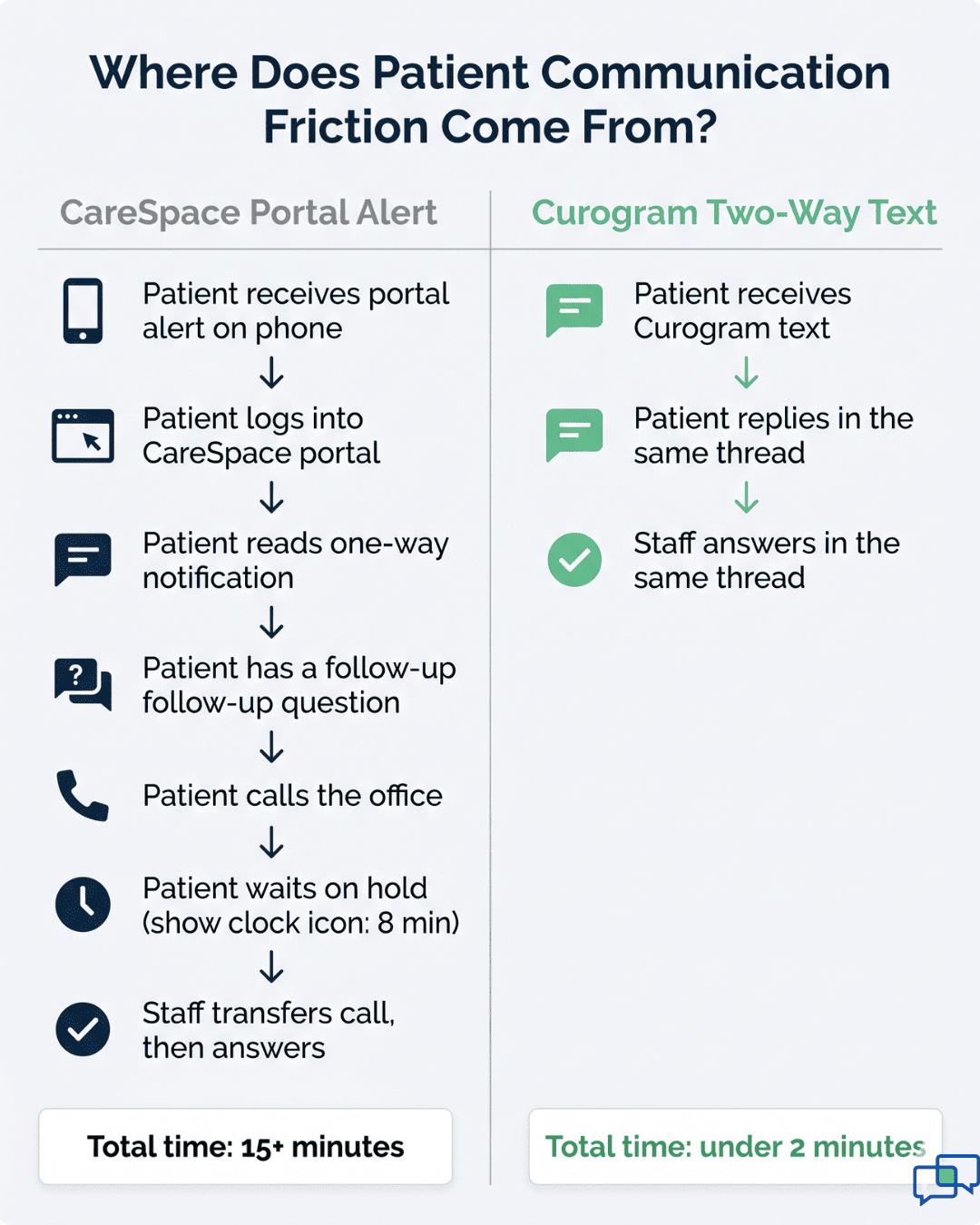
The CareSpace patient portal in OncoEMR is useful, but it has one big flaw. It only sends one-way alerts. A patient sees the message "Your lab results are ready" and has follow-up questions. They cannot reply inside the portal.
So they pick up the phone. Staff answer, repeat the same information, and log it again. This is the CareSpace staff workaround two-way texting many practices are forced into. It is not a workflow. It is a bottleneck.
Insurance Tag Eats the Day
Prior auths. Denials. Coverage checks. Oncology has more insurance friction than almost any specialty. Based on our internal data, front desk staff can spend 45+ minutes each day on hold with payers.
Add that to patient call-backs about coverage, and you have lost more than an hour before lunch. These calls cannot shift to text on the payer side. But patient updates about auth status? Those can.
Active-Tab Friction in OncoEMR
OncoEMR uses an active-tab layout. Staff have to close one task to open another. Check-in tab. Portal tab. Phone note tab. Then back to check-in.
Each switch costs focus and time. A staff member managing the front desk often has to leave a task mid-step just to send a portal alert. Then they have to pick the first task back up. This friction compounds across 80+ interactions a day.
The Hidden Cost to Patients
Patients feel the phone bottleneck too. They call and wait on hold. They leave voicemails and hope for a call back. They miss the return call and start the cycle again.
For a chemo patient already feeling tired and anxious, this is exhausting. Delayed answers can mean delayed care. A missed call about pre-visit labs can push back an infusion by a full day.
Why This Hurts the Business
Let's put numbers to it. Say your front desk has two staff members and each spends 4 hours a day on the phone. That is 40 hours a week, or one full-time role spent just on calls.
If you could shift 75% of those calls to text, you would save 30 staff hours a week. That is time redirected to prior auth battles, patient intake, and care coordination. It is not about cutting staff. It is about freeing them for work that matters.
The phone is the villain here. It is loud, slow, and one-on-one. It does not scale. To fix the oncology front desk, you need a tool built for community oncology call deflection automation. That is where the next section comes in.

The Guide: The Text Thread That Replaces the Call
Curogram runs alongside OncoEMR as a patient communication layer. It does not replace your EMR. It plugs the gap CareSpace leaves behind. Think of it as the texting engine your front desk always wished it had.
Here is how an OncoEMR staff text dashboard HIPAA compliant workflow actually looks in practice.
Two-Way Appointment Confirmations
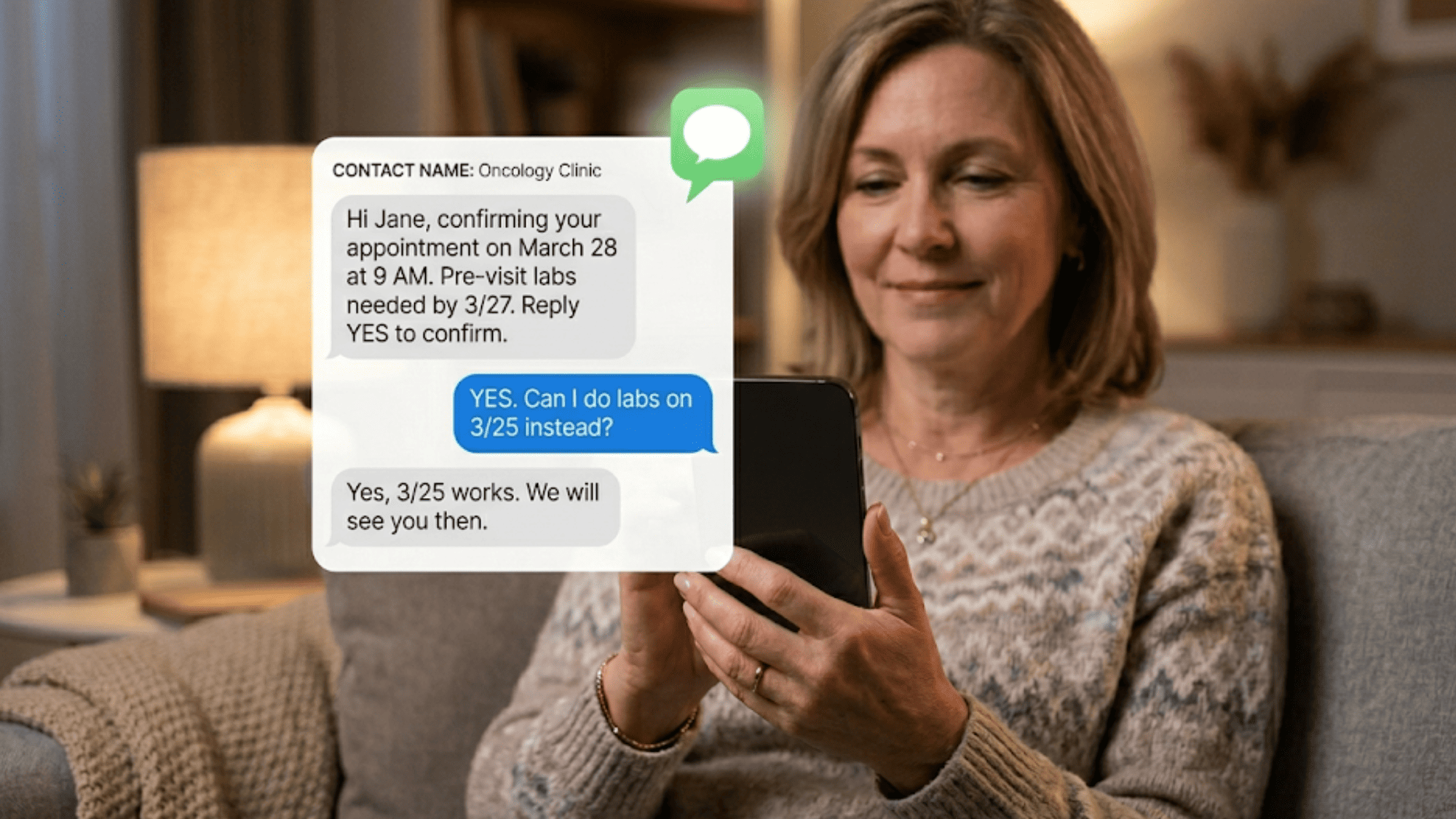
A staff member opens Curogram and sends: "Hi Jane, confirming your appointment on March 28 at 9 a.m. Pre-visit labs needed by 3/27. Reply YES to confirm or call us with questions."
Jane replies YES. Done. If she has a question like "Can I do labs on 3/25?" she types it in the same thread. Staff see it in a clean inbox and reply right there.
No call. No hold music. No toggling tabs. The whole thread lives in one place.
Secure Links for Lab Results and Sensitive Updates
For anything with PHI, Curogram uses secure, encrypted links. A staff member texts: "Your lab results from XYZ Oncology are ready. Please click the secure link to view them: [SECURE LINK]."
The patient taps the link, verifies their identity, and sees the results in a secure portal. If they have follow-up questions, they reply in the text thread. This keeps every detail HIPAA-compliant while still fast.
This matters because standard SMS is not encrypted. Sharing specific lab values or medication names in plain text is a compliance risk. Curogram's secure-link approach gives patients quick access without cutting corners.
Bulk Appointment Reminders That Still Feel Personal
You can send 30 or 300 reminders at once. Each one has two-way reply built in. Staff can filter responses in one inbox and triage quickly.
Based on our internal data, Curogram clients confirm more than 1,100 appointments per month on average at one mid-size multi-specialty practice. Covina Arthritic Clinic hit this number through automated text reminders alone.
HIPAA Compliance Is Built In
Curogram is SOC 2 Type II certified. Every message is encrypted, archived, and audit-logged. The platform ships with default SMS templates that follow HIPAA rules.
For messages with PHI, it uses the encrypted secure-link workflow. This keeps your practice safe from inadvertent PHI exposure in standard SMS. Your compliance team will rest easy.
No Write-Back to OncoEMR Required
This is a common worry: "Will the texts mess up our EMR data?" No. Curogram pulls data from OncoEMR one way. It does not write back.
Patient communication lives in Curogram. Clinical notes stay in OncoEMR. Staff can copy key info over when needed, but the two systems stay cleanly separated. Your EMR data integrity is safe.
One Inbox, Less Tab-Switching
Instead of toggling through OncoEMR tabs to manage messages, staff work in a single Curogram inbox. They see all active threads in one view. They can assign messages, tag them, and close them out.
This reduces the active-tab friction that drains time in OncoEMR. Staff stay focused on one task at a time and finish it faster.
Practical Example: A Full Text Chain
Monday 8 a.m.: Bulk reminder goes to 25 patients with Tuesday chemo visits. By 10 a.m., 21 confirm. Three ask quick questions about timing. One needs to reschedule.
Staff handle all four replies in the inbox in under 15 minutes. Total calls made or received: zero. This is oncology front desk communication efficiency at work.

The Success: Real Numbers
Moving from phone-first to text-first is not just a feel-good shift. It shows up in the numbers. Here is what the data looks like across Curogram clients, and what it could mean for your oncology practice.
Appointment Confirmation Rates That Beat Every Other Channel
Based on our internal research, Curogram clients see a 75%+ average appointment confirmation rate. Portal alerts and email sit far below that mark in most practices.
Text works because patients open it fast. Most people check their phones within minutes of a text arriving. For a chemo patient waiting for pre-visit labs, that speed matters.
A 75%+ confirmation rate means your schedule is more reliable. You know who is coming, who needs a nudge, and who is a no-show risk before the day starts. That lets you plan infusion chair time better.
No-Show Rates 53% Below the Industry Average
This is the number that gets CFO attention. Based on our internal data, Curogram practices run no-show rates 53% lower than the industry average.
Atlas Medical Center cut their no-show rate from 14.20% to 4.91% in just three months. That is a 66% drop. For a practice that sees 300 appointments a week, that means 30+ extra kept appointments every week.
Here is what that looks like in dollars. If each oncology visit averages $1,500 in net revenue, 30 recovered appointments per week adds up to $45,000 in weekly revenue saved. Over a year, that is more than $2 million.
No-Show Comparison by Specialty
Here is how Curogram clients stack up against industry averages in various specialties:
|
Specialty |
Industry Average No-Show |
Curogram Average No-Show |
|
Primary Care |
19.00% |
14.11% |
|
Pediatrics |
30.00% |
14.00% |
|
Psychiatry |
23.00% |
11.03% |
|
Radiology |
18.00% |
8.00% |
|
Dermatology |
25.00% |
9.00% |
|
Pain Medicine |
14.00% |
10.00% |
|
Specialty Clinics |
23.00% |
10.00% |
Oncology practices fall under specialty clinics. A drop from 23% to 10% cuts missed revenue by more than half. That directly boosts the bottom line.
Call Volume Deflection: 75%+ of Routine Calls Shift to Text
This is the operational win. When patients can text instead of call, most do. Simple confirmations, reminder replies, and quick questions move off the phone.
If your team handles 80 calls a day now, a 75% shift leaves just 20 phone calls. That is 60 calls a day your team does not have to answer. At an average of 4 minutes per call, that is 4 hours saved daily.
Those 4 hours go into higher-value work. Prior auth battles. Benefit checks. Patient intake. Complex care coordination. This is where skilled front desk staff should be spending their time.
Recovered Revenue Per Appointment
Based on our internal data, Curogram clients see a 10-20% increase in revenue after adding automated reminders and two-way texting. This comes from three sources:
First, fewer no-shows mean more kept appointments and more billable encounters. Second, faster confirmations let practices fill gaps with patients who need same-day slots. Third, staff time saved on phones can go into collecting balances, running prior auths, and booking follow-ups.
For a mid-size oncology practice doing $10 million a year in revenue, a 10% lift is $1 million. Even a 5% lift pays for the software many times over.
Appointment Recalls Bring Patients Back
Curogram also helps with patient recalls. This is key in oncology, where missed follow-ups can mean missed progression.
Based on our internal data, one multi-location practice saw 35% of patients who got an SMS recall message schedule an appointment within a month. That added 1,240 patients seen from recall messages alone.
For oncology, this could mean bringing back survivorship patients due for their annual check. Or flagging chemo patients who missed a follow-up scan. These are visits that pay both in revenue and in better clinical outcomes.
How Curogram Turns the OncoEMR Front Desk Into a Text-First Operation
Curogram was built from day one to fit alongside EMRs like OncoEMR. It is not a generic texting app with a HIPAA sticker. It is a full patient communication platform designed for the specific pain points oncology practices face daily.
Here is what sets it apart. It integrates with almost any EMR, including OncoEMR, with no double data entry needed. Patient lists, appointment times, and contact info sync automatically. Your staff never copy-paste between systems.
The platform covers every front desk task through text. Automated appointment reminders. Two-way confirmations. Patient recalls for overdue follow-ups. Automated surveys and Google review requests. Electronic patient forms. Text-to-pay. Internal office secure messaging between providers.
All of it runs on one platform. Many practices juggle two or three tools to get these features. Curogram is the one-stop shop. This cuts software costs and removes the friction of using many logins each day.
Security and compliance are built in. Curogram is SOC 2 Type II certified and HIPAA-compliant by design. Every message is encrypted and audit-logged. PHI flows through secure links, not plain SMS. Your compliance team and your IT team will both approve.
For oncology specifically, Curogram solves the core problem: the CareSpace portal is one-way, but chemo care needs two-way communication. Curogram fills that gap without replacing CareSpace. Patients who prefer the portal can still use it. Patients who want text get a fast, secure channel.
Based on our internal research, clients who switch to Curogram see a 10-20% revenue increase within months. No-shows drop 53% below industry average. Staff reclaim 3+ hours a day. The OncoEMR front desk stops drowning in calls and starts running at a pace that actually matches modern oncology care.
Conclusion: A Communication Layer Built for Oncology
The 80-call oncology front desk is not a staffing problem. It is a communication infrastructure problem. Phones cannot keep up with modern chemo schedules, insurance complexity, and patient demand.
CareSpace is a patient portal. Curogram is a patient communication layer. The two work together to give your staff and patients a modern, compliant, fast workflow.
Two-way texting cuts routine phone volume by 75%+ while your team keeps working inside OncoEMR. Patients reply faster, helping your schedule stay full and your no-show rate stay low.
SOC 2 Type II and HIPAA compliance keeps every message secure and audit-ready. Your EMR data stays clean because Curogram does not write back to OncoEMR.
Staff reclaim hours each day for prior auth work, patient intake, and care coordination.
The math is simple. Fewer calls plus faster confirmations plus compliant messaging equals a healthier practice. You save staff time. You recover revenue. You give patients a better experience.
For community oncology practices, this is not a small upgrade. It is the difference between a front desk that drowns and one that thrives. Every week you wait is another week of missed confirmations, longer hold times, and staff burnout.
The good news: setup is fast. Your team can be live on Curogram in days, not months. Training is light because the tool works like texting already does. Your patients will adopt it right away.
Ready to cut the phone volume and free your front desk? Schedule a demo today to see how Curogram's text layer works with your OncoEMR practice. One call now can save your team thousands of calls down the road.
Your team did not sign up to spend half their day on hold with patients. Request a demo to see how two-way texting clears the phone lines without disrupting your OncoEMR workflow.
Frequently Asked Questions
Most teams get comfortable in one to two days. The platform looks and works like texting, which your staff already know. Full onboarding, including EMR sync setup and template building, usually wraps up within a week.
Curogram is opt-in at the patient level. You can tag patients by communication preference and route messages the right way. Phone-preferred or portal-preferred patients keep their current workflow. Text-friendly patients move to the faster channel.
Keeping messaging separate from the EMR protects your clinical data. Notes stay clean in OncoEMR. Communication stays fully logged in Curogram. If specific details need to land in the EMR, staff can add them manually with full control.