
.jpg?width=30&height=30&name=square-formal-photo%20(1).jpg) Mira Gwehn Revilla
Mira Gwehn Revilla

- A balance question that takes a biller 4 minutes can sit in voicemail for 3 days at a short-staffed site.
- Patients judge the whole group by its slowest location, then book elsewhere without saying why.
- Curogram times every text thread per location and per queue, so each site’s wait has a number and an owner.
- Shared queues let staff at a quieter site pick up messages from a busy one.
- Based on our internal data, practices that move routine questions to managed text see no-shows 53% below the industry average.
A patient texts your downtown site to ask why her statement shows $86. Your biller sees it between two check-ins, pulls up the payment in Office Ally, and answers in 20 minutes.
At your Eastside site, a patient with the same question leaves a voicemail. It sits until Thursday. Two of the three front desk staff are stuck on phones, and nobody owns the billing line.
Both patients belong to the same group. Only one of them will book there again without a second thought.
Patients already grade you on response speed. We think you should grade yourself first, per location, with real numbers. That’s the case for measuring patient response experience across Office Ally locations.
Most groups track no-shows, collections, and A/R days by site. Very few track how long a question waits for an answer. That blind spot is where the three-day callback lives. Nobody designed it, no report shows it, and the patients it costs you rarely explain why they left.
Office Ally holds the claim, the payment, and the visit record. It wasn’t built to time the gap between a patient’s question and your reply. Between visits, that gap is the part of care patients feel most.
Their sense of “fast” comes from outside healthcare, too. A package sends a text when it ships. A bank flags an odd charge within seconds.
Next to those habits, a voicemail returned on day three reads as being ignored. It feels that way even when the real cause was a sick call and a full schedule, and the patient never hears about either.
The Three-Day Callback
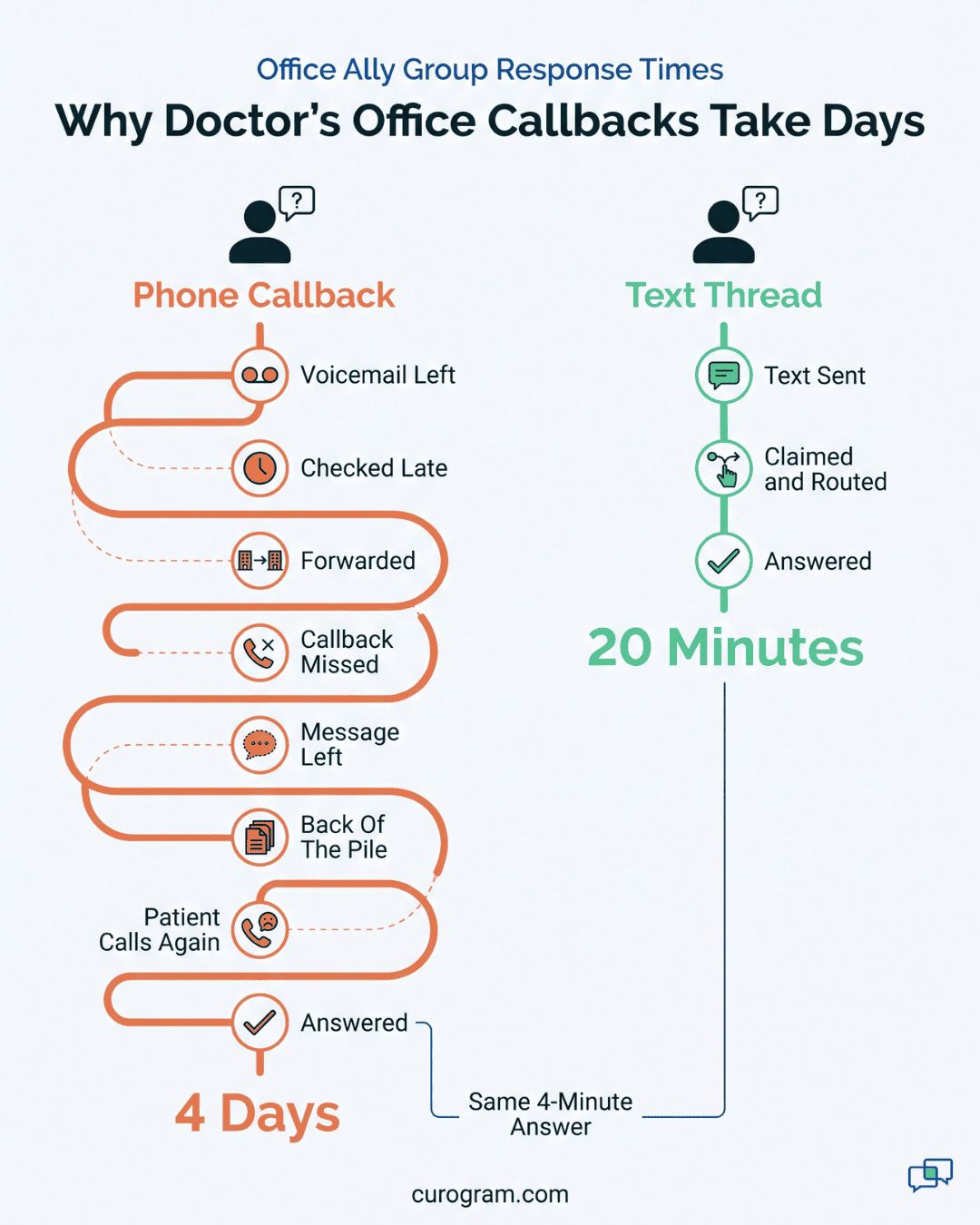
A patient calls Monday about a balance on her statement. Nobody picks up, so she leaves a voicemail on the main line. That box gets checked when someone has a gap. With 40 patients on a Monday schedule, that means late afternoon.
Billing sits at a different site, so the message gets forwarded. Your biller calls back Tuesday and reaches the patient’s voicemail. Meanwhile, the patient waits for callback number two.
|
Day |
What the patient did |
What happened inside |
|
Monday |
Left a voicemail about a $140 balance |
Message heard late in the day, forwarded to billing |
|
Tuesday |
Missed a call from an unknown number |
Biller left a message, went back to claims |
|
Wednesday |
Heard nothing new |
Message sat in the biller’s follow-up pile |
|
Thursday |
Called again, annoyed |
Biller answered in 4 minutes |
A copay had posted to the wrong visit. Fixing it took four minutes of the biller’s time, spread across a wait of four days.
No one in this story did a bad job. Your front desk checked voicemail when it could, and your biller called back within a day. Four reasonable handoffs added up to a patient who now thinks your group doesn’t call back.
How Response Speed Loyalty Works in Healthcare
Patients experience your group one reply at a time, and the wait is the part they can measure. None of them know about the front desk role you haven’t filled since July.
That clock is set by the rest of their lives. Their pharmacy texts when a refill is ready. Their bank answers a chat in minutes. A three-day reply from a clinic gets judged against those apps, since that’s the speed patients see every week.
We’d put the same-day answer expectation at the floor for routine questions. A balance question, a form request, or a “do I need to fast?” question should get a reply the day it arrives. Same morning is what earns credit. Anything slower starts to feel like being forgotten.
Why Patients Leave Slow Communication Behind Without a Word
Slow replies rarely produce complaint letters. Patients leave slow communication behind the quiet way: next time they need a visit, they book somewhere else.
Nothing in your system flags this. A no-show shows up on the schedule. A canceled visit leaves a record.
Someone who never books again leaves no trace. Months later, the name appears on a recall list as overdue.
By then, the reason is gone. A recall list mixes patients who forgot with patients who left on purpose, and it can’t tell them apart.
Based on our internal data, one multi-location practice brought back 1,240 patients with SMS recall messages, a 35% reconversion rate. Those numbers show how many patients drift out of a group between visits. Nobody writes down why each one left.
Patient Experience by Location Gets Blended Into One Name
Your group might run one site that answers in an hour and another that takes days. Patients see one logo on the statement, one name on Google, and one number on the reminder text.
So a patient’s worst site becomes their view of the whole group. Say a family uses your Northgate office for a child’s checkups and your downtown office for a parent’s follow-ups. One slow week at Northgate can move both sets of visits to a competitor.
That’s why patient experience by location needs its own line in your reports. In an illustrative five-site group, four sites answer in 1 hour and one takes 26 hours. Your group average reads 6 hours, which sounds fine, while one site loses patients every month.
Why No Report Shows the Wait
Most groups pull Office Ally reports on claims, payments, denials, and A/R aging. Those are the right reports for billing. None of them track the time between a patient’s question and your answer.
Phone systems leave the same gap. Most show call counts and hold times. A voicemail gets a timestamp when it lands. Nothing ties it to the moment someone calls back and solves the problem.
Without that link, a manager is guessing. Eastside might be slow because it’s short-staffed. Billing questions might pile up there, or nobody checks the voicemail box after 3 p.m. Each of those needs a different fix, and a staffing request won’t solve a routing problem.
What the Scoreboard Measures
Curogram treats patient wait time as an operating number with an owner at every site. You already run no-show rate and A/R days that way.
The scoreboard runs two clocks on every text thread. First reply time runs from the patient’s message to your staff’s first answer. Resolution time runs until the thread is closed.
Both clocks roll up by location and by queue. In an illustrative case, Riverside answers scheduling texts in 25 minutes while its billing texts wait 7 hours. That split tells you where to look, since the fix for each is different.
We report medians alongside averages. One thread that arrives late on a Friday and gets answered Monday can drag an average up all week. A median shows what a typical patient felt.
Who Owns Each Number
A metric without an owner gets looked at once and forgotten. Each location gets a named owner for its response time, usually the site manager or front desk lead. Billing gets its own owner, since billing questions often span every site.
A 10-minute weekly review is enough. Your owner checks three things: the week’s median first reply, the five oldest open threads, and any queue that slipped past the standard.
If Eastside’s median jumped from 2 hours to 9, the owner asks what changed that week. Often it’s a staff absence or a new statement batch that flooded billing.
How Claiming and Routing Bring the Number Down
Two shared-inbox tools do most of the work of shrinking the wait.
When a text arrives, a staff member claims it with one click. Everyone else sees it’s taken, so two people don’t answer the same patient and nobody assumes someone else has it. Unclaimed threads stay at the top of the queue with their age showing.
Routing rules send each message to the right queue. Billing questions go straight to the billing queue without passing through the front desk first. In the Monday voicemail story, that one change removes a full day. The forward from the front desk to billing never has to happen.
Cross-Location Coverage for Lean Sites
Small sites have the hardest time keeping pace. A two-person front desk can’t check in patients, answer phones, and reply to texts at the same rate as a five-person desk downtown.
Cross-location coverage lets staff at one site work another site’s queue. Say Northgate is down to one person on a Tuesday. A staff member at Riverside picks up Northgate’s routine texts between her own tasks. The patient gets a reply in the Northgate thread and never knows who typed it.
Coverage works best for questions that don’t need someone in the building. Directions, form links, reschedule requests, and prep instructions all qualify. A question about a lost item in the waiting room still goes to Northgate.
Faster Answers With the Record in View
Speed doesn’t help much if the reply is “let me check and call you back.” Threads carry the patient’s context, so the person answering can see who the patient is, which location they use, and their upcoming visits.
For billing questions, that context turns a callback into one reply. Your biller opens the thread, checks the account in Office Ally, and texts back: “The $140 was a copay posted to your March visit by mistake. We’ve moved it, and your balance is $0.” The patient gets the answer in writing and has it on hand if the next statement looks odd.
Why Text Makes Speed Cheap for Staff
A callback needs the patient to pick up. If she doesn’t, you’ve started phone tag, and each round costs a few minutes plus a day.
A text reply takes under a minute and lands whether the patient is free or not. Staff can answer between check-ins without leaving the desk. Based on our internal data, automated texting has cut inbound calls by 24%. Some practices see phone volume drop by up to 50%.

The Group That Answers
Take a three-location group on Office Ally: Riverside, Eastside, and Northgate. All figures below are illustrative, built to show how each step works in practice.
Step 1: Get a Baseline Before Changing Anything
For two weeks, the group moves patient texts into the shared inbox and changes nothing else. Phones work the way they always have. Median first reply comes back at 1 hour for Riverside, 9 hours for Eastside, and 2.5 days for Northgate.
Northgate’s staff already knew. The group’s operations director had heard “we’re a little behind” and pictured a few hours.
Step 2: Pull Billing Into One Queue
Most of Northgate’s oldest threads are balance questions. A new statement batch went out, and those texts sat while the two-person desk handled check-ins.
So the group routes billing texts from all three sites into one billing queue, owned by the central biller at Riverside. Her target is same-day for every billing thread.
Step 3: Turn On Coverage and Set the Standard
Next, Riverside’s front desk gets access to Northgate’s routine queue on days Northgate runs short. The group writes down its standard: same-morning replies for routine questions, with same-day as the floor. Each site lead reviews the scoreboard every Monday for 10 minutes.
Step 4: Use the Monday Review to Catch Slips
Week 3 shows why the review matters. Eastside’s median jumps from 3 hours back to 8. The site lead opens the five oldest threads and finds four of them unclaimed, all sent after 4 p.m.
Her front desk had been closing the inbox at the same time it switched phones to the answering service. One change to the closing checklist fixes it: someone claims every open thread before leaving, and anything routine gets a reply that evening. By week 4, Eastside is back under 3 hours.
None of this showed up anywhere before the scoreboard existed. The old voicemail box would have held those four messages until the next morning, and nobody would have counted them.
Curogram Highlight: Response-Time Tracking
Response-Time Tracking is Curogram’s per-location scoreboard for patient messages. It times every text thread from the patient’s first message to your first reply, then to the close. Results roll up by site, by queue, and by week. A group director can open one view and see which location is slow, and on which kind of question.
Tracking sits on top of the shared inbox your staff already work in. A few parts do the heavy lifting:
- Thread claiming, so each message has one owner and no duplicate replies.
- Routing rules that send billing questions to one billing queue across all sites.
- Cross-location coverage, so a busy site’s routine texts can be answered from another site.
- Age flags that push the oldest unclaimed threads to the top.
- Patient context in each thread, so replies answer the question the first time.
Set a standard per queue, such as same-morning for scheduling and same-day for billing, and the scoreboard shows who’s meeting it. Site leads get a number they can act on in a 10-minute weekly review. Billing owners can spot a statement batch flooding the queue on day one, well before it turns into a week of callbacks.
Curogram is HIPAA-compliant and works with Office Ally groups that run several locations. Your response data sits next to the scheduling and billing work your teams already do every day.
Conclusion: Answer Speed is a Brand Promise
Every group makes a promise about response speed, whether anyone wrote it down or not. Patients learn the real version the first time they leave a message and wait.
That promise should hold at every site.
A patient at your smallest location deserves the same reply time as one at the flagship. A scoreboard is how you find out whether they’re getting it. Office Ally keeps your record of the visit. Curogram covers what the patient lives through between visits: the questions, the waits, and the replies.
Try one test this week. Leave a voicemail at your busiest location with a routine question, such as whether a form can be signed online. Time how long it takes to get an answer, then do the same at your smallest site.
Write both numbers down. Those are the waits your patients are already timing.
If the gap between the two sites bothers you, book a demo with our team. We’ll walk through how claiming, routing, and coverage would work across your sites.