
.jpg) Mira Gwehn Revilla
Mira Gwehn Revilla
- A billing question that takes 4 minutes to answer can sit in a voicemail box for 3 days.
- Patients who wait too long rarely complain. They book somewhere else next time.
- Tracking by office shows which desk replies within the hour and which one takes days.
- Shared text queues let staff at one office pick up overflow from another.
- Curogram clients run no-show rates 53% below the industry average, based on our internal data.
Two offices in the same DrChrono group can share a logo, a fee schedule, and a phone menu. They can still feel like two different practices.
At one, a text about a copay gets an answer before lunch. At the other, the same question goes to voicemail on Monday and gets a call back on Thursday.
Patients judge the group by the wait they had. And they carry the worst wait they’ve had at any office over to the whole group.
Our position is plain: reply speed is a loyalty metric. Patients already track it at every office, and most groups have no report that shows it.
Measuring patient response experience across DrChrono locations closes that gap, because it turns a feeling patients have into a number a manager can own.
The cost is hard to spot. A patient who waited three days for a billing answer doesn’t write a letter.
They pick a different practice when the next issue comes up, and the chart goes silent. We’d argue reply time is a better early warning than the yearly patient survey, since it moves weeks before an empty slot shows up on the schedule.
Most of the fix is boring and doable. You see the number by office. You give one person at each office the job of watching it. Then you give every desk the same tools, so a two-person office can answer as fast as the flagship.
Text is what makes this cheap. A front desk can answer a text between check-ins, with no hold music and no phone tag. The patient gets the answer on the phone they already carry, and your staff never has to dial out and hope someone picks up.
The Three-Day Callback
A pharmacy app tells patients when a refill is ready. A bank app answers a chat in a few minutes. Delivery apps show the driver moving across a map. Each one sets a clock in the patient’s head, and that clock keeps running while their voicemail sits in your box.
Most front desks still work by an older rule. Urgent calls get returned the same day. Everything else gets returned “when we can.” That rule made sense when the phone was the only channel and every reply meant a live call.
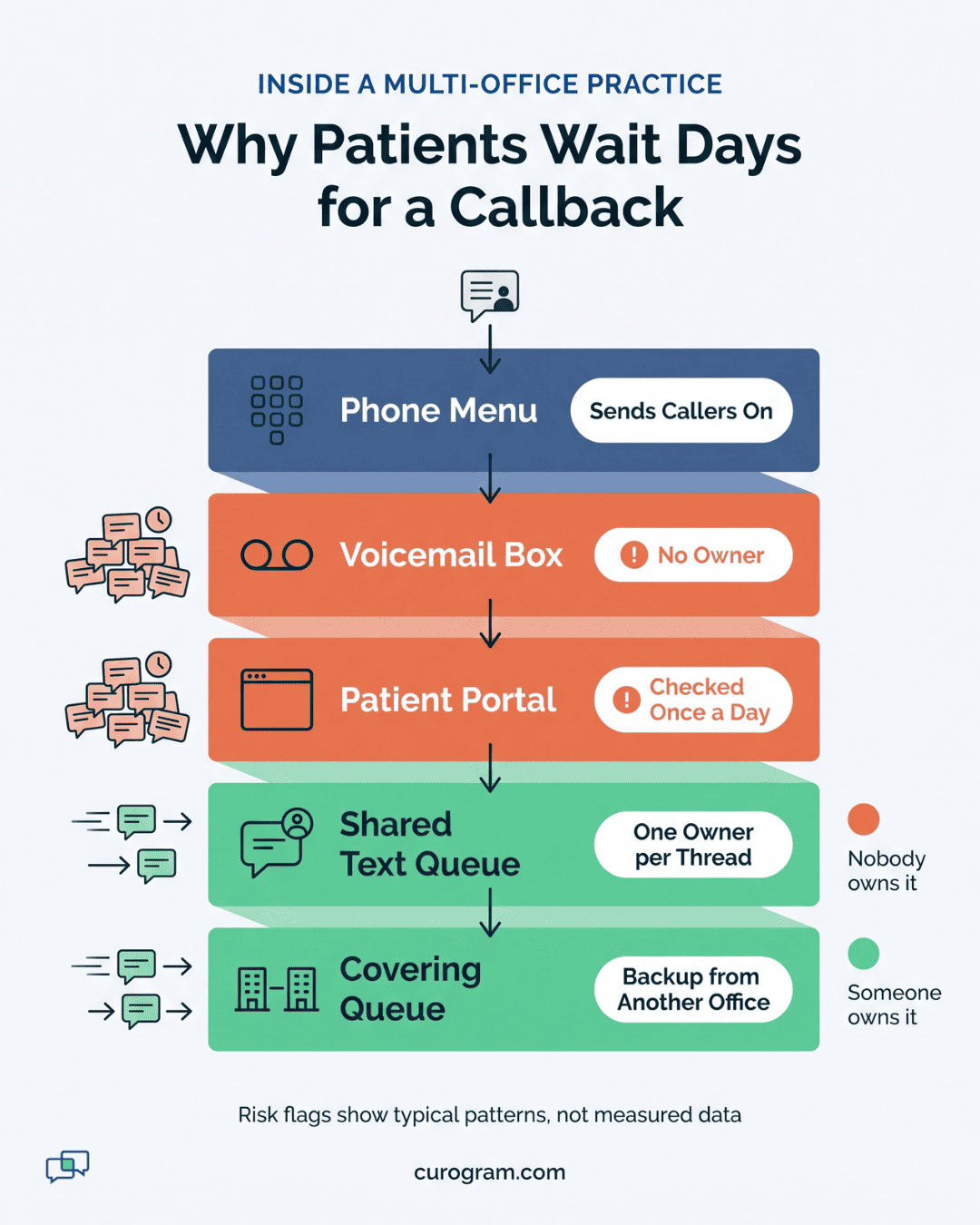
Patients don’t know which bucket their question landed in. A refill question, a bill that looks wrong, and a request to move a visit all feel the same from the outside: silence. To the patient, two days of silence on a “small” question reads the same as being ignored.
How a 4-Minute Question Turns Into a 3-Day Wait
This day-by-day example shows how a small question stalls. The details are made up, but the pattern is common at busy front desks.
|
Day |
What the patient does |
What the office does |
|
Monday |
Leaves a voicemail about an $85 balance |
Message lands in the main voicemail box |
|
Tuesday |
Checks their phone, sees nothing |
Desk is busy with check-ins and prior auth calls |
|
Wednesday |
Sends a portal message, gets no reply |
Portal inbox is checked once, late in the day |
|
Thursday |
Calls again, clearly annoyed |
Staff fixes a coding error in 4 minutes |
Four minutes of staff time solved it. Three days of waiting came first, and the patient now thinks of your office as hard to reach. That voicemail box had no owner and no clock, so nobody on staff saw the message aging.
Why the Loss Never Shows Up
Patients switch practices over slow communication the same way people stop going to a store with long lines. They book elsewhere next time, without a word to anyone.
Each extra day a patient waits for a callback, the practice hands them another reason to look around.
In DrChrono, that patient’s chart looks like any other chart. There’s no “lost” flag and no note explaining why. No next visit gets booked, and six months later the name shows up on an overdue recall list. By then, they may have seen a provider across town.
Winning those patients back is possible, but it costs effort. Based on our internal data, an SMS recall campaign at one multi-location practice brought back 35% of overdue patients within a month, and 1,240 patients were seen from recall texts alone. We’d rather keep patients on the schedule than pay to win them back later.
One Slow Office Sets the Score for All of Them
Patients don’t keep a separate score for your Main Street office and your Eastside office. If the Eastside desk lets a refill question sit over a weekend, that patient tells friends the whole group is hard to reach.
Reviews spread the same story. A one-star review that says “never call back” hurts the office it’s posted on, and it shows up when someone searches your group’s name.
Based on our internal research, 90% of new patient leads check a Google Business Profile before they visit the website. One slow desk can shape what a new patient thinks of an office they’ve never visited.
Response speed and patient loyalty connect at the worst office. A patient’s verdict comes from that one desk, and the group pays for it at every location.
Why the Group Average Hides the Problem
Say a group runs four offices. Three of them reply to patients in about 2 hours, and the fourth takes about 50 hours. Averaged together, that’s 14 hours, which sounds close to same-day. (This is illustrative math, not client data.)
Behind that 14-hour figure sits an office where patients wait more than two days for a reply. It’s why a single group-wide number is the wrong tool. Patient experience by location is the view that matters, because patients only ever deal with one office at a time.
Use the median reply time for each office. Means are easy to skew: one message that sat over a long weekend can drag an average up, while the median shows what a normal patient feels on a normal day.

The Network Scoreboard
Most DrChrono groups already track no-shows, days in A/R, and visits per provider per day. At the monthly ops meeting, each of those numbers has a name next to it. Reply time almost never does.
Curogram treats the wait a patient feels as an operating number, with an owner at each office. The clock starts when a patient’s message arrives. It stops when a staff member sends the first real reply, meaning a human answer. Auto-responses don’t count.
We measure first reply on purpose, before final resolution. A refill question might take a day to clear because the provider has to sign off. If the patient heard “Got it, Dr. Patel is reviewing this today” within the hour, that day feels fine.
Set the Clock Rules Before You Compare Offices
Two offices can only be compared if their clocks run the same way. Settle three rules up front and write them down.
-
Messages that arrive after hours start the clock when the office opens. A text sent at 9 PM shouldn’t count as a 12-hour wait.
-
Auto-replies and “we got your message” texts never stop the clock.
-
Holidays and closed days are skipped for every office, or for none.
Without these rules, an office with a Saturday clinic looks slower than one that’s closed weekends. Managers then spend the ops meeting arguing about the math instead of the patients.
What to Track at Each Office
Four numbers give a manager a clear picture of each desk. Keep them per office and, where you can, per queue (billing, scheduling, refills):
- Median time to first reply during business hours
- Share of messages answered the same business day
- Age of the oldest message still waiting right now
- Messages handled per staff member per day
The second number speaks to the same-day answer expectation most patients bring with them. The third is the early alarm. If a thread is six hours old at 3 PM, someone needs to grab it before the office closes.
The fourth keeps the scoreboard fair. An office that handles 120 texts a day with two people shouldn’t be judged the same way as one that handles 40 with four.
The Inbox Mechanics That Bring the Number Down
A score with no tools behind it just makes staff feel watched. The number drops when the inbox itself works differently.
|
Mechanic |
What goes wrong without it |
What changes with it |
|
Claiming |
Two people answer the same patient, or nobody does |
Each thread has one name on it |
|
Routing by topic |
Billing questions sit in the scheduling queue |
Questions land with someone who can answer them |
|
Cross-location coverage |
A two-person desk falls behind on a busy morning |
Another office picks up the overflow |
|
Office tags from DrChrono |
Staff guess which office the patient uses |
The thread shows the patient’s home office |
Claiming is the one most groups skip, and it causes the most double replies. Coverage is the one that lets a small office keep up with a large one.
Answers With the Chart Context Attached
Speed doesn’t help much if the answer is wrong. Say a patient texts, “Is my appointment still on for Thursday?” Without context, staff open DrChrono, search the name, click into the schedule, and then come back to reply.
Curogram threads carry DrChrono context next to the message, such as the patient’s next appointment, provider, and office.
DrChrono already stores each appointment with the office it belongs to, so the thread can show that detail without staff hunting for it. A faster reply is also a better-informed reply.
This matters most with cross-office coverage. A biller at the Downtown office answering a Lakeview patient needs to know it’s a Lakeview patient. The office tag makes that clear before they type a word.
Why Text Makes Speed Cheap
A phone callback needs two people free at the same moment. That’s why callbacks turn into phone tag, and why a “quick call back” can eat three tries over two days.
Text removes that timing problem. Staff can answer between check-ins, and patients read the reply when they’re free.
Based on our internal data, practices using automated texting see a 24% drop in inbound calls, and some cut phone volume by up to 50%. Front desk teams in our client base also report a productivity lift of 30% or more.
Fewer calls leave more desk time for the texts that need a person. Communication speed and retention both depend on that time.
The Group That Answers
Take a DrChrono group with three offices: Downtown, Northside, and Lakeview. All figures in this example are illustrative, built to show the steps.
Step 1: Pull a Two-Week Baseline
The group’s manager exports two weeks of first-reply times for each office.
|
Office |
Median first reply |
Answered same day |
Oldest open message |
|
Downtown |
45 minutes |
92% |
3 hours |
|
Northside |
3 hours |
80% |
1 day |
|
Lakeview |
26 hours |
41% |
4 days |
Step 2: Find the Cause
Lakeview has a two-person desk. From 8 to 10 AM, both staff are checking in patients and answering phones, so texts wait until the afternoon. Anything sent after 3 PM on Friday waits until Monday.
To confirm it, the manager sorts Lakeview’s slowest threads by the hour they arrived. Nearly all came in before 10 AM or late on a Friday. That points to a timing gap at the desk, so the fix is coverage during those hours.
Step 3: Set One Standard for Every Office
All three offices agree on a first reply within 2 business hours, and a same-day reply for anything that arrives before 3 PM. Each office names one owner who checks the oldest open message twice a day.
Step 4: Turn On Coverage
Any Lakeview billing thread left unclaimed for 30 minutes shows up in the Downtown billing queue. Downtown’s billing lead claims it, sees the Lakeview office tag, and answers with the patient’s balance in view.
Step 5: Review It Weekly
Every Monday huddle opens with the three numbers. Someone asks what got stuck that week and why, then one fix gets assigned.
After six weeks, Lakeview’s median first reply drops from 26 hours to about 90 minutes. Its same-day share climbs from 41% to 88%. No new hires were needed. Downtown’s billing lead had slack most afternoons, and that time now covers Lakeview.
Curogram Highlight: Response-Time Tracking for DrChrono Groups
Response-Time Tracking gives each office in your DrChrono group a live reply-time number that a named person owns. It measures the time from a patient’s text to the first staff reply. You can view it by office, by queue, and across the whole group.
The dashboard shows four things at a glance:
- Median first reply during business hours, per office and per queue
- Share of messages answered the same business day
- The oldest message still waiting at each office
- Messages per staff member, so busy desks are judged fairly
The shared inbox is what brings the number down. Staff claim a thread so only one person replies. Messages route by topic, so billing questions reach billing. When an office falls behind, unclaimed threads can move to a covering team at another office.
Each thread carries DrChrono context, including the patient’s home office and next appointment. A biller covering for another location can answer correctly on the first try.
All of it runs on Curogram’s HIPAA-compliant two-way texting, alongside the appointment reminders, recall campaigns, and review requests your group may already use. Office and appointment data syncs with DrChrono, so staff don’t keep a second patient list.
For a group manager, this means the Monday ops meeting finally has a reply-time number for each office. For a patient, it means a question sent at 9 AM can get an answer before lunch, no matter which office they call home.
Conclusion: Answer Speed is a Brand Promise
Your patients are already grading your response times. They do it every time they leave a voicemail, send a portal message, or text the front desk. That grade rarely reaches anyone who can act on it.
A group can run good medicine at every office and still lose patients at the one desk where questions sit for days. No complaint arrives. You get a chart that goes quiet and a recall list that keeps growing.
DrChrono holds your record of each visit. Between visits, when billing questions, refill needs, and schedule changes come up, patients decide whether your group is easy to deal with. Measuring patient response experience across DrChrono locations puts that time on the same report as no-shows and A/R.
Try one test this week. Leave a voicemail question at your busiest office, then time how long it takes to hear back. Do the same at your smallest office. That gap is what your patients live with right now.
Then see what it looks like with a number and an owner at every desk. Book a demo with Curogram and we’ll walk you through per-office reply-time dashboards on live-style data from a DrChrono group like yours.