1 min read
Per-Location Engagement Analytics for DrChrono
💡 Location-level patient engagement reporting for DrChrono groups shows how each site handles patient texts, reminders, and reviews, side by side....

Ask the billing lead at a five-location Office Ally group for last month’s denial rate. You’ll get a number to one decimal place, maybe split by payer. Ask the same person which location took longest to answer a patient’s text, and the answer is a guess.
Someone says Hillcrest “seems swamped.” Someone else thinks Riverside is fine.
That gap is odd for groups this careful. Practice Mate and the Office Ally Service Center put claim data in front of you every day.
Nothing in that stack counts confirmations, reply times, or no-shows site by site, so patient communication runs on feel.
Our view: patient engagement deserves the same per-location scoreboard your claims already get. And you don’t need a new project to build it.
The data already exists in the reminders, texts, and recall messages your locations send each week. It just isn’t counted side by side.
That’s the job of location-level patient engagement reporting for Office Ally groups. It turns message traffic into five numbers per site that you can compare, rank, and track over time. A site manager can read them in the time it takes to scan a denial report.
The stakes are real money. In our illustrative math below, a location with a 20% no-show rate loses about $23,000 a month in empty slots. In most groups, that leak runs for a year before anyone names it.
A 2-point rise in the denial rate gets a meeting within a week. Engagement problems should get the same speed, and they can, once the numbers sit in one place.
Office Ally groups tend to run a tight billing shop. Engagement gets far looser attention, even though both show up in the same Monday meeting.
Your billing team lives in reports. Practice Mate shows A/R aging. Claim status reports from the Office Ally Service Center flag every rejection. A good billing manager can tell you which payer denies the most and which CPT codes bounce back.
The front desk side gets none of that. Nobody has ever handed you an Office Ally communication performance report, because the stack was built around the claim. Reminders go out and patients text back, but no tool lines up those results by location.
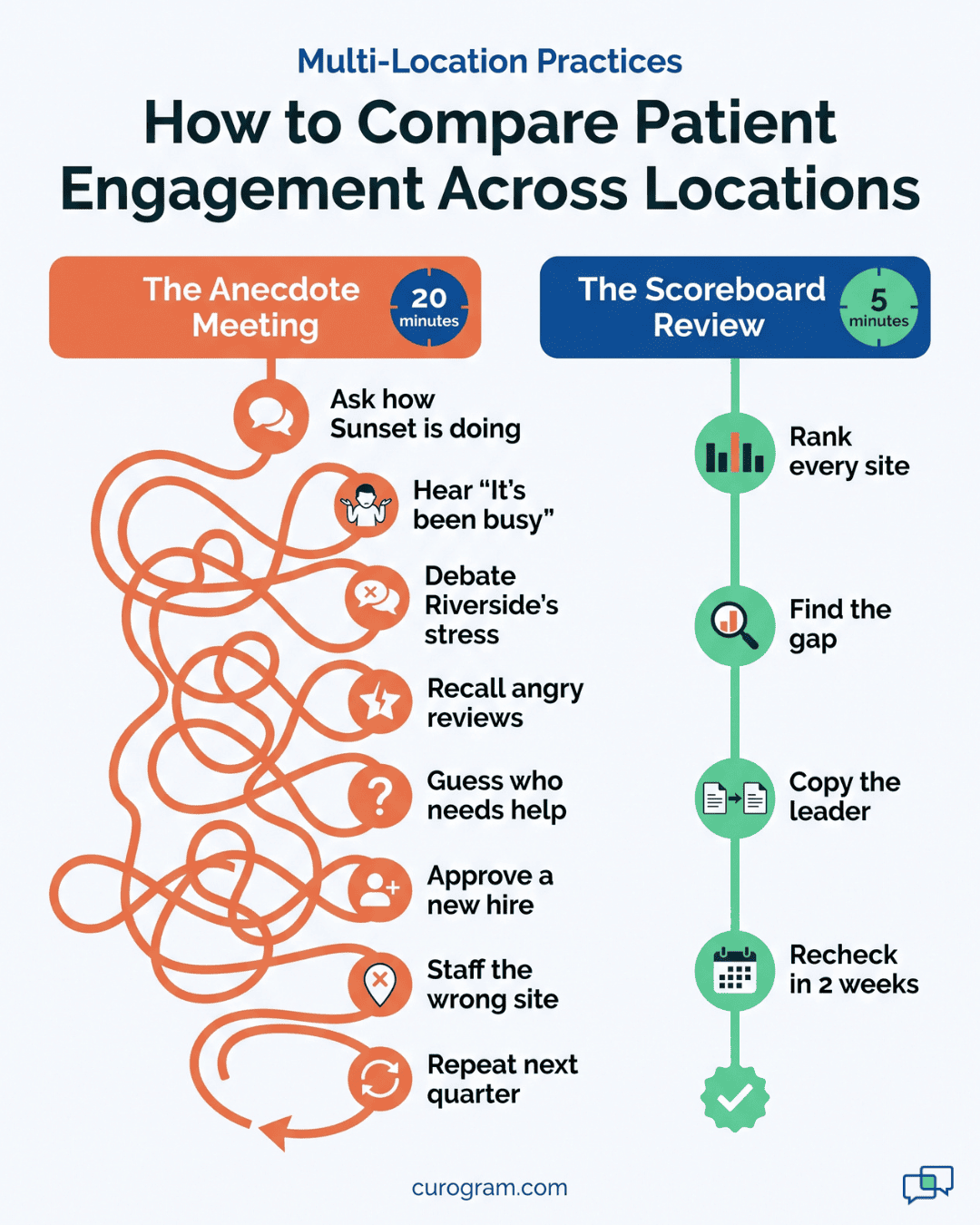
So the Monday check-in asks, “How are things going over at Sunset?” The site manager says it’s been busy. Everyone nods. Nobody would accept that answer as a billing update.
A common version goes like this. Leadership spends twenty minutes debating whether Riverside needs another front desk hire. The manager there sounds stressed, phones ring nonstop, and two patients posted angry reviews last month.
Then look at the numbers nobody pulled. In this illustrative case, Riverside’s median reply time to patient texts is 12 minutes. Hillcrest’s is 31. Riverside is busy but coping, and Hillcrest is the site losing patients to slow answers.
Nobody in the room knows this, because the comparison has never been possible to compute. So the group approves a hire for the wrong site.
That’s $40,000 or more a year in salary aimed at a problem that isn’t there (an illustrative figure). Hillcrest keeps drifting, and next quarter the debate starts again with a fresh set of stories.
Weak spots last longest where nobody can see them. A site can run a 20% no-show rate for a full year. The same group would chase a 2-point denial drift within a week.
The illustrative math below uses 30 visits a day, 22 clinic days a month, and $175 in average revenue per visit:
|
Site at 20% no-shows |
Site at 5% no-shows |
|
|
Scheduled visits per month |
660 |
660 |
|
Missed visits |
132 |
33 |
|
Lost visit revenue per month |
$23,100 |
$5,775 |
That’s a gap of $17,325 a month, or about $208,000 a year, from one site. A 5% rate is within reach. Atlas Medical Center cut its no-show rate from 14.20% to 4.91% in three months after it automated reminders, based on our internal data.
Say Sunset confirms 85% of its visits. Its front desk lead sends a 48-hour reminder that asks patients to reply C. A short nudge follows the morning of the visit. She also answers texts in the lull right after morning check-in.
Those are small, teachable habits. But if nobody can see that Sunset leads the group, nobody asks how.
The habits stay with one person at one site, and they leave when she does. If she takes a job elsewhere, Sunset’s rate can slide for months before anyone links the two.
The reverse hurts too. A strong manager has no proof of her results when budgets get set. A weak site has no clear target to aim for.
Some groups try to patch this by hand. Once a month, someone exports reminder logs from each site and pastes them into Excel.
It takes most of a day. Sites define “confirmed” in different ways: one counts a reply of C, another counts a callback logged in the chart. Reply times can’t be pulled at all, since they live in phones and inboxes. By the time the sheet is done, the data is three to five weeks old.
Then the person who built it goes on vacation, and the sheet stops for a month. Nothing in the process repeats on its own. Managers also learn to shrug off numbers that show up late and half-finished.
Every reminder Curogram sends, every patient reply, and every staff answer carries a timestamp and a location. Those records already exist in your account. The scoreboard counts them.
No one at a five-site practice wants to form a per-location analytics budget group. Nobody wants to hire an analyst and wait a quarter for a first report either. You don’t have to.
The numbers come from the work your staff already does. A reminder goes out at 9:02 a.m., and the patient replies C at 9:40. That’s one confirmation, logged against that visit and that location.
A patient texts a billing question at 2:15 p.m. The front desk answers at 2:31. That’s a 16-minute reply for that site, added to its weekly median.
Multiply that by every message in a week, and you get a full view with no extra clicks. Staff don’t fill out forms or tag threads.
On the administrator dashboard, patient communication shows up as five numbers for each site:
|
Measure |
What it counts |
What it tells you |
|
Confirmation rate |
Visits confirmed by reply out of visits reminded |
Whether patients plan to show up |
|
Median reply time |
Minutes from patient text to staff answer |
How fast the front desk responds |
|
No-show trend |
Missed visits over the last 4 to 12 weeks |
Whether a site is improving or slipping |
|
Review velocity |
New Google reviews per week |
How often patients are asked and respond |
|
Campaign conversion |
Recall texts that turned into booked visits |
How well a site brings patients back |
Review velocity and campaign conversion move slower, so read them over four weeks rather than one. Each view filters by location and by time period. A group rollup sits on top, so you can see the network average and each site’s distance from it.
A ranking is only fair if every site is measured the same way. Hand-built reports fail here first. One manager counts a voicemail as a reply, and another doesn’t.
On the scoreboard, the rules are fixed. A confirmation is a patient reply to a reminder. Reply time runs from the patient’s text to the first staff answer, and only during office hours. A no-show is a booked visit marked as missed on the schedule.
That matters most on a Monday when a manager pushes back on a low score. You can point to the rule, and the talk moves to the fix. Nobody has to argue over whose spreadsheet is right.
To benchmark locations, confirmation rate is the cleanest place to start. It’s hard to game and ties straight to the schedule. It also moves within days when a site changes how it sends reminders.
It’s the one engagement KPI multi-site practice owners can explain to any staff member in a sentence.
Based on our internal data, Curogram clients average above 75%. Covina Arthritic Clinic confirms more than 1,100 visits a month through automated confirmations.
Compare each site to its own past as well as to its peers. A pediatric site with young families and a pain clinic with older patients won’t confirm at the same rate. A site that drops 8 points from its own average is a signal no matter where it ranks.
Each measure links back to real visits on the schedule. A confirmed visit either arrived or didn’t, and that outcome feeds the no-show trend for that site.
This puts engagement next to the revenue numbers your group already tracks in Practice Mate.
If Hillcrest’s confirmation rate slides in March, expect a dip in its visit volume and collections in April. In that case, the scoreboard flags the cause weeks before the billing report shows the dip.
The link runs the other way too. When collections fall at one site, check the scoreboard first. If patients stopped confirming a month earlier, you’ve found the cause before anyone blames coding or payers.
The output is one page per week. It ranks every site on the five measures. Any number that moved more than a set amount since last week gets marked.
Your billing team already knows this routine. They rank, look into the outliers, fix the cause, and check the next report.
The engagement review uses the same four steps and takes about five minutes on a Monday. Site managers get the page before the meeting, so they walk in with an answer ready.

A scoreboard only helps if someone uses it on a schedule. Below is a full weekly review for a five-site group, from the first sort to the follow-up check two weeks later. All site numbers here are illustrative.
The administrator opens the Monday report and sorts by confirmation rate:
|
Location |
Confirmation rate |
Median reply time |
4-week no-show trend |
|
Sunset |
84% |
9 min |
6%, flat |
|
Riverside |
78% |
12 min |
9%, flat |
|
Lakeview |
76% |
15 min |
10%, down 1 point |
|
Oak Park |
74% |
18 min |
11%, flat |
|
Hillcrest |
61% |
31 min |
17%, up 4 points |
Hillcrest sits last in every column. Riverside, the site the group almost staffed up, ranks second. The hiring debate ends in under a minute.
Look at the middle, too. Lakeview’s no-show rate is falling, and its manager changed her reminder time two weeks ago. That’s worth a note in the meeting, even with no problem to solve.
Ranking says where. Now the administrator needs to know why, so she opens Hillcrest’s message log and checks two things.
First, timing. Most of the unanswered texts arrived between noon and 1:30 p.m., when one person covers the desk alone during lunch. Patients who asked to reschedule waited over an hour, and several didn’t come.
Second, wording. Hillcrest’s reminder still says “Call us to confirm.” Patients who would happily reply C put off the call instead, and many never make it.
Both problems are fixable this week. Neither one needs a new hire.
Sunset already solved both problems. Its reminder asks patients to reply C. A second, shorter text goes out the morning of the visit. A named staff member owns the text inbox during lunch, with a backup listed on the schedule.
The administrator sends Hillcrest’s manager Sunset’s template and lunch plan. Better yet, the two managers get on a 15-minute call. Hillcrest’s manager hears what went wrong at Sunset before it worked, which no template can tell her.
That’s how your best site’s playbook spreads. It moves as specific steps one manager can follow, with the person who wrote them a phone call away.
Two weekly cycles later, the administrator checks Hillcrest again. She looks at three numbers: reply time, confirmation rate, and the no-show trend.
If the first two have moved toward the group average, the fix worked, and the no-show line should bend within a month. If they haven’t, the cause was something else. The team digs again before the next review.
She also asks Hillcrest’s manager what the staff noticed. A desk that now answers texts at lunch may be fielding fewer angry calls at 2 p.m. That’s worth hearing, even if no report counts it.
Per-Location Dashboards give an Office Ally group one view of patient engagement across every site.
Each location gets its own page with confirmation rate, median reply time, no-show trend, review velocity, and campaign conversion. A group rollup sits on top, so the administrator sees the network average and every site’s place in it.
Nothing needs to be built. The dashboards fill in from the reminders, two-way texts, review requests, and recall campaigns Curogram already sends for your group.
You can filter by location and by date range, and each user’s access matches their role. A site manager sees their own location, while the administrator sees all of them.
The campaign and review numbers show where a site’s effort pays off. Based on our internal data, one multi-location practice saw 35% of patients who got an SMS recall book a visit within a month.
That added up to 1,240 patients seen from recall messages alone. Another multi-location practice added 1,064 new five-star Google reviews in three months by asking patients for feedback after each visit.
On a dashboard, those results stop being one group-wide total. You can see which site’s recall list converts best and which site’s review requests get answered. That makes the strong site’s method easy to spot and easy to share.
A one-page weekly report pulls it all together. Every site is ranked on the same five measures, with last week’s changes marked. It takes about five minutes to read, the same time your team gives a claims report.
Your group already proves it can manage by the numbers. Denials get a rate, an owner, and a trend line. A 2-point drift gets caught within a week.
The work that fills the schedule deserves that same treatment. Confirmation rates, reply times, and no-shows decide whether patients show up and pay. In most Office Ally groups, they still live in anecdotes and in the heads of a few good front desk leads.
Office Ally already tells you where the money stands. Curogram adds the report on how each location treats its patients, built from messages your staff sends anyway. Put the two side by side, and you can spot a slipping site a month before its collections fall.
Try one test this week. Ask your team for last week’s confirmation rate at each location. If the answer takes more than a minute, you’ve found your blind spot.
Book a demo with Curogram. We’ll set up the scoreboard with your real location list and show you the first ranking live.
Curogram already sends your reminders, carries your two-way texts, and runs your recall and review campaigns. Each of those actions is logged with a timestamp, a visit, and a location. Dashboards count those records on their own, so there’s no export, no spreadsheet, and no analyst to hire. Your staff keeps working the way they do now.
Access follows each person’s role. A site manager signs in and sees their own location’s confirmation rate, reply time, and no-show trend. Administrators see every site plus the group rollup. Since everyone works from the same numbers, a Monday review doesn’t open with an argument about whose spreadsheet is right.
Confirmation rate moves within days of a change, while no-show rate takes weeks to show a trend. Say a site switches its reminder from “call to confirm” to “reply C.” You’ll see the effect in the next weekly report. That fast feedback makes it the best early signal. No-show rate then shows whether the gain held on the schedule.
Compare each site against its own history as well as its peers. A pediatric office with busy parents and a clinic serving older adults will confirm at different rates. A raw ranking between them can mislead. Watch for change instead: a site that falls 8 points below its own 12-week average needs attention, even if it still ranks mid-pack.
The dashboards show totals and rates, such as 78% confirmed or a 12-minute median reply. They don’t list patient names or message content. Conversations behind those numbers stay inside Curogram’s HIPAA-compliant platform, where access is limited by role and activity is logged. An administrator can review a site’s results without opening a single patient thread.
1 min read
💡 Location-level patient engagement reporting for DrChrono groups shows how each site handles patient texts, reminders, and reviews, side by side....
1 min read
💡Location-level patient engagement reporting for athenahealth networks brings benchmark discipline to the one layer that never had it.athenahealth...
1 min read
💡Location-level patient engagement reporting for Tebra groups measures the stage between marketing and billing: whether patients confirm, how...