
 Aubreigh Lee Daculug

A profile whose last review is a year old creates a "Stale First Impression." Patients quietly pick the clinic with last week's reviews instead.
Curogram syncs appointments from Office Ally and sends review requests after real visits, so each location can build its own fresh stream of reviews. One multi-location practice earned 1,064 new five-star reviews in just 3 months.
Grab your phone, stand in the parking lot of your newest clinic, and search "family doctor near me." Look closely at what appears. That small screen is the whole first impression a new patient gets before they call.
Now check the date on that location's most recent review. If it reads "11 months ago," you have a problem that great care alone can't solve.
Patients don't search for your organization as a whole. They search for a convenient clinic close to home, often when they need care soon. Your founding office may have hundreds of glowing reviews, but those reviews stay attached to that single address.
That's why helping patients choose your Office Ally locations on Google requires more than a strong average rating. It requires visible, recent proof that real people are visiting each location and leaving satisfied. Most patients read reviews before booking, and they notice immediately when the newest one is outdated.
Consider the Google profile first impression clinic leaders rarely stop to check. A busy, well-run office can appear quiet, neglected, or even closed online. Meanwhile, a rival down the street with fresher reviews gets the booking.
This gap affects chiropractic, behavioral health, and family practice groups especially hard. Their patients often search under pressure, comparing options on a small screen. Each near me search decision happens in seconds, based on whatever looks current and trustworthy.
Fortunately, this problem is fixable. You already have the most valuable ingredient: real patients completing real visits every single day.
In this guide, you'll learn why stale profiles push potential patients away and how consistent, fresh reviews change the picture. You'll also see how Curogram works alongside Office Ally to help each location build its own steady stream of honest feedback.
Finally, you'll explore real results from a Curogram client.
Why an Old Review Can Cost You a New Patient
Your existing patients already trust your care. Strangers searching online haven't experienced that care yet, so they rely on the only evidence available. That evidence is a public profile, and it tells a story whether you manage it or not.
Patients Research a Location, Not a Group
When someone searches for a clinic, Google displays the locations nearest to them. It doesn't combine reviews across your entire network. So your original office's 500 reviews do nothing for the new location three towns over.
It's a familiar trap for growing groups: new location, no reviews, no history to lean on. Established sites can fall into it too. If reviews stopped arriving months ago, that location looks just as unproven as a brand-new one.
The 90-Second Choice
Here's how it typically plays out.
A patient who recently moved to the area needs a chiropractor and compares two nearby clinics.
Your location offers better care, but its latest review is a year old.
The competing clinic has a review from last Tuesday. The patient books there in roughly 90 seconds. Your team never even learns that someone was looking.
Old Reviews Signal Risk
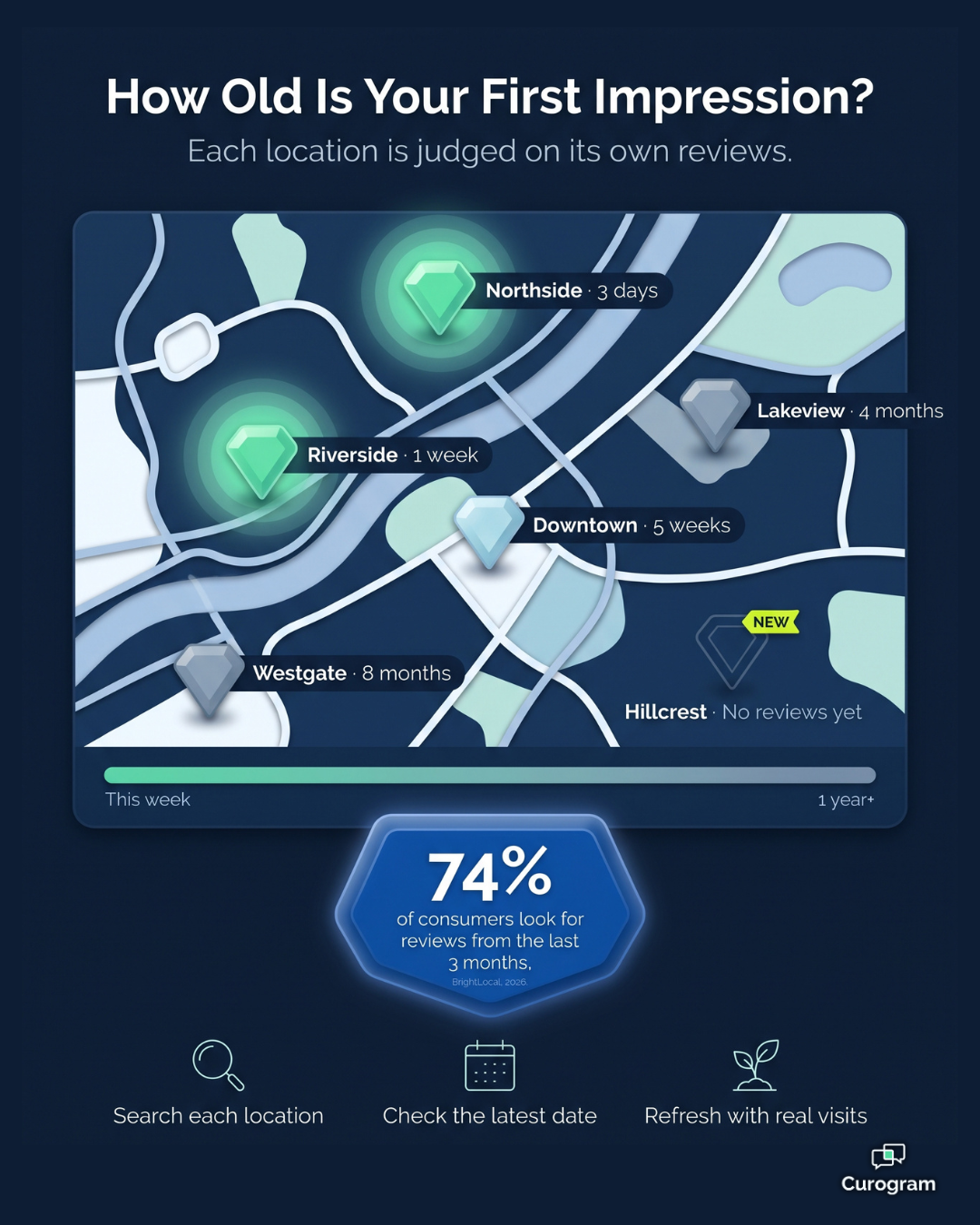
Star ratings receive the first glance, and review dates receive the second. When the newest review is a year old, patients begin wondering whether the clinic changed ownership, lost staff, or is preparing to close.
Independent research supports this pattern. The BrightLocal Local Consumer Review Survey 2026 found that 74% of consumers look for reviews written within the last three months.
You could call it review recency trust: patients believe what feels current.
Great Care, Invisible Proof
You opened that location to expand your reach. Instead, it competes for every patient at a disadvantage. The care is excellent, but the evidence remains hidden.
That's a quiet drain on your patient acquisition Google Maps strategy, precisely where visibility matters most. And the longer the silence continues, the harder it becomes to reverse.
Meet the Network Reputation Desk Behind Every Location
Curogram acts as "The Network Reputation Desk" for groups with more than one location.
Its job is simple:
Keep the proof flowing at the same pace as the care. Every location gets a chance to build fresh, real reviews, not just your flagship office.
Here's how the pieces fit together:
- Post-visit review requests: Curogram's automated post-appointment surveys reach patients while the visit is still fresh. Happy patients get an easy path to share a public review on Google.
- Built on real visits: Curogram's Office Ally integration syncs appointment data into Curogram. Review requests follow actual visits, so each location's reviews can mirror its real patient flow.
- Real voices, real volume: Since requests come from real appointments, the reviews sound like your patients. There's no bulk posting and no made-up praise.
- What new patients want: People looking for care get recent stories from patients like them, about the exact location they're thinking about.
Light Setup, Steady Results
Getting connected takes little effort. Curogram's Office Ally connection runs through its Integration Engine and is marked Ready. Setup needs an Office Ally user ID and password. It doesn't require access to an EMR server, and the stated timeline is one day.
The same integration can also send appointment statuses back to Office Ally. These include confirmed, cancelled, no-show, and requested reschedule.
That matters more than it seems, since smooth logistics are often what patients praise in reviews. It's one reason centralized reminder governance supports your reputation too.
For the bigger picture on running reviews across your network, see our guide to managing Google reviews for multiple Office Ally locations.
What a Fresh Profile Looks Like in Real Numbers
Fresh reviews aren't a cosmetic upgrade. They're the specific proof a nearby patient needs to choose your location over the clinic next door. Here's what that looked like for one Curogram client.
A multi-location practice came to Curogram because it was struggling with patient feedback and its online reputation. After turning on Curogram's automated post-appointment surveys linked to Google Reviews, the practice earned 1,064 new five-star reviews in just 3 months.
That figure comes from Curogram client data from clinical settings.

Here's a practical way to interpret it.
Spread across about 13 weeks, that equals roughly 82 new five-star reviews per week across the group (1,064 ÷ 13, our own calculation).
Every one represents a recent, patient-written reason for someone nearby to book.
From Stale and Silent to Fresh and Chosen
| What patients notice | Stale and silent | Fresh and chosen |
|---|---|---|
| Latest review | Months or a year old | From this week |
| What it suggests | "Is this place still open?" | "People are happy here right now." |
| Who gets the booking | The clinic down the street | Your location |
| How the first visit starts | With doubt | With confidence |
The change goes beyond a single number. Each location's profile becomes its own best marketer. It works around the clock, in its own neighborhood, using your patients' own words.
That shift also changes how care begins. Patients arrive already reassured because they chose you based on evidence, not guesswork. The relationship starts with confidence instead of hesitation.
A Simple Weekly Routine to Keep Every Location Looking Alive
Fresh reviews do most of the heavy lifting, but a few consistent habits help each profile deliver its full value. None of these steps take long, and together they help every location look as active online as it is in person.
- Track review dates by location. Keep a short list of each location and the date of its latest review. Gaps become obvious quickly, especially at newer or recently expanded locations.
- Keep profile basics accurate. Make sure each location's hours, phone number, address, and services are correct on Google. A great review loses its value if the patient then calls a dead line or arrives at a locked door.
- Reply to reviews with care. A short, warm reply shows that real people are paying attention. Never confirm that a reviewer is a patient or mention health details, even if they shared those details first.
- Ask at the right moment. The best time to ask for a review is soon after a visit, while the experience is still fresh. That's the moment Curogram's post-appointment surveys are built for.
- Learn from what patients say. Reviews often identify the details patients value most, like short waits, clear communication, or friendly staff. Share these comments with each team so they know what's working.
Small habits like these turn a steady flow of reviews into a profile that earns trust. They also give every location manager a practical, measurable way to monitor progress week by week.
Your Care Is Current. Make Sure Your Profiles Are Too.
Your locations earn patient trust every day. Their public profiles should reflect it every week.
That's the core of helping patients choose your Office Ally locations on Google. It isn't about tricks or shortcuts. It's about making sure the story online matches the quality of care inside your doors.
Keep the two responsibilities distinct. Office Ally maintains your record of care. Curogram helps patients tell their public story about that care, one genuine visit at a time.
When those two systems work together, every location receives a fair opportunity. Your newest clinic stops depending on your oldest one's reputation. It competes on its own reviews, within its own neighborhood, and begins winning its own searches.
Here's a quick test you can run today.
Search Google for each of your locations individually. Then check the date on the most recent review for every profile.
That date reveals the age of your first impression in that neighborhood. If it's several months old, nearby patients are seeing a version of your practice that no longer exists. They're making decisions based on silence instead of your current, real-world care.
The solution starts with something you already have. Real patients walk through your doors every day. Many of them had a great experience and would gladly share it if someone simply asked at the right moment.
Curogram makes that request easy and consistent across your entire network. Requests follow actual appointments, so each location builds reviews that reflect its genuine patient flow. Over time, every profile begins to look as active as the clinic behind it.
Ready to see how it works? Book a Demo and discover how a busy Tuesday at one location can turn into a full week of fresh reviews. Then let every neighborhood you serve see the care you already deliver.