


8 min read

Notenetic Confirmations on Autopilot for Behavioral Health

Notenetic Confirmations on Autopilot for Behavioral Health
💡 Automated appointment confirmations for a Notenetic behavioral health front desk let intake coordinators stop being the practice's human reminder system.

Notenetic schedules, documents, and bills, but it has no built-in SMS reminders, so staff manually call 20 to 40 clients a day.

Curogram runs alongside Notenetic as a parallel layer, sending HIPAA-compliant text reminders that confirm, cancel, or reschedule in a single reply.  

The results are measurable: Atlas Medical Center cut no-shows from 14.26% to 4.91% in 90 days, and River Valley Family Health Center reduced phone call volume by 24%.   


You know the sound. The slow exhale before the first call of the day. The schedule for tomorrow is printed, sorted by clinician, and waiting. So you start dialing.

Voicemail. Cell phone. Voicemail. Portal message. Move on.

By lunch, half your appointments still read "left message," and you are no closer to knowing who will actually walk through the door. This is the quiet tax on every behavioral health front desk, and it has nothing to do with how good your team is. It is simply the system you were handed.

Here is the part that stings. Notenetic runs your schedule beautifully. It documents, it bills, and it keeps your clinicians organized.

But the moment an appointment hits the calendar, Notenetic goes silent. There is no automated text and no two-way reminder waiting to nudge the client toward the chair.

That gap lands squarely on your coordinators, who quietly become the human reminder system for the entire practice.

The cost of that adds up fast. A coordinator spending four to six hours a day on confirmation calls is a coordinator who is not onboarding new clients or triaging clinical questions.

And when the busywork outweighs the work people came to do, they burn out and many of them leave the practice for good.

So let's talk about a better way to run things.

Automated appointment confirmations for a Notenetic behavioral health front desk are not about replacing your EHR. They are about adding a layer that handles the routine reminders for you, quietly, in the background, while your team handles the work that needs a real person.

The shift sounds simple. It is.

And for the practices already doing it, the morning starts somewhere new: with a schedule that has mostly confirmed itself overnight.

Let's now look at exactly how.

Meet the Real Villain: The Daily Confirmation Loop

Every front desk has a villain, and in behavioral health it has a name: the confirmation loop. It is the daily cycle of calls, voicemails, and callbacks that decides how your whole morning feels.

Beat it, and the day flows. Lose to it, and you spend hours treading water.

The morning that repeats itself

The cycle starts the same way every single day. Pull tomorrow's schedule, sort it by clinician, and begin working down the list. One call connects, four go to voicemail, and somewhere a portal message sits unread.

By midday the board is a sea of "left message" notes. You have spent two hours and still cannot say with confidence who is showing up. Then the callbacks start trickling in, and the whole thing runs in reverse.

Where Notenetic stops short

None of this is a knock on your EHR. Notenetic does exactly what it was built to do: schedule, document, and bill. The trouble is that its job ends right where the client's attendance begins.

There is no native SMS, no client-level reminder preferences, and no waitlist that refills itself when a cancellation lands.

So a Notenetic confirmation workflow, left to its defaults, still depends on a person picking up the phone. That missing piece is the entire reason the loop exists.

The hidden price tag

Now put a number on it. Behavioral health practices routinely field 40 to 80-plus inbound calls a day, and intake coordinator reminder calls pile right on top of that volume.

A coordinator who burns four to six hours on confirmations is not triaging clinical questions or moving a new client through intake.

That is not a small leak. It is most of a workday, every day, spent on a task a machine could handle. The labor is real, and so is the opportunity cost behind it.

The slow burnout

Here is the cost no spreadsheet tracks.

People take front-desk roles in behavioral health because they care about the clinical mission, not because they want to play voicemail tag for six hours.

When the job becomes the loop, they leave, and the next hire starts the cycle over from zero. The carousel keeps spinning, and your best people are the ones who step off it first.

Putting Your Schedule on Autopilot

So what actually replaces the loop? Not another person on the phones.

A quiet automated layer that runs beside your EHR and only taps a human when one is truly needed. That is the heart of behavioral health front desk automation, and it is simpler than most teams expect.

Curogram works as a parallel communication system to Notenetic. Your team keeps scheduling, documenting, and billing inside Notenetic exactly as they do today.

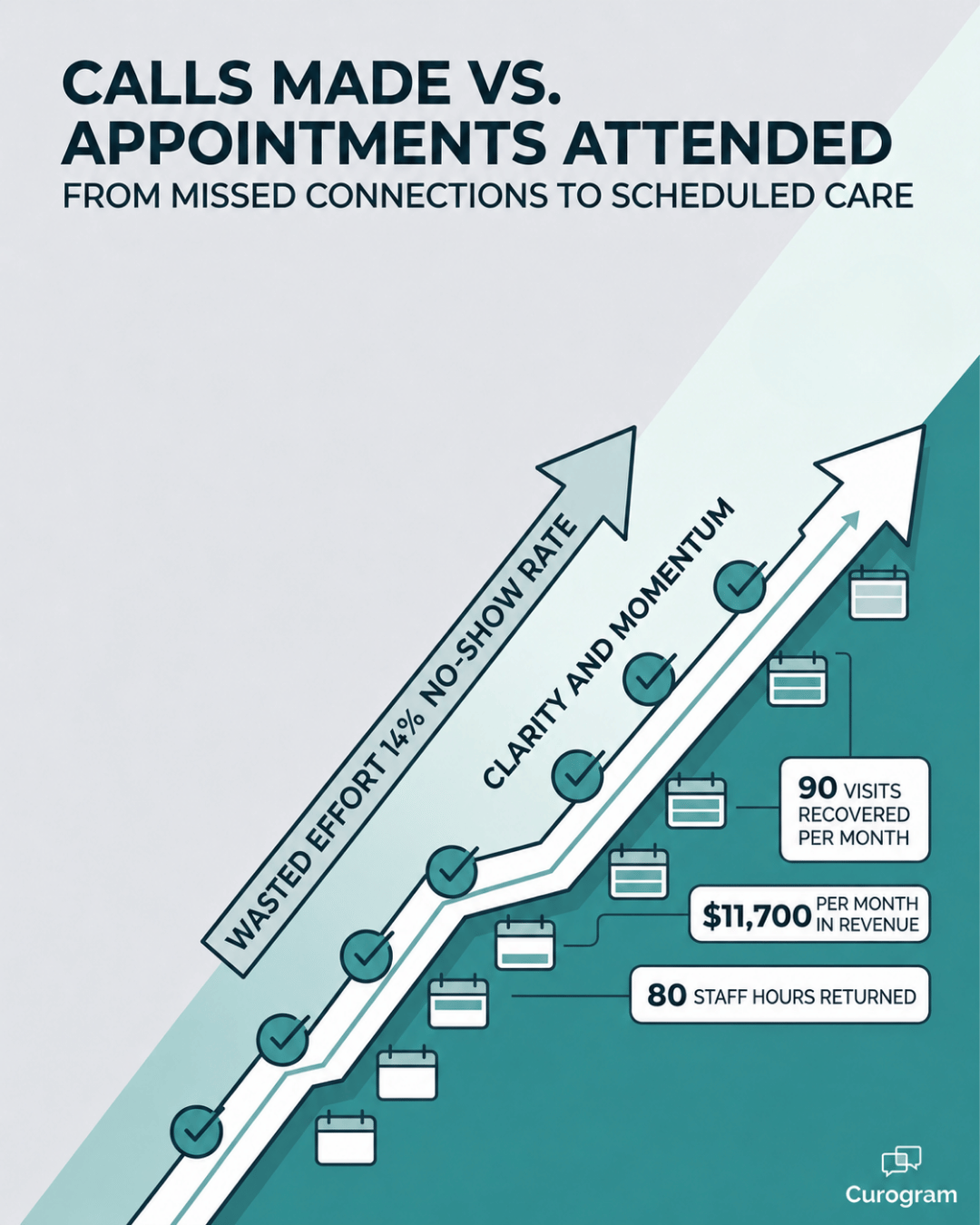
Infographic comparing phone calls made to appointments attended after automated reminders

Curogram simply handles the outreach. Here is how the sequence runs:

  1. Reminders fire on your cadence. Curogram sends HIPAA-compliant texts at the intervals you choose, commonly 72 hours, 24 hours, and 2 hours before the visit. You control the timing, the wording, and the channel.
  2. Clients reply in one tap. Every reminder is two-way. A client can confirm, cancel, or reschedule with a single text. That turns a vague "did they get my voicemail" into a clear yes or no.
  3. Replies land in a shared inbox. Responses flow into one Curogram dashboard that any coordinator on shift can pick up. Nothing hides on a personal cell phone or a sticky note.
  4. Open slots surface instantly. When a cancellation comes in, the freed time shows up right away. A coordinator can then offer it to a waitlisted client before the day even starts.

Because Notenetic has no public API, this parallel design is the right Notenetic reminder integration approach, not a workaround. Most teams keep the reminder list in Curogram and leave clinical data untouched in Notenetic, so there is no double entry of charts.

The fit is especially strong for group therapy, intensive outpatient programs, and substance use teams, where one missed seat reshapes a whole session. And for clients covered under 42 CFR Part 2, reminder content can leave out any diagnostic or treatment detail.

That keeps the mental health appointment confirmation system compliant by design.

Intake coordinator greeting a returning client at a behavioral health practice reception

What Changes When the Calls Stop

The real payoff is not just fewer calls. It is a different operating mode for the entire front desk. Once the routine reminders run themselves, your coordinators stop confirming and start managing exceptions, the handful of moments that genuinely need a human touch.

Here is the new normal.

A 9 AM Tuesday slot gets confirmed at 8:45 the night before by a thumb-tap.

A reschedule request arrives at 6:45 PM, and the open seat goes to a waitlisted client by 6:46. The morning huddle opens with a settled schedule instead of a backlog of follow-ups.

The numbers behind this shift are hard to argue with:

14.26% to 4.91% 

Atlas Medical Center's no-show rate over 90 days on Curogram's reminder sequence, a 65.5% drop.

That is not a rounding error. It is a third of a no-show problem erased in a single quarter, which for most practices translates directly into recovered revenue and steadier clinician schedules.

River Valley Family Health Center tells the same story from a different angle. On the same platform, the team cut inbound phone volume by 24%. Its COO credited two-way texting for the change and described the front desk shifting away from acting like answering machines and into the role of real patient coordinators.

That is the whole point of solid therapy practice schedule confirmation: the technology absorbs the repetitive work, and your people get promoted back to the job they were hired for.

No-shows cost you money! Reduce missed appointments by up to 75% with Curogram's automated, customizable smart reminders.  

So what does "success" actually look like here?

It is not a coordinator making 40 calls a day.

It is a coordinator handling the three to five exceptions that genuinely need a person:

  • The client who needs to reschedule
  • The new intake with a clarifying question
  • The open slot that can go to someone on the waitlist

The rest of the day goes back to intake, triage, and client care. The loop does not just shrink; it stops being the front desk's job at all.

What a Lower No-Show Rate Is Actually Worth

Numbers like Atlas Medical Center's 65.5% drop are easy to nod at and hard to feel. So let's turn a percentage into a dollar figure your finance team would recognize.

The example below uses round, illustrative numbers, but the shape of the result holds across most behavioral health practices.

Take a mid-size practice with these monthly inputs:

  • 1,000 scheduled appointments a month
  • A 14% no-show rate before automated reminders
  • A 5% no-show rate after, in line with the Atlas result
  • An average of $130 in revenue per completed visit

Start with the missed visits. At 14%, that practice loses 140 appointments a month. At 5%, it loses 50.

That is 90 recovered visits every single month, simply because more clients remember to show up.

Now attach the dollars. Ninety recovered visits at $130 each is $11,700 a month in revenue that used to walk out the door. Annualized, that is roughly $140,000 a year.

For your team, that is not a soft efficiency gain; it is a real number that could fund a new hire or a second location.

The time savings stack on top of the revenue.

A coordinator who reclaims four hours a day from confirmation calls hands back about 80 hours a month to intake, triage, and client care. In practice, you keep paying the same staff but get a far larger share of their day spent on work that grows the practice.

This means the real question is not whether you can afford to automate. It is what the manual loop is quietly costing you every month you keep it.

Stop Counting Calls. Start Counting Attended Appointments.

Here is the simplest way to think about the pairing.

Notenetic shows your front desk what the schedule is supposed to look like. Curogram handles the quiet, repetitive work that makes it actually look that way.

One platform owns the clinical chart. The other owns the attendance.

That distinction matters more than it first sounds. For years, the only way to protect a behavioral health schedule was to throw human hours at it, calling client after client and hoping enough of them answered. The underlying math never justified the effort.

A team buried in confirmation calls is a team with no remaining capacity for the clients who genuinely need them.

When the routine reminders run automatically, the entire rhythm of the day changes. Your coordinators stop chasing voicemails and start handling the three to five exceptions that legitimately require a person.

The morning huddle opens with a settled schedule instead of a discouraging stack of follow-ups. And the people you hired to support your clinical mission get to do precisely that.

So measure your front desk by the right number. Not calls completed, but appointments attended. That single shift in what you track tends to reveal how much time and revenue the older approach was quietly costing your practice.

The practices that committed to this move did not gamble on it. Atlas Medical Center watched its no-show rate fall from 14.26% to 4.91% in ninety days. River Valley reduced phone volume by 24% and reassigned its front desk to meaningful coordination work.

Numbers like that are not theoretical; they are what happens when the calls stop.

You do not have to rebuild anything to get there. Keep Notenetic exactly as it is and let Curogram run the reminders alongside it. Schedule a Demo, and watch a schedule confirm itself overnight.


Frequently Asked Questions

Will the reminder system create double entry if our schedule lives in Notenetic?

No. Curogram works as a parallel communication layer, so your clinical documentation, scheduling, and billing stay right where they are inside Notenetic. Most practices keep a client and appointment list in Curogram for reminders only. The small amount of coordination that takes is usually offset within the first month by the hours saved on manual confirmations.

How customizable is the reminder cadence, and can we set it for our specialty?

Yes. The smart reminders are configurable per practice, so you control the timing, the language, and the channel. Most behavioral health teams run a 72-hour, a 24-hour, and a 2-hour reminder, though the intervals flex to fit you. Group therapy practices often add a 1-week reminder for recurring sessions, and substance use teams can configure content to comply with 42 CFR Part 2.

What happens when a client cancels by text? Does the slot just disappear?

It does the opposite. Cancellations land in the Curogram dashboard in real time, so a coordinator sees the open slot right away and can offer it to a waitlisted client by SMS in the same workflow. The whole exchange lives in an audit-logged thread, not on a personal phone or a sticky note, so the full chain of cancel, refill, and confirm stays traceable.

Is texting clients actually HIPAA-compliant?

Yes, when it runs on a platform built for it. Curogram's messaging is HIPAA-compliant, and reminder content can be stripped of any diagnostic or treatment-specific detail. For practices under 42 CFR Part 2, that configurability is what keeps a routine reminder from ever revealing the nature of care.

How fast do practices usually see results?

Faster than most expect. Atlas Medical Center reached its 14.26% to 4.91% no-show improvement within 90 days, and many teams notice lighter phone volume in the first few weeks. Because the reminders run automatically from day one, the time savings show up almost immediately, while the no-show gains build over the first quarter.


SMS Reminders for Notenetic Therapy Clients That Actually Show Up

SMS Reminders for Notenetic Therapy Clients That Actually Show Up

💡 SMS appointment reminders for therapy clients on Notenetic work because they reach people where their attention already lives — a text on their...

Read More
Notenetic Appointment Reminders: Cut Behavioral No-Shows

Notenetic Appointment Reminders: Cut Behavioral No-Shows

💡 Notenetic gives behavioral health practices a solid schedule, but no automated SMS reminders. The Client Portal only shows appointments when...

Read More
Your Appointment Reminder — Via Text, Not Portal

Your Appointment Reminder — Via Text, Not Portal

💡 Veradigm patient appointment reminder text message without portal enrollment means patients confirm their visit by replying YES to a single text...

Read More