
11 min read

Telehealth for ModMed: Frictionless Virtual Visits for Specialty Care

Telehealth for ModMed: Frictionless Virtual Visits for Specialty Care
💡 Specialty practices using ModMed can add telehealth by integrating Curogram's platform. This creates HIPAA-compliant virtual visits that launch directly from your EMA schedule.

Patients join through a secure SMS link with no app downloads required. This removes the biggest barrier to virtual care and reduces no-shows by 53%.

The system supports high-definition video and secure image sharing for dermatology, orthopedics, and psychiatry. Specialists can conduct remote triage, post-op follow-ups, and therapy sessions while maintaining full documentation in ModMed.

Your front desk staff spends 15 minutes helping a patient download an app. The patient gets frustrated trying to create an account. By the time they figure it out, your provider is already behind schedule. Sound familiar?

This scenario plays out in specialty practices every day. The promise of telehealth is better access to care. But most platforms create more problems than they solve. They add complexity instead of removing it.

What if your patients could join a virtual visit with just one click? No apps. No passwords. No technical support from your staff. What if telehealth actually made your practice more efficient instead of creating more work?

That's exactly what telehealth for ModMed delivers when you integrate Curogram. The platform works directly inside your EMA workflow. You can schedule a virtual visit just like any other appointment. When it's time, you send a secure link through text message.

Your patient taps the link and joins immediately. No downloads. No logins. Just instant connection to their doctor. The entire process takes seconds, not minutes.

For dermatologists, this means patients can share clear photos of skin conditions during the visit. You can zoom in to examine details that might be hard to see in person.

Orthopedic surgeons can watch patients demonstrate their range of motion after surgery. You can verify they're following post-op protocols without making them travel to your office.

Psychiatrists can maintain consistent therapy schedules without asking patients to drive across town.

The familiar environment of home often helps patients open up more during sessions. Pain management specialists can conduct follow-up consultations to adjust medications without requiring patients to sit in waiting rooms.

The numbers tell the story. Practices using ModMed virtual visits with Curogram see 53% fewer no-shows. They complete more appointments per day because there's no time wasted on tech troubleshooting.

And patients love the convenience. Patient satisfaction scores often increase after implementing streamlined virtual care.

This guide shows you how specialty telehealth integration transforms your practice. You'll learn why traditional video platforms fail specialists and what makes them so frustrating for both staff and patients. You'll see exactly how the technology works behind the scenes. You'll discover practical workflows for different medical specialties.

And you'll understand the real business impact on your bottom line, including revenue increases and efficiency gains.

Why Traditional Telehealth Fails Specialty Practices

Most telehealth and telemedicine platforms weren't built for medical practices. They were designed for business meetings, remote work teams, and corporate training sessions. That creates three major problems for specialists who need clinical-grade tools, not conference room software.

The App Download Barrier

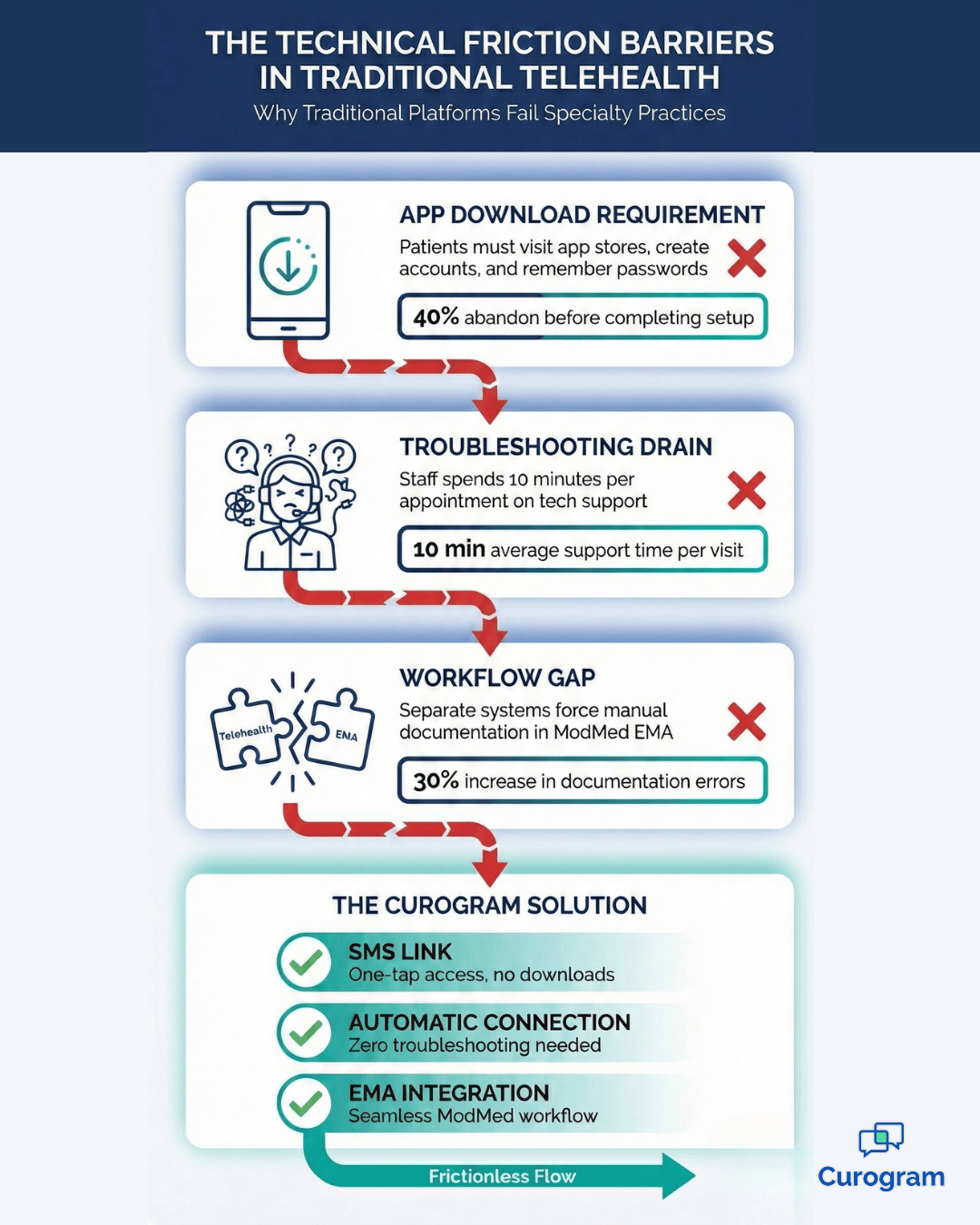
Patients must download an app and create an account before their first visit, which is especially difficult for older adults and those with limited digital skills. Many give up before starting, leading to cancellations.

Even tech-savvy patients find the process frustrating—downloading, creating login credentials, verifying email, and navigating back can waste 10–15 minutes. Some cancel entirely.

App requirements also create version issues. Updates can happen at inconvenient times, and outdated versions may prevent patients from joining, causing delays or missed visits.

The Time Drain on Clinical Staff

When patients struggle with technology, your staff becomes an IT help desk. A 15-minute appointment can start with 10 minutes of troubleshooting, delaying the entire schedule.

Front desk staff handle calls about downloading the app and joining the visit. Medical assistants spend time on tech issues instead of collecting vitals and history, while providers wait in empty virtual rooms.

This support burden adds hidden costs and creates stress and burnout. Staff morale suffers, and turnover increases—leading to more time and expense spent on recruiting and training.

The Workflow Gap

Most video platforms don’t connect to your EMA, so you must document visits manually in ModMed. This doubles work and increases the risk of errors, like entering notes in the wrong chart or forgetting key details.

The workflow gap also creates compliance risks. When information is split across systems, records can be incomplete, and billing codes may not match the services provided.

Separate systems require extra training, login credentials, and workflows, which slows your team and increases mistakes. Manual billing also adds risk, since you must ensure telehealth requirements like location and consent are documented.

These issues often cause practices to abandon telehealth after a few months. The solution is to choose a platform that integrates with your existing system.

How Curogram Connects to Your ModMed Workflow

Curogram eliminates technical friction by working inside your existing system. The integration happens in three simple steps that mirror your in-office workflow. There's no separate platform to learn, no new credentials to remember, and no disruption to your established processes.

Direct Schedule Integration

The platform integrates directly with your ModMed EMA schedule, so you see in-office and virtual appointments in one view. There’s no separate calendar to manage, and your staff doesn’t need to learn a new system.

Virtual visits appear in ModMed like any other appointment, allowing reminders, tracking, and scheduling in the same workflow.

Patient information automatically flows into the virtual visit, so providers can review history and visit details before joining the call—just like preparing for an in-person appointment.

Key benefits of schedule integration include:

  • No duplicate data entry across systems
  • Automatic patient information syncing
  • Unified reporting for all appointment types
  • Single platform for staff training and support

The schedule integration extends to room management too. Just as you might have multiple exam rooms in your physical office, you can have multiple virtual rooms.

Providers can move between virtual appointments as easily as they move between physical exam rooms. Medical assistants can prep patients in one room while providers see patients in another.


One-Click SMS Links Replace App Downloads

When it’s time for a virtual visit, you send the patient a one-click SMS link. They tap it and join the secure video room immediately—no app, username, or password needed.

This solves the access problem of other platforms. Every patient with a smartphone can receive a text, so they can connect easily without downloading apps or creating accounts.

The SMS link also works across all devices and operating systems:

  • Compatible with iPhone and Android devices
  • Works on tablets and computers too
  • No minimum operating system requirements
  • Adapts to older devices automatically

Patients can access the link from anywhere. If they're at work, they can join from their office. If they're at home, they can join from their couch. If they're traveling, they can join from their hotel room.

The flexibility increases attendance rates because patients don't need to be in a specific location with specific equipment.

Secure Clinical Image Sharing

During the visit, you can securely share and receive images. This is especially useful for dermatology, wound care, and post-surgical orthopedic follow-ups. Images are protected with bank-level encryption and remain HIPAA-compliant.

Patients can take photos with their phone and send them through the secure connection. You can view them in real time, zoom in for details, and request additional angles if needed.

This capability is especially valuable for visual specialties:

  • Close-up examination of skin lesions and rashes
  • Wound healing progress documentation
  • Surgical site monitoring
  • Medication reaction assessment
  • Before-and-after treatment comparisons

Images automatically save to the patient’s ModMed record, so you don’t need to download or upload them manually. They become part of the visit documentation, supporting complete records, billing, and compliance.

The process mirrors your in-office workflow. Staff can join the virtual room first for intake, then hand off to the provider—just like an exam room handoff. The technology adapts to your workflow, not the other way around.

Technical barriers in traditional telehealth vs Curogram's seamless ModMed integration

Virtual Care Solutions for Different Specialties

Each medical specialty uses telehealth differently. The key is matching the technology to clinical needs. Here's how different practices benefit from specialty telehealth integration and how they adapt virtual visits to their specific requirements.

Dermatology Remote Triage

Dermatology remote triage lets you assess skin conditions quickly without an in-person visit. Patients can show rashes, lesions, or healing sites via high-definition video, and you decide whether they need to come in or can be treated remotely.

Because dermatology is visual, virtual visits work well. You can see color, texture, and size, view different angles, and have patients describe symptoms like itching or pain.

Common conditions that work well for virtual assessment:

  • Acne management and prescription adjustments
  • Eczema and psoriasis flare-ups
  • Post-surgical wound checks
  • Rash identification and treatment
  • Mole monitoring between annual exams

Many dermatology issues can be resolved through virtual visits. Prescription renewals and follow-ups for conditions like eczema or psoriasis don’t require in-person exams.

Virtual triage helps prioritize urgent cases. If a patient is worried about a new mole, a quick virtual visit can determine if they need to come in right away or can wait for a routine appointment.

Image sharing is essential. Patients can send high-quality photos before the visit, which you can review alongside their history. During and after the visit, those images stay in the record for future comparison.

Orthopedic Post-Surgical Care

Orthopedic virtual follow-ups let you monitor patients after surgery without travel. You can assess range of motion, ensure exercises are done correctly, and check for complications—all via video. This is especially helpful for patients with limited mobility or pain.

Post-surgical follow-ups are often brief and don’t require hands-on exams. You can check the surgical site for infection, confirm activity restrictions, and ensure rehab exercises are being followed.

Virtual visits also allow more frequent check-ins—like at one and four weeks—so you can catch issues early and reassure patients without adding burden.

Behavioral Health and Psychiatry

Virtual visits are particularly effective for maintaining consistent therapy schedules.

Consider these advantages:

  • Patients connect from comfortable, familiar environments
  • Travel barriers and parking challenges are eliminated
  • Appointment consistency improves treatment outcomes
  • Session frequency can increase without adding patient burden

Secure video visits provide the privacy needed for sensitive therapy sessions and often help patients feel more comfortable at home. This makes it easier to keep regular appointments, which is essential for progress.

Virtual care reduces missed sessions by removing barriers like bad weather, transportation issues, and scheduling conflicts. It also allows more flexible scheduling, such as evening or lunch-hour appointments, and helps patients in rural areas access care.

For some patients—especially those with anxiety or mobility challenges—virtual therapy can improve outcomes by making attendance easier. The platform supports evaluations, ongoing therapy, and medication management. Only cases needing physical exams or immediate crisis intervention require in-person care.

Overall, virtual visits keep care consistent and focused on treatment rather than logistics.

Elderly patient using smartphone for orthopedic virtual follow-up from home

The Financial Impact of Reducing No-Shows

Every missed appointment costs your practice money. The exam room sits empty. Your staff has already prepared for the visit. And your provider's time goes unused. The revenue loss from no-shows adds up quickly, especially in specialty practices where appointment slots are valuable.

The 53% No-Show Reduction

Telemedicine for healthcare visits cut no-shows by 53% because patients face fewer barriers like weather, traffic, or childcare. They can join from anywhere.

That can add real revenue. If you normally have 10 no-shows per week, virtual care could reduce that to under 5, resulting in about 20 more completed visits per month—or 240 more per year. At $150 per visit, that’s $36,000 in recovered annual revenue. Higher-value specialties would see even bigger gains.

One practice reduced no-shows from 14.2% to 4.9% after adopting a digital workflow, generating over $50,000 in extra annual revenue.

Beyond money, consistent attendance improves outcomes. Patients get timely care, better monitoring, and medication adjustments, leading to higher satisfaction and retention.

Increased Daily Capacity

Virtual visits increase daily capacity by saving time on exam room turnover and patient escorting. These small savings can add up to one or two extra appointments per day.

In-office visits require check-in, rooming, vitals, exam, checkout, and room cleaning. Virtual visits skip the room and escort steps, so the workflow is faster and simpler.

Even saving 5–10 minutes per appointment can add up. Over 20 appointments, that’s 100–200 minutes—enough for an extra one or two visits, generating revenue without needing more space or hours.

Virtual visits also reduce the disruption of late patients. If someone joins late, you can still see the next patient on time and fit them in later.

This flexibility lets you optimize your schedule by filling slow times, last-minute cancellations, or offering early/late appointments, increasing capacity without extra cost.

Long-Term Revenue Growth

The math is simple: more completed appointments and shorter visit times increase revenue. These improvements can boost your monthly income by 20% or more, and the gains grow over time as you refine workflows and expand your patient base.

Patients who enjoy virtual visits are more likely to return and recommend your practice. That word-of-mouth referral brings new patients without extra marketing costs.

Virtual visits create sustainable growth in several ways:

  • Geographic expansion beyond your immediate area
  • Better work-life balance while maintaining revenue
  • Competitive advantage in your local market
  • Higher patient retention and loyalty
  • Reduced marketing costs through referrals

Virtual visits let you serve patients beyond your local area, including neighboring towns or states (where licensure allows). This expands your potential patient base.

They also improve efficiency, allowing you to see more patients without longer hours. That can support revenue growth while preserving work-life balance, or free time for research, teaching, or practice development.

In many markets, telehealth is a competitive advantage. Practices that offer convenient virtual visits can attract new patients—especially younger ones who expect modern, tech-friendly care.

Frequently Asked Questions About ModMed Telehealth

Do patients need a portal account?

No. Curogram bypasses the patient portal for virtual visits. Patients get a direct link via text that takes them straight to the video room, eliminating a major adoption barrier.

Portal logins create friction—users must remember credentials, navigate menus, and sometimes reset passwords. These steps often lead to frustration or support calls.

With a direct link, patients simply tap and connect. No portal credentials or navigation needed, making virtual care easy even for patients who aren’t tech-savvy. 

Is the video quality high enough for clinical exams?

Yes. The platform is built for medical use, not business meetings. It supports high-definition video and secure photo sharing, which is essential for visual specialties like dermatology.

Video quality adjusts automatically based on the patient’s connection—prioritizing clarity when possible and stability when bandwidth is limited.

The platform also includes clinical features, like asking patients to move closer to the camera or adjust lighting. Image sharing allows patients to send full-resolution photos, often providing better detail than live video.

Can staff join the call first?

Yes. Medical assistants can join the virtual room first to complete intake, verify patient information, review medications, and document the visit reason. Then they hand off the call to the provider, just like in an exam room, preserving your workflow.

This keeps efficiency high because MAs handle routine tasks such as insurance verification, medication updates, and allergy checks. They can also document vitals if patients have home monitoring devices and help collect photos before the provider joins.

The handoff is seamless: the MA tells the patient the doctor will join shortly and transfers the call with one click. The provider enters the same video room, and the visit continues naturally.

How does billing work for virtual visits?

Virtual visits are billed using the same CPT codes as in-person visits in most cases. ModMed EMA documentation contains the information needed for billing, and the platform automatically marks appointments as telehealth to support accurate coding and reimbursement.

Most insurers now reimburse telehealth at the same rate as in-person care. Medicare, Medicaid, and most private insurers cover telehealth for many conditions, making virtual care financially viable.

The key is proper documentation: notes should indicate the visit was telehealth, include the patient’s location, and document the same elements as an in-person visit. The ModMed integration helps by automatically capturing these details.

What if a patient has technical issues during a call?

The platform is built to reduce technical issues, but they can still happen. If a patient loses connection, they can tap the same link to rejoin, and your staff can resend it if needed.

If video quality is poor, the system gives simple troubleshooting tips like moving to better wifi, closing other apps, or switching from cellular to wifi. These steps usually fix the issue quickly.

If video still won’t work, you can switch the visit to a phone call, reschedule for better connectivity, or ask the patient to come in if it’s urgent—ensuring they still receive the care they need.

Is the platform HIPAA compliant?

Yes. The platform is HIPAA-compliant and protects patient health information. Video calls are encrypted end-to-end, and images shared during visits are stored securely and encrypted. The platform also undergoes regular security audits.

Each video link is unique and expires after the appointment, preventing unauthorized access. The platform logs access for audits and stores data in HIPAA-compliant data centers with redundancies.

These security features run automatically in the background, so your practice can focus on patient care while the platform handles privacy and compliance.


Start Delivering Better Virtual Care Today

Technology should make healthcare easier—not harder. That’s the principle behind Curogram’s telehealth for ModMed. Every feature is designed to remove obstacles, not create them.

Many platforms force patients to download apps, create accounts, and remember passwords, causing frustration before the visit even starts. Curogram keeps it simple: patients tap a link to connect, and providers use the same system they already know. No learning curve, no extra training, no tech stress.

When virtual visits are easy, patients show up more consistently. That improves continuity of care and outcomes. Providers can focus on medicine instead of troubleshooting, and staff can operate efficiently using familiar workflows and documentation.

The business benefits are clear: fewer no-shows and higher daily capacity lead to more completed visits and revenue. Satisfied patients return and refer others, boosting retention and growth.

Virtual visits also expand your reach—helping rural patients, working professionals, and parents who can’t easily travel. You can offer early morning, lunch, or evening appointments without extending office hours.

The real question isn’t whether to offer telehealth—it’s whether your solution actually works for medical practices. Curogram is built specifically for ModMed users, with input from specialists, so it fits real workflows and delivers real results.

Schedule a quick demo today to see how Curogram's one-click virtual visits integrate with your ModMed workflow. You'll see the platform in action with real appointment scenarios.


Maximizing ROI for ModMed Practices with Telehealth & Virtual Visits

Maximizing ROI for ModMed Practices with Telehealth & Virtual Visits

💡 Specialty practices can unlock powerful ModMed ROI for telehealth by using virtual visits to recover lost revenue. When patients cancel because...
Read More
Telehealth for Elation Health: Delivering Frictionless Virtual Care

Telehealth for Elation Health: Delivering Frictionless Virtual Care

💡 Independent practices using Elation Health can improve virtual care with telehealth for Elation Health through Curogram. This system removes the...

Read More
GE Centricity Telehealth: No-App Virtual Care with Curogram

GE Centricity Telehealth: No-App Virtual Care with Curogram

💡 Curogram integrates directly with GE Centricity EMR systems to provide HIPAA-compliant telehealth for specialty and radiology practices without...

Read More