7 min read
Medstreaming OBL Review Request Workflow: A Staff Automation Guide
Mira Gwehn Revilla
:
May 13, 2026
- Build short surveys into the existing discharge flow
- Use one-tap publishing for five-star ratings
- Route low ratings to staff for fast follow-up
- Train discharge teams in short, focused briefings
- Track key metrics on one shared review dashboard
Your last patient walked out the door pleased with the care. The procedure went well, the team was kind, and the recovery plan made sense. But that good feeling rarely makes it to Google. Most clinics lose those quiet wins to silence.
This is the gap that drains referrals from many OBLs and vascular practices. Strong outcomes hide behind weak online reviews. A clinic with 15 reviews and a 3.4 rating loses ground to a less skilled rival with 200 reviews and a 4.6 rating. Patients trust ratings before they trust skill.
The cause is rarely poor care. It's that no one has time to ask for feedback. Front desk teams juggle calls and check-ins. Nurses run discharge. There's no spare hour to chase reviews.
That's where automated surveys come in. Built into Medstreaming, they turn each discharge into a small chance to grow your reputation. Patients get a short prompt at the right moment. Five-star ratings flow to Google, and low ratings flow to staff for a private fix.
The payoff goes beyond stars. Based on our internal data, one multi-location practice gained 1,064 new five-star reviews in just three months after rolling out Curogram surveys. About 90% of patients who replied gave a five-star score. That kind of lift takes no new hires and no fresh budget.
This guide walks you through the rollout. We cover survey design, staff training, escalation rules, and review response. You'll learn how to set up a Medstreaming OBL review request workflow that runs on its own. By the end, you'll have a clear plan to launch in 4-6 weeks.
Deployment Strategy and Workflow Integration
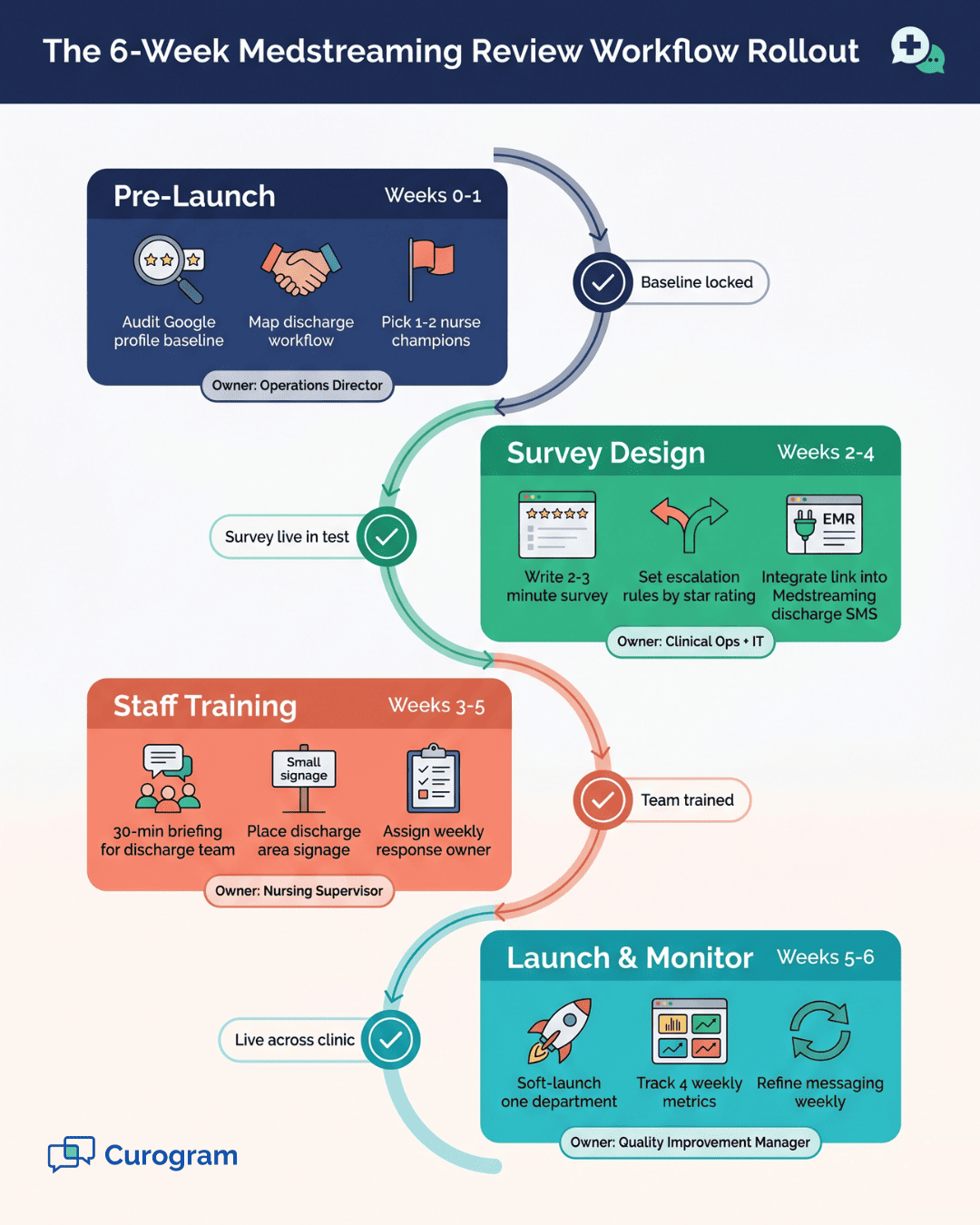
A clean rollout takes 4-6 weeks from start to go-live. The plan moves in four phases. Each phase has a clear set of tasks. Below is a quick view of the timeline.
|
Phase |
Weeks |
Focus |
|
Pre-Launch |
0-1 |
Audit and find champions |
|
Survey Design |
2-4 |
Build and integrate |
|
Staff Training |
3-5 |
Brief and align team |
|
Launch & Monitor |
5-6 |
Soft launch and track |
Pre-Launch: Assess Your Starting Point (Week 0-1)
Start with a clear baseline. Pull up your Google Business profile and write down your current star rating and review count. Note the date of your most recent review. This is your starting line.
Next, sit with your discharge team for an hour. Map the flow step by step. Find the 2-3 minute window when patients sit and wait, often during checkout or while waiting for a ride. That idle moment is where your survey link will live.
Then pick your champions. You need one or two nursing leads who believe in the project. They will pull the team along and drive adoption. Without them, the rollout stalls.
Survey Design and Launch (Week 2-4)
Keep the survey short. Two to three minutes is the right length. Lead with one simple question: "How was your overall experience?" rated one to five stars. Add a quick follow-up: "Would you refer a friend?"
Build escalation rules into the survey. A five-star rating gets a one-tap link to leave a Google review. A three or four-star rating flags the patient for a phone call. A one or two-star rating triggers a staff alert and holds publishing until your team can step in.
Then connect the survey to Medstreaming. Work with your IT team to add the survey link to the discharge summary or the post-op SMS. This is the heart of the automated review requests Medstreaming workflow that makes the rest of the system run on its own.
Staff Training and Change Management (Week 3-5)
Brief every team member who touches discharge. A 30-minute session is enough. Show them the link, explain why it matters, and give them a script: "Your feedback helps us improve and helps other patients find us."
Add small signs in the discharge area. A short line like "Your feedback shapes our care" makes the survey feel routine. Patients are more likely to take it when it feels normal, not pushy.
Last, set up a clear response plan. Assign one person each week to watch for low ratings. They call the patient within 24 hours, log the call, and decide on a public reply.
Launch and Monitor (Week 5-6)
Soft-launch in one department first. Try the interventional team before rolling out to the full clinic. Get feedback for a week, refine your messaging, then expand.
Track four metrics each week: % of patients who get the survey, % who finish it, % who rate five stars, and % who post to Google. A simple OBL review management staff log works in week one. A full vascular practice reputation dashboard takes shape by week six.
If the completion rate is low, add a 24-hour SMS reminder. If five-star ratings come in below 70%, audit your messaging or your procedure flow. The goal is steady tuning, not perfection on day one.
Response Management and Reputation Strategy
Collecting reviews is only half the work. How you respond shapes how your clinic looks to future patients. Strong response habits often matter more than raw star count.
How to Amplify Positive Reviews (4-5 Stars)
Don't just collect five-star ratings. Push them out. When a patient rates you five stars, Curogram offers a one-tap link to publish to Google. Most clinics stop there and miss the second wave.
Add a follow-up nudge 24 hours later. Send a short email or SMS: "Your kind words mean a lot. Share them on Google to help other patients find us." This second ask can lift publish rates from 25-30% to 40-50%.
Then close the loop. Send a thank-you SMS the next day after the review posts. This small touch builds loyalty. Some of these patients turn into long-term referral sources for friends and family.
How to Respond to Negative Reviews (1-2 Stars)
Never let a low rating sit. A quiet response to a public complaint tells future patients you don't care. Always reply within 48 hours, even if the complaint feels unfair.
Use a calm, clear template:
"Thank you for sharing this with us. We take patient experience seriously. We'd like the chance to learn more and make this right. Please call our office at [phone] so we can speak directly."
This kind of reply does two things. It shows you care, and it moves the talk off the public page. Future patients reading this see a clinic that owns its work and listens.
Clinics with strong ratings AND strong reply records tend to win the local search game. They outrank practices with higher star counts but no replies. Google's local ranking favors steady, recent activity.
For groups with several sites, a multi-location review management view helps you track all clinics at once. You can spot a low-performing site early. You can also share what's working at your strongest site.

How a Google Review Workflow OBL Teams Actually Use Works in Practice
A real flow looks like this. A patient finishes a vein procedure at 10 AM. At 11 AM, after discharge, they get an SMS with a short survey link. They tap five stars and hit publish to Google. By noon, the review is live.
Meanwhile, a second patient leaves a two-star rating about post-op pain. The system flags it. By 2 PM, your nursing lead has called, listened, and noted the case. By the next morning, the team has reviewed the post-op script.
That's the full loop. Good outcomes amplify; bad outcomes get caught and fixed. The system runs on its own, with about one staff hour per week to manage exceptions.
How Curogram's Staff Automation Dashboard Cuts Review Work to One Hour a Week
Curogram was built around one core idea: front desk and nursing teams should not chase reviews by phone. The platform takes that job and runs it in the background. Your staff only steps in when a patient needs a real human touch.
Inside Medstreaming, the workflow links each closed visit to a short SMS survey. The patient gets it at the right moment, not days later. Response rates climb when the timing matches the experience.
The staff automation dashboard then sorts each reply by score. Five-star replies show up in a green queue with one-click publish buttons. Low scores show up in a red queue with the patient name, phone number, and notes from prior visits. Your weekly champion works only the red queue.
Based on our internal data, a multi-location practice using this setup gained 1,064 new five-star reviews in just three months. Around 90% of patients who replied gave a five-star score. The practice did not hire new staff or buy a separate review tool.
The dashboard also tracks the metrics that matter. You can see review velocity by site, average star rating by month, and response time on low scores. For a multi-site group, you can roll up all clinics into one view or drill into a single location.
The platform meets the same HIPAA and SOC 2 Type II standards your IT team needs. Patient data stays inside the same secure flow as your other Medstreaming records. There are no extra logins for staff and no double data entry.
The result is a system that runs daily, scales with patient volume, and gives your team back their time.

Conclusion
Strong clinical work deserves to be seen. When your OBL or ASC delivers great care but lives behind weak online reviews, you lose patients who never knew your name. The fix is not more staff or more spend. It is a simple, well-built system.
A Medstreaming OBL review request workflow takes four to six weeks to launch. You audit your baseline, design a short survey, brief your team, and roll out one department at a time. Within three weeks, the first new reviews land. Within six months, most clinics reach 80 or more new reviews and lift their star rating to 4.7 or higher.
The numbers behind this are not theory. Based on our internal data, one multi-location practice gained 1,064 new five-star reviews in three months. About 90% of patients who replied chose five stars. No new hires, no overtime, no manual chase work.
What makes this work is the design of the flow itself. The survey runs at the right moment. The dashboard sorts each reply by score. Your team only steps in when a patient needs care.
Keep OncoEMR exactly as it is — and add the text-to-pay layer your patients already wish you had. Book a demo with us and see how fast it plugs in, with zero workflow disruption.
Frequently Asked Questions
A star rating shift usually shows within 4-6 weeks of steady survey volume. Local search ranking often follows 8-12 weeks later. Most clinics see a 30-50% rise in organic traffic by month four.
Use one shared template for both five-star thanks and low-score replies. Assign a single owner per site for weekly review. A multi-location review management dashboard lets your lead see all sites in one view.
Future patients judge how you handle conflict, not whether it happens. A calm, kind reply within 48 hours shows you care. Silence, by contrast, signals a clinic that does not own its mistakes.