9 min read

How Medstreaming OBL Billing Automation Cuts Paper & Staff Costs

How Medstreaming OBL Billing Automation Cuts Paper & Staff Costs
💡 Medstreaming OBL billing automation helps reduce paper statement costs and gives your staff their hours back. Setup takes 2-3 weeks with zero IT involvement. Quick wins for OBL and ASC admins:
  • Cut billing staff hours by 80%
  • Save $4,000-$5,000 a month on paper costs
  • Push collection rates from 20% up to 45-50%
  • Shrink A/R from 60 days down to 2-5 days
  • Get built-in HIPAA and PCI compliance from day one
You manage the whole rollout from one dashboard. Your team gets back to work that matters.

Your billing team just spent another full day chasing past-due bills. The mail room printed 600 paper statements last month. Most got tossed unopened. Sound familiar?

Most OBL and ASC admins know this math by heart. Paper billing eats $4,000 to $5,000 each month. One full-time staffer spends 80+ hours on collection calls and mailings. After all that work, you still collect just 20% of what you're owed.

There's a faster way. Medstreaming OBL billing automation helps you reduce paper statement costs and give your staff their time back. Patients get a secure text with a payment link within hours of discharge. They tap. They pay. You move on.

This guide walks you through every step. No IT team needed. No long planning cycle. Just a clear path from paper chase to digital cash flow.

You'll learn how to capture patient consent during pre-op. You'll see how to set up SMS triggers and watch results live. We'll also cover how OBL paper billing elimination fits inside your existing Medstreaming payment workflow.

By the end, you'll know what to do on day one, week two, and beyond. Your billing team will thank you. Your A/R aging report will too.

The best part? You can run the whole setup from your laptop. No vendor visits. No server installs. The hardest call you'll make is which staffer to reassign once paper billing goes away.

Pre-Op Consent and Patient Enrollment

Text-to-pay starts long before discharge. You need patient consent on file first. The simplest fix? Add one checkbox to your Medstreaming pre-op form.

The wording can be short and clear:

"I authorize [Facility Name] to send me text payment reminders and secure payment links. Standard SMS rates may apply."

Then two boxes: Opt-In or Opt-Out.

Medstreaming captures three things on its own:

  • The patient's choice

  • The exact time they checked the box

  • Their mobile number

This logged data is your audit trail for HIPAA.

Expect 65% to 70% of patients to opt in. Older patients sometimes prefer paper. That's fine. They keep getting paper statements. Nothing changes on their end.

Consent capture works in three steps:

  • Patient signs pre-op forms at intake (on paper or tablet)
  • Medstreaming stores the timestamp, attestation, and phone number
  • Curogram pulls this consent data through the API sync

This setup protects you in two ways. First, you can't legally text non-consenting patients. Second, if any patient disputes the SMS later, you have proof of consent on file.

A quick training tip: have pre-op staff mention the benefits in one sentence. Something like, "This lets you pay your bill from your phone in 30 seconds." Practices that train staff on this one line see opt-in rates climb 10% to 15%.

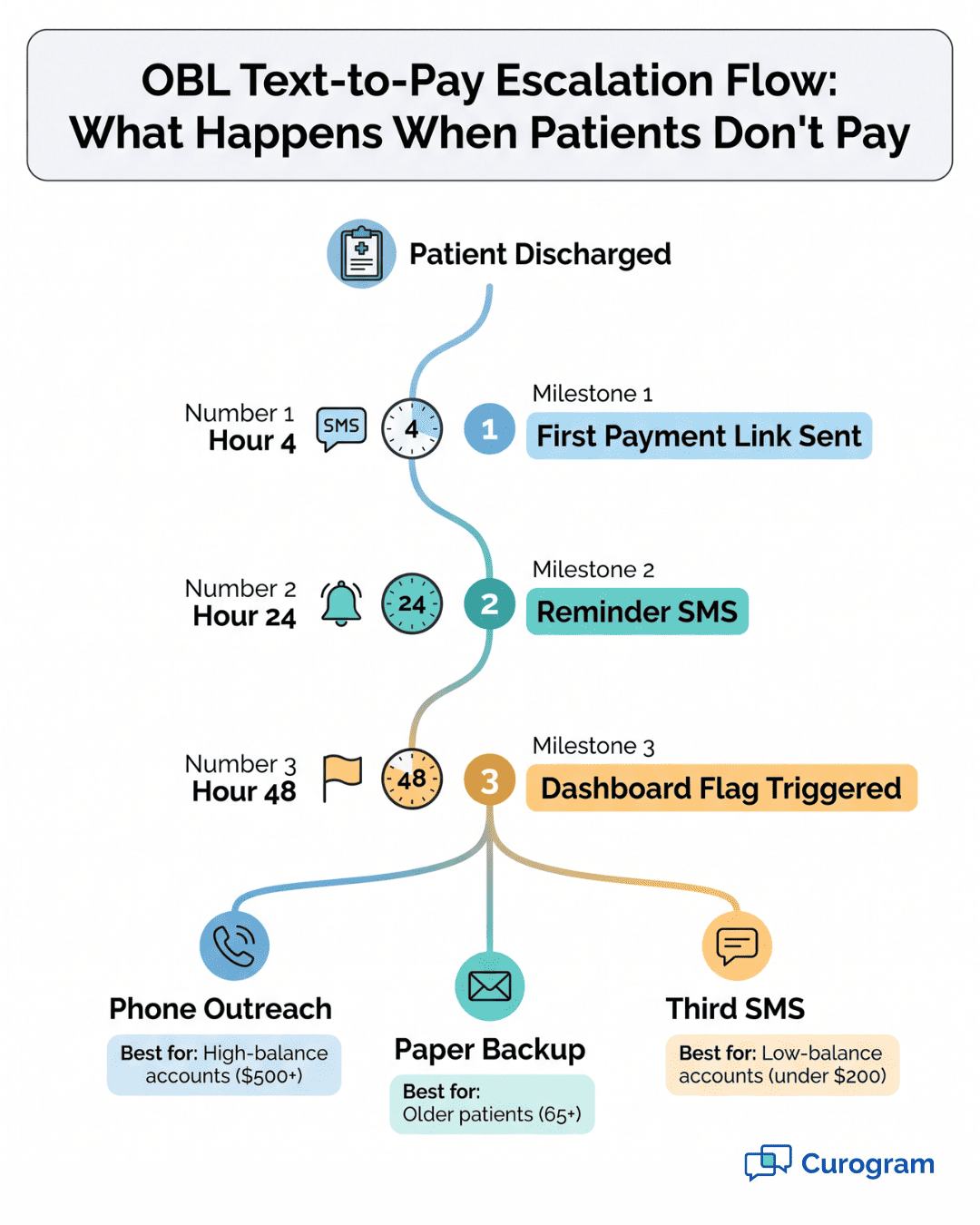
Text-to-pay escalation flowchart showing 4-hour, 24-hour, and 48-hour patient billing milestones

Dual-Language Support for Diverse Patient Populations

Many OBL and ASC sites serve Spanish-speaking patients. Some serve Vietnamese, Mandarin, or Tagalog speakers too. A consent form only in English leaves real money on the table.

Curogram lets your team add SMS templates in many languages. The pre-op checkbox can also appear in the patient's chosen language. Pick the language at intake. The system handles the rest.

Why this matters for collections:

  • Patients pay faster when they fully understand the message
  • Trust goes up when the practice speaks their language
  • Opt-in rates climb 15% to 20% in non-English groups

Here's how it works in real life. A patient lists Spanish as their main language. The pre-op staff hands them the Spanish consent form. After discharge, the payment SMS arrives in Spanish too. The payment link works the same as the English version.

Your billing team doesn't need to be bilingual. The templates do the work. You just need to set them up once.

This step ties directly to procedure billing staff efficiency. Staff field fewer confused phone calls. Patients pay on their own. Translation requests drop sharply.

For vascular practice billing automation staff, this helps with mixed-age households too. Cardiac and vascular cases often involve older patients whose adult kids handle the bills. Those kids may prefer a different language than the patient does.

One last tip: A/B test your consent wording. Some practices boost opt-in by 10% just by changing one line. Try, "Pay your bill securely from your phone in 30 seconds" instead of generic terms. Track which version wins in your Curogram dashboard.

Configuring Payment Triggers and Escalation

This is where the real lift kicks in. When your team marks a patient as discharged in Medstreaming, Curogram takes over. Within four hours, a payment SMS goes out. No staff hands needed.

The SMS includes everything the patient needs in one short message:

  • Patient name
  • Procedure type and date
  • Balance owed
  • Facility branding
  • One-tap secure payment link

Here's a real example for a vascular case. Patient Maria gets an angioplasty on Tuesday morning. She discharges by 11 AM. By 3 PM, her phone buzzes:

"Hi Maria, your secure payment link for your angioplasty on 11/14 at Riverside Vascular is ready. Balance: $487. Tap here to pay: [link]."

Maria taps. She pays in 30 seconds. Done.

This automation handles 100% of opted-in patients. Your staff makes zero clicks. The system runs by itself once it's set up.

Escalation Rules for Non-Responders

Not every patient pays right away. That's expected. The system has built-in rules for follow-up.

Here's the standard timeline:

Time Since Discharge

Action

Staff Effort

0-4 hours

First SMS sent

None

24 hours

Second SMS reminder

None

48 hours

Account flagged in dashboard

Light review

72+ hours

Manual outreach options

Phone call or paper


You can change these timelines to fit your practice. Some admins prefer 48-hour first reminders. Others want 12-hour ones. The rules are yours to set.

After 48 hours with no payment, the account moves to your dashboard. Now your staff can choose what to do next. Some accounts get a phone call. Some get a paper backup statement. Some get a third SMS with fresh wording.

The result is a clean split:

  • 80% of patients pay through SMS alone (zero staff time)
  • 20% need traditional follow-up (some staff time)

This split is the heart of procedure billing staff efficiency. You save the most hours by handling the easy cases on autopilot. Your team focuses on the trickier ones that actually need a human touch.

Based on our internal data, this hybrid setup keeps cost per collection low. You spend less on stamps and printed forms. You spend less on staff hours too.

For ASC revenue cycle SMS workflows, this matters even more. Surgery centers often discharge 20 to 40 patients per day. Hand-billing each one is brutal work. Automating the first two touches changes the whole rhythm.

One more useful detail. The escalation rules can pause on weekends or holidays. You set the rules. Curogram follows them. A patient who has surgery on Friday won't get pinged on Sunday morning if you don't want that.

The system also avoids over-messaging. Once a patient pays, all future reminders stop right away. No awkward "You owe $487" texts after the bill is already paid.

Monitoring Collections and Compliance

Once your text-to-pay system is live, you need a way to see what's working. The Curogram dashboard shows it all in one place. Open it from any browser. No installs.

The daily view shows:

  • Number of SMS sent that day
  • Number of payment links clicked
  • Successful payments completed
  • Failed or exception messages

The weekly view shows bigger trends:

  • Collection rate as a percentage
  • A/R aging by day count
  • Cost per dollar collected
  • Comparison to your old paper baseline

What to check each morning:

  • Did yesterday's SMS batch send cleanly?
  • Are there any flagged accounts to follow up on?
  • What's the 7-day rolling collection rate?

This dashboard replaces the old binder-and-spreadsheet method. No more pulling reports from three systems. No more manual A/R aging audits each Friday afternoon.

Weekly Metrics to Watch Closely

Set aside 30 minutes each Monday to review your key numbers. Most admins find this is enough to spot issues early.

Watch these five metrics:

  • Opt-in rate (target: 65% or higher)
  • First-SMS payment rate (target: 35% or higher)
  • A/R over 30 days (should drop month over month)
  • Cost per collection (should fall under $0.10 per dollar)
  • Patient complaints or opt-outs (should stay under 2%)

If any metric slips, you can act fast. A drop in opt-in rate often means pre-op staff need a refresher. A drop in first-SMS payment rate may mean your message wording needs a tune-up.

Compliance and Security Verification

Security is often the biggest worry for OBL and ASC admins. The good news? Curogram does the heavy lifting.

Three layers of security protect your patient data:

  • PCI DSS Level 1 for payment data
  • HIPAA-compliant SMS for patient info
  • Full audit trails for every message and payment

PCI Level 1 means payment data never touches your Medstreaming server. The card info flows through tokenized channels. Even Curogram doesn't store full card numbers. Only a vault token.

HIPAA compliance covers the text content too. Each SMS includes only what the patient needs to act. Name, procedure date, balance, and link. No diagnosis codes. No clinical notes. No PHI exposure.

The audit trail logs everything:

  • When consent was captured
  • When each SMS was sent
  • When each link was clicked
  • When each payment cleared

If you ever face a HIPAA audit, you have full records. Pull them in seconds from your dashboard.

Compare this to paper statements. Paper moves through mail rooms, postal trucks, and shared mailboxes. Anyone in that chain could see a patient name and balance. That's PHI in transit. It's a real audit risk.

OBL paper billing elimination cuts this risk to zero. No paper. No mailroom exposure. No undocumented patient phone calls about bills.

A few extra compliance wins worth knowing:

  • Two-factor login on the admin dashboard
  • Role-based access (billing team sees billing data only)
  • Encryption at rest and in transit
  • Auto session timeout for shared workstations


These features matter for ASC revenue cycle SMS programs especially. Surgery centers face tighter audit cycles than standalone clinics. Built-in compliance saves your team from doing manual paperwork at year-end.

One more compliance angle: state-level texting laws. Some states have specific rules about commercial SMS. Curogram applies the strictest state rules to all messages. You don't need to track which state each patient lives in. The system does it for you.


Text-to-pay escalation flowchart showing 4-hour, 24-hour, and 48-hour patient billing milestones

How Curogram Cuts Setup Time to Just Three Weeks

Most billing software changes take six months or more. Curogram takes two to three weeks. Here's why that gap matters for OBL admins under real budget pressure.

Curogram was built as an add-on, not a rip-and-replace tool. It plugs into Medstreaming through a clean API. Your existing pre-op forms stay where they are. Your existing billing codes stay the same. Only one new checkbox gets added to the consent form.

The rollout breaks into three weeks:

  • Week 1: Add the consent checkbox; train billing staff on the dashboard
  • Week 2: Configure SMS triggers; pilot test with 10 to 20 patients
  • Week 3: Go live with full patient volume

Curogram's team handles the API integration on its end. They also handle PCI compliance certification, HIPAA audit setup, and security testing. You don't need an in-house IT lead for any of this.

Based on our internal research, OBL admins who follow this three-week plan see results fast. By day 30, collection rates already start climbing. By day 60, paper costs drop sharply. By day 90, most facilities hit the full 45% to 50% collection rate.

What you're really getting is a partner who built Medstreaming OBL billing automation with your workflow in mind. Curogram doesn't ask you to change how you check patients in or out. It just adds a faster, cleaner way to get paid after discharge.

The best part for vascular practice billing automation staff? Your team gets training in 30 minutes or less. The dashboard works like any modern web app. If your staff can use email, they can use Curogram. That keeps adoption smooth and morale high during the switch.

Conclusion

Paper billing is a quiet drain on your practice. It eats staff hours. It eats cash. It puts PHI at risk every time a statement leaves the mailroom.

Medstreaming OBL billing automation flips the script. Patients pay faster. Staff get their time back. A/R clears in days, not months. Compliance gets stronger, not weaker.

The numbers speak for themselves. Collection rates climb from 20% to 45-50%. Paper costs drop by 90% or more. One full-time staffer gets freed up for higher-value work. Cash flow speeds up by tens of thousands of dollars a month.

And the setup is simple. Three weeks. No IT team. No big project plan. Just one new checkbox in your pre-op form and a clean Medstreaming payment workflow that handles the rest.

If you run an OBL or ASC, the question isn't whether to switch. It's when. Every month you wait costs another $4,000-$5,000 in paper alone. That's before you count the staff hours you'd save.

Tired of your team chasing past-due bills by phone? Request a demo today and see how to cut collection calls by 80% without losing a single dollar of revenue.


Frequently Asked Questions

How does Medstreaming text-to-pay handle patients without a smartphone?

Non-smartphone patients still get a paper statement on the old schedule. The system flags them during pre-op opt-out. Your staff treats them exactly as before. About 5-10% of patients fall in this group, mostly older demographics.

Why does the collection rate jump so much when you switch from paper to SMS?

SMS messages get opened within 3 minutes on average. Paper statements often sit unopened for weeks. The faster you reach a patient, the more likely they are to pay before their attention shifts. Speed plus a one-tap link removes friction completely.

How do we explain text-to-pay to skeptical billing staff who fear job loss?

Frame it as a workload shift, not a job cut. The boring tasks like stuffing envelopes and chasing past-due calls go away. Higher-value work like insurance verification, patient education, and dispute resolution opens up. Most teams report better morale within 60 days.

What happens to A/R aging when high-deductible patients use text-to-pay?

High-deductible patients respond especially well to SMS payment links. Most pay within 48 hours of discharge instead of 30-60 days. Your A/R aging drops sharply because these patients are the biggest cause of long-aged balances. Cash flow becomes far more predictable.

Why is two-way SMS better than one-way payment reminders for ASCs?

Two-way SMS lets patients ask questions and get answers fast. They might ask, "Can I split this into two payments?" or "Did my insurance pay yet?" Quick replies from staff build trust and speed up payment. One-way reminders leave patients stuck if they have any doubt.