
9 min read
How GE Centricity Enterprises Standardize Virtual Visit Workflows
Jo Galvez
:
May 25, 2026
A single dashboard fixes this. Providers schedule virtual visits inside Centricity. Staff launch every visit from one screen. Notes flow back to the chart on their own.
The result is one workflow for every department and every location. New hires learn one process. Compliance training runs once. Leaders see visit data in real time.
This guide shows how to move from a patchwork of apps to one unified system. It covers the staff dashboard, scheduling, documentation, and a safe rollout plan.
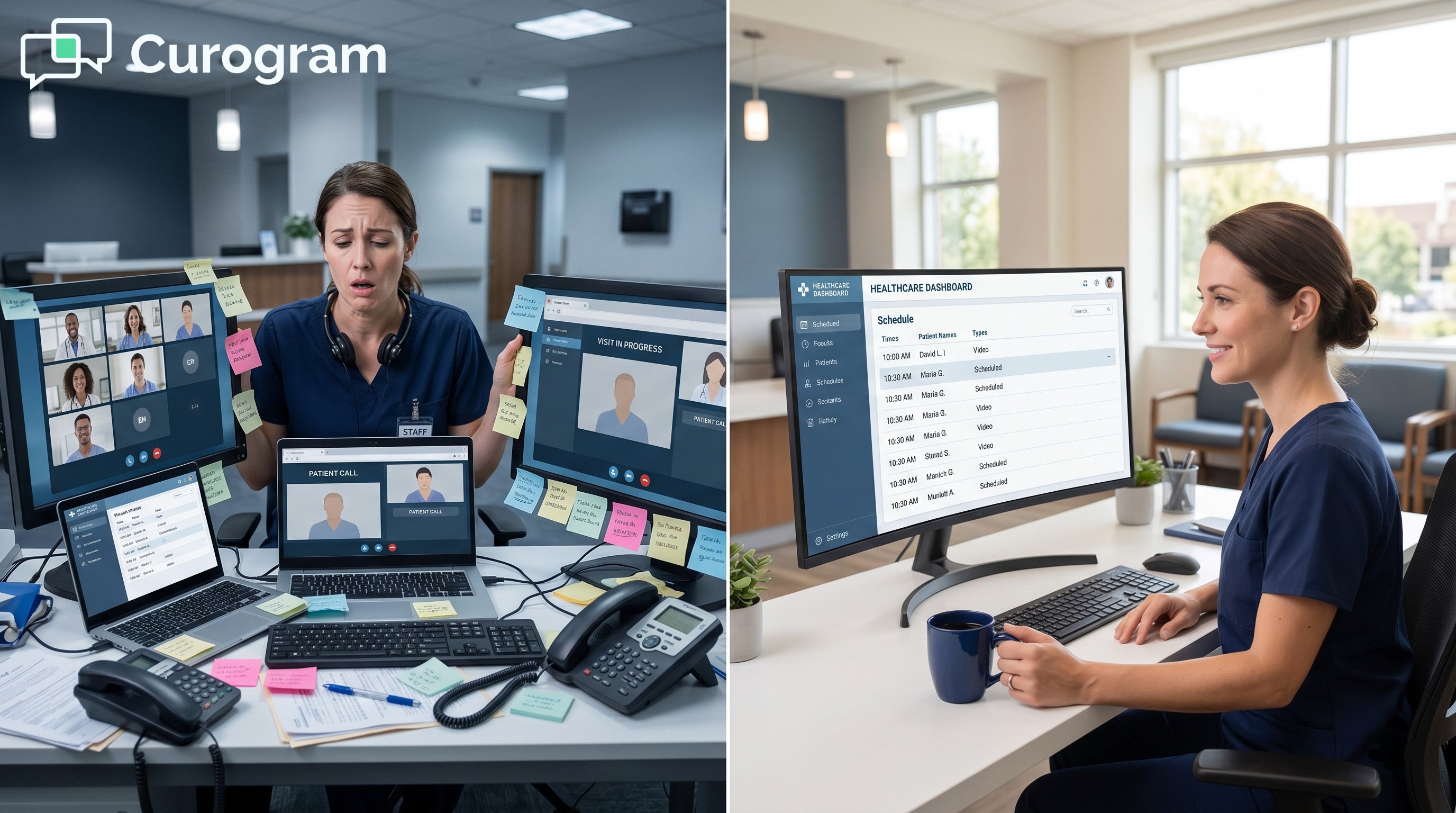
Picture a Monday morning at a 20-site practice. The front desk at Site A logs into Doxy.me. Site B opens Zoom. Site C clicks into a third tool the psychiatry team picked back in 2020.
A floater nurse covers cardiology this week and dermatology next week. She needs two logins, two training videos, and two sets of help articles. The same patient who sees three specialists gets three different join links.
This is not a rare story. Many large groups still run the COVID-era patchwork. Each app made sense in 2020. Today, it costs staff time and adds risk.
The fix is not another tool to add to the stack. The fix is to bring every visit under one roof. That roof is a Centricity-integrated dashboard your staff can run from day one.
This article walks through the staff telemedicine workflow GE Centricity single-dashboard virtual visits approach. You will see how one screen replaces five. You will see how providers keep their current habits. You will see how staff training drops from hours to minutes.
We will name the real villain first: department silos. Then we will walk through the guide that ends them. After that, the success story, the rollout plan, and a short FAQ.
If your IT team is tired of managing five separate vendors, this is for you. If your COO wants real data on virtual visits, this is for you. And if your front desk just wants one login, this is very much for you.
You will not have to replace Centricity. You will not have to retrain providers from scratch. The plan is to wrap your existing systems with one shared layer that brings order back.
The Villain: The Department Silo
The villain here is not Doxy.me, or Zoom. The villain is the silo that grew up around each app. Each department built its own way of working. None of those ways talks to Centricity or to each other.
When you add it all up, the silo touches four parts of the day. Each one quietly drains time.
Platform Fragmentation Across Departments
Primary care knows Doxy.me by heart. Cardiology trained for months on Zoom. Psychiatry picked a third tool for privacy. Each team is right that their app fits their work.
The problem starts when staff move. A transfer means a fresh round of training. A new hire hears, "We use one app here, but the other site uses something else." It is confusing and expensive.
The hidden cost of "department choice"
Each app has its own vendor contract, its own login policy, and its own help desk. IT has to manage five security reviews instead of one. That work never shows up on a clinic schedule, but it eats hours every week.
Scheduling Chaos and Patient Confusion
Providers at different sites schedule visits in different places. Some book inside Doxy.me. Some books in Zoom. A few use Centricity because the platform they chose lets them.
Patients pay the price. They get different join links from different apps. Some get an app download prompt. Some get a web link. They call the front desk to ask which one is "real."
Better virtual visit scheduling Centricity means one process, no matter the location. Without that, the front desk fields the same call again and again.
The Documentation and Training Burden
After every virtual visit, someone has to update the chart. On Doxy.me, staff copy notes by hand. On Zoom, they export and paste. Only the site with a true integration gets notes that flow on their own.
Training that never ends
Compliance training has to run for each tool. Privacy rules differ. Tech support tickets pile up. Strong staff workflow management for telemedicine teams know this drag well.
Every time leadership tries to switch tools, the whole org has to retrain. That fear keeps the silos in place. The patchwork becomes the new normal, even when no one likes it.
These four issues feed each other. Fragmentation breeds scheduling chaos. Scheduling chaos breeds bad documentation. Bad documentation forces more training. The cycle keeps going until something breaks it.
The cost is not just time. It is staff trust. When the front desk has to guess which app to open, mistakes happen. When mistakes happen, patients lose faith in the visit before it even starts.
Leadership often does not see this drag day to day. It hides inside support tickets, dropped visits, and small complaints. Add it up across 20 sites, though, and the cost is real.

The Guide: One Unified Telemedicine Dashboard
The way out is not to pick a winner among the five apps. The way out is to put one layer over all of them. That layer plugs into Centricity and gives every staff member one screen.
Curogram is built for this job. It is the unified dashboard that ends the silo without ending the work each team already knows.
One Dashboard, Every Visit Type
Providers keep their habits. They schedule virtual visits inside Centricity, the same way they schedule in-person visits. Nothing about their booking flow changes.
Staff logs into the Curogram dashboard once. From there, they see every virtual visit for the day. They click to launch each one. Whether it is a 10-minute follow-up or a complex case, the steps are the same.
Notes that flow back to Centricity
Visit notes do not live on a side platform. They go right into the Centricity chart. Staff never copy and paste again. Charts stay clean and current.
Standard Workflows Across All Locations
Every site uses the same three steps. Check Centricity for the day. Launch from the Curogram dashboard. Trust that the note will land in the chart.
This is what real multi-location virtual visit standardization looks like. There is no "Site A way" and "Site B way." There is just one way that works for all 20 sites.
For providers, provider telemedicine scheduling integration means they never log into a side app to start a visit. They click the link in their Centricity calendar, and the visit opens.
No-App Video Visits for Patients
Patients get a simple text message with a link. They tap it, and the visit opens in their browser. No app to find, download, or update.
Why "no app" matters for older patients
A 75-year-old patient should not have to learn a new app to see her doctor. With a no-app flow, she just taps the link that her grandson can also help her open. Staff training for no-app video visits is short because the patient side is so simple.
For staff, this means fewer support calls. For patients, it means fewer no-shows. For the practice, it means more visits that actually happen.
Old Patchwork vs. Unified Dashboard
|
Daily Task |
Old Patchwork |
Unified Dashboard |
|---|---|---|
|
Schedule a visit |
3 to 5 places |
Centricity only |
|
Launch a visit |
Login per app |
One dashboard |
|
Patient join step |
App download |
Tap a text link |
|
Notes to chart |
Copy and paste |
Auto into Centricity |
|
Staff training |
Hours per app |
15 to 30 minutes |
The Success: The Standardized Workflow in Action
A unified dashboard is not just cleaner. It is faster, cheaper, and easier to track. Practices that consolidate see a change in their numbers within weeks.
Here is what changes once every site runs on one workflow.
Training Time Drops by Half
Old training meant a session for Doxy.me, another for Zoom, and a third for the psychiatry tool. New hires sat through hours of content before their first shift.
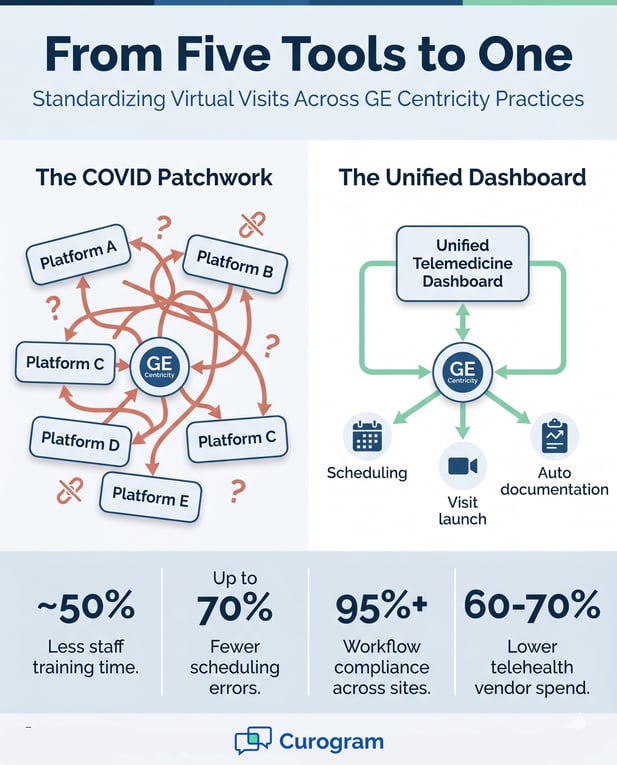
Based on our internal data, practices that move to a single dashboard cut staff training time by about 50%. Most front desk staff learn the new flow in 15 to 30 minutes.
This matches our broader Curogram client data. Front desk teams pick up our software in under five minutes of hands-on practice.
Onboarding becomes a one-page guide
Instead of three vendor manuals, your onboarding team needs one short doc. It covers the dashboard, the Centricity step, and where to ask for help. That is it.
Scheduling Errors Fall Sharply
With one workflow, the most common errors fade. Staff stop launching the wrong app. Patients stop getting links to the wrong visit. Based on our internal data, scheduling errors drop by up to 70% after consolidation.
The shift is simple. Before, staff asked, "Which platform does this provider use?" Now the answer is always the same. The question stops getting asked.
What Practices Report After Consolidation
|
Metric |
Reported Change |
|---|---|
|
Staff training time |
Down about 50% |
|
Virtual visit scheduling errors |
Down up to 70% |
|
Workflow compliance across sites |
95%+ |
|
Telehealth vendor spend |
Down 60 to 70% |
Source: Curogram client data from clinical settings.
Leaders Finally Get Real Visit Data
When data lives in five tools, no one can answer simple questions. How many virtual visits did we run last week? What is our show rate? Which site has the longest visits?
A single dashboard tracks all of it in one place. Leaders see counts, show rates, and visit length by site or department. Reports stop being a guess.
From scattered data to one source of truth
IT teams stop pulling reports from five admin panels. Operations leaders compare sites with real numbers. The data finally matches what your Centricity team already trusts.
The big shift is cultural too. Staff stop thinking about the tool. They start thinking about the patient again. That is the goal of every telemedicine project, and it finally gets met.
Patient-side wins follow quickly. Show rates climb as text-based join links replace app downloads. Older patients and rural patients are the biggest winners here. Our Curogram client data shows that no-app flows reduce patient drop-off by two to three times compared to app-based tools.
Finance teams notice too. Once the legacy vendor contracts wind down, the savings show up on the next budget cycle. Many groups redirect that money toward staff retention or new clinical programs.
Change Management and Staff Adoption
A tool is only as good as the rollout that brings it in. The good news is that this kind of switch is one of the easier ones in healthcare IT. Providers barely feel it. Staff get a shorter routine, not a harder one.
Here is how most practices move from patchwork to unified, step by step.
Start With a Single-Department Pilot
Pick one department first. Primary care is a common choice because the visits are simple and high volume. Run the pilot for two to four weeks.
During the pilot, staff use the new dashboard for every virtual visit. The old tool stays available as a backup. Any rough edges show up early, while the team is small enough to fix them fast.
Pick a champion at each site
A site champion is the person staff members ask first when something is unclear. This person learns the dashboard a week before the rest of the team. They become the front line of support during go-live.
Train Staff in Under 30 Minutes
Training is short because the flow is short. Step one: providers schedule in Centricity, the same way they always have. Step two: staff launch from the Curogram dashboard.
Step three: documentation flows back to the chart on its own. Most staff are ready after a 15 to 30-minute walkthrough. New hires later get the same short session.
Run a Safe, Side-by-Side Transition
The legacy apps do not get cut off on day one. Curogram runs next to your current tools for 30 to 60 days. Some visits run on the new dashboard. Some keep using the legacy app while staff build trust.
Patients see no change in care during this period. They get the new no-app link from sites that are live. They get the old link from sites that have not switched yet. There is no big-bang risk to manage.
Decommission only when staff are ready
Legacy tools turn off only after every site is comfortable. Most groups hit that point inside 60 days. After that, the old vendor contracts can be wound down and the savings begin to show up.
Want to see what a rollout looks like for your group? Schedule a telemedicine standardization consultation. We will walk you through the unified workflow and share training timelines based on practices of your size.
During the pilot phase, our team works alongside your IT and clinical leads. We help build the simple training doc and set up the dashboard for your sites. Most of the heavy lifting happens before staff ever log in.
Curogram also provides ongoing support after go-live. Video walkthroughs and quick-reference guides live inside the dashboard. New hires can self-serve, and site champions can hand off basic questions to those tools.
Conclusion: Virtual Care Standardization Is Within Reach
The COVID patchwork worked when nothing else could. Five years later, it is the thing slowing your staff down. The fix is not a sixth tool. The fix is to bring every virtual visit under one workflow.
A unified, Centricity-integrated dashboard does this. Providers keep their habits. Staff get one screen. Patients tap a text link instead of hunting for an app.
The wins are real and easy to measure. Training time drops. Scheduling errors fall. Compliance stays high across every site. Vendor costs come down, often by more than half.
Centricity is your clinical hub. Curogram is the virtual care layer that sits on top of it. The two work together, and your staff finally stops juggling logins.
Ask yourself one question. How many hours did your team spend last month learning, fixing, or troubleshooting telehealth platforms? Now picture that number cut by half, or more.
That is the shift this guide describes. It is not a moonshot. It is a rollout that most practices finish in under 60 days.
If your CIO is tired of five vendor relationships, this is the path forward. If your COO wants real data on virtual visit volume, this is how to get it. If your front desk wants one login and one process, this is the way.
The next step is simple. Schedule a demo with our team and we will walk you through how the rollout would look for your group.
Frequently Asked Questions
Providers continue to book inside Centricity, just as they do for in-person visits. The booking screen does not change. What changes is on the back end: the Curogram dashboard picks up the visit and gets it ready for staff to launch. From the provider's seat, it feels almost identical to today.
Today, training has to cover three to five different tools, plus the rules and shortcuts for each. With one dashboard, training covers one flow. Most staff learn it in 15 to 30 minutes. New hires no longer need a different curriculum based on their site or department.
The new dashboard runs alongside your current tools for 30 to 60 days. Some visits use the new flow, and some keep using the legacy app. Patients see no change in their experience during this time. Legacy tools turn off only after every site is comfortable.
App downloads are a common reason patients miss virtual visits. With a no-app flow, the patient gets a text, taps the link, and the visit opens in the browser. There is no account to set up and no app store to navigate. Older patients and patients with slower connections both benefit.
Every visit, no matter the site or department, lives in one dashboard. Leaders see counts, show rates, and visit length in real time. Reports compare sites side by side using the same definitions. The "data lives in five tools" problem ends on day one of go-live.