8 min read

How GE Centricity Clinics Streamline Intake With Online Forms

How GE Centricity Clinics Streamline Intake With Online Forms
💡 GE Centricity specialty clinics struggle with paper-based patient intake across multiple locations. A digital intake workflow GE Centricity integration solves these problems through automation.
  • Pre-registration forms sent before appointments
  • E-signature intake completed from home
  • Automatic form routing by appointment type
  • Direct GE Centricity integration for accurate data
This approach helps radiology departments, specialty clinics, and multi-location practices reduce wait times and free staff for patient care instead of paperwork.

Picture this: Your radiology department schedules 50 MRI scans today. Half the patients arrive without completing their safety screening forms. Your front desk staff scrambles to print forms, answer questions, and manually enter data into GE Centricity while a line grows longer. Sound familiar?

This scenario plays out daily in specialty clinics nationwide. The problem goes beyond simple inconvenience. It delays care, frustrates patients, and burns out your team. Every minute spent chasing paperwork is a minute stolen from actual patient care.

Multi-location practices face an even bigger headache. Each site develops its own workarounds. One clinic emails PDFs, another hands out clipboards, and a third tries text reminders. Patients get confused about which forms to complete. Staff waste precious time tracking down missing paperwork. The cost adds up fast.

The good news? A digital intake workflow GE Centricity solution changes everything. Instead of chasing paperwork, your staff focuses on what matters most: taking care of patients. Pre-registration forms go out automatically when appointments are scheduled. Patients complete everything before they arrive.

The right system does more than replace paper with screens. It connects directly to your GE Centricity platform, matching patients accurately and routing forms based on appointment type. An e-signature intake feature ensures legal compliance while keeping the process simple for patients.

This guide shows you exactly how online patient forms transform clinic operations. You will learn which workflow problems these tools solve, how they integrate with GE Centricity, and what results to expect. Real examples from radiology departments and specialty clinics demonstrate the impact on daily operations.

Workflow Challenges in Multi-Location GE Centricity Clinics

Imaging centers run on tight schedules. Each MRI slot, CT scan window, and ultrasound block must stay filled. When one patient misses their visit, the entire day's plan shifts.

Paper-Driven Intake Causing Delays

Traditional clipboard intake slows everything down from the moment patients walk in. They stand at the front desk filling out forms while other patients wait behind them. Staff cannot start preparing for appointments until forms are complete and checked. The delay ripples through your entire schedule.

A 15-minute intake delay at 9 a.m. pushes every appointment behind schedule. Radiology techs wait while patients finish forms, and exam rooms sit unused. Studies show practices lose 20–30% of front desk time to manual paperwork. That time could be redirected to patient care and service.

Inconsistent Form Processes Across Sites

Each clinic location often develops its own way of handling forms. Your downtown office emails PDFs to patients. Your suburban location prints forms at check-in. Your hospital-based clinic uses a portal that only works half the time. The result? Confusion and frustration.

Patients visiting multiple locations are repeatedly asked for the same information. This feels inefficient and makes the organization appear disorganized. Staff training becomes harder when processes vary by site. Managers spend extra time trying to standardize workflows that keep drifting apart.

High Administrative Workload for Staff

Front desk teams carry the heaviest burden of manual intake processes. During busy hours, they juggle patient check-in, form questions, insurance verification, and data entry into GE Centricity all at the same time. The workload becomes impossible to manage well.

Constant interruptions keep staff from completing other tasks. Calls go to voicemail while forms are explained, and appointment confirmations get delayed. Rushed, overwhelmed staff provide lower-quality patient interactions. This workload drives burnout and turnover, increasing recruitment and training costs.

Patient Confusion With Preparation Forms

Patients need clear instructions before procedures, especially for imaging studies or specialty appointments. Paper forms often fail to communicate these requirements effectively. Patients misplace forms, forget to read them, or misunderstand the instructions. Then they arrive unprepared.

Patients arrive having eaten before a fasting blood draw, wearing metal jewelry to an MRI, or forgetting to stop certain medications. Each mistake delays or cancels the appointment. Staff spend time rescheduling and re-explaining instructions, while patients feel frustrated, and your schedule has unexpected gaps.

How Manual Intake Processes Slow Down Clinic Operations

This multi-channel approach catches patients wherever they are. Some prefer texts, others check their email first. The system adapts to each patient's communication style based on their response history.

Long Check-In Lines

The waiting room tells the story of inefficient intake. Patients arrive on time but spend 20 minutes standing in line at the front desk. Each person fills out multiple forms, asks questions, and provides insurance cards. This creates a terrible first impression. Staff feel the pressure and rush through forms, leading to missed information and errors.

Lost or Incomplete Paperwork

Paper forms disappear at critical moments. A patient’s insurance page might be missing, or someone takes forms home and forgets to return them. Incomplete forms create bigger problems—patients skip questions or leave allergy fields blank, preventing clinical teams from working safely.

Time-Consuming Data Transcription

Every piece of information patients write on paper must be typed into GE Centricity. Front desk staff read handwriting that ranges from neat to illegible, introducing errors along the way. A typo in a medication name could cause serious problems. This repetitive work exhausts your team when they could be doing more valuable tasks.

Delays for Radiology and Specialty Procedures

Imaging departments face unique timing pressures. MRI safety screening must be perfect before a patient enters the scanner. Missing or incomplete forms mean delayed or rescheduled procedures. An MRI machine that sits idle for 30 minutes while staff chase down safety forms costs hundreds of dollars in lost revenue

How Digital Intake Forms Standardize Workflows Across All Locations

Implementing online patient forms transforms scattered processes into a unified system. Every location follows the same workflow, creating consistency and efficiency.

Automated Pre-Visit Form Delivery

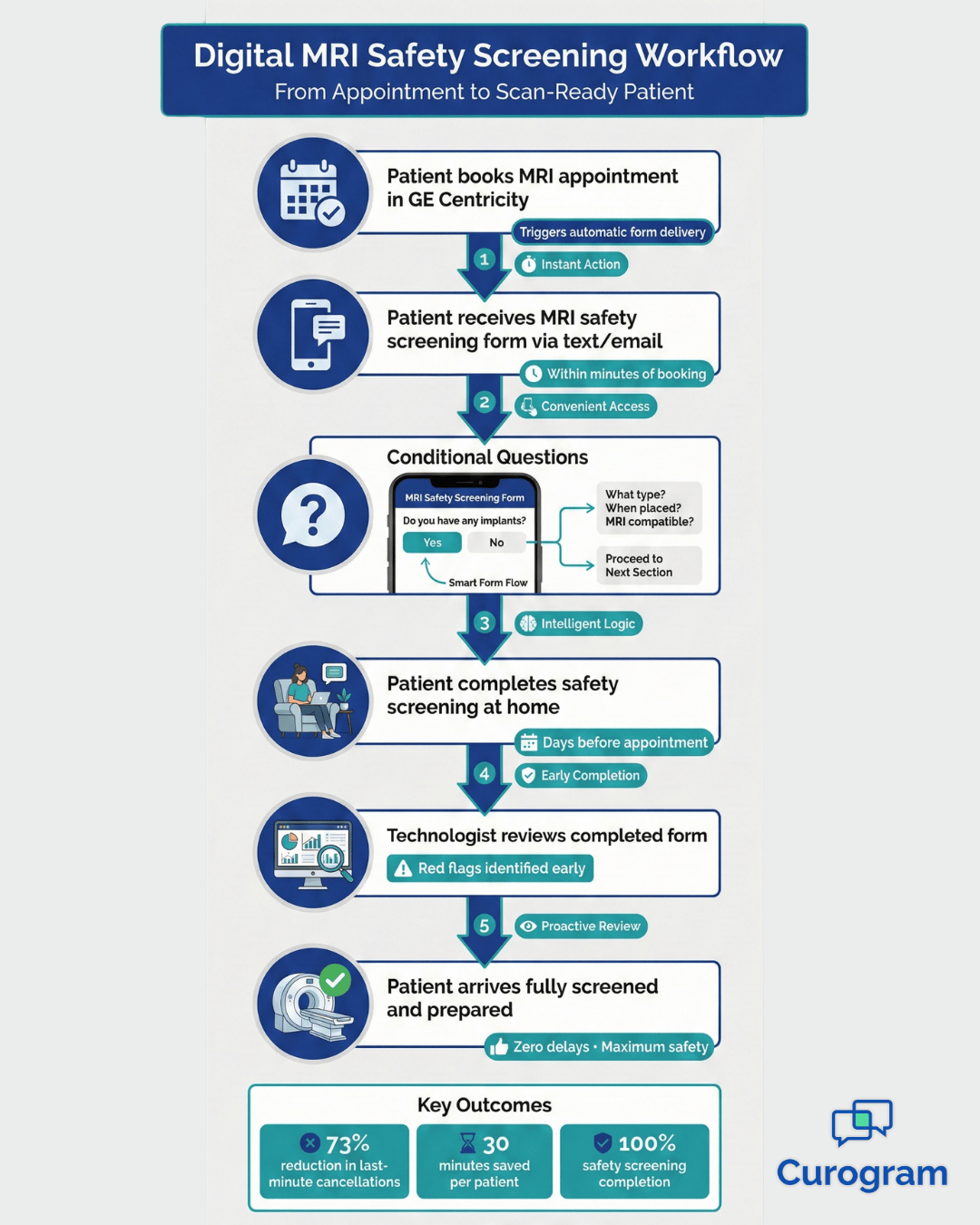
Digital systems send forms automatically when appointments are scheduled. When a patient is booked for an MRI, the system emails or texts the forms immediately. Patients can complete them from their phone, even at night, with time to gather insurance information. Automated reminders ensure forms are finished before the appointment.

Consistent Templates Across Departments

A digital intake workflow GE Centricity platform uses the same form templates at every location. Patients see the same questions whether they visit your downtown clinic or suburban office. This consistency improves data quality significantly. Staff training becomes easier when forms are standardized across all sites.

Centralized Review for Staff

Online systems put all completed forms in one place for staff to review. Your team opens a dashboard that shows which patients completed forms and which still need reminders. Red flags like medication allergies jump out immediately. Clinical staff can review forms before appointments start, making visits more efficient.

Improved Operational Flow

Standardized digital workflows create predictable daily operations. Your morning starts smoothly because most patients completed forms the night before. Front desk staff check people in quickly, and providers stay on schedule. You can see more patients per day without adding staff hours. The data flowing into your GE Centricity system becomes cleaner and more complete.

Digital intake workflow GE Centricity - mid

GE Centricity + Curogram Workflow Synchronization

Integration between your patient communication platform and GE Centricity creates seamless workflows that feel almost automatic. This synchronization eliminates manual steps that slow down your team.

Automatic Form Routing Based on Appointment Type

The system knows which forms each appointment type requires. When a patient schedules an MRI, they automatically receive MRI safety screening forms and prep instructions. The right forms reach the right patients every time. Complex appointments that need multiple form types get handled automatically too.

Accurate Patient Matching Using Centricity Data

The integration pulls patient information directly from your GE Centricity database. Forms pre-fill with accurate demographic data and insurance details. When patients submit completed forms, the data flows directly into the correct Centricity patient chart. No manual matching is required.

Multi-Location Routing Support

Practices with multiple locations need forms to route to the correct site. The integration recognizes which location the appointment is scheduled at and ensures forms follow the right workflow. This location awareness prevents common mix-ups. Staff at each location see only the patients and forms relevant to their site.

Workflow Improvements for Radiology and Specialty Departments

Imaging and specialty departments benefit greatly from automated intake. These teams face strict safety requirements, complex preparation steps, and costly equipment downtime. Digital forms help prevent delays while improving patient safety and efficiency.

MRI safety screening must be completed accurately before a patient enters the scanner room. Required fields ensure nothing is missed, and conditional questions appear when patients report implants. This screening happens before arrival, reducing risk and last-minute issues.

CT and other imaging prep forms clearly outline fasting, medication timing, and exam expectations. E-signatures confirm patients reviewed and understood instructions. This creates a timestamped record that protects your practice if a patient arrives unprepared.

Many specialty procedures require additional preparation, such as stopping medications or arranging transportation. Digital forms communicate these requirements clearly and capture patient acknowledgment. This reduces misunderstandings and keeps everyone aligned.

Each specialty has unique information needs that digital forms can address:

  • Cardiology collects detailed family cardiac history and risk factors
  • Orthopedics gathers injury mechanism and pain level tracking data
  • Gastroenterology captures dietary history and symptom patterns
  • Neurology documents seizure frequency and medication responses

These specialty forms feed directly into clinical workflows. Patient-entered data appears in GE Centricity templates where providers expect to find it. Staff no longer need to search through paper forms or repeat questions during the visit. This saves time and reduces frustration for both patients and clinicians.

When intake forms are completed before arrival, clinical staff can triage more efficiently. Nurses review symptoms, medications, and allergies in advance and identify urgent cases early. Complete information means fewer interruptions during the visit. Appointments flow more smoothly, improving patient satisfaction and team productivity.

Front Desk Efficiency and Reduced Administrative Burden

The front desk transformation is one of the most visible benefits of digital intake. Staff who once spent 60-70% of their time on paperwork can redirect that energy to patient service and other valuable tasks.

Curogram integrates directly with GE Centricity to automate form workflows. When an appointment is booked, Curogram sends the correct pre-registration forms via text or email. Patients complete them on any device, and responses flow back into Centricity instantly.

Patient matching happens automatically using Centricity data. Form routing follows the rules you configure once. Staff review completed forms in a clean dashboard that shows completion status, flags missing information, and highlights important responses.

Front desk staff no longer retype information from paper forms into GE Centricity. Patients enter their own data, which flows automatically into the system. Practices processing 50–100 new patient forms weekly can save 8–16 staff hours. Patient-entered data is often more accurate, since patients know their own medications and insurance details.

With less administrative burden, staff can focus on tasks that require a human touch, like phone calls, scheduling, and assisting patients. This improves morale, reduces turnover, and enhances patient service.

Curogram handles all form types, from simple demographic updates to complex medical histories and specialty intake. E-signatures ensure compliance for legally required documents. Multi-location practices benefit from centralized management, creating forms once and deploying them across all sites. 

Conclusion

Moving from paper to digital intake transforms every aspect of clinic operations. Your staff work more efficiently, patients arrive better prepared, and appointments run on time.

Modern platforms integrate directly with GE Centricity without changing your core systems. Implementation typically takes weeks, not months. The return on investment shows up quickly with shorter check-in times and fewer paperwork errors.

Multi-location practices especially benefit from standardized digital workflows. You finally achieve consistency across all sites. Specialty departments like radiology gain specific advantages with more thorough safety screening and increased equipment utilization.

Start by identifying your biggest pain points. Which workflows cause the most delays? Where do staff spend excessive time on repetitive tasks? Prioritize solving these specific challenges first.

Book a demo now. See exactly how Curogram integrates with your GE Centricity system to automate patient intake.

Frequently Asked Questions

How does digital intake improve data accuracy in GE Centricity?

Digital intake eliminates manual transcription errors that occur when staff type information from paper forms. Patients enter their own data directly, which they typically know better. The system validates information in real-time, checking phone number formatting and email addresses. This creates much cleaner data in your GE Centricity system.

Why should radiology departments prioritize digital pre-visit forms?

Radiology departments operate expensive equipment that loses significant revenue during downtime. Digital pre-visit forms ensure patients complete critical safety screening before they arrive. MRI safety questions get answered thoroughly at home rather than rushed in the waiting room. This reduces last-minute cancellations and equipment idle time while improving patient safety.

How do online forms help multi-location practices maintain consistency?

Digital platforms use the same form templates across all locations while still supporting location-specific routing. You create forms once, deploy them everywhere, and manage updates centrally. Patients get consistent experiences regardless of which site they visit.

What makes e-signature intake legally compliant for medical consent forms?

E-signature intake platforms designed for healthcare meet HIPAA security requirements and federal e-signature laws. They create timestamped audit trails showing when documents were sent, opened, and signed. These features make electronic signatures legally equivalent to handwritten signatures.

How long does it take to implement digital intake with GE Centricity?

Most practices can launch digital intake within 4-6 weeks. The process includes configuring the integration with your GE Centricity system, building forms, setting up routing rules, and training staff. Modern platforms are designed for quick deployment rather than lengthy IT projects.


Online Patient Forms for GE Centricity | Curogram

Online Patient Forms for GE Centricity | Curogram

💡 Online patient forms in GE Centricity help specialty clinics cut down wait times and reduce errors. GE Centricity digital intake connects...
Read More
The ROI of Online Patient Forms for GE Centricity Clinics

The ROI of Online Patient Forms for GE Centricity Clinics

💡 GE Centricity clinics achieve measurable returns by switching to online patient forms. Digital intake eliminates paper handling and cuts labor...

Read More
Streamlining Digital Intake Workflows in Veradigm

Streamlining Digital Intake Workflows in Veradigm

💡 Digital intake workflow, along with Veradigm solutions, helps imaging centers eliminate delays and errors from paper-based processes. Patients...

Read More