9 min read
Cut Manual Calls: Elation Health Automated Confirmation Workflow
Mira Gwehn Revilla
:
May 19, 2026
- Two-way SMS reminders sent at custom intervals with zero staff input
- Patient replies update appointment status in real time
- Integrates with Elation Health schedules to skip double data entry
- 75% average confirmation rate across Curogram clients, based on internal data
- Covina Arthritic Clinic confirms 1,100+ visits per month through automation
A receptionist making $20 an hour can burn 600 work hours per year on one task. That task is dialing patients to confirm tomorrow's visits. For a mid-market Elation Health practice running 5 to 20 providers, this isn't a side duty. It's the entire morning, every morning, before the first patient walks in.
The math gets worse from there. Staff reach voicemail on roughly half of those calls and leave scripted messages. Patients call back during peak hours, jamming the same phones the team is trying to clear. Confirmation status ends up scattered across sticky notes and spreadsheets that never match the Elation schedule.
This is the gap Curogram closes. Curogram automates the Elation Health staff appointment confirmation workflow with reminders that send, receive, and log replies without anyone picking up a phone.
Patients get a text and respond with a yes, a no, or a reschedule request. The dashboard updates in real time, with no dialing, no voicemails, and no double entry.
The shift isn't subtle. Covina Arthritic Clinic confirms over 1,100 visits per month this way, based on our internal data. That volume would otherwise need a full-time staff member glued to a phone. Instead, that labor gets redirected to check-in, insurance checks, and the patients already in the lobby.
This article walks through what makes the morning call list so costly. It then shows how appointment confirmation automation works for Elation users and what the daily routine looks like once the calls stop. The goal is to show you the real numbers behind the change.
The Villain: The Morning Call List
Every morning starts the same way at a mid-market Elation practice. Someone on the front desk pulls up tomorrow's schedule and starts dialing. They have 50 to 100 calls ahead of them. This task usually eats the first 2 to 3 hours of the workday.
While the calling happens, the front desk is offline. They cannot greet arriving patients, answer the main line, or run insurance checks. Other tasks pile up in the queue. The phones ring with incoming calls that nobody can pick up.
By the time the call list ends, it's nearly lunch. The day is half gone, and the front desk has barely started the work that actually serves the patients in the building.
The Voicemail Spiral
Between 40% and 60% of those calls go to voicemail. Staff leave a scripted message and ask the patient to call back. Maybe the patient hears the message. Maybe they don't.
If they do call back, it lands during peak phone hours. Now the front desk is fielding incoming calls while still trying to finish the outbound list. If the patient never calls back, the slot sits in limbo. You don't know if they're coming, and you can't safely backfill the slot.
Reducing manual reminder calls in Elation practices is supposed to solve this. But the phone-based confirmation loop creates more calls, not fewer. Each unanswered call generates a callback. Each callback adds friction to a phone system already past capacity.
The Documentation Burden
Every call outcome needs a label. Confirmed. Voicemail. No answer. Rescheduled. Canceled.
In practices without integrated tools, this lives in a spreadsheet, a paper list, or a separate scheduling app. None of those tools sync with Elation. Staff end up touching the same record three times.
By Friday, the spreadsheet and the schedule disagree, and nobody trusts either one. This double-entry pattern is the quiet drag on front desk no-show management. The data exists in two places, which means it exists in zero places you can act on with confidence.

The Real Cost of the Call List
Here is what 2 to 3 hours per day actually costs over a year. The math below uses a $20-per-hour front desk wage.
|
Daily Call Time |
Weekly Hours Lost |
Annual Labor Cost |
|
2 hours |
10 hours |
$10,400 |
|
2.5 hours |
12.5 hours |
$13,000 |
|
3 hours |
15 hours |
$15,600 |
That's $10,000 to $16,000 per year for one task. And the math doesn't include the no-shows the calls fail to prevent.
Each missed visit represents lost revenue from a slot that could have been backfilled with earlier notice. Across a year, those preventable no-shows can add up to tens of thousands in lost income for a 5-provider practice. Add the labor cost on top, and the morning call list becomes one of the most expensive workflows in the building.
Why It Scales the Wrong WayThe call list grows with appointment volume, not with staff headcount. Add a new provider, and the call list grows. Add a new service line, and the call list grows. The only way to keep up is to hire more staff to dial more phones. Most practice managers feel this pressure before they can name it. The morning gets busier. The phones never stop. The right answer is never another receptionist. |
The Guide: The Automatic Confirmation Engine
Curogram works as an automatic confirmation engine that runs on top of Elation Health. It reads the schedule, sends two-way SMS reminders at the times you choose, and processes patient replies without any staff action. Confirmations, reschedules, and cancellations all land in the same dashboard, ready to act on.
The shift is structural, not surface-level. The work that used to live in a phone queue now lives in a system. The front desk stops being the bottleneck for confirmation and starts being the place where confirmed patients get checked in.
Set-and-Forget Scheduling
The most important feature is that you set it up once. You choose your reminder intervals — say, 48 hours out and 24 hours out — and write your message templates. Curogram handles the rest.
Patients receive a text. They reply with a single word: "yes," "no," or "reschedule." That reply updates the appointment status automatically. Staff never have to initiate a reminder, watch for a response, or chase down an unconfirmed visit.
You can also customize messages by appointment type. A new patient visit might get a longer reminder with parking instructions. A follow-up gets a short, simple confirm-or-reschedule text. A telehealth visit gets a link to the video room.
Direct Connection to Elation Health
Curogram pulls appointment data straight from Elation Health's scheduling system. There is no manual export. There is no nightly sync that can break. When a new appointment is booked in Elation, Curogram automatically queues the right reminder at the right time.
When a patient replies, the confirmation status shows up in the dashboard in real time. Front desk staff can see at a glance who confirmed, who canceled, and who hasn't responded yet. The remaining manual follow-ups are now a short list, not a 100-call mountain.
This is the heart of appointment confirmation automation. Data flows from the EMR to the engagement platform to the patient, and the responses flow back the same way.
Why This Fits Primary Care and DPC Models
For primary care and direct primary care practices on Elation, patient panels often run above 2,000 per provider. With 5 to 20 providers, that means a daily schedule of 80 to 200 appointments. Manual confirmation calls at that volume are not just inefficient — they are physically impossible to sustain.
Automated reminders are the only way to keep confirmation workflows running as the practice grows. You don't add staff to match volume. You let the system handle the scale and reserve human attention for the exceptions.
Staff efficiency in Elation Health reminders also improves because the front desk no longer juggles outbound and inbound calls at the same time. The phones are free for new patients, urgent issues, and the calls that actually need a human voice.
A Side-by-Side Workflow Snapshot
Here's what the daily flow looks like before and after:
|
Old Workflow (Phone) |
New Workflow (Curogram) |
|
Print schedule at 7:30 AM |
Reminders auto-sent overnight |
|
2-3 hours of manual dialing |
Dashboard review in 10-15 minutes |
|
Track outcomes in spreadsheet |
Status updates in real time |
|
Voicemail follow-ups all day |
Targeted texts to unresponsive only |
|
Documentation by hand |
All replies logged automatically |
The morning shifts from active outbound effort to passive monitoring. The front desk does less work and gets better results. That is the trade Curogram makes possible.

The Success: The Zero-Call Morning
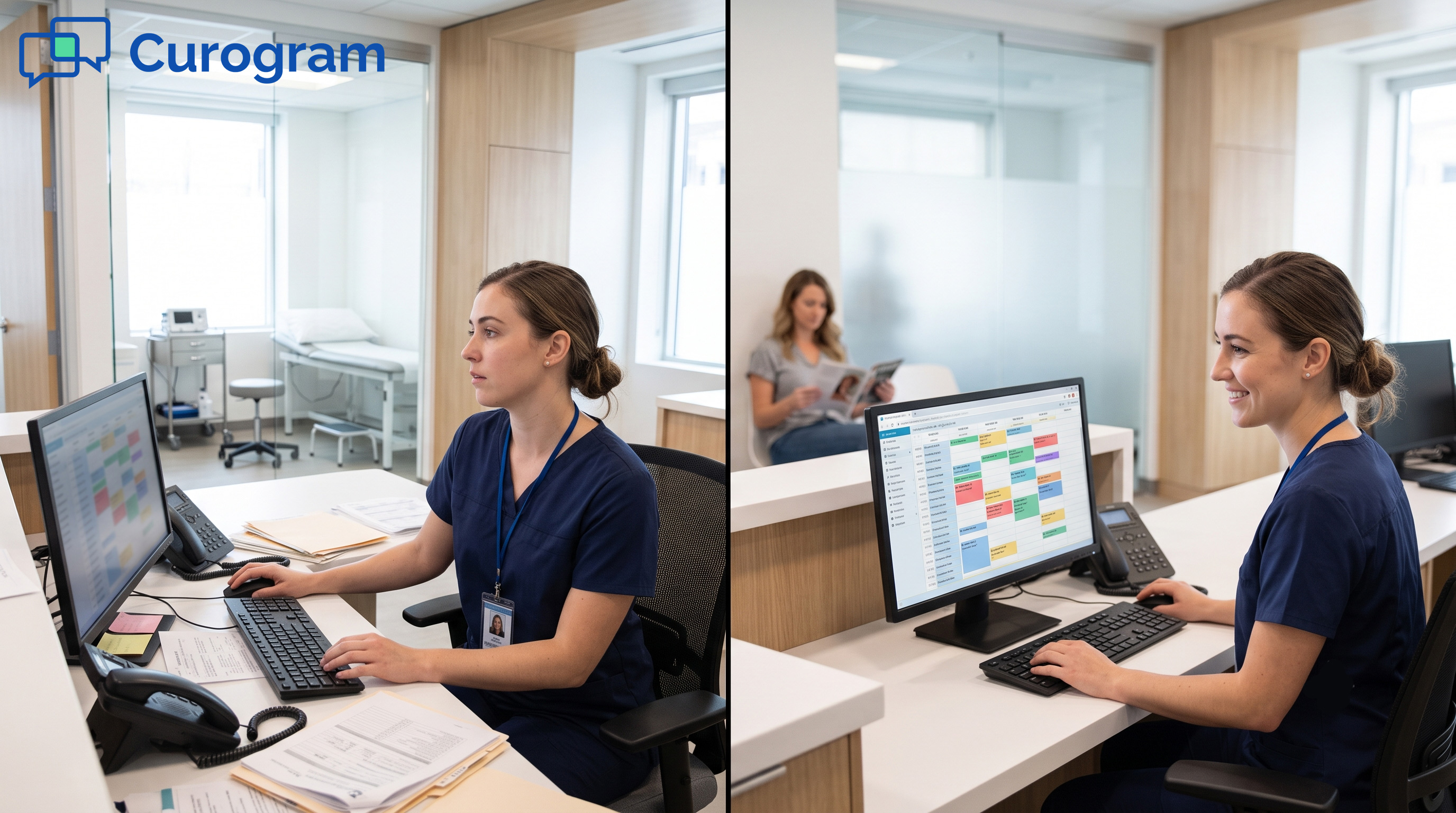
The clearest way to see the impact is in the daily routine. Before Curogram, the front desk arrives, prints a list, and starts dialing. After Curogram, the front desk arrives, opens a dashboard, and sees overnight confirmations already processed.
That difference reshapes the entire morning. The team doesn't open the day in reactive mode. They open it with a clear picture of who's coming, who isn't, and where attention is needed. The phone queue starts the day at zero, not 100.
The Numbers Behind the Shift
Covina Arthritic Clinic confirms more than 1,100 appointments per month through Curogram's automated system, based on our internal data. To do that volume manually, the practice would need a full-time employee dedicated entirely to confirmation calls. Instead, the system handles it in the background.
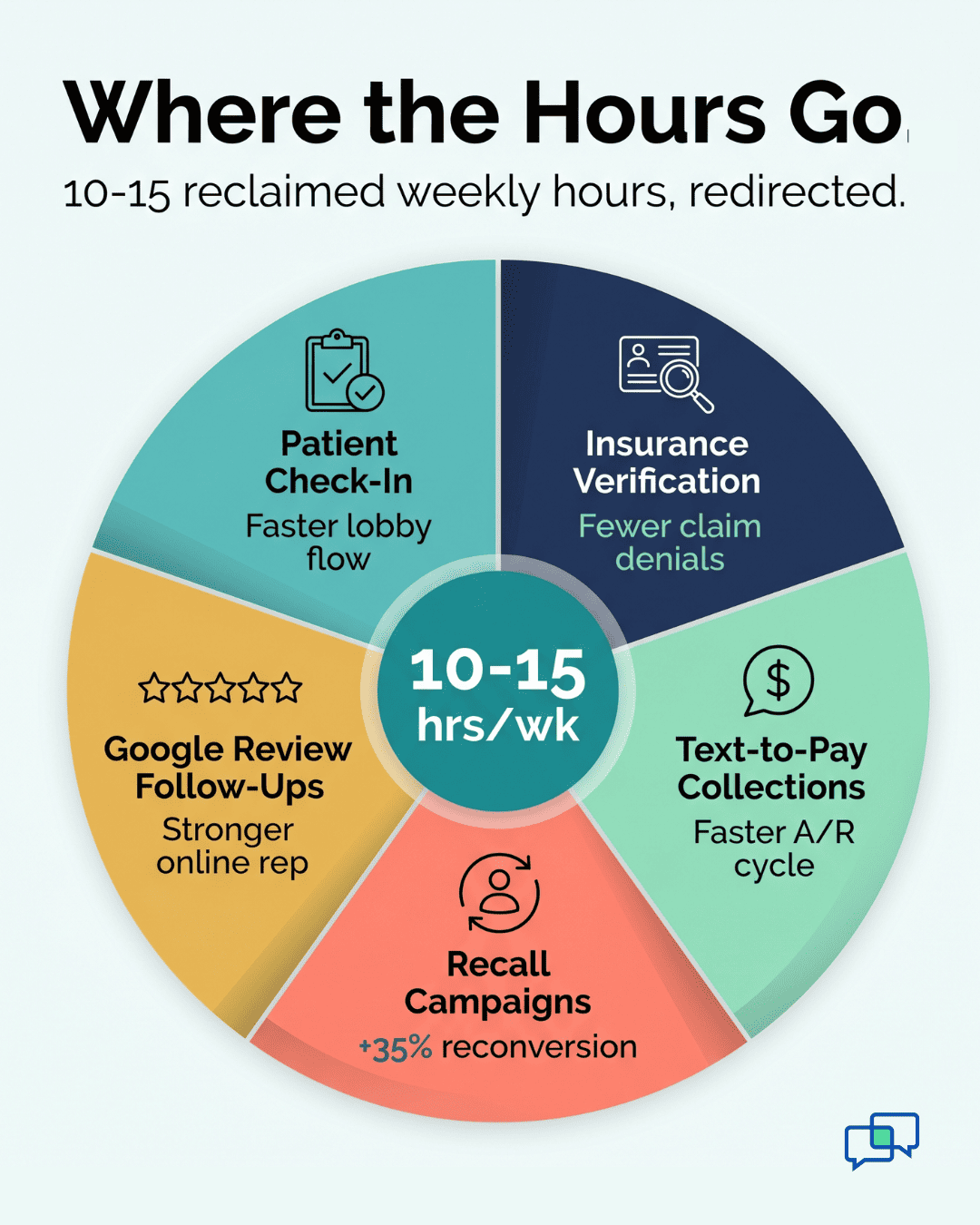
Time savings land between 10 and 15 hours per week. That's nearly two full workdays of front desk labor reclaimed every seven days. Over a year, that's 500 to 750 hours redirected from dialing to patient-facing work.
Confirmation rates also climb. Across Curogram's current clients, the average confirmation rate sits above 75%, based on our internal research. Compare that to phone-based confirmation, where the practice often confirms only the patients who pick up.
From Call List to Confirmation Dashboard
The front desk's daily focus changes shape. Instead of starting with outbound calls, they start with a dashboard view of confirmed and unconfirmed visits. Confirmed patients are ready for check-in prep. Unconfirmed patients become a short, targeted list — not the whole schedule.
This is where front desk no-show management actually gets manageable. You're not trying to reach 100 people. You're trying to reach 5 or 10. Those calls are short, focused, and high-value, because you know in advance which patients need them.
Practice Managers feel this shift first. They stop fielding "we need more staff" requests from the front desk. They stop hearing about the phone queue backing up at 9 AM. They start hearing about how the morning runs smoothly, even on the busiest days.
What Happens to the Saved Time
The 10 to 15 hours per week don't disappear. They go somewhere. Most practices redirect them in three directions.
The first is patient-facing work. Staff spend more time on check-in, insurance verification, and form processing. Wait times drop because the front desk isn't half-on-the-phone when a patient walks in.
The second is revenue work. Some practices put the saved hours into text-to-pay follow-ups on outstanding balances, post-visit surveys for Google reviews, or recall campaigns for dormant patients. Each of these activities directly affects the bottom line.
The third is breathing room. Front desk burnout is real, and the morning call list is one of its top causes. Removing it from the daily routine improves staff retention and saves the practice the recruiting and training cost of replacing a receptionist.
The full picture comes together when you actually quantify what each redirected hour produces. Calculating ROI for staff efficiency makes that visible by combining your monthly appointment volume, staff time per appointment, and hourly labor cost into a number you can act on.
How Curogram Turns the Elation Schedule Into Confirmed Visits Without Staff Input
Curogram is a HIPAA-compliant communications platform that sits on top of your existing EMR. For Elation Health users, that means no rip-and-replace. The Elation schedule stays where it is. Curogram simply reads it and acts on it.
Here's the full path. A patient books an appointment in Elation. Curogram sees the new entry and queues a reminder based on the rules you set during onboarding. At the chosen interval, the system sends a two-way SMS to the patient. The patient replies. The reply updates the appointment status in the Curogram dashboard in real time.
Staff don't touch any of that. They open the dashboard when they're ready and see what's confirmed, what's pending, and what needs a real human follow-up. Most days, that follow-up list is small enough to clear in 10 to 15 minutes.
The features that make this work go beyond reminders. Curogram includes two-way patient texting for any other patient conversation. It includes mass messaging for recall campaigns. It also includes electronic patient forms, text-to-pay billing, and automated review requests.
The business case is straightforward. Reduce phone calls by up to 50%. Reduce no-show rates by up to 75%, based on our internal data. Reclaim 10 to 15 hours of front desk time per week. Increase revenue by 10% to 20% from recovered appointments alone.
Staff training takes about 10 minutes. The platform integrates with Elation through the standard API. Setup is handled by the Curogram team during onboarding, so the practice doesn't need IT involvement on day one.
Conclusion: Automate the Calls, Reclaim the Hours
The morning call list is the most time-consuming, lowest-return task on your front desk's calendar. It pulls hours from the schedule, frustrates staff, and still leaves the practice with confirmation gaps. Curogram's automated two-way reminders shut that workflow down entirely for Elation Health practices.
Confirmation happens at scale. Staff focus on patients. The schedule stays full because the system catches cancellations early and gives you time to backfill slots.
The split is clean. Elation Health manages the clinical workflow and the appointment schedule. Curogram makes sure the patients actually show up for it. The EMR runs the medical side. The engagement platform runs the communication side.
The first step is honest math. Count how many hours your front desk spends on confirmation calls each week. Multiply that by your hourly wage. Add the cost of preventable no-shows over the past year. That number is your baseline.
Now compare it to a workflow where the same tasks run in the background while your team handles in-person care. The difference is what Curogram delivers. Across our client base, that difference shows up as fewer calls, higher confirmation rates, and a steadier front desk.
Schedule a demo with us and bring your front desk lead to the call. They'll see the exact dashboard their morning will run on starting day one.
Frequently Asked Questions
Curogram uses customizable reminder templates and timing rules you set during onboarding. New patient visits, follow-ups, procedures, and telehealth appointments can each have their own intervals and message content. Reminders match the visit context without staff intervention.
The cancellation flags immediately in your Curogram dashboard. Staff get real-time visibility to backfill the slot before the day starts. This early notification is the difference between a lost revenue slot and a proactive reschedule that keeps the schedule full.
Curogram links to Elation Health through its scheduling API and pulls appointment data automatically. During onboarding, our team maps the integration to your exact configuration. Custom appointment types, provider schedules, and location-specific rules all get matched during setup.
Patients respond to text faster than phone, especially during work hours. Text doesn't require picking up, listening, or calling back. A two-word reply confirms the visit, which is why text reminders consistently hit above 75% confirmation rates in our internal data.
Most front desk teams are productive on Curogram within 10 minutes of training. The dashboard is built to feel like familiar messaging tools. Day-one staff usually need only a quick walkthrough to start managing confirmations and exceptions with confidence.