


10 min read

Streamlining the Elation Health Telehealth Workflow for Clinical Staff

Streamlining the Elation Health Telehealth Workflow for Clinical Staff
💡 Independent clinics can boost Elation Health telehealth workflow efficiency by using an app-free, SMS-based video solution.

When you integrate Curogram with the Elation scheduler, your clinical staff can launch virtual visits via a secure text link. Patients don't need to download apps or log into portals.

This simple approach cuts out the 10 to 15 minutes typically spent fixing patient tech issues. It ensures a 99% connection success rate.

This means providers can maintain tight clinical schedules without delays. Your staff can focus on what they do best: preparing patients for care instead of acting as tech support.

Picture this: your next patient is scheduled for a virtual visit in five minutes. Your medical assistant is already on the phone, walking the patient through app store navigation. "Can you see the download button?" "Try restarting your phone." "What's your password again?"

Sound familiar? If you work in an independent practice virtual visits setting, this scenario plays out multiple times per day. Your clinical staff didn't train to become IT support specialists. Yet that's exactly what happens when telehealth platforms require complex setup steps.

The real cost goes beyond frustration. Every minute spent on tech support is time lost to clinical preparation. When staff can't review charts or verify medications, patient care quality suffers. Providers fall behind schedule. The whole clinic feels the ripple effect.

Small practices face unique challenges with virtual care. You don't have dedicated IT teams. Your staff wear multiple hats already. When telehealth adds another layer of complexity, something has to give. Usually, it's either staff time or patient experience, or both.

But what if virtual visits could work as smoothly as sending a text message? What if patients could join appointments with a single click, no downloads required? What if your Elation EMR video integration could eliminate technical barriers entirely?

This isn't wishful thinking. It's how modern telehealth should work. This guide shows you how to reduce telehealth troubleshooting and reclaim your staff's valuable time.

You'll learn how HIPAA-compliant video solutions can integrate seamlessly with Elation Health. Most importantly, you'll discover how no-app telehealth join technology transforms virtual care from a headache into a smooth operation.

The Tech Support Villain: Why App-Based Telehealth Slows Down Your Clinic

Traditional telehealth platforms create unnecessary friction for small practices. These systems force patients through multiple steps before they can see their doctor. Each step becomes a potential failure point that demands staff intervention.

The "Can You See Me?" Logjam

App-based video platforms require patients to jump through hoops before connecting. First, they must find the right app in their device's app store. Then they need to download and install it. Next comes account creation with password requirements. Finally, they have to remember login credentials for their next visit.

Each of these steps creates opportunities for confusion. Older patients struggle with app stores. Busy parents forget passwords. Tech-averse individuals give up entirely. When problems occur, who gets the call? Your front desk staff.

Software updates compound the problem. Patients who successfully joined their last visit may face new issues this time. Their app needs updating. Their operating system changed. Their browser blocks the camera. Each scenario requires troubleshooting from your team.

Real Impact on Daily Operations

One practice tracked their telehealth support calls over two weeks. They found staff spent an average of 12 minutes per patient on technical issues. With 15 virtual visits daily, that's three hours of staff time lost to tech support. That's time that could go toward patient care, documentation, or clinical coordination.

Fragmented Coordination

When video tools don't connect with your Elation system, coordination becomes chaotic. Staff must manually check who's in the virtual waiting room. They need to notify providers when patients arrive. They track which appointments started and which ones are still pending.

This disconnected workflow creates clinical downtime. Providers wait for staff to confirm patient arrival. Staff interrupt providers to announce readiness. Everyone operates in the dark about actual patient status. The result? Wasted time and provider frustration.

The Hidden Cost of Context Switching

Medical assistants and nurses must constantly switch between systems. They check the Elation schedule, then open the video platform.

After that, they text or call the patient. They return to Elation for documentation. Each system switch breaks concentration and slows workflow.

The Administrative Burden

Small teams are stretched thin by design. Your medical assistant might handle rooming, vitals, patient communication, and clinical documentation all in one shift. Adding tech support duties to this list creates breaking points.

Every minute spent helping a patient with a login is a minute lost to clinical rooming or proper documentation. When staff rush through clinical tasks to make up time, quality suffers. Patient safety risks increase. Staff burnout accelerates. The whole practice feels the strain.

This burden falls hardest on practices that can least afford it. Independent clinics operate on tighter margins than large health systems. You can't simply hire more staff to handle the extra workload. You need solutions that reduce burden, not add to it.

The Seamless Workflow: Curogram + Elation Health

Modern telehealth should simplify your workflow, not complicate it. When Curogram integrates with Elation Health, virtual visits become as straightforward as in-person appointments. Your staff focuses on patient care while the technology handles itself.

One-Click Staff Launch

The workflow starts where your staff already works: the Elation schedule. When a virtual appointment appears on the schedule, staff can launch the video encounter with a single click. There's no need to open separate windows or copy meeting IDs.

This direct integration eliminates the usual juggling act. Staff don't switch between multiple platforms. They don't manually create video rooms. They don't generate and send meeting links. The system handles all of this automatically.

For clinical staff, this means less time on logistics and more time on what matters. Medical assistants can review the patient's chart while the video link sends automatically. They can prepare clinical questions for the provider. They can verify that intake forms are complete.

How It Works in Practice

When appointment time approaches, staff click the patient's name in Elation. The video room opens instantly in their browser.

The system sends the patient their join link via text message. Staff see confirmation when the message delivers. The entire process takes seconds.

The "Zero-App" Patient Join

Patient experience determines telehealth success. When joining is complicated, patients avoid virtual visits. When joining is simple, they embrace it. The no-app telehealth join approach makes virtual care accessible to everyone.

Patients receive a text message before their appointment. The message contains a secure link. They tap the link. Their phone's browser opens. If their device has a camera and internet connection, they're ready. No app downloads. No account creation. No password to remember.

This simplicity transforms patient compliance. Elderly patients who struggle with technology can join easily. Parents juggling multiple tasks can connect quickly. Even tech-savvy patients appreciate the speed. The barrier to entry disappears.

Cross-Device Compatibility

Browser-based video works on any device. iPhones, Android phones, tablets, and computers all support it. Patients don't need specific operating systems or hardware.

They use what they already have. This universal compatibility eliminates a major source of technical problems.

Status Visibility

Real-time status updates keep everyone informed. Staff see when the patient receives the text link. They see when the patient clicks it. They know exactly when the patient enters the virtual room. This visibility enables smooth coordination.

When patients arrive early, staff can notify the provider. When patients are late, staff can follow up appropriately. When technical issues occur, staff know immediately and can help. This awareness prevents confusion and keeps appointments on schedule.

The result is a warm handoff to the physician. Staff can tell the doctor, "Mrs. Johnson is in the room and ready to be seen." The provider joins with confidence. The appointment starts smoothly. Everyone saves time.

Reducing No-Shows

Clear visibility also reduces no-shows. When the system shows a patient hasn't clicked their link, staff can reach out proactively. A quick reminder call often gets the appointment back on track. This early intervention prevents schedule gaps and revenue loss.


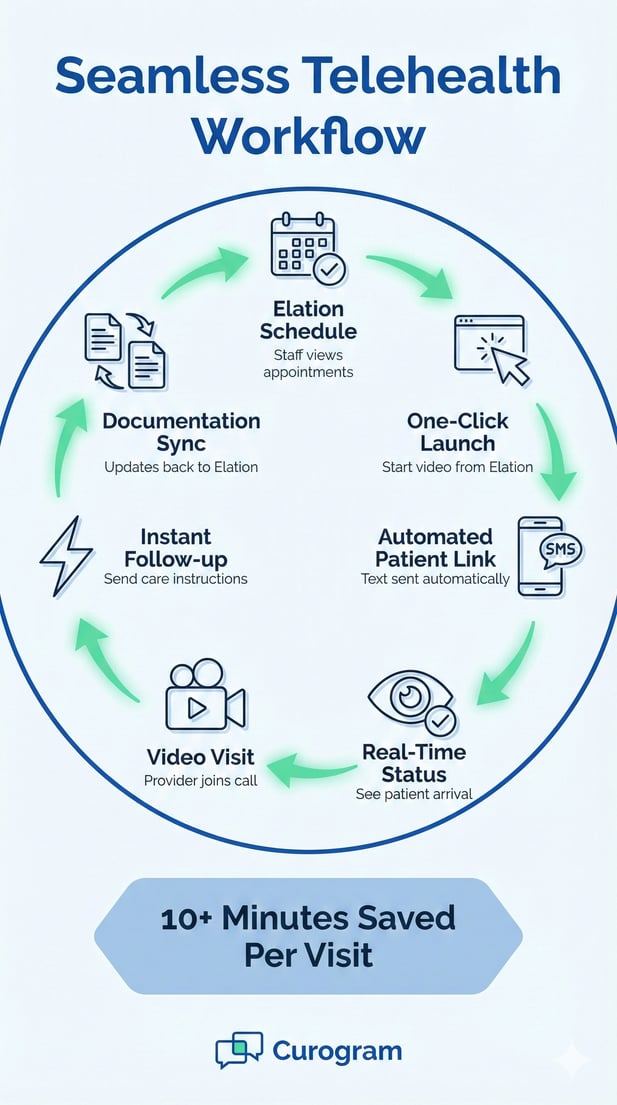
Circular diagram of the Curogram Elation telehealth integration saving 10+ minutes per visit

Clinical Efficiency: Saving 10+ Minutes Per Virtual Visit

Time is your practice's most valuable resource. When virtual visits via telehealth run efficiently, you see more patients and provide better care. Small improvements per appointment add up to significant time savings across your entire schedule.

Automated Pre-Visit Links

Automation removes manual tasks from your staff's plate. You can configure Curogram to automatically send virtual room links 10 minutes before each scheduled appointment. This happens without any staff action required.

The patient receives their text message while they're likely preparing for the visit. They can test their connection. They can find a quiet space. They can settle in before the appointment officially starts. By the time the doctor is ready, the patient is already waiting in the virtual room.

This advance preparation eliminates the scramble that often happens at appointment time. Staff don't rush to send links at the last minute. Patients don't panic about connection issues. Everyone has buffer time to address any problems that arise.

Timing Best Practices

Ten minutes provides the ideal balance. It gives patients enough warning without being too early. If sent 30 minutes ahead, patients might forget. If sent at appointment time, there's no buffer for issues. Ten minutes hits the sweet spot for most practices.

Some practices customize timing based on patient population. Older patients might benefit from 15-minute warnings. Busy working professionals do well with five-minute notices. The system flexibility lets you match timing to your needs.

Integrated Intake Integration

Virtual visits should be as clinically productive as in-person appointments. This requires complete intake and consent before the video starts. When these steps happen during the video call, they waste valuable provider time.

Smart workflow design puts digital intake in the right place. Patients complete their forms in Elation before the appointment. They sign necessary consents. They update their medication list. They answer screening questions. All of this happens before they even join the video room.

When the provider joins the video call, they have everything they need. The chart is complete. The consent is signed. The reason for the visit is documented. The appointment can focus entirely on clinical care rather than administrative tasks.

This preparation transforms provider efficiency. A doctor can complete a straightforward follow-up visit in 10 minutes instead of 15 minutes. That's 50% more patients seen in the same time block. Or it's earlier finish times for providers while maintaining the same patient volume.

Form Completion Reminders

Some patients forget to complete intake forms before their appointment. The system can send automatic reminders via text. These gentle prompts increase completion rates significantly. Most patients appreciate the reminder and fill out forms promptly.

Post-Visit Follow-up

The appointment doesn't end when the video disconnects. Patients need after-visit summaries, prescription information, and lab orders. Traditional workflows require staff to print, mail, or manually send this information later.

Integrated messaging makes follow-up instant. As soon as the video ends, staff can text the patient their follow-up plan through the same secure thread. Lab orders go out immediately. Prescription details arrive while the patient still remembers the conversation. Next appointment reminders send automatically.

This immediate communication improves patient compliance. Studies show patients are more likely to follow through when instructions arrive quickly. They're less likely to forget medication changes. They're more likely to complete recommended tests.

For staff, instant follow-up eliminates backlogs. They don't have a pile of after-visit summaries to send at day's end. They handle each appointment completely before moving to the next. This keeps work flowing smoothly and prevents end-of-day rushes.

Documentation Benefits

Secure messaging creates an automatic record of all patient communication. When patients ask follow-up questions, the full context is visible. When they need clarification on instructions, staff can reference exactly what was sent. This documentation protects both patients and the practice.


Frequently Asked Questions About Elation Telehealth Workflow

Practices considering workflow changes naturally have questions. These common concerns come up in nearly every conversation about telehealth integration. Understanding the answers helps you make informed decisions.


Does the staff need to train patients on how to use it?

No patient training is required. The interface works just like standard text message links that people use every day. Patients click a link in a text and their browser opens. This familiar pattern means even non-tech-savvy patients navigate it successfully.

Most patients figure it out within seconds. They receive a text. They tap the blue link. They allow camera and microphone access when prompted. They see the video room. The whole process mirrors how they join video calls with family and friends.

The few patients who do need help usually have basic questions. "Where do I tap?" "How do I turn on my camera?" Staff can answer these quickly over the phone. These brief conversations replace the lengthy troubleshooting sessions required by app-based platforms.

Some practices send a one-page guide with the first appointment confirmation. This optional resource shows a screenshot of the text message and explains the three simple steps. Most patients never need to reference it, but it provides peace of mind.

The system can detect first-time users and send slightly different messages. These messages include a bit more context: "This is your video visit link. Tap it when ready." This small customization helps nervous patients feel more confident.

How does it document in Elation?

Complete visit documentation flows back to Elation automatically. The system captures start and end times for each video session. This data syncs back to the Elation clinical note, ensuring accurate billing and complete audit trails.

The integration maintains all necessary compliance records. You can prove when the visit occurred. You can show how long it lasted. You can demonstrate that the encounter used HIPAA-compliant video technology. Auditors and payers can verify everything they need.

For billing purposes, the documentation supports proper telehealth codes. Whether you bill for synchronous video or use time-based codes, the visit duration is recorded. This removes guesswork from coding and helps ensure correct reimbursement.

Providers can add clinical notes during or after the visit using their normal Elation workflow. The video component doesn't change how they document medical decision-making, examination findings, or treatment plans. It simply adds the telehealth-specific details automatically.

All video sessions maintain HIPAA compliance throughout. Encryption protects the video stream. Text messages use secure messaging standards. Patient data never travels through unsecured channels. Your practice stays compliant without extra effort.

Can we use this for high-touch DPC check-ins?

Absolutely. The workflow speed makes it ideal for Direct Primary Care practices that offer frequent, brief clinical touches. DPC thrives on accessibility and relationship-building. Quick video check-ins support both goals.

Traditional telehealth platforms add friction that contradicts the DPC model. If connecting takes five minutes of tech troubleshooting, a seven-minute check-in becomes unworkable. But when connection happens instantly, brief visits become practical.

DPC practices use quick video touches for many purposes. Blood pressure monitoring, medication adjustment follow-ups, minor symptom checks, and mental health check-ins all work well. The low barrier to entry means patients actually use these services instead of avoiding them.

Some DPC doctors schedule 10-minute video slots throughout the day. These quick touches keep patients healthy and reduce the need for longer urgent visits. The efficiency of the workflow makes this scheduling approach sustainable for the practice.

Easy virtual access becomes a selling point for DPC membership. Practices can advertise: "Text your doctor for a video visit in minutes." This convenience justifies membership fees and differentiates you from traditional practices. Patients value immediate access when they need it.


Efficient clinical staff using technology to manage patient care in a modern office

Restore Clinical Focus to Your Virtual Care

Your clinical staff chose healthcare to care for patients, not to troubleshoot technology. When telehealth becomes a technical burden, it undermines the core mission of your practice. The right workflow restoration gives time back to what matters most.

Every minute saved on tech support is a minute redirected to patient care. Medical assistants can review charts thoroughly. Nurses can conduct more complete pre-visit assessments. Front desk staff can focus on scheduling and patient experience rather than IT troubleshooting.

The efficiency gains extend beyond time savings. When staff aren't frustrated by technical problems, they bring more positive energy to patient interactions. When providers aren't kept waiting by connection issues, they maintain better focus throughout their clinical sessions. The entire practice operates more smoothly.

Patient satisfaction improves when virtual visits work seamlessly. Patients notice when appointments start on time. They appreciate not struggling with app downloads. They remember practices that make healthcare access easy. This positive experience drives patient retention and referrals.

Independent practices compete based on patient experience and care quality. Large health systems may have more resources, but small practices win on personal attention and convenience. When your telehealth workflow is smoother than bigger competitors, it becomes a competitive advantage.

The integration between Curogram and Elation Health makes this level of efficiency achievable. You don't need a large IT department. You don't need extensive staff training. You don't need to completely overhaul your current workflows. The technology adapts to how you already work.

Staff adoption happens naturally when technology simplifies their work rather than complicates it. There's no resistance to tools that save time and reduce frustration. Your team will embrace a workflow that lets them focus on clinical skills instead of technical support.

Schedule a 10-Minute Demo today to see how Curogram’s Elation Health telehealth workflow can eliminate technical friction and give your staff their time back.

Telehealth in StreamlineMD: Smarter Patient Prep With Curogram

Telehealth in StreamlineMD: Smarter Patient Prep With Curogram

💡 Telehealth in StreamlineMD helps radiology, vascular, and IR practices improve patient prep and cut day-of delays. Curogram adds HIPAA-compliant...

Read More
How GE Centricity Clinics Streamline Telehealth Workflows

How GE Centricity Clinics Streamline Telehealth Workflows

💡 GE Centricity specialty clinics face unique workflow challenges when managing virtual visits across multiple locations. Traditional telehealth...

Read More
Telehealth for Elation Health: Delivering Frictionless Virtual Care

Telehealth for Elation Health: Delivering Frictionless Virtual Care

💡 Independent practices using Elation Health can improve virtual care with telehealth for Elation Health through Curogram. This system removes the...

Read More