
Why eCW Patients Review by Text | Post-Visit Timing That Works
💡 When a patient leaves a good visit, that positive feeling fades fast. An eClinicalWorks patient text review request sent 1–2 hours after the...
Your front desk means well. Every coordinator knows a strong Google rating brings in new patients, and every one of them plans to ask for reviews. Then the day starts.
The phone rings. Three patients check in at once. A prescription question jumps the line. The review card stays in the drawer, and the moment to ask quietly slips away.
It sounds like a small miss. It isn't.
Multiply one forgotten ask across every shift, every week, and you get a review program that never really runs. Your care is excellent. Your rating doesn't show it. Patients who would gladly leave five stars simply walk out, because no one had a free second to ask.
This is the quiet gap inside most eClinicalWorks practices. eCW is built for clinical work, not reputation building. It won't remind anyone to request feedback, so the whole effort rests on people who are already stretched thin. No system flags it, so nothing catches it.
Here's the good news.
You can stop manually asking patients for reviews in eCW and still watch them roll in. The fix isn't a new hire or a stricter checkout script. It's automation that does the asking for you, every visit, without fail.
When you automate patient review requests for eClinicalWorks front-desk staff, review building leaves the to-do list for good.
A short text goes out after each appointment, feedback comes back on its own, and your team gets one full task off their plate.
The rest of this guide breaks down what the manual approach really costs, how a hands-off system works, and the results it can produce.
By the end, you'll see why the real fix isn't more effort from your team — it's less.
Let's start with the price of the ask that never happens.
The barrier is simple. eClinicalWorks doesn't prompt anyone for reviews, so the request depends entirely on staff — and staff are slammed.
So the ask gets pushed. A coordinator plans to hand over a review card or mention Google at checkout, then the phone rings and three patients arrive at once. The moment passes, and it passes again the next visit.
Do that all week and the pattern is clear. Reviews trickle in instead of building, and your rating stays stuck no matter how good the care is.
Three things keep the ask from happening:
None of that is about effort or intent. It's a manual step dropped into the busiest minute of the day, and busy always wins.
Here's what that gap looks like in plain numbers. Say your practice sees 40 patients a day and 30% would leave a review if asked every time.
| Review outcome | Asked every visit | Asked when there's time (about 1 in 5) |
|---|---|---|
| Patients asked per day | 40 | 8 |
| New reviews per day (30% act) | 12 | ~2 |
| New reviews per month (22 days) | 264 | ~44 |
| New reviews per year | 3,168 | ~528 |
That's roughly 2,600 reviews a year left on the table — not because patients said no, but because no one had time to ask.
This means the problem was never your patients or your care. It was a manual step that can't survive a busy clinic. And it leaves your front desk feeling guilty about one more thing they "should" be doing while the rating barely moves.

Think of Curogram as a virtual front-desk assistant that does the asking for your team — every patient, every visit, automatically. It's the piece eCW was never built to handle.
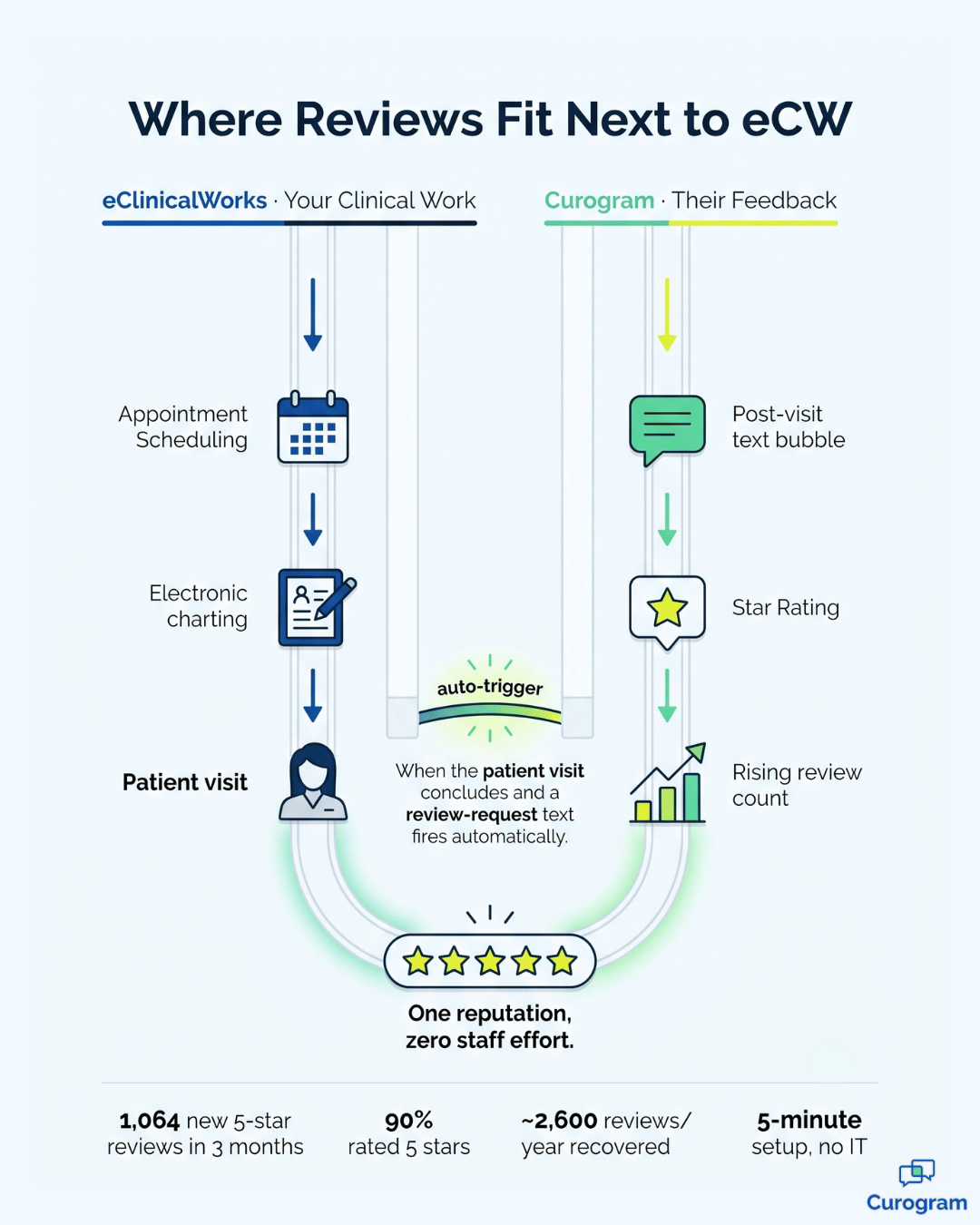
The core of it is review request automation for eCW practices. Automated review requests and post-visit surveys fire right after the encounter, with no one clicking, remembering, or handing out a card.
Because the ask runs on its own, it happens whether or not the day gets busy. That consistency is the whole point — a program that doesn't depend on a free minute that never comes.
Curogram works next to eClinicalWorks and triggers each request after the visit, so there's nothing new for staff to learn inside eCW.
It adds a review layer on top instead of a system to manage.
This becomes your eClinicalWorks front-desk reputation workflow, running quietly in the background. Training takes about five minutes, and no IT department is required to get started.

The same engine adapts to how you see patients. A high-volume primary care desk builds reviews without adding a single checkout task.
A pediatric office captures parent feedback automatically after well-child visits.
And a behavioral-health team grows credibility through discreet automated post-visit surveys in eCW, rather than uncomfortable in-person requests that never feel right in that setting.
Once the asking is automatic, the results build on their own.
Here's the shift practices tend to see:
That last point matters more than it sounds. A front desk review program for eClinicalWorks that runs itself doesn't just add reviews — it removes a recurring task, a source of guilt, and a bottleneck all at once.
In practice, this is what no-staff-effort Google reviews for eClinicalWorks practices look like:
Feedback accumulating in the background, a rating that finally reflects your care, and a team free to focus on the patients in front of them.
The system asks. Your people don't have to.
Your team shouldn't have to carry a review program that a system can run automatically. They have enough to hold in a full clinic day, and the ask is the first thing to fall off the list when things get loud.
Here's the simplest way to think about it.
eClinicalWorks is for your clinical work. Curogram is for their feedback. Together they grow your reputation without growing your staff's workload.
The manual approach was never going to win. It relies on a quiet moment that a busy front desk rarely gets, and every missed ask is a five-star review that walks out the door. You've seen the math — hundreds of reviews a year lost to timing, not to unhappy patients.
Automation closes that gap for good. A single friendly text goes out after each visit, patients respond on their own time, and your rating grows from a program nobody has to babysit.
No cards, no scripts, no reminders taped to the monitor.
And the setup is genuinely light. Five-minute training, no IT department, and no disruption to how your team already works in eCW. The review layer simply sits on top and starts doing the asking the very next day, with no learning curve to slow anyone down.
So stop relying on a busy front desk to remember.
Let the system handle the one task it can do perfectly every single time, and let your people do the work only they can do. That trade is an easy one to make.
Ready to see it in action? Schedule a Demo of the eClinicalWorks integration and watch review requests fire automatically after each visit — with nothing for your staff to do. It's a five-minute setup for a program that keeps building your reputation long after the demo ends.
No — requests fire automatically after each visit, so there's nothing for staff to remember or hand out. The program runs in the background, which is exactly what makes it consistent. That hands-off design is the whole reason it works when a manual ask doesn't.
Requests trigger after the appointment, and Curogram runs alongside eClinicalWorks without changing how your team works in eCW. It adds a review layer on top rather than a new system to learn. Nothing about your existing eCW workflow changes.
No — it's a single, friendly post-visit text that's easy to act on or ignore, and patients can opt out anytime. Most are happy to share feedback when asked the moment their visit is still fresh. A well-timed text tends to feel helpful, not pushy.
It depends on your patient volume, but reviews start arriving as soon as the automation goes live. A busy practice sending requests after every visit can see meaningful numbers within the first few weeks. The comparable practice above reached 1,064 reviews in three months.
No — training takes about five minutes and no IT department is required. Curogram layers onto your current setup, so there's no rip-and-replace and no downtime for eCW. Most teams are up and running the same day they start.
💡 When a patient leaves a good visit, that positive feeling fades fast. An eClinicalWorks patient text review request sent 1–2 hours after the...
💡 A DrChrono patient Google review text link lets you turn happy patients into 5-star Google reviews in under 30 seconds. Curogram sends an...
💡 A Lytec Google review text link patients tap after a visit makes leaving a review as easy as opening a text. Curogram sends each CGM Lytec...