7 min read

Automate Review Requests | DrChrono Locations

Automate Review Requests | DrChrono Locations
💡Automating review requests across DrChrono locations means every completed visit sends a review invite on its own. 

No one at the front desk has to remember. Curogram reads DrChrono visit activity. It then texts each patient a well-timed request that links to that location's Google profile.

This retires "The Manual Ask," the staff-driven habit that fades within weeks at most sites. Administrators get per-location request and conversion reports. Staff get nothing new to do.

One multi-location group using this workflow earned 1,064 new five-star reviews in three months. That's based on Curogram client data from clinical settings.


Every multi-location group has held this meeting.

Someone pulls up the Google profiles for each site. The flagship location might have 200 reviews, while the newest clinic has 19. Everyone agrees that reviews matter, so the group prints a script and places table tents on every check-in counter.

Three weeks later, the asking has quietly stopped. Nobody decided to stop. The habit simply faded, one busy morning at a time.

It sounds like a staffing problem. It isn't.

A busy front desk forgets review asks for a simple reason: nothing in the daily workflow prompts them. Your staff members are checking in patients, resolving insurance questions, and answering phone calls.

A polite "Would you mind leaving us a review?" is always the first task to drop.

That's the real villain in this story, and it has a name: the manual ask. It depends on memory, mood, and staffing levels. As a result, your review count ends up tracking front-desk turnover instead of the quality of care your providers deliver.

It's also a strange gap for a technology-forward organization. You likely automate intake, appointment reminders, and billing already, yet your online reputation still runs on "remember to mention it."

Meanwhile, patients are searching. Curogram reports that 90% of new patient leads see a clinic's Google Business Profile before they ever visit its website.

For a newer location with a thin profile, that first impression can decide whether the phone rings at all.

This guide shows how automating review requests across DrChrono locations puts the ask after every visit, at every site. It adds no work for your staff.

You'll learn why the manual approach keeps breaking down and how a system-based approach connects with DrChrono. You'll also see what results look like when reviews become a natural byproduct of good care.

Why "The Manual Ask" Keeps Letting Your Locations Down

The manual ask isn't a bad idea. It's a fragile one, because it only works when every person at every location remembers, every single day.

Everyone Agrees, but No One Owns It

Ask any practice leader whether online reviews matter, and you'll get an immediate yes. Then ask whose job it is to generate them, and the room goes quiet.

Reviews rarely appear in anyone's job description. The front desk owns check-in, clinical staff own patient care, and managers own the schedule. So at every location, the ask belongs to everyone, which means it really belongs to no one.

The Three-Week Fade

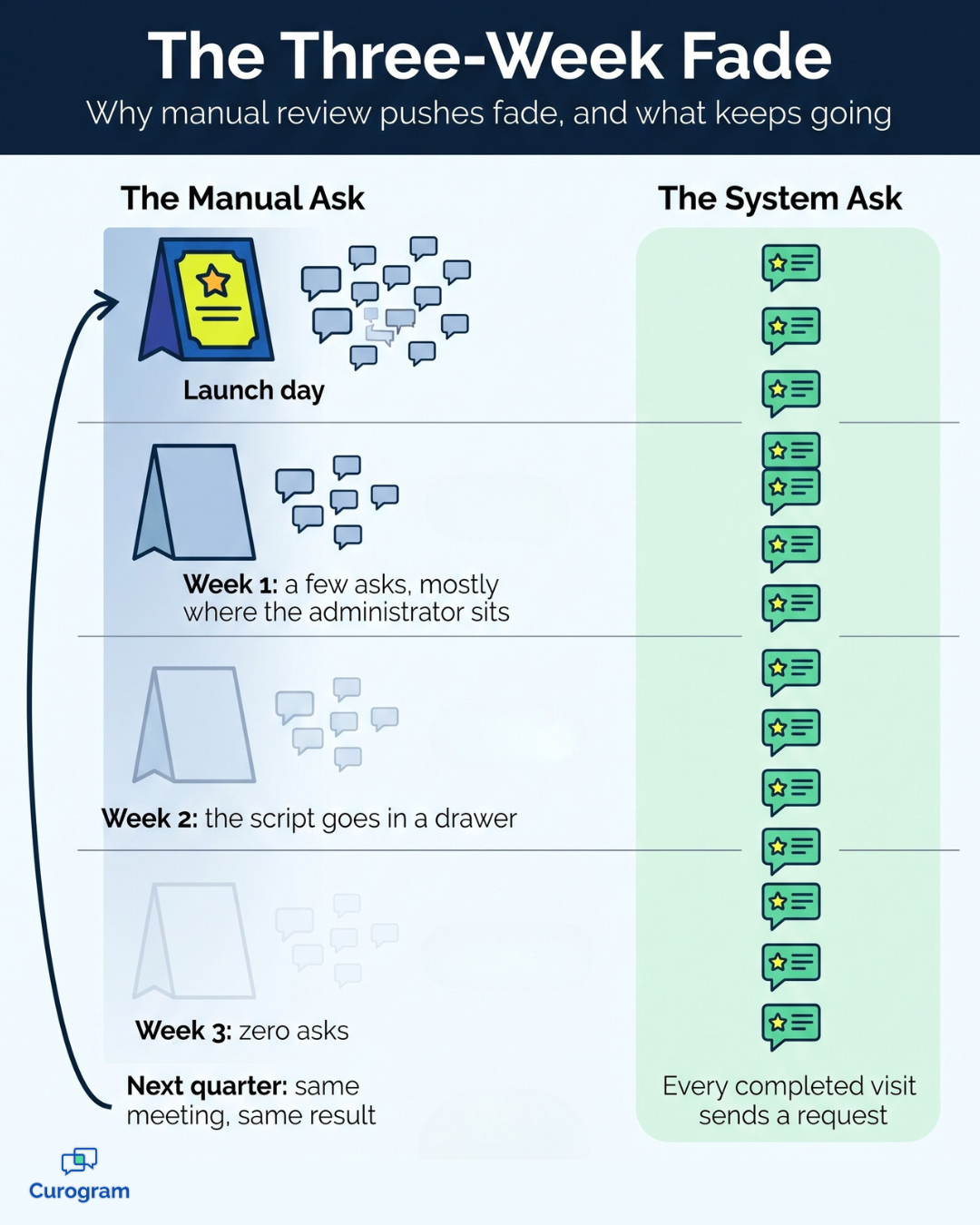
The pattern is easy to recognize. Week one brings a burst of requests, mostly at the location where the administrator works. By week two, the printed script lives in a drawer.

By week three, the count has dropped to zero almost everywhere. Next quarter, the same meeting happens again, with the same table tents and the same disappointing result.

Your Competitor Isn't Waiting

While your team tries to remember, the practice across the street may already rely on an automated system. Their system asks after every appointment, while yours asks whenever someone has a spare moment.

That difference compounds over time. Every month of manual effort widens their lead, especially against your newer locations. Unfortunately, those are the sites that need reviews the most and have the least capacity to chase them.

Outcomes Tied to Turnover, Not Care

Here's the most frustrating part.

When results depend on whoever is working the desk, a single resignation can stall a location's reviews for months.

Leadership then sees one site growing and another staying flat, with no clear explanation. The care might be identical across locations. The asking simply isn't.

How a Network Reputation Desk Takes Over the Ask

The solution isn't a better script or another reminder. It's taking the task off the human to-do list for good.

Curogram works as "The Network Reputation Desk" for multi-location DrChrono groups. It turns review generation from a task into a system. It fits the automation-first mindset your group likely applies everywhere else.

Here's how post-visit review request automation works in practice:

  1. A visit is marked complete in DrChrono. Curogram reads real visit activity, so there are no patient lists to upload and no campaigns to remember.
  2. The request waits for the right moment. Review request timing is set during setup, so the text lands while the visit is still fresh in the patient's mind.
  3. The text routes to the correct profile. A patient seen at your east-side clinic gets a link to that clinic's Google profile, not the main office's.
  4. The patient responds in two taps. They open the link, choose a rating, and share a few words, without logins or extra steps.
  5. Unhappy patients can reach your team directly. A private feedback path gives you a chance to fix concerns fast.

Think of your entire network as one Google review automation group. The rules are shared across every site, but the profiles, and the credit, remain local.

Text messaging is also the right channel for this job. Curogram client data shows a 98% open rate for SMS messages. A request that gets read is one that can become a review.

Compliance matters just as much as reach. Google bans review gating and paid or incentivized reviews, but it doesn't ban automation. Strong review gating compliance means every patient keeps a fair opportunity to post publicly, as outlined in Google's review content policy.

Once requests are running, the real value for managers shows up in the reports. You get request, click, and conversion data for each site. That turns review volume per location into a number you can compare, coach, and improve.

For the broader strategy, read our guide to managing Google reviews for multiple DrChrono locations.

When a patient shares private feedback, it flows into a shared inbox through the Multi-Location Command Center. That way, the right person at the right location sees it quickly.

Infographic: manual review requests fade by week three while automated requests stay steady

What Changes When Reviews Become a Byproduct of Care

When a system handles the asking, reviews stop depending on who remembers. Instead, they depend on something every location already produces: completed visits.

The results can be dramatic. One multi-location group using Curogram earned 1,064 new five-star reviews in three months, according to Curogram client data from clinical settings. That's roughly a dozen new reviews every day, with zero staff hours spent asking.

To understand why, compare the two approaches at a single location. The figures below are just an example, not real client results.

Per location, per month (example) Manual ask Automated ask
Completed visits 500 500
Review requests sent 25 (5% of visits) 500 (100% of visits)
New reviews at an assumed 10% response rate About 3 50
New reviews per quarter About 8 150

In this example, the care is the same. The only change is who does the asking.

For a four-location group, that adds up to roughly 600 reviews per quarter instead of about 30. In practice, a newer site could go from a thin profile to a strong one in a single quarter.

That shift pays off across the entire network. Weaker profiles improve first, since they have the most room to grow. As each location builds a steady stream of fresh reviews, the whole group's local search presence rises from the bottom up.

For your team, the change is simple. Nobody gets a new task, and nobody needs a reminder. The front desk can focus on the patient standing in front of them, while every completed visit quietly strengthens your reputation.

What to Watch Once Every Location Is Live

Once automation handles the asking, your role shifts to interpreting the results and acting on what they reveal.

Fortunately, the reporting is straightforward, and each location's dashboard tells a clear story about how visits become reviews.

These are the four signals worth reviewing every month:

  • Requests sent vs. completed visits. These two numbers should track closely, so a wide gap often points to visits that aren't being closed out in DrChrono.
  • Click rate. This shows how many patients opened the link, and a low rate may mean the delivery time needs a small adjustment.
  • Review conversion. This is the share of requests that became public reviews. It's the clearest measure of how each site turns good care into reputation.
  • Private feedback volume. A rising count at one site is an early warning. It often flags a service issue before it shows up in public ratings.

The most valuable insight comes from comparing locations side by side. Imagine two sites with similar patient volume, where one converts 12% of requests and the other converts 6% (example figures only). That gap deserves a closer look.

The cause might be longer wait times, a crowded lobby, or a difficult week of staffing. Either way, you now know exactly where to focus.

That's the operational shift that reporting makes possible. Instead of telling managers to "push harder on reviews," you can give them one clear number to improve.

Stop Relying on Memory and Start Collecting What You've Earned

Any process that depends on a busy person remembering will eventually lose to a system that never forgets. That isn't a criticism of your staff. It's simply a realistic view of how front desks operate.

Your team already delivers the kind of care worth talking about. Patients leave your locations grateful every day, but most of that gratitude disappears before anyone asks for it.

Think about it this way.

DrChrono is designed for your visit record. Curogram is designed for the patient's moment of gratitude, captured while it's still fresh.

Automating review requests across DrChrono locations closes that gap permanently. Every completed visit becomes an opportunity to earn a review. Every location follows the same consistent process, regardless of who's working the desk that week.

Your administrators finally get answers, too. Instead of guessing why one location grows while another stalls, they can compare the numbers side by side and take action.

Here's a quick exercise to try before your next operations meeting.

Pull last month's completed visits for each location, then count the new Google reviews each site earned during the same period.

The difference between those two numbers is your group's uncollected reputation. For most multi-location groups, that gap is much larger than they expect.

You don't need another staff meeting, printed script, or round of table tents to close it. You need a system that asks on your behalf, every time, at every location.

Ready to see how it works? Schedule a Demo with Curogram. In one working session, we'll show you how requests trigger from your DrChrono visits. Then we'll map out timing and routing for every one of your locations.


Frequently Asked Questions

Does this create extra work for front desk staff?

No. Requests trigger automatically when a visit is marked complete in DrChrono. Some locations add a quick verbal heads-up, like "You'll get a text from us," but the system runs fine without it.

Is automated review requesting allowed by Google?

Yes. Google prohibits review gating and incentivized reviews, not automation. Curogram requests are designed to stay ungated, so every patient keeps the option to post a public review.

What happens when a patient has negative feedback?

Unhappy patients get a direct feedback path that reaches your team right away. That gives you a service-recovery moment before a concern turns into a public review. Nothing blocks their right to post; you simply get to hear them first.

When does the review request go out after a visit?

You set the timing during setup. The goal is to reach patients soon enough that the visit is still fresh, without catching them in the middle of their drive home. Timing can be tuned by location if your sites see different visit patterns.

Can we track results for each location separately?

Yes. Curogram reports requests, clicks, and conversions for each site. That makes it easy to compare locations, spot the ones falling behind, and see how each one turns completed visits into reviews.