
 Aubreigh Lee Daculug

This ends "The Manual Ask," the staff-meeting push that fades by week three. Administrators get per-location request and conversion reports. Staff get nothing new to do.
The model works. One multi-location group earned 1,064 new five-star reviews in three months using Curogram's automated review requests.
Count the patients your newest location saw last month, then count the new Google reviews it received. If the second number fits on one hand, your group is far from alone.
Most practices share the same story. Patients leave satisfied and tell a friend the visit went well. Then they head home, and that positive experience never appears online.
The reason is simple: somebody has to ask, and that somebody is usually the front desk. That same team answers phones, checks in patients, verifies insurance, and handles billing questions.
Marketing was never part of their job description. So the ask gets skipped, not because staff don't care, but because something more urgent is always waiting at the counter.
It sounds like a small gap. It isn't.
Prospective patients read reviews before they book, and they compare your office to the clinic down the street. When your profile shows 12 reviews and a competitor's shows 400, the decision is made before anyone picks up the phone.
For multi-location groups, the problem multiplies. One office might have a manager who pushes for reviews, while another just lost two front desk employees. Over time, your review counts start reflecting staff turnover rather than the quality of your care.
That's why automating review requests across Office Ally locations has become a real priority for lean groups. When the request runs automatically, it no longer depends on who is working that day.
In this guide, you'll see why the manual approach keeps failing and how Curogram turns each completed visit into a well-timed review request. You'll also see what happened when one group stopped relying on memory and let the system handle the asking.
The result was more than 1,000 five-star reviews in a single quarter, without additional staff hours or new front desk responsibilities.
Why the Manual Ask Breaks Down at Every Location
Reviews Are Nobody's Job
A lean group runs lean on purpose. Every role is already full, and every hour of the day is spoken for. Generating reviews simply isn't in anyone's job description.
So it doesn't happen, not at the flagship office and not at the newest one. When a recurring task has no clear owner, its results eventually round down to zero.
The Meeting That Keeps Coming Back
You've probably watched this play out before. Leadership announces a review campaign, table tents appear on the counter, and staff receive a short script to read at checkout.
During week one, a few patients get asked, mostly at the office where the administrator works. By week three, the asks have quietly stopped everywhere. Staff aren't ignoring the plan; a busy front desk forgets review ask scripts the moment the phones start ringing.
Next quarter, the same meeting happens again. The plan hasn't changed, and neither has the result.
Your Competitors Are Already Automating
While your team tries to remember, the franchise clinic nearby has already automated the process. Its system asks every patient, every day, without exception.
Here's an illustrative example.
Suppose that clinic adds 3 reviews a day, which adds up to about 90 a month and over 1,000 a year.
Every month you depend on the manual ask, their lead over your newer locations grows a little wider.
When Turnover Shapes Your Ratings
Over time, a frustrating pattern emerges. Review counts begin to follow front desk turnover instead of the quality of patient care.
One office with a long-time manager grows at a steady pace, while another that just lost two employees stalls completely. Your review volume per location becomes a reflection of staffing luck, and nobody can quite explain the difference.
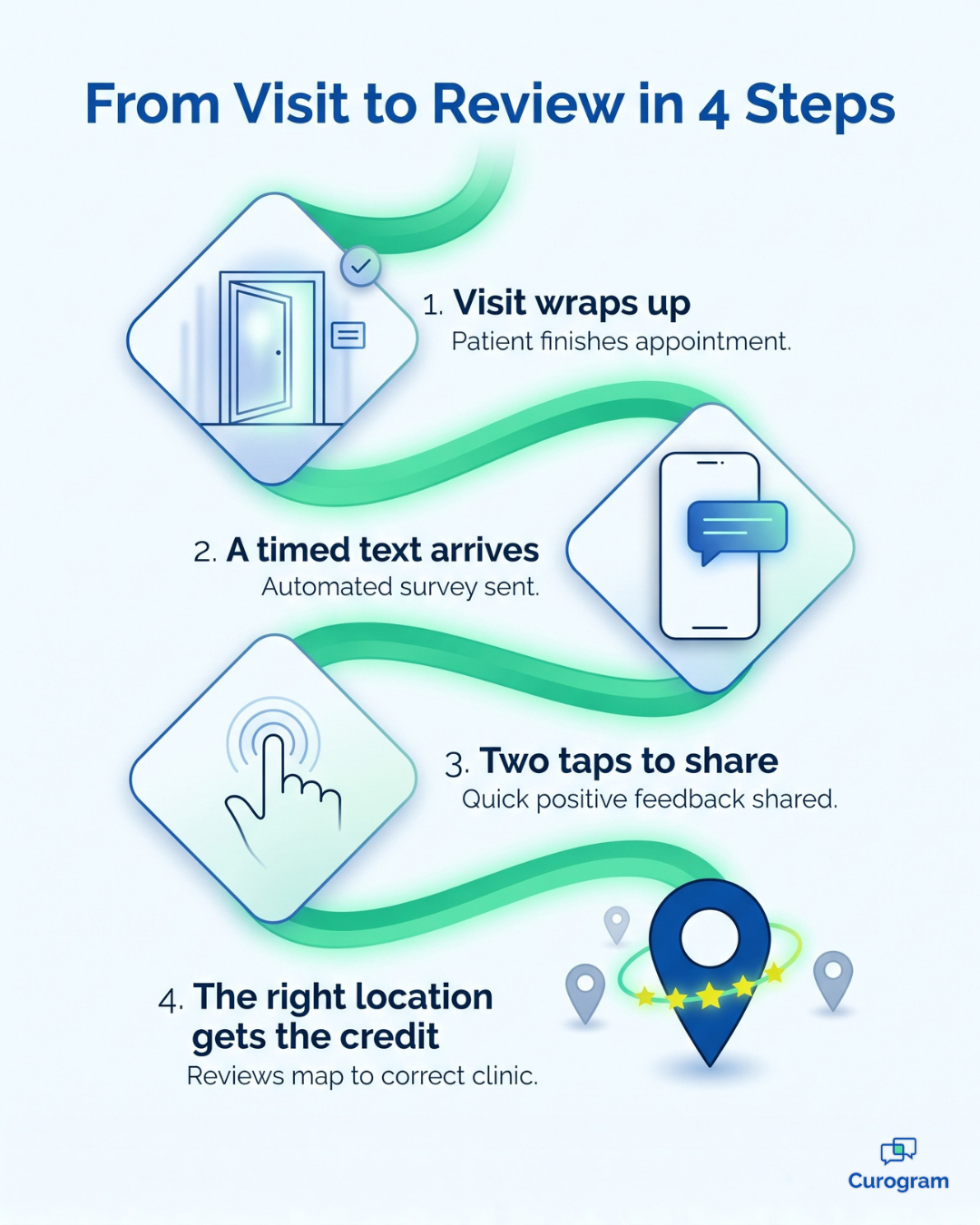
How the Network Reputation Desk Takes Over the Ask
Curogram works like a Network Reputation Desk for your entire group. It turns review requests from a task someone has to remember into a system that runs by itself.
The core feature is Automated Review Requests. When a visit is marked complete, Curogram texts the patient a short invitation to share their experience. Patients who want to post land on the right Google profile in two taps.
This is post-visit review request automation built on real appointment activity. There are no patient lists to upload and no campaigns to schedule, and your staff never have to touch it.
Here's how each piece fits together:
| Component | What It Does | What Your Staff Do |
|---|---|---|
| Visit trigger | Sends a request when an appointment is completed | Nothing |
| Tuned timing | Delivers the text while the visit is still fresh | Nothing |
| Location routing | Links each patient to the Google profile for the office they visited | Nothing |
| Per-location reporting | Tracks requests, clicks, and conversions for every office | Review the numbers |
Review request timing matters more than most groups realize. A patient who felt cared for an hour ago is far more likely to respond than one who gets asked a week later. Text is also the right channel, since Curogram messages see a 98% open rate, so the invitation actually gets read.
Routing matters just as much. A review that lands on the wrong profile does little for the office that earned it, but with per-location routing, each office builds its own reputation.

For administrators, the reporting is the real win. You can see how well each location converts visits into reviews, which gives you a number you can compare, coach, and improve. Patient feedback and replies can also flow into the shared inbox in Curogram's Multi-Location Command Center.
This is the kind of Google review automation lean group administrators actually need. It adds no tasks, no training, and no new screens for the front desk.
It also plays by the rules. Google prohibits review gating, which means only inviting satisfied patients to post, and it also bans paying for reviews. It does not ban automation, and Curogram invites patients without filtering who gets to post, which keeps your review gating compliance on solid ground.
You can read the details in Google's policy on fake engagement.
Reviews That Grow Out of Everyday Care
1,064 new five-star reviews in three months. One multi-location group reached this number with Curogram's automated review requests. That works out to roughly a dozen new reviews every day, with zero staff hours spent asking.
What changed was not the care itself. The patients were already satisfied; the difference was that every one of them finally received an invitation.
That shift from "remember to ask" to "the system asks" changes how growth works. Review volume becomes a natural result of visits, and every location already generates visits.
Here's how that can play out over a single quarter:
- Month one: Requests go out after every completed visit at every office, and low-review locations start to see steady activity.
- Month two: Per-location reports reveal which offices convert best, so administrators can spot gaps and share what works.
- Month three: Weaker profiles climb toward credible review counts, and local search visibility starts improving, beginning with the offices that needed it most.
To see the gap in numbers, consider an illustrative example. A group with 4 locations completes about 4,000 visits a month. If the manual ask reaches 1 in 20 patients and a third of them post, that produces about 67 reviews, but if every patient gets a timed text and just 8% respond, that produces 320 reviews a month.
Same patients. Same care. Nearly five times the reviews.
In practice, this means your newest office doesn't have to wait years to catch up. It grows at the pace of the patients it already sees every week.
Stop Asking Your Front Desk to Remember
Anything that depends on a busy person remembering will eventually lose to a system that never forgets. That's not a criticism of your staff; it's simply how front desks operate.
Your team already has a full plate. Phones, check-ins, insurance, and billing come first, and they should. Asking those same people to also manage your online reputation sets everyone up to fail.
There's a better way to think about it. Office Ally holds your visit record, while Curogram captures your patient's moment of gratitude while it's still fresh. One system documents the care, and the other makes sure that care gets noticed.
So try this quick exercise. Pull last month's completed visits for each of your locations, then pull the new Google reviews each one received during the same period.
Look closely at the gap between those two numbers. That gap is your uncollected reputation, made up of patients who appreciated their visit but were never asked to say so.
Automating review requests across Office Ally locations closes that gap without adding a single task to anyone's day. Every visit triggers a request, every request reaches the right profile, and every location gets a fair shot at the reputation it has already earned. No reminders, no table tents, and no repeat staff meetings are required.
For a broader look at handling reviews across your group, read our guide on Managing Google Reviews for Multiple Office Ally Locations.
When you're ready, Schedule a Demo with Curogram. We'll walk through your locations and configure request timing and routing for each one in a single working session.