7 min read

Manage Reviews Across DrChrono Locations | Curogram

Manage Reviews Across DrChrono Locations | Curogram
💡Managing Google reviews for multiple DrChrono locations means treating each location's Google profile as something you run on purpose. Review requests go out on their own after real visits, and every location's ratings are tracked and answered from one dashboard.

This matters because 90% of new patient leads see your Google profile before your website. 

A newer site with 13 old reviews loses every "near me" search, while the first location keeps most of the group's good name. Call it "The Invisible Location."

Curogram fixes this with "The Network Reputation Desk," which runs off DrChrono visits. One multi-location practice on Curogram earned 1,064 new five-star reviews in three months.


Your newest location has skilled providers, a welcoming lobby, and a front desk that operates like clockwork. It also has 13 Google reviews and a 3.7-star rating, and that's the detail a new patient notices first.

It's the rating. Every time.

Patients today select a provider the way they select a restaurant: they search, evaluate the stars, check how recent the reviews are, and tap the most convincing option. Most never scroll past the first few search results.

That places enormous importance on a small box of stars. In fact, 90% of new patient leads see your Google Business Profile before they ever visit your website, which makes your profile the real front door of your practice.

Here's where many groups get stuck.

Your founding location has years of reviews that accumulated almost by accident, as loyal patients shared positive comments over time and the rating settled high. Your newer sites never received that advantage.

So they sit quietly on the second page, losing "near me" searches to the competitor across the street even when your care is just as good. We call this "The Invisible Location," and it costs you the patients you opened that site to reach.

The stakes become even higher for groups with aesthetic or elective service lines, because those patients compare stars long before they compare prices.

The good news is that this is fixable. Managing Google reviews for multiple DrChrono locations doesn't have to mean chasing patients or logging into five separate profiles weekly.

With the right system, review requests go out automatically after real visits, and every location builds its reputation steadily.

In this guide, you'll learn why newer locations fall behind, how a centralized review system closes the gap, and what results look like when each of your locations finally gets found.

Why Your Newest Location Keeps Losing "Near Me" Searches

Care quality is consistent across your group, but review counts are not. And on Google, the review count is the part patients actually see.

Reviews Pile Up by Accident

At most groups, nobody formally owns reviews. Your founding location earned its impressive review count slowly, from patients who decided to post on their own without anyone asking. It simply happened over the years.

Newer locations don't have years to wait. They open with zero reviews, collect a few scattered ones, and then stall, so six months later the most recent review might be from a different season entirely.

One Search, One Lost Patient

Consider a patient with a twisted knee who searches "orthopedic urgent care near me." Two results appear side by side: your newest location with 13 reviews, and a competitor with 350.

The patient taps the competitor, and there's no call, no complaint, and no trace. The location you opened to serve that exact neighborhood just lost its exact target patient, and nobody on your team will ever know it happened.

A Front Door That Stays Shut

With 90% of new patient leads meeting you on Google first, a weak profile works like a locked front door. Patients walk right past it and knock on the next one.

Elective services review shopping makes this even sharper. Someone booking a cosmetic consultation or laser treatment will compare several profiles line by line, and a thin review count can cost you an entire treatment plan, not just one visit.

This is the quiet trap inside nearly every multi-location Google Business Profile medical group. Many tech-forward groups have polished websites, online booking, and efficient DrChrono workflows.

Yet the review column, the most decisive marketing surface they own, runs completely unmanaged at four of five locations.

How a Network Reputation Desk Puts Every Location on the Map

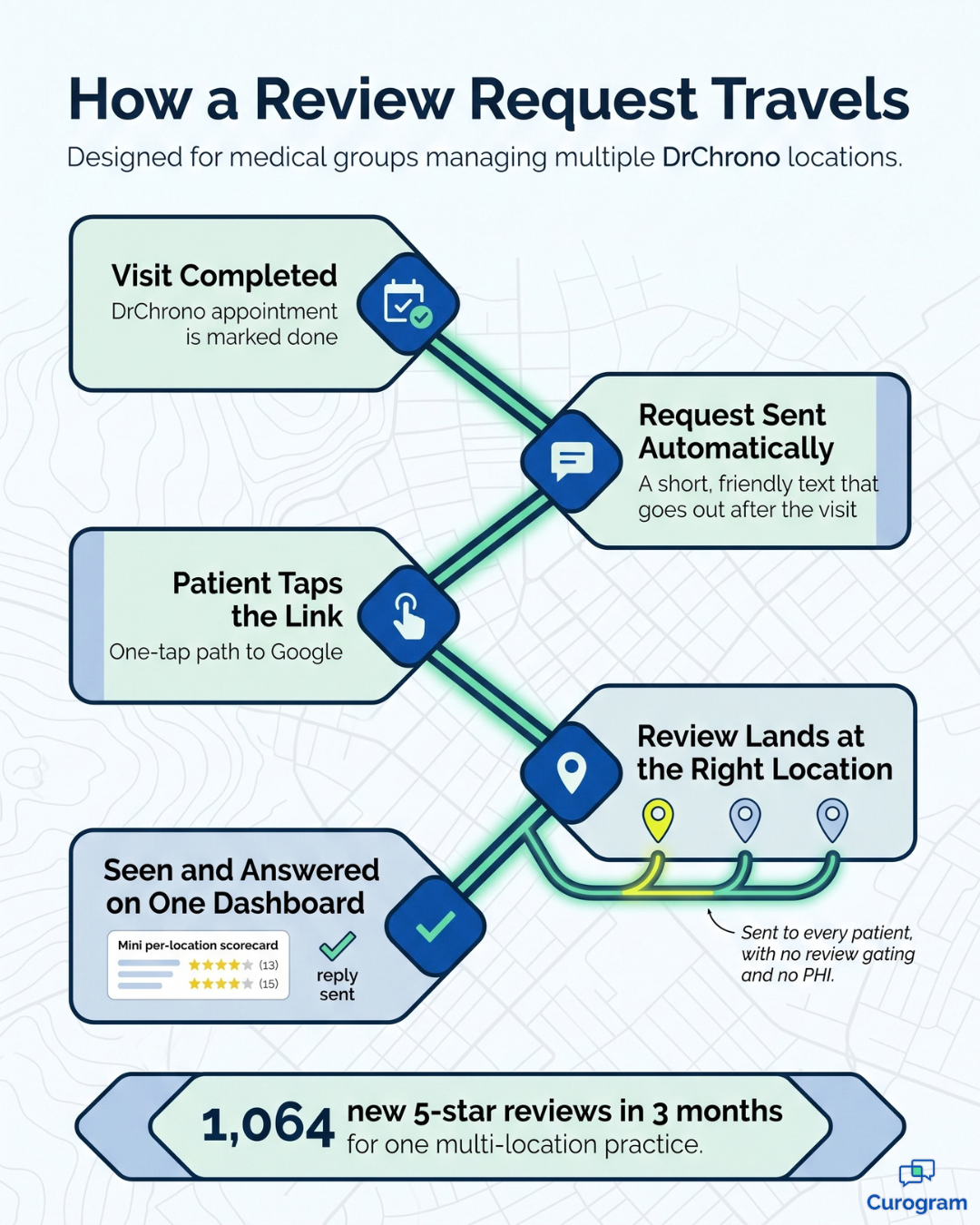
Curogram works as "The Network Reputation Desk." It's one dashboard where every location's reviews are requested, tracked, and answered. Instead of hoping patients post, you run a steady system in the background.

Here's how it works day to day:

  1. A real visit happens. Curogram keys off actual DrChrono appointment activity, so requests only go to patients who were truly seen.
  2. The request goes out on its own. After the visit, the patient gets a short, friendly text inviting them to share their experience on Google. No one at the front desk has to remember to ask.
  3. The review lands at the right location. Each request links to the Google profile of the site the patient visited. Reviews flow to every location, not just the original.
  4. Your team watches and replies. New reviews show up in one place, so your staff can respond fast and keep every reply free of patient details.

These are the automated review requests DrChrono groups have been missing.

Because timing follows real appointments, the ask feels natural to patients. And because volume tracks each site's traffic, busy locations and new ones both grow at their own pace.

The per-location rating dashboard gives your administrator the full group view. Every location's rating, review count, and trend sit side by side. Location managers see only their own site, so reputation finally has a clear owner at every level.

You can also tune requests by location. New location review building can run at full speed at your newest site, while your founding location stays in maintenance mode.

Infographic showing how an automated review request travels from a DrChrono visit to Google

What Happens When Every Location Gets Found

One multi-location practice using Curogram's automated review requests earned 1,064 new five-star reviews in just three months. That works out to roughly 350 new five-star reviews every month, compounding week after week across the group.

For your team, the real question is how quickly your weakest location can catch up. Here's a simple example that shows the math.

Example only (illustrative numbers):

A newer location sees 400 patient visits a month. If 15% of those patients leave a review after receiving a request, the location gains 60 new reviews every month.

Timeline Total Google Reviews How It Compares
Today 13 Far behind a 350-review competitor
Month 1 73 Already 5x more than today
Month 3 193 More than half the competitor's count
Month 6 373 Passes the competitor's 350

In practical terms, a location that looks brand new on Google could match an established competitor in about six months. Just as important, its most recent review will always be current, which is exactly what patients check next.

That's the real transformation. Your group moves from "the original and the ghosts" to "a group of strong front doors," with each location winning its own neighborhood searches instead of relying on the founding site's reputation.

Appear at the top of Google. Automate 5-star reviews and build a pervasive online reputation today with Curogram.  

Google's own guidance says review count and rating help determine which local results appear first. Steady, honest review volume is the one local SEO practice locations can't fake or buy their way around.

The payoff appears exactly where it matters most. New patients start finding the very locations that used to be invisible, and you didn't spend an additional advertising dollar to get there.

The Weekly Review Scorecard Your Group Should Be Tracking

Once reviews flow to every location, the next question is whether they're actually working. The simplest approach is a short scorecard your administrator checks each week, right alongside visit counts and new patient numbers.

Four numbers tell you almost everything you need to know:

  • Star rating by location: the first thing patients see, and the fastest signal that a site needs attention.
  • New reviews this week: proof that requests are going out and patients are responding.
  • Days since the last review: a quick freshness check, since a stale profile looks inactive to patients.
  • Reply rate: the share of reviews your team has answered, which shows patients that someone is listening.

Each number points to a clear next step. A falling rating calls for a closer look at that location's patient experience, while a slow week of new reviews usually means request settings need adjusting.

Here's an example with illustrative numbers.

Imagine your third location adds only four reviews in a week while its visits hold steady at 100. That's a 4% review rate against a 15% group goal, which tells your administrator to confirm requests are sending properly at that site.

Over time, this scorecard turns reputation from a vague worry into a number someone owns. Location managers can track their own progress, and leadership can compare every site fairly, side by side.

Treat Your Star Ratings Like the Growth Numbers They Are

Reviews aren't a group-wide score. They're a per-location asset, and each location either wins its neighborhood or loses it. The groups that grow treat reviews like any other number on the weekly report: tracked, owned, and managed deliberately.

Consider how the two tools divide the work. DrChrono runs your clinical operations, while Curogram shapes the first impression patients form before they ever call your office. That impression is earned visit by visit and location by location.

When you leave reviews to chance, your founding location keeps dominating while your newer sites fade. When you manage them from one place, every location gets a genuine opportunity to reach the patients who live around it.

So try a quick experiment tonight. Open Google, search for your newest location like a new patient would, and study the stars, the review count, and the date of the most recent review.

That listing is exactly what every prospective patient in that neighborhood sees. Would you choose it?

If that answer gives you pause, you're not alone; most multi-location groups have at least one site stuck there.

The fix doesn't require more staff time or a bigger advertising budget. It requires a system that asks every patient, sends every review to the right profile, and shows you the results in one central place.

Managing Google reviews for multiple DrChrono locations becomes simple when the process runs on real visits. Your team keeps caring for patients while the system builds public proof of their work.

Schedule a Demo with Curogram today. We'll audit the review gap at each of your locations and project your 90-day review volume based on your actual visit counts, showing which sites need help first and how quickly they can catch up.


Frequently Asked Questions

Is it compliant to ask patients for Google reviews?

Yes, when it's done the right way. Requests go to all patients, with no filtering based on how they feel about their visit (known as review gating). The messages contain no protected health information (PHI). They also run through Curogram's HIPAA-compliant platform, with consent management built in.

Who should respond to reviews across our locations?

That's your choice. Many groups keep responses with the administrator for a consistent voice, while others hand each location its own replies. Curogram supports both setups from the same dashboard. Either way, no reply should ever include PHI.

Can we focus review requests on the locations that need them most?

Yes. Request campaigns can be tuned by location. Your newest and weakest profiles can build volume fastest, while your established location stays in maintenance mode. As each site catches up, you can shift its settings.

How quickly can a new location build up its review count?

It depends mostly on visit volume. A site that sees a few hundred patients a month can add dozens of reviews each month once requests run after every visit. Because requests follow real appointments, growth keeps pace as a new location gets busier.

How should we handle a negative review at one location?

Respond quickly, stay calm, and keep the reply general. Never confirm that the reviewer is a patient or mention any details of their care. Instead, thank them for the feedback and invite them to contact the office directly so you can make it right.